Skip to content
KitploitKITPLOIT
ToolsBlog
Submit
ToolsBlog
Submit

Hacking, PenTest, and Cybersecurity Tools for Your Security Arsenal!

Kitploit is a directory of hacking, cybersecurity, and pentesting tools. Discover the latest project updates to find vulnerabilities, analyze systems, automate testing, and strengthen your security.

··Feeds·Contact·Privacy·© 2026 Kitploit

Tool Directory

Categories

View all categories
Loading categories
Tools/GitHubGitHub/iodn/tap-ducky
Android SecurityPayload GenerationExploitationScripting & AutomationHardware HackingPenetration TestingRed TeamingPayload Development
GitHubiodn/tap-ducky

tap-ducky

Turns any rooted phone into the legendary USB Rubber Ducky. Android USB HID Keystroke Injector

View Repository
1532093 months agoReviewed by Kitploit

Most Popular

View all →

Discover the most used tools by our community.

Explore all tools

Browse our collection of tools

View all tools →
Share
Website

TapDucky - Android USB HID Keystroke Injector
TapDucky icon

TapDucky - Android USB HID Keystroke Injector

Open-source DuckyScript runner for rooted Android with USB Gadget (ConfigFS) support
TapDucky lets you create, customize, schedule, and run DuckyScript on Android by emulating a USB keyboard, mouse, or composite HID device for authorized testing and automation. It includes payload parameterization, multiple scheduler triggers, execution logs, and a GitHub-backed payload library with automatic DuckyScript validation and optional Digispark .ino conversion.

GitHub License Issues Pull Requests Android Version Root Required

Get it on F-Droid GitHub Releases

Overview

  • USB HID gadget profiles (no external USB dongle required on supported/rooted devices):
    • Keyboard, Mouse, and Composite profiles with configurable VID/PID, manufacturer/product strings, and power draw.
  • DuckyScript pipeline:
    • Live validation with human‑readable issues/warnings, placeholder parameters, delay multiplier, and optional jitter for human‑like timing.
  • Payload management:
    • Create/edit payloads with name/description/tags/parameters, quick share/export, and built‑in templates/wizard.
  • GitHub Payload Store:
    • Add sources, browse repositories, preview files with validation, import supported scripts; auto‑detects DuckyScript and converts Digispark .ino sketches when possible.
  • Scheduler:
    • One‑time at date/time, on App cold start, on App foreground, or when HID session is armed (device_connected), with optional daily time window.
  • Execution & Logs:
    • Tabbed execute view, parameter prompts, run/cancel, execution history, and structured logs with export/clear and level filter.
  • Device diagnostics:
    • Snapshot of device, kernel/gadget status, UDC info, keyboard layouts; copy‑to‑clipboard; emulator detection note.

Note: A rooted device with Linux USB gadget (ConfigFS) support is required. Use a physical device as emulators cannot validate HID behavior.

Features

  • Payload Editor & Parameters

    • Create payloads with name/description/tags.
    • Add typed parameters with default values, required flags, and per‑execution overrides.
    • Built‑in DuckyScript validator with line/issue mapping and command counts.
    • Share a single payload or export a pack.
  • GitHub Payload Store

    • Manage multiple GitHub sources (user/repo/branch/path).
    • Browse directories and preview files with format detection (DuckyScript, TapDucky JSON, Digispark script (.ino) converted).
    • Import validated scripts directly into your library; failed validations show reasoned previews.
  • Execute & Test

    • Validate before run; prompt for parameter values; run or cancel with execution IDs.
    • Quick HID tests: keyboard key press, mouse move, and Ctrl+Alt+Del.
    • Engine-based runtime estimate (matches actual timing model).
    • Wakelock control to keep sessions active during execution.
  • Scheduler & Triggers

    • Triggers: one_time, app_cold_start, app_foreground, device_connected (session armed).
    • Optional daily time window (HH:MM → HH:MM), including wrap‑around at midnight.
    • Enable/disable, edit, and delete schedules; last run tracked.
    • Dial shortcut bindings via secret codes (auto‑arm + background execution).
      • Supported codes: ##38250##, ##38251##, ##38252##, ##38253##
      • Binding keys per code: enabled, mode (last executed | selected payload), payload (when mode = selected payload)
  • Device & HID Profiles

    • Activate Keyboard, Mouse, or Composite profiles with configurable IDs/strings/power.
    • Keyboard layout selection and code/ID resolution.
    • Status stream shows ACTIVE/IDLE, writer readiness, and host configuration requests.
  • Logs & History

    • Logs tab with level filter (all/info/debug/warn/error), export to share, clear all.
    • Execution history details with metadata and share.

User‑facing

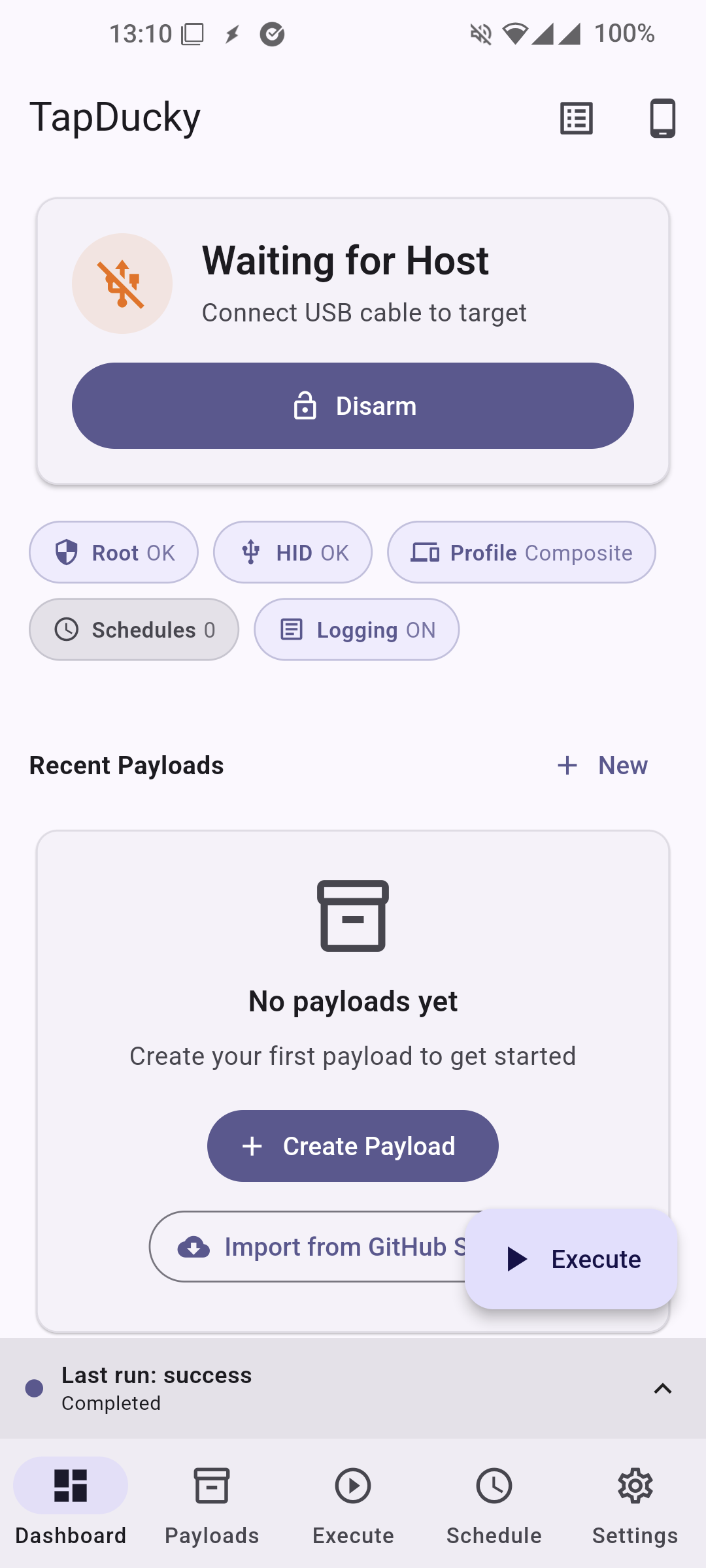
  • Dashboard with quick status cards, payload/library stats, and scheduler summary.
  • Clear empty states and step‑by‑step wizards for first‑time setup/imports.
  • Material 3 theming, dynamic light/dark color schemes.

Technical/architectural

  • Platform channels (Android):
    • Method Channel: org.kaijinlab.tap_ducky/gadget
      • checkRoot, checkSupport, listUdcs, getStatus, getDiagnostics
      • getKeyboardLayouts, setKeyboardLayout, resolveKeyboardLayoutId, setKeyboardLayoutByCode
      • activateProfile, deactivate, panicStop, retryOpenHidWriters

DuckyScript / Keystroke Engine

TapDucky includes a full DuckyScript-style engine implemented natively on Android (Kotlin) with expression evaluation and structured control flow. It supports keyboard, mouse/pointer, timing, variables/defines, functions, and simple randomness utilities.

Supported command families (high level):

  • Text and timing: STRING, STRINGLN, STRING_DELAY, DELAY, DEFAULTDELAY/DEFAULT_DELAY, REM (and REM_BLOCK)
  • Keys and combos: ENTER, TAB, ESC, SPACE, BACKSPACE, arrows, navigation keys (HOME/END/PGUP/PGDN/INS/DEL), F1–F24, media keys, numpad keys
  • Modifier combos: GUI/WIN/COMMAND, CTRL/CONTROL, ALT/OPTION, SHIFT with additional key tokens (e.g., GUI r, CTRL ALT DEL)
  • Hold/release and injected modifiers: HOLD, RELEASE, INJECT_MOD (set/clear modifier mask persisting across subsequent key taps)
  • Pointer/mouse: MOUSE/POINTER CLICK, HOLD, DRAG, MOVE, SCROLL with buttons LEFT/RIGHT/MIDDLE and relative dx/dy and repeat count
  • Control flow: IF / ELSE IF / ELSE / END_IF, WHILE / END_WHILE
  • Functions and calls: FUNCTION / END_FUNCTION, CALL_FUNCTION, RETURN
  • Variables and constants: VAR $name = expr, DEFINE NAME value; $?(exit code) maintained as unsigned 16-bit
  • Random generators: RANDOM_LOWERCASE_LETTER, RANDOM_UPPERCASE_LETTER, RANDOM_LETTER, RANDOM_NUMBER, RANDOM_SPECIAL, RANDOM_CHAR
  • Attack mode passthrough: ATTACKMODE (proxied to the gadget manager layer when applicable)

Notes on behavior:

  • Default delay: DEFAULTDELAY/DEFAULT_DELAY sets a base delay applied after each executable command (scaled by the run-time delay multiplier).
  • Expression evaluator: arithmetic, comparisons, and logical expressions are supported in IF/WHILE and VAR assignments; non-zero is true.
  • Repetition: REPEAT N duplicates the previous command N times during preprocessing.
  • Keyboard mapping: full HID usage mapping with layout selection; common aliases supported (ESC/ESCAPE, BKSP/BACKSPACE, etc.).
  • Execution streams: step/start/done/error events are emitted with progress, for real-time UI updates and logs.

Mouse/Pointer syntax quick reference:

  • MOUSE CLICK [LEFT|RIGHT|MIDDLE] [num]
  • MOUSE HOLD [LEFT|RIGHT|MIDDLE] [dx] [dy] [num]
  • MOUSE DRAG [LEFT|RIGHT|MIDDLE] [dx] [dy] [num]
  • MOUSE MOVE [dx] [dy] [num]
  • MOUSE SCROLL [UP|DOWN] [num]

Capability matrix (selected):

Note: The validator surfaces syntax issues, unknown commands, and structure errors before execution. See the Payload Editor for in-UI validation results with line numbers.

Execution timing highlights:

  • Separate execution delay multiplier and typing speed factor (with optional risky fast mode).
  • Periodic flush during long STRING runs to reduce host keybuffer overruns.
  • Host-aware backoff and grace window for transient HID disconnects.
  • Hardware-aware estimate calibration when micro-sleep is unavailable.

Explicit key and alias support

Note: In addition to the listed aliases, TapDucky accepts snake_case forms like down_arrow, up_arrow, left_arrow, right_arrow, page_up, page_down, print_screen, scroll_lock, num_lock, caps_lock, string_delay, default_delay, etc. These are normalized internally.

  • Modifiers (left/right variants supported where noted):

    • Left: CTRL/CONTROL, SHIFT, ALT/OPTION, GUI/WINDOWS/COMMAND/WIN
    • Right: RCTRL/RCONTROL, RSHIFT, RALT, RGUI/RWINDOWS/RCOMMAND
  • System/navigation keys (aliases included):

    • ENTER
    • ESC/ESCAPE
    • BACKSPACE/BKSP
    • TAB
    • SPACE
    • DELETE/DEL
    • INSERT/INS
    • HOME, END
    • PAGEUP, PAGEDOWN
    • Arrows: UP/UPARROW, DOWN/DOWNARROW, LEFT/LEFTARROW, RIGHT/RIGHTARROW
    • LOCKS: CAPSLOCK, NUMLOCK, SCROLLLOCK
    • PRINTSCREEN/PRINTSCRN/PRTSCN
    • PAUSE/BREAK
    • MENU/APP
  • Function keys:

    • F1–F24
  • Numpad keys (aliases included):

    • NUMPAD_0/KP0, NUMPAD_1/KP1, NUMPAD_2/KP2, NUMPAD_3/KP3, NUMPAD_4/KP4, NUMPAD_5/KP5, NUMPAD_6/KP6, NUMPAD_7/KP7, NUMPAD_8/KP8, NUMPAD_9/KP9
    • NUMPAD_PLUS/KPPLUS, NUMPAD_MINUS/KPMINUS, NUMPAD_MULTIPLY/KPASTERISK, NUMPAD_DIVIDE/KPSLASH, NUMPAD_ENTER/KPENTER, NUMPAD_PERIOD/KPDOT
  • Media keys (aliases included):

    • MEDIA_PLAYPAUSE/PLAYPAUSE
    • MEDIA_STOP/STOPCD
    • MEDIA_PREV/PREVIOUSSONG
    • MEDIA_NEXT/NEXTSONG
    • MEDIA_VOLUMEUP/VOLUMEUP
    • MEDIA_VOLUMEDOWN/VOLUMEDOWN
    • MEDIA_MUTE/MUTE
  • Alphanumeric shortcuts:

    • Single characters A–Z and digits 0–9 map to corresponding HID usage codes.

Examples

  • CTRL ALT DEL
  • GUI r
  • SHIFT TAB
  • STRING_DELAY 15 Hello world
  • MOUSE CLICK LEFT 2
  • MOUSE MOVE 40 0 3

Scheduler Triggers (Details)

  • One‑time
    • Runs once at a specified date/time, if within the optional time window.
  • App Start (Cold Start)
    • Runs once when the app starts from a true cold start (not when resuming from background).
  • App Open (Foreground)
    • Runs each time the app comes to the foreground; can run many times.
  • Session Armed
    • Runs when the HID session is armed (USB gadget binds to UDC) — typically when you tap "Arm Session".

Payloads Management

  • Create/edit payloads with parameters and defaults.
  • Validate scripts live; open the DuckyScript Syntax reference.
  • Share individual payloads or export a pack; import from the GitHub Store.

Device Diagnostics

  • View kernel/UDC list, HID writers readiness, active profile state, host configuration request count, and more.
  • Copy values to clipboard and refresh snapshot/diagnostics independently.

Developer Notes

  • All privileged HID actions require root and a kernel with ConfigFS gadget support.
  • On Android 8+, notifications use a dedicated channel; foreground service keeps the HID session active.
  • App avoids coupling runtime UI strings to Android resources in the service layer to reduce resource merge risk.

Requirements

  • Rooted Android device with Linux USB Gadget (ConfigFS) support
  • Android 11+
  • Physical device (emulators cannot validate USB gadget behavior)

Installation

  1. Download the latest APK from Releases:
GitHub Releases
  1. Install the application:

    • Enable installation from unknown sources if needed.
    • Grant root when prompted by your root manager.
  2. Launch and Configure:

    • Open TapDucky.
    • In Advanced Settings, choose/adjust HID profile (Keyboard/Mouse/Composite), VID/PID, and keyboard layout.
    • Arm a session and run a test command from Execute.

Usage

Running a Payload

  1. Create or import a payload (Payloads tab).
  2. Validate it and add parameters if needed.
  3. Go to Execute, select the payload, fill parameters, and Run.
  4. Check Logs and Execution History for results.

Scheduling a Payload

  1. Open Scheduler.
  2. Create a schedule, choose trigger (one‑time, cold start, foreground, armed).
  3. Optionally set a daily time window and parameter overrides.
  4. Save and ensure the schedule is enabled.

Import from GitHub Store

  1. Open Payloads Store.
  2. Manage sources (add owner/repo or full URL with branch/path).
  3. Preview files; TapDucky validates DuckyScript and can convert Digispark sketches.
  4. Import supported files directly to your payloads.

Screenshots

TapDucky app screenshot 1 TapDucky app screenshot 2 TapDucky app screenshot 3 TapDucky app screenshot 4 TapDucky app screenshot 5 TapDucky app screenshot 6 TapDucky app screenshot 7 TapDucky app screenshot 8


TapDucky Banner App

Contributing

Contributions are welcome! If you'd like to help improve TapDucky:

  1. Fork the repository.
  2. Create a new branch for your feature or bug fix.
  3. Submit a pull request with your proposed changes.

License

This project is licensed under the GNU GPLv3 License. See LICENSE.

Support

If you encounter any issues or have questions, please open an issue on the GitHub repository or contact the maintainer.

More Apps by KaijinLab!

Download Tool
  • executeDuckyScript(script, delayMultiplier, executionId?), cancelExecution(executionId)
  • Test helpers: testKeyboardKey(label), testMouseMove(dx,dy,wheel,buttons), testCtrlAltDel()
  • Event Channels:
    • org.kaijinlab.tap_ducky/gadget_logs
    • org.kaijinlab.tap_ducky/gadget_status
    • org.kaijinlab.tap_ducky/gadget_exec
  • HID Profiles model: keyboard/mouse/composite with VID/PID, strings, serial, power.
  • DuckyScript:
    • Parsing to steps; supports DELAY/STRING/keys/raw commands; placeholder resolution; base key delay; jitter.
    • Validator returns issues with severity and line mapping; used across editor/store/execute flows.
    • TRY/CATCH/END_TRY, WAIT_FOR, SLEEP_UNTIL, FUNCTION args, and scoped variables.
    • Unicode fallback modes (warn+skip / skip / ASCII transliteration).
    • Structured exec error codes in the execution stream.
  • Scheduling engine:
    • Triggers (cold start, foreground, armed, one‑time), daily time window rules, persistence in SharedPreferences.
  • State management: Riverpod 3, go_router navigation, clean repository/services/controllers separation.
  • Feature groupSub-featureSupportedNotes
    Text/timingSTRING / STRINGLN / STRING_DELAY✅Per-char timing for STRING_DELAY; global delay via DEFAULTDELAY
    Text blocksSTRING/STRINGLN blocks✅Multiline blocks terminated by END_STRING / END_STRINGLN
    TimingDELAY, DEFAULTDELAY/DEFAULT_DELAY✅DEFAULT applies after each executable step
    RepeatREPEAT N✅Duplicates the previous command N times
    CommentsREM, REM_BLOCK/END_REM✅Non-executable
    ModifiersGUI/WIN, CTRL, ALT, SHIFT combos✅Parsed as a single combo step
    Key commandsExplicit key names✅All keys/aliases listed in “Explicit key and alias support”
    Hold/releaseHOLD, RELEASE✅Tracks held set; pairs with INJECT_MOD
    Explicit key stateKEYDOWN, KEYUP✅Direct key down/up control for combos and held keys
    Injected modifiersINJECT_MOD✅Persisting modifier mask until cleared
    Mouse/pointerMOUSE/POINTER CLICK/HOLD/DRAG/MOVE/SCROLL✅Relative motion with repeat counts
    Control flowIF/ELSE IF/ELSE/END_IF✅Nested chains supported
    LoopsWHILE/END_WHILE✅Condition evaluated with expression engine
    FunctionsFUNCTION/END_FUNCTION, CALL/CALL_FUNCTION, RETURN✅Supports arguments; RETURN sets $?
    VariablesVAR $name = expr✅Integers, 0..65535 stored; $? is exit code; scoped locals
    DefinesDEFINE NAME value✅Simple text substitution before parse
    Error handlingTRY/CATCH/END_TRY✅Recoverable failures without aborting script
    WaitsWAIT_FOR, SLEEP_UNTIL✅Host/UDC/keyboard readiness + timed waits
    RandomRANDOM_* generators✅Lower/upper/letter/number/special/char
    Attack modesATTACKMODE⚠️Parsed, but no backend handler is implemented yet
    AppWhat it does
    IR BlasterControl and test infrared functionality for compatible devices.
    USBDevInfoInspect USB device details and behavior to understand what's connected.
    GadgetFSExperiment with USB gadget functionality (hardware‑adjacent, low‑level).
    TapDuckyA security/testing tool for controlled keystroke injection workflows.
    HIDWiggleA mouse jiggler built with USB gadget functionalities.
    AKTuneAdaptive Android kernel auto‑tuner for CPU/GPU/scheduler/memory/I/O.