
 ilianazz/young-domain-guard
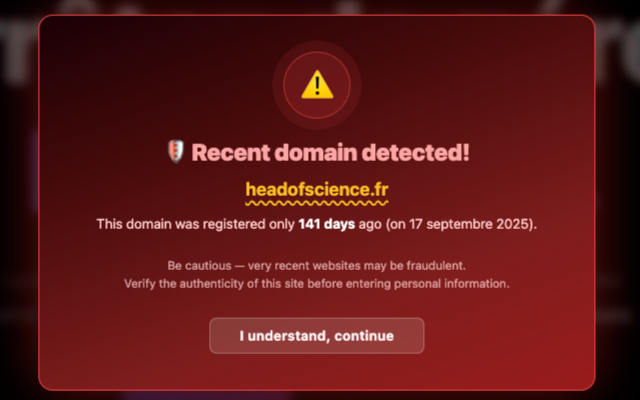
Browser extension that warns users about recently registered domains to prevent phishing attacks. Queries RDAP to check domain age and displays visual alerts on suspicious sites.


A browser extension that alerts you when visiting websites with recently registered domain names.


Phishing and scam domains are created and abandoned constantly — most live less than a month before being taken down and replaced. Traditional blacklists can't keep up because new malicious domains appear faster than they can be catalogued.
Young Domain Guard takes a different approach: instead of maintaining an ever-outdated blocklist, it checks the age of the domain you're visiting. If the domain was registered recently (default: less than 30 days), you get a warning. Simple, effective, and always up to date.
Results are cached for 4 hours to avoid repeated lookups. Major well-known domains (Google, GitHub, Amazon, etc.) are automatically skipped.
.co.uk, .com.au, etc.)Requirements:
Steps:
Clone the repository:
git clone https://github.com/ilianAZZ/young-domain-guard.git
cd young-domain-guard
Run the build script (installs dependencies via npm ci — using the exact versions pinned in package-lock.json — then runs npm run build):
./build.sh
npm run build invokes the TypeScript compiler (tsc), which compiles the source files in src/ (background.ts, content.ts, i18n.ts, popup.ts) into build/js/*.js, per the settings in tsconfig.json. No other transform, bundler, or minifier is involved. The rest of build/ (manifest.json, icons/, _locales/, popup.html) is static and already committed as-is.
The extension to load/review is the entire build/ directory, which now matches exactly what's published to the stores:
chrome://extensions, enable "Developer mode", click "Load unpacked", and select the build folderabout:debugging#/runtime/this-firefox, click "Load Temporary Add-on", and select build/manifest.jsonscripts/update-rdap-hosts.mjs is a separate, optional maintenance script (not part of the build) that regenerates the host_permissions list in build/manifest.json from IANA's public RDAP bootstrap registry. It is not required to reproduce this build, since build/manifest.json is already committed with the current list.
npm run dev
This runs the TypeScript compiler in watch mode, recompiling on file changes. Reload the extension in your browser after changes.
Click the extension icon to open the popup, where you can:
MIT
