 ifpdz/cve-2025-24104
Technical writeup of CVE-2025-24104: an iOS sandbox escape via symlink validation bypass in backup restoration, enabling arbitrary file reads outside the sandbox.

I reported a bug that Apple later tracked as CVE-2025-24104. In my original report, I demonstrated how a malicious backup could be used to bypass sandbox restrictions. However, Apple’s initial description stated that this vulnerability could lead to modifications of protected system files. I want to set the record straight: this bug actually allows an attacker to read arbitrary files outside the sandbox.
When I dug into the issue, I found that the vulnerability stems from a lack of proper symlink validation during the backup restoration process. Specifically, if you craft a backup where the file
/private/var/containers/Shared/SystemGroup/systemgroup.com.apple.configurationprofiles/Library/ConfigurationProfiles/CloudConfigurationDetails.plist
is replaced with a symbolic link, the system ends up reading a file of your choosing—even if it lies outside the sandbox.
The Flaw:
The mc_mobile_tunnel lockdown service fails to check whether CloudConfigurationDetails.plist is a symlink. If it is, the service follows the link, allowing an attacker to retrieve the content of any restricted file.
Steps to Reproduce:
CloudConfigurationDetails.plist is a symlink that points to any restricted file.GetCloudConfiguration command to the com.apple.mobile.MCInstall service. Instead of getting the expected file content, the service returned the contents of the file my symlink pointed to.The ability to read arbitrary files outside the sandbox is a serious issue. It means that sensitive system data, which should remain protected, could be exposed to attackers. This isn’t just a minor bug—it’s a fundamental security flaw in how backups are handled.
To fix this, the backup restoration process needs a more rigorous check:
CloudConfigurationDetails.plist, the service should verify that it’s a regular file and not a symlink. If it is a symlink, the restoration should either reject it or handle it safely.With the release of iOS 18.3, Apple introduced additional checks in the ManagedConfiguration framework to remove any symlinks found in the ConfigurationProfiles folder. Specifically:
MCRemoveFileIfSymlink was added.MCFixHostileSymlinks.ConfigurationProfiles folder is identified as a symlink, it is immediately deleted.You can see the bindiff details here:
https://github.com/blacktop/ipsw-diffs/blob/main/18_2_22C152__vs_18_3_22D5034e/DYLIBS/ManagedConfiguration.md
Below is a screenshot of my own diff showing where the new checks were added:
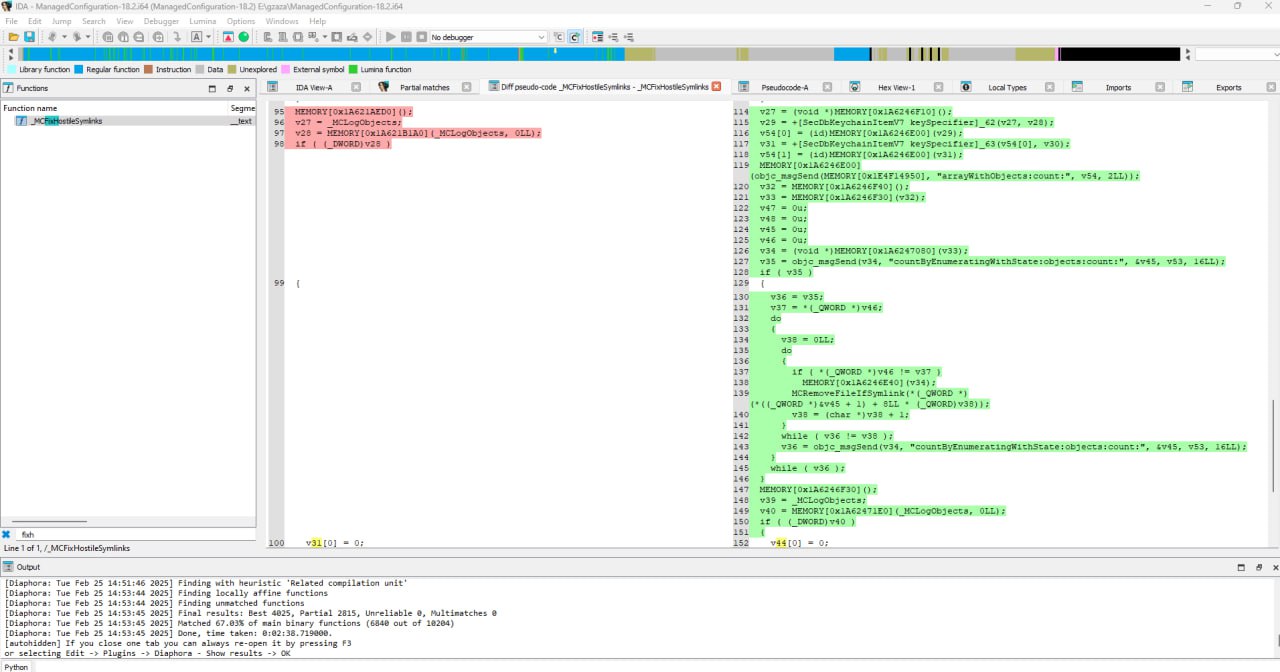
It’s worth mentioning that this new mitigation does not fix the issue 100%. I’ve already found a method to bypass it because Apple didn't implement my recommended fix, but I will keep those details private.
This is my personal account of CVE-2025-24104, emphasizing that Apple’s original description missed the mark. The true risk is the unauthorized reading of files out-of-sandbox, not modifications to system files.
Exploit found by Hichem Maloufi (ifpdz)
