 hxnoyd/ossem-power-up
A tool to assess data quality, built on top of the awesome OSSEM.


A tool to assess data quality, built on top of the awesome OSSEM project.
Power-up uses OSSEM Detection Data Model (DDM) as the foundation of its data quality assessment. The main reason for this is because it provides a structured way to correlate ATT&CK Data Sources, Common information model entities (CIM), and Data Dictionaries (events) with each other.
For those unfamiliar the DDM structure, here is a sample:
| ATT&CK Data Source | Sub Data Source | Source Data Object | Relationship | Destination Data Object | EventID |
|---|---|---|---|---|---|
| Process monitoring | process creation | process | created | process | 4688 |
| Process monitoring | process creation | process | created | process | 1 |
| Process monitoring | process termination | process | terminated | - | 4689 |
| Process monitoring | process termination | process | terminated | - | 5 |
As you can see each entry in the DDM defines a sub data source (scope) using abstract entities like process, user, file, etc. Each of these entries also contain an event ID, where the scope applies. You can read more about these entitites here.
In a nutshell, DDM entries play a major role on removing the complexity of raw events, by providing a scope that defines how a log source (data channels) can be consumed.
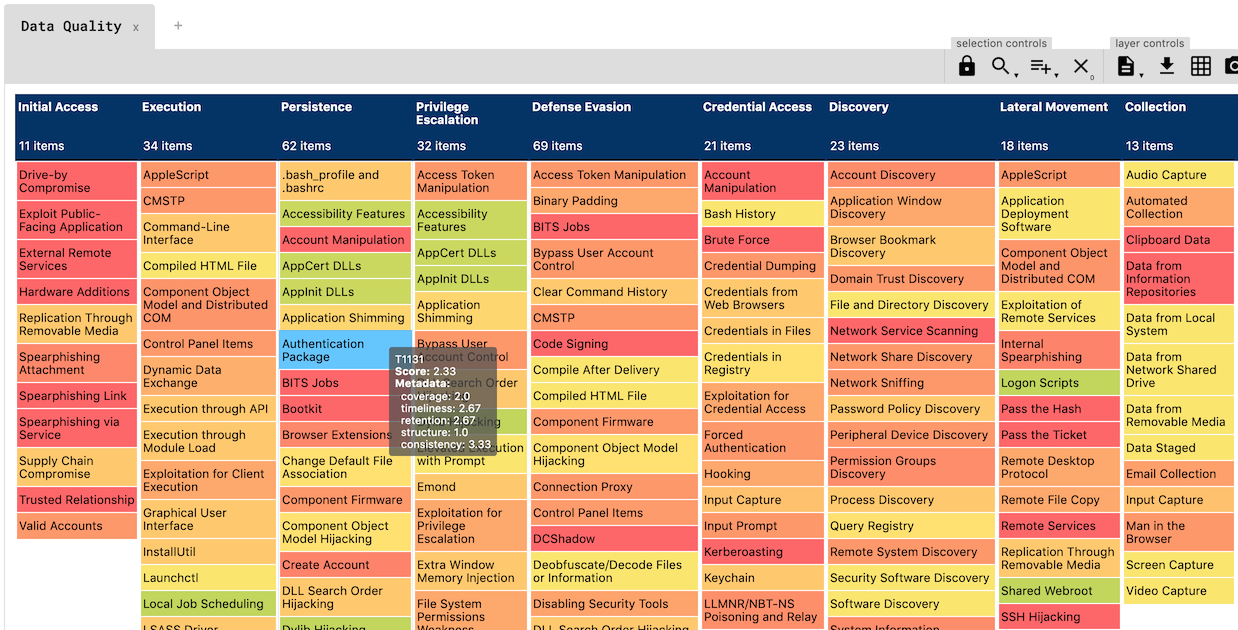
Power-up assesses data quality score according to five distinct dimensions:
| Dimension | Type | Description |
|---|---|---|
| Coverage | Data channel | How many devices or network segments are covered by the data channel |
| Timeliness | Data channel | How long does it take for the event to be available |
| Retention | Data channel | How long does the event remain available |
| Structure | Event | How complete is the event, if relevant fields are available |
| Consistency | Event | How standard are the event fields, if fields have been normalized |
Every dimension is rated with a score between 0 (none) to 5 (excelent).
These dimensions are tied to data channels, and propagate to all events provided by it.
Due to the nature of these dimensions, they must be rated manually, according to the specifities of the data channels.
Power-up uses resources/dcs.yml to define data channel and rate the dimensions:
data channel: sysmon
description: sysmon monitoring
coverage: 2
timeliness: 5
retention: 2
---
data channel: security
description: windows security auditing
coverage: 5
timeliness: 5
retention: 2
In order to calculate how complete the event structure is, power-up compares the data dictionary standard names with the fields of the entities (CIM) referenced in the DDM entry (source and destination).
Because not all entity fields are relevant (depends on the context), power-up uses the concept of profiles to select which fields need to match the data dictionary standard names. For example:
# OSSEM CIM Profile
process:
    - process_name
    - process_path
    - process_command_line
Note: There is an example profile in
profiles/default.ymlfor you to play with.
The structure score is calculated with the following formula:
SCORE_PERCENT = (MATCHED_FIELDS / TOTAL_RELEVANT_FIELDS) * 100
For the sake of clarity, here is an example of how structure score is calculated:
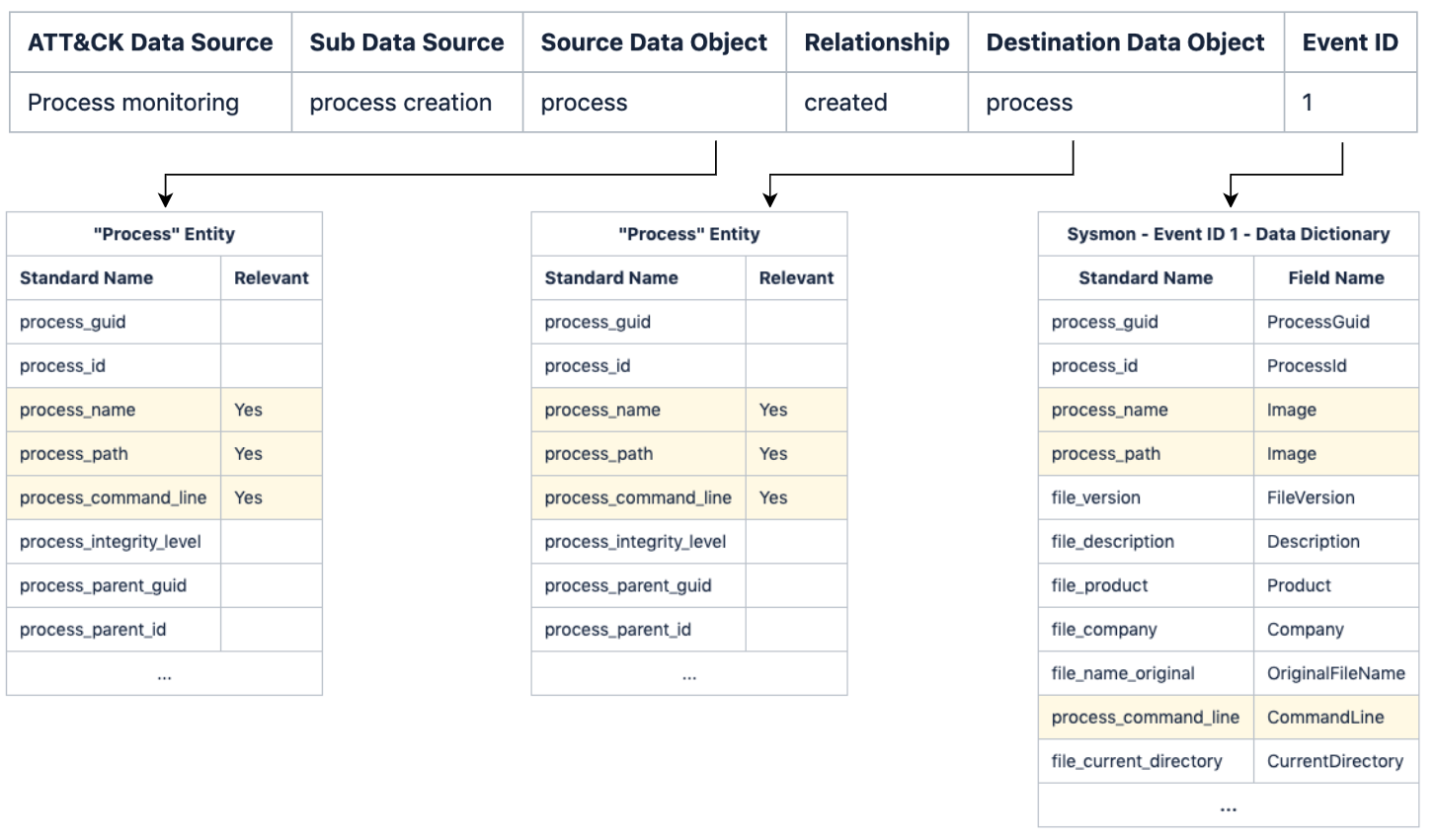
Note: Because Sysmon Event Id 1 data dictionary matches 100% of the relevant entity fields, the structure score will be rated as 5 (excelent).
The structure score is translated to the 0-5 scale in the following way:
| Percentage | Score |
|---|---|
| 0 | 0 |
| 1 to 25 | 1 |
| 26 to 50 | 2 |
| 51 to 75 | 3 |
| 76 to 99 | 4 |
| 100 | 5 |
Note: Depending on the use case (SIEM, Threat Hunting, Forensics), you can define different profiles so that you can rate your logs differently.
To calculate consistency, power-up simply calculates the percentage of fields with a standard name in a data dictionary. Data dictionaries with a high number of fields mapped to a standard name are more likely to correlate with CIM entities.
The consistency score is calculated with the following formula:
SCORE_PERCENT = (STANDARD_NAME_FIELDS / TOTAL_FIELDS) * 100
The consistency score is translated to the 0-5 scale in the following way:
| Percentage | Score |
|---|---|
| 0 | 0 |
| 1 to 50 | 1 |
| 51 to 99 | 3 |
| 100 | 5 |
pip install -r requirements.txt$> python3 powerup.py --help
_____ _____ _____ _____ _____ _____ _____ _ _ _ _____ _____ _____ _____ __
| | __| __| __| | | _ | | | | | __| __ |___| | | _ | |
| | |__ |__ | __| | | | | __| | | | | | __| -|___| | | __|__|
|_____|_____|_____|_____|_|_|_| |__| |_____|_____|_____|__|__| |_____|__| |__|
usage: powerup.py [-h] [-o OSSEM] [-y OSSEM_YAML] [-p PROFILE] [--excel]
[--elastic] [--yaml]
A tool to assess ATT&CK data source coverage, built on top of awesome OSSEM.
optional arguments:
-h, --help show this help message and exit
-o OSSEM, --ossem OSSEM
path to import OSSEM markdown
-y OSSEM_YAML, --ossem-yaml OSSEM_YAML
path to import OSSEM yaml
-p PROFILE, --profile PROFILE
path to CIM profile
--excel export OSSEM DDM to excel
--elastic export OSSEM data models to elastic
--yaml export OSSEM data models to yaml
--layer export OSSEM data models to navigator layer
As you can see power-up can consume OSSEM data from two different formats:
Currently, Power-up exports OSSEM output to:
output/ folderouput/ folderNote: if no profile file path is specified power-up uses
profiles/default.ymlby default.
$> python3 powerup.py -o ../OSSEM --yaml
  _____ _____ _____ _____ _____    _____ _____ _ _ _ _____ _____     _____ _____ __
 |     |   __|   __|   __|     |  |  _  |     | | | |   __| __  |___|  |  |  _  |  |
 |  |  |__   |__   |   __| | | |  |   __|  |  | | | |   __|    -|___|  |  |   __|__|
 |_____|_____|_____|_____|_|_|_|  |__|  |_____|_____|_____|__|__|   |_____|__|  |__|
