 hfiref0x/winobjex64
Windows Object Explorer 64-bit

# WinObjEx64
[](https://ci.appveyor.com/project/hfiref0x/winobjex64)

## Windows Object Explorer 64-bit
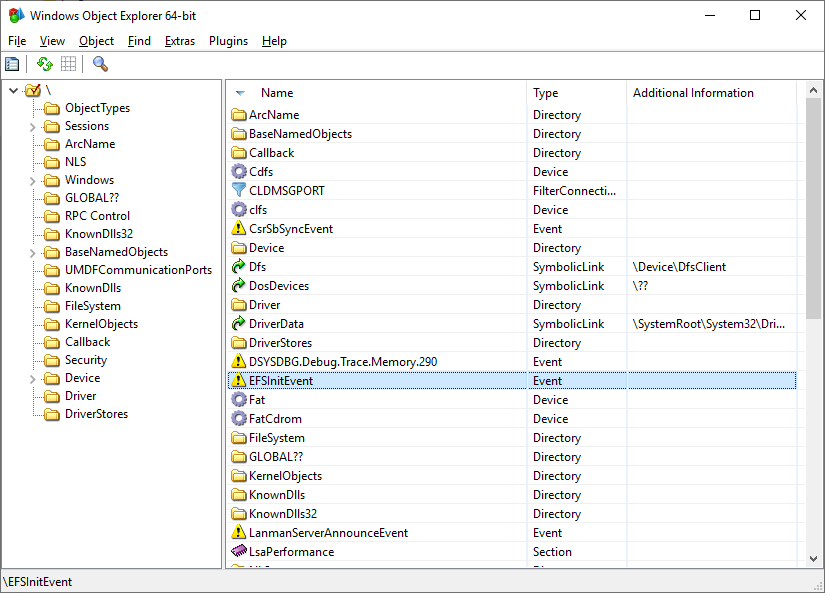
<img src="https://assets.kitploit.com/production/public/readmes/2674/1d7a62147dd2fe019ce5873b6d85097fd248a7106b5a5d5febe8ab44d397b9aa.png" width="600" />
WinObjEx64 is an advanced utility that lets you explore the Windows Object Manager namespace. For certain object types, you can double-click on it or use the "Properties..." toolbar button to get more information, such as description, attributes, resource usage etc. WinObjEx64 let you view and edit object-related security information if you have required access rights.
# System Requirements
WinObjEx64 does not require administrative privileges. However, administrative privileges are required to view much of the namespace and to edit object-related security information.
WinObjEx64 works only on the following x64 Windows: Windows 7, Windows 8, Windows 8.1, and Windows 10/11, including Server variants.
# Features
<details>
<summary>View list</summary>
- **Explore all of Windows Object Manager namespace**
- Hierarchical objects tree
- Symbolic links resolving
- Version information for `Section`-type objects backed by an image file
- Additional information for `WindowStation`-type objects
- **View objects details**:
- Descriptions
- Flags
- Invalid attributes
- Memory pool type
- Object type-specific information
- Object-related structure memory dumps<sup>1</sup>:
- `ALPC_PORT`
- `CALLBACK_OBJECT`
- `DEVICE_OBJECT`
- `DRIVER_OBJECT`
- `DIRECTORY_OBJECT`
- `FLT_SERVER_PORT_OBJECT`
- `KEVENT`
- `KMUTANT`
- `KSEMAPHORE`
- `KTIMER`
- `KQUEUE` (IoCompletion)
- `OBJECT_SYMBOLIC_LINK`
- `OBJECT_TYPE`
- Opened handles
- Statistics
- Supported access rights
- Process Trust label
- And more...
- **Display in dump sub-structures**<sup>1</sup>:
- `ALPC_PORT_ATTRIBUTES`
- `DEVICE_MAP`
- `LDR_DATA_TABLE_ENTRY`
- `OBJECT_TYPE_INITIALIZER`
- `UNICODE_STRING`
- And many others
- Edit object-related security information<sup>2</sup>
- Detect driver object IRP modifications (via structure dump)<sup>1</sup>
- Detect kernel object hooking (via structure dump)<sup>1</sup>
- Search for objects by name and/or type
- **System information viewer**
- Boot state and type
- Code Integrity options
- Mitigation flags
- Windows version and build
- **Loaded drivers list viewer**
- Dump selected driver<sup>1</sup>
- Export driver list to CSV file
- Jump to driver file location
- Detect Kernel Shim Engine "shimmed" drivers<sup>1</sup>
- View driver file properties
- **Mailslots/Named pipes viewer**
- List all registered mailslots/named pipes
- Edit named pipes security information<sup>4</sup>
- Object statistics
- **Hierarchical process tree viewer**<sup>2</sup>
- Show process ID, user name, `EPROCESS` addresses
- Highlight processes by type (similar to Process Explorer)
- Show thread list for selected process
- Show `ETHREAD` addresses
- **Common properties for Process/Thread objects**:
- Basic properties (as other object types)
- Start time
- Process type
- Image file name
- Command line
- Current directory
- Applied mitigations
- Protection
- "Critical Process" flag state
- Security edit
- Jump to process file location
- **Process/Thread token information**:
- User name
- User SID
- AppContainer SID
- Session
- UIAccess
- Elevation state
- Integrity level
- Privileges and groups
- **Additional token properties**:
- Basic properties (as other object types)
- Security attributes list
- Security edit
- **Software Licensing Cache viewer**
- List registered licenses
- Display license data
- Dump `SL_DATA_BINARY` license data to file
- **User Shared Data viewer**
- Structured dump of key `KUSER_SHARED_DATA` sections
- **System callbacks viewer**<sup>1</sup>
- Display callback addresses, modules, and details for:
- `PsSetCreateProcessNotifyRoutine`
- `PsSetCreateProcessNotifyRoutineEx`
- `PsSetCreateProcessNotifyRoutineEx2`
- `PsSetCreateThreadNotifyRoutine`
- `PsSetCreateThreadNotifyRoutineEx`
- `PsSetLoadImageNotifyRoutine`
- `PsSetLoadImageNotifyRoutineEx`
- `KeRegisterBugCheckCallback`
- `KeRegisterBugCheckReasonCallback`
- `CmRegisterCallback`
- `CmRegisterCallbackEx`
- `IoRegisterShutdownNotification`
- `IoRegisterLastChanceShutdownNotification`
- `PoRegisterPowerSettingCallback`
- `SeRegisterLogonSessionTerminatedRoutine`
- `SeRegisterLogonSessionTerminatedRoutineEx`
- `IoRegisterFsRegistrationChange`
- `IopFsListsCallbacks`
- `IoRegisterPlugPlayNotification`
- `ObRegisterCallbacks`
- `DbgSetDebugPrintCallback`
- `DbgkLkmdRegisterCallback`
- `PsRegisterAltSystemCallHandler`
- CodeIntegrity `SeCiCallbacks`
- `ExRegisterExtension`
- `PoRegisterCoalescingCallback`
- `PsRegisterPicoProvider`
- `KeRegisterNmiCallback`
- `PsRegisterSiloMonitor`
- `EmProviderRegister`
- **Windows Object Manager private namespace viewer**<sup>1</sup>
- Namespace entry information
- Boundary descriptor details
- Common object properties
- **KiServiceTable viewer**<sup>1</sup>
- Dump `Ntoskrnl`-managed `KiServiceTable` (SSDT)
- Jump to service entry module
- Export to CSV file
- **W32pServiceTable viewer**<sup>1</sup>
- Dump `Win32k`-managed `W32pServiceTable` (Shadow SSDT)
- Win32k import forwarding support
- Win32k ApiSets resolving
- Jump to service entry module
- Export to CSV file
- **CmControlVector viewer**
- Dump `Ntoskrnl` `CmControlVector` array
- Export kernel memory data to file<sup>1</sup>
- Export to CSV file
- **Clipboard integration**: Copy object addresses/names to clipboard
- **Wine/Wine-Staging support**<sup>3</sup>
- **Plugins subsystem**
- **Included plugins**:
- **ApiSetView**: Windows ApiSetSchema viewer (supports loading schema from file)
- **Example plugin**: Developer template
- **Sonar**: NDIS protocols viewer (dumps protocol details)
- **ImageScope**: Enhanced `Section`-type object details (via context menu)
- **Documentation**
- Windows Callbacks
- Plugins subsystem
1. Requires driver support (see "Driver Support" section).
2. Administrator privileges may be required.
3. Windows internals features unavailable on Wine/Wine-Staging.
4. Administrator privileges required for some named pipes.
### Driver support
WinObjEx64 supports two types of driver helpers:
1. **Helper for read-only access to kernel memory**:
- Default version uses the **Kernel Local Debugging Driver (KLDBGDRV)** from WinDbg.
- Requires:
- Windows booted in debug mode (`bcdedit -debug on`)
- WinObjEx64 running with administrator privileges
- **Custom helper driver versions** do **not** require Windows debug mode.
- Multiple third-party drivers can be used as helpers, though only the **WinDbg-type** driver is included by default.
2. **Helper to access object handles**:
- WinObjEx64 (any variant) **supports** Process Explorer driver v1.5.2 for opening processes/threads.
- Enable by running **both** Process Explorer and WinObjEx64 with administrator privileges.
**Note**: All driver helpers require WinObjEx64 to run with administrative privileges.
</details>
# Build
WinObjEx64 comes with full source code. To build from source, you need Microsoft Visual Studio 2015 or later.
## Instructions
* Select Platform ToolSet first for the project in the solution you want to build (Project->Properties->General):
* v140 for Visual Studio 2015;
* v141 for Visual Studio 2017;
* v142 for Visual Studio 2019;
* v143 for Visual Studio 2022.
* For v140 and above, set Target Platform Version (Project->Properties->General):
* If v140, select 8.1;
* If v141 and above, select 10.
* Minimum required Windows SDK version: 8.1
* Recommended Windows SDK version: 10.0.19041 and above
# What is new
[Whats New in 2.0.0](https://github.com/hfiref0x/WinObjEx64/blob/master/Docs/WHATSNEW_200.md)
[Complete changelog](https://github.com/hfiref0x/WinObjEx64/blob/master/Source/CHANGELOG.txt)
# Support Our Work
If you enjoy using this software and would like to help the authors maintain and improve it, please consider supporting us with a donation. Your contribution fuels development, ensures updates, and keeps the project alive.
### Cryptocurrency Donations:
BTC (Bitcoin): bc1qzkvtpa0053cagf35dqmpvv9k8hyrwl7krwdz84q39mcpy68y6tmqsju0g4
This is purely optional, thank you!~
# Authors
(c) 2015 – 2026 WinObjEx64 Project, hfiref0x
Original WinObjEx (c) 2003 – 2005 Four-F