 hannah-portswigger/totpauthenticate
This extension, for Burp Suite Enterprise Edition, utilizes session handling rules to provide a TOTP token to outgoing requests.

For Burp Suite Enterprise Edition
Please note that extensions are written by third party users of Burp, and PortSwigger makes no warranty about their quality or usefulness for any particular purpose.
Extensions > Installed > AddSettings > Search > SessionsSession handling rules, go to Add > Rule actions > Add > Invoke a Burp extension, select TOTP Authenticate from the dropdown list available and click OKScope tab, ensuring that the Tools scope > Scanner box is checkedOKExtensions > Installed and reload the extension (uncheck the TOTP Authenticate "Loaded" checkbox, and click it again)Session handling rules > Cog button > Save settings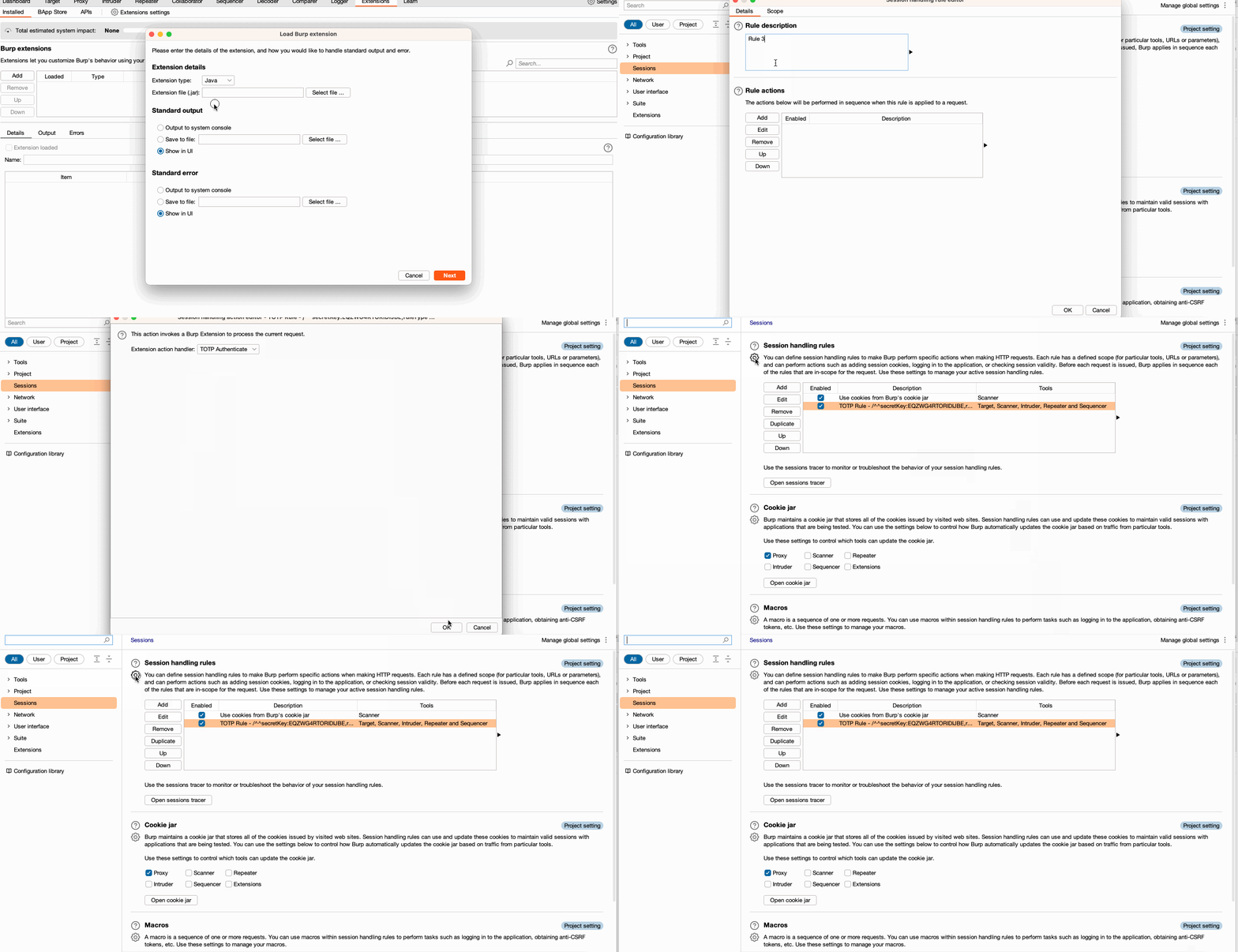
/^^secretKey:BASE32,ruleType:TYPE,parameterName:NAME_OF_PARAMETER_VALUE_OR_BASE64_ENCODED_REGEX^^/
/^^ delimiter to signify the start of the rulesecretKey: the BASE32 encoded OTP seedruleType: describes where to apply the ruleparameterName:
ruleType of BODY_REGEX it is the BASE64 encoded regular expression that defines where to updateruleType of HEADER, URL, COOKIE or BODY_PARAM it is the literal name of the key:value pair to add or update^^/ delimiter to signal the end of the ruleHEADERURLCOOKIEBODY_PARAMBODY_REGEXThe following example supplies the regex of .*\"AdditionalAuthData\":\"(\d*)\".* as its parameterName to identify the match expression and replace (\d*) with the generated OTP rolling code
/^^secretKey:EQZWG4RTORIDIJBE,ruleType:BODY_REGEX,parameterName:LipcIkFkZGl0aW9uYWxBdXRoRGF0YVwiOlwiKFxkKilcIi4q^^/
The following example adds or replaces a header named TEST with the value of the generated OTP rolling code
/^^secretKey:EQZWG4RTORIDIJBE,ruleType:HEADER,parameterName:TEST^^/
{
  "project_options":{
    "sessions":{
      "session_handling_rules":{
        "rules":[
          {
            "actions":[
              {
                "action_name":"TOTP Authenticate",
                "enabled":true,
                "type":"invoke_extension"
              }
            ],
            "description":"My OTP rule: /^^secretKey:EQZWG4RTORIDIJBE,ruleType:HEADER,parameterName:TEST^^/",
            "enabled":true,
            "exclude_from_scope":[],
            "include_in_scope":[],
            "named_params":[],
            "restrict_scope_to_named_params":false,
            "tools_scope":[
              "Scanner"
            ],
            "url_scope":"all",
            "url_scope_advanced_mode":false
          }
        ]
      }
    }
  }
}
We would recommend testing this extension out in Burp Suite Professional/Community before usage in Burp Suite Enterprise Edition.
To test this extension in Enterprise, you can configure an upstream proxy through Burp to ensure that your token has been added appropriately.
If using the following configuration, please make sure that an instance of Burp Suite Pro/Community is running and you are using a local agent.
{
  "project_options":{
    "connections":{
      "upstream_proxy":{
        "servers":[
          {
            "auth_type":"none",
            "destination_host":"*",
            "proxy_host":"127.0.0.1",
            "proxy_port":8080,
            "enabled":true
          }
        ],
        "use_user_options":false
      }
    }
  }
}
gradle fatJar from the installation directory using the command line.