
Skip to content
KitploitKITPLOIT
ToolsBlog
Submit
ToolsBlog
Submit

Hacking, PenTest, and Cybersecurity Tools for Your Security Arsenal!

Kitploit is a directory of hacking, cybersecurity, and pentesting tools. Discover the latest project updates to find vulnerabilities, analyze systems, automate testing, and strengthen your security.

··Feeds·Contact·Privacy·© 2026 Kitploit

Tool Directory

Categories

View all categories
Loading categories
Tools/GitHubGitHub/halilkirazkaya/burpfox
Web Vulnerability ScannersDynamic Analysis (Sandboxing)Vulnerability AnalysisWeb Application ExploitationWeb SecurityPenetration Testing
GitHubhalilkirazkaya/burpfox

burpfox

A Burp Suite extension that integrates Dalfox XSS scanner directly into your workflow.

View Repository
23157 months agoReviewed by Kitploit

Most Popular

View all →

Discover the most used tools by our community.

Explore all tools

Browse our collection of tools

View all tools →
Share

🦊 BurpFox

A Burp Suite extension that integrates Dalfox XSS scanner directly into your workflow.

Burp Suite Java License

Features

  • 🎯 Right-click scanning - Scan requests directly from Proxy History or Repeater.
  • ⚙️ Full Dalfox options - Context-aware, WAF evasion, Blind XSS and more.

Prerequisites

1. Install Dalfox

Dalfox must be installed on your system before using BurpFox.

macOS (Homebrew):

root@kitploit:~
brew install dalfox

Linux (Go):

root@kitploit:~
go install github.com/hahwul/dalfox/v2@latest

Verify installation:

root@kitploit:~
dalfox version

Note: Ensure dalfox is in your PATH. BurpFox also checks common locations like ~/go/bin/dalfox and /usr/local/bin/dalfox.

Installation

Option A: Download Release (Recommended)

  1. Download the latest burpfox-x.x.jar from Releases
  2. Open Burp Suite
  3. Go to Extensions → Installed → Add
  4. Select Extension type: Java
  5. Click Select file and choose the downloaded JAR
  6. Click Next to load the extension

Option B: Build from Source

Requirements:

  • Java 17+
  • Maven 3.6+
root@kitploit:~
# Clone the repository
git clone https://github.com/halilkirazkaya/burpfox.git
cd burpfox

# Build
mvn clean package

# The JAR will be at target/burpfox-0.1.jar

Then follow steps 2-6 from Option A to install the JAR.

Usage

Quick Scan

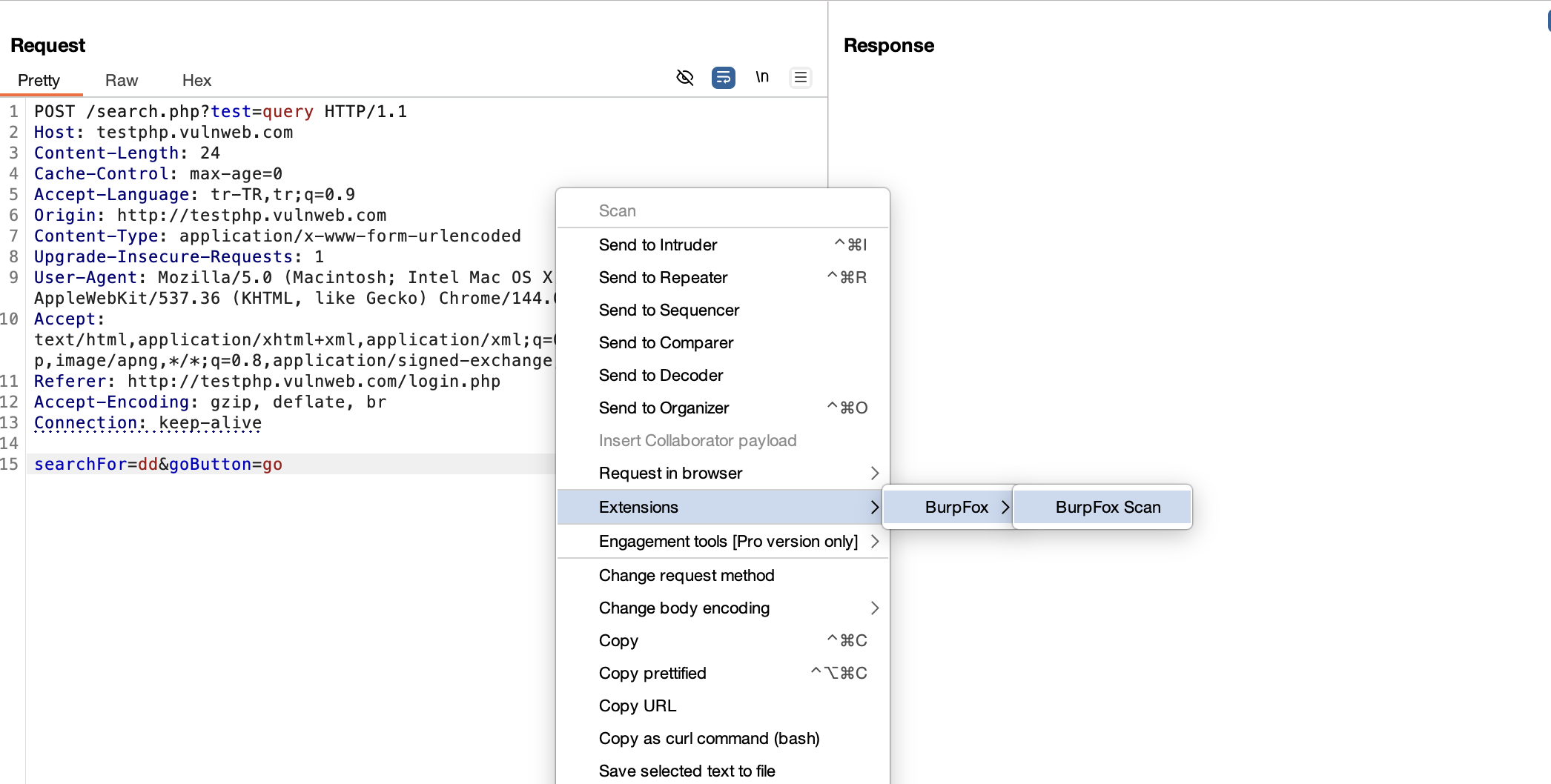
  1. In Burp Suite, capture a request (Proxy, Repeater, etc.)
  2. Right-click on the request
  3. Select BurpFox Scan
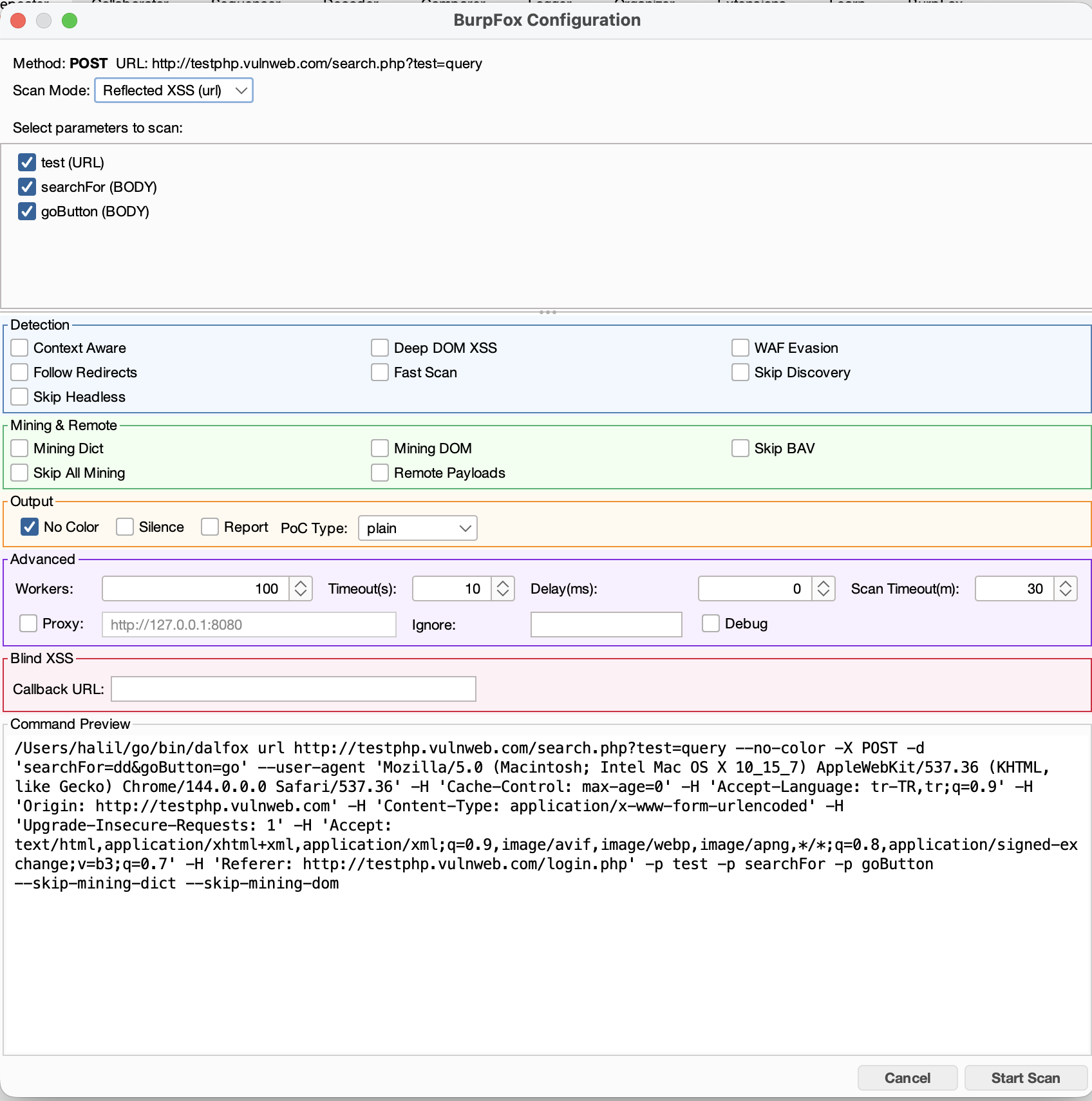
  4. Configure scan options and select parameters
  5. Click Start Scan

Scan Options

CategoryOptions
DetectionContext Aware, Deep DOM XSS, WAF Evasion, Follow Redirects, Fast Scan
MiningMining Dict, Mining DOM, Skip BAV, Remote Payloads
OutputNo Color, Silence Mode, Report, PoC Type (plain/curl/httpie)
AdvancedWorkers, Timeout, Delay, Proxy, Ignore Return

Scan Modes

  • Reflected XSS (url) - Standard XSS scanning
  • Stored XSS (sxss) - Requires a trigger URL where the payload will execute

Bulk Scanning

Select multiple requests in Proxy History or Site Map, then right-click to:

  • Scan All Selected - Opens config dialogs for each request
  • Scan Individual - Choose specific requests from the submenu

Configuration

Custom Dalfox Path

If Dalfox is not in your PATH, set the system property:

root@kitploit:~
# In Burp Suite JVM options
-Ddalfox.path=/custom/path/to/dalfox

Proxy Through Burp

Enable the Proxy option in Advanced settings to route Dalfox traffic through Burp (default: http://127.0.0.1:8080).

Screenshots

1. Send to BurpFox Send to BurpFox

2. Configure Scan Configure Scan

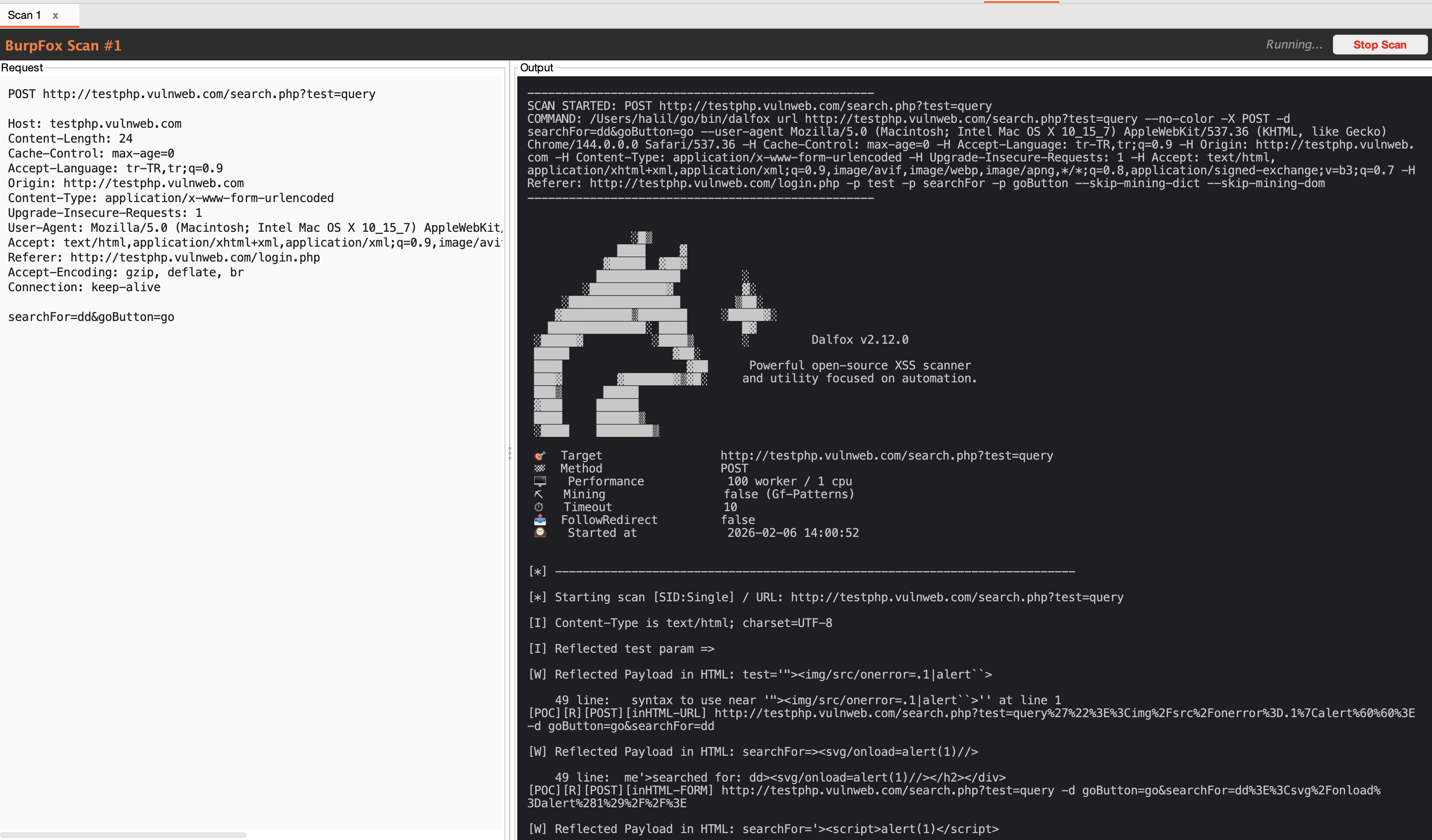
3. Scan Results Scan Results

Troubleshooting

"Dalfox not found"

  1. Verify Dalfox is installed: dalfox version
  2. Check if it's in PATH: which dalfox

Scan hangs or times out

  • Increase Scan Timeout in Advanced options (default: 30 minutes)
  • Try enabling Fast Scan for quicker results
  • Check if target is reachable

No vulnerabilities found

  • Ensure parameters are selected for scanning
  • Try disabling Skip Discovery to find more injection points
  • Enable Mining Dict and Mining DOM for comprehensive scanning

Contributing

Contributions are welcome! Please feel free to submit a Pull Request.

License

This project is licensed under the MIT License - see the LICENSE file for details.

Credits

  • Dalfox by @hahwul - The powerful XSS scanner
  • Burp Suite by PortSwigger - The web security testing platform

Author

Halil Kirazkaya - @halilkirazkaya


Made with ❤️ for the security community.

Download Tool