 halildeniz/cryptochat
End-to-end encrypted server-client chat application with adaptive encryption modes, multimedia support, and group chat, built on Python socket programming.

Welcome to CryptoChat - where conversations remain truly private. Built on the robust Python ecosystem, our application ensures that every word you send is wrapped in layers of encryption. Whether you're discussing sensitive business details or sharing personal stories, CryptoChat provides the sanctuary you need in the digital age. Dive in, and experience the next level of secure messaging!
Clone the repository:
git clone https://github.com/HalilDeniz/CryptoChat.git
Navigate to the project directory:
cd CryptoChat
Install the required dependencies:
pip install -r requirements.txt
$ python3 server.py --help
usage: server.py [-h] [--host HOST] [--port PORT] [--loglevel {DEBUG,INFO,WARNING,ERROR,CRITICAL}] [--logfile LOGFILE]

Start the chat server.

options:
-h, --help            show this help message and exit
--host HOST           The IP address to bind the server to. (Default: 0.0.0.0)
--port PORT           The port number to bind the server to. (Default: 12345)
--loglevel {DEBUG,INFO,WARNING,ERROR,CRITICAL}
                     Set the logging level (Default: INFO)
--logfile LOGFILE     Set the log file name. (Default: server.log
--------------------------------------------------------------------------
$ python3 client.py --help
usage: client.py [-h] [--host HOST] [--port PORT]

Connect to the chat server.

options:
-h, --help   show this help message and exit
--host HOST  The server's IP address.
--port PORT  The port number of the server.
$ python3 serverE.py --help
usage: serverE.py [-h] [--host HOST] [--port PORT] [--key KEY] [--loglevel {DEBUG,INFO,WARNING,ERROR,CRITICAL}] [--logfile LOGFILE]

Start the chat server.

options:
  -h, --help            show this help message and exit
  --host HOST           The IP address to bind the server to. (Default=0.0.0.0)
  --port PORT           The port number to bind the server to. (Default=12345)
  --key KEY             The secret key for encryption. (Default=mysecretpassword)
  --loglevel {DEBUG,INFO,WARNING,ERROR,CRITICAL}
                        Set the logging level (Default: INFO)
  --logfile LOGFILE     Set the log file name. (Default: server.log)
--------------------------------------------------------------------------
$ python3 clientE.py --help
usage: clientE.py [-h] [--host HOST] [--port PORT] [--key KEY]

Connect to the chat server.

options:
  -h, --help   show this help message and exit
  --host HOST  The IP address to bind the server to. (Default=127.0.0.1)
  --port PORT  The port number to bind the server to. (Default=12345)
  --key KEY    The secret key for encryption. (Default=mysecretpassword)
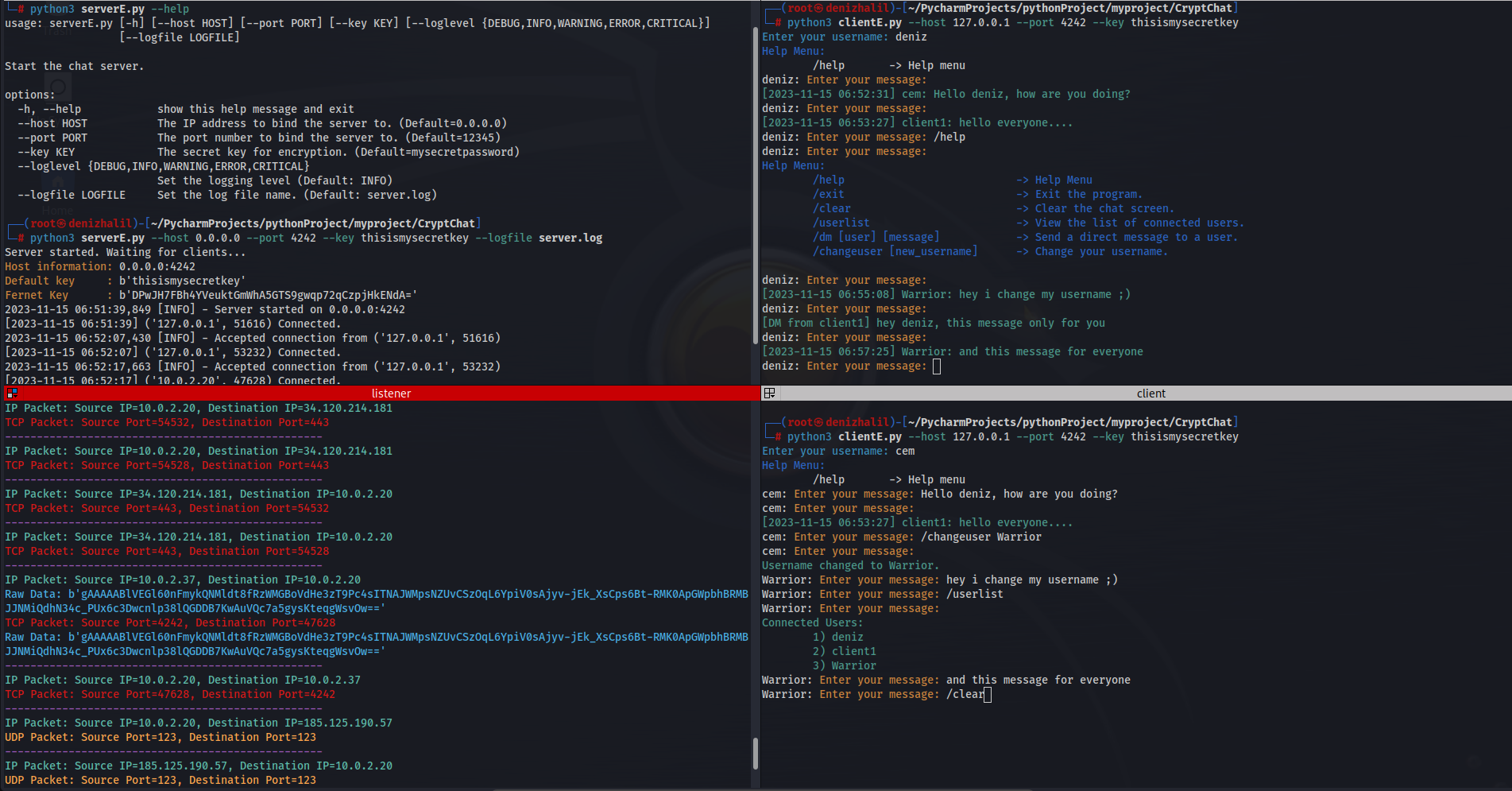
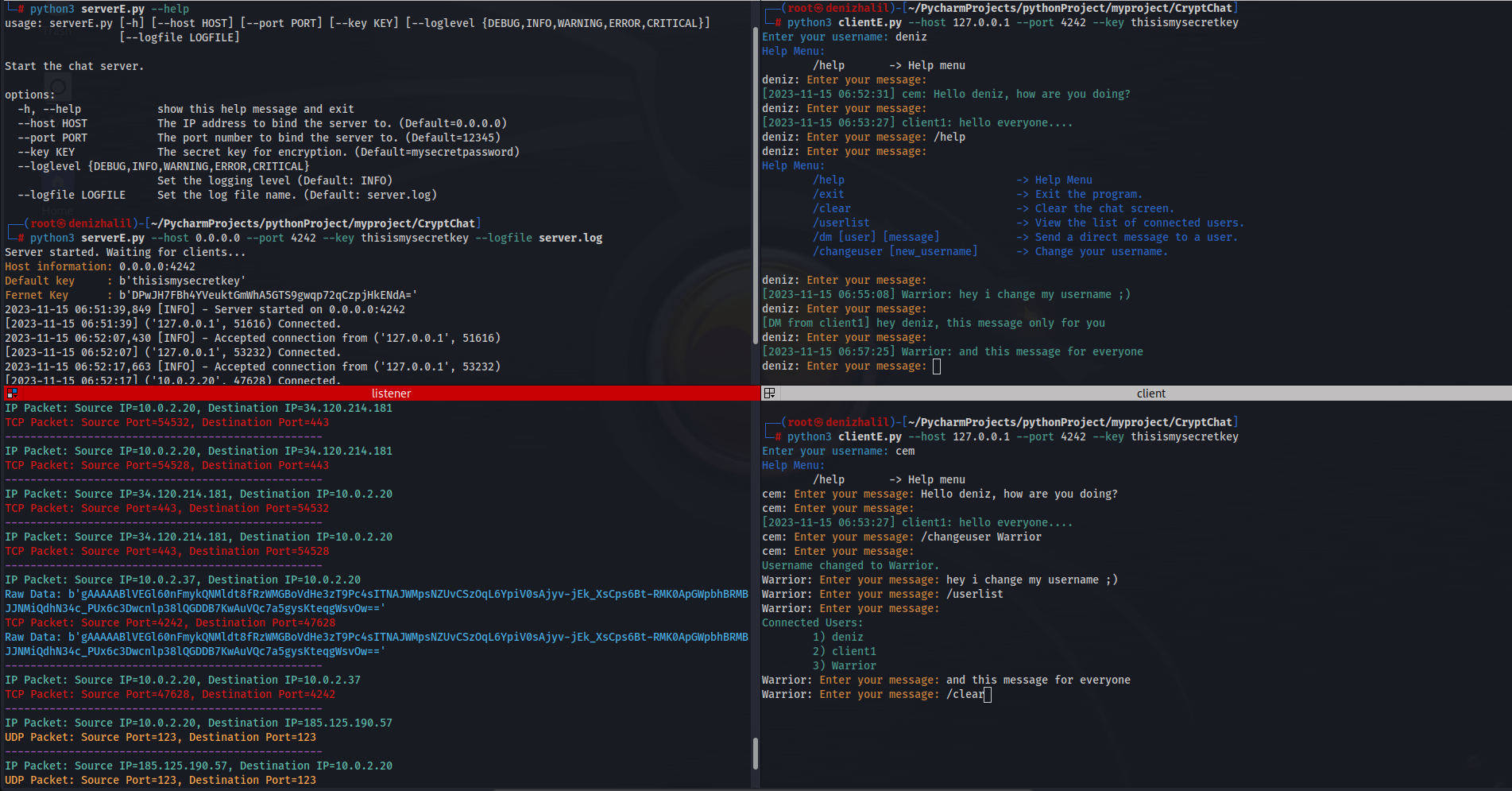
--help : show this help message and exit--host : The IP address to bind the server.--port : The port number to bind the server.--key : The secret key for encryption--loglevel: Set the logging level--logfile : Set the log file namepython3 clientE.py
Enter your username: deniz
Help Menu:
/help -> Help menu
deniz: Enter your message: /help
deniz: Enter your message:
Help Menu:
/help -> Help Menu
/exit -> Exit the program.
/clear -> Clear the chat screen.
/userlist -> View the list of connected users.
/dm [user] [message] -> Send a direct message to a user.
/changeuser [new_username] -> Change your username.
deniz: Enter your message:
I wrote a listening tool to see if encrypted messaging is working correctly
└─# python3 SCsniff.py
IP Packet: Source IP=127.0.0.1, Destination IP=127.0.0.1
TCP Packet: Source Port=12345, Destination Port=50968
Raw Data: b'gAAAAABlOlxawZboULf0WJkQQkzVwJKLXbGh3qyxWYbaCqNhi5xLwhR9YdckSiPiPQCkWHHGSzKAKG5pW3HyatQnpekoR0Zl-_DH-WH_azjGm86QGW1PRnE='
--------------------------------------------------
IP Packet: Source IP=127.0.0.1, Destination IP=127.0.0.1
TCP Packet: Source Port=12345, Destination Port=50968
Raw Data: b'gAAAAABlOlxawZboULf0WJkQQkzVwJKLXbGh3qyxWYbaCqNhi5xLwhR9YdckSiPiPQCkWHHGSzKAKG5pW3HyatQnpekoR0Zl-_DH-WH_azjGm86QGW1PRnE='
--------------------------------------------------
IP Packet: Source IP=127.0.0.1, Destination IP=127.0.0.1
TCP Packet: Source Port=50968, Destination Port=12345
--------------------------------------------------
TCP Packet: Source Port=42228, Destination Port=12345
Raw Data: b'gAAAAABlOlyHDfYapDc2kawoEjNozSJybZBk0SxZwMiE2_x9OffGGc-NlaB3FHJue6jY3rQbBKseCkDATpnBgJRxLJQA6heDlw=='
--------------------------------------------------
IP Packet: Source IP=127.0.0.1, Destination IP=127.0.0.1
TCP Packet: Source Port=42228, Destination Port=12345
Raw Data: b'gAAAAABlOlyHDfYapDc2kawoEjNozSJybZBk0SxZwMiE2_x9OffGGc-NlaB3FHJue6jY3rQbBKseCkDATpnBgJRxLJQA6heDlw=='
--------------------------------------------------
IP Packet: Source IP=127.0.0.1, Destination IP=127.0.0.1
TCP Packet: Source Port=12345, Destination Port=42228
Raw Data: b'gAAAAABlOlyHyCO4dV50WtplQ8eZxbH8d9xuL04iGsrbjhU-oFlguaaig0vjRd7GVvLiBm5Js6kFYHpc6esuTkDrmabq-k1DdSrlEHOgvdaMotxMMg5KEL8='
--------------------------------------------------
IP Packet: Source IP=127.0.0.1, Destination IP=127.0.0.1
TCP Packet: Source Port=12345, Destination Port=42228
Raw Data: b'gAAAAABlOlyHyCO4dV50WtplQ8eZxbH8d9xuL04iGsrbjhU-oFlguaaig0vjRd7GVvLiBm5Js6kFYHpc6esuTkDrmabq-k1DdSrlEHOgvdaMotxMMg5KEL8='
--------------------------------------------------

IP Packet: Source IP=127.0.0.1, Destination IP=127.0.0.1
TCP Packet: Source Port=42228, Destination Port=12345
Raw Data: b'gAAAAABlOlyPKyzTR_-1LFSNLtBCR5sghmont3299N9QWrQhHXzwo1Y-toax3Xh4f3PQ5cG-8QuOpM9ApGFoxkVGbpH4Bfhy9iYduQgwYy59kChiGwIQ1rI='
--------------------------------------------------
IP Packet: Source IP=127.0.0.1, Destination IP=127.0.0.1
TCP Packet: Source Port=42228, Destination Port=12345
Raw Data: b'gAAAAABlOlyPKyzTR_-1LFSNLtBCR5sghmont3299N9QWrQhHXzwo1Y-toax3Xh4f3PQ5cG-8QuOpM9ApGFoxkVGbpH4Bfhy9iYduQgwYy59kChiGwIQ1rI='
--------------------------------------------------
Contributions are welcome! If you find any issues or have suggestions for improvements, feel free to open an issue or submit a pull request.
If you have any questions, comments, or suggestions about CryptoChat, please feel free to contact me:
