
Steganographic storage & File encryption tool

tird & tirdFStird /tɪrd/ (an acronym for "this is random data") is a file encryption tool that minimizes metadata and hides encrypted data.

With tird, you can:
tirdFS) inside container files and block devices. Unlike VeraCrypt and Shufflecake, tirdFS containers do not contain headers; the user specifies the data locations inside the container and is responsible for keeping those locations separate. Any random-looking region of a file or block device may be used as a container.tird offers built-in plausible deniability, even when encrypted files are stored outside containers. It also helps resist coercive key-disclosure attacks (rubber-hose cryptanalysis, xkcd 538).
[!WARNING] Before using
tird, please read the "Warnings" section. Security depends not only on the tool but on your actions: secure key storage, operating in a safe environment, and avoiding debug mode with real data.
Format stabilization and a formal specification are planned for v1.0.0.
You don't need to memorize command-line options to use tird. This tool features a prompt-based CLI: simply start it, select a menu option, and answer the questions that will follow.
$ tird
MENU
———————————————————————————————————————————
0. Exit 1. Info & Warnings
2. Encrypt 3. Decrypt
4. Embed 5. Extract
6. Encrypt & Embed 7. Extract & Decrypt
8. Create w/ Random 9. Overwrite w/ Random
———————————————————————————————————————————
A0. SELECT AN OPTION [0-9]:
There are 4 groups of input options: A (Action), D (Data), K (Keys), P (Proceed). They are numbered for ease of description.
+——————————————————————+————————————————————————+
| A0. SELECT AN OPTION | A. Select an action |
+——————————————————————+————————————————————————+
| D1. INPUT FILE PATH | |
| D2. COMMENTS | D. Enter data, |
| D3. OUTPUT FILE PATH | data location, |
| D4. OUTPUT FILE SIZE | data size |
| D5. START POSITION | |
| D6. END POSITION | |
+——————————————————————+————————————————————————+
| K1. KEYFILE PATH | K. Enter values |
| K2. PASSPHRASE | related to |
| K3. TIME COST | key derivation |
+——————————————————————+————————————————————————+
| P0. PROCEED? | P. Confirm to continue |
+——————————————————————+————————————————————————+
A detailed description of these options with examples can be found here.
The payload that will be encrypted during cryptoblob creation consists of:
Specifying the payload in the UI looks as follows:
D1. FILE TO ENCRYPT (OPT): files.zip
I: path: 'files.zip'; size: 2,824,230,648 B (2.6 GiB)
D2. COMMENTS (DEFAULT='files.zip'): The X-Files, zip (секретные материалы)
I: comments will be shown as ['The X-Files, zip (секретные материалы)']
tird provides the option to use the contents of keyfiles and a passphrase to derive one-time keys.
Specifying IKM in the UI looks as follows:
K1. KEYFILE PATH (OPT): key
I: path: 'key'; size: 32 B
I: reading and hashing contents of 'key'
I: keyfile accepted
K1. KEYFILE PATH (OPT):
K2. PASSPHRASE (OPT):
K2. CONFIRM PASSPHRASE:
I: passphrase accepted
+————————————————————————————————————————————————————————+
| CSPRNG output: |
| Salt for key stretching used with Argon2 (16 B) |
+————————————————————————————————————————————————————————+
| ChaCha20 output: |
| Encrypted pad_ikm (8 B) |
+————————————————————————————————————————————————————————+
| CSPRNG/BLAKE2 output: |
| Randomized padding (0-25% of the unpadded size) |
| + MAC tag (32 B) |
+————————————————————————————————————————————————————————+
| ChaCha20/BLAKE2 output: |
| Encrypted payload file contents + MAC tags (0+ B) |
+————————————————————————————————————————————————————————+
| ChaCha20/BLAKE2 output: |
| Encrypted padded comments (1 KiB) + MAC tag (32 B) |
+————————————————————————————————————————————————————————+
| CSPRNG output: |
| Salt for pre‑hashing IKM used with BLAKE2 (16 B) |
+————————————————————————————————————————————————————————+
For more details, refer to the specification.
While the content of an encrypted message is protected, its size, its provenance, its destination… are not. Data is hidden, metadata is shown. Sometimes, that’s all your enemy needs to uncover your secrets.
We kill people based on metadata.
![]() Vs. ![]() |
|---|
tirdFS — User-driven Steganographic File Systemtird employs a technique that is described as follows:
Concealing data within encrypted data or within random data. The message to conceal is encrypted, then used to overwrite part of a much larger block of encrypted data or a block of random data (an unbreakable cipher like the one-time pad generates ciphertexts that look perfectly random without the private key).
You can encrypt files and embed cryptoblobs into containers starting at arbitrary positions. After writing the cryptoblob, you will need to remember its location in the container (the starting and ending positions), which will be used later to extract the cryptoblobs. In this way, you can create tirdFS — hidden, headerless, user-driven file system inside a container:
tirdFS is not a mounted filesystem with internal metadata structures. It is a user-managed hidden storage model built from independently placed cryptoblobs.
Any file, disk, or partition larger than the minimum cryptoblob size (1160 B) can be a valid container. Cryptoblobs can be embedded into any area.
Examples of Valid Containers include:
Example of Container Structure:
+—————————+—————————————+ <— Position 0 of the container
| | |
| | Random data |
| | |
| +—————————————+ <— Cryptoblob1 start position
| Header- | |
| less | Cryptoblob1 |
| | |
| Layer +—————————————+ <— Cryptoblob1 end position
| | Random data |
| Cake +—————————————+ <— Cryptoblob2 start position
| | |
| | Cryptoblob2 |
| | |
| +—————————————+ <— Cryptoblob2 end position
| | Random data |
+—————————+—————————————+
User-managed Header
Separate user-managed tirdFS text header might look like the following:
[100000000:100345765] secret_video.mp4
[100345765:234765345] various_secrets.zip
[12654876456:14765345098] Epstein_files_part1.zip
That is, it should typically contain the location of each cryptoblob in the container plus a brief comment. However, the user is free to determine how to store positions and what to include in such a header.
The next image visualizes how hard it is to distinguish one random data entry from another and the process of embedding cryptoblobs in a container.
Empty container with random data:

One cryptoblob embedded in the container:

Two cryptoblobs embedded in the container:

Three cryptoblobs embedded in the container:

Animation: visualization of embedding:

Carry everywhere. It is your right.
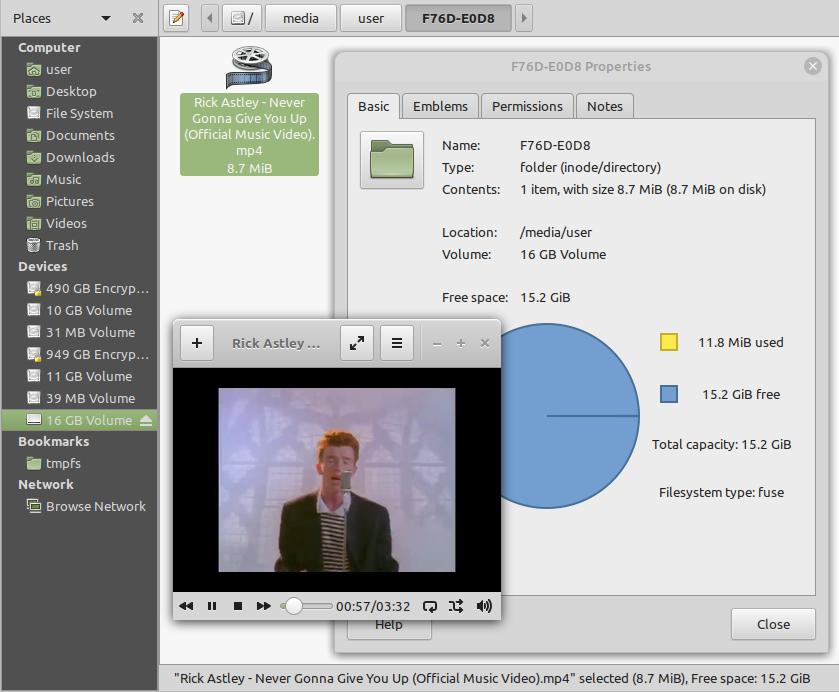
Please look at the following screenshot.
It looks like this 16 GB volume contains only one 8.7 MiB file. Is it really true? Maybe yes, maybe no.
The file system tells us that there is only one file here. But is there really only one file on the volume? We cannot determine this using the file system. In fact, data may be located outside the file system and be undetectable by file system tools. The 15.2 GiB of space marked as free may be occupied by a hidden file system. This "free" space may be taken up by hidden encrypted data.
Can we disprove the existence of this data? Yes, for example, by examining the entropy level of this free space using binwalk. Low entropy indicates a likely absence of hidden data. High entropy does not, by itself, prove the presence of encrypted hidden data. Areas with high entropy can be either just residual data or hidden encrypted data.
If you are interested in hiding data outside the visible file system, then tird is at your service to provide an Invisibility Cloak for your files.
Time-lock encryption (TLE) can be used to prevent an adversary from quickly accessing plaintexts in the event of an IKM compromise (in case of user coercion, for example). In our implementation, it is actually a PoW-based time-lock key derivation. The "Time cost" input option specifies the number of Argon2 passes. If you specify a sufficiently high number of passes, it will take a significant amount of time to perform them. However, an attacker will require the same amount of time when using similar hardware. The execution of Argon2 cannot be accelerated through parallelization, so it is expected that the time spent by an attacker will be approximately the same as that spent by the defender.
This TLE implementation works offline, unlike tlock.
Set the desired TIME COST value:
K3. TIME COST (DEFAULT=4): 1000000
I: time cost: 1,000,000
W: decryption will require the same "TIME COST" value!
Plausible TLE: The adversary does not know the actual value of the time cost, so you can plausibly misrepresent the number of passes. The adversary cannot refute your claim until they attempt to decrypt the cryptoblob using the specified time cost value.
tird requires no command-line options for normal use.
$ tird --help
tird v0.30.0
A tool for encrypting files and hiding encrypted data.
Homepage: https://github.com/hakavlad/tird
Usage:
tird [--unsafe-debug] [--unsafe-decrypt]
Start without options for normal usage.
Options:
--help print this help message and exit
--unsafe-debug enable unsafe debug mode
--unsafe-decrypt release plaintext even if MAC verification
failed (dangerous)
Examples:
$ tird
$ tird --unsafe-debug
[!WARNING] Debug mode is not intended for use in production!
Start tird with the --unsafe-debug option to look under the hood while the program is running.
Enabling debug mode additionally shows:
[!WARNING] In this mode the returned plaintext may have been modified or substituted by an attacker!
In unsafe decrypt mode tird will release plaintext even if authentication fails. Use only if you prioritize availability over integrity, when you cannot successfully decrypt a cryptoblob in normal mode.
tird does not support:
tird does not provide:
tird cannot handle (encrypt/embed) more than one file in one pass. Encryption of directories and multiple files is not supported.tird does not sanitize filesystem metadata (atime, mtime, ctime).tird's encryption speed is not very high (up to 730 MiB/s in my tests on modern hardware).Crypto can help, but it won’t save you from misuse, vulnerabilities, social engineering, or physical threats.
tird has not been independently security audited by humans.tird is ineffective in a compromised environment; executing it in such cases may cause disastrous data leaks.tird is unlikely to be effective when used with short and predictable keys.tird does not erase its sensitive data from memory after use; keys may persist in memory after program exit.tird does not sort digests of keyfiles and passphrases in constant-time.tird protects data, not the user; it cannot prevent torture if you are under suspicion.HKDF and a fast ChaCha20 implementation)Argon2 and BLAKE2)Improve the documentation.
Please feel free to ask questions, leave feedback, or provide critiques in the Discussions section.