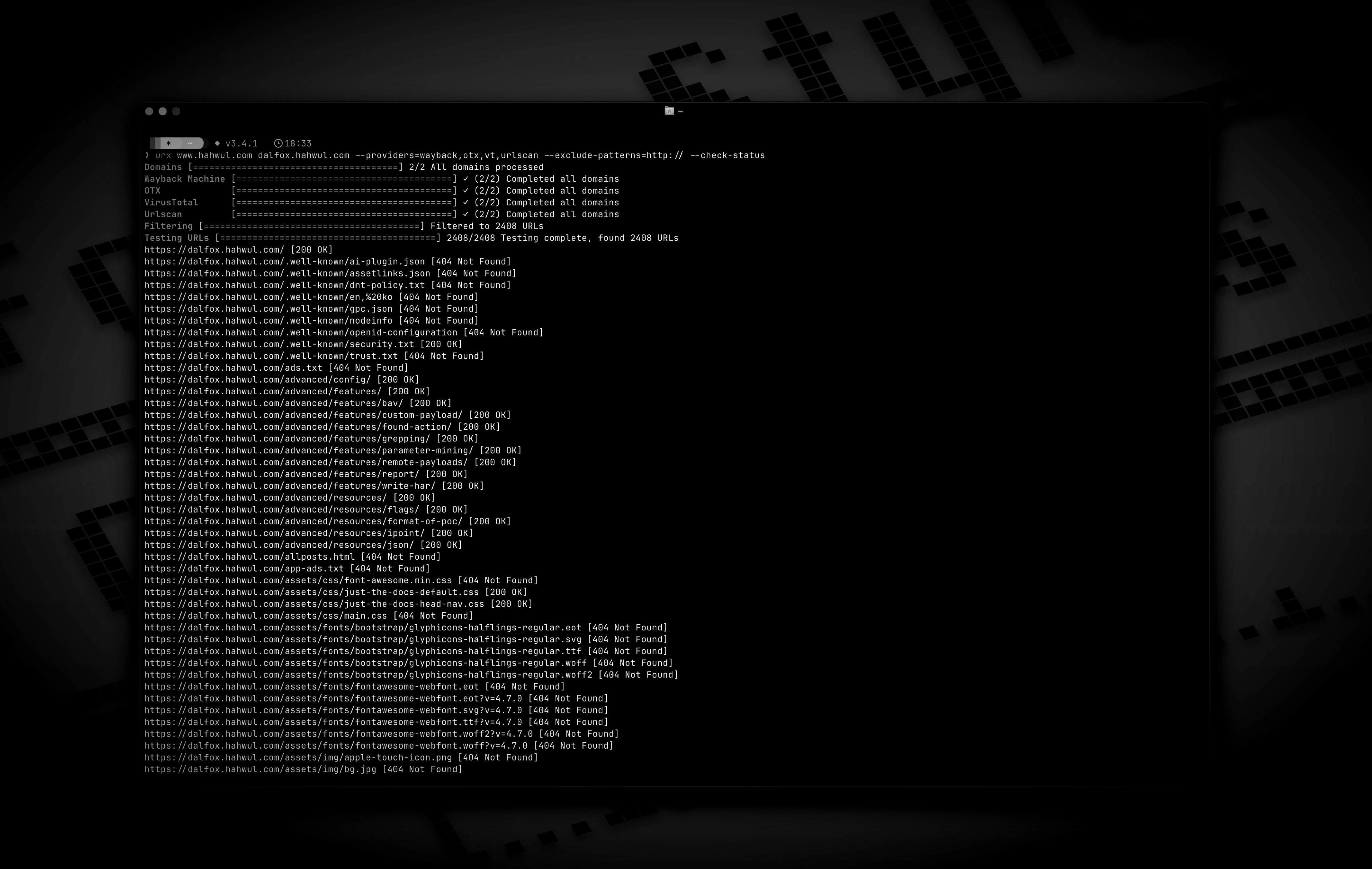
 hahwul/urx
Extracts URLs from OSINT Archives for Security Insights


Extracts URLs from OSINT Archives for Security Insights.




Urx is a command-line tool designed for collecting URLs from OSINT archives, such as the Wayback Machine and Common Crawl. Built with Rust for efficiency, it leverages asynchronous processing to rapidly query multiple data sources. This tool simplifies the process of gathering URL information for a specified domain, providing a comprehensive dataset that can be used for various purposes, including security testing and analysis.
--cdx-endpoint URL, no code change needed-H, --cookie and --user-agent apply to every request urx makes to the target (--check-status, --extract-links, --extract-js-endpoints, --expand-specs) and are deliberately never sent to an archive--match-regex / --filter-regex)--meta-*): filter on first/last capture date, recorded MIME type and recorded status uniformly across every provider, after collectionurx example.com/shop pushes the scope into the CDX query itself (url=example.com/shop*), so a subtree of a large site costs a fraction of the whole index instead of being filtered out client-side--scope-file): a program's own *.example.com / !admin.example.com list used verbatim, repeatable and unioned, exclusions always winning--dedup-similar)wordlist — the path segments and parameter names the target is built from, with ids, hashes and dates left out--params (the whole target's parameter inventory), --params-by-endpoint (which endpoint takes what), and --fuzz-placeholder FUZZ (one templated URL per parameter signature, ready for ffuf or dalfox)first_seen, last_seen, mime, archive_status, and digest come back with every URL a CDX archive reported, at no extra network cost--stream): URLs are written as each provider reports them, so a pipeline starts working immediately instead of waiting for the slowest archive--archive-body), so pages that no longer exist still give up the links they contained — one request per distinct body, thanks to CDX digest deduplication--extract-js-endpoints, mine the archived JavaScript too: a bundle named by build hash 404s the moment the site redeploys, and the archive is the only place its API surface still exists--archive-body-dir) as a corpus to grep for what no link extractor looks for — developer comments, inlined credentials, internal hostnames — at no extra requests--expand-specs): OpenAPI 3.x, Swagger 2.0 and GraphQL introspection documents, JSON or YAML, turned into every route they describe — one request buys the whole documented surface--check-status also records Location, Content-Length and Content-Type, and --check-title adds the HTML --archived-discovery): every distinct version the Wayback Machine holds, so a Disallow: from 2015 still names the paths the site has since stopped mentioningurx cache subcommand to inspect and maintain the cache: stats, list, prune, drop <domain>, clear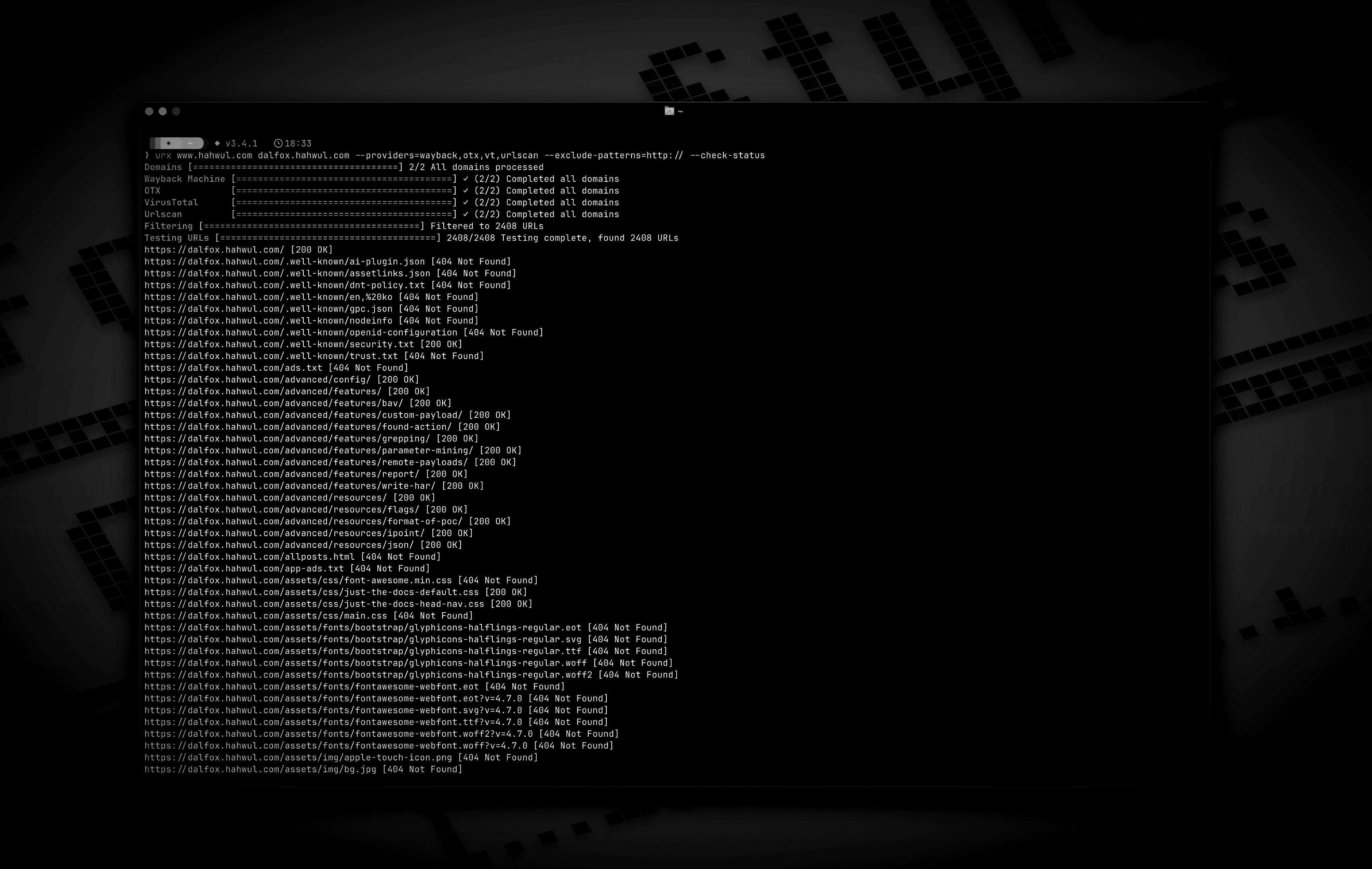
# https://crates.io/crates/urx
cargo install urx
# https://formulae.brew.sh/formula/urx
brew install urx
git clone https://github.com/hahwul/urx.git
cd urx
cargo build --release
The compiled binary will be available at target/release/urx.
urx generates its own completion script, so it always matches the flags of
the binary you actually have installed.
# zsh — any directory on your $fpath works
urx --completions zsh > ~/.zfunc/_urx
# (make sure ~/.zfunc is on the fpath, then `compinit`)

# bash
urx --completions bash > ~/.local/share/bash-completion/completions/urx

# fish
urx --completions fish > ~/.config/fish/completions/urx.fish
powershell and elvish are supported too. The flag needs no target domain.
urx --manpage > ~/.local/share/man/man1/urx.1
man urx
# Scan a single domain
urx example.com

# Scan multiple domains
urx example.com example.org

# Scan domains from a file
cat domains.txt | urx
Usage: urx [OPTIONS] [DOMAINS]... [COMMAND]

Commands:
  cache  Inspect and maintain the URL cache: stats, list, prune, drop <DOMAIN>..., clear

Arguments:
  [DOMAINS]...  Domains to fetch URLs for

Options:
  -c, --config <CONFIG>           Config file to load
      --provider-config <PATH>    Separate provider config file holding only API keys (default: $XDG_CONFIG_HOME/urx/provider-config.toml). CLI/env > provider-config > main config.
      --completions <SHELL>       Print a shell completion script (bash, zsh, fish, powershell, elvish) to stdout and exit
      --manpage                   Print the roff man page to stdout and exit
  -h, --help             Print help
  -V, --version          Print version

Input Options:
      --files <FILES>...        Read URLs directly from files (supports WARC, URLTeam compressed, and text files)
      --domain-list <PATH>      File of newline-separated domains to scan (repeatable; merged with positional DOMAINS and stdin; `#` comments allowed)

Output Options:
  -o, --output <OUTPUT>          Output file to write results
      --output-dir <PATH>        Write one file per domain into this directory (extension matches --format). Coexists with --output / stdout.
  -f, --format <FORMAT>          Output format: "plain", "json" (one array), "jsonl" (one JSON object per line), "csv", "wordlist" (path segments and parameter names, deduplicated and sorted) [default: plain]
      --stream           Write URLs as each provider reports them instead of once at the end (unsorted; bypasses cache; rejects options needing the full result set)
      --merge-endpoint   Merge endpoints with the same path and merge URL parameters
      --normalize-url    Normalize URLs for better deduplication (sorts query parameters, removes trailing slashes)
      --dedup-similar    Collapse URLs that differ only in variable data (numeric ids, UUIDs, hashes, dates, query values)
      --params           Replace the URL list with every query parameter name the run saw, once each
      --params-by-endpoint
                         One line per endpoint: the endpoint and the comma-separated union of the parameter names seen on it (id-looking path segments collapse to `{id}`)
      --fuzz-placeholder <VALUE>
                         Replace every query parameter value with VALUE, keeping one URL per parameter signature — output you can feed straight to ffuf or dalfox

Provider Options:
      --providers <PROVIDERS>
          Providers to use (comma-separated, e.g., "wayback,cc,otx,arquivo,vt,urlscan") [default: wayback,cc,otx]
      --exclude-providers <EXCLUDE_PROVIDERS>
          Providers to exclude (comma-separated). Wins on conflict with --providers / --all-providers.
      --all-providers
          Enable every supported provider. API-keyed providers only activate when a key is available.
      --list-providers
          List every supported provider then exit.
      --subs
          Include subdomains when searching
      --cc-index <CC_INDEX>
          Common Crawl index to use; accepts comma-separated list to query multiple indexes in parallel (e.g. `CC-MAIN-2026-17,CC-MAIN-2025-51`). `latest` (the default) resolves the newest via collinfo.json. [default: latest]
      --cdx-endpoint <URL>
          Query an additional CDX index server (any pywb, OutbackCDX, or classic Internet-Archive-style CDX API) by its full API URL, e.g. https://vefsafn.is/cdx. Repeatable. Each endpoint becomes a provider with id `cdx:<host>` and honours --subs, --from/--to and the --archive-* filters. See "Custom CDX Endpoints" below
      --cdx-dialect <DIALECT>
          Which CDX dialect the --cdx-endpoint servers speak: `pywb` or `classic`. Unset: urx probes each endpoint once and falls back to pywb when the answer is ambiguous
      --from <DATE>
          Restrict every CDX-backed provider (wayback, cc, arquivo, --cdx-endpoint) to captures at or after DATE (YYYY/YYYYMM/YYYYMMDD/YYYYMMDDhhmmss). Alias: --wayback-from
      --to <DATE>
          Restrict every CDX-backed provider to captures at or before DATE (same format as --from). Alias: --wayback-to
      --archive-status <CODE>
          Keep only captures the archive recorded with this HTTP status code (e.g. "200"). Applied by the CDX index itself, so unlike --include-status it costs no extra requests. A multi-value list works on wayback only — see "Archive-side Filtering" below
      --archive-exclude-status <CODES>
          Drop captures the archive recorded with these HTTP status codes (comma-separated, e.g. "404,500"). Multi-value works on every CDX provider
      --archive-mime <TYPE>
          Keep only captures with this recorded MIME type (e.g. "application/json"). Catches endpoints with no file extension, which -e/--extensions cannot
      --archive-exclude-mime <TYPES>
          Drop captures with these recorded MIME types (comma-separated, e.g. "text/html,image/png")
      --vt-api-key <VT_API_KEY>
          API key for VirusTotal (can be used multiple times for rotation, can also use URX_VT_API_KEY environment variable with comma-separated keys)
      --urlscan-api-key <URLSCAN_API_KEY>
          Optional API key for Urlscan; the provider also works anonymously (rate-limited ~30 req/min per IP). Can be used multiple times for rotation, or via URX_URLSCAN_API_KEY (comma-separated keys)
      --github-api-key <GITHUB_API_KEY>
          Personal access token for the GitHub Code Search provider (also reads URX_GITHUB_API_KEY, comma-separated for rotation)
      --bevigil-api-key <BEVIGIL_API_KEY>
          API key for BeVigil, which returns URLs extracted from unpacked Android apps (also reads URX_BEVIGIL_API_KEY, comma-separated for rotation). Required for the `bevigil` provider

Discovery Options:
      --exclude-robots
          Exclude robots.txt discovery
      --exclude-sitemap
          Exclude sitemap.xml discovery
      --archived-discovery
          Also read every distinct archived version of robots.txt and sitemap.xml the Wayback Machine holds
      --archived-discovery-limit <N>
          Maximum archived documents fetched per domain by each archived provider (nested sitemaps count) [default: 50]

Display Options:
  -v, --verbose       Show verbose output
      --silent        Silent mode (no output)
      --no-progress   No progress bar
      --no-color      Disable ANSI color in the progress UI and output (NO_COLOR is also honored)
      --show-sources  Annotate output URLs with the providers that returned them
      --show-meta     Annotate plain-text URLs with the archive capture metadata
      --stats         Print a per-provider summary to stderr at end of run

Filter Options:
  -p, --preset <PRESET>
          Filter Presets (e.g., "no-resources,no-images,no-audio,only-js,only-style,only-secrets,only-backup,only-config,only-api")
  -e, --extensions <EXTENSIONS>
          Filter URLs to only include those with specific extensions (comma-separated, e.g., "js,php,aspx")
      --exclude-extensions <EXCLUDE_EXTENSIONS>
          Filter URLs to exclude those with specific extensions (comma-separated, e.g., "html,txt")
      --patterns <PATTERNS>
          Filter URLs to only include those containing specific patterns (comma-separated)
      --exclude-patterns <EXCLUDE_PATTERNS>
          Filter URLs to exclude those containing specific patterns (comma-separated)
      --match-regex <RE>
          Keep only URLs matching this regular expression (repeatable, ORed; case-sensitive; never comma-split)
      --filter-regex <RE>
          Drop URLs matching this regular expression (repeatable; one match is enough)
      --show-only-host
          Only show the host part of the URLs
      --show-only-path
          Only show the path part of the URLs
      --show-only-param
          Only show the parameters part of the URLs
      --min-length <MIN_LENGTH>
          Minimum URL length to include
      --max-length <MAX_LENGTH>
          Maximum URL length to include
      --strict
          Enforce exact host validation (default)
      --no-strict
          Disable host validation (keep URLs on any host a provider returns). Wins over --strict. A target's path scope still applies: only the *host* check is waived
      --scope-file <FILE>
          Bug-bounty scope file: one host pattern per line, `!` to exclude, `*.example.com` for a wildcard (which covers the apex too), `#` for a comment. Repeatable and unioned; exclusions always win. See "Scope Files" below
      --meta-first-seen-after <DATE>
          Keep URLs whose oldest archived capture is on or after DATE (YYYY/YYYYMM/YYYYMMDD/YYYYMMDDhhmmss)
      --meta-first-seen-before <DATE>
          Keep URLs whose oldest archived capture is on or before DATE
      --meta-last-seen-after <DATE>
          Keep URLs whose newest archived capture is on or after DATE — "still alive as of"
      --meta-last-seen-before <DATE>
          Keep URLs whose newest archived capture is on or before DATE — "dead since"
      --meta-mime <TYPE>
          Keep only URLs whose archived MIME type is one of these (comma-separated; `image/*` matches any subtype)
      --meta-exclude-mime <TYPE>
          Drop URLs whose archived MIME type is one of these
      --meta-status <CODE>
          Keep only URLs whose archived status code matches (comma-separated; `20x` / `5xx` patterns)
      --meta-exclude-status <CODE>
          Drop URLs whose archived status code matches

Network Options:
      --network-scope <NETWORK_SCOPE>  Control which components network settings apply to (all, providers, testers, or providers,testers) [default: all]
      --proxy <PROXY>                  Use proxy for HTTP requests (format: <http://proxy.example.com:8080>)
      --proxy-auth <PROXY_AUTH>        Proxy authentication credentials (format: username:password)
      --insecure                       Skip SSL certificate verification (accept self-signed certs)
      --random-agent                   Use a random User-Agent for HTTP requests
  -H, --header <NAME: VALUE>           Extra request header, repeatable; sent only on requests urx makes to the target, never to an archive
      --cookie <COOKIES>               Cookie header for requests to the target; shorthand for -H "Cookie: ..."
      --user-agent <STRING>            User-Agent for requests to the target, overriding the default and --random-agent
      --timeout <TIMEOUT>              Request timeout in seconds [default: 120]
      --retries <RETRIES>              Number of retries for failed requests [default: 2]
      --parallel <PARALLEL>            Maximum domains fetched concurrently per provider (and concurrent URL tests); a provider's --rate-limit is shared across them [default: 5]
      --rate-limit <RATE_LIMIT>        Rate limit (requests per second)
      --rate-limit-by <PAIRS>          Per-provider rate overrides (e.g. `vt=1,wayback=10`); falls back to --rate-limit for unlisted providers
      --max-time <MAX_TIME>            Global ceiling on provider enumeration time in seconds (0 = unlimited) [default: 0]

Testing Options:
      --check-status
          Check HTTP status code of collected URLs [aliases: ----cs]
      --check-title
          Also record each response's HTML <title> while checking statuses; implies --check-status
      --include-status <INCLUDE_STATUS>
          Include URLs with specific HTTP status codes or patterns (e.g., --is=200,30x) [aliases: ----is]
      --exclude-status <EXCLUDE_STATUS>
          Exclude URLs with specific HTTP status codes or patterns (e.g., --es=404,50x,5xx) [aliases: ----es]
      --extract-links
          Extract additional links from collected URLs (requires HTTP requests)
      --extract-js-endpoints
          Fetch collected JavaScript files and extract the endpoint paths and URLs found in their string literals (requires HTTP requests); with --archive-body this also mines the *archived* copy of each script
      --max-js-files <N>
          Maximum number of files --extract-js-endpoints will fetch (0 = unlimited) [default: 500]
      --archive-body
          Fetch the archived body of each collected URL from the Wayback Machine and extract the links inside it (works for pages that no longer exist)
      --archive-body-limit <N>
          Maximum number of archived bodies --archive-body fetches per run; bounds distinct bodies, not URLs [default: 500]
      --archive-body-dir <DIR>
          Keep every body --archive-body replays in DIR, with an index.jsonl mapping each file back to its URL, capture and content type
      --expand-specs
          Fetch the API specification documents among the collected URLs (OpenAPI, Swagger, GraphQL introspection; JSON or YAML) and expand every route they document into a URL. See "Expanding API Specifications" below
      --max-spec-files <N>
          Maximum number of specification documents --expand-specs will fetch (0 = unlimited) [default: 50]

Cache Options:
      --incremental              Enable incremental scanning mode (only return new URLs compared to previous scans)
      --cache-type <TYPE>        Cache backend: sqlite or redis [default: sqlite]
      --cache-path <PATH>        Path for the SQLite cache database
      --redis-url <URL>          Redis connection URL for remote caching
      --cache-ttl <SECONDS>      Cache time-to-live in seconds [default: 86400]
      --no-cache                 Disable caching entirely

Notification Options:
      --notify <URL>                   POST a run summary to this webhook when the run ends (repeatable; also URX_NOTIFY_URL, provider-config `notify_url`, or `[notify].url`)
      --notify-on <NOTIFY_ON>          When to send: new (only if URLs were emitted), always, or never [default: new]
      --notify-format <NOTIFY_FORMAT>  Payload shape: json (urx summary), slack ({"text"}), or discord ({"content"}) [default: json]
--extract-links reads every URL-bearing tag, not just anchors: <a href>,
<script src>, <link href>, <form action>, , ,
<source src>, <object data>, <embed src>, and <meta http-equiv="refresh">
targets. Relative URLs resolve against the page (honouring <base href>),
duplicates are collapsed, and discovered links pass through the same filters
and host validation as the rest of the run. See
docs/content/guide/cli-options.md for the
full table.
--extract-js-endpoints goes one step further and reads the JavaScript
itself: every collected URL that looks like a script is fetched and its
string literals are mined for the paths and URLs the app calls —
fetch("/api/v2/users"), axios.post("/graphql"), the static prefix of
`/api/orders/${id}`. These are the endpoints that never appear in HTML.
Output is aggressively de-noised (MIME types, module specifiers, base64,
CSS values, regex fragments and more are dropped), each body is capped at
10 MiB, the number of files fetched is bounded by --max-js-files, and the
discovered endpoints pass the same filters and host validation as everything
else. The full extraction and noise-suppression policy is in
docs/content/guide/cli-options.md.
--archive-body does the same extraction over the bodies the Wayback Machine
stored rather than over the live site, so a page that was deleted years ago
still yields the links it contained. See
Mining Archived Response Bodies.
# Save results to a file
urx example.com -o results.txt

# Output in JSON format
urx example.com -f json -o results.json

# Filter for JavaScript files only
urx example.com -e js

# Exclude HTML and text files
urx example.com --exclude-extensions html,txt

# Filter for API endpoints
urx example.com --patterns api,v1,graphql

# Exclude specific patterns
urx example.com --exclude-patterns static,images

# Use Fileter Preset (similar to --exclude-extensions=png,jpg,.....)
urx example.com -p no-images

# Use specific providers
urx example.com --providers wayback,otx

# Add the keyless Arquivo.pt (Portuguese web archive) provider
urx example.com --providers wayback,cc,otx,arquivo

# Query another CDX index server alongside the defaults (id: cdx:vefsafn.is)
urx example.is --cdx-endpoint https://vefsafn.is/cdx

# ...or on its own, rate-limited, with the archive-side filters it shares with wayback/cc
urx example.is --cdx-endpoint https://vefsafn.is/cdx --providers cdx:vefsafn.is \
  --rate-limit-by cdx:vefsafn.is=1 --from 2020 --archive-status 200

# URLScan works without a key (anonymous, rate-limited); a key just raises limits
urx example.com --providers urlscan

# BeVigil: endpoints pulled out of unpacked Android apps (key required; auto-enables the provider)
URX_BEVIGIL_API_KEY=*** urx example.com

# Using VirusTotal and URLScan providers
# 1. Explicitly add to providers (with API keys via command line)
urx example.com --providers=vt,urlscan --vt-api-key=*** --urlscan-api-key=***

# 2. Using environment variables for API keys
URX_VT_API_KEY=*** URX_URLSCAN_API_KEY=*** urx example.com --providers=vt,urlscan

# 3. Auto-enabling: providers are automatically added when API keys are provided
urx example.com --vt-api-key=*** --urlscan-api-key=*** # No need to specify in --providers

# 4. Multiple API key rotation (to mitigate rate limits)
# Using repeated flags for multiple keys
urx example.com --vt-api-key=key1 --vt-api-key=key2 --vt-api-key=key3

# Using environment variables with comma-separated keys
URX_VT_API_KEY=key1,key2,key3 URX_URLSCAN_API_KEY=ukey1,ukey2 urx example.com

# Combining CLI flags and environment variables (CLI keys are used first)
URX_VT_API_KEY=env_key1,env_key2 urx example.com --vt-api-key=cli_key1 --vt-api-key=cli_key2

# URLs from robots.txt and sitemap.xml are included by default

# Exclude URLs from robots.txt files
urx example.com --exclude-robots

# Exclude URLs from sitemap
urx example.com --exclude-sitemap

# Also read every archived version of robots.txt and sitemap.xml, so paths the
# site once listed and has since removed come back
urx example.com --archived-discovery

# Only the versions captured in a given era
urx example.com --archived-discovery --from 2014 --to 2016 --exclude-sitemap

# Include subdomains
urx example.com --subs

# Check status of collected URLs
urx example.com --check-status

# Read URLs directly from a text file
urx --files urls.txt

# Combine file input with filtering
urx --files urls.txt --patterns api,admin -f json

# Extract additional links from collected URLs
# (anchors, scripts, stylesheets, form actions, iframes, images, media
#  sources, objects, embeds, and meta-refresh targets)
urx example.com --extract-links

# Discovered links go through the same filters as everything else, so this
# keeps only the JavaScript the pages reference
urx example.com --extract-links -e js

# Read the collected JavaScript and pull out the API paths it calls
urx example.com --extract-js-endpoints --patterns api

# Chain them: collect the site's bundles, then mine those for endpoints
urx example.com --extract-links --extract-js-endpoints --max-js-files 100

# Mine the links inside the *archived* bodies instead — dead pages included.
# One request per distinct body; the limit bounds bodies, not URLs
urx example.com --archive-body --archive-body-limit 200 --rate-limit 5

# Network configuration
urx example.com --proxy http://localhost:8080 --timeout 60 --parallel 10 --insecure

# Advanced filtering
urx example.com -e js,php --patterns admin,login --exclude-patterns logout,static --min-length 20

# HTTP Status code based filtering (live requests: urx re-fetches each URL)
urx example.com --include-status 200,30x,405 --exclude-status 20x

# Archive-side filtering (free: the CDX index already knows these)
# Skip everything the archive recorded as a 404 — no extra requests
urx example.com --archive-exclude-status 404

# Only captures the archive served as JSON — finds extensionless API endpoints
urx example.com --archive-mime application/json

# Drop HTML to leave assets and endpoints behind
urx example.com --archive-exclude-mime text/html

# Restrict the crawl window across wayback, cc, arquivo, and any --cdx-endpoint alike
urx example.com --from 2023 --to 2024

# Disable host validation
urx example.com --strict false

# URL normalization and deduplication
# Normalize URLs by sorting query parameters and removing trailing slashes
urx example.com --normalize-url

# Combine normalization with endpoint merging for comprehensive deduplication
urx example.com --normalize-url --merge-endpoint

# URL normalization with file input
urx --files urls.txt --normalize-url

# Collapse /post/1, /post/2, /post/99999 ... into a single representative line
urx example.com --dedup-similar

# Regular-expression filtering (repeat either flag; they are never comma-split)
urx example.com --match-regex '/api/v[0-9]+/'
urx example.com --match-regex '\.php$' --match-regex '\.aspx$'
urx example.com --filter-regex '/(assets|static)/'

# Regexes are case-sensitive; ask for insensitivity explicitly
urx example.com --match-regex '(?i)admin'

# Security presets: match by path shape as well as by extension
urx example.com -p only-secrets   # /.env, /.git/config, id_rsa, *.pem
urx example.com -p only-backup    # *.bak, *.sql, /backup/, index.php~
urx example.com -p only-config    # *.yaml, web.config, .htaccess, Dockerfile
urx example.com -p only-api       # /api/, /v1/, /graphql, /swagger, *.wsdl

# Scope files: a bug bounty program's own host list, used verbatim
urx example.com --subs --scope-file scope.txt

# Metadata filters, applied after collection so every provider is covered
urx example.com --providers wayback --meta-last-seen-after 2024 --meta-exclude-mime 'image/*'
urx example.com --providers wayback --meta-mime application/json --meta-status 200

# What parameters does this target take, and where?
urx example.com --params
urx example.com --params-by-endpoint

# One templated URL per parameter signature, straight into a fuzzer
urx example.com --fuzz-placeholder FUZZ | ffuf -w - -u FUZZ

# A target-specific wordlist instead of a URL list
urx example.com --subs -f wordlist -o words.txt

# Open the API specifications the sweep found and expand every route in them
urx example.com -p only-api --expand-specs

# Status checks also keep the response head; --check-title adds the <title>
urx example.com --check-status -f jsonl
urx example.com --check-title --show-meta

# Inspect and maintain the cache
urx cache stats
urx cache drop example.com
A target may name a path, and it means what it says: urx example.com/shop
collects the part of the site under /shop.
urx example.com/shop
urx https://example.com/api/v2      # a pasted URL works too
This is not a filter applied after the fact. A CDX index answers prefix queries
natively, so urx sends url=example.com/shop* and the archive never ships the
rest of the site across the network — on a large target that is the difference
between a few hundred rows and a few hundred thousand. Providers that cannot
express a path in their query (OTX, VirusTotal, urlscan, GitHub, BeVigil,
ZoomEye) are asked about the host and their answers are narrowed afterwards, as
are the results of a --subs run, where the *.host form and a path prefix
cannot be combined in one CDX query.
Scope means at or under the path: /shop and /shop/cart are in, /shopping
is not. Case is ignored, because a CDX server lower-cases the whole URL when it
builds its index key — example.com/Shop* and example.com/shop* return the
same rows, all spelled in lower case, so a case-sensitive check would throw
away everything the archive just returned. A query string or fragment in the
target is dropped — those narrow a request, not a scope.
Note: urx used to discard the path from a target, so
urx https://example.com/shopscanned the whole ofexample.com. It now scans/shop. Pass just the host for the old behaviour; a run whose target carries a path says so on stderr.
--patterns / --exclude-patterns are plain substring tests: both sides are
lower-cased, and every metacharacter is a literal. --match-regex /
--filter-regex are the regex counterparts, and they differ in three ways worth
remembering:
Both regex flags are evaluated against the whole URL string as collected
(scheme, host, path, and query), so ^https:// and \.js$ both work.
Exclusion wins: a URL matching --filter-regex is dropped even if
--match-regex also matched it. A malformed expression fails the run at
startup, before any archive is queried.
A bug bounty program's scope is a list of hosts, and every platform writes it
the same way. --scope-file takes that list verbatim instead of making you
hand-translate it into anchored regex alternations — where getting the
anchoring wrong silently widens the scope rather than failing.
# scope.txt — in scope
*.example.com
api.example.org

# out of scope, even though the wildcard above covers them
!admin.example.com
!*.internal.example.com
urx example.com --subs --scope-file scope.txt
urx --domain-list targets.txt --subs --scope-file scope-a.txt --scope-file scope-b.txt
*.example.com matches the apex as well as everything under it (the
bug-bounty reading, which is what a platform's scope table means); a bare host
matches exactly that host; a lone * makes the file a pure deny-list;
exclusions always win; # starts a comment. Anything urx cannot honour — a
port, a path, a wildcard in the middle — is a startup error naming the file and
line rather than a silently wider scope. The filter applies to every provider
and to extracted links, and it combines with --strict rather than replacing
it, so a *.example.com scope line still needs --subs.
--from/--to and the --archive-* predicates are pushed into the archive's
own query, which makes them free and also limits them to CDX-backed providers —
and the two CDX dialects disagree badly enough that a positive multi-value list
(--archive-status 200,301) is unsatisfiable on pywb servers. The eight
--meta-* filters run after collection instead, over one merged set of
capture metadata per URL, so they apply to every provider uniformly.
# Endpoints still being captured recently, with HTML and images out of the way
urx example.com --providers wayback --meta-last-seen-after 2024 --meta-exclude-mime 'text/html,image/*'

# Pages that died: nothing captured since 2019
urx example.com --providers wayback --meta-last-seen-before 2019

# JSON the archive served successfully
urx example.com --providers wayback --meta-mime application/json --meta-status 200

# First archived during 2020 (partial dates pad to the start / end of the period)
urx example.com --providers wayback --meta-first-seen-after 2020 --meta-first-seen-before 2020
URLs that carry no metadata — the non-CDX providers, --files input, cache hits
— are split by the direction of the predicate: a positive predicate cannot be
satisfied by an absent value, so the URL is dropped; an exclusion drops only
what positively matches, so it survives. --verbose reports the split, and when
missing metadata accounts for the whole result set urx says so even without
-v, because a cache hit otherwise makes an empty run look like a target with
nothing to find.
An archive will happily hand back /post/1 through /post/99999. They are one
endpoint, and --dedup-similar prints one line for them. A path segment is
treated as data — not as part of the route — when it is entirely one of:
/post/1, /page/42)/u/550e8400-e29b-41d4-a716-446655440000)/blog/2024-01-02/)Segments that merely contain digits stay put, so /api/v1/ and /api/v2/ are
still two endpoints, and a lower-case slug is prose rather than a token. Query
strings are grouped by parameter names only: ?q=cats&page=1 and
?q=dogs&page=7 collapse, while ?q=cats alone does not — dropping a
parameter changes the request.
The survivor of each group is its lexicographically smallest URL, so two runs
over the same data print the same thing. --verbose reports how many URLs were
collapsed. The option is independent of --normalize-url and
--merge-endpoint and combines with either; all three need the complete result
set, so none of them works with --stream.
--show-only-param only cuts the query string off each URL, which cannot answer
the first question a tester asks: what parameters does this target take? Three
views answer it, built on the same grouping --dedup-similar uses.
$ urx example.com --params
page
q
ref
sort
utm_source

$ urx example.com --params-by-endpoint
https://example.com/post/{id} ref,utm_source
https://example.com/search page,q,sort

$ urx example.com --fuzz-placeholder FUZZ
https://example.com/post/1?ref=FUZZ
https://example.com/post/2?utm_source=FUZZ
https://example.com/search?q=FUZZ&page=FUZZ
https://example.com/search?q=FUZZ&sort=FUZZ
--params-by-endpoint collapses id-looking path segments to {id} exactly as
--dedup-similar does, and spells the endpoint out in full because urx
routinely scans several hosts in one run. --fuzz-placeholder keeps one URL per
parameter signature and keeps its real path — a {id} would not route — so the
output feeds straight into a fuzzer:
urx example.com --fuzz-placeholder FUZZ | ffuf -w - -u FUZZ
urx example.com --fuzz-placeholder FUZZ | dalfox pipe
All three need the complete result set, so they are batch-only and mutually
exclusive with each other and with the --show-only-* views.
-f wordlist turns a run into a target-specific wordlist: every path segment
and query parameter name it saw, deduplicated across the whole run and sorted,
one term per line.
urx example.com --subs -f wordlist -o words.txt
ffuf -w words.txt -u https://example.com/FUZZ
Segments that look like data rather than route names are left out, reusing the
test --dedup-similar groups on — a wordlist full of 4711, UUIDs, dates and
session tokens is worse than no wordlist, since every one of those words exists
on exactly one target. A segment whose stem is an identifier goes too
(article-1234.html). Case is preserved: path segments are case-sensitive on
most origins, so lower-casing WebResource.axd would produce a word that 404s
everywhere it is tried. The union has to be taken over the full set, so the
format is batch-only.
By default urx collects everything, then filters, sorts, and prints once. On a
large target that means no output at all until the slowest archive finishes.
--stream writes each URL the moment the provider reporting it comes back:
# Matches start appearing immediately instead of after the slowest provider
urx big-target.com --stream | grep admin

# Line-delimited JSON stays valid while it is still being written
urx big-target.com --stream -f jsonl | jq -r 'select(.url | test("/api/")) | .url'
Streamed URLs pass exactly the same filters as a batch run and are still deduplicated. Two things differ:
sort if you need ordering.--merge-endpoint, --dedup-similar,
--check-status /
--include-status / --exclude-status, --extract-links,
--extract-js-endpoints, --archive-body, --expand-specs,
--incremental, --show-sources, --show-meta, the --meta-* filters,
, , , , and
. Caching is bypassed;
is refused in favour of because a JSON array has to
know which entry is last, and because no term can be known
to be new until every URL has arrived.Because the batch result map is never populated in this mode, a streamed run also holds far less in memory — only the dedup set of URLs already written.
A CDX index records more than the URL: every capture carries a timestamp, the
MIME type and HTTP status the archive saw, and a digest of the body. urx keeps
all of it, so the CDX-backed providers — wayback, cc, arquivo, and any
--cdx-endpoint — report each URL together with:
archive_status is not status: status only appears under --check-status,
which re-requests the URL live now, whereas archive_status is what the crawler
got when it captured the page. A URL can perfectly well be archive_status
200 and dead today.
Where the same URL comes from several captures or several archives, the values
are merged: first_seen is the oldest timestamp anyone reported, last_seen
the newest, and mime/archive_status come from the most recent capture that
had them. Providers with no capture index (otx, vt, urlscan, zoomeye,
github, bevigil, robots, sitemap, and --files input) report the URL
alone — no values are invented for them.
How the metadata surfaces depends on the format:
json / jsonl — each field appears as a key when it has a value and is
omitted entirely when it does not, exactly like sources.csv — a column is added only when at least one row has a value for it,
so a run with no metadata still produces a single url column.--show-meta to append the fields.# Rich records: when the URL was alive, and what it served
urx example.com --providers wayback -f jsonl
# {"url":"https://example.com/old.php","first_seen":"20040112093000",
# "last_seen":"20180722140311","mime":"text/html","archive_status":"200",
# "digest":"HT2DYGA5UKZCPBSFVCV3JOBXGW2G5UUA"}
# Triage by age: everything last captured before 2010
urx example.com -f jsonl | jq -r 'select(.last_seen < "20100101000000") | .url'
# Opt plain output into the metadata
urx example.com --providers wayback --show-meta
Streaming (--stream) reports URLs only. A URL is printed on first sighting,
before the captures that would widen its first_seen/last_seen range have
arrived, so --show-meta is rejected there for the same reason
--show-sources is.
A cache hit also carries no metadata: the cache stores URLs, so a domain served
from cache reports its URLs without capture fields. Use --no-cache (or wait
for the TTL) for a run that repopulates them.
--check-status already sends a request and waits for the response head, so
what that head carries comes for free: Location, Content-Length and
Content-Type are recorded alongside the status code. Redirects are still never
followed, so a reported status always belongs to the URL that was asked for and
location simply says where the 3xx pointed.
--check-title adds the HTML <title>. It is the one field that is not free —
a title needs the response body — so it sits behind its own flag. The read is
bounded twice (at most 64 KiB, and it stops at the closing tag) and skipped
entirely for a body the server declared as non-HTML, so a JSON API or an image
costs nothing. The title is whitespace-collapsed, entity-decoded and cut to 200
characters. --check-title implies --check-status.
urx example.com --check-status -f jsonl
urx example.com --check-title --show-meta
urx example.com --check-status --is 30x -f jsonl | jq -r '.url + " -> " + .location'
Exposure follows the rule the archive metadata already set: json/jsonl/csv
always carry the fields (absent keys are omitted, and the CSV columns are
appended after the existing ones), while plain text stays one bare URL per line
unless --show-meta asks otherwise. In plain output the title is quoted, since
it is the one value that routinely contains spaces.
--check-status, --extract-links, --extract-js-endpoints and
--expand-specs all re-request collected URLs from the target itself. -H
gives those requests whatever headers they need:
urx example.com --check-status -H "Authorization: Bearer $TOKEN"
urx example.com --extract-links --cookie "session=abc; role=admin"
urx example.com --check-status --user-agent "acme-security-scan/1.0"
-H is repeatable, takes Name: value, and a malformed one stops the run
rather than going out unnoticed — an argument that is silently dropped leaves
an anonymous scan reading as an authenticated one. --cookie and
--user-agent are shorthands for the corresponding headers.
These headers never reach an archive. They are sent only by the components
that talk to the target: the four testers above, plus the robots and
sitemap providers, which fetch from the target too. Every other provider
queries web.archive.org, index.commoncrawl.org or a third-party API, and so
does --archive-body when it replays a capture; handing them the target's
session cookie would mail a credential to a service that keeps what it
receives, for no gain. Archive queries keep urx's own User-Agent, which
--random-agent still rotates.
--extract-links fetches every collected URL from the live site, which is
exactly the wrong place to look for the pages an OSINT sweep cares about most:
the ones that no longer exist. --archive-body fetches the bodies the Wayback
Machine stored instead. For every collected URL that carries a capture
timestamp, urx replays that capture in its raw form
(https://web.archive.org/web/<timestamp>id_/<url> — the id_ flag turns off
the Wayback toolbar and link rewriting, so the body is the original bytes) and
runs the same link extraction --extract-links uses over it.
# Links from the archived bodies of everything the CDX providers found
urx example.com --archive-body

# Bound the run and pace it; the archive is one host no matter how many URLs
urx example.com --archive-body --archive-body-limit 200 --rate-limit 5

# Only the JavaScript those pages referenced back then
urx example.com --archive-body -e js
Why this needs far fewer requests than waymore. Every CDX row carries a
content digest, and two captures with the same digest are byte-for-byte the
same body. Archives are full of them: every ?utm_source= variant of a page,
every /index.html next to its /, every tracking-parameter permutation
serves identical bytes, so a list of tens of thousands of URLs routinely
collapses to a few thousand distinct bodies. waymore has no notion of this — it
downloads one response per URL and copes with the volume through a blunt
-l 5000 cap, which both hammers the archive and truncates coverage. urx
claims each digest the first time it is seen and skips every later URL that
would replay the same bytes, so the same coverage costs one request per
distinct body. --archive-body-limit (default 500) bounds distinct bodies,
not URLs; duplicates never count against it, and --verbose reports how many
were skipped.
Mining archived JavaScript. A modern app's API surface lives in its bundles
as string literals, and --extract-js-endpoints fetches those from the live
site — where they are frequently gone. Bundles are named by build hash, so
app.a3f9c2.js 404s the moment the site redeploys, and the endpoints it named
go with it. Run the two flags together and urx mines the archived copy
instead, and an archived page's inline <script> blocks alongside its links:
urx example.com --archive-body --extract-js-endpoints
Keeping the bodies. The requests are already being made, so writing the
bodies to disk costs nothing extra and answers the questions no link extractor
asks: the <!-- staging.internal --> comment, the token a 2019 build inlined,
the stack trace naming a framework version.
urx example.com --archive-body --archive-body-dir ./corpus
grep -ri "api[_-]key" ./corpus
Each file is named after its URL plus a hash of it, and corpus/index.jsonl
maps every file back to its URL, capture timestamp, digest and content type.
Only text-like bodies are stored — HTML, script, JSON, XML, CSS, plain text —
so the directory does not fill up with the site's images and fonts. Because the
fetch is deduplicated by digest, the corpus covers far more of the target per
request than one response per URL would.
Details worth knowing:
wayback,
cc, arquivo) supply one; --files input, non-CDX providers, and cached
results (the cache stores URLs only) have none. urx says so when there is
nothing to replay — pass --no-cache to get fresh captures.--extract-links ignores live error pages.--rate-limit, --rate-limit-by wayback=N, --parallel, --proxy,
--timeout, and --retries all apply to the replay requests.A -p only-api sweep finds /swagger.json, /openapi.yaml and /v3/api-docs
and then never opens them: --extract-links parses HTML, --extract-js-endpoints
drops application/json bodies, and --archive-body runs the HTML parser over
whatever the archive returns. --expand-specs reads them and expands every route
they describe into the result set — one request buys the whole documented
surface, exact and already parameterised.
urx example.com -p only-api --expand-specs
urx example.com --expand-specs --max-spec-files 10 --rate-limit 2

# Recover an API the live host no longer serves: read the archived document
urx example.com --archive-body --expand-specs
What is expanded:
servers[].url (absolute, document-relative, and templated,
with {var} resolved from variables[var].default or the first enum value)
crossed with every paths key; a path item's own servers override the
document's.schemes × host + basePath, each part falling back to
the corresponding part of the document's own URL. ws/wss are dropped.?query=…. A schema saved as a file
resolves to its endpoint (/graphql/schema.json → ).JSON and YAML are both read. Targets are chosen by name first and for free (a
spec-marker substring — swagger, openapi, api-docs, graphql,
introspection — plus a json/yaml/yml extension when there is one, so
swagger-ui.html costs no request), then by the response's Content-Type. Path
templates are emitted as the document writes them (/users/{id}, not
/users/%7Bid%7D). Bodies are capped at 10 MiB, and a YAML document with more
than 32 alias references is refused before parsing to rule out expansion bombs.
--max-spec-files (default 50) bounds the documents fetched. With
--archive-body also on, an archived specification is read as one at no extra
request cost — the body was already being fetched.
The robots and sitemap providers read the live files, which only say what
a site hides or lists today. --archived-discovery also reads every distinct
version of those files the Wayback Machine has stored. A Disallow: from 2015
names paths the site has since stopped mentioning — often because they were
meant to be forgotten, not because they are gone — and an old sitemap lists
everything the site once wanted crawled.
# Every archived version of robots.txt and sitemap.xml, alongside the live ones
urx example.com --archived-discovery

# Bound it and pace it; both archived providers answer to --rate-limit-by
urx example.com --archived-discovery --archived-discovery-limit 20 --rate-limit-by robots=2,sitemap=2

# Only the versions captured in a given era
urx example.com --archived-discovery --from 2014 --to 2016
How it works, and why it is cheap:
robots.txt, sitemap.xml, sitemap_index.xml, sitemap.txt), using
collapse=digest so consecutive captures that served the same bytes fold
into one row. Only rows recorded as a success are asked for: the index folds
www. and the apex into one listing, and their interleaved 301/200 rows
otherwise defeat the collapse — for github.com/robots.txt that is 325k rows
without the filter and 14k with it, for the same 107 distinct versions./web/<timestamp>id_/…) and
handed to the same parser as the live file. No second parser: a 2015
robots.txt is read by exactly the rules the current one is, including the
absolute-path and pattern-skipping guards. An archived <sitemapindex> is
followed into its children as they were at that same moment.--verbose only.--archive-status, --archive-mime, --from, and --to are evaluated by the
archive's CDX index rather than by urx. Two consequences are worth knowing:
wayback, cc, arquivo, and
any --cdx-endpoint. Other providers ignore them; urx warns when none is
enabled.--cdx-dialect classic endpoint) treats values as regular expressions, so
--archive-status "30." matches any 3xx. Common Crawl, Arquivo.pt and pywb
endpoints match exactly, and their index ANDs repeated filters together —
so a multi-value positive list like --archive-status 200,301 is
unsatisfiable there. urx skips that filter for those providers (with a
warning) instead of sending a query that would come back empty. Multi-value
exclusions mean "not this and not that" and work everywhere.Use --archive-status when you want what the archive recorded at crawl time and
--check-status / --include-status when you want the target's status now;
the latter re-requests every URL.
Every web archive built on pywb, OutbackCDX, or the Internet Archive's CDX
server exposes the same query API. Rather than hardcoding a provider per
archive, --cdx-endpoint URL turns any such server into a provider on the
spot:
# The Icelandic web archive, alongside the default providers
urx example.is --cdx-endpoint https://vefsafn.is/cdx

# Several at once; each gets its own progress line, stats row and rate limit
urx example.com --cdx-endpoint https://vefsafn.is/cdx --cdx-endpoint http://localhost:8080/cdx \
  --rate-limit-by cdx:vefsafn.is=1
cdx:<host> (cdx:vefsafn.is), which is what
--exclude-providers, --rate-limit-by, --stats and --show-sources use.
Naming an endpoint enables it; no --providers entry is needed, and
--providers cdx:vefsafn.is runs it alone. --list-providers shows the
endpoints named on the same command line with the ids they will run as.--subs,
--from/--to, the --archive-* filters, pagination, --rate-limit, and
the capture metadata described above.Verified endpoints. As of this writing, the only public endpoint confirmed
to work end to end is https://vefsafn.is/cdx (Landsbókasafn's Icelandic web
archive, pywb dialect). Two things to know about it: it ignores limit, page
and showNumPages and returns the complete result set for every query, which
urx handles; and after a handful of requests it may start answering with an
Anubis-style bot-protection page ("Session Verification"). urx detects an HTML
answer in place of CDX rows and reports it as a provider error naming the
endpoint — it is never counted as "no URLs". If you hit it, slow down with
--rate-limit-by cdx:vefsafn.is=1 or retry later.
Known not to work. The UK Web Archive (webarchive.org.uk), the Library of
Congress web archive (webarchive.loc.gov), Bibliotheca Alexandrina, and the
National Library of Australia (web.archive.org.au) all sit behind bot
protection or redirects that block their CDX APIs from a command-line client.
urx does not attempt to work around that, so pointing --cdx-endpoint at them
yields the HTML-answer error above.
Urx supports caching to improve performance for repeated scans and incremental scanning to discover only new URLs.
# Enable caching with SQLite (default)
urx example.com --cache-type sqlite --cache-path ~/.urx/cache.db

# Use Redis for distributed caching
urx example.com --cache-type redis --redis-url redis://localhost:6379

# Incremental scanning - only show new URLs since last scan
urx example.com --incremental

# Set cache TTL (time-to-live) to 12 hours
urx example.com --cache-ttl 43200

# Disable caching entirely
urx example.com --no-cache

# Combine incremental scanning with filters
urx example.com --incremental -e js,php --patterns api

# Configuration file with caching settings
urx -c example/config.toml example.com
urx cache inspects and maintains the cache without touching the database by
hand. Every subcommand honours the same --cache-type, --cache-path,
--redis-url and --cache-ttl a scan does, and all five work against both
backends.
urx cache stats                     # entries, domains, URLs, age span, size, expired count
urx cache list                      # per-domain counts, last scan, TTL remaining
urx cache list --domain '*.example.com'
urx cache prune                     # delete only what --cache-ttl has expired
urx cache drop example.com          # rescan one target without clearing the rest
urx cache clear --yes               # delete everything

# machine-readable
urx cache stats -f json | jq '.expired_entries'
Domain matching is case-insensitive and exact unless the pattern contains
* — a substring default would have let drop example.com take out
notexample.com too. clear asks before deleting and refuses a
non-interactive stdin rather than assuming an answer, drop names any pattern
that matched nothing, looking at the cache never creates one, and Redis is swept
with SCAN rather than the blocking KEYS (with any password in --redis-url
redacted before it is printed).
# Daily monitoring - only alert on new URLs (built-in webhook, see below)
urx target.com --incremental --silent --notify https://hooks.slack.com/services/... --notify-format slack

# ...or hand the new URLs to an external notifier
urx target.com --incremental --silent | notify-tool

# Efficient domain lists processing
cat domains.txt | urx --incremental --cache-ttl 3600 > new_urls.txt

# Distributed team scanning with Redis
urx example.com --cache-type redis --redis-url redis://shared-cache:6379

# Fast re-scans during development
urx test-domain.com --cache-ttl 300  # 5-minute cache for rapid iterations
--notify <URL> POSTs a summary of the run to a webhook when the run ends,
which turns --incremental into a monitor: put it in cron and the webhook
fires only when something new shows up.
# Slack incoming webhook, only when the run finds new URLs (the default)
urx target.com --incremental --silent \
  --notify https://hooks.slack.com/services/T000/B000/XXXX --notify-format slack

# Discord, and send even when nothing is new
urx target.com --incremental --notify "$DISCORD_HOOK" --notify-format discord --notify-on always

# Several receivers, urx's own JSON schema (the default format)
urx target.com --incremental --notify https://n8n.example/hook --notify https://ntfy.example/urx

# Keep the webhook out of the shell history
export URX_NOTIFY_URL=https://hooks.slack.com/services/...
urx target.com --incremental --notify-format slack
--notify-on is new by default: nothing is sent when the run emits zero
URLs, so a quiet cron run stays quiet. always sends regardless; never
keeps the configuration but disables sending.--notify-format json (default) sends urx's schema: domains,
incremental, url_count, new_url_count, elapsed_ms, a per-provider
providers list (the same numbers --stats prints), and a sample of up to
20 emitted URLs with sample_truncated set when more were found.
sends and sends with a
short human-readable message; messages longer than the service allows are
cut on a line boundary and end with .Urx works well in pipelines with other security and reconnaissance tools:
# Find domains, then discover URLs
echo "example.com" | urx | grep "login" > potential_targets.txt

# Combine with other tools
cat domains.txt | urx --patterns api | other-tool
Urx was inspired by gau (GetAllUrls), a tool that fetches known URLs from AlienVault's Open Threat Exchange, the Wayback Machine, and Common Crawl. While sharing similar core functionality, Urx was built from the ground up in Rust with a focus on performance, concurrency, and expanded filtering capabilities.
Urx is open-source project and made it with ❤️ if you want contribute this project, please see CONTRIBUTING.md and Pull-Request with cool your contents.

<title>--patterns | --match-regex |
|---|
| Matching | substring | full regex syntax |
| Case | insensitive (both sides lower-cased) | sensitive — use (?i) to opt out |
| Multiple values | one comma-separated flag | repeat the flag; commas are never split |
--params--params-by-endpoint--fuzz-placeholder--output-dir--files--format jsonjsonl--format wordlist| Field | Meaning |
|---|
first_seen | Oldest capture timestamp, 14-digit CDX form (YYYYMMDDhhmmss) |
last_seen | Newest capture timestamp |
mime | MIME type of the most recent capture that recorded one |
archive_status | HTTP status the archive recorded at capture time |
digest | A representative content digest across the captures |
--stream, like every option that runs after collection./graphql--archived-discovery-limit (default 50) caps the documents fetched per
domain by each archived provider, newest versions first; nested sitemaps
count. --verbose says when the cap cut the list short.--stats and --show-sources — but
under the existing robots / sitemap ids, so --exclude-robots,
--exclude-sitemap, and --rate-limit-by robots=N govern both the live and
archived reads. --from / --to narrow which versions are considered.--stream; it is a provider like any other.--cdx-dialect classic|pywb names the server's dialect (field names, filter
semantics, row format and pagination scheme all follow from it — see
"Archive-side Filtering"). Left unset, urx probes the endpoint once per run
and falls back to pywb, the more common dialect; set it explicitly when the
probe cannot tell (an empty answer for an unknown domain, for instance).cdx_endpoint = [...], cdx_dialect).slack{"text": ...}discord{"content": ...}[truncated: N lines cut ...]--output by the time the webhook is called, so a dead webhook is a warning
on stderr and the run still exits 0. --verbose shows the response status.--verbose, not in warnings, not in --stats. To keep it out
of a config that is checked in, put it in URX_NOTIFY_URL or as
notify_url in the provider-config file; [notify].url in the main config
works too. Precedence is CLI/env > provider-config > main config.--proxy, --proxy-auth, --timeout and --insecure.
--network-scope does not apply: it partitions traffic aimed at the target
and the archives, and the webhook is your own endpoint.--silent still sends (that is the main use case); it only hides the
diagnostics.