
 goodwithtech/dockle
Container Image Linter for Security, Helping build the Best-Practice Docker Image, Easy to start






Dockle - Container Image Linter for Security, Helping build the Best-Practice Docker Image, Easy to start
Dockle helps you:
$ brew untap goodwithtech/dockle # who use 0.1.16 or older version
$ brew install goodwithtech/r/dockle
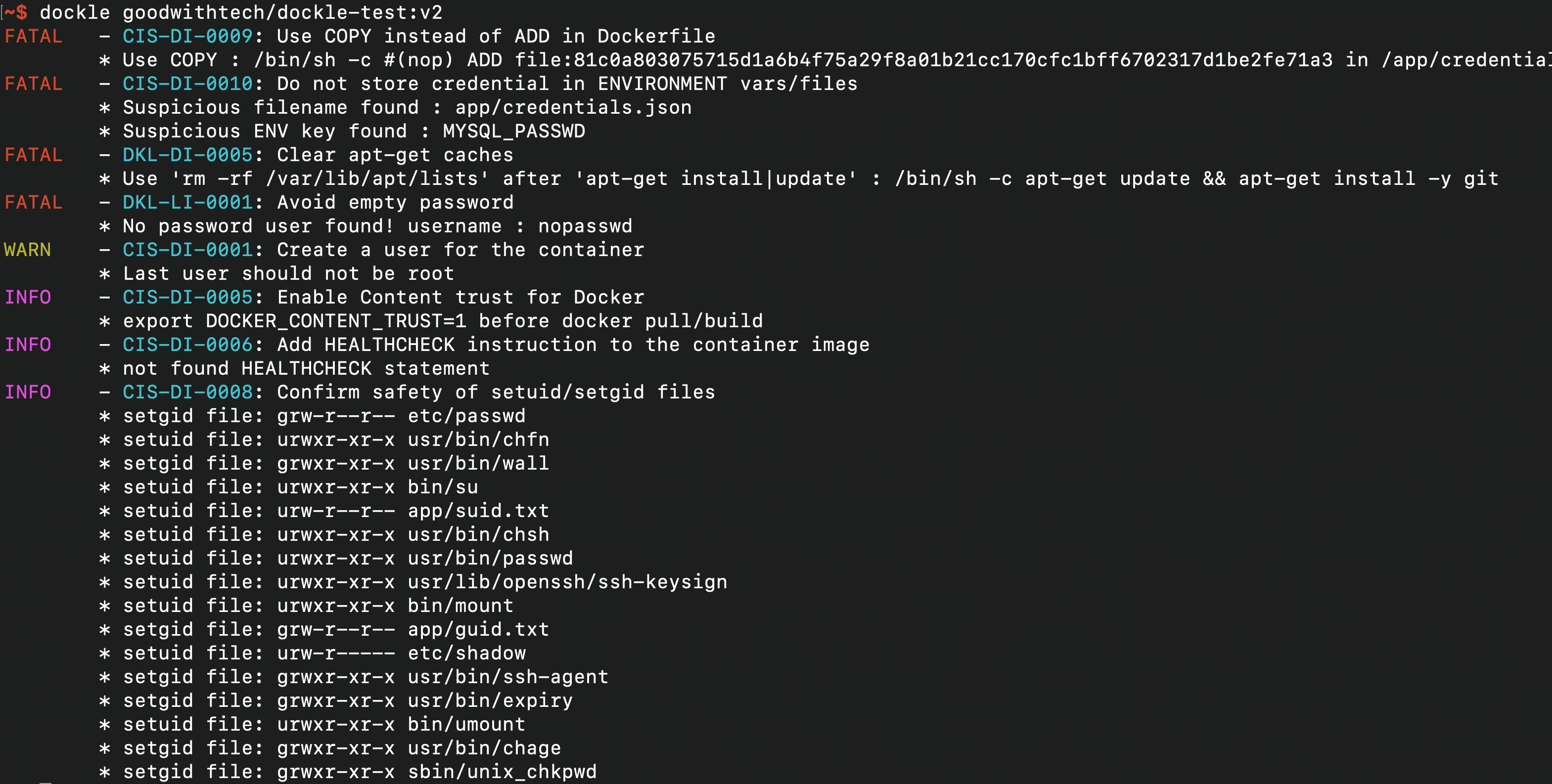
$ dockle [YOUR_IMAGE_NAME]
See Installation and Common Examples
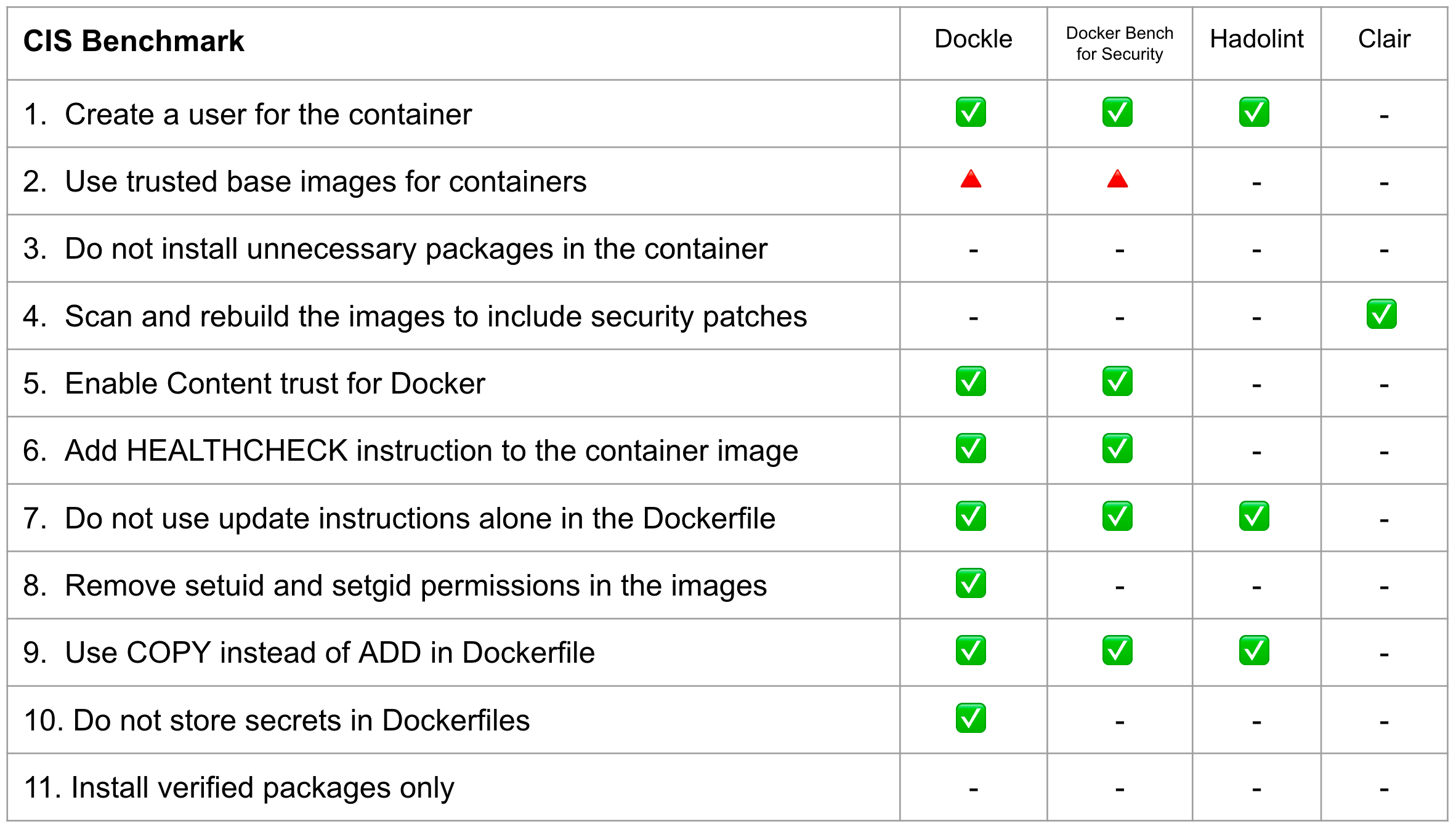
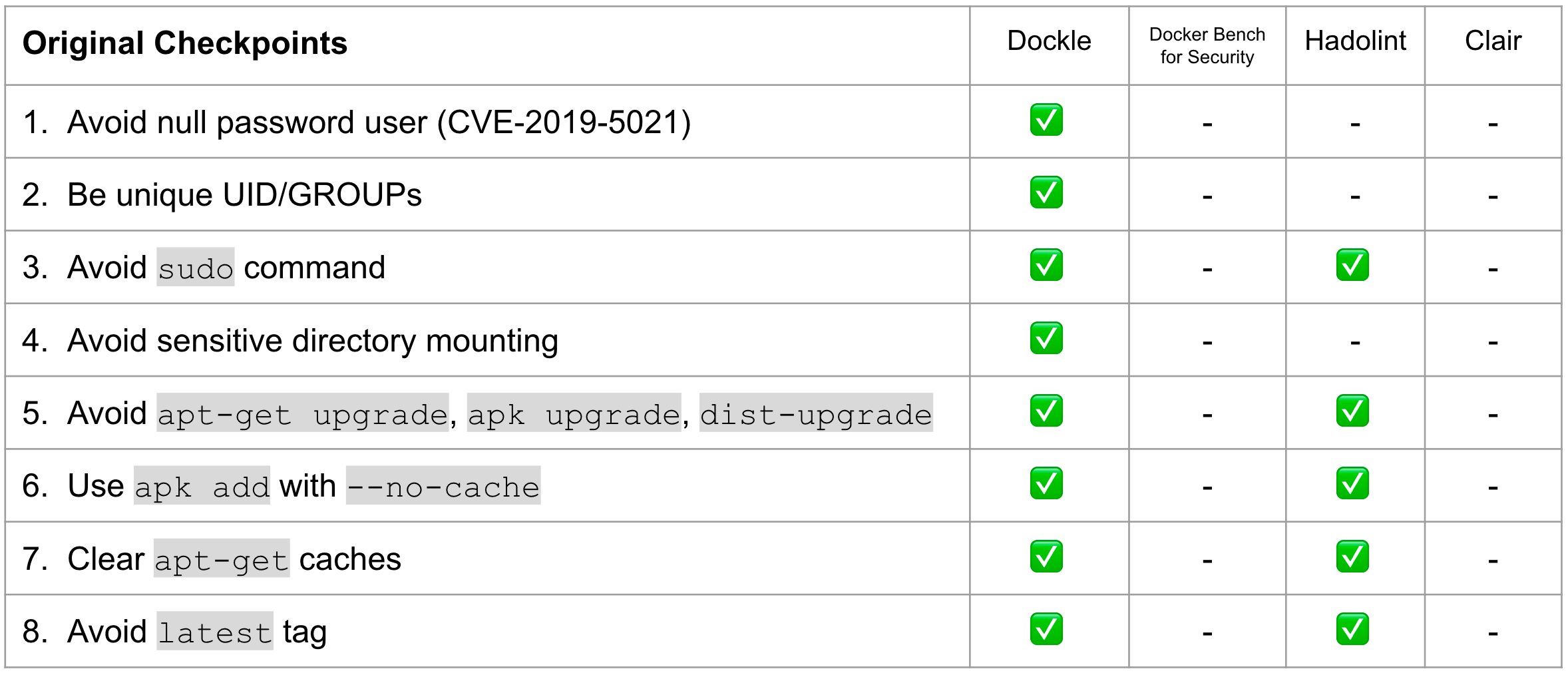
| Dockle | Hadolint | Docker Bench for Security | Clair | |
|---|---|---|---|---|
| Target | Image | Dockerfile | Host Docker Daemon Image Container Runtime | Image |
| How to run | Binary | Binary | ShellScript | Binary |
| Dependency | No | No | Some dependencies | No |
| CI Suitable | ✓ | ✓ | x | x |
| Purpose | Security Audit Dockerfile Lint | Dockerfile Lint | Security Audit Dockerfile Lint | Scan Vulnerabilities |
You can use Homebrew on Mac OS X or Linux and WSL (Windows Subsystem for Linux).
$ brew install goodwithtech/r/dockle
VERSION=$(
 curl --silent "https://api.github.com/repos/goodwithtech/dockle/releases/latest" | \
 grep '"tag_name":' | \
 sed -E 's/.*"v([^"]+)".*/\1/' \
) && rpm -ivh https://github.com/goodwithtech/dockle/releases/download/v${VERSION}/dockle_${VERSION}_Linux-64bit.rpm
VERSION=$(
 curl --silent "https://api.github.com/repos/goodwithtech/dockle/releases/latest" | \
 grep '"tag_name":' | \
 sed -E 's/.*"v([^"]+)".*/\1/' \
) && curl -L -o dockle.deb https://github.com/goodwithtech/dockle/releases/download/v${VERSION}/dockle_${VERSION}_Linux-64bit.deb
$ sudo dpkg -i dockle.deb && rm dockle.deb
dockle can be installed from the Arch User Repository using dockle or dockle-bin package.
git clone https://aur.archlinux.org/dockle-bin.git
cd dockle-bin
makepkg -sri
VERSION=$(
 curl --silent "https://api.github.com/repos/goodwithtech/dockle/releases/latest" | \
 grep '"tag_name":' | \
 sed -E 's/.*"v([^"]+)".*/\1/' \
) && curl -L -o dockle.zip https://github.com/goodwithtech/dockle/releases/download/v${VERSION}/dockle_${VERSION}_Windows-64bit.zip
$ unzip dockle.zip && rm dockle.zip
$ ./dockle.exe [IMAGE_NAME]
if (((Invoke-WebRequest "https://api.github.com/repos/goodwithtech/dockle/releases/latest").Content) -match '"tag_name":"v(?<ver>[^"]+)"') {
$VERSION=$Matches.ver &&
Invoke-WebRequest "https://github.com/goodwithtech/dockle/releases/download/v${VERSION}/dockle_${VERSION}_Windows-64bit.zip" -OutFile dockle.zip &&
Expand-Archive dockle.zip && Remove-Item dockle.zip }
You can get the latest version binary from releases page.
Download the archive file for your operating system/architecture. Unpack the archive, and put the binary somewhere in your $PATH (on UNIX-y systems, /usr/local/bin or the like).
chmod +x dockle)You can install dockle with the asdf version manager with this plugin, which automates the process of installing (and switching between) various versions of github release binaries. With asdf already installed, run these commands to install dockle:
# Add dockle plugin
asdf plugin add dockle

# Show all installable versions
asdf list-all dockle

# Install specific version
asdf install dockle latest

# Set a version globally (on your ~/.tool-versions file)
asdf global dockle latest

# Now dockle commands are available
dockle --version
