TruffleHog Explorer 🕵️♂️
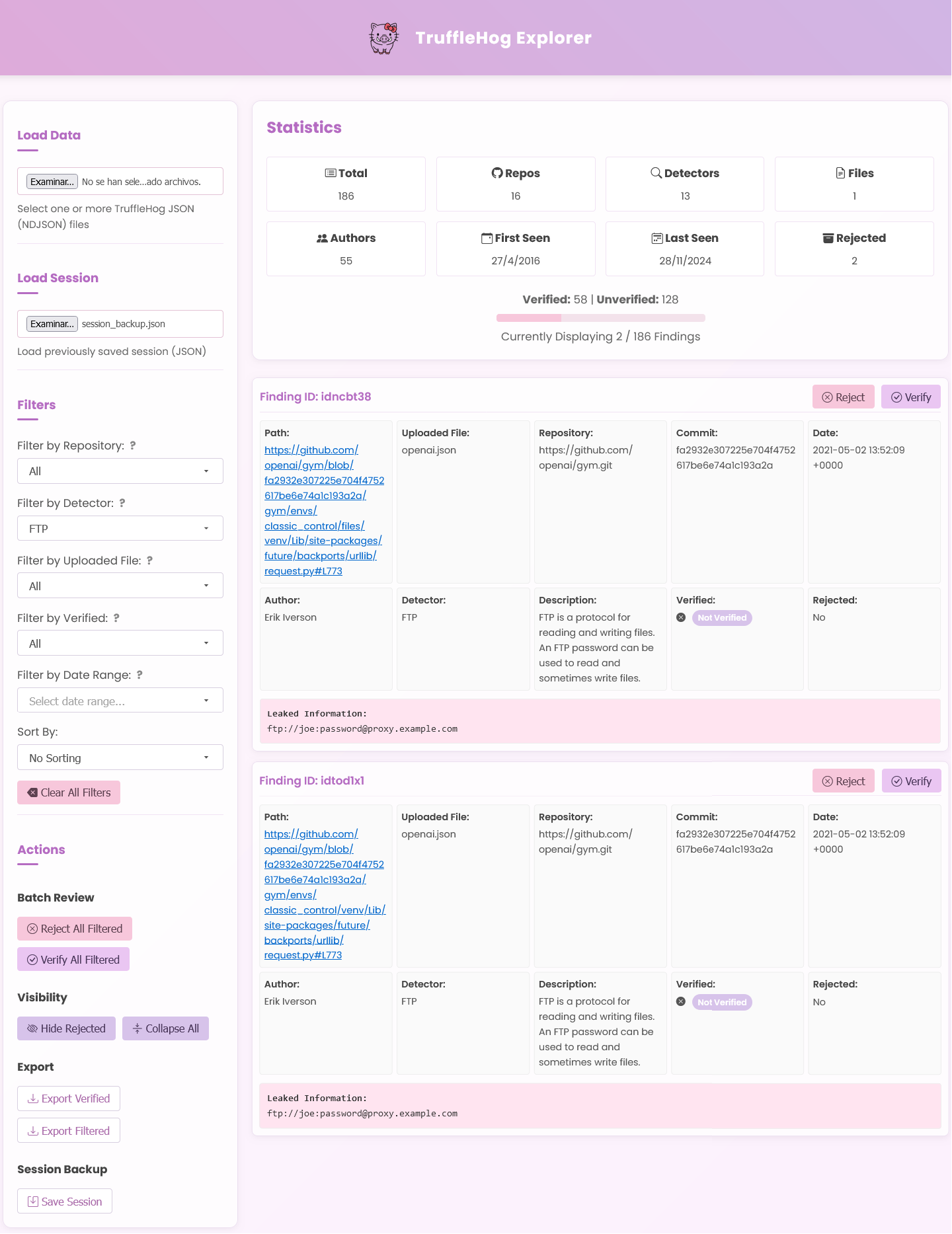
Welcome to TruffleHog Explorer, a user-friendly web-based tool to visualize and analyze data extracted using TruffleHog. TruffleHog is one of the most powerful secrets discovery, classification, validation, and analysis open source tool. In this context, a secret refers to a credential a machine uses to authenticate itself to another machine. This includes API keys, database passwords, private encryption keys, and more.
With an improved UI/UX, powerful filtering options, and export capabilities, this tool helps security professionals efficiently review potential secrets and credentials found in their repositories.
⚠️ This dashboard has been tested only with GitHub TruffleHog JSON outputs. Expect updates soon to support additional formats and platforms.
You can use online version here: TruffleHog Explorer
🚀 Features
- Intuitive UI/UX: Beautiful pastel theme with smooth navigation.
- Powerful Filtering:
- Filter findings by repository, detector type, and uploaded file.
- Flexible date range selection with a calendar picker.
- Verification status categorization for effective review.
- Advanced search capabilities for faster identification.
- Batch Operations:
- Verify or reject multiple findings with a single click.
- Toggle visibility of rejected results for a streamlined view.
- Bulk processing to manage large datasets efficiently.
- Export Capabilities:
- Export verified secrets or filtered findings effortlessly.
- Save and load session backups for continuity.
- Generate reports in multiple formats (JSON, CSV).
- Dynamic Sorting:
- Sort results by repository, date, or verification status.
- Customizable sorting preferences for a personalized experience.
📥 Installation & Usage
1. Clone the Repository
$ git clone https://github.com/GONZOsint/trufflehog-explorer.git
$ cd trufflehog-explorer
2. Open the index.html
Simply open the index.html file in your preferred web browser.
📂 How to Use
- Upload TruffleHog JSON Findings:
- Click on the "Load Data" section and select your
.json files from TruffleHog output.
- Multiple files are supported.
- Apply Filters:
- Choose filters such as repository, detector type, and verification status.
- Utilize the date range picker to narrow down findings.
- Leverage the search function to locate specific findings quickly.
- Review Findings:
- Click on a finding to expand and view its details.
- Use the action buttons to verify or reject findings.
- Add comments and annotations for better tracking.
- Export Results:
- Export verified or filtered findings for reporting.
- Save session data for future review and analysis.
- Save Your Progress:
- Save your session and resume later without losing any progress.
- Automatic backup feature to prevent data loss.
Happy Securing! 🔒
 gonzosint/trufflehog-explorer
