
Skip to content
KitploitKITPLOIT
ToolsBlog
Submit
ToolsBlog
Submit

Hacking, PenTest, and Cybersecurity Tools for Your Security Arsenal!

Kitploit is a directory of hacking, cybersecurity, and pentesting tools. Discover the latest project updates to find vulnerabilities, analyze systems, automate testing, and strengthen your security.

··Feeds·Contact·Privacy·© 2026 Kitploit

Tool Directory

Categories

View all categories
Loading categories
gost — GO Simple Tunnel - a simple tunnel written in golang | Kitploit
Tools/GitHubGitHub/ginuerzh/gost
Encryption/Decryption ToolsNetwork SecurityUtilities & FrameworksDNS Analysis
GitHubginuerzh/gost

gost

GO Simple Tunnel - a simple tunnel written in golang

View Repository
18.2k2.6k6010 days agoReviewed by Kitploit

Most Popular

View all →

Discover the most used tools by our community.

Explore all tools

Browse our collection of tools

View all tools →
Share

gost - GO Simple Tunnel

A simple security tunnel written in Golang

GoDoc Go Report Card codecov GitHub release Docker gost

Features

  • Listening on multiple ports
  • Multi-level forward proxy - proxy chain
  • Standard HTTP/HTTPS/HTTP2/SOCKS4(A)/SOCKS5 proxy protocols support
  • Probing resistance support for web proxy
  • Support multiple tunnel types
  • TLS encryption via negotiation support for SOCKS5 proxy
  • Tunnel UDP over TCP
  • TCP/UDP Transparent proxy
  • Local/remote TCP/UDP port forwarding
  • Shadowsocks protocol
  • SNI proxy
  • Permission control
  • Load balancing
  • Routing control
  • DNS resolver and proxy
  • TUN/TAP device

Wiki: v2.gost.run

Telegram group: https://t.me/gogost

Google group: https://groups.google.com/d/forum/go-gost

GOST v3: https://gost.run

Installation

Binary files

https://github.com/ginuerzh/gost/releases

From source

root@kitploit:~
git clone https://github.com/ginuerzh/gost.git
cd gost/cmd/gost
go build

Docker

root@kitploit:~
docker run --rm ginuerzh/gost -V

Homebrew

root@kitploit:~
brew install gost

Ubuntu store

root@kitploit:~
sudo snap install core
sudo snap install gost
Getting started

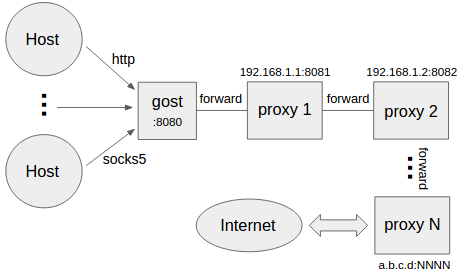
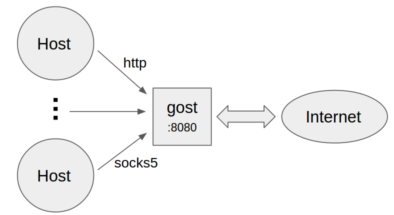
No forward proxy

  • Standard HTTP/SOCKS5 proxy
root@kitploit:~
gost -L=:8080
  • Proxy authentication
root@kitploit:~
gost -L=admin:123456@localhost:8080
  • Multiple sets of authentication information
root@kitploit:~
gost -L=localhost:8080?secrets=secrets.txt

The secrets parameter allows you to set multiple authentication information for HTTP/SOCKS5 proxies, the format is:

root@kitploit:~
# username password

test001 123456
test002 12345678
  • Listen on multiple ports
root@kitploit:~
gost -L=http2://:443 -L=socks5://:1080 -L=ss://aes-128-cfb:123456@:8338
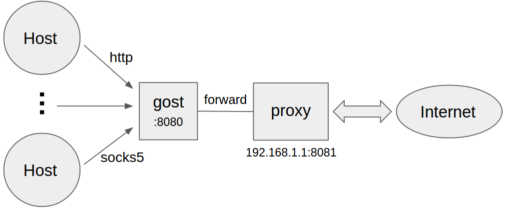
Forward proxy

root@kitploit:~
gost -L=:8080 -F=192.168.1.1:8081
  • Forward proxy authentication
root@kitploit:~
gost -L=:8080 -F=http://admin:[email protected]:8081
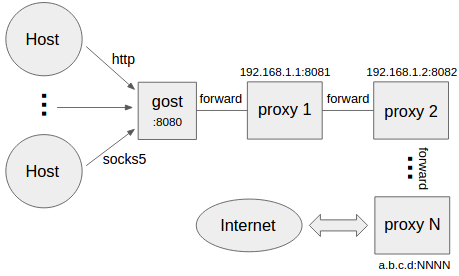
Multi-level forward proxy

root@kitploit:~
gost -L=:8080 -F=quic://192.168.1.1:6121 -F=socks5+wss://192.168.1.2:1080 -F=http2://192.168.1.3:443 ... -F=a.b.c.d:NNNN

Gost forwards the request to a.b.c.d:NNNN through the proxy chain in the order set by -F, each forward proxy can be any HTTP/HTTPS/HTTP2/SOCKS4/SOCKS5/Shadowsocks type.

Local TCP port forwarding

root@kitploit:~
gost -L=tcp://:2222/192.168.1.1:22 [-F=...]

The data on the local TCP port 2222 is forwarded to 192.168.1.1:22 (through the proxy chain). If the last node of the chain (the last -F parameter) is a SSH forwad tunnel, then gost will use the local port forwarding function of SSH directly:

root@kitploit:~
gost -L=tcp://:2222/192.168.1.1:22 -F forward+ssh://:2222

Local UDP port forwarding

root@kitploit:~
gost -L=udp://:5353/192.168.1.1:53?ttl=60 [-F=...]

The data on the local UDP port 5353 is forwarded to 192.168.1.1:53 (through the proxy chain). Each forwarding channel has a timeout period. When this time is exceeded and there is no data interaction during this time period, the channel will be closed. The timeout value can be set by the ttl parameter. The default value is 60 seconds.

NOTE: When forwarding UDP data, if there is a proxy chain, the end of the chain (the last -F parameter) must be gost SOCKS5 proxy, gost will use UDP-over-TCP to forward data.

Remote TCP port forwarding

root@kitploit:~
gost -L=rtcp://:2222/192.168.1.1:22 [-F=... -F=socks5://172.24.10.1:1080]

The data on 172.24.10.1:2222 is forwarded to 192.168.1.1:22 (through the proxy chain). If the last node of the chain (the last -F parameter) is a SSH tunnel, then gost will use the remote port forwarding function of SSH directly:

root@kitploit:~
gost -L=rtcp://:2222/192.168.1.1:22 -F forward+ssh://:2222

Remote UDP port forwarding

root@kitploit:~
gost -L=rudp://:5353/192.168.1.1:53?ttl=60 [-F=... -F=socks5://172.24.10.1:1080]

The data on 172.24.10.1:5353 is forwarded to 192.168.1.1:53 (through the proxy chain). Each forwarding channel has a timeout period. When this time is exceeded and there is no data interaction during this time period, the channel will be closed. The timeout value can be set by the ttl parameter. The default value is 60 seconds.

NOTE: When forwarding UDP data, if there is a proxy chain, the end of the chain (the last -F parameter) must be gost SOCKS5 proxy, gost will use UDP-over-TCP to forward data.

HTTP2

Gost HTTP2 supports two modes:

  • As a standard HTTP2 proxy, and backwards-compatible with the HTTPS proxy.

  • As a transport tunnel.

Standard proxy

Server:

root@kitploit:~
gost -L=http2://:443

Client:

root@kitploit:~
gost -L=:8080 -F=http2://server_ip:443?ping=30
Tunnel

Server:

root@kitploit:~
gost -L=h2://:443

Client:

root@kitploit:~
gost -L=:8080 -F=h2://server_ip:443

QUIC

Support for QUIC is based on library quic-go.

Server:

root@kitploit:~
gost -L=quic://:6121

Client:

root@kitploit:~
gost -L=:8080 -F=quic://server_ip:6121

NOTE: QUIC node can only be used as the first node of the proxy chain.

KCP

Support for KCP is based on libraries kcp-go and kcptun.

Server:

root@kitploit:~
gost -L=kcp://:8388

Client:

root@kitploit:~
gost -L=:8080 -F=kcp://server_ip:8388

Gost will automatically load kcp.json configuration file from current working directory if exists, or you can use the parameter to specify the path to the file.

root@kitploit:~
gost -L=kcp://:8388?c=/path/to/conf/file

NOTE: KCP node can only be used as the first node of the proxy chain.

SSH

Gost SSH supports two modes:

  • As a forward tunnel, used by local/remote TCP port forwarding.

  • As a transport tunnel.

Forward tunnel

Server:

root@kitploit:~
gost -L=forward+ssh://:2222

Client:

root@kitploit:~
gost -L=rtcp://:1222/:22 -F=forward+ssh://server_ip:2222
Transport tunnel

Server:

root@kitploit:~
gost -L=ssh://:2222

Client:

root@kitploit:~
gost -L=:8080 -F=ssh://server_ip:2222?ping=60

The client supports the ping parameter to enable heartbeat detection (which is disabled by default). Parameter value represents heartbeat interval seconds.

Transparent proxy

Iptables-based transparent proxy

root@kitploit:~
gost -L=redirect://:12345 -F=http2://server_ip:443

obfs4

Contributed by @isofew.

Server:

root@kitploit:~
gost -L=obfs4://:443

When the server is running normally, the console prints out the connection address for the client to use:

root@kitploit:~
obfs4://:443/?cert=4UbQjIfjJEQHPOs8vs5sagrSXx1gfrDCGdVh2hpIPSKH0nklv1e4f29r7jb91VIrq4q5Jw&iat-mode=0

Client:

root@kitploit:~
gost -L=:8888 -F='obfs4://server_ip:443?cert=4UbQjIfjJEQHPOs8vs5sagrSXx1gfrDCGdVh2hpIPSKH0nklv1e4f29r7jb91VIrq4q5Jw&iat-mode=0'

Encryption Mechanism

HTTP

For HTTP, you can use TLS to encrypt the entire communication process, the HTTPS proxy:

Server:

root@kitploit:~
gost -L=http+tls://:443

Client:

root@kitploit:~
gost -L=:8080 -F=http+tls://server_ip:443

HTTP2

Gost HTTP2 proxy mode only supports the use of TLS encrypted HTTP2 protocol, does not support plaintext HTTP2.

Gost HTTP2 tunnel mode supports both encryption (h2) and plaintext (h2c) modes.

SOCKS5

Gost supports the standard SOCKS5 protocol methods: no-auth (0x00) and user/pass (0x02), and extends two methods for data encryption: tls(0x80) and tls-auth(0x82).

Server:

root@kitploit:~
gost -L=socks://:1080

Client:

root@kitploit:~
gost -L=:8080 -F=socks://server_ip:1080

If both ends are gosts (as example above), the data transfer will be encrypted (using tls or tls-auth). Otherwise, use standard SOCKS5 for communication (no-auth or user/pass).

Shadowsocks

Support for shadowsocks is based on library shadowsocks-go.

Server:

root@kitploit:~
gost -L=ss://aes-128-cfb:123456@:8338

Client:

root@kitploit:~
gost -L=:8080 -F=ss://aes-128-cfb:123456@server_ip:8338
Shadowsocks UDP relay

Currently, only the server supports UDP Relay.

Server:

root@kitploit:~
gost -L=ssu://aes-128-cfb:123456@:8338

TLS

There is built-in TLS certificate in gost, if you need to use other TLS certificate, there are two ways:

  • Place two files cert.pem (public key) and key.pem (private key) in the current working directory, gost will automatically load them.

  • Use the parameter to specify the path to the certificate file:

root@kitploit:~
gost -L="http2://:443?cert=/path/to/my/cert/file&key=/path/to/my/key/file"

Client can specify secure parameter to perform server's certificate chain and host name verification:

root@kitploit:~
gost -L=:8080 -F="http2://server_domain_name:443?secure=true"

Client can specify a CA certificate to allow for Certificate Pinning:

root@kitploit:~
gost -L=:8080 -F="http2://:443?ca=ca.pem"

Certificate Pinning is contributed by @sheerun.

Download Tool



