 frkngksl/exporthider
ExportHider: Generating Export Table during Runtime to Hide the Exported Functions from the DLL File.

ExportHider generates a C++ DLL template which contains a code stub that allows you to hide Exported Functions from the Export Directory of the DLL on the filesystem. After putting the function definitions and compiling the file, you won't see the hidden export functions through PE File Viewers like CFF Explorer. However, since the code stub in the template recreates the Export Directory during runtime, legitimate GetProcAddress calls would be executed successfully. This method only works for Dynamic DLL loading or custom DLL loader cases.
Normally, when you want to define an Exported Function in the DLL files (in C or C++), you simply put a __declspec(dllexport) keyword before the function name, or create a .def file. After the compilation, the compiler creates a specific table called the Export Directory for holding the information related to Exported Functions. The structure of the Export Directory can be seen below:
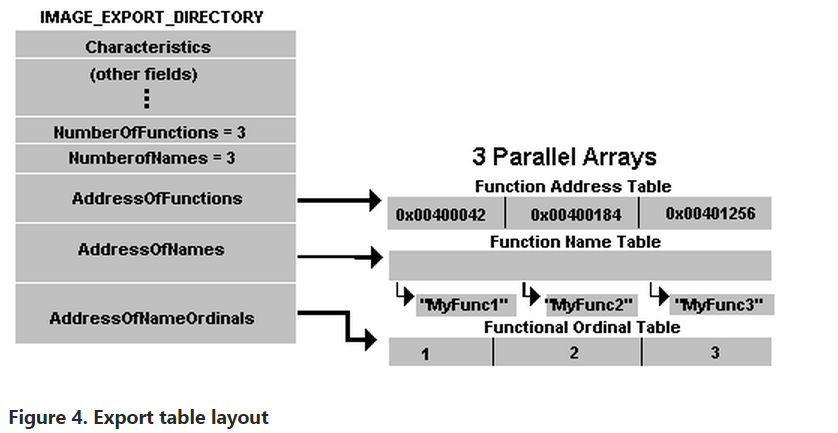
When a process wants to use a function from a DLL file, Windows Loader simply parses this structure and imports the requested functions by using the AddressOfFunctions, AddressOfNames, AddressOfNameOrdinals arrays.
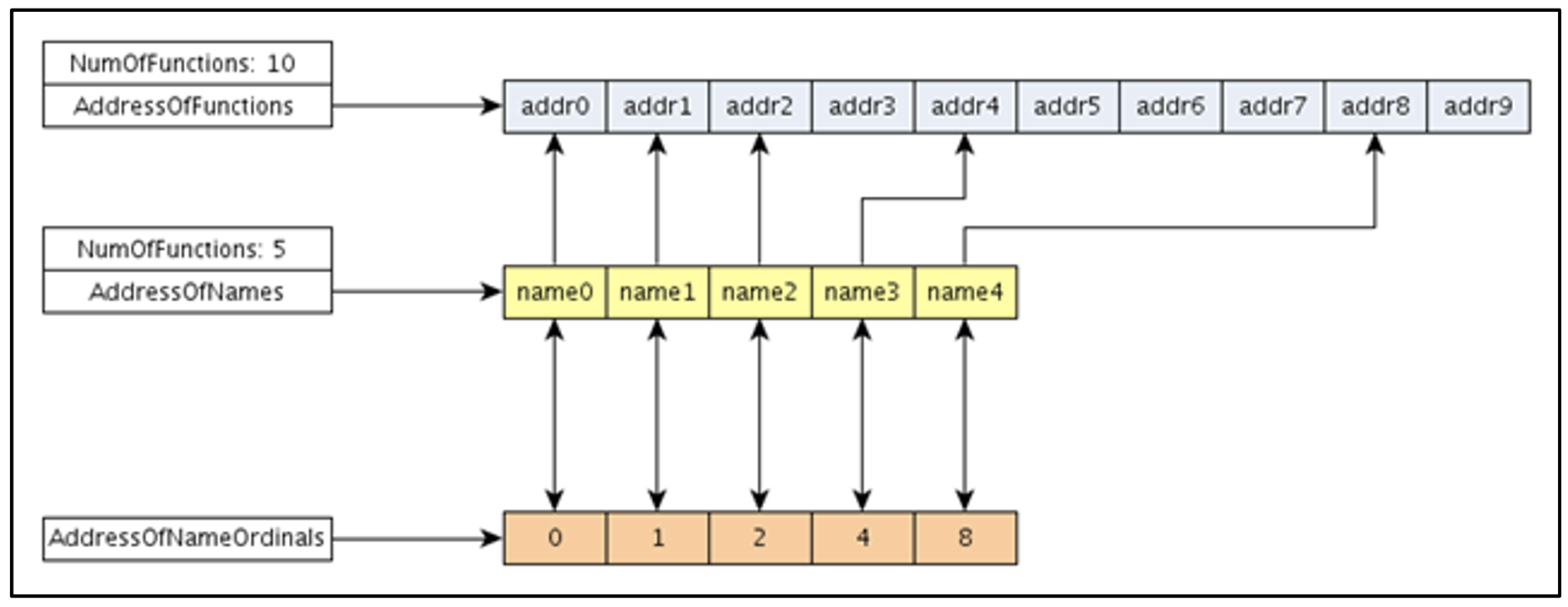
The specific routine for importing a function is explained by ferreirasc's blog post in detail, but shortly, for a function imported by name, the Loader iterates the AddressOfNames array (values of this array are just RVA values) and searches the given name. Once the loader has a match in the “i” position, it will refer to the ith index of AddressOfNameOrdinals array and get the ordinal associated with this function. Having the ordinal, the loader will refer to AddressOfFunctions on the ordinal value position to finally get the RVA associated with the imported function.
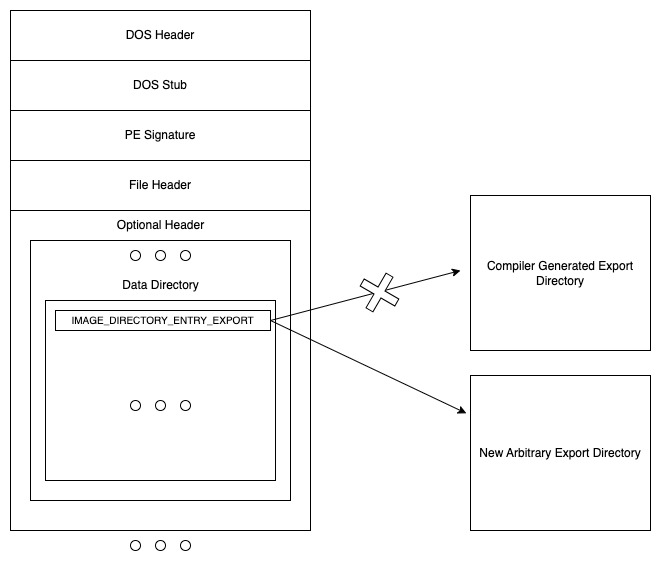
The crucial point here is that all these search and access operations by the Windows Loader, when LoadLibrary is called, are done after the DLL is mapped to the process address space. During DLL mapping, the whole DLL file, including its PE headers, is written to the memory, and the Loader parses the headers in the memory to reach the Export Directory. This means that if the DLL itself is able to overwrite its PE headers in the memory to change the Export Directory Address (simply the 0th index of the DataDirectory) after attaching to the process, the loader can look for functions to import in an arbitrary Export Directory rather than in the Export Directory added by the compiler.
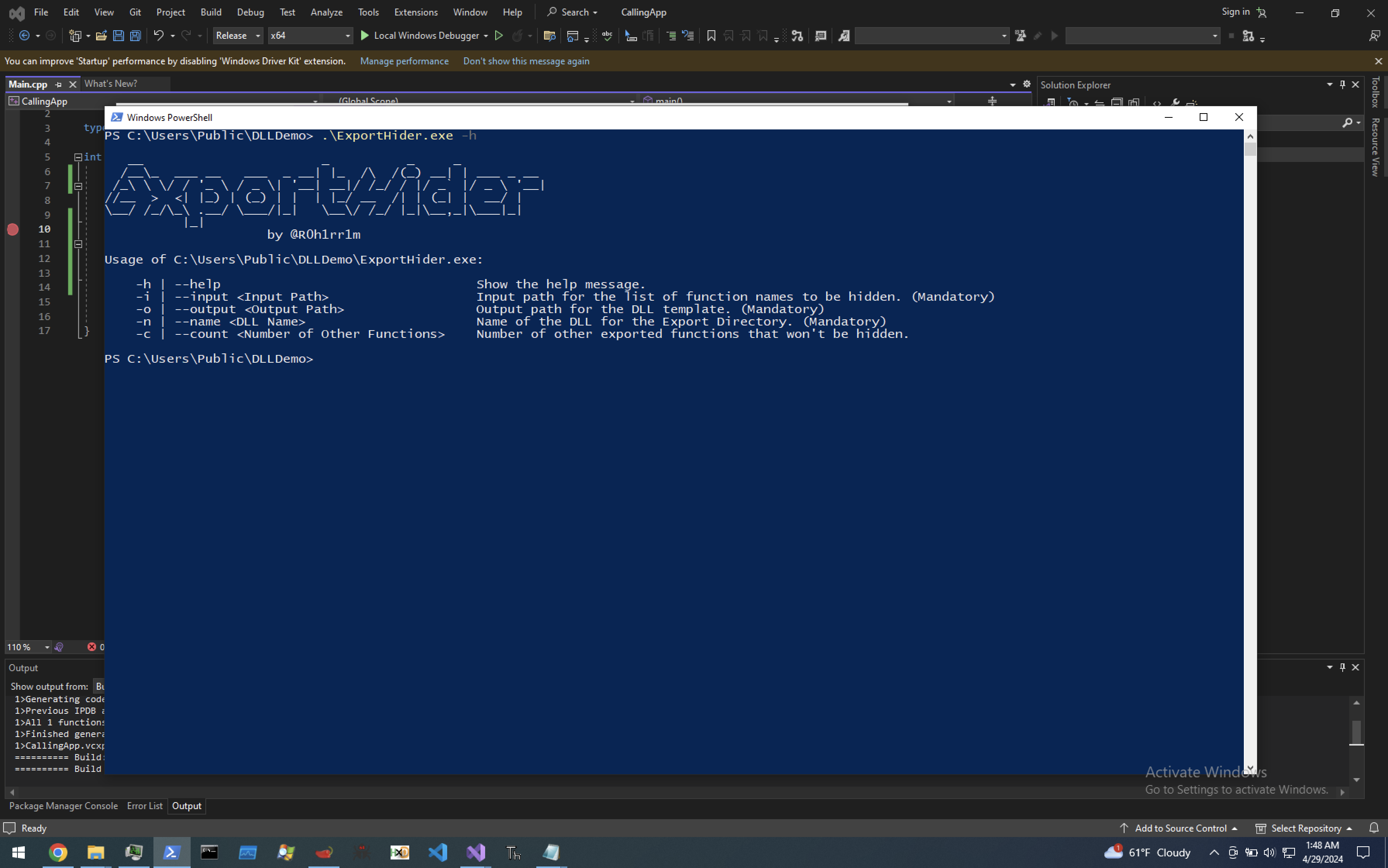
   __                       _          _     _
  /__\_  ___ __   ___  _ __| |_  /\  /(_) __| | ___ _ __
 /_\ \ \/ / '_ \ / _ \| '__| __|/ /_/ / |/ _` |/ _ \ '__|
//__  >  <| |_) | (_) | |  | |_/ __  /| | (_| |  __/ |
\__/ /_/\_\ .__/ \___/|_|   \__\/ /_/ |_|\__,_|\___|_|
          |_|
                     by @R0h1rr1m

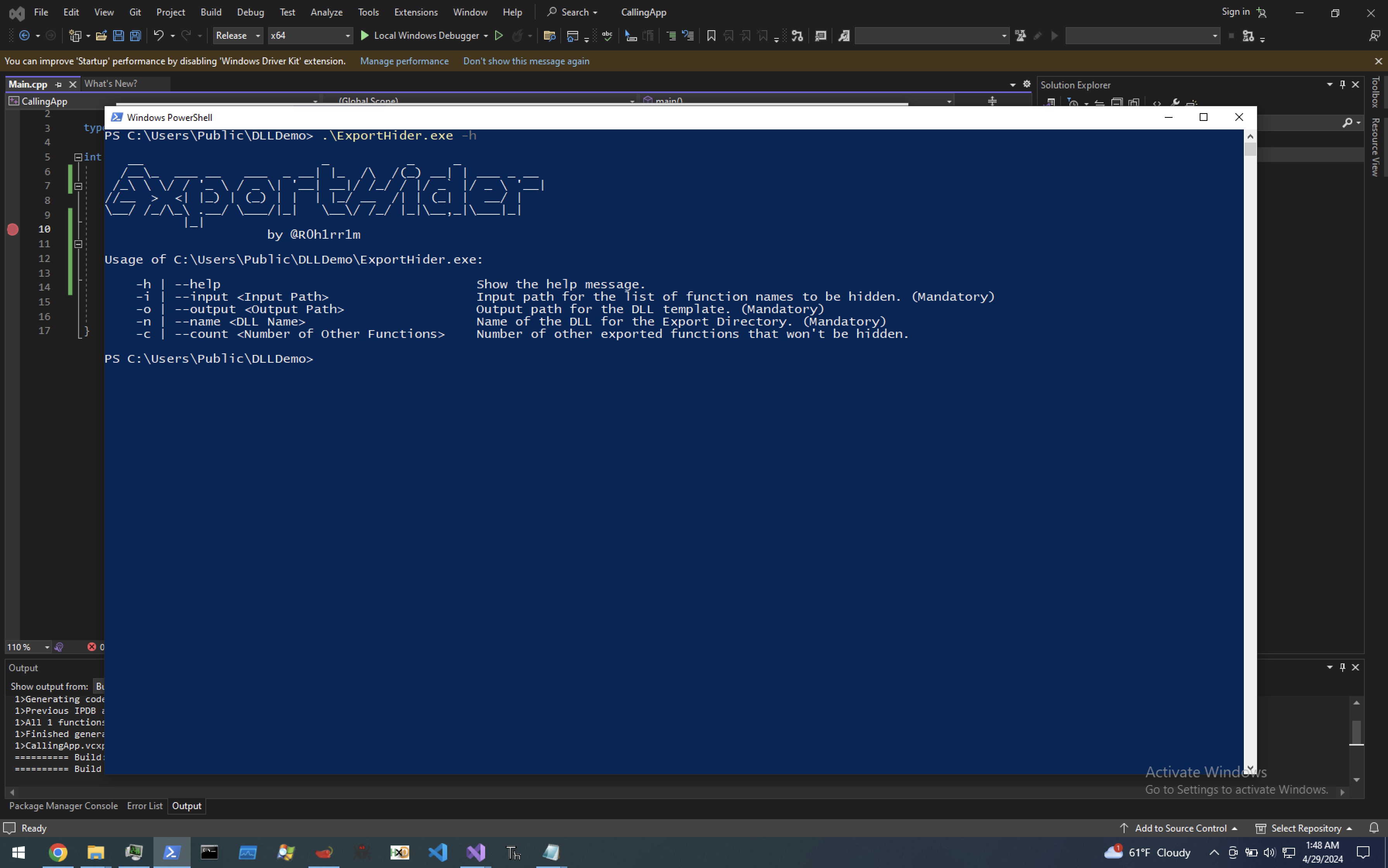
Usage of C:\Users\Public\DLLDemo\ExportHider.exe:

    -h | --help                                 Show the help message.
    -i | --input <Input Path>                   Input path for the list of function names to be hidden. (Mandatory)
    -o | --output <Output Path>                 Output path for the DLL template. (Mandatory)
    -n | --name <DLL Name>                      Name of the DLL for the Export Directory. (Mandatory)
    -c | --count <Number of Other Functions>    Number of other exported functions that won't be hidden.
Regarding the -i | --input <Input Path> parameter, you need to specify a path for the input file that stores the function names to be hidden line by line. The content of an example input file would be:
TestFunction1
TestFunction2
TestFunction3
Regarding the -c | --count parameter, if you don't want to hide all your exported functions (i.e. there are some functions exported with __declspec(dllexport) or .def file, and they appear in the Export Directory of the DLL file in the filesystem via PE File Viewers), just specify how many there are by using this parameter because the tool needs this information when making memory calculations.
If you want to play with the technique, there are two interesting points that I encountered during the development of the project. You might need to know them before changing the project:
GetProcAddress function with a name. Because of that, the names of all exported functions, including the hidden ones, need to be sorted in the AddressOfNames array. Otherwise, the GetProcAddress function returns NULL. Therefore, I used the Bubble Sort algorithm to sort the members of this array.AddressOfNames array, AddressOfFunctions array, DataDirectory array, and some other fields require values in Relative Virtual Addresses (RVAs). In addition to that, they hold these RVA values in DWORD-sized fields. When you allocate a memory region for a new arbitrary export directory by using Dynamic Memory Allocation Functions like VirtualAlloc or HeapAlloc, given addresses will be far from the DLL mapped region, and RVA values don't fit into the DWORD-sized fields, and you encounter integer overflow. That's why I used global variables with the byte array type in the DLL template for memory requirements.My first goal while creating this project was to generate a DLL that has missing exports (or a complete lack of an export table) but is still successfully loaded by the newly created process. I thought that behavior might bring a new playground for the DLL sideloading payloads. However, I couldn't find any function or a way that the export directory fixer stub runs before the Windows Loader checks for the exported DLL functions.
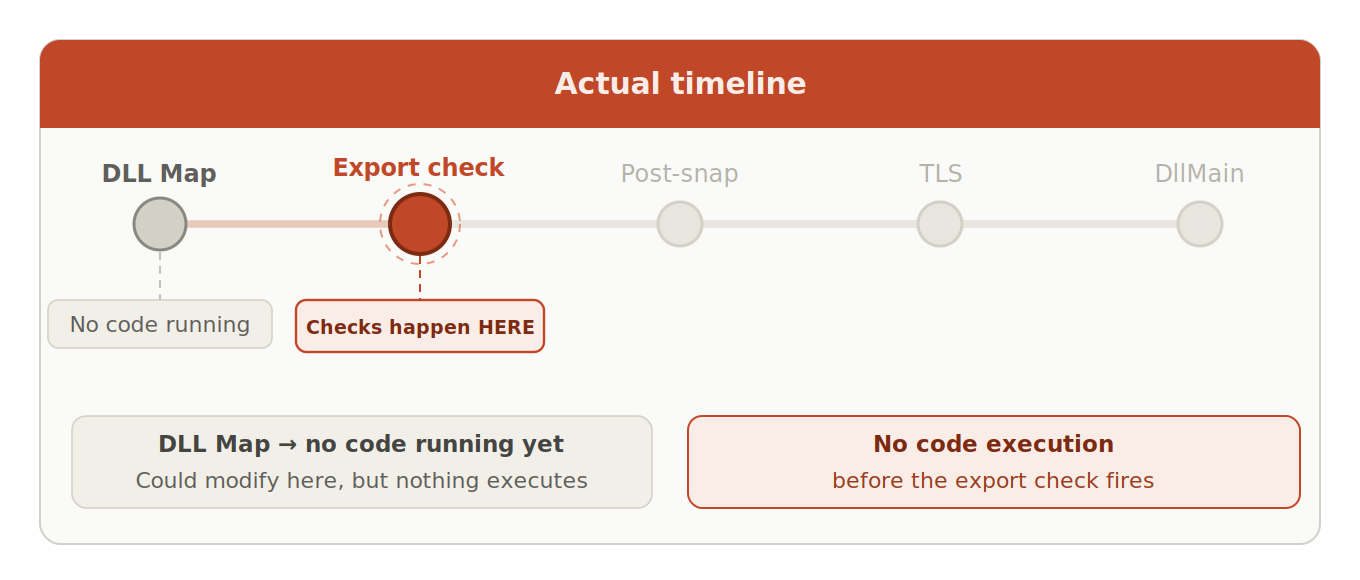
More technically, I noticed the following flow and function call for each DLL in the code sections related to the Windows Loader in NTDLL (gathered from my old notes; there might be some mistakes because I'm not an expert reverse engineer):
