
Skip to content
KitploitKITPLOIT
ToolsBlog
Submit
ToolsBlog
Submit

Hacking, PenTest, and Cybersecurity Tools for Your Security Arsenal!

Kitploit is a directory of hacking, cybersecurity, and pentesting tools. Discover the latest project updates to find vulnerabilities, analyze systems, automate testing, and strengthen your security.

··Feeds·Contact·Privacy·© 2026 Kitploit

Tool Directory

Categories

View all categories
Loading categories
CVE-2022-23131 — CVE-2022-23131 Zabbix Server SAML authentication exploit | Kitploit
Tools/GitHubGitHub/fork-bombed/cve-2022-23131
Authentication & AuthorizationVulnerability AnalysisExploitationWeb Application ExploitationPenetration Testing
GitHubfork-bombed/cve-2022-23131

CVE-2022-23131

CVE-2022-23131 Zabbix Server SAML authentication exploit

View Repository
431 year agoNot yet reviewed

Most Popular

View all →

Discover the most used tools by our community.

Explore all tools

Browse our collection of tools

View all tools →
Share

CVE-2022-23131 Zabbix SAML Authentication Exploit

This Python script exploits a misconfigured SAML authentication flow on a Zabbix server. By providing a Zabbix server URL and a user (default: Admin), the script generates an authenticated Zabbix session (zbx_session), and attempts to access the dashboard with the authenticated session.

Usage

To use the script, run it from the command line and provide the target Zabbix server URL. You can optionally specify a user and a custom user agent.

Basic Usage

root@kitploit:~
python cve-2022-23131.py <target_url>

Optional Parameters

  • -u or --user: Specify the Zabbix user to authenticate as (default: Admin).
  • -a or --user-agent: Provide a custom User-Agent string.

Examples

  1. Run the exploit with default parameters:
root@kitploit:~
python cve-2022-23131.py https://zabbix.local
  1. Run the exploit with a custom user:
root@kitploit:~
python cve-2022-23131.py https://zabbix.local -u JohnDoe
  1. Run the exploit with a custom User-Agent:
root@kitploit:~
python cve-2022-23131.py https://zabbix.local -u JohnDoe -a "CustomUserAgent/1.0"

Output

The script will indicate whether the exploit was successful. If successful, it will print an authenticated zbx_session, which you can use to access the Zabbix dashboard.

Here’s an example of the script in action:
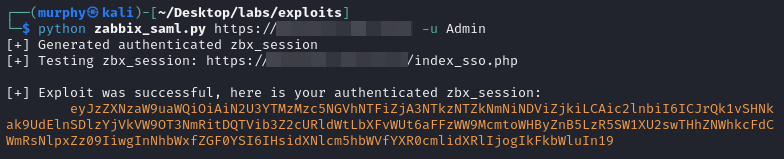
Example Output

How to Update the Cookie in Chrome or Firefox

Once you have successfully retrieved the zbx_session value, you can manually update the cookie in your browser to authenticate yourself as the specified user. Follow the steps below for Chrome or Firefox.

Chrome

  1. Open Chrome and go to the Zabbix server URL.
  2. Right-click on the page and select Inspect to open the Developer Tools.
  3. Go to the Application tab.
  4. In the left-hand pane, under Storage, click Cookies, and select the Zabbix server URL.
  5. Find the zbx_session cookie.
  6. Double-click the Value field, replace it with the newly generated zbx_session value, and press Enter.

Firefox

  1. Open Firefox and go to the Zabbix server URL.
  2. Right-click on the page and select Inspect Element to open the Developer Tools.
  3. Go to the Storage tab.
  4. In the left-hand pane, click on Cookies, and select the Zabbix server URL.
  5. Find the zbx_session cookie.
  6. Double-click the Value field, replace it with the new zbx_session value, and press Enter.

Here is an example of how to update the cookie in the Developer Tools:
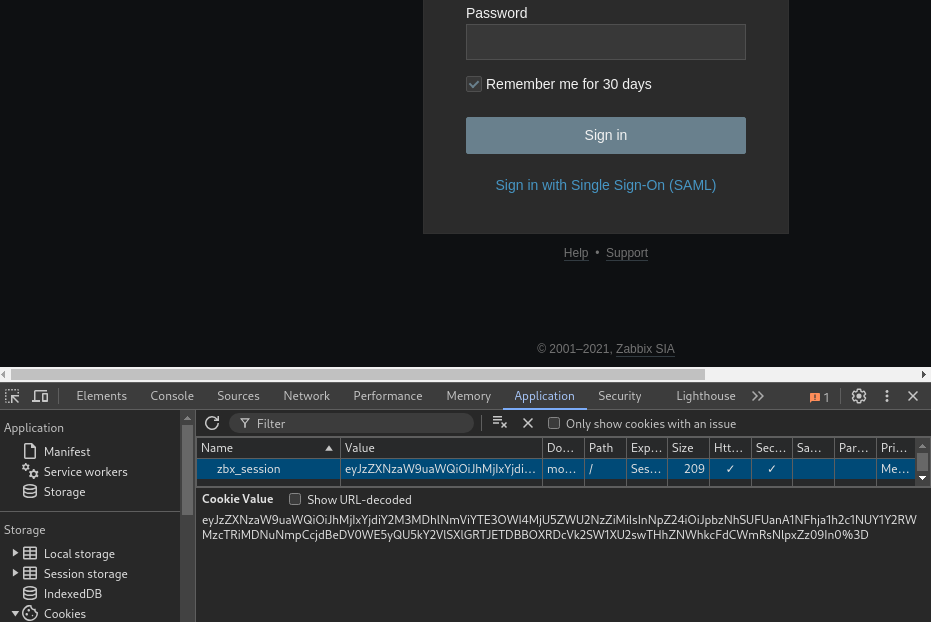
Update Cookie Example

Credits

Credits for this exploit write-up go to @random-robbie, @jweny, and @Mr-xn. I just modified the script as I found it wasn't working as expected anymore.

Reference: https://github.com/Mr-xn/cve-2022-23131

Download Tool