p0wny@shell:~# -- Single-file PHP Shell

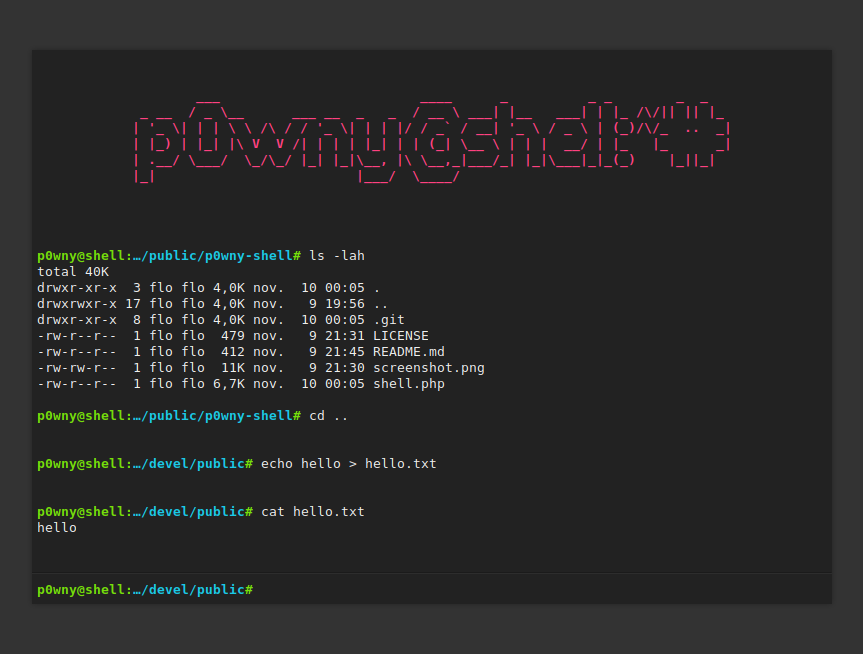
p0wny@shell:~# is a very basic, single-file, PHP shell. It can be used to quickly execute commands on a server when pentesting a PHP application. Use it with caution: this script represents a security risk for the server.
Features:
- Command history (using arrow keys
↑ ↓)
- Auto-completion of command and file names (using
Tab key)
- Navigate on the remote file-system (using
cd command)
- Upload a file to the server (using
upload <destination_file_name> command)
- Download a file from the server (using
download <file_name> command)
WARNING: THIS SCRIPT IS A SECURITY HOLE. DO NOT UPLOAD IT ON A SERVER UNLESS YOU KNOW WHAT YOU ARE DOING!
Demo with Docker:
docker build -t p0wny .
docker run -it -p 8080:8080 -d p0wny
# open with your browser http://127.0.0.1:8080/shell.php
Contributing
Questions
If you have any question, you can:
Bugs
Please open an issue on GitHub with as much information as possible if you found a bug:
- Your operating system / Linux distribution (and its version)
- The PHP version you are using (example:
PHP-FPM 8.1, Apache mod_php 7.4,...)
- The Web server you are using and its version (example:
Nginx 1.23, Apache 2.4.55,...)
- All the logs and message outputted by the software
- etc.
Pull requests
Please consider filing a bug before starting to work on a new feature; it will allow us to discuss the best way to do it. It is obviously unnecessary if you just want to fix a typo or small errors in the code.
Support this project
Want to support this project?
Changelog
- v2023.08.10:
- Make p0wny@shell compatible with PHP 5.3 (@FrancoisCapon, #38)
- v2023.05.28:
- Encode all data fields as base64 to avoid encoding errors, especially on Windows (@cli-ish, #8, #35)
- v2023.05.22:
- Display the username and the hostname in the prompt (@cli-ish, #33, #7)
- v2023.05.10:
- Try different execution functions (
exec, shell_exec, system, passthru, popen, proc_open) to run commands to bypass disabled functions (@cli-ish, #31, #32)
- v2023.02.27:
- Make terminal window resizable (@FrancoisCapon, #27)
- v2023.02.13:
- Larger terminal size on large screens (@psyray, #26)
- No more horozontal scrolling on small screens (@flozz)
- v2022.09.19:
- Expand path in
cd command (cd ~, cd ~username,...)
- Go home when running cd withoud argument.
- → Thanks @FrancoisCapon for the suggestion (#25)
- v2021.01.24:
- Style improvements:
- Better-looking scrollbar on webkit (@nakamuraos)
- Display a smaller logo on mobile (@nakamuraos)
- Ergonomic improvements:
- Focus the command field when clicking the page (@nakamuraos)
- Put the cursor at the end of the command field while navigating the history (@nakamuraos)
- v2019.06.07:
- Adds the
clear command to clear the terminal (@izharaazmi #12)
- v2018.12.15:
- File upload and download feature (@Oshawk #5)
- v2018.06.01:
- Auto-completion of command and file names (@lo001 #2)
- Adaptation to mobile devices (responsive) (@lo001 #2)
- Improved handling of stderr (@lo001 #2)
- v2018.05.30:
- ES5 compatibility (@lo00l #1)
- Dependency to JQuery removed (@lo00l #1)
- Command history using arrow keys (@lo00l #1)
- Keep the command field focused when pressing the tab key
- v2017.10.30:
- v2016.11.10:
 flozz/p0wny-shell
