
Weaponized Browser-in-the-Middle (BitM) for Penetration Testers

Weaponized multi-user browser-in-the-middle (BitM) for penetration testers. This attack can be used to bypass multi-factor authentication on many high-value web applications. It even works for applications that do not use session tokens, and therefore would not be exploitable using traditional token stealing attacks. This is a social engineering tool and does not exploit any technical flaws in the target service.
This tool is a specialized web server. It is designed to run on a Debian 11 (Bullseye) Linux server and relies on public IP information to protect the admin functionality. Don't expect to be able to test locally without jumping through some serious hoops.
Warning: Chromium is not supported on ARM. While it is technically possible to force the use of an ARM chromium binary, you will lose all the additional features/protections of puppeteer-extra.
This example setup utilizes Caddy to handle TLS, SNI, and add a couple of custom headers like 'X-Real-IP' to each request. You don't have to use Caddy with Cuddlephish, as the same reverse proxy can be set up using Nginx, Apache, etc. I just like Caddy because it is easy to install with Docker, and has plugins to manage Letsencrypt certs for most domain registrars. The example Caddyfile shows how you would set it up for Gandi. Check the docs for your registrar.
Install Docker, Node, XVFB, and some other dependencies:
git clone https://github.com/fkasler/cuddlephish
cd cuddlephish
sudo bash install_deps.sh
You can then use Docker to build Caddy with a wildcard cert plugin for your registrar. The example is for Gandi. Check the docs here and the list of dns provider modules here. You can mod the Dockerfile for your registrar before building:
sudo docker build -t caddy .
Now mod the Caddyfile to swap your domain and Gandi (or other registrar) API key, and start Caddy. I recommend starting this in a screen or tmux window so that you can run the Node server in another window in a moment:
sudo docker run -p 80:80 -p 443:443 -p 2019:2019 -v $PWD/Caddyfile:/etc/caddy/Caddyfile --network=host caddy:latest
With Caddy fielding traffic for us on 80 and 443, we can finally run the tool!
Install the Node dependencies:
npm install
A few config tweaks: CRITICAL STEP: Make sure to mod the example config.json to add your approved public IP(s) for admin access. This whitelist of IPs is what dictates access to the "/admin" web interface. You should also change the default socket key to something more secure.
The tool is not set up to target any logins by default so you will need to add some. There is an 'add_target.js' script to make this step easy. Just run the script and paste in the URL of the login portal you would like to target when prompted:
node add_target.js
This will grab the service name, tab title, and favicon for you and add an entry to 'targets.json'. You can run this script multiple times and it will append your new targets. The script will name each service based on the domain, without the top level. So, for 'https://www.example.com/login.php' the service would just be 'example' when specifying your target when you...
Run it!
node index.js example
After a few seconds, you should see a message in the console when your first automated Chrome instance checks in over websockets. Now visitors to your phishing site should see what appears to be the target login page but is actually a video feed of your automated browser instance. They can also interact with your browser instance and log in for you.
If you properly configured your admin IP(s) in the config.json, you should be able to view a special '/admin' web interface to track users, view key logs, takeover control of logged in browser instances, steal cookies, and delete unwanted browser instances.
Note: You will not see anything in the admin page until you have some victims. Once you have a victim, their browser instance should pop up on the admin UI.
I have had several people open issues about a "Blank White Page", which is more of a symptom of many possible issues, and not an issue in itself. Please do not open issues under vague symptom names. Instead, if you have a blank page on the user side, try first looking into the following:
At a high level, if you just see a blank page on the front-end, then it means there is some breakdown occuring in the chain of data flow from "Start WebRTC" > "Select Tab to Broadcast" > "Negotiate ICE with Vicitim's Browser" > "Stream Video". The above troubleshooting steps are intended to help you follow the data through this process. When working properly, you should expect to see a log stream on the server similar to the following:
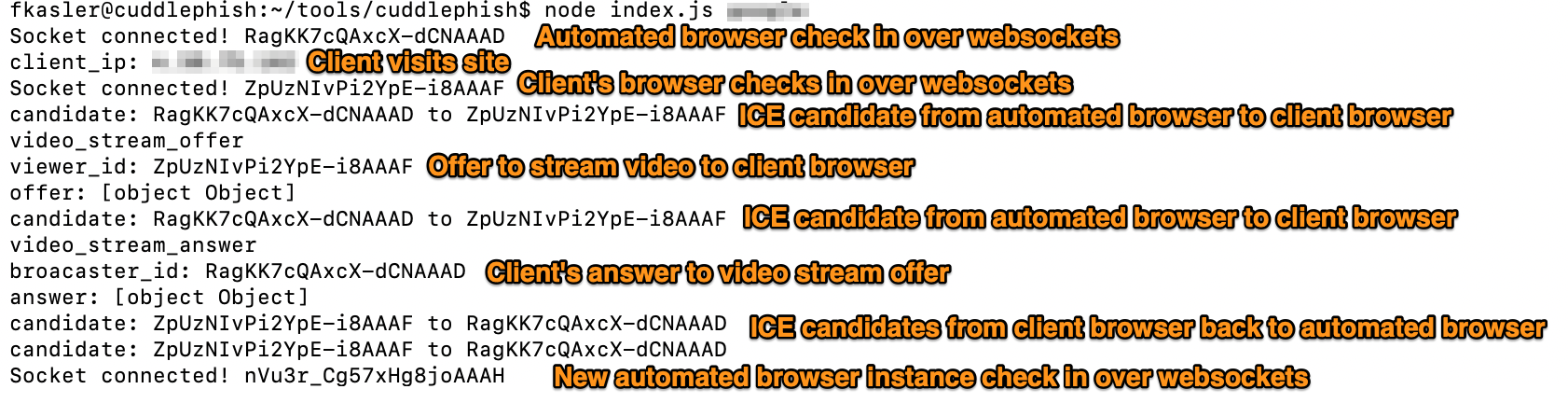
I hope this helps with any issues, and as always, sufficient information to consistently replicate an issue is a prerequisite for submitting issues for further investigation.
Manually trigger a payload to download to the victim's system via JavaScript. Each target starts off with 'payload.txt' as a test payload. Just swap the file location in targets.json to send a custom payload.
Sends a window.location change to the victim to send them to the real login portal. It will seem like they are just being forced to re-authenticate and prevent them from watching you take the controls. If you mod the code, you could do some other fancy things with this general technique ;)
Allows you to step in and take control of a browser instance directly from the admin portal. To stop controlling the instance, hit ESCAPE key. Note, this will take the controls away from the phishing victim and they will be able to watch your movements if you do not boot them first. You have been warned.
Allows you to manually give the user back control of the automated browser instance. This could be useful for some social engineering scenarios when spoofing IT. You can tell the user you are starting a help session, take control and navigate to the target service, give back control and have them log in, take the controls again etc.
Extracts all cookie and local storage items from the browser instance, and downloads it as a JSON file. To inject this credential material back into a browser instance running on your local system, there is a script in the project called 'stealer.js'. It is meant to be run from your machine, and not the server, so to use it you will also need to install the Node components of the project on your system.
node stealer.js ~/Downloads/cuddle_asdf1234.json
Kills a browser instance when you don't need it. Sometimes users don't fully log you in. Sometimes the WebRTC connection fails. Sometimes a session times out before you can use it. In these cases, this button can help you clean up useless browser instances via the admin portal.
Each browser is spawned with its own random "browser id" and matching user data directory in the "user_data" folder of the project. In some cases where 'stealer.js' is not working, you may need to replicate the user data for that instance as well. This can be useful in cases targeting services with a "remember this browser" feature depending on how that feature is implemented.
There is also a keylog.txt in each user data directory with a full keylog of the victim user. The general keylog in the admin portal tries to account for things like backspaces, whereas this keylog.txt will have all recorded keystrokes.
Example pm.json:
{
"tacking_id": "id",
"logging_endpoint": "https://www.phishmongerserver.com/create_event",
"admin_cookie": "admin_cookie=s3cret",
"post_url_search": "ppsecure"
}
This tool works by pairing phishing site visitors with an automated Chrome browser, running on the phishing server. A video feed of the attacker-controlled Chrome instance is then streamed to the phishing victim over WebRTC, and all user-supplied mouse movements and keyboard inputs are forwarded on from the victim's browser to their associated Chrome instance. The server uses websockets to track victims, pair them with browsers, broker WebRTC video feeds, and man-in-the-middle user inputs. For each new visitor, the server spawns a new Chrome instance. Because we are using Chrome Devtools Protocol (CDP) to drive each Chrome instance, we can use APIs like "Storage.getCookie" to extract session cookies for target sites once the user has logged in for us. We can also step in at any time and directly drive each Chrome instance, leveraging the same method we use to give victims remote control in the first place.
The Node Server Performs the Following:
It is my understanding that this technique has been theorized and even weaponized for several years now (see shoutouts). So, while threat actors can leverage this technique, and probably have for some time, offensive security professionals have not had an easy way to replicate this technique and may even be unaware of its existence. My intent in releasing the tool is to allow penetration testers and red teamers to use BitM on operations to showcase its potential impact and help network defenders prepare for real threats.
First, understand that this attack relies on social engineering a user into visiting a malicious website. Domain whitelisting would go a long way in preventing this and other types of social engineering. If we rely on users to manage 100% of the credential data (password, OTP, SMS, PhoneFactor, Push notification, etc.) for a web service, then we are potentially vulnerable to this attack. Therefore, to thwart this attack, we need to leverage credential data that users do not manage. For example, client TLS certificates can be issued to client devices, and will only be valid for the real web service. The cert is managed by the browser and operating system, and there is no way for an attacker's server to obtain a copy of the victim's TLS cert. Another option is to use U2F or FIDO2 with hardware like a YubiKey to manage some of the required credential data. There is no way for a hacker's website to interact with a YubiKey plugged into a victim's computer.
I'm not a Docker wiz (yet). If you can come up with a simple Dockerized setup, I'd really love a pull request.
It's a play on Cuttlefish, a badass sea creature that can blend into its surroundings, Phishing, because it requires social engineering to perform the attack, and intentionally misspelled to be unique, playful, and silly. It makes me happy to think this funny tool name will be mentioned alongside critical-risk findings in pentest reports.
While I came up with this technique and implementation independently, I have since learned that a couple other researchers beat me to the discovery. They each took an approach of using web-based VNC clients to achieve a similar outcome. It's an intuitive approach and might be applicable to performing MitM attacks against other software, not just browsers (VPN-in-the-browser maybe?). Definitely worth checking out:
Franco Tommasi, Christian Catalano & Ivan Taurino https://link.springer.com/article/10.1007/s10207-021-00548-5
@mrd0x https://mrd0x.com/bypass-2fa-using-novnc/
Also:
Shoutout to Daniel Aaron @majordmg for helping with the early stages of WebRTC proof-of-concept.
Huge thanks to RJ Stallkamp @Z3rO-C00L for fixing and styling the admin interface, and the sweet new logo.