
🦞 Security hardening patch for Clawdbot/Moltbot. Detects and fixes exposed gateways automatically.
Security hardening for Clawdbot/Moltbot installations. Detects and fixes exposed gateways.
Detect and fix exposed Clawdbot/Moltbot gateways
Problem • Features • Quick Start • Docker • CLI • What Gets Fixed • Development
900+ Clawdbot/Moltbot instances are currently exposed on the internet (visible on Shodan, port 18789) without any authentication. This allows anyone to:
The issue isn't a bug—it's misconfiguration. Users who change gateway.bind to 0.0.0.0 or use Docker with -p 18789:18789 without proper auth are fully exposed.
ClawdGuard fixes this.
cargo install clawdguard
# Run
clawdguard
# Clone repository
git clone https://github.com/fadidevv/clawdguard.git
cd clawdguard
# Build (first time takes ~2 min)
cargo build --release
# Run
./target/release/clawdguard
# Clone repository
git clone https://github.com/fadidevv/clawdguard.git
cd clawdguard
# Build image (~3-5 min first time)
docker build --no-cache -t clawdguard .
# Run (mount your config directory)
docker run -v ~/.moltbot:/root/.moltbot clawdguard
# Or for legacy Clawdbot:
docker run -v ~/.clawdbot:/root/.clawdbot clawdguard
clawdguard
That's it! ClawdGuard will:
ClawdGuard generates a secure token. Save it!
╭────────────────────────────────────────────────────────────────────╮
│ ⚠️ IMPORTANT: Save your new gateway token! │
│ │
│ clwd_a8f2k9x3m1p7v4q2b6n8... │
│ │
│ You'll need this to connect from the Control UI or CLI. │
╰────────────────────────────────────────────────────────────────────╯
Full Docker documentation for those without Rust installed.
# 1. Clone repository
git clone https://github.com/fadidevv/clawdguard.git
cd clawdguard
# 2. Build image (~3-5 min first time)
docker build --no-cache -t clawdguard .
# 3. Run scan (mount your config directory)
# For Moltbot (newer):
docker run -v ~/.moltbot:/root/.moltbot clawdguard
# For Clawdbot (legacy):
docker run -v ~/.clawdbot:/root/.clawdbot clawdguard
# With verbose mode
docker run -v ~/.moltbot:/root/.moltbot clawdguard --verbose
# Scan only (no fixes)
docker run -v ~/.moltbot:/root/.moltbot clawdguard --scan-only
# Auto mode (no prompts)
docker run -v ~/.moltbot:/root/.moltbot clawdguard --auto
# Show help
docker run clawdguard --help
Simpler syntax using docker-compose:
# Run with docker-compose
docker-compose run clawdguard
# With verbose
docker-compose run clawdguard --verbose
# Scan only
docker-compose run clawdguard --scan-only
# Auto mode
docker-compose run clawdguard --auto
| Mount | Purpose |
|---|---|
~/.moltbot:/root/.moltbot | Your Moltbot config directory (newer) |
~/.clawdbot:/root/.clawdbot | Your Clawdbot config directory (legacy) |
./results:/app/results | Save results locally |
# Create alias for easier usage (use your config directory)
alias clawdguard='docker run -v ~/.moltbot:/root/.moltbot clawdguard'
# Or for legacy Clawdbot:
alias clawdguard='docker run -v ~/.clawdbot:/root/.clawdbot clawdguard'
# Then just run:
clawdguard
clawdguard --scan-only
clawdguard --verbose
clawdguard [OPTIONS]
OPTIONS:
--scan-only Only scan for issues, don't apply fixes
--auto Apply all fixes without confirmation prompts
--backup-dir <DIR> Custom directory for backup files
--skip-firewall Skip adding firewall rules
--skip-restart Skip restarting the gateway service
--token <TOKEN> Use a specific token instead of generating one
-v, --verbose Show detailed output
--json Output results as JSON (for scripting)
-h, --help Print help
-V, --version Print version
# Basic usage - scan, fix, verify
clawdguard
# Scan only (don't fix anything)
clawdguard --scan-only
# Fix everything automatically (no prompts)
clawdguard --auto
# Use your own token
clawdguard --token "my-secure-token-here"
# Verbose output for troubleshooting
clawdguard --verbose
# JSON output for scripting
clawdguard --json
# Combine options
clawdguard --auto --skip-firewall --verbose
# Custom backup directory
clawdguard --backup-dir /tmp/backups
ClawdGuard calculates a risk score from 0-10:
| Score | Level | Meaning |
|---|---|---|
| 0-3 | 🟢 LOW | Minor issues or already secure |
| 4-6 | 🟡 MEDIUM | Some security concerns |
| 7-10 | 🔴 CRITICAL | Exposed to internet, fix immediately |
Risk Score Calculation:
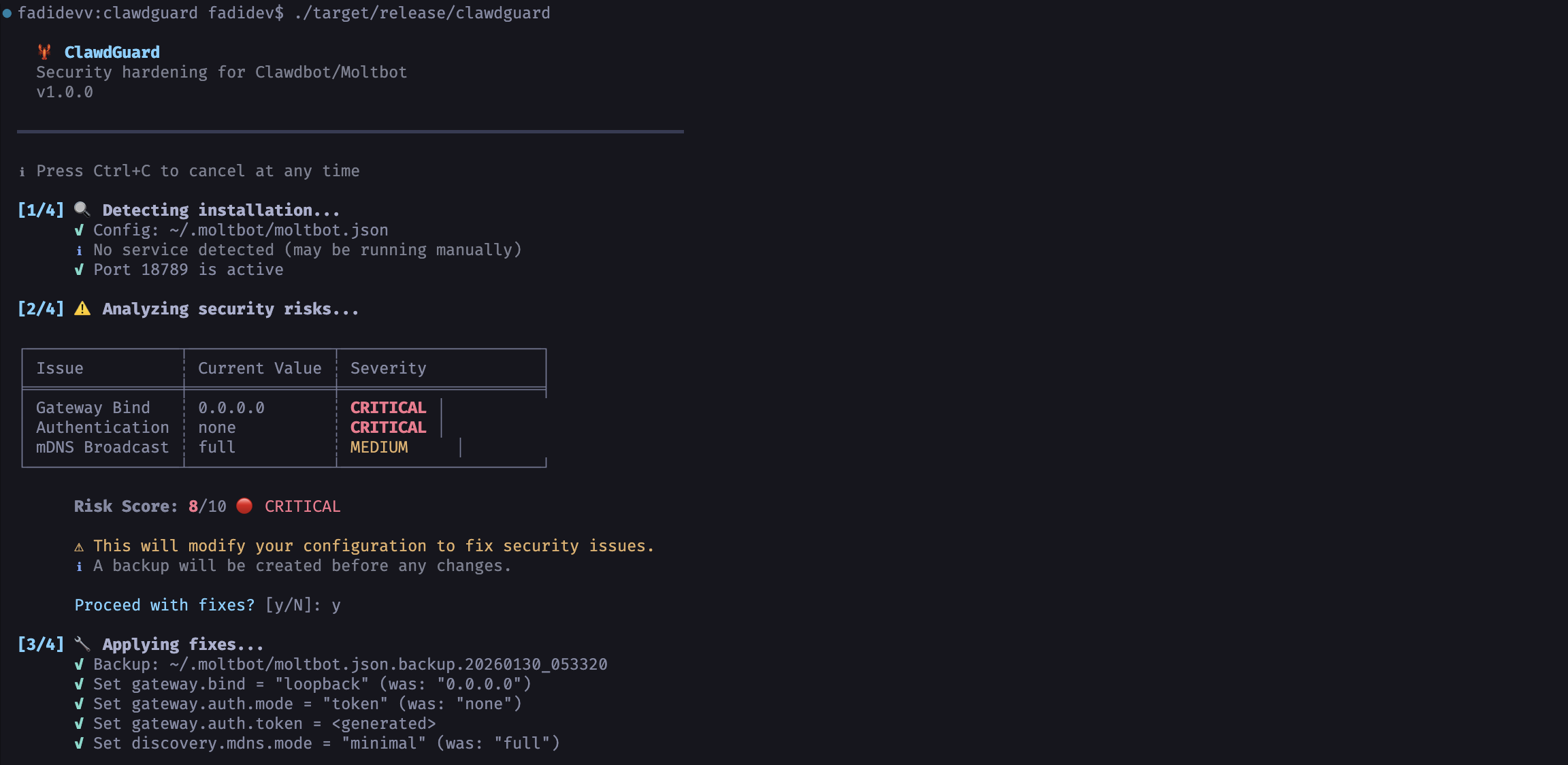
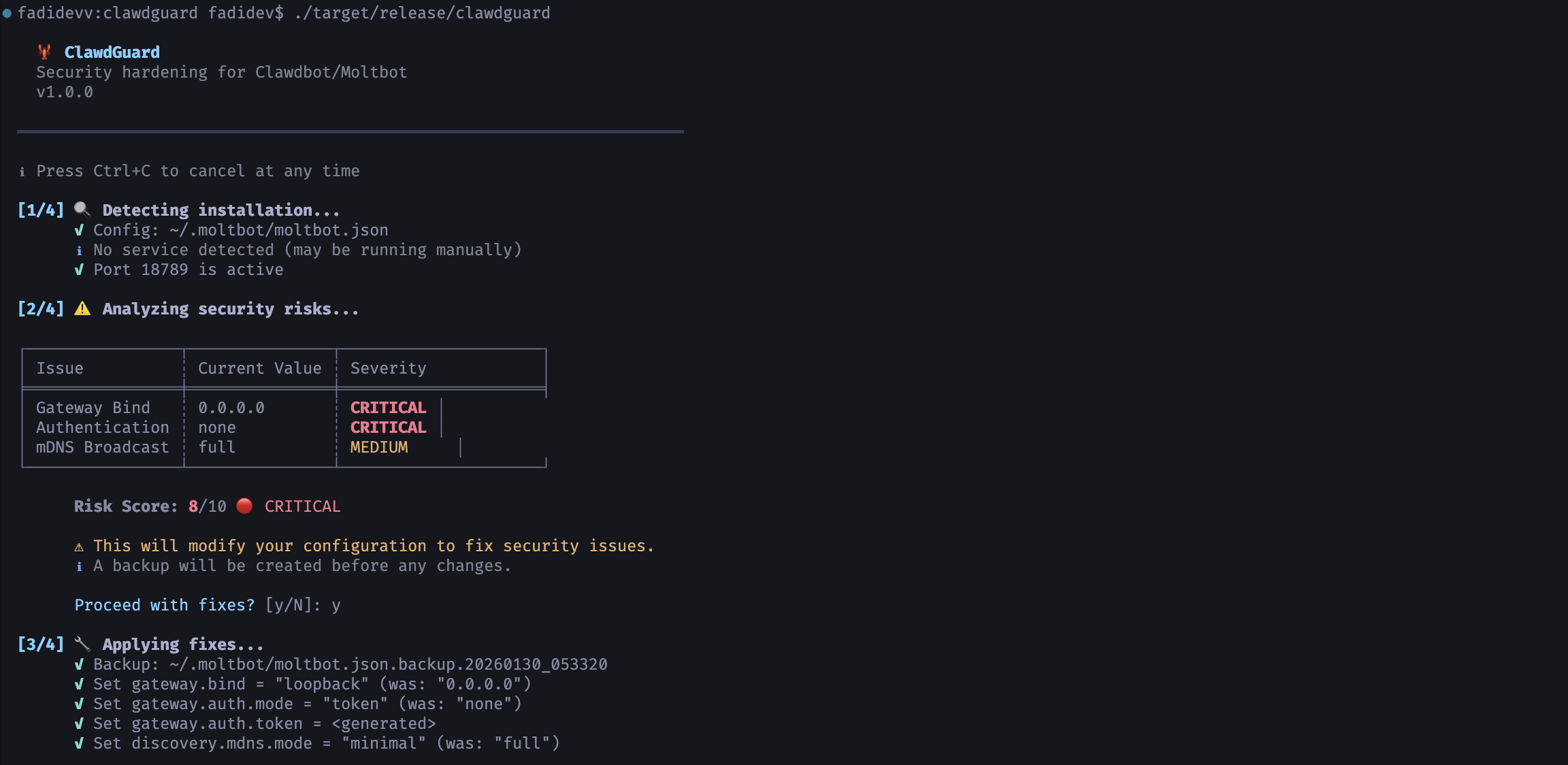
🦞 ClawdGuard
Security hardening for Clawdbot/Moltbot
v1.0.0
━━━━━━━━━━━━━━━━━━━━━━━━━━━━━━━━━━━━━━━━━━━━━━━━━━━━━━━━━━━━━━━━━━━━━━
ℹ Press Ctrl+C to cancel at any time
[1/4] 🔍 Detecting installation...
✓ Config: ~/.clawdbot/clawdbot.json
✓ Service: bot.molt.gateway (running, PID 1234)
✓ Port 18789 is active
[2/4] ⚠️ Analyzing security risks...
╭──────────────────┬─────────────────────────┬──────────╮
│ Issue │ Current Value │ Severity │
├──────────────────┼─────────────────────────┼──────────┤
│ Gateway Bind │ 0.0.0.0 │ CRITICAL │
│ Authentication │ none │ CRITICAL │
│ mDNS Broadcast │ full │ MEDIUM │
╰──────────────────┴─────────────────────────┴──────────╯
Risk Score: 9/10 🔴 CRITICAL
⚠ This will modify your configuration to fix security issues.
ℹ A backup will be created before any changes.
Proceed with fixes? [y/N]: y
[3/4] 🔧 Applying fixes...
✓ Backup: ~/.clawdbot/clawdbot.json.backup.20260128_143022
✓ Set gateway.bind = "loopback" (was: "0.0.0.0")
✓ Set gateway.auth.mode = "token" (was: "none")
✓ Set gateway.auth.token = <generated>
✓ Fixed file permissions (600)
Generated Token: clwd_a8f2k9x3m1p7v4q2b6n8...
[4/4] ✅ Verifying fixes...
✓ Gateway service restarted
✓ Port 18789 no longer reachable externally
✓ Gateway responding on localhost
✓ Authentication is now required
━━━━━━━━━━━━━━━━━━━━━━━━━━━━━━━━━━━━━━━━━━━━━━━━━━━━━━━━━━━━━━━━━━━━━━
╭────────────────────────────────────────────────────────────────────╮
│ │
│ 🎉 SUCCESS! Your Clawdbot/Moltbot is now secure. │
│ │
╰────────────────────────────────────────────────────────────────────╯
clawdguard --json
{"status": "fixed", "token": "clwd_a8f2k9x3m1p7v4q2b6n8...", "backup": "~/.clawdbot/clawdbot.json.backup.20260128_143022"}
Press Ctrl+C anytime during scanning to stop safely.
[2/4] ⚠️ Analyzing security risks...
^C
⚠ Interrupted! Exiting...
No changes are made until you confirm, so interrupting is always safe.
# Add to your shell profile (~/.bashrc, ~/.zshrc, etc.)
export CLAWDBOT_GATEWAY_TOKEN="clwd_your_token_here"
If you need remote access, use one of these secure methods:
| Method | Command |
|---|---|
| Tailscale (Recommended) | tailscale serve --bg 18789 |
| SSH Tunnel | ssh -L 18789:localhost:18789 your-server |
| Cloudflare Tunnel |
Never change gateway.bind back to 0.0.0.0 or expose the port directly.
Make sure:
~/.moltbot/ or ~/.clawdbot/)~/.moltbot/moltbot.json or ~/.clawdbot/clawdbot.jsonTry manually:
clawdbot gateway restart
# or
moltbot gateway restart
clwd_ prefix)Make sure your config directory is readable:
# For Moltbot (newer)
chmod 755 ~/.moltbot
chmod 644 ~/.moltbot/moltbot.json
# For Clawdbot (legacy)
chmod 755 ~/.clawdbot
chmod 644 ~/.clawdbot/clawdbot.json
| Platform | Status | Service Manager |
|---|---|---|
| macOS | ✅ Full | launchd |
| Linux | ✅ Full | systemd (user) |
| Windows | ⚠️ WSL2 | Run inside WSL2 |
┌─────────────────────────────────────────────────────────────────┐
│ ClawdGuard v1.0 │
├─────────────────────────────────────────────────────────────────┤
│ │
│ ┌──────────┐ ┌──────────┐ ┌──────────┐ ┌──────────┐ │
│ │ DETECT │ → │ ANALYZE │ → │ PATCH │ → │ VERIFY │ │
│ └──────────┘ └──────────┘ └──────────┘ └──────────┘ │
│ │ │ │ │ │
│ ▼ ▼ ▼ ▼ │
│ Find config Check risks Fix config Confirm safe │
│ Find service Score danger Gen token Test port │
│ Find process List issues Fix perms Restart svc │
│ │
└─────────────────────────────────────────────────────────────────┘
clawdguard/
├── Cargo.toml # Dependencies
├── Dockerfile # Docker build
├── docker-compose.yml # Docker compose
├── .dockerignore
├── README.md
├── LICENSE
├── .gitignore
├── assets/
│ └── screenshot.png # Screenshot for README
├── src/
│ ├── main.rs # CLI entry point
│ ├── lib.rs # Library root
│ ├── detect/ # Installation detection
│ │ ├── mod.rs
│ │ ├── config.rs # Config file detection
│ │ ├── process.rs # Process detection
│ │ └── service.rs # Service detection (launchd/systemd)
│ ├── analyze/ # Security analysis
│ │ ├── mod.rs
│ │ ├── config_risk.rs
│ │ ├── network.rs # Port exposure check
│ │ └── permissions.rs
│ ├── patch/ # Configuration patching
│ │ ├── mod.rs
│ │ ├── config.rs
│ │ ├── firewall.rs
│ │ └── token.rs # Secure token generation
│ ├── verify/ # Fix verification
│ │ ├── mod.rs
│ │ ├── port_check.rs
│ │ └── service.rs
│ └── output/
│ ├── mod.rs
│ └── printer.rs # Colorful CLI output
└── tests/
└── integration.rs
Option A: Native (Rust)
curl --proto '=https' --tlsv1.2 -sSf https://sh.rustup.rs | sh)Option B: Docker
Native:
# Clone repository
git clone https://github.com/fadidevv/clawdguard.git
cd clawdguard
# Build debug (faster compile)
cargo build
# Build release (optimized)
cargo build --release
Docker:
# Clone repository
git clone https://github.com/fadidevv/clawdguard.git
cd clawdguard
# Build image
docker build --no-cache -t clawdguard .
# Run all tests
cargo test
# Run with output
cargo test -- --nocapture
# Format code
cargo fmt
# Run linter
cargo clippy
# Check without building
cargo check
Contributions welcome! Please:
git checkout -b feature/improvement)cargo test)cargo clippy)cargo fmt)git commit -m 'Add improvement')git push origin feature/improvement)Ideas for contributions:
This tool is for security purposes only.
The authors are not responsible for misuse of this tool.
MIT License - see LICENSE for details.
Stay secure! 🦞🔐
| Risk | Impact |
|---|
| Access API keys | Steal OpenAI, Anthropic, and other credentials |
| Execute commands | Run arbitrary shell commands on your machine |
| Control browser | Take over your browsing session |
| Read emails | Access Gmail, calendar, contacts |
| Read chats | See all your conversation history |
| Hijack the bot | Send messages on your behalf |
| Command | Description |
|---|
docker build --no-cache -t clawdguard . | Build image |
docker run clawdguard --help | Show help |
docker run -v ... clawdguard | Run scan |
docker run -v ... clawdguard --scan-only | Scan only |
docker run -v ... clawdguard --auto | Auto fix |
docker run -v ... clawdguard --verbose | Verbose mode |
docker-compose run clawdguard | Run with compose |
| Setting | Before (Insecure) | After (Secure) |
|---|
gateway.bind | "0.0.0.0" / "lan" / "all" | "loopback" |
gateway.auth.mode | "none" / missing | "token" |
gateway.auth.token | missing | Generated secure token |
discovery.mdns.mode | "full" | "minimal" |
| File permissions | 644 / 755 | 600 |
cloudflared tunnel --url http://localhost:18789 |
