 f-bader/tokentacticsv2
A fork of the great TokenTactics with support for CAE and token endpoint v2

  ______      __                 __             __  _                     ___
 /_  __/___  / /_____  ____     / /_____ ______/ /_(_)_________   _   __ |__ \
  / / / __ \/ //_/ _ \/ __ \   / __/ __ `/ ___/ __/ / ___/ ___/  | | / / __/ /
 / / / /_/ / ,< /  __/ / / /  / /_/ /_/ / /__/ /_/ / /__(__  )   | |/ / / __/
/_/  \____/_/|_|\___/_/ /_/   \__/\__,_/\___/\__/_/\___/____/    |___(_)____/
This is an updated version of TokenTactics originally written by Stephan Borosh @rvrsh3ll & Bobby Cooke @0xBoku.
Azure access tokens allow you to authenticate to certain endpoints as a user who signs in with a device code. If you are in possesion of a FOCI (Family of Client IDs) capable refresh token you can use it to get access tokens to all known FOCI capable endpoints. Since the refresh-token also contains the information if the user has done multi-factor authentication you can use this. Once you have a user's access token, it may be possible to access certain apps such as Outlook, SharePoint, OneDrive, MSTeams and more.
For instance, if you have a Graph or MSGraph refresh token, you can then connect to Azure and dump users, groups, etc. You could then, depending on conditional access policies, switch to an Azure Core Management token and run AzureHound. Then, get an Outlook access token and read/send emails or MS Teams and read/send teams messages!
For more on Azure token types Microsoft identity platform access tokens
There are some example requests to endpoints in the resources folder. There is also an example phishing template for device code phishing.
You may also use these tokens with AAD Internals as well. We strongly recommended to check this amazing tool out.
Import-Module .\TokenTactics.psd1
Get-Help Get-EntraIDToken
Invoke-RefreshToSubstrateToken -Domain "myclient.org"
The test suite requires PowerShell 7 and Pester 5.7.1. It uses mocked HTTP responses and does not require Entra ID credentials or network access.
Install-Module Pester -RequiredVersion 5.7.1 -Scope CurrentUser
pwsh ./tests/Invoke-Tests.ps1
The same suite runs on Linux, macOS, and Windows for every pull request.
Get-EntraIDToken -Client MSGraph
Once the user has logged in, you'll be presented with the JWT and it will be saved in the $response variable. To access the access token use $response.access_token from your PowerShell window to display the token. You may also display the refresh token with $response.refresh_token. Hint: You'll want the refresh token to keep refreshing to new tokens!
Get-EntraIDToken -Client DODMSGraph
[!IMPORTANT] This feature was introduced in v0.2.20 and required PowerShell 7.0
If you have created a passkey in a third party provider like KeePassXC, Bitwarden, 1Password, or similar you can export the private key material.
[!CAUTION] Exporting you private key material is extremely dangerous. Make sure you understand the risk before your move on.
The KeePassXC passkey file format is natively supported and you can point the cmdlet to the file directly. The initial sign-in procedure will only get the required ESTSAUTH cookie and you have to use Get-EntraIDTokenFromESTSCookie to exchange this cookie for a bearer token (access token, refresh token, and id token).
# Retrieve the ESTSAUTH cookie value
Invoke-EntraIDPasskeyLogin -Verbose -KeyFilePath "C:\Users\Fabian\Microsoft.passkey"
# Exchange the ESTSAUTH cookie for bearer tokens
Get-EntraIDTokenFromESTSCookie -CookieValue $Global:ESTSAUTH
If you have an unsupported file format you can specify the required values manually and achieve the same goal.
Invoke-EntraIDPasskeyLogin -Verbose -UserPrincipalName "[email protected]" -UserHandle "XYZ" -CredentialId "9e9c8297-0cde-4726-8852-16c141e15bd3" -PrivateKey $PrivateKey
Get-EntraIDTokenFromESTSCookie -CookieValue $Global:ESTSAUTH
If you have obtained an sccauth cookie from an authenticated session to security.microsoft.com (e.g., via Evilginx or browser DevTools), you can use it to retrieve Entra ID access tokens for a broad set of resources through the Microsoft Defender XDR portal.
# Retrieve a Microsoft Graph token using the sccauth cookie
Get-EntraIDTokenFromSCCAUTHCookie -SCCAuth "your_sccauth_value" -ResourceName MicrosoftGraph

# Provide an XSRF token explicitly to skip the bootstrapping request
Get-EntraIDTokenFromSCCAUTHCookie -SCCAuth "your_sccauth_value" -XSRF "your_xsrf_value" -ResourceName Azure

# Use a custom resource URL
Get-EntraIDTokenFromSCCAUTHCookie -SCCAuth "your_sccauth_value" -Resource "https://management.core.windows.net/"
Supported -ResourceName values: Azure, LogAnalytics, MATP, MCAS, MicrosoftGraph, MicrosoftOffice, Purview, PurviewACC, ThreatIntelligencePortal.
Get-EntraIDTokenFromESTSCookie -ESTSAuthCookie "0.AbcApTk..."
This module uses authorization code flow to obtain an access token and refresh token using ESTSAuth (or ESTSAuthPersistent) cookie. Useful if you have phished a session via Evilginx or have otherwise obtained this cookie.
Be sure to use the right cookie! ESTSAuthPersistent is only useful when a CA policy actually grants a persistent session. Otherwise, you should use ESTSAuth. You can usually tell which one to use based on length, the longer cookie is the one you want to use :)
Note: This may not work in all cases as it may require user interaction. If this is the case, either use the Device Code flow above, or try roadtx interactiveauth --estscookie
This feature was backported from the pull request by rotarydrone in the original repo.
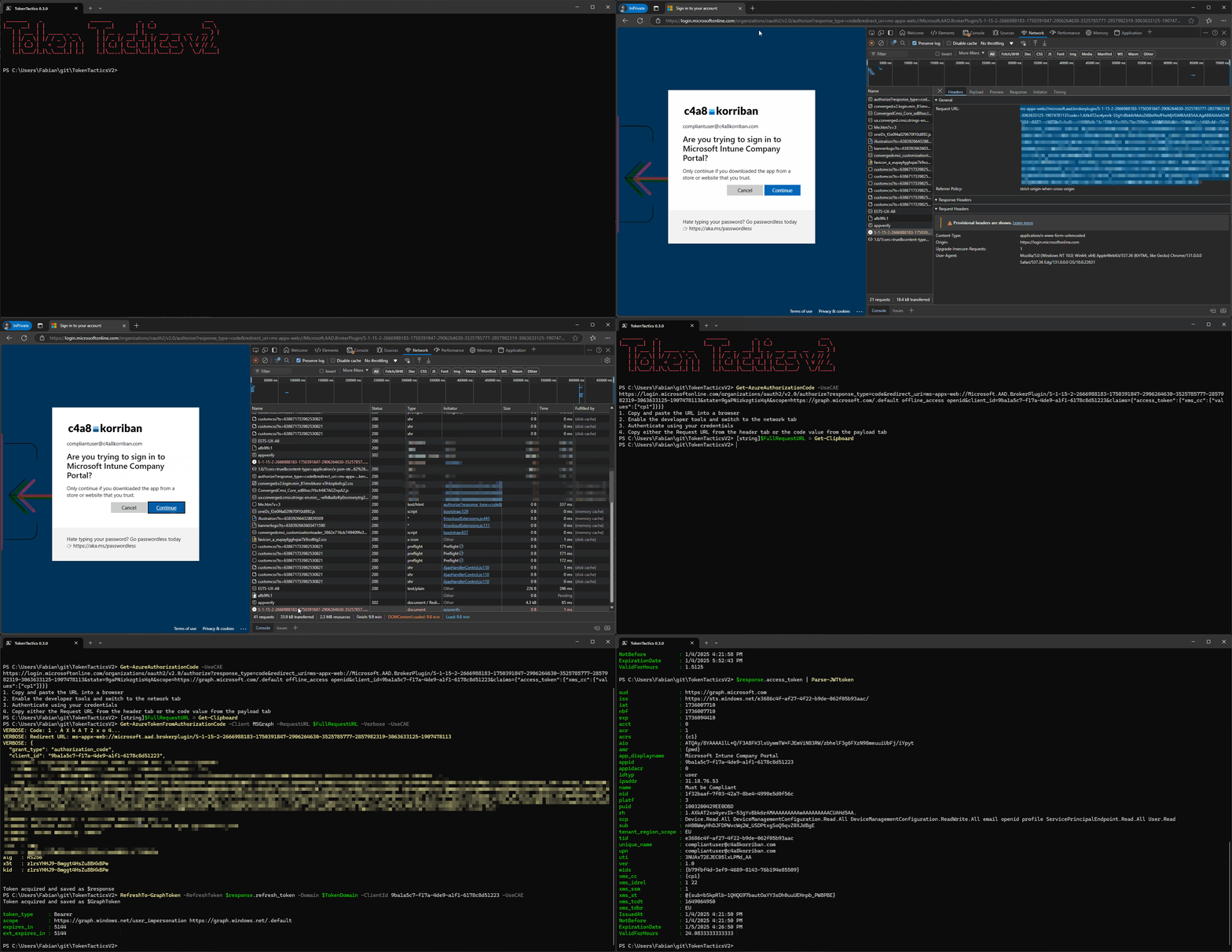
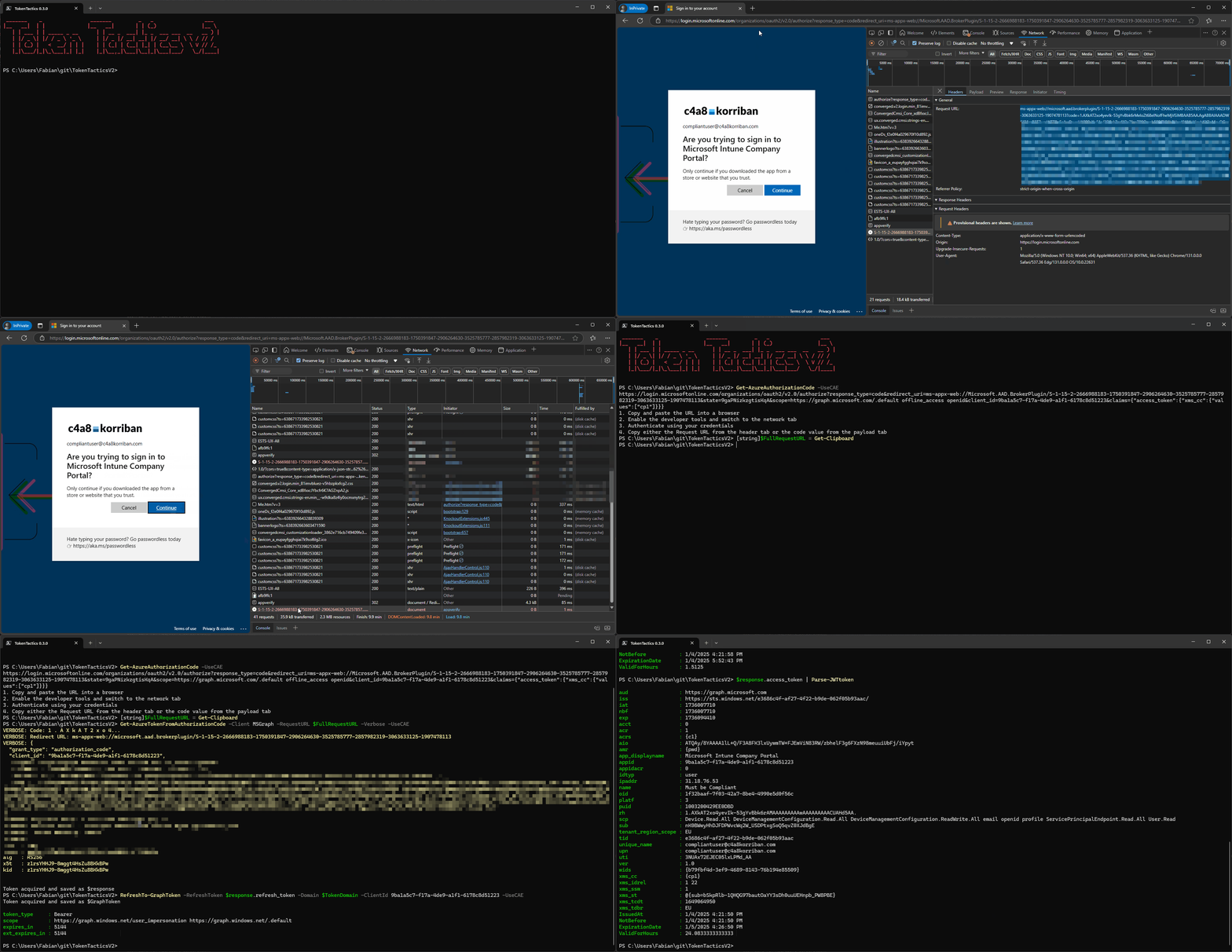
One of the most prominent example for this oauth2 flow (at least at the beginning on 2025) is the Intune Company Portal which allows, for some resources, to bypass device compliance requirements.
This intel was first published by @dirkjan and then released at Black Hat Europe to a wider audience by @TEMP43487580
JumpsecLabs published a blog article and a POC in form of TokenSmith shortly after.
Now the same capabilities are available in TokenTacticsV2.
Get-AzureAuthorizationCode will create a URL you can then use to authenticate to.
Get-EntraIDTokenFromAuthorizationCode uses wither the full URL or can be used with the parameters AuthorizationCode and RedirectUrl to exchange the auth code to an access and refresh token. After that you can try to get access to other resources as always.