
Skip to content
KitploitKITPLOIT
ToolsBlog
Submit
ToolsBlog
Submit

Hacking, PenTest, and Cybersecurity Tools for Your Security Arsenal!

Kitploit is a directory of hacking, cybersecurity, and pentesting tools. Discover the latest project updates to find vulnerabilities, analyze systems, automate testing, and strengthen your security.

··Feeds·Contact·Privacy·© 2026 Kitploit

Tool Directory

Categories

View all categories
Loading categories
CVE-2020-13277 — CVE-2020-13277 靶场: Gitlab 逻辑漏洞 - 任意用户越权访问私有仓库 | Kitploit
Tools/GitHubGitHub/exp-docs/cve-2020-13277
Vulnerability AnalysisExploitationWeb Application ExploitationPenetration TestingLearning & EducationLabs & Practice
GitHubexp-docs/cve-2020-13277

CVE-2020-13277

CVE-2020-13277 靶场: Gitlab 逻辑漏洞 - 任意用户越权访问私有仓库

View Repository
28343 years agoReviewed by Kitploit

Most Popular

View all →

Discover the most used tools by our community.

Explore all tools

Browse our collection of tools

View all tools →
Share

CVE-2020-13277

CVE-2020-13277 Lab: GitLab Logic Vulnerability - Unauthorized User Access to Private Repositories


0x10 Lab Environment

0x20 Directory Structure

root@kitploit:~
CVE-2020-13277
├── README.md ............... [This README file]
├── imgs .................... [Images for README]
├── gitlab .................. [Gitlab container mount directory]
│   ├── Dockerfile .......... [Docker build file for Gitlab]
│   ├── config .............. [Gitlab config mount directory]
│   ├── data ................ [Gitlab data mount directory]
│   ├── logs ................ [Gitlab logs mount directory]
│   ├── keys ................ [Gitlab cracked license storage directory]
│   └── runner .............. [Runner container mount directory]
├── license ................. [Container build directory for cracked license]
│   ├── Dockerfile .......... [Docker build file for License]
│   └── license.rb .......... [Ruby script to generate cracked license]
├── docker-compose.yml ...... [Docker build configuration]
├── keygen.ps1 .............. [Windows: one-click generate cracked license]
├── keygen.sh ............... [Linux:   one-click generate cracked license]
├── run.ps1 ................. [Windows: one-click run Gitlab lab]
├── run.sh .................. [Linux:   one-click run Gitlab lab]
├── register.ps1 ............ [Windows: one-click register Runner]
├── register.sh ............. [Linux:   one-click register Runner]
├── stop.ps1 ................ [Windows: one-click stop Gitlab lab]
└── stop.sh ................. [Linux:   one-click stop Gitlab lab]

0x30 Preliminary Notes

About the Basis for Choosing the Lab Docker Image Version

The core of this vulnerability primarily exploits Mirror Repository - the mirror synchronization backup function of repositories.

Mirror synchronization has two directions:

  • Pull: Pulls the content of a specified Repository into the current Repository
  • Push: Pushes the content of the current Repository to a specified Repository

This vulnerability exploits the Pull direction of Mirror Repository.

It is known that GitLab is divided into two versions: CE (Community Free Edition) and EE (Enterprise Paid Edition), and GitLab officially states that this vulnerability affects the following versions of both CE and EE:

  • >=10.6, <12.9.10
  • >=12.10, <12.10.11
  • >=13.0, <13.0.6

However, this does not mean that all these versions of Gitlab Docker Image can be used to build the lab, because:

  • The CE version of Mirror Repository only has the Push direction
  • The EE version is further divided into Core, Starter, Premium, and Ultimate. From the official feature comparison table, it is known that only the Core version lacks the Pull direction, and all Gitlab-EE Docker Images provide only the Core version

In other words, to build the lab using Docker, you must choose the Gitlab-EE version and crack it (or purchase a License if you are rich) to activate the Mirror Repository - Pull function.

But even after cracking Gitlab-EE, whether it is 10.x, 12.x, or 13.x, when the Mirror Repository - Pull URL contains a local path, it will report an error Import url is blocked: Requests to localhost are not allowed.

Although you can configure a local URL by setting Allow requests to the local network from hooks and services via Admin area => Settings => Network => Outbound requests, synchronizing the mirror will report an error 2:Fetching remote upstream failed: fatal: unable to access http://127.0.0.1/xxxx/: The requested URL returned error: 301. In other words, only Pull Remote Repository is available.

Fortunately, although 12.x and 13.x are very strict in judging local URLs, the 10.x version has a workaround: when configuring the Pull URL, simply use a locally configured DNS service name to bypass.

In summary, the final choice is to use the gitlab-ee:10.6.0-ee.0 version of the Docker Image to build this lab.

In fact, from the above description, it can be seen that the exploitation conditions for this vulnerability are quite strict, and basically poor people are unlikely to be affected by this vulnerability.

0x40 Lab Setup

0x41 Build

  • The host machine must have Docker and Docker Compose pre-installed
  • Download this repository: git clone https://github.com/lyy289065406/CVE-2020-13277
  • Generate cracked key pair: ./keygen.sh or ./keygen.ps1
  • Build and run GitLab (ensure port 80 is not occupied): ./run.sh or ./run.ps1
  • After about 5 minutes, you can log in to GitLab from the browser: http://127.0.0.1 (the first login requires resetting the password of the admin account root)

0x42 Crack

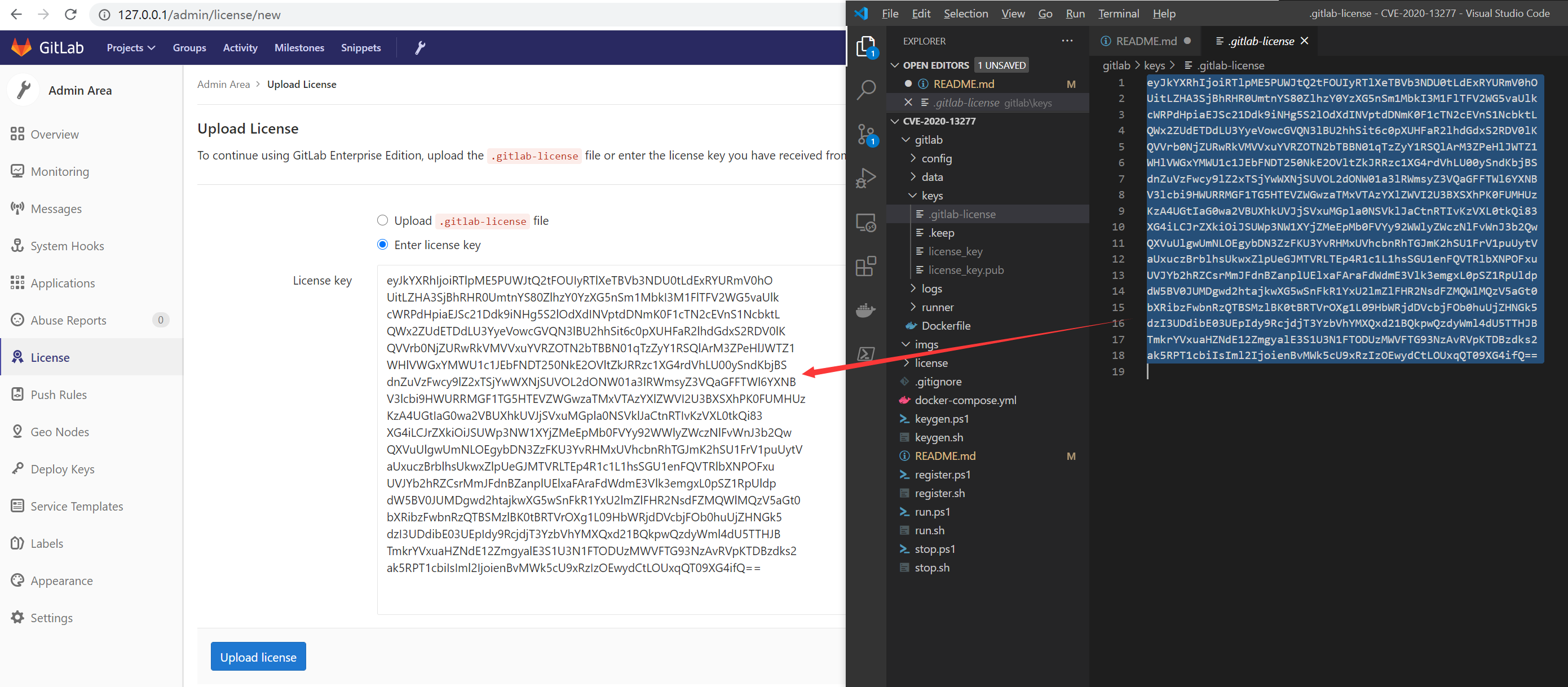
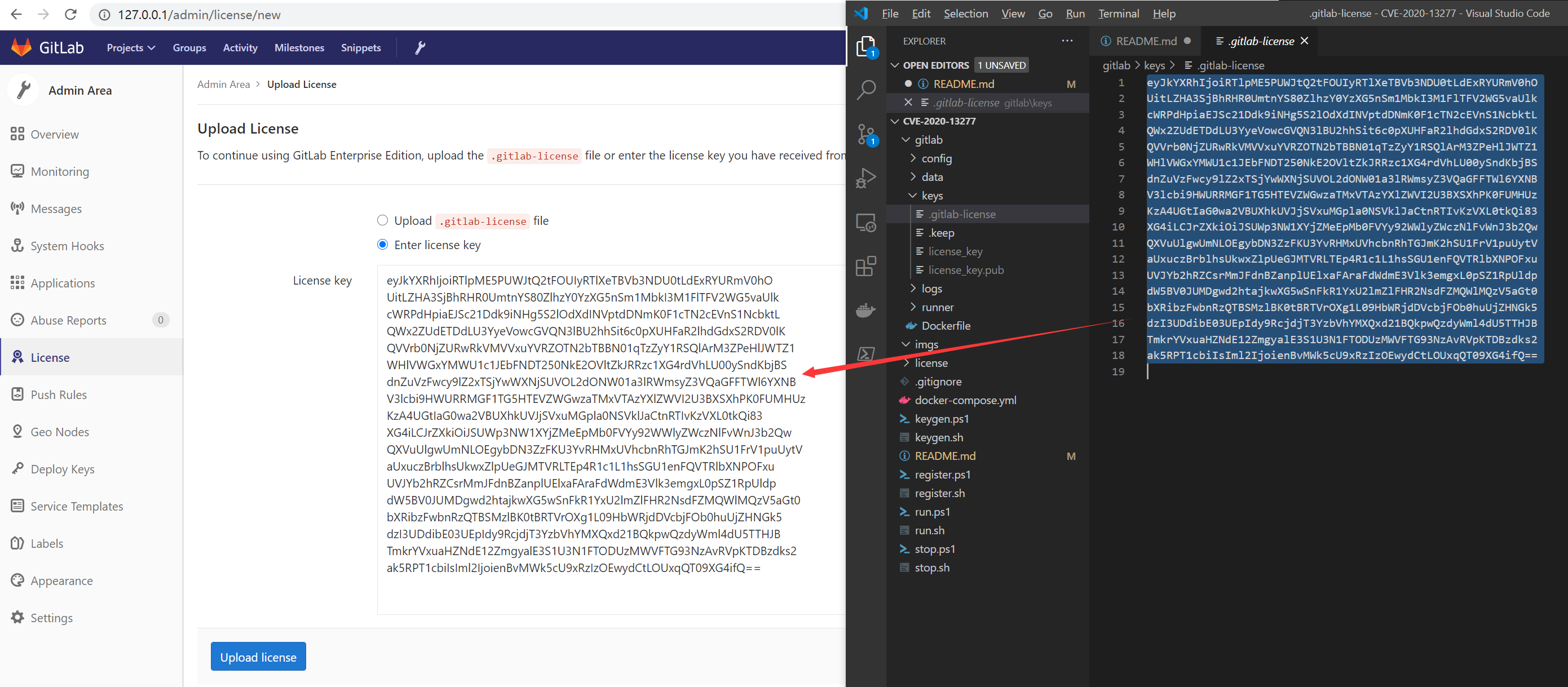
When generating the cracked key pair earlier, the public key has already been written into the GitLab container backend. The private key still needs to be uploaded to GitLab through the frontend to complete the cracking:

  • The key pair is generated in the ./gitlab/keys/ directory, copy the content of .gitlab-license (the private key) from it
  • Open http://127.0.0.1/admin/license/new as the root user
  • Choose Enter license key, paste the private key, and click the Upload license button to complete the cracking

At this point, the Mirror Repository - Pull function is activated
0x43 Outbound Settings

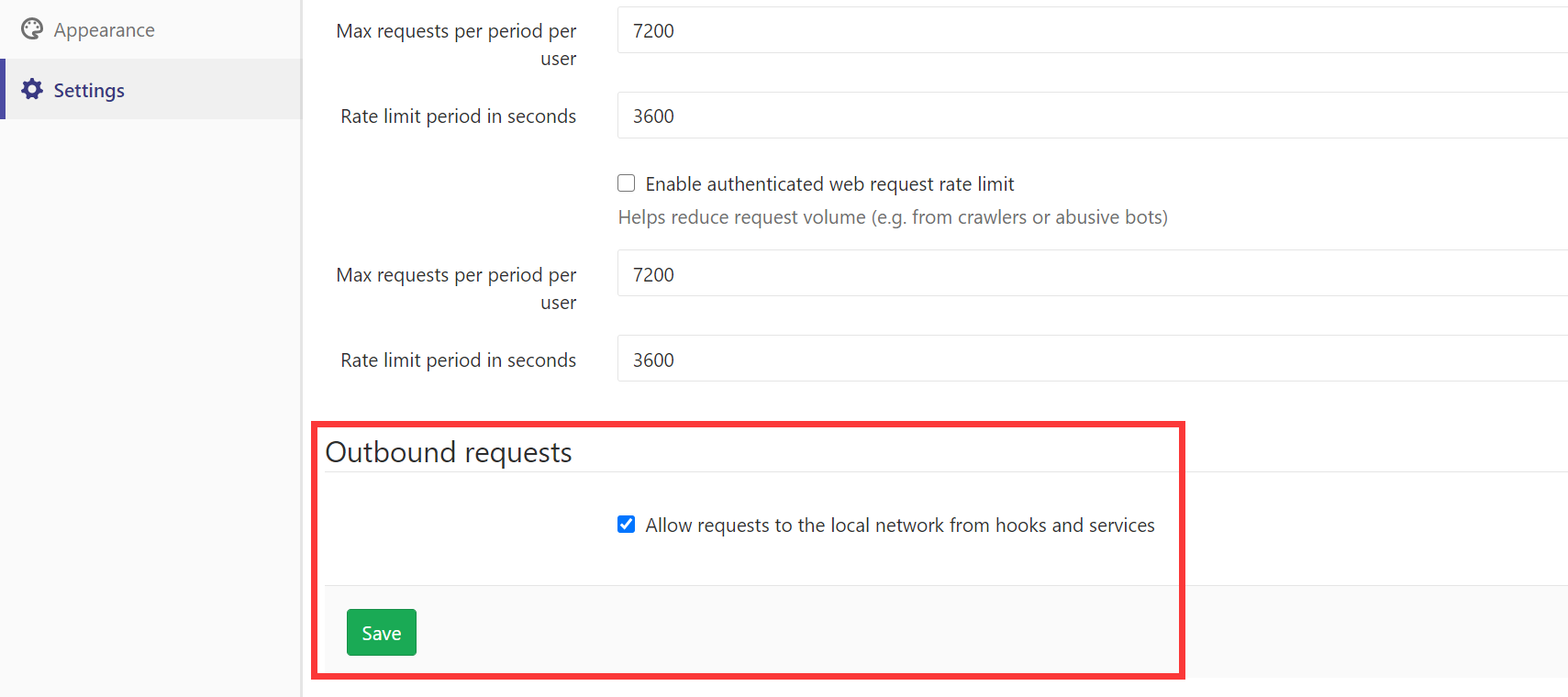
  • Open http://127.0.0.1/admin/application_settings as the root user
  • Find Outbound requests at the very bottom and check Allow requests to the local network from hooks and services, then save

Now Mirror Repository - Pull supports pulling local Repository
0x44 Setup Runner

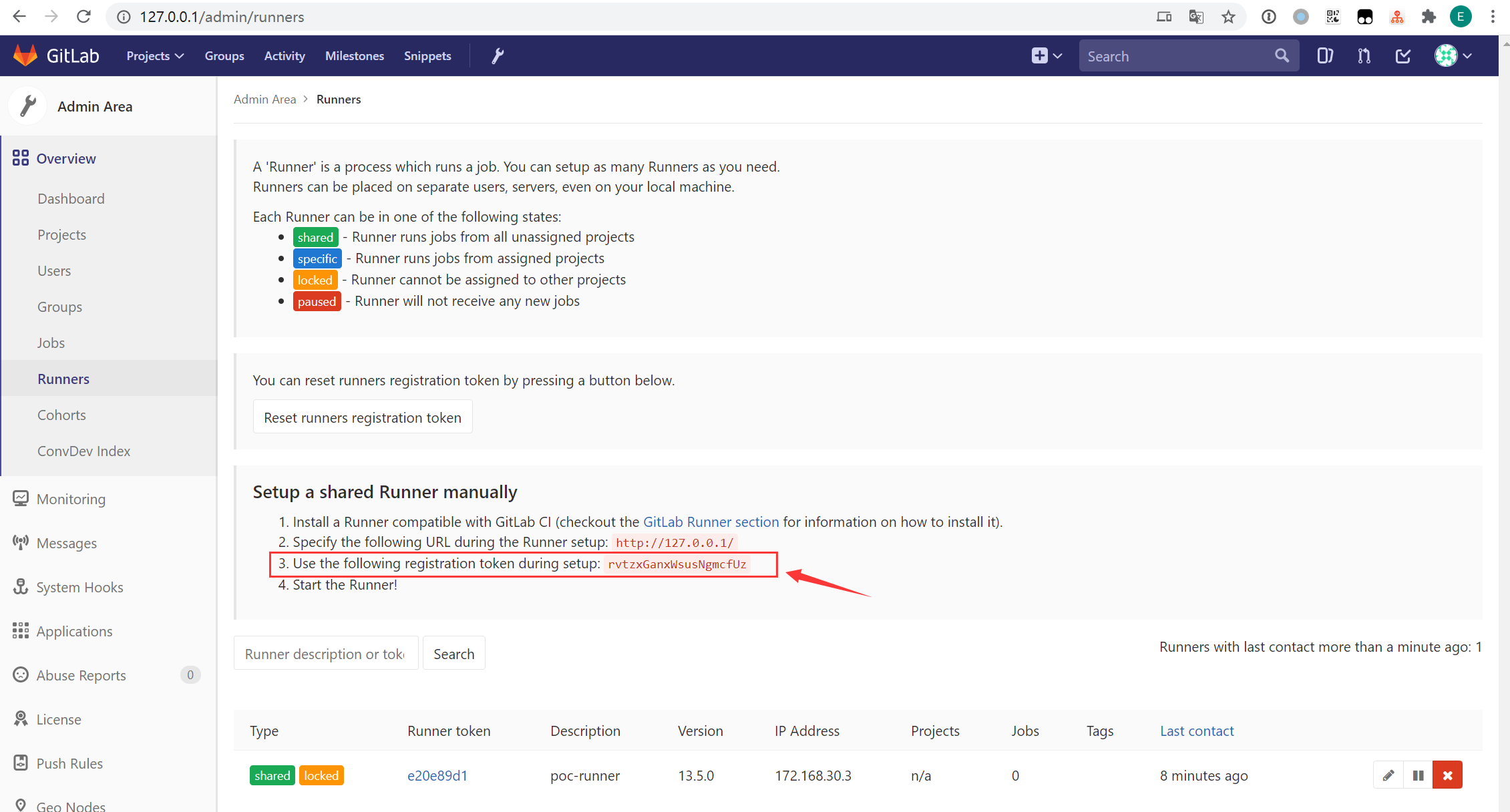
  • Open http://127.0.0.1/admin/runners as the root user
  • Find the registration token and copy it
  • Register the Runner: ./register.sh $TOKEN or ./register.ps1 $TOKEN

Now all Repository can use this Runner to execute CI scripts (Pipeline Jobs)
0x50 Lab Verification

The verification process can refer to the official Issue, but the following verification process will be slightly adjusted for this lab.

0x51 Pre-build Accounts for Verification

Open http://127.0.0.1/admin/users as the root user to create 3 accounts:

  • victim: victim account
  • attacker1: attacker account 1
  • attacker2: attacker account 2

When creating an account, you cannot set an initial password. GitLab will push the initial password to the set Email by default. For convenience, you can fill in any Email, create the account, and then immediately edit the account. At that point, you can set the initial password for the account as root without going through Email.

0x52 Pre-build Victim Repository

  • Log in to GitLab with the victim account
  • Create a new project New Project:
    • Name: target
    • Visibility Level: Private
  • Create a new README.md file in the repository, set its content arbitrarily as mykey is abcxyz

Obviously, target is the private repository of victim, and our goal is to exploit the vulnerability to obtain the content of this repository.

0x53 Create Attacker's Poc Repository

  • Log in to GitLab with the attacker1 account
  • Create a new project New Project:
    • Name: poc
    • Visibility Level: Public
  • Create a new file .gitlab-ci.yml in the repository with the following content:
root@kitploit:~
image: "ruby:2.6"

rspec:  
  script:  
    - git clone http://gitlab-ci-token:[email protected]/victim/target.git
    - cd target
    - ls -lah .  
    - cat README.md

[Purpose] In the following operations, some tricks will be used to make victim execute this CI script with its privileges without its knowledge.

Because the current lab has no certificate configured, only the http protocol can be used; additionally, 172.168.30.2 is the IP assigned by docker-compose.yml to the GitLab container. Since this CI script will eventually be executed by the Runner, and the Runner and GitLab are not in the same container in the current lab, the IP assigned by Docker must be used.

0x53 Create Attacker's Poc Mirror Repository

  • Log in to GitLab with the attacker2 account
  • Create a new group New Group:
    • Name: test
    • Visibility Level: Public
  • Create a completely empty project New Project within the test group:
    • Name: poc
    • Visibility Level: Public

Configure the mirror repository via Settings => Repository => Pull from a remote repository:

  • Mirror repository: Checked
  • Git repository URL: Enter http://GITLAB/attacker1/poc
  • Password: (Leave blank, the pulled repository is Public, no password required)
  • Trigger pipelines for mirror updates: Checked (triggers CI script execution on mirror sync)

After successful configuration, it will check every 30 minutes if the source repository has changed; if it has, a forced sync will be performed.

The Git repository URL points to the poc repository created earlier. The reason for not using 127.0.0.1 is that Pull is prohibited from pulling local repositories, but this can be bypassed using DNS: GITLAB is the hostname assigned to the GitLab container by docker-compose.yml, and it is set in /etc/hosts by default. Although the host machine cannot resolve GITLAB, inside the container it effectively accesses http://127.0.0.1/attacker1/poc

0x54 Force Transfer Ownership of Poc Mirror Repository to Victim

  • Continue using the attacker2 account
  • Open http://127.0.0.1/groups/test/-/group_members to manage users of the test group
  • Add the victim user to the group:
    • Add new member to test: victim
    • Permissions: Owner
    • Expiration date: (Leave blank, i.e., no expiration)
  • Click the account avatar in the top right corner => Setting => Account => Delete account to delete the current account (attacker2)

[Purpose] In the test group, there are only two Owner users: victim and attacker2. After the attacker2 user is deleted, the ownership of the test group and all repositories under it will be forcibly transferred to victim. Currently, under the test group, there is a test/poc repository that is mirrored from attacker1/poc. This effectively means the test/poc repository is forcibly adopted by the victim user.

0x55 Launch Attack

First, let's summarize the current situation:

  • The attacker forcibly and secretly created a test/poc repository for the victim victim
  • The content of the test/poc repository is synchronized via mirror from the attacker1/poc repository (checks every 30 minutes for changes requiring sync)
  • The content of the attacker1/poc repository is controlled by the attacker, including the CI script .gitlab-ci.yml
  • Because the test/poc repository has Trigger pipelines for mirror updates enabled, the CI script will be executed during each sync
  • Because the Owner of the test/poc repository is victim, the CI script will run with the privileges of victim

Review the content of the previously set CI script .gitlab-ci.yml. This poc uses victim's privileges in the Runner to access the directory structure and README.md of its Private repository target:

root@kitploit:~
image: "ruby:2.6"

rspec:  
  script:  
    - git clone http://gitlab-ci-token:[email protected]/victim/target.git
    - cd target
    - ls -lah .  
    - cat README.md

After that, the attacker only needs to arbitrarily modify some irrelevant content in the attacker1/poc repository. In the worst case, just wait 30 minutes, and the set CI script will be executed with victim's privileges.

Although the attacker does not have direct permission to access the execution results of Pipeline Jobs, they only need to adjust the output target of the script, such as sending the repository content to a specified Email or FTP server, to steal the repository code.

Download Tool