 elceef/dnstwist
Domain name permutation engine for detecting homograph phishing attacks, typo squatting, and brand impersonation


See what sort of trouble users can get in trying to type your domain name. Find lookalike domains that adversaries can use to attack you. Can detect typosquatters, phishing attacks, fraud, and brand impersonation. Useful as an additional source of targeted threat intelligence.
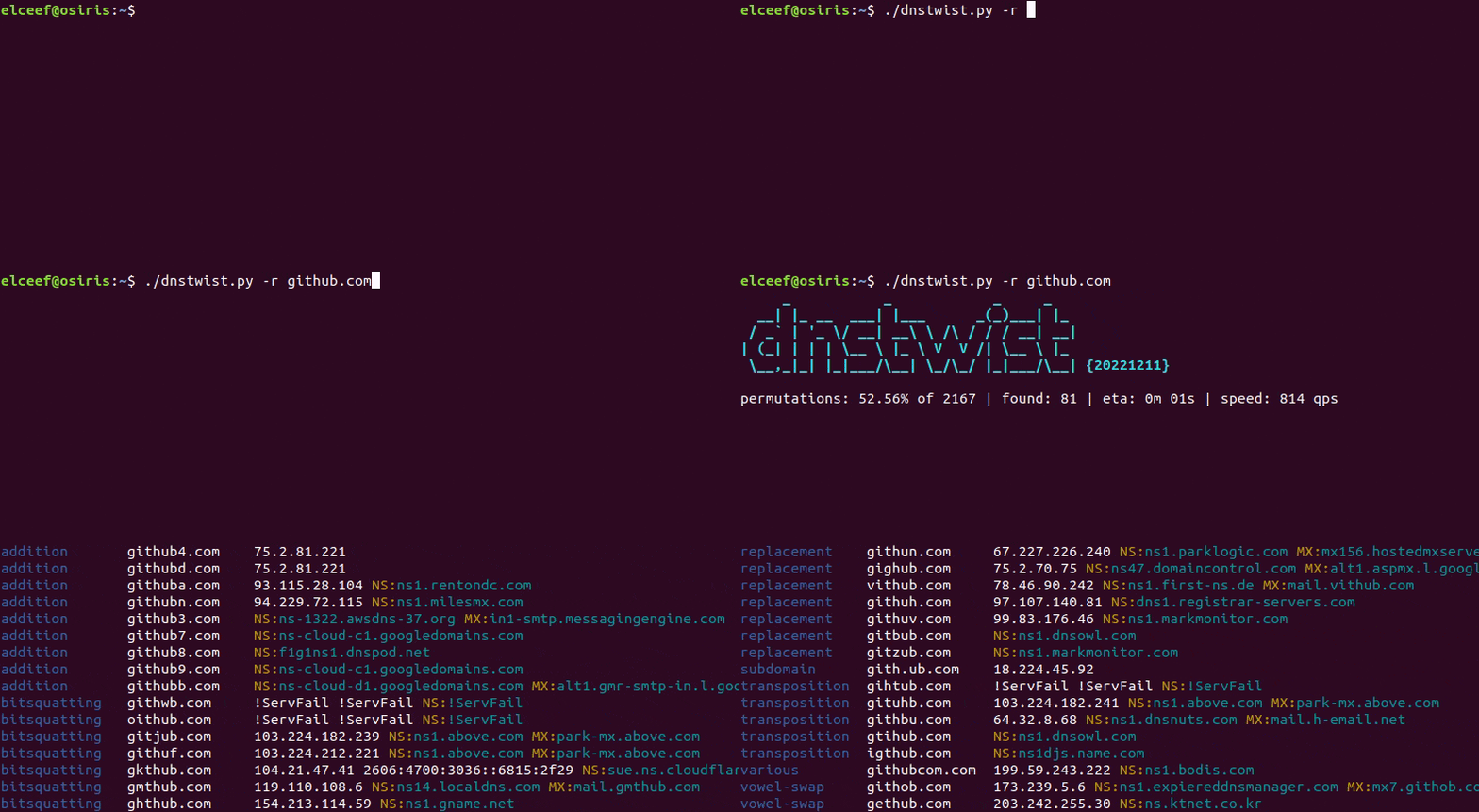
DNS fuzzing is an automated workflow that aims to uncover potentially malicious domains that target your organization. This tool generates a comprehensive list of permutations based on a provided domain name, and subsequently verifies whether any of these permutations are in use. Additionally, it can generate fuzzy hashes of web pages to detect ongoing phishing attacks or brand impersonation, and much more!
In a hurry? Try it in your web browser: dnstwist.it
Python PIP
$ pip install dnstwist[full]
Alternatively install the bare minimum and add other requirements manually depending on your needs:
$ pip install dnstwist
Git
If you want to run the latest version of the code, you can install it from Git:
$ git clone https://github.com/elceef/dnstwist.git
$ cd dnstwist
$ pip install .
Debian/Ubuntu/Kali Linux
Invoke the following command to install the tool with all extra packages:
$ sudo apt install dnstwist
Fedora Linux
$ sudo dnf install dnstwist
Arch Linux User Repository (yay)
$ yay -S dnstwist
macOS
This will install dnstwist along with all dependencies, and the binary will
be added to $PATH.
$ brew install dnstwist
Docker
Pull and run official image from the Docker Hub:
$ docker run -it elceef/dnstwist
Alternatively you can build your local images:
$ docker build -t dnstwist .
$ docker build -t dnstwist:phash --build-arg phash=1 .
The tool will run the provided domain name through its fuzzing algorithms and generate a list of potential phishing domains along with DNS records.
Usually thousands of domain permutations are generated - especially for longer input domains. In such cases, it may be practical to display only the ones that are registered:
$ dnstwist --registered domain.name
Ensure your DNS server can handle thousands of requests within a short period
of time. Otherwise, you can specify an external DNS or DNS-over-HTTPS server
with --nameservers argument.
If domain permutations generated by the fuzzing algorithms are insufficient,
please supply dnstwist with a dictionary file. Some dictionary samples with
a list of the most common words used in phishing campaigns are included.
$ dnstwist --dictionary dictionaries/english.dict domain.name
If you need to check whether domains with different TLD exist, just supply a dictionary file with the list of TLD.
$ dnstwist --tld dictionaries/common_tlds.dict domain.name
On the other hand, if only selected algorithms need to be used, --fuzzers
argument is available, which takes a comma-separated list.
$ dnstwist --fuzzers "homoglyph,hyphenation" domain.name
Apart from the colorful terminal output, the tool allows exporting results to CSV and JSON:
$ dnstwist --format csv domain.name | column -t -s,
$ dnstwist --format json domain.name | jq
In case you need just the bare permutations without making any DNS lookups, use
--format list argument:
$ dnstwist --format list domain.name
The tool can perform real-time lookups to return geographical location (approximated to the country) of IPv4 addresses.
$ dnstwist --geoip domain.name
The GeoIP2 library is used by default. Country database location has to be
specified with $GEOLITE2_MMDB environment variable. If the library or the
database are not present, the tool will fall-back to the older GeoIP Legacy.
To display all available options with brief descriptions simply execute the tool without any arguments.
Manually checking each domain name in terms of serving a phishing site might be
time-consuming. To address this, dnstwist makes use of so-called fuzzy hashes
(locality-sensitive hash, LSH) and perceptual hashes (pHash). Fuzzy hashing is
a concept that involves the ability to compare two inputs (HTML code) and
determine a fundamental level of similarity, while perceptual hash is
a fingerprint derived from visual features of an image (web page screenshot).
Fuzzy hashing
The unique feature of detecting similar HTML source code can be enabled with
--lsh argument. For each generated domain, dnstwist will fetch content
from responding HTTP server (following possible redirects), normalize HTML code
and compare its fuzzy hash with the one for the original (initial) domain. The
level of similarity is expressed as a percentage.
In cases when the effective URL is the same as for the original domain, the fuzzy hash is not calculated at all in order to reject false positive indications.
Note: Keep in mind it's rather unlikely to get 100% match, even for MITM attack frameworks, and that a phishing site can have a completely different HTML source code.
$ dnstwist --lsh domain.name
In some cases, phishing sites are served from a specific URL. If you provide a
full or partial URL address as an argument, dnstwist will parse it and apply
for each generated domain name variant. Use --lsh-url to override URL to
fetch the original web page from.
$ dnstwist --lsh https://domain.name/owa/
$ dnstwist --lsh --lsh-url https://different.domain/owa/ domain.name
By default, ssdeep is used as LSH algorithm, but TLSH is also available and can be enabled like so:
$ dnstwist --lsh tlsh domain.name
Perceptual hashing
If Chromium browser is installed, dnstwist can utilize its headless mode,
which operates without a graphical user interface, to capture web page
screenshots, render them, and calculate pHash values. These pHash values are
then compared to evaluate the visual similarity, expressed as a percentage.
$ dnstwist --phash domain.name
Moreover, it is possible to save the captured screenshots in the PNG format to a location of choice:
$ dnstwist --phash --screenshots /tmp/domain domain.name
Note: Due to the multi-threaded use of a fully functional web browser, an appropriate amount of free resources (mainly memory) should be provided.
Proxy support
For all HTTP connections, proxies are automatically used when the presence of
environment variables named $<scheme>_proxy, in a case insensitive approach,
is detected. If both lowercase and uppercase environment variables exist,
lowercase is preferred.
In case you need to consume the data produced by the tool within your code, the most convenient and efficient way is to pass the input as follows.
>>> import dnstwist
>>> data = dnstwist.run(domain='domain.name', registered=True, format='null')
To work in a completely passive operating mode and produce just domain permutations, it is required to combine the list format with output redirection to the null device.
>>> dnstwist.run(domain='domain.name', format='list', output=dnstwist.devnull)
