 dndx/phantun
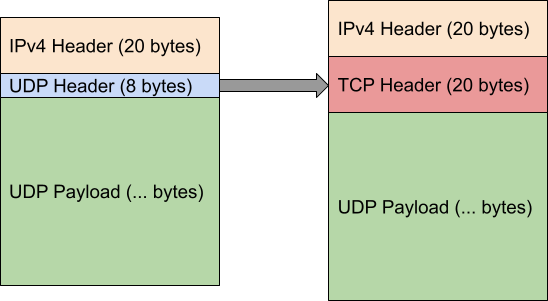
Transforms UDP stream into (fake) TCP streams that can go through Layer 3 & Layer 4 (NAPT) firewalls/NATs.

A lightweight and fast UDP to TCP obfuscator.

Rust only provides Tier 3 supports for MIPS based platforms since 2023. Phantun's MIPS build are therefore built using nightly Rust toolchain and provided on a best effort basis only.
Phantun is a project that obfuscated UDP packets into TCP connections. It aims to achieve maximum performance with minimum processing and encapsulation overhead.
It is commonly used in environments where UDP is blocked/throttled but TCP is allowed through.
Phantun simply converts a stream of UDP packets into obfuscated TCP stream packets. The TCP stack used by Phantun is designed to pass through most L3/L4 stateful/stateless firewalls/NAT devices. It will not be able to pass through L7 proxies. However, the advantage of this approach is that none of the common UDP over TCP performance killer such as retransmissions and flow control will occur. The underlying UDP properties such as out-of-order delivery are fully preserved even if the connection ends up looking like a TCP connection from the perspective of firewalls/NAT devices.
Phantun means Phantom TUN, as it is an obfuscator for UDP traffic that does just enough work to make it pass through stateful firewall/NATs as TCP packets.
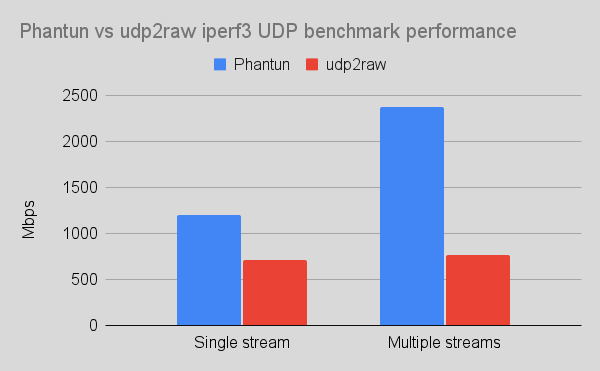
Phantun is written in 100% safe Rust. It has been optimized extensively to scale well on multi-core systems and has no issue saturating all available CPU resources on a fast connection. See the Performance section for benchmarking results.
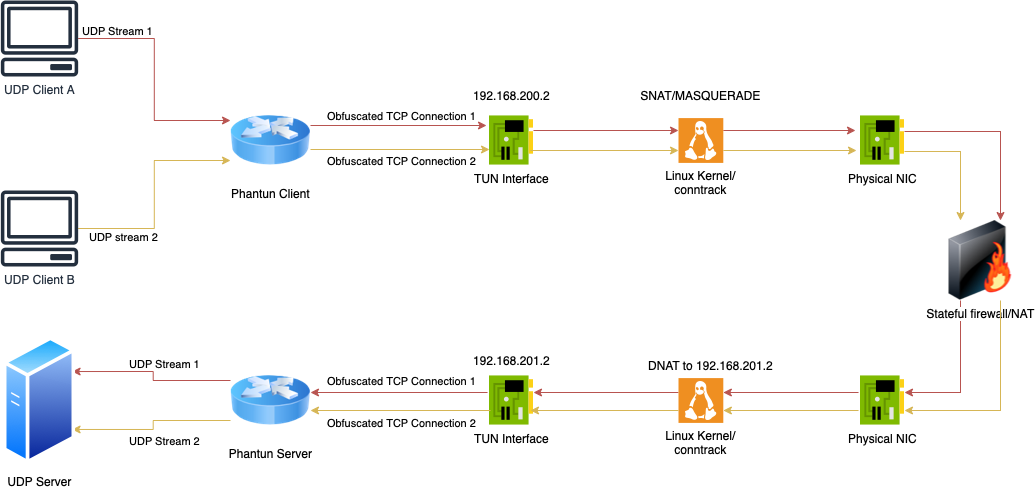
For the example below, it is assumed that Phantun Server listens for incoming Phantun Client connections at
port 4567 (the --local option for server), and it forwards UDP packets to UDP server at 127.0.0.1:1234
(the --remote option for server).
It is also assumed that Phantun Client listens for incoming UDP packets at
127.0.0.1:1234 (the --local option for client) and connects to Phantun Server at 10.0.0.1:4567
(the --remote option for client).
Phantun creates TUN interface for both the Client and Server. For Client, Phantun assigns itself the IP address
192.168.200.2 and fcc8::2 by default.
For Server, it assigns 192.168.201.2 and fcc9::2 by default. Therefore, your Kernel must have
IPv4/IPv6 forwarding enabled and setup appropriate iptables/nftables rules for NAT between your physical
NIC address and Phantun's Tun interface address.
You may customize the name of Tun interface created by Phantun and the assigned addresses. Please
run the executable with -h options to see how to change them.
Another way to help understand this network topology (please see the diagram above for an illustration of this topology):
Phantun Client is like a machine with private IP address (192.168.200.2/fcc8::2) behind a router.
In order for it to reach the Internet, you will need to SNAT the private IP address before it's traffic
leaves the NIC.
Phantun Server is like a server with private IP address (192.168.201.2/fcc9::2) behind a router.
In order to access it from the Internet, you need to DNAT it's listening port on the router
and change the destination IP address to where the server is listening for incoming connections.
In those cases, the machine/iptables running Phantun acts as the "router" that allows Phantun to communicate with outside using it's private IP addresses.
As of Phantun v0.4.1, IPv6 is fully supported for both TCP and UDP sides.
To specify an IPv6 address, use the following format: [::1]:1234 with
the command line options. Resolving AAAA record is also supported. Please run the program
with -h to see detailed options on how to control the IPv6 behavior.
Edit /etc/sysctl.conf, add net.ipv4.ip_forward=1 and run sudo sysctl -p /etc/sysctl.conf.
net.ipv6.conf.all.forwarding=1 will need to be set as well.
Client simply need SNAT enabled on the physical interface to translate Phantun's address into one that can be used on the physical network. This can be done simply with masquerade.
Note: change eth0 to whatever actual physical interface name is
table inet nat {
    chain postrouting {
        type nat hook postrouting priority srcnat; policy accept;
        iifname tun0 oif eth0 masquerade
    }
}
Note: The above rule uses inet as the table family type, so it is compatible with
both IPv4 and IPv6 usage.
iptables -t nat -A POSTROUTING -o eth0 -j MASQUERADE
ip6tables -t nat -A POSTROUTING -o eth0 -j MASQUERADE
Server needs to DNAT the TCP listening port to Phantun's TUN interface address.
Note: change eth0 to whatever actual physical interface name is and 4567 to
actual TCP port number used by Phantun server
table inet nat {
    chain prerouting {
        type nat hook prerouting priority dstnat; policy accept;
        iif eth0 tcp dport 4567 dnat ip to 192.168.201.2
        iif eth0 tcp dport 4567 dnat ip6 to fcc9::2
    }
}
iptables -t nat -A PREROUTING -p tcp -i eth0 --dport 4567 -j DNAT --to-destination 192.168.201.2
ip6tables -t nat -A PREROUTING -p tcp -i eth0 --dport 4567 -j DNAT --to-destination fcc9::2
It is ill-advised to run network facing applications as root user. Phantun can be run fully
as non-root user with the cap_net_admin capability.
sudo setcap cap_net_admin=+pe phantun_server
sudo setcap cap_net_admin=+pe phantun_client
Note: Run Phantun executable with -h option to see full detailed options.

