IPBan - Free software to block out attackers quickly and easily on Linux and Windows



Helpful Links
Requirements
- IPBan free version requires .NET 9 SDK to build and debug code. For an IDE, I suggest Visual Studio Community for Windows, or VS code for Linux. All are free. You can build a self contained executable to eliminate the need for dotnet core on the server machine, or just download the precompiled binaries in releases.
- Running and/or debugging code requires that you run your IDE or terminal as administrator or root.
- Officially supported platforms:
- Windows 10 or newer (x86, x64)
- Windows Server 2016 or newer (x86, x64)
- Windows Server 2025 or newer requires IPBan 2.0.1 or newer.
- Linux Ubuntu x64, arm, arm64 (requires firewalld, nftables, or iptables)
- Linux Debian x64, arm, arm64 (requires firewalld, nftables, or iptables)
- Linux CentOS x64, arm, arm64 (requires firewalld, nftables, or iptables)
- Linux RedHat x64, arm, arm64 (requires firewalld, nftables, or iptables)
- Mac OS X not supported at this time
Features
- Auto ban ip addresses by detecting failed logins from event viewer and/or log files. On Linux, SSH is watched by default. On Windows, RDP, OpenSSH, VNC, MySQL, SQL Server, Exchange, SmarterMail, MailEnable are watched. More applications can easily be added via config file.
- Additional recipes for event viewer and log files are here: https://github.com/DigitalRuby/IPBan/tree/master/Recipes
- Highly configurable, many options to determine failed login count threshold, time to ban, etc.
- Make sure to check out the ipban.config file (formerly named DigitalRuby.IPBan.dll.config, see IPBanCore project) for configuration options, each option is documented with comments.
- Banning happens basically instantly for event viewer. For log files, you can set how often it polls for changes.
- Very fast - I've optimized and tuned this code since 2012. The bottleneck is pretty much always the firewall implementation, not this code.
- Unban ip addresses easily by placing an unban.txt file into the service folder with each ip address on a line to unban.
- Works with ipv4 and ipv6 on all platforms.
- Please visit the wiki at https://github.com/DigitalRuby/IPBan/wiki for lots more documentation.
Download
Install
Please note that for IPBan Pro, you can find install instructions at https://ipban.com/ipban-pro-install-instructions/. These install instructions here on github are for the free IPBan version.
Windows
- IPBan is supported on Windows Server 2016 and Windows 10, or newer.
- Fail2Ban but for Windows!
- Easy one click install, open admin powershell and run:
$ProgressPreference = 'SilentlyContinue'; [Net.ServicePointManager]::SecurityProtocol = [Net.SecurityProtocolType]::Tls12; iex ((New-Object System.Net.WebClient).DownloadString('https://raw.githubusercontent.com/DigitalRuby/IPBan/master/IPBanCore/Windows/Scripts/install_latest.ps1'))
Note: Powershell 5.1 or greater is required.
Advanced Installation Options
The installer script supports additional parameters for customization. Due to PowerShell parameter validation introduced in recent updates, you must explicitly specify the startupType parameter when using the one-liner installation command.
Installation with custom startup type:
$ProgressPreference = 'SilentlyContinue'; [Net.ServicePointManager]::SecurityProtocol = [Net.SecurityProtocolType]::Tls12; iex "& { $((New-Object System.Net.WebClient).DownloadString('https://raw.githubusercontent.com/DigitalRuby/IPBan/master/IPBanCore/Windows/Scripts/install_latest.ps1')) } -startupType 'delayed-auto'"
Replace 'delayed-auto' with 'auto' if you want the service to start immediately on boot (provides immediate protection but may have compatibility issues).
Available parameters:
-startupType: Service startup type - 'delayed-auto' (default, safer) or 'auto' (immediate boot protection)-silent: $True for non-interactive installation, $False (default) for interactive mode-autostart: $True (default) to start service immediately after installation, $False to leave stopped-uninstall: 'uninstall' or 'u' to uninstall IPBan
Example with multiple parameters:
$ProgressPreference = 'SilentlyContinue'; [Net.ServicePointManager]::SecurityProtocol = [Net.SecurityProtocolType]::Tls12; iex "& { $((New-Object System.Net.WebClient).DownloadString('https://raw.githubusercontent.com/DigitalRuby/IPBan/master/IPBanCore/Windows/Scripts/install_latest.ps1')) } -startupType 'auto' -silent `$True -autostart `$True"
Note: The 'delayed-auto' startup type waits for higher priority services to start first, leaving the system briefly unprotected after boot. The 'auto' option provides immediate protection on boot but may encounter compatibility issues with some system configurations. If you choose 'auto', verify the service starts correctly after reboot.
Additional Windows Notes
- Windows Server 2012 is no longer supported as of October 2023. Please upgrade to a different operating system that is actually supported by Microsoft.
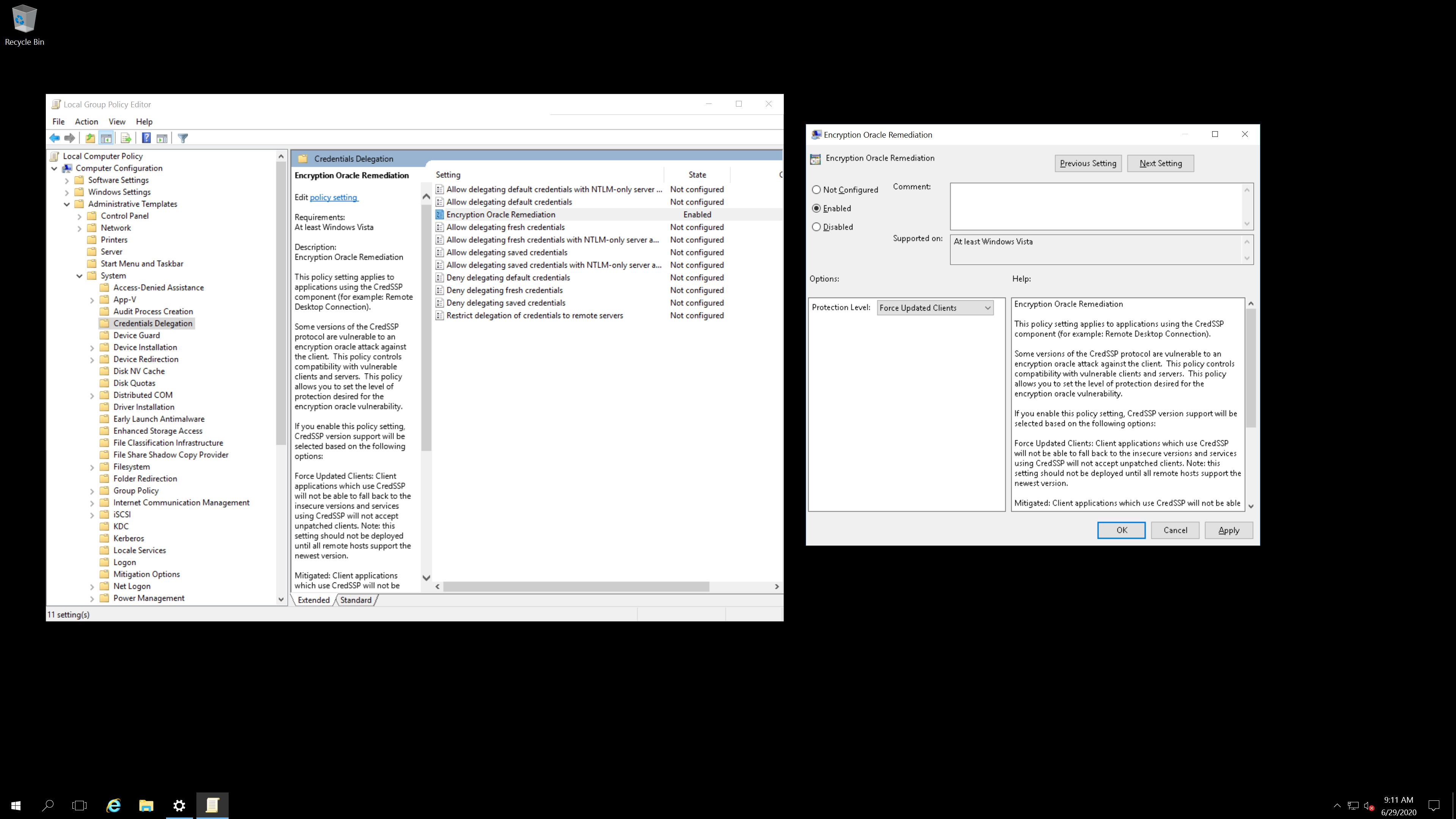
- Please ensure your server and clients are patched before making the above change: https://support.microsoft.com/en-us/help/4093492/credssp-updates-for-cve-2018-0886-march-13-2018. You need to manually edit group policy as specified in the link.
- On Windows Server running Exchange, it is impossible to disable NTLM (deny all clients in Security restrict ntlm incoming ntlm traffic) as then Outlook on client computers permanently asks users for entering username and password. To workaround this, set LAN Manager authenticating level in Security Options of Local Policies to "Send NTLMv2 response only. Refuse LM & NTLM". There is one small issue – when somebody tries to login with an undefined username, the log does not contain an IP address. Not sure why Microsoft can't log an ip address properly.
- If using Exchange, disabling app pool 'MSExchangeServicesAppPool' can eliminate quite a lot of problems in the event viewer with ip addresses not being logged.
- Uninstaller: https://github.com/DigitalRuby/IPBan/blob/master/IPBanCore/Windows/Scripts/uninstall.cmd
Linux
Easy one click install:
sudo -i; bash <(wget -qO- https://raw.githubusercontent.com/DigitalRuby/IPBan/master/IPBanCore/Linux/Scripts/Install.sh)
Uninstall: sudo systemctl stop ipban; sudo systemctl disable ipban; sudo rm /opt/ipban -r
Sign up for the IPBan Mailing List
Upgrade
 digitalruby/ipban
