 derv82/wifit3
Wifite but USB-only & cross-platform.

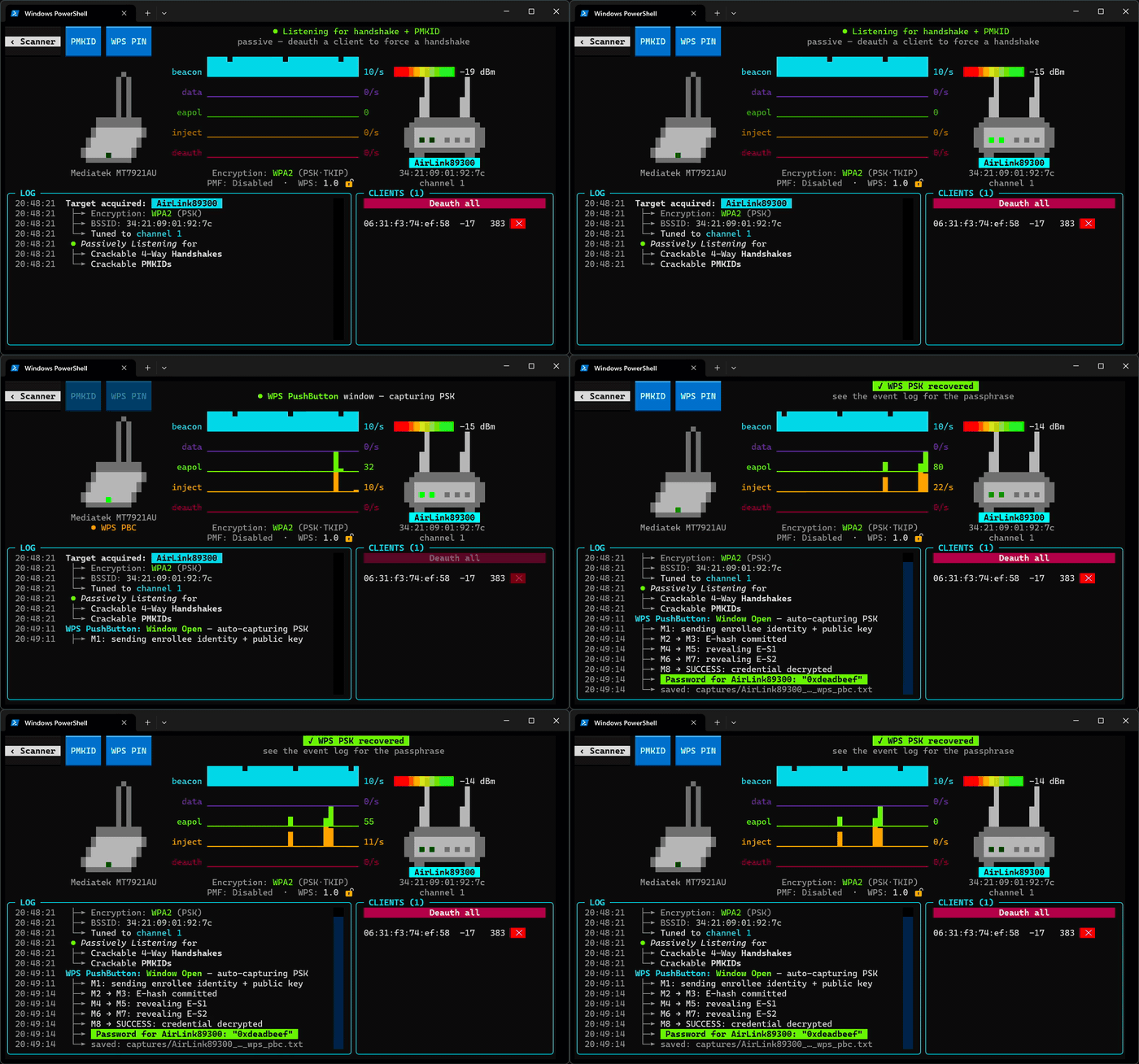
# wifit3 > A standalone USB Wi-Fi auditor for Linux, Windows, and macOS. <p align="center"> <img src="https://assets.kitploit.com/production/public/readmes/50012/04606166e4819097d373eac8e473da43c3c80449f1e3c4ed8b2652ada7a80d96.png" alt="wifit3 splash / adapter picker" width="700"> </p> > *At least* one of the [supported USB adapters](#supported-hardware) is **required**. ## Why? * **Cross-Platform:** Runs identically on Linux, macOS, and Windows. * **Wireless Driver Heaven:** Built-in wireless stack avoids kernel driver versioning hell and Windows' NDIS. * **Zero Runtime Dependencies:** No `aircrack-ng` or `reaver`, just pure Python with PyUSB & Textual libraries. <p align="center"> <img src="https://assets.kitploit.com/production/public/readmes/50012/2efdf06fe93e90c9b114d815ee6a0f847a42f4259fba335ee71e94a3c6c88fa6.gif" alt="wifit3 in action: WPS PushButton PSK capture" width="700"> </p> --- ## Features ### Reconnaissance & Analysis - **Multi-Card Aggregation:** Capture packets across multiple adapters simultaneously; pick a dedicated card to inject. - **Real-time Scanner:** 2.4GHz & 5GHz channel-hopping (split for multi-cards); tracks signal strength, encryption suites, WPA3/SAE transition modes. - **AP & Client Identification:** Fingerprints device vendors and categories; extracts router make and model from WPS beacons. - **VAP Decloaking:** Identifies hidden networks by correlating their BSSIDs with known visible siblings. - **Packet Dashboard:** Visualizes real-time beacon, data, injection, and deauthentication packet rates. ### Attacks & Captures - **WPA/WPA2 Handshakes:** Passive sniffing and targeted deauthentication; validates crackable pairs; exports `.pcap` and `.hc22000` files. - **PMKID Harvesting:** Active association harvest and passive sniffing for WPA/WPA2 PMKID key material (`.hc22000`). - **EvilTwin WPA3 Downgrade:** Clones the AP and evicts clients (via CSA, BTM, and de-auths) to capture handshakes. Works on single and multiple cards. - **WPS Recovery Suite:** - **PixieDust (2 Modes):** Instant offline PIN recovery exploiting *Null Secret* and *Static Secret* PRNG weaknesses. - **PushButton (PBC):** Detects physical WPS button presses and immediately extracts the plaintext WPA PSK. - **PIN Brute-Force:** Resumable WPS PIN cracking with known-PIN database and AP lock monitoring. - **WEP Suite:** Pure Python ARP replay, ChopChop, Fake Authentication, and PTW key recovery. ## Screenshots | Scanner | Focus (single target) | |---|---| | 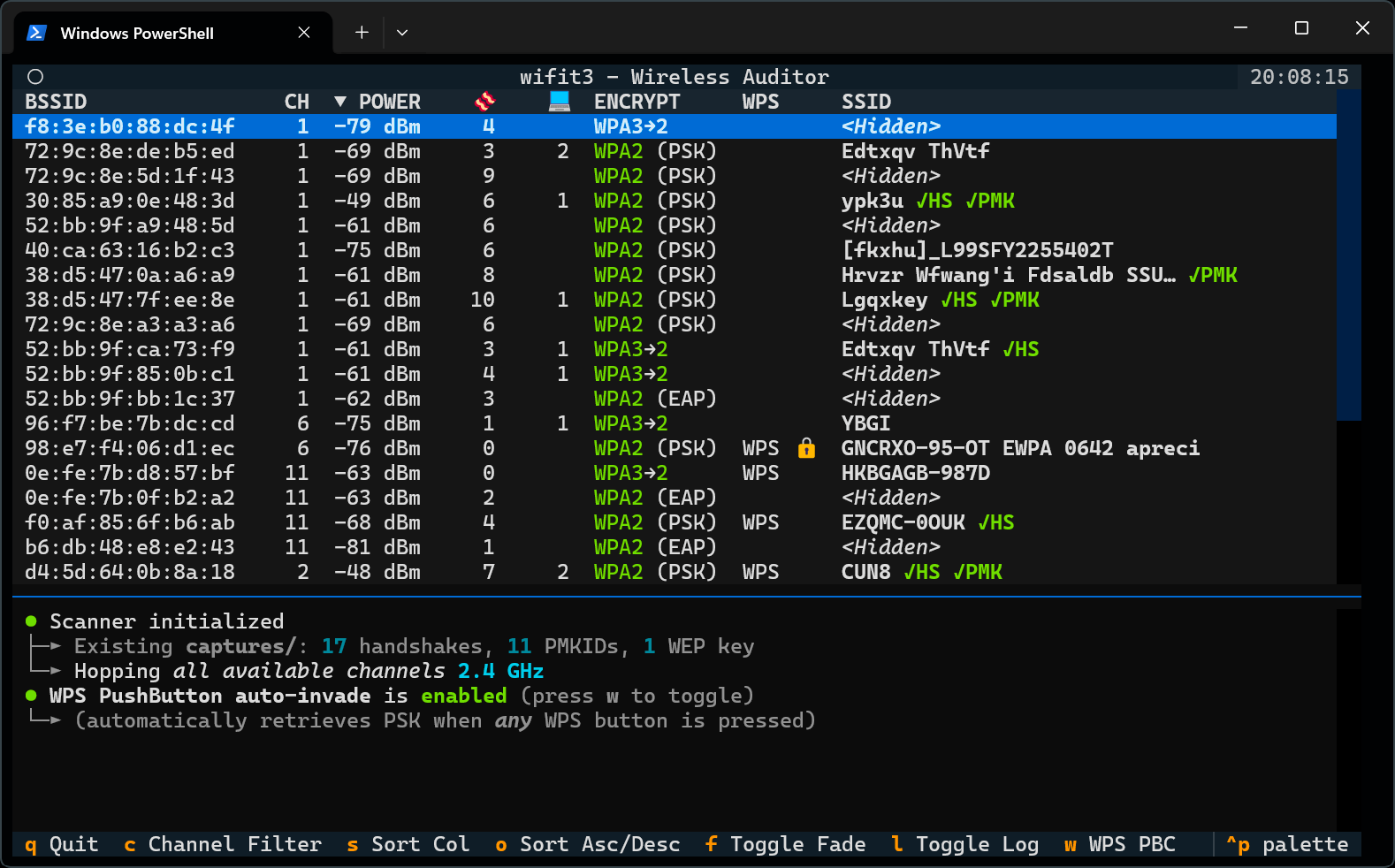 | 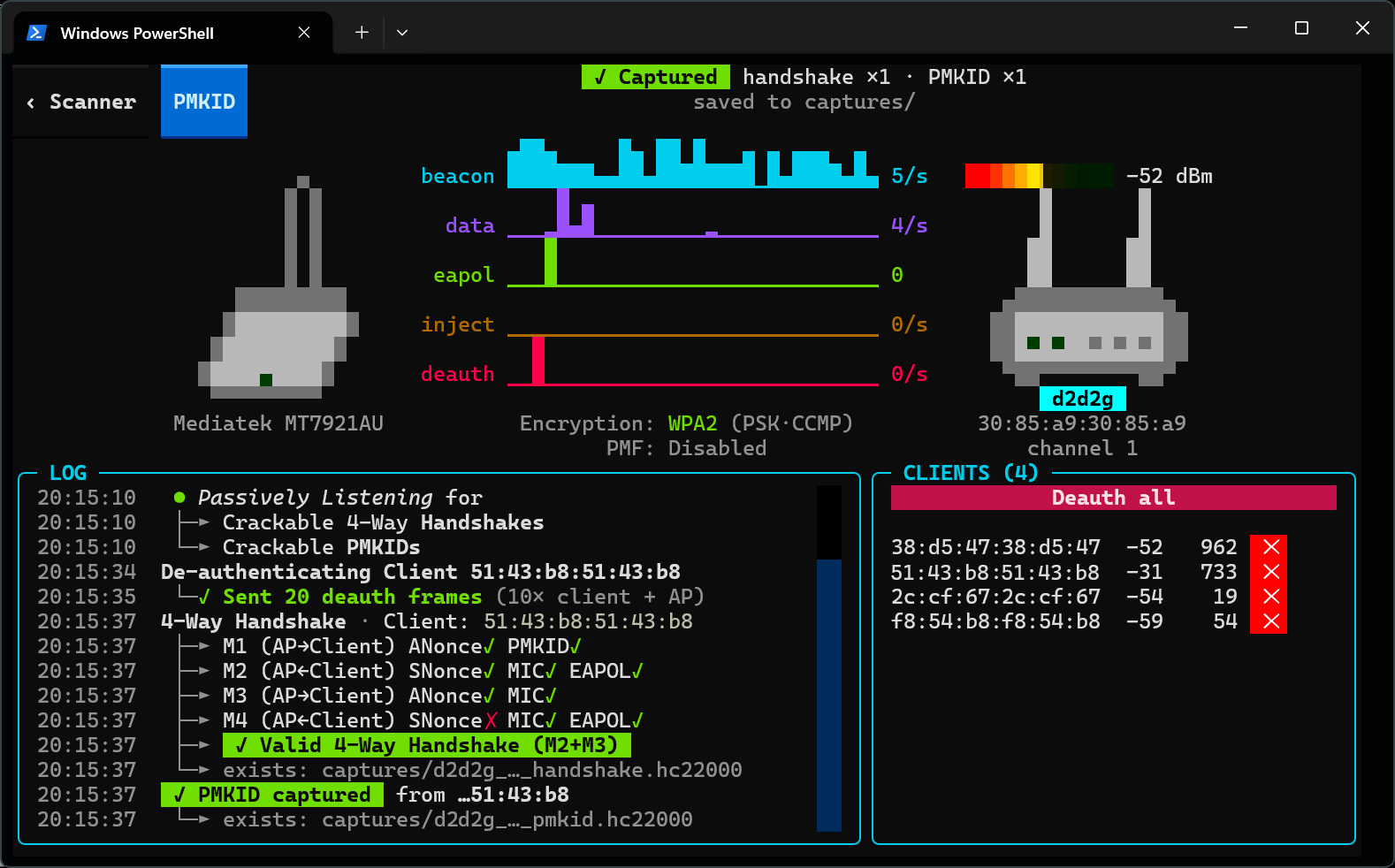 | ## Supported Hardware > **Important:** *At least one supported USB wireless adapter is required.* | Chipset | Bands | Cards (Make + Model) | |---|---|---| | Atheros AR9271 | 2.4 GHz | ALFA AWUS036**NHA**, TP-Link TL-WN722N V1 | | MediaTek MT7601U | 2.4 GHz | Generic unbranded "nano" dongles | | MediaTek MT7610U | 2.4 / 5 GHz | ALFA AWUS036**ACHM**, Panda PAU0B | | MediaTek MT7612U | 2.4 / 5 GHz | ALFA AWUS036**ACM** | | MediaTek MT7921AU | 2.4 / 5 GHz | ALFA AWUS036**AXM[L]**, Panda PAU0F | | MediaTek MT7925U | 2.4 / 5 GHz | Netgear A9000 | | Realtek RTL8812AU | 2.4 / 5 GHz | ALFA AWUS036**ACH** | | Realtek RTL8814AU | 2.4 / 5 GHz | ALFA AWUS1900, ASUS USB-AC68 | | Realtek RTL8821AU | 2.4 / 5 GHz | ALFA AWUS036**ACS**, TP-Link Archer T2U Plus/Nano | | Realtek RTL8821CU | 2.4 / 5 GHz | Auscoumer 600 Mbps | | Realtek RTL8922AU | 2.4 / 5 GHz | ASUS USB-BE93 | | Realtek RTL8822BU | 2.4 / 5 GHz | TP-Link T3U Plus, Archer T4U v3 / T4U+ | | Realtek RTL8822CU | 2.4 / 5 GHz | D-Link AC13U | | Realtek RTL8187L | 2.4 GHz | ALFA AWUS036**H** | | Realtek RTL8188EUS | 2.4 GHz | TP-Link TL-WN722N v2/v3 | | Ralink RT2570 | 2.4 GHz | Buffalo Nintendo Wi-Fi USB Controller | | Ralink RT3070 | 2.4 GHz | ALFA AWUS036**NH**, TP-Link TL-WN7200ND | | Ralink RT5370 | 2.4 GHz | LOTEKOO 150 Mbps | | Ralink RT5372 | 2.4 GHz | Panda PAU05/PAU06 | | Ralink RT5572 | 2.4 / 5 GHz | Panda PAU09 N600 | Breakdown of each device's capabilities and limitations: [Supported Hardware Doc](https://github.com/derv82/wifit3/blob/master/docs/SUPPORTED-HARDWARE.md). ## Installation & Running ### Option 1: Download Prebuilt Binaries (Recommended) Download the latest standalone executable from [**Releases**](https://github.com/derv82/wifit3/releases/latest): * **Windows:** Download and run `wifit3-windows-x64.exe`. * **Linux (non-sudo):** `chmod +x wifit3-linux-x64 && ./wifit3-linux-x64` * **macOS:** (bypass quarantine) ```bash xattr -d com.apple.quarantine wifit3-macos-universal2 chmod +x wifit3-macos-universal2 ./wifit3-macos-universal2 ``` ### Option 2: Run from Source wifit3 uses Astral's [`uv`](https://docs.astral.sh/uv/). `sync` sets up dependencies: ```bash uv sync uv run wifit3 ``` ### Option 3: Build your own binary ```bash uv run pyinstaller wifit3.spec --noconfirm --clean ``` Binary executable is written to `dist/` subdirectory. ## One-Time Driver Setup wifit3 automatically handles hardware configuration within the app, after clicking the `START` button: - **Linux:** Prompts once via `pkexec`/`sudo` to write udev permissions and blocklists in `/etc/modprobe.d/`. - **macOS:** No installation required; plug in the device and select *Allow* in the authorization dialog. - **Windows:** Prompts once via UAC to install WinUSB for the device. - **VirtualBox:** Add your device(s) to VirtualBox's `USB Filters` *before* plugging in. ## Uninstalling Return the previously-installed device to your operating system's Wi-Fi stack: 1. Select the card on the wifit3 splash screen. 2. Click the `Uninstall` button and confirm. 3. Accept the elevation prompt (UAC on Windows or `pkexec` on Linux). 4. Unplug and re-plug the adapter. On Linux, this deletes wifit3's `udev` and `modprobe` rules. On Windows, this uninstalls the WinUSB binding, and triggers a PnP device rescan (old driver reattaches). ## *Thank you, Linux!* wifit3 only exists because of the great people who reverse-engineered and maintained these Linux wireless drivers. It's usually a thankless job. Special thanks to: - **Christian "kimo" B. ([@kimocoder](https://github.com/kimocoder))** who maintains **wifite2** and `aircrack-ng`'s RTL8188EUS DKMS driver. - [**Neur0sp1cy**](https://github.com/neur0sp1cy): Close friend and the master to my Linux & wireless-hacking apprenticeship. - **Nick Morrow** ([@morrownr](https://github.com/morrownr)), legend, maintains the out-of-tree Realtek USB DKMS drivers. The full list is in **[CREDITS.md](https://github.com/derv82/wifit3/blob/master/docs/CREDITS.md)**. ## How it Works: Mini-Drivers wifit3 bypasses the operating system's native Wi-Fi stack entirely. It ships with lightweight Python ports of Linux kernel drivers ([src/wifit3/chips/\*](https://github.com/derv82/wifit3/tree/master/src/wifit3/chips)) that directly control wireless devices over USB bulk and control transfers. Because register-level frame injection and monitor mode are performed entirely in user space, Windows NDIS restrictions and Linux kernel driver locking do not apply. For architecture details, driver porting methodology, and USB trace replay tooling, see the [Porting Documentation](https://github.com/derv82/wifit3/blob/master/docs/porting/METHODOLOGY.md). ## License & Disclaimer **Code:** Licensed under [**GNU General Public License v2.0**](https://github.com/derv82/wifit3/blob/master/LICENSE) (matching upstream Linux drivers). **Firmware:** Vendor firmware blobs loaded onto adapters are redistributed verbatim under their respective manufacturers' licenses (details in [FIRMWARE.md](https://github.com/derv82/wifit3/blob/master/docs/FIRMWARE.md)). **⚠️ Notice & Disclaimer:** For use only on networks and equipment you own or are explicitly authorized to audit. wifit3 operates directly on USB hardware registers without kernel guardrails; use at your own risk.
