Skip to content
KitploitKITPLOIT
ToolsBlog
Submit
ToolsBlog
Submit

Hacking, PenTest, and Cybersecurity Tools for Your Security Arsenal!

Kitploit is a directory of hacking, cybersecurity, and pentesting tools. Discover the latest project updates to find vulnerabilities, analyze systems, automate testing, and strengthen your security.

··Feeds·Contact·Privacy·© 2026 Kitploit

Tool Directory

Categories

View all categories
Loading categories
BlackBerryC2 — Encrypted command‑and‑control (C2) research framework for cybersecurity education, red team labs, and secure client‑server communication experiments. | Kitploit
Tools/GitHubGitHub/dereeqw/blackberryc2
Encryption/Decryption ToolsPayload GenerationIDS/IPS EvasionNetwork SecurityCryptographyPenetration TestingCommand and ControlLearning & EducationRed TeamingRemote Access Tool
GitHubdereeqw/blackberryc2

BlackBerryC2

31255 months agoReviewed by Kitploit

Most Popular

View all →

Discover the most used tools by our community.

Explore all tools

Browse our collection of tools

View all tools →
Share

Encrypted command‑and‑control (C2) research framework for cybersecurity education, red team labs, and secure client‑server communication experiments.

View Repository

BlackBerryC2 2.0.0-beta

BlackBerryC2 is an encrypted remote administration and C2 framework designed exclusively for educational use, security research, and controlled laboratory environments. BlackBerryC2 Demo
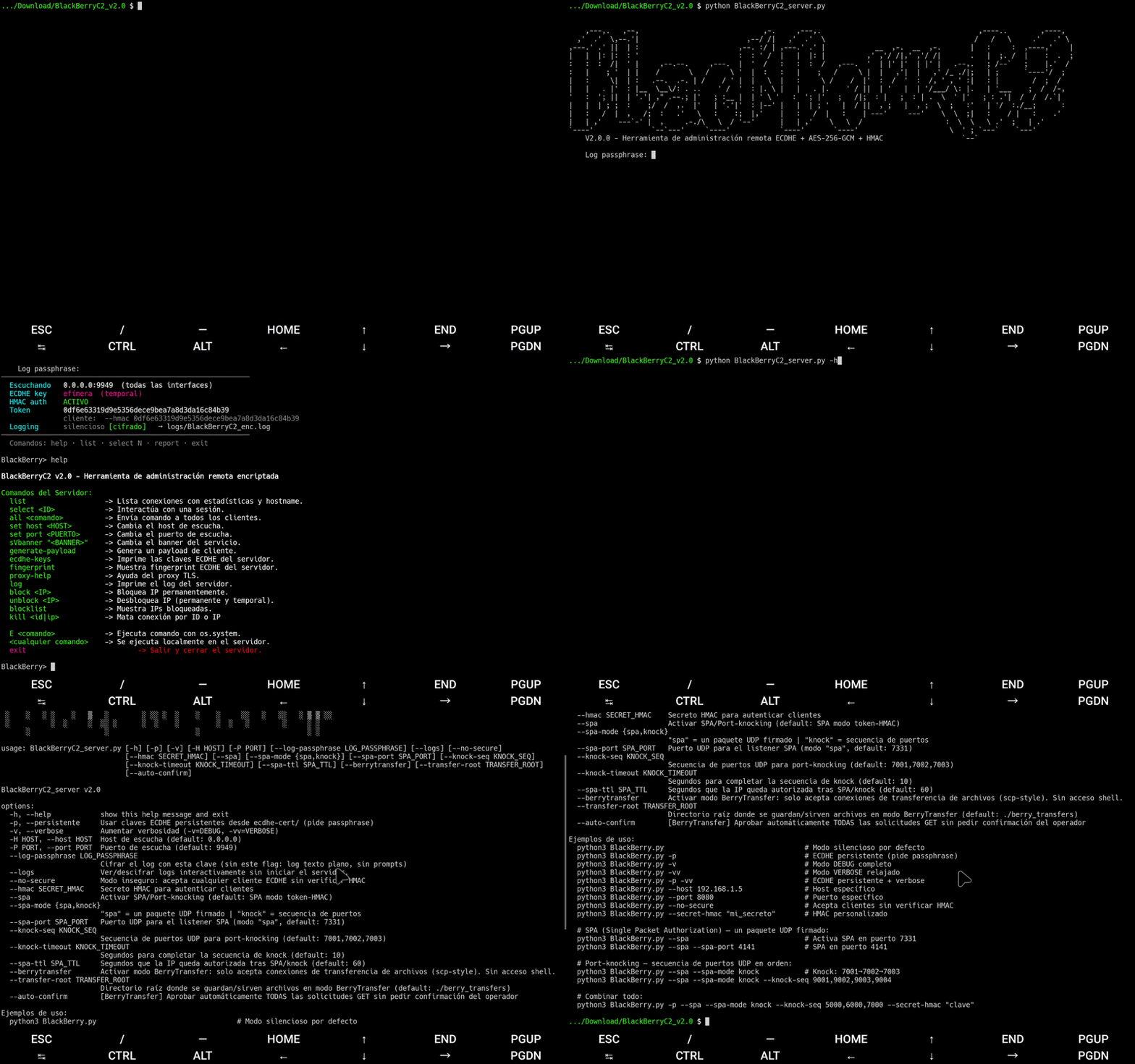
The project demonstrates how to build a custom command-and-control server with application-layer cryptography, session management, and secure client communication without relying on external TLS stacks.


⚠️ Important Notice

This project is NOT malware and NOT intended for unauthorized access.

BlackBerryC2:

  • Does not self-propagate
  • Does not exploit vulnerabilities automatically
  • Does not include persistence mechanisms
  • Does not attempt to evade antivirus software

Use only on systems and networks you own or have explicit authorization to test.


Python dependencies:

root@kitploit:~
pip install cryptography prompt_toolkit zstandard

zstandard is optional but recommended for transfers larger than 1 GB.


Key Features

  • Custom TCP-based encrypted C2 server (v2.0)
  • ECDHE (secp256r1) key exchange — ephemeral or persistent
  • AES-256-GCM authenticated encryption per session
  • HMAC-SHA256 per-packet authentication + anti-replay sequence numbers
  • Multiple concurrent client sessions
  • Interactive operator console with tab-completion (prompt_toolkit)
  • Encrypted remote command execution
  • Encrypted file transfers with zlib / Zstandard compression
  • Recursive directory upload/download (get -r, put -r)
  • Background transfers (-b flag) — non-blocking, cancellable
  • Transfer resume support (.partial + .resume files)
  • Client payload generator (generate-payload)
  • IP blocking: persistent blocklist + temporary auto-bans
  • Scan/flood detection: connect scan, banner grab, handshake failures, heartbeat flood
  • Optional HTTP(S)/TLS proxy support (BlackBerryHTTPs_TLSProxyGUI)
  • SPA (Single Packet Authorization) and Port-Knocking pre-auth
  • BerryTransfer mode — dedicated file-transfer-only server (no shell)
  • Encrypted session log (AES-256-GCM + PBKDF2, 600k iterations)
  • Encrypted server log with in-shell viewer (log command)
  • Startup config saved to logs/last_start.json

Cryptographic Design

BlackBerryC2 v2.0 establishes secure communication as follows:

  1. Client connects via TCP; server sends service banner.
  2. Client sends REQUEST_PUBKEY.
  3. Server sends its ephemeral ECDHE public key (secp256r1).
  4. Client sends its ECDHE public key + HMAC-SHA256 authentication tag.
  5. Server verifies the HMAC against the pre-shared secret (HMAC_PRE_SHARED_SECRET).
  6. Both sides derive a 256-bit AES session key via HKDF-SHA256 over the shared secret.
  7. All further communication uses AES-256-GCM with per-packet HMAC-SHA256 and anti-replay sequence numbers.

Each session maintains:

  • Its own AES-256 key and HMAC key
  • Independent nonces (12-byte random per message)
  • Isolated anti-replay tracker (sequence window ±100)
  • Flood protection rate limiter (configurable commands/second)

All cryptographic keys are generated at runtime and never reused across restarts (unless --persistente is set).


Running the Server

root@kitploit:~
python3 BlackBerryC2_server.py

Default configuration:

  • Host: 0.0.0.0
  • Port: 9949

Command-Line Arguments

Examples:

root@kitploit:~
# Basic startup (prompts for log passphrase)
python3 BlackBerryC2_server.py

# Persistent ECDHE keys + verbose
python3 BlackBerryC2_server.py -p -vv

# Custom port, no HMAC check
python3 BlackBerryC2_server.py -P 8080 --no-secure

# Port-knocking on custom ports
python3 BlackBerryC2_server.py --spa --spa-mode knock --knock-seq 9001,9002,9003

# BerryTransfer mode with auto-confirm
python3 BlackBerryC2_server.py --berrytransfer --auto-confirm

# View/decrypt logs without starting server
python3 BlackBerryC2_server.py --logs

Operator Console Commands

Server Management

Proxy


Session Commands (inside select <ID>)

General

File Transfer


BerryTransfer Mode

BerryTransfer is a dedicated file-transfer-only server mode inspired by scp. When active, the server rejects all shell access and only accepts BT:* protocol commands.

Start:

root@kitploit:~
python3 BlackBerryC2_server.py --berrytransfer
python3 BlackBerryC2_server.py --berrytransfer --auto-confirm  # no operator prompt for GETs

BerryTransfer shell commands:

Transfer log is written to logs/bt_transfer.jsonl (optionally AES-256-GCM encrypted).


SPA / Port-Knocking

When --spa is active, clients must authenticate via UDP before the TCP connection is accepted.

SPA mode (default): Client sends a 32-byte HMAC-SHA256 token to SPA_UDP_PORT.

root@kitploit:~
token = HMAC-SHA256(HMAC_SECRET, "{ip}:{time_window_30s}")

Knock mode: Client knocks a sequence of UDP ports in order within a timeout window.

root@kitploit:~
python3 BlackBerryC2_server.py --spa --spa-mode knock --knock-seq 7001,7002,7003 --knock-timeout 10

Authorized IPs are valid for --spa-ttl seconds (default 60).


Security Features


Logging

View logs with the built-in viewer:

root@kitploit:~
BlackBerry> log

Or standalone (no server):

root@kitploit:~
python3 BlackBerryC2_server.py --logs

Intended Use

This project is intended only for:

  • Educational demonstrations
  • Security research
  • Controlled lab environments
  • Authorized penetration testing

Unauthorized use against systems without permission is strictly prohibited.


License

See LICENSE file for full license details.


Disclaimer

This software is provided "as is", without warranty of any kind.
The authors assume no responsibility for misuse or damage caused by this software.

Download Tool
FlagDescription
-p / --persistenteUse persistent ECDHE keys from ecdhe-cert/ (prompts for passphrase)
-vDebug logging
-vvVerbose (relaxed) logging
-H <host>Listening host (default: 0.0.0.0)
-P <port>Listening port (default: 9949)
--no-secureAccept any ECDHE client without HMAC verification
--hmac <secret>Custom HMAC pre-shared secret (hex or string)
--log-passphrase <pass>Encrypt server log with AES-256-GCM (PBKDF2 600k iter)
--logsInteractive log viewer — no server started
--spaEnable SPA/port-knocking pre-authentication
--spa-mode <spa|knock>spa = single UDP token, knock = port sequence
--spa-port <port>UDP port for SPA listener (default: 7331)
--knock-seq <ports>Port sequence for knock mode (default: 7001,7002,7003)
--knock-timeout <sec>Seconds to complete knock sequence (default: 10)
--spa-ttl <sec>Seconds an authorized IP remains valid (default: 60)
--berrytransferBerryTransfer mode: file-transfer-only, no shell
--transfer-root <dir>Root directory for BerryTransfer (default: ./berry_transfers)
--auto-confirmAuto-approve all GET requests in BerryTransfer (no operator prompt)
CommandDescription
listList active sessions with stats and hostname
select <ID>Interact with a client session
all <cmd>Send a command to all connected clients
reportFull server status report (uptime, sessions, transfers)
set host <HOST>Change listening host (rebinds server)
set port <PORT>Change listening port (rebinds server)
sVbanner "<text>"Change service banner
generate-payloadGenerate a client payload
fingerprintShow ECDHE server key fingerprint (SHA-256)
ecdhe-keysPrint current ECDHE key pair (PEM)
kill <id|ip>Terminate a session by ID or IP
block <IP>Permanently block an IP
unblock <IP>Unblock an IP (persistent + temporary)
blocklistShow blocked IPs (persistent and temporary)
logInteractive log viewer (supports encrypted logs)
reportStatus summary: uptime, sessions, transfers
bannerRedisplay startup banner
cleanDelete server log files
vToggle DEBUG logging
vvToggle VERBOSE logging
cd <dir>Change server local working directory
E <cmd>Execute command via os.system locally
<any command>Execute locally on the server
exitStop server and exit
CommandDescription
proxyStart TLS/HTTP proxy daemon (auto mode)
proxy --mode <mode>Modes: auto, tls, http, https, both, all
proxy --statsShow proxy statistics
proxy guiLaunch proxy GUI (separate process)
stop-proxyStop proxy daemon
stop-proxy-guiStop proxy GUI
proxy-helpFull proxy help
CommandDescription
helpShow session help
exitReturn to main shell
!<cmd>Execute command locally on the server
<cmd>Execute command on the remote client
cmd1 && cmd2Chain: run cmd2 only if cmd1 succeeded
cmd1 || cmd2Chain: run cmd2 only if cmd1 failed
cmd1 ; cmd2Chain: always run cmd2
CommandDescription
get <file>Download file from client
get <dir> -rRecursive directory download
get <file> -bBackground download (non-blocking)
get <dir> -r -bBackground recursive download
put <file>Upload file to client
put <file> -excUpload and execute in memory (scripts)
put <dir> -rRecursive directory upload
put <file> -bBackground upload
transfersList all active and completed transfers
stop <ID>Cancel a background transfer (e.g. stop T1)
resume <local_file>Resume an interrupted download
screenshotCapture client screen
CommandDescription
confirm <ID>Approve a pending GET request
deny <ID>Reject a pending GET request
pendingList GET requests awaiting approval
auto [on|off]Toggle/set auto-confirm
clientsShow active BerryTransfer sessions
ls [dir]List files in transfer root
tree [dir]File tree of transfer root
find <name>Search file in transfer root
rm <file>Delete file from transfer root (with confirmation)
log [N]Show last N transfer log entries (default 30)
cd <dir>Change local working directory
pwdShow current local directory
!<cmd>Execute local system command
exitStop BerryTransfer server
FeatureDetails
Key exchangeECDHE secp256r1 ephemeral or persistent
Session encryptionAES-256-GCM, random 12-byte nonce per message
Client authenticationHMAC-SHA256 over shared secret during handshake
Message integrityHMAC-SHA256 per-packet (covers seq + nonce + ciphertext)
Anti-replaySequence number window tracker per session
Downgrade protectionMinimum AES key size enforced (256-bit)
Heartbeat rate limitingMin 3s between heartbeats; violations tracked
Command flood protectionRate limiter; auto-disconnect after threshold
Scan detectionConnect scan, banner grab, handshake failure counters
IP managementPersistent blocklist + temporary bans (auto + manual)
Log encryptionAES-256-GCM + PBKDF2-HMAC-SHA256 (600k iterations)
Response jitter10–50ms random jitter to resist timing attacks
Pre-authSPA token or port-knocking before TCP is accepted
Log fileContents
logs/BlackBerryC2_Server.logPlaintext rotating server log (INFO+)
logs/BlackBerryC2_enc.logEncrypted server log (if --log-passphrase set)
logs/sessions.jsonlSession events: connect, disconnect, bytes
logs/bt_transfer.jsonlBerryTransfer file transfer log
logs/last_start.jsonStartup config snapshot (host, port, token, pid)
