
Skip to content
KitploitKITPLOIT
ToolsBlog
Submit
ToolsBlog
Submit

Hacking, PenTest, and Cybersecurity Tools for Your Security Arsenal!

Kitploit is a directory of hacking, cybersecurity, and pentesting tools. Discover the latest project updates to find vulnerabilities, analyze systems, automate testing, and strengthen your security.

··Feeds·Contact·Privacy·© 2026 Kitploit

Tool Directory

Categories

View all categories
Loading categories
guarddog — 🐍 🔍 GuardDog is a CLI tool to Identify malicious PyPI and npm packages | Kitploit
Tools/GitHubGitHub/datadog/guarddog
Static AnalysisVulnerability ScannersDynamic Analysis (Sandboxing)Code AnalysisMalware AnalysisDevSecOpsSecret DetectionThreat IntelligenceSupply Chain Security
GitHubdatadog/guarddog

guarddog

🐍 🔍 GuardDog is a CLI tool to Identify malicious PyPI and npm packages

1.2k112127 days agoReviewed by Kitploit
View RepositoryWebsite

Most Popular

View all →

Discover the most used tools by our community.

Explore all tools

Browse our collection of tools

View all tools →
Share

GuardDog

Test OpenSSF Scorecard OpenSSF Best Practices

GuardDog

GuardDog is a CLI tool that identifies malicious PyPI and npm packages, Go modules, Rust crates, RubyGems, GitHub actions, or VSCode extensions. It runs static analysis on package source code (through YARA rules) and analyzes package metadata to detect supply chain attacks.

What makes GuardDog different: Instead of just listing suspicious patterns, GuardDog correlates findings to identify actual risks based on attack chains. A package needs both the capability to perform an action (e.g., network access) and a threat indicator (e.g., suspicious domain) in the same file to be flagged as high risk.

It downloads and scans code from:
  • NPM: Packages hosted in npmjs.org
  • PyPI: Source files (tar.gz) packages hosted in PyPI.org
  • Go: GoLang source files of repositories hosted in GitHub.com
  • Rust: Crates hosted on crates.io
  • RubyGems: Gem packages hosted in rubygems.org
  • GitHub Actions: Javascript source files of repositories hosted in GitHub.com
  • VSCode Extensions: Extensions (.vsix) packages hosted in marketplace.visualstudio.com
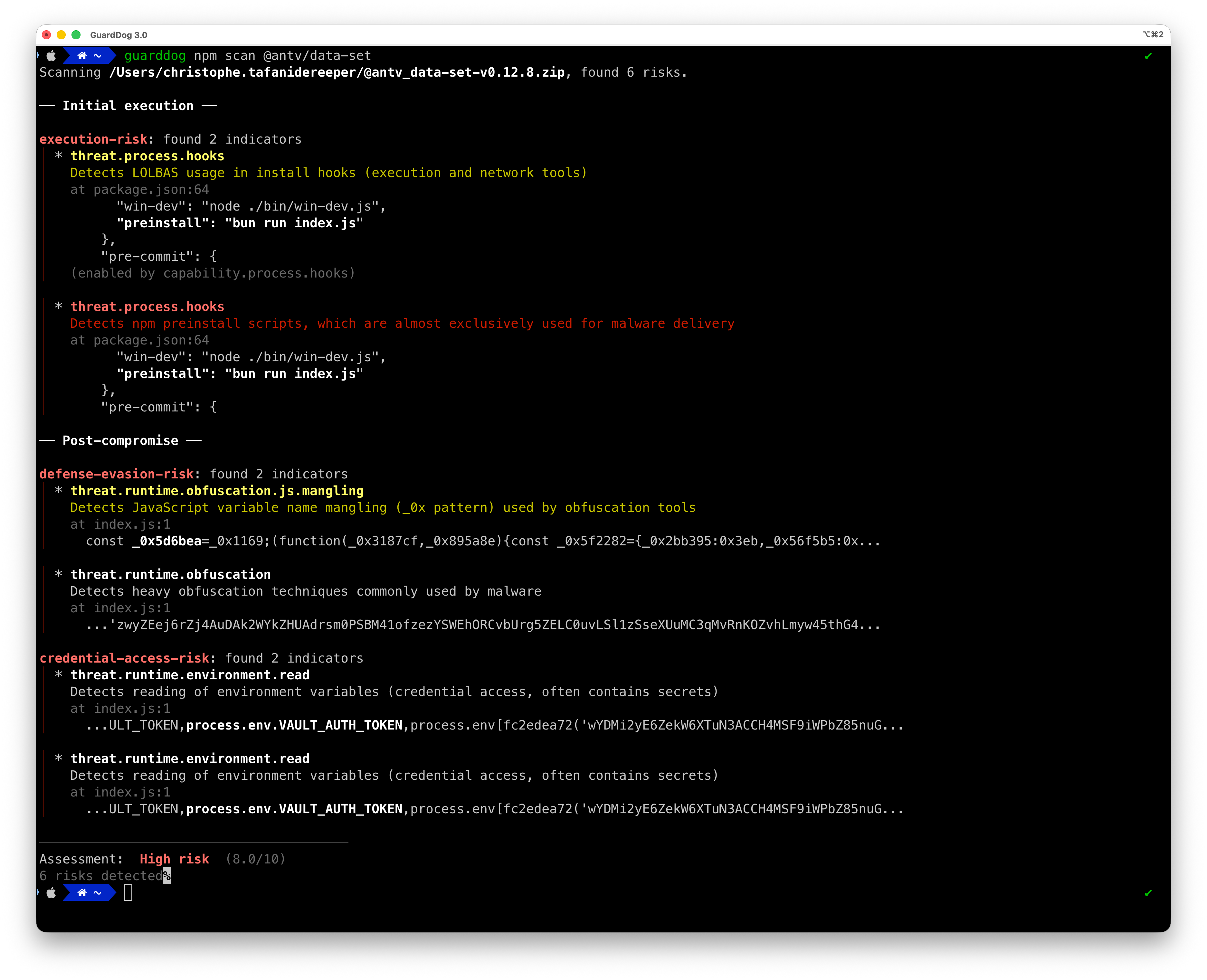
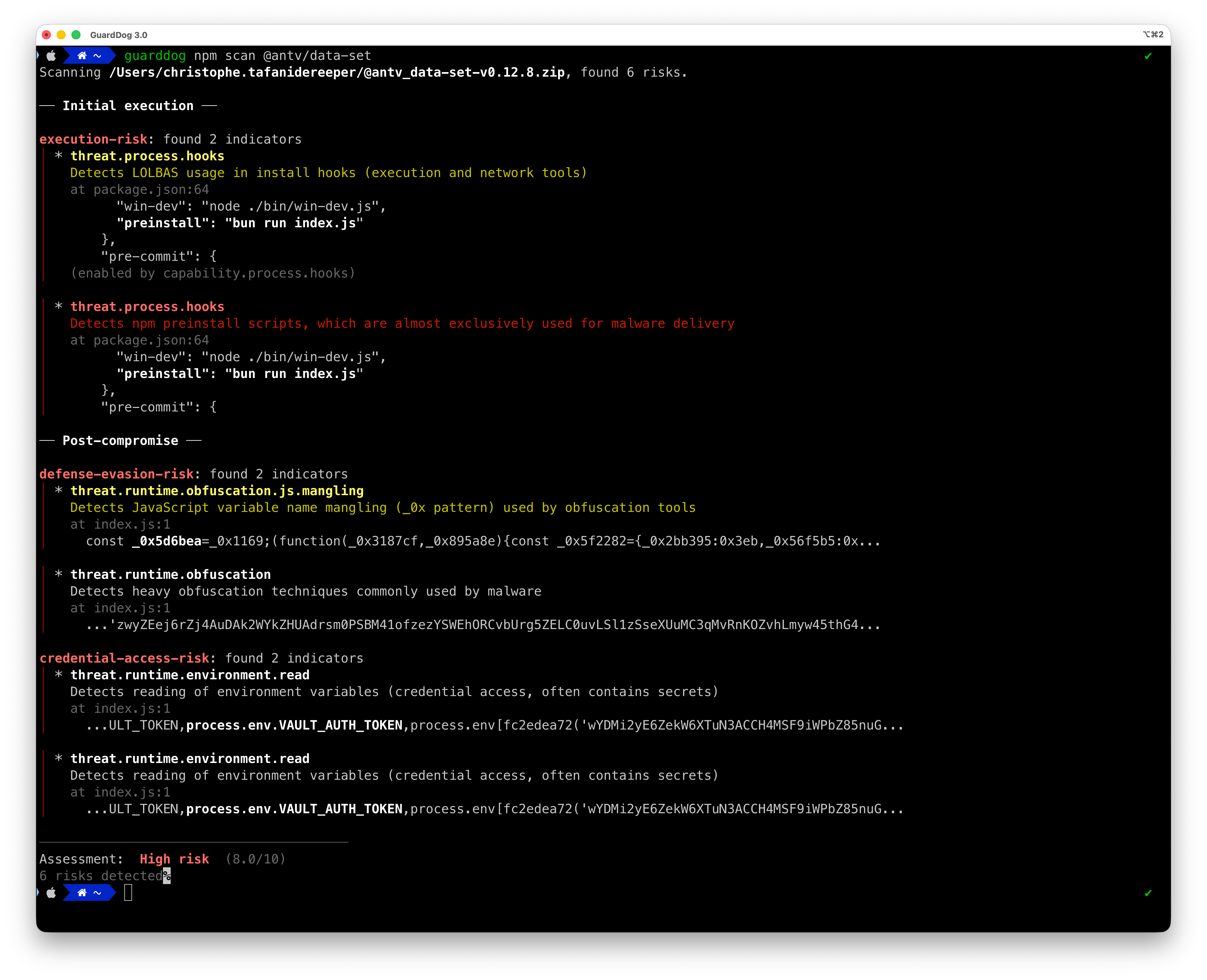
  • GuardDog demo usage

    How GuardDog Works

    GuardDog uses a risk-based detection model that correlates code capabilities with threat indicators:

    1. Detection: Rules identify either capabilities (what code can do) or threats (suspicious indicators)
    2. Correlation: Capabilities and threats found in the same file form risks (cross-file matches also form risks, with downgraded severity)
    3. Scoring: Risks are scored (0-10) based on attack chain completeness and sophistication
    4. Reporting: Packages receive a severity rating (low/medium/high) with detailed risk breakdown

    Why This Approach?

    Traditional SAST tools flag every suspicious pattern independently, leading to alert fatigue. GuardDog understands that:

    • Capability alone isn't malicious (network libraries should make HTTP requests)
    • Threat indicators alone might be false positives (test fixtures, documentation)
    • Capability + Threat together indicates actual risk (code that can and will do something malicious)

    Risk Scoring

    Packages receive a score from 0-10 based on four factors:

    FactorWeightDescription
    Severity30%Highest severity finding (low/medium/high)
    Attack Chain20%Presence of complete attack stages (early → mid/late)
    Specificity30%How specific patterns are to malware vs legitimate code
    Sophistication20%Technique advancement level

    Score Labels:

    • 0: No risks detected
    • 0.1-3: Low risk (single-stage threats, low specificity)
    • 3.1-7.5: Medium risk (partial attack chain, metadata indicators, or single-stage code findings)
    • 7.6-10: High risk (multi-stage attack chain with source code evidence — near-certainty of compromise)

    Attack Chain Stages (based on MITRE ATT&CK):

    • Early: Initial access, execution capabilities
    • Mid: Persistence, defense evasion, credential access
    • Late: Command & control, exfiltration, impact

    Check out the new Datadog Agent integration and Cloud SIEM content pack for GuardDog.


    Getting started

    Installation

    The easiest way to run GuardDog is to use uvx:

    root@kitploit:~
    uvx guarddog pypi scan requests
    

    To install it locally:

    root@kitploit:~
    uv tool install guarddog
    # or
    pip install guarddog
    

    Or use the Docker image:

    root@kitploit:~
    docker pull ghcr.io/datadog/guarddog
    alias guarddog='docker run --rm ghcr.io/datadog/guarddog'
    

    Note: On Windows, the only supported installation method is Docker.

    Sample usage

    root@kitploit:~
    # Scan the most recent version of the 'requests' package
    guarddog pypi scan requests
    
    # Scan a specific version of the 'requests' package
    guarddog pypi scan requests --version 2.28.1
    
    # Scan the 'request' package using 2 specific heuristics
    guarddog pypi scan requests --rules exec-base64 --rules code-execution
    
    # Scan the 'requests' package using all rules but one
    guarddog pypi scan requests --exclude-rules exec-base64
    
    # Scan a local package archive
    guarddog pypi scan /tmp/triage.tar.gz
    
    # Scan a local package directory
    guarddog pypi scan /tmp/triage/
    
    # Scan a package stored in S3 (a folder/prefix or a single archive object)
    guarddog pypi scan s3://my-bucket/path/to/package/
    guarddog pypi scan s3://my-bucket/path/to/package.tar.gz
    
    # Scan every package referenced in a requirements.txt file of a local folder
    guarddog pypi verify workspace/guarddog/requirements.txt
    
    # Scan every package referenced in a requirements.txt file and output a sarif file - works only for verify
    guarddog pypi verify --output-format=sarif workspace/guarddog/requirements.txt
    
    # Output JSON to standard output - works for every command
    guarddog pypi scan requests --output-format=json
    
    # All the commands also work on npm, go, crates, rubygems
    guarddog npm scan express
    
    guarddog go scan github.com/DataDog/dd-trace-go
    
    guarddog go verify /tmp/repo/go.mod
    
    # Scan Rust crates
    guarddog crates scan serde
    
    guarddog crates verify /tmp/repo/Cargo.lock
    
    # Scan RubyGems packages
    guarddog rubygems scan rails
    
    guarddog rubygems verify /tmp/repo/Gemfile.lock
    
    # Additionally can support scanning GitHub actions that are implemented in JavaScript
    guarddog github_action scan DataDog/synthetics-ci-github-action
    
    guarddog github_action verify /tmp/repo/.github/workflows/main.yml
    
    # Scan VSCode extensions from the marketplace
    guarddog extension scan ms-python.python
    
    # Scan a specific version of a VSCode extension
    guarddog extension scan ms-python.python --version 2023.20.0
    
    # Scan a local VSCode extension directory or VSIX archive
    guarddog extension scan /tmp/my-extension/
    
    # Run in debug mode
    guarddog --log-level debug npm scan express
    

    Sandboxed Scanning

    When scanning packages, GuardDog runs source code analysis inside a kernel-level sandbox (Linux via Landlock, macOS via Seatbelt, using nono). The sandbox blocks all network access and restricts filesystem operations to only the paths needed for analysis. This protects against malicious packages that attempt to execute code during archive extraction or scanning.

    By default, the sandbox is required: if it's not available on the platform, the scan fails instead of running unprotected. To scan without it, you must explicitly pass --no-sandbox:

    root@kitploit:~
    # Default: require the sandbox, exit with an error if it's unavailable
    guarddog pypi scan requests
    
    # Explicitly disable the sandbox
    guarddog pypi scan requests --no-sandbox
    

    For remote packages, three phases run with different privilege levels:

    1. Download and metadata analysis run without sandbox (need network access)
    2. Archive extraction runs in a sandboxed subprocess (network blocked, filesystem restricted)
    3. Source code analysis (YARA) runs in the main process after a sandbox is applied (network blocked, filesystem restricted to extracted files)

    The sandbox was introduced to mitigate path traversal and code execution vulnerabilities during archive extraction (CVE-2022-23530, CVE-2022-23531, CVE-2026-22870, CVE-2026-22871).

    Scanning packages from S3

    GuardDog can scan a package stored in S3, either as a folder/prefix or a single archive object:

    root@kitploit:~
    guarddog npm scan s3://my-bucket/path/to/package/
    guarddog npm scan s3://my-bucket/path/to/package.tar.gz
    

    This uses your existing AWS credentials (environment variables, ~/.aws, SSO, or an IAM role). GuardDog verifies authentication via STS before doing anything and exits with an error if no valid credentials are found. The objects are synced to a temporary directory, scanned under the sandbox like any other untrusted content, and removed from disk afterward.

    Rules

    GuardDog uses two types of detection rules, both participating in the risk-based scoring engine:

    • Source code rules (YARA): Static analysis of package source code detecting capabilities and threats
    • Metadata rules (Python detectors): Analysis of package registry metadata detecting supply chain attack indicators

    For the full list of rules per ecosystem, see RULES.md.

    For guidance on writing new rules, see WRITING_RULES.md.

    Running GuardDog in a GitHub Action

    The easiest way to integrate GuardDog in your CI pipeline is to leverage the SARIF output format, and upload it to GitHub's code scanning feature.

    Using this, you get:

    • Automated comments to your pull requests based on the GuardDog scan output
    • Built-in false positive management directly in the GitHub UI

    Sample GitHub Action using GuardDog:

    root@kitploit:~
    name: GuardDog
    
    on:
      push:
        branches:
          - main
      pull_request:
        branches:
          - main
    
    permissions:
      contents: read
    
    jobs:
      guarddog:
        permissions:
          contents: read # for actions/checkout to fetch code
          security-events: write # for github/codeql-action/upload-sarif to upload SARIF results
        name: Scan dependencies
        runs-on: ubuntu-latest
    
        steps:
          - uses: actions/checkout@v4
    
          - uses: astral-sh/setup-uv@v7
    
          - run: uvx guarddog pypi verify requirements.txt --output-format sarif --exclude-rules repository_integrity_mismatch > guarddog.sarif
    
          - name: Upload SARIF file to GitHub
            uses: github/codeql-action/upload-sarif@v3
            with:
              category: guarddog-builtin
              sarif_file: guarddog.sarif
    

    Development

    Running a local version of GuardDog

    • Ensure poetry has an env with python >=3.10 poetry env use 3.10.0
    • Install dependencies poetry install
    • Run guarddog poetry run guarddog or poetry shell then run guarddog

    Unit tests

    Running all unit tests: make test

    Running unit tests against package metadata heuristics: make test-metadata-rules (tests are here).

    Benchmarking

    You can run GuardDog on legitimate and malicious packages to determine false positives and false negatives. See ./tests/samples

    Code quality checks

    Run the type checker with

    root@kitploit:~
    mypy --install-types --non-interactive guarddog
    

    and the linter with

    root@kitploit:~
    flake8 guarddog --count --select=E9,F63,F7,F82 --show-source --statistics --exclude tests/analyzer/sourcecode,tests/analyzer/metadata/resources,evaluator/data
    flake8 guarddog --count --max-line-length=120 --statistics --exclude tests/analyzer/sourcecode,tests/analyzer/metadata/resources,evaluator/data --ignore=E203,W503
    

    Configuration via Environment Variables

    GuardDog's behavior can be customized using environment variables:

    General Configuration

    Environment VariableDescriptionDefault Value
    GUARDDOG_PARALLELISMNumber of threads to use for parallel processingNumber of CPUs available
    GUARDDOG_VERIFY_EXHAUSTIVE_DEPENDENCIESAnalyze all possible versions of dependencies (true/false)false
    GUARDDOG_NPM_INCLUDE_DEV_DEPENDENCIESInclude devDependencies when scanning npm package.json files (true/false); can also be toggled per-invocation with guarddog npm verify --include-dev-dependenciesfalse
    GUARDDOG_TOP_PACKAGES_CACHE_LOCATIONLocation of the top packages cache directoryguarddog/analyzer/metadata/resources
    GUARDDOG_YARA_EXT_EXCLUDEComma-separated list of file extensions to exclude from YARA scanningini,md,rst,txt,lock,json,yaml,yml,toml,xml,html,csv,sql,pdf,doc,docx,ppt,pptx,xls,xlsx,odt,changelog,readme,makefile,dockerfile,pkg-info,d.ts

    Metadata Rule Configuration

    Environment VariableDescriptionDefault Value
    GUARDDOG_NEW_DEPENDENCY_RISK_THRESHOLDMinimum risk score for a newly introduced dependency to flag the parent package in the risky_new_dependency rule5.0

    Archive Extraction Security Limits

    GuardDog implements multiple security checks when extracting package archives to protect against compression bombs and file descriptor exhaustion attacks:

    Environment VariableDescriptionDefault Value
    GUARDDOG_MAX_UNCOMPRESSED_SIZEMaximum allowed uncompressed size in bytes (prevents disk space exhaustion)2147483648 (2 GB)
    GUARDDOG_MAX_COMPRESSION_RATIOMaximum allowed compression ratio (detects suspicious compression patterns)100 (100:1)
    GUARDDOG_MAX_FILE_COUNTMaximum number of files allowed in an archive (prevents file descriptor/inode exhaustion)100000

    Maintainers

    • Sebastian Obregoso
    • Ian Kretz
    • Tesnim Hamdouni

    Authors

    • Ellen Wang
    • Christophe Tafani-Dereeper

    Acknowledgments

    Inspiration:

    • Backstabber’s Knife Collection: A Review of Open Source Software Supply Chain Attacks
    • What are Weak Links in the npm Supply Chain?
    • A Survey on Common Threats in npm and PyPi Registries
    • A Benchmark Comparison of Python Malware Detection Approaches
    • Towards Measuring Supply Chain Attacks on Package Managers for Interpreted Languages
    Download Tool