
 cybersecsi/dockerized-android
A container-based framework to enable the integration of mobile components in security training platforms


Dockerized Android is a container-based framework that allows to execute and Android Emulator inside Docker and control it through a browser. This project has been developed in order to provide a starting point for integrating mobile security components into Cyber Ranges but it can be used for any purpose. Anyway, for development and testing purposes the project suggested is docker-android.
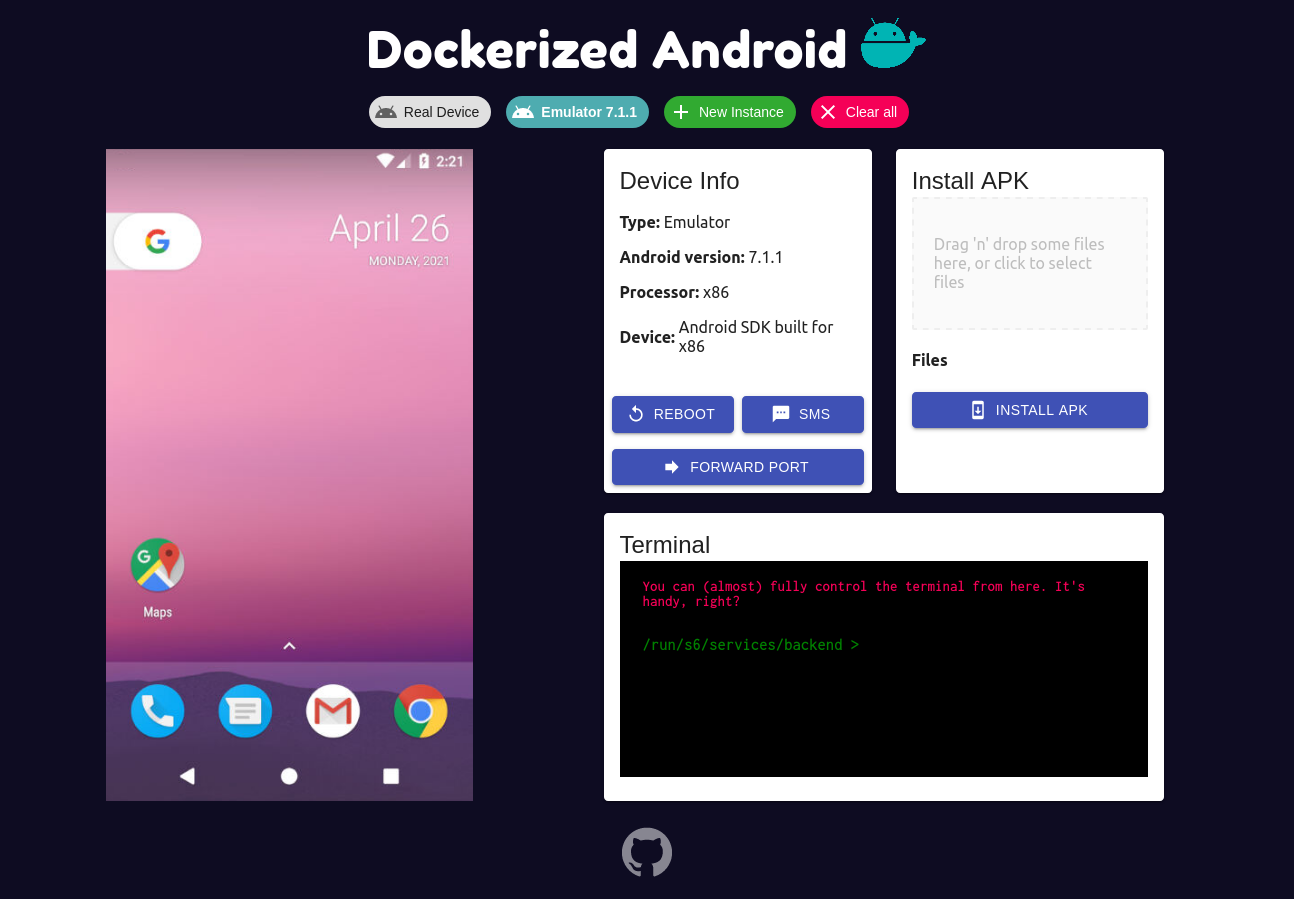




As stated in the brief description above this project has been created in order to provide a starting point for the introduction of mobile security components into Cyber Ranges. For this reasons the features already developed and the ones that will be added in the feature will help the user to make easier to setup a realistic simulation (for example for security training). This README is quite long, maybe you just wanna skip to the "How to run" part.
The following features are currently available:
| Initial setup | Instance Manager Setup | Manual Setup |
|---|---|---|
| initial-setup | instance-manager-setup | manual-setup |
| Toolbox features | Instance Switch |
|---|---|
| toolbox | instance-switch |
The project is composed by three main pieces:
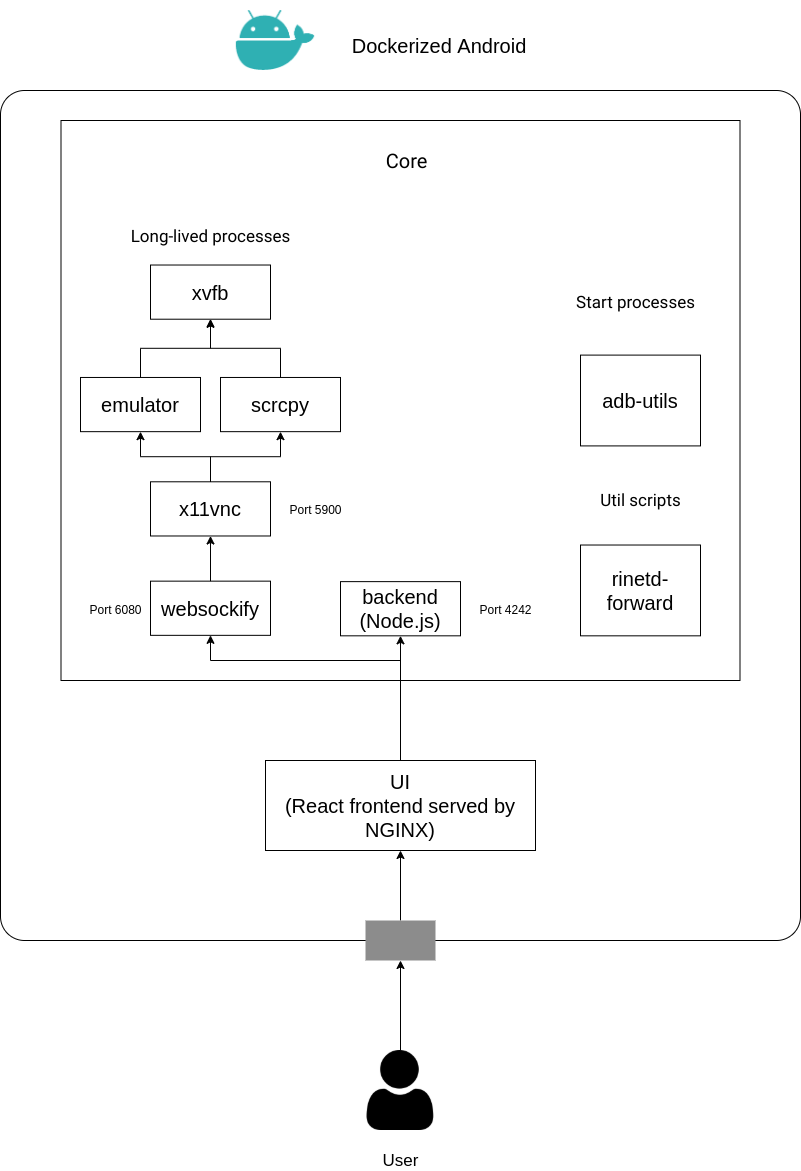
The Core component is the one that executes all the processes needed to run an Android Com-ponent (Emulated or Real) inside a Docker container, also ex-posing some features to the outside. It is with no doubt the most complex part becauseit has to manage different processes in order to provide a set of features. The above figure shows a clear distinction between long-lived processes,start processes and util scripts. Besides, this figure shows that there are 6 long-lived processes, this is a little inaccuracy added to provide a general overview of the Core component, in reality there are two different flavours of the Core component:
The main architectural difference is the one regarding the long-lived processess: the Core for Emulator runs the long-lived emulator process while the Core for Real Device runs the long-lived scrcpy process to display and control the physical device. The other parts are quite similar with just some logic to follow a different behaviour based on the type of the Core component.
The UI component provides a simple way to use all the features exposed by the backend and also adds the ability to display and control the device. The user has to manually insert the address of the Core component and the corresponding ports (the port exposed by the backend and the port exposed by websockify); through this manual setup it is possible to change the default ports (which are 4242 for the backend and 6080 for websockify).
The Instance Manager component has the job to provide all the informations(i.e., addresses and ports) about the running Cores through a single REST API. This is done by writing a simple JSON configuration file that contains all the information about the Cores that are present into the docker-compose in order to avoid the painful job of manually adding one by one. The structure of the JSON configuration file is the following:
{
    "instances": [
        {
            "name": [Generic string to identify the device],
            "address": [Address of the component],
            "core_port": [Port of the backend],
            "vnc_port": [Port of VNC]
        }
    ]
}
| Android Version | API | Image |
|---|---|---|
| 5.0.1 | 21 | secsi/dockerized-android-core-emulator-5.0.1 |
| 5.1.1 | 22 | secsi/dockerized-android-core-emulator-5.1.1 |
| 6.0 | 23 | secsi/dockerized-android-core-emulator-6.0 |
| 7.0 | 24 | secsi/dockerized-android-core-emulator-7.0 |
| 7.1.1 | 25 | secsi/dockerized-android-core-emulator-7.1.1 |
| 8.0 | 26 | secsi/dockerized-android-core-emulator-8.0 |
| 8.1 | 27 | secsi/dockerized-android-core-emulator-8.1 |
| 9.0 | 28 | secsi/dockerized-android-core-emulator-9.0 |
| 10.0 | 29 | secsi/dockerized-android-core-emulator-10.0 |
| 11.0 | 30 | secsi/dockerized-android-core-emulator-11.0 |
| - | - | secsi/dockerized-android-core-bare |
| - | - | secsi/docker-android-core-real-device |
The secsi/dockerized-android-core-bare does not download any system image and you may mount the folder on your host machine where you have all the SDK folders
