
 cyberark/kubiscan
A tool to scan Kubernetes cluster for risky permissions
[![GitHub release][release-img]][release]
[![License][license-img]][license]
 A tool for scanning Kubernetes cluster for risky permissions in Kubernetes's Role-based access control (RBAC) authorization model.
The tool was published as part of the "Securing Kubernetes Clusters by Eliminating Risky Permissions" research https://www.cyberark.com/threat-research-blog/securing-kubernetes-clusters-by-eliminating-risky-permissions/.
A tool for scanning Kubernetes cluster for risky permissions in Kubernetes's Role-based access control (RBAC) authorization model.
The tool was published as part of the "Securing Kubernetes Clusters by Eliminating Risky Permissions" research https://www.cyberark.com/threat-research-blog/securing-kubernetes-clusters-by-eliminating-risky-permissions/.
KubiScan helps cluster administrators identify permissions that attackers could potentially exploit to compromise the clusters. This can be especially helpful on large environments where there are lots of permissions that can be challenging to track. KubiScan gathers information about risky roles\clusterroles, rolebindings\clusterrolebindings, users and pods, automating traditional manual processes and giving administrators the visibility they need to reduce risk.
You can run it like that:
./docker_run.sh <kube_config_file>
# For example: ./docker_run.sh ~/.kube/config
It will copy all the files linked inside the config file into the container and spwan a shell into the container.
To build the Docker image run:
docker build -t kubiscan .
apt-get update
apt-get install -y python3 python3-pip
pip3 install -r requirements.txt
Run alias kubiscan='python3 /<KubiScan_folder>/KubiScan.py' to use kubiscan.
After installing all of the above requirements you can run it in two different ways:
Make sure you have access to ~/.kube/config file and all the relevant certificates, simply run:
kubiscan <command>
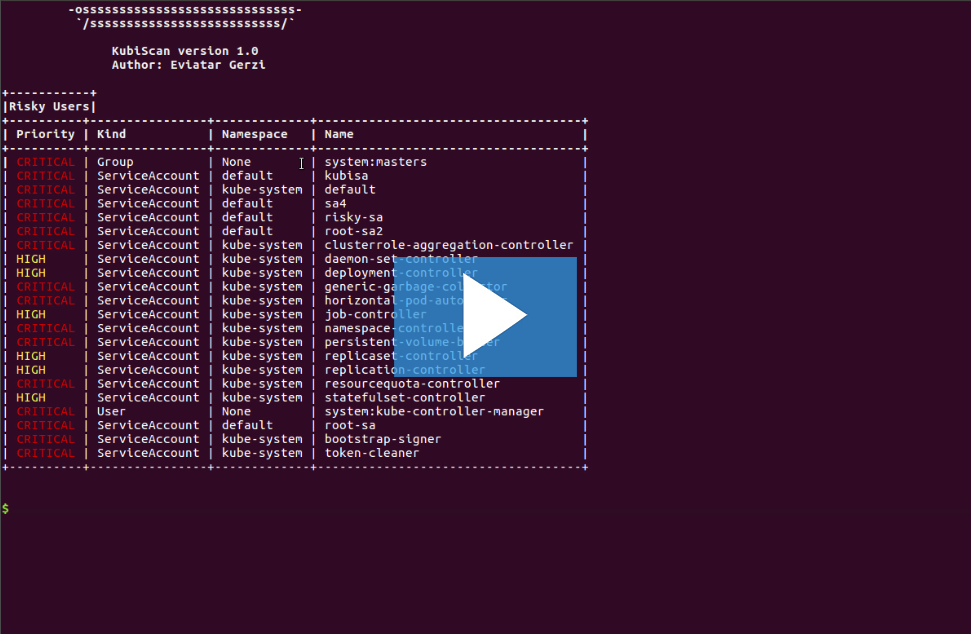
For example: kubiscan -rs will show all the risky subjects (users, service accounts and groups).
Some functionality requires a privileged service account with the following permissions:
["roles", "clusterroles", "rolebindings", "clusterrolebindings", "pods", "secrets"]["get", "list"]["pods/exec"]["create", "get"]But most of the functionalities are not, so you can use this settings for limited service account:
It can be created by running:
kubectl apply -f - << EOF
apiVersion: v1
kind: ServiceAccount
metadata:
  name: kubiscan-sa
  namespace: default
---
apiVersion: v1
kind: Secret
type: kubernetes.io/service-account-token
metadata:
  name: kubiscan-sa-secret
  annotations:
    kubernetes.io/service-account.name: kubiscan-sa
---
kind: ClusterRoleBinding
apiVersion: rbac.authorization.k8s.io/v1
metadata:
  name: kubiscan-clusterrolebinding
subjects:
- kind: ServiceAccount
  name: kubiscan-sa
  namespace: default
  apiGroup: ""
roleRef:
  kind: ClusterRole
  name: kubiscan-clusterrole
  apiGroup: ""
---
kind: ClusterRole
apiVersion: rbac.authorization.k8s.io/v1
metadata:
  name: kubiscan-clusterrole
rules:
- apiGroups: ["*"]
  resources: ["roles", "clusterroles", "rolebindings", "clusterrolebindings", "pods"]
  verbs: ["get", "list"]
EOF
Note that from Kubernetes 1.24, the creation of service account doesn't create a secret. This means that we need to create the secret.
Before 1.24, you can remove the Secret object from the above commands and save the service account's token to a file:
kubectl get secrets $(kubectl get sa kubiscan-sa -o=jsonpath='{.secrets[0].name}') -o=jsonpath='{.data.token}' | base64 -d > token
From 1.24, you don't need to change anything and save the token like that:
kubectl get secrets kubiscan-sa-secret -o=jsonpath='{.data.token}' | base64 -d > token
After saving the token into the file, you can use it like that:
python3 ./KubiScan.py -ho <master_ip:master_port> -t /token <command>
For example:
alias kubiscan='python3 /<KubiScan_folder>/KubiScan.py
kubiscan -ho 192.168.21.129:8443 -t /token -rs
Notice that you can also use the certificate authority (ca.crt) to verify the SSL connection:
kubiscan -ho <master_ip:master_port> -t /token -c /ca.crt <command>
To remove the privileged service account, run the following commands:
kubectl delete clusterroles kubiscan-clusterrole
kubectl delete clusterrolebindings kubiscan-clusterrolebinding
kubectl delete sa kubiscan-sa
kubectl delete secrets kubiscan-sa-secret
To see all the examples, run python3 KubiScan.py -e or from within the container kubiscan -e.
A small example of KubiScan usage:
There is a file named risky_roles.yaml. This file contains templates for risky roles with priority.
Although the kind in each role is Role, these templates will be compared against any Role\ClusterRole in the cluster.
When each of these roles is checked against a role in the cluster, it checks if the role in the cluster contains the rules from the risky role. If it does, it will be marked as risky.
We added all the roles we found to be risky, but because each one can define the term "risky" in a different way, you can modify the file by adding\removing roles you think are more\less risky.
Copyright (c) 2020 CyberArk Software Ltd. All rights reserved
This repository is licensed under GPL-3.0 License - see LICENSE for more details.
For more comments, suggestions or questions, you can contact Eviatar Gerzi (@g3rzi) and CyberArk Labs.

