 cosasdepuma/masterchef
🍳 The most delicious pentesting tool

Masterchef is a graphical vulnerability exploitation and validation tool that helps you break down your penetration testing workflow by creating tasty recipes.
It is the ideal tool for getting started in the world of offensive cybersecurity. Visual, intuitive, customizable and with a lot of delicious ingredients! So yummy!
MisterChef was created by the author under the academic validation of the University of Vigo in the form of a Final Degree Project.
The use of the application may be a criminal act, depending on the regulations of each country.
The author of this document is not responsible in case criminal charges are brought against any individual or corporation using the tool against the stipulated laws, as well as for damages caused by a misuse of the tool. It is the responsibility of the end user to obey all applicable laws.
It is recommended that use be limited to controlled environments and/or penetration testing with prior approval.
Download and install Masterchef Framework quickly with the steps described here.
Click the button below to download the Masterchef binary.



Don't see your operating system here? Try one of the other downloads.
Masterchef binary requires no installation or dependencies.
Go 1.16+ is required
Install the application using go get:
go install github.com/cosasdepuma/masterchef@latest
It is possible to compile and run Masterchef in a container using docker:
# Download the container from Docker Hub
docker pull cosasdepuma/masterchef

# Run the container
docker run --name masterchef -d -p 7767:7767 cosasdepuma/masterchef
Alternatively, you can pull up the Masterchef service, as well as its documentation, using docker-compose:
cd masterchef/
docker-compose up
If you are a paranoid sybarite, you can download and install the program yourself from the source code.
Download or clone the repository using git:
git clone https://github.com/cosasdepuma/Masterchef
Compile the code:
cd masterchef/

# Manually
npm --prefix frontend install
npm --prefix frontend run compile
cd backend/
export GOOS=linux     # windows, darwin...
export GOARCH=amd64   # 386, arm, arm64...
go build -a -ldflags="-s -w -extldflags \"-static\"" -o ../dist/masterchef main.go
cd ..
upx -9 --ultra-brute dist/masterchef # optional

# Automatically
make clean
make

# Using Docker
docker build -t cosasdepuma:masterchef .
Run the application by double clicking or using the console:
./masterchef
It is possible to modify the address and the number of threads per request using environment variables:
export MC_ADDR=0.0.0.0:7767 # Address
export MC_THREADS=200       # Threads
Once the application is started, access the displayed web address. By default, it is http://127.0.0.1:7767/.
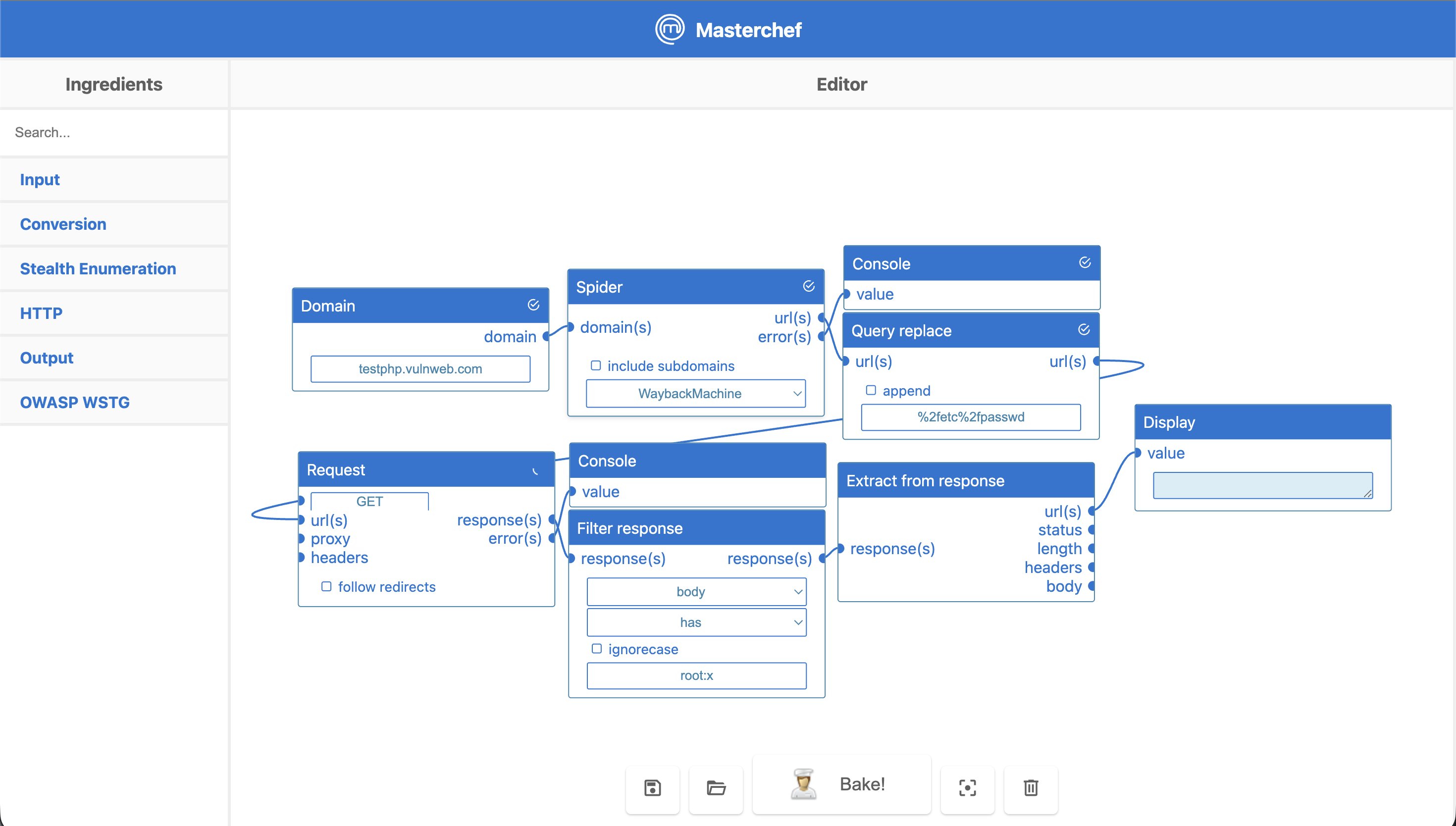
If everything works correctly, the following interface will be shown:
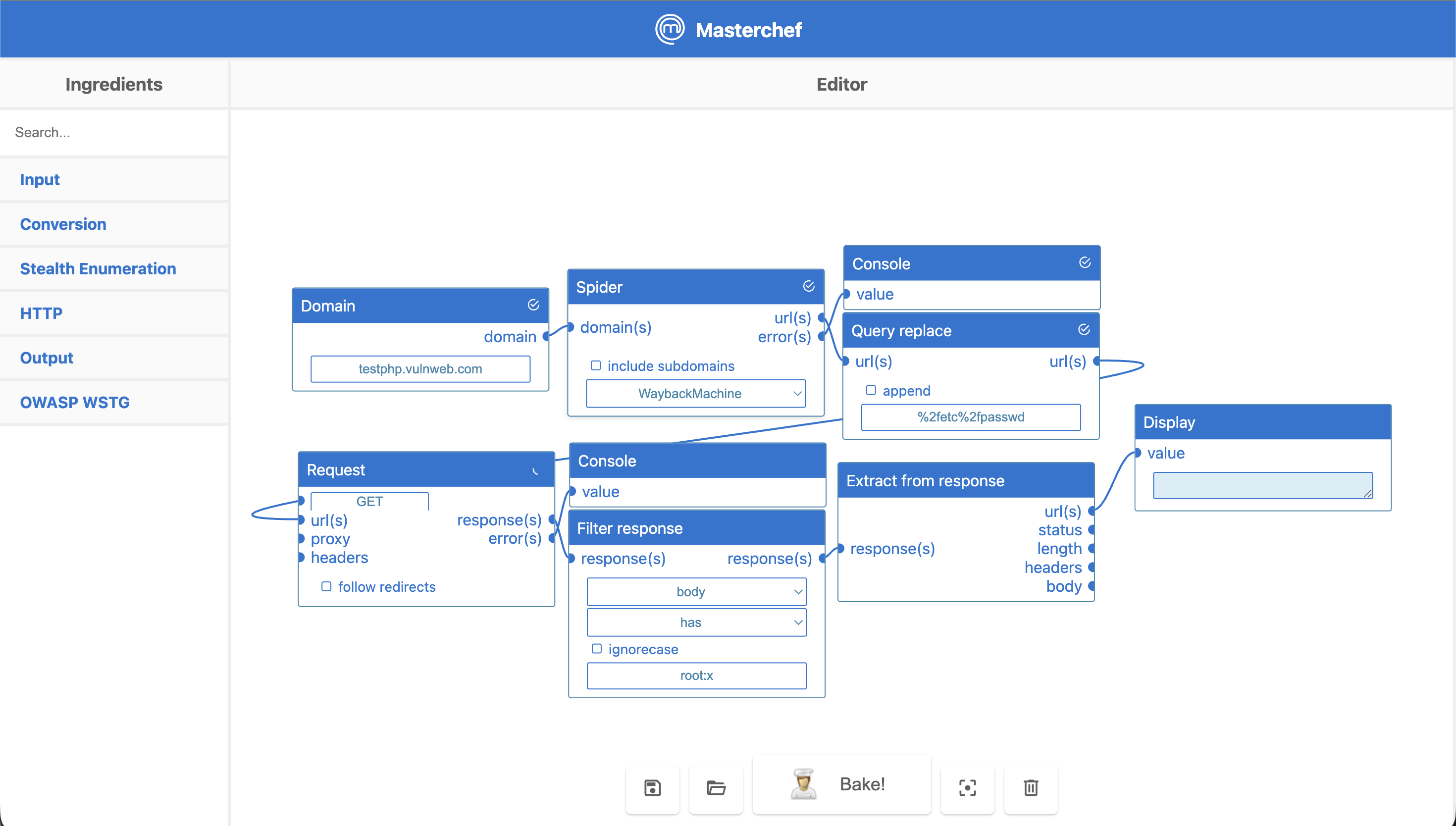
You can find recipes with examples of functionality in the cookbook folder.
