 compasssecurity/entrafalcon
A lightweight PowerShell tool for assessing the security posture of Microsoft Entra ID environments. It helps identify privileged objects, risky assignments, and potential misconfigurations.

# EntraFalcon

EntraFalcon is a PowerShell-based assessment tool for pentesters, security analysts, and system administrators to evaluate the security posture of a Microsoft Entra ID environment.
Designed for ease of use, EntraFalcon runs on PowerShell 5.1 and 7, supports both Windows and Linux, and requires no additional PowerShell modules, extra installations, or Microsoft Graph API consent.
The tool helps uncover privileged objects, potentially risky assignments and Conditional Access misconfigurations that are often overlooked, such as:
- Users with control over high-privilege groups or applications
- External or internal enterprise applications with excessive permissions (e.g., Microsoft Graph API, Azure roles)
- Users with Azure IAM role assignments directly on resources
- Privileged accounts synced from on-premises
- Inactive users or users without MFA capability
- Unprotected groups used in sensitive assignments (e.g., Conditional Access exclusions, Subscription Owner, or eligible member of a privileged group)
Findings are presented in interactive HTML reports to support efficient exploration and analysis.
## 🚀 Features
- Simple PowerShell script compatible with PowerShell 5.1 and 7. Works on Windows and Linux
- Built-in authentication supporting multiple methods
- Uses first-party Microsoft applications with pre-consented scopes to bypass Graph API consent prompts
- Generates navigable HTML reports that support filtering, sorting, data export, etc.
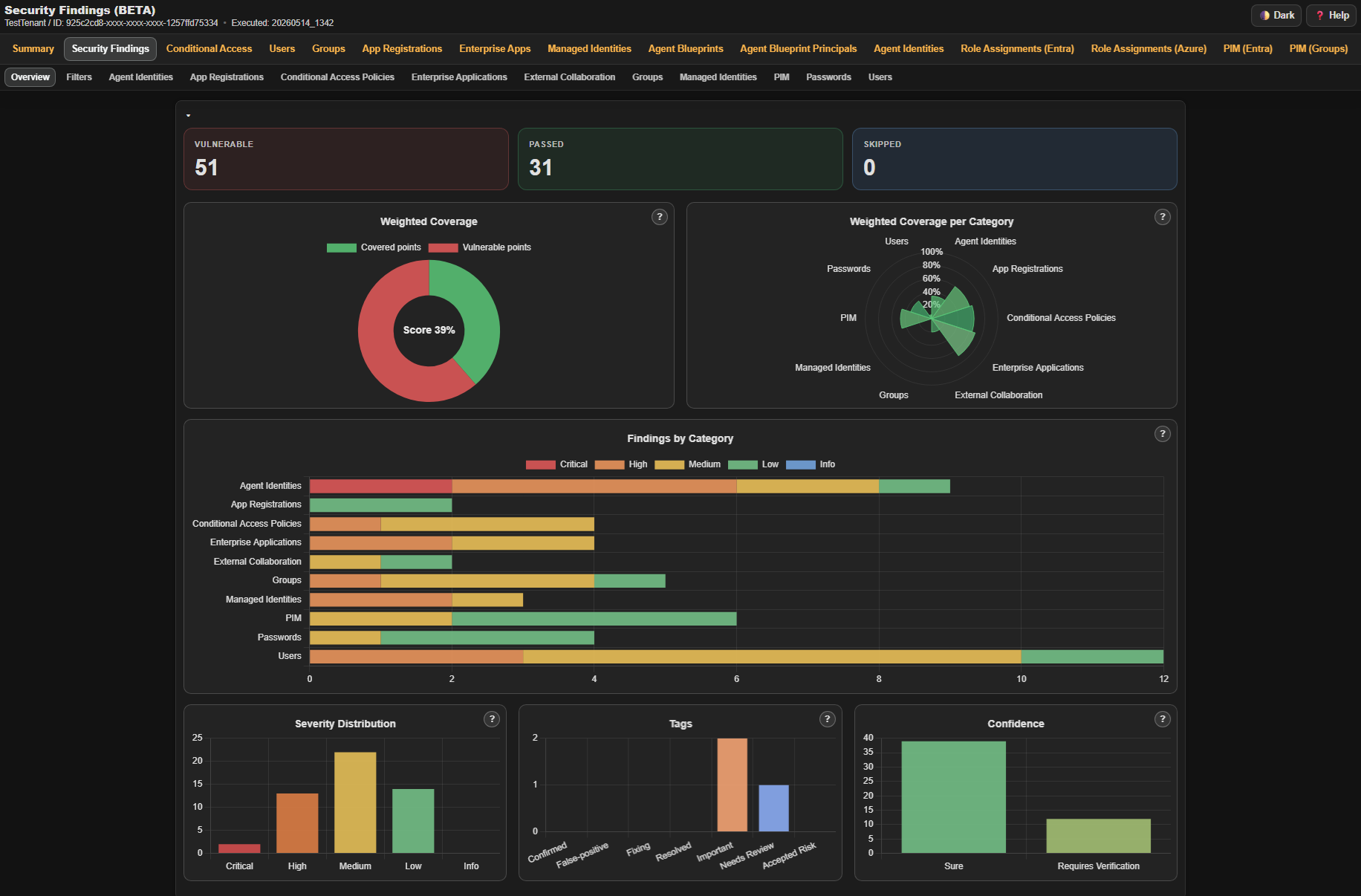
- Performs >90 automated checks and summarizes the results in a Security Findings Report
- Includes checks for weak tenant configurations and risky object properties or permissions
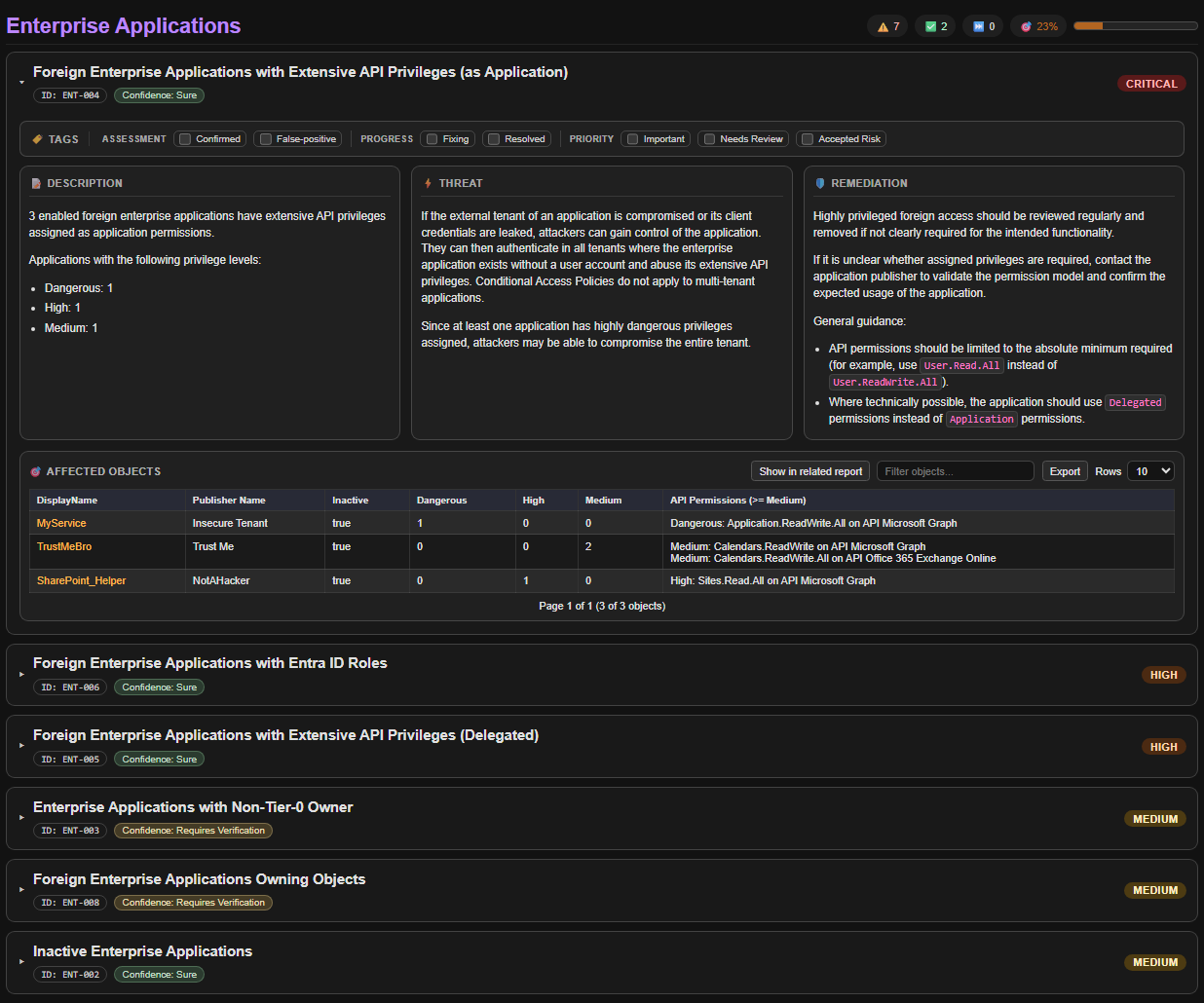
- Provides severity ratings as well as descriptions of the issue, potential threats, and remediation guidance
- Lists affected objects and links directly to their detailed reports for further investigation
- Performs basic impact, likelihood, and risk scoring to highlight weakly protected high-privilege objects and sort the data.
- Displays warnings for risky configurations and elevated privileges
- Enumerates Entra ID objects, including:
- Users (including Agent Users)
- Groups
- Enterprise Applications
- App Registrations
- Managed Identities
- Agent identities
- Agent identity blueprint principals
- Agent identity blueprints
- PIM assignments:
- PIM for Entra Roles
- PIM for Groups
- PIM for Azure Roles
- Entra Role Assignments
- Azure Role Assignments
- Intune RBAC Assignments
- Access Packages
- Entitlement Management Catalogs
- Catalog RBAC
- Conditional Access Policies
- Administrative Units
- PIM settings:
- PIM for Entra Roles
- PIM for Groups (BroCi auth only)
## ✅ Requirements
|Type|Permission|Mandatory|Impact if missing|
|-|-|-|-|
|Entra ID Role|Global Reader|Yes|Not possible to run the scripts|
|Azure Role|Reader: On every Management Group or Subscription|No|Can't assess Azure IAM assignments|
Furthermore, you must be able to authenticate to the Microsoft Graph API and optionally the Azure ARM API from the device where you run the tool.
Ensure that Conditional Access Policies do not block your authentication.
## ▶️ Usage
### Download EntraFalcon
To get started, clone the repository and navigate into the project directory:
```powershell
git clone https://github.com/CompassSecurity/EntraFalcon
cd EntraFalcon
```
Note: You may need to temporarily change the PowerShell execution policy to run the script.
Only do this for trusted scripts!
```
Set-ExecutionPolicy -ExecutionPolicy Unrestricted -Scope Process
```
### Run EntraFalcon
EntraFalcon includes built-in support for Entra ID authentication. Use `-AuthFlow` to select the authentication flow.
For normal assessments, use one of the full-coverage flows:
| Recommended Flow | Best For | Platform | Coverage |
|-|-|-|-|
| `BroCi` *(default)* | Interactive Windows runs | Windows | Full |
| `BroCiManualCode` | Authentication in another browser | Windows, Linux, macOS | Full |
| `BroCiToken` | Existing Azure Portal refresh token | Windows, Linux, macOS | Full |
| `ServicePrincipal` | Automation / CI | Windows, Linux, macOS | Full |
`BroCi` uses one interactive login. `BroCiToken` and `ServicePrincipal` use none. Fallback user flows may require multiple interactive logins because separate resource tokens are requested.
<details>
<summary>Fallback Authentication Flows</summary>
Due to the lack of pre-consented first-party applications, the fallback flows cannot perform the full enumeration (`PIM for Groups`, `Access Packages`, `Catalogs`). Therefore, they currently remain fallback options only.
| Flow | Use Only When | Platform | Limitations |
|-|-|-|-|
| `AuthCode` | Legacy compatibility is required | Windows | Partial coverage. No standalone `PIM for Groups`, `Access Packages`, or `Catalogs` report. |
| `DeviceCode` | Browser-based authentication is not possible | Windows, Linux, macOS | Partial coverage. No standalone `PIM for Groups`, `Access Packages`, or `Catalogs` report. Some Security Findings checks run with reduced depth. |
| `ManualCode` | Authentication must be completed through a separate browser session | Windows, Linux, macOS | Partial coverage. No standalone `PIM for Groups`, `Access Packages`, or `Catalogs` report. |
</details>
#### Recommended: BroCi Flow (default / Windows only)
BroCi uses alternate first-party applications and requires only one interactive sign-in.
It is useful when the *Azure Active Directory PowerShell* client requires assignment and must be avoided.
```powershell
.\run_EntraFalcon.ps1
```
Explicit BroCi selection:
```powershell
.\run_EntraFalcon.ps1 -AuthFlow BroCi
```
#### Recommended: BroCi + Manual Code Flow
```powershell
.\run_EntraFalcon.ps1 -AuthFlow BroCiManualCode
```
1. The script copies the authentication URL to the clipboard.
2. Paste the URL into a browser (optionally on another device for SSO support).
3. Open the browser developer tools and, in the Network tab, enable `Preserve log`.
4. Complete authentication.
5. Search the network log for `code=1.` and copy the request URL containing the code to the clipboard.
6. Press Enter to continue; the script reads the code from the clipboard and completes token acquisition.
#### Recommended: BroCi with Token
If a valid Azure Portal refresh token is already available (client c44b4083-3bb0-49c1-b47d-974e53cbdf3c), it can be used directly.
Example: Obtaining the refresh token from the browser
1. Open the browser developer tools and, in the Network tab, enable Preserve log.
2. Authenticate at https://entra.microsoft.com.
3. Search the network log for `brk_client_id=c44b4083-3bb0-49c1-b47d-974e53cbdf3c` and extract the refresh token from the response.
```powershell
.\run_EntraFalcon.ps1 -AuthFlow BroCiToken -BroCiToken "1.XXXXXXXXXXX"
```
#### Recommended: Service Principal
Authenticates as a registered application using the OAuth2 client credentials grant — no user interaction required.
Useful for repeated automated executions.
Requires a custom Entra app registration with `Application`-type Graph API permissions (see below).
**With client secret:**
```powershell
.\run_EntraFalcon.ps1 -AuthFlow ServicePrincipal -Tenant "mysecuretenant.ch" -SPClientId "<AppId>" -SPClientSecret "<Secret>"
```
**With PFX certificate:**
```powershell
.\run_EntraFalcon.ps1 -AuthFlow ServicePrincipal -Tenant "mysecuretenant.ch" -SPClientId "<AppId>" -SPCertificatePath "C:\certs\app.pfx"
```
For a password-protected PFX, add `-SPCertificatePassword (Read-Host -Prompt "Certificate password" -AsSecureString)`.
**With PEM certificate + private key (PowerShell 7+ only):**
```powershell
.\run_EntraFalcon.ps1 -AuthFlow ServicePrincipal -Tenant "mysecuretenant.ch" -SPClientId "<AppId>" -SPCertificatePemPath "C:\certs\cert.pem" -SPPrivateKeyPemPath "C:\certs\key.pem"
```
For an encrypted private key, add `-SPPrivateKeyPemPassword (Read-Host -Prompt "Private key password" -AsSecureString)`.
##### Required App Registration Permissions
Grant the following **Application** permissions (not Delegated) on the app registration and admin-consent them:
| Permission | Type |
|---|---|
| `AdministrativeUnit.Read.All` | Application |
| `AgentIdentity.Read.All` | Application |
| `AgentIdentityBlueprint.Read.All` | Application |
| `AgentIdentityBlueprintPrincipal.Read.All` | Application |
| `Application.Read.All` | Application |
| `AuditLog.Read.All` | Application |
| `Device.Read.All` | Application |
| `EntitlementManagement.Read.All` | Application |
| `Group.Read.All` | Application |
| `Organization.Read.All` | Application |
| `Policy.Read.All` | Application |
| `PrivilegedAccess.Read.AzureADGroup` | Application |
| `RoleManagement.Read.Directory` | Application |
| `RoleManagementPolicy.Read.AzureADGroup` | Application |
| `User.Read.All` | Application |
| `DeviceManagementRBAC.Read.All` | Application |
In addition, assign the **Azure Reader** role on the root management group (or every relevant subscription) and optionally the **Global Reader** role to the service principal in Entra ID (required for per-user MFA status).
#### Fallback: Auth Code Flow (Windows only)
```powershell
.\run_EntraFalcon.ps1 -AuthFlow AuthCode
```
#### Fallback: Device Code Flow
It is often restricted by Conditional Access in hardened environments.
With `DeviceCode`, two Security Findings checks run with reduced depth (`CAP-004` and `CAP-005`).
```powershell
.\run_EntraFalcon.ps1 -AuthFlow DeviceCode
```
#### Fallback: Auth Code + Manual Code Flow
```powershell
.\run_EntraFalcon.ps1 -AuthFlow ManualCode
```
1. The script copies the authentication URL to the clipboard.
2. Paste the URL into a browser (optionally on another device for SSO support).
3. Complete authentication.
4. Copy the final redirect URL from the browser address bar (containing the authorization code) to the clipboard.
5. Press Enter to continue; the script reads the code from the clipboard and completes token acquisition.
### Other Parameters
#### Include Microsoft-Owned Enterprise Apps
By default, official Microsoft enterprise applications are excluded from the assessment to reduce noise. To include them in the enumeration and analysis, use the `-IncludeMsApps` switch:
```powershell
.\run_EntraFalcon.ps1 -IncludeMsApps
```
#### Skip PIM for Groups Assessment
Use the `-SkipPimForGroups` switch to skip PIM for Groups precollection and enrichment.
This also skips the standalone `PIM for Groups` settings report.
```powershell
.\run_EntraFalcon.ps1 -SkipPimForGroups
```
#### Other Optional Parameters
| Parameter | Description | Default Value |
|---------------------- |----------------------------------------------------------------------------------------------------------------------------------|---------------------------------------------------|
| **UserAgent** | User agent used for the requests to the token endpoint and API calls. | `EntraFalcon` |
| **DisableCAE** | Disables requesting Continuous Access Evaluation (CAE) tokens. | `false` |
| **Tenant** | Specifies the tenant (ID or domain) to authenticate against. Useful when assessing a tenant other than the account’s home tenant.| `Account's home tenant` |
| **OutputFolder** | Output folder where the reports are stored. | `Results_%TenantName%_YYYYMMDD_HHMM` |
| **LimitResults** | Limits the number of groups and users in the report (after sorting by risk). Useful for large tenants. | - |
| **LogLevel** | Controls runtime cli logging verbosity. Supported values: `Off` (default), `Verbose`, `Debug`, `Trace`. | `Off` |
| **ApiTop** | Sets the requested Graph API page size (objects per response). Lower values can reduce timeout risk (HTTP 504), but increase request count. | `999` (Valid range: 5–999) |
| **AuthFlow** | Preferred auth-flow selector. Values: `BroCi` (default), `AuthCode`, `DeviceCode`, `ManualCode`, `BroCiManualCode`, `BroCiToken`, `ServicePrincipal`. | `BroCi` |
| **BroCiToken** | Azure Portal **refresh token** for `AuthFlow BroCiToken`. | - |
| **SPClientId** | Application (client) ID of the service principal. Required for `-AuthFlow ServicePrincipal`. | - |
| **SPClientSecret** | Client secret for the service principal. Used with `-AuthFlow ServicePrincipal`. | - |
| **SPCertificatePath** | Path to a PFX/P12 certificate file for service principal authentication. | - |
| **SPCertificatePassword** | Password (`SecureString`) for the PFX certificate specified by `-SPCertificatePath`. | - |
| **SPCertificatePemPath** | Path to a PEM certificate file. Used together with `-SPPrivateKeyPemPath`. | - |
| **SPPrivateKeyPemPath** | Path to the PEM private key file matching `-SPCertificatePemPath`. | - |
| **SPPrivateKeyPemPassword** | Password (`SecureString`) for the PEM private key specified by `-SPPrivateKeyPemPath`. | - |
| **Csv** | Enables writing CSV report files in addition to TXT/HTML report files. | `false` |
| **ExportCapUncoveredUsers** | For each enabled Conditional Access policy with user targeting, exports a CSV listing users **not** covered by that policy. Files are written to a `ConditionalAccessPolicies_UncoveredUsers` subfolder in the output directory. | `false` |
| **ExportFindingsJson** | Exports all Security Findings as JSON at the end of the run. | `false` |
| **ExportDataJson** | Exports enriched report and supporting datasets as raw JSON data files under `Data_Json`; run metadata is available in `Summary.json`. | `false` |
| **DebugObjectDump** | Exports final in-memory report objects as CLIXML to `Debug_ObjectDump` for troubleshooting and testing. | `false` |
## 📊 Some Example Reports
### Security Finding Report
### Users
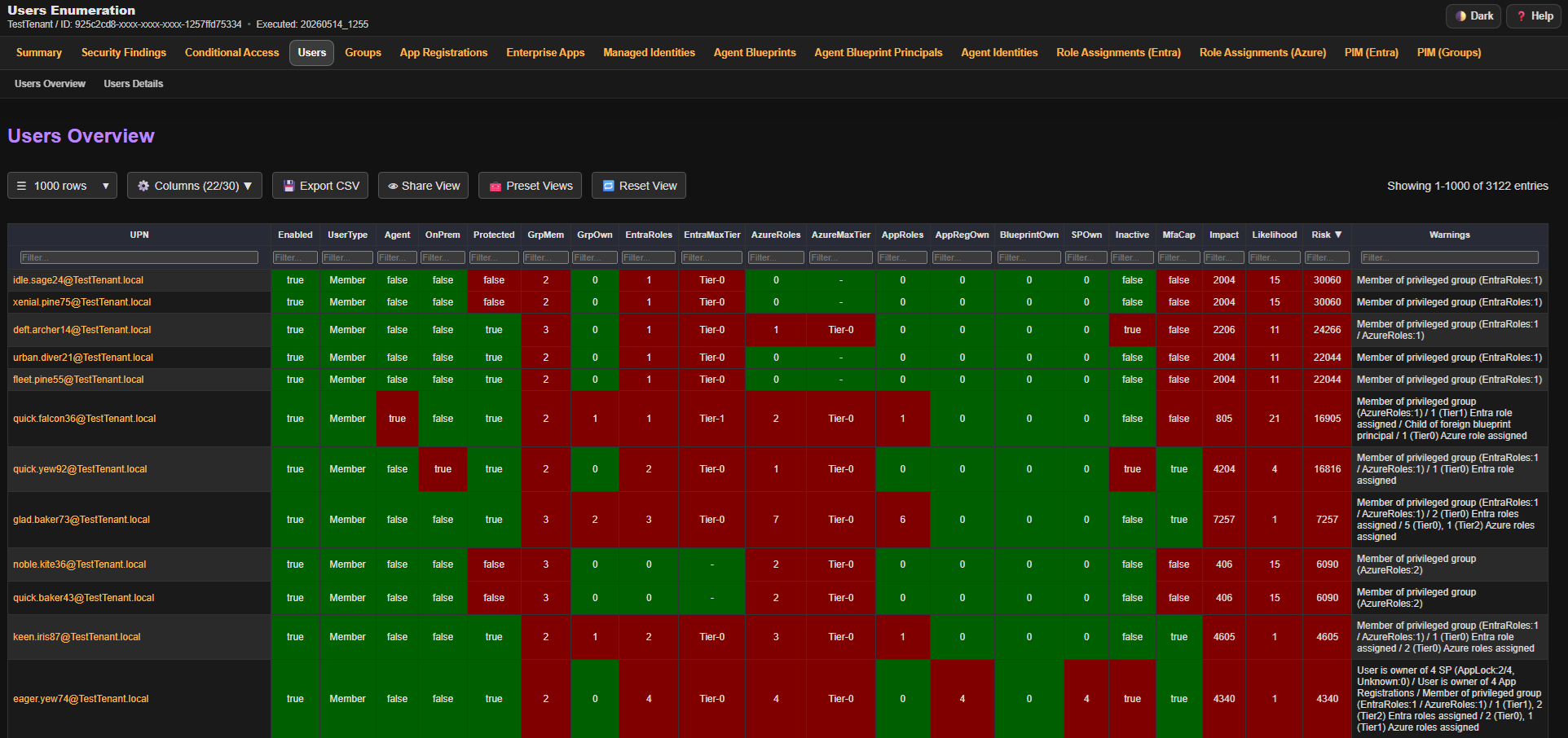
### Users (Details Section)
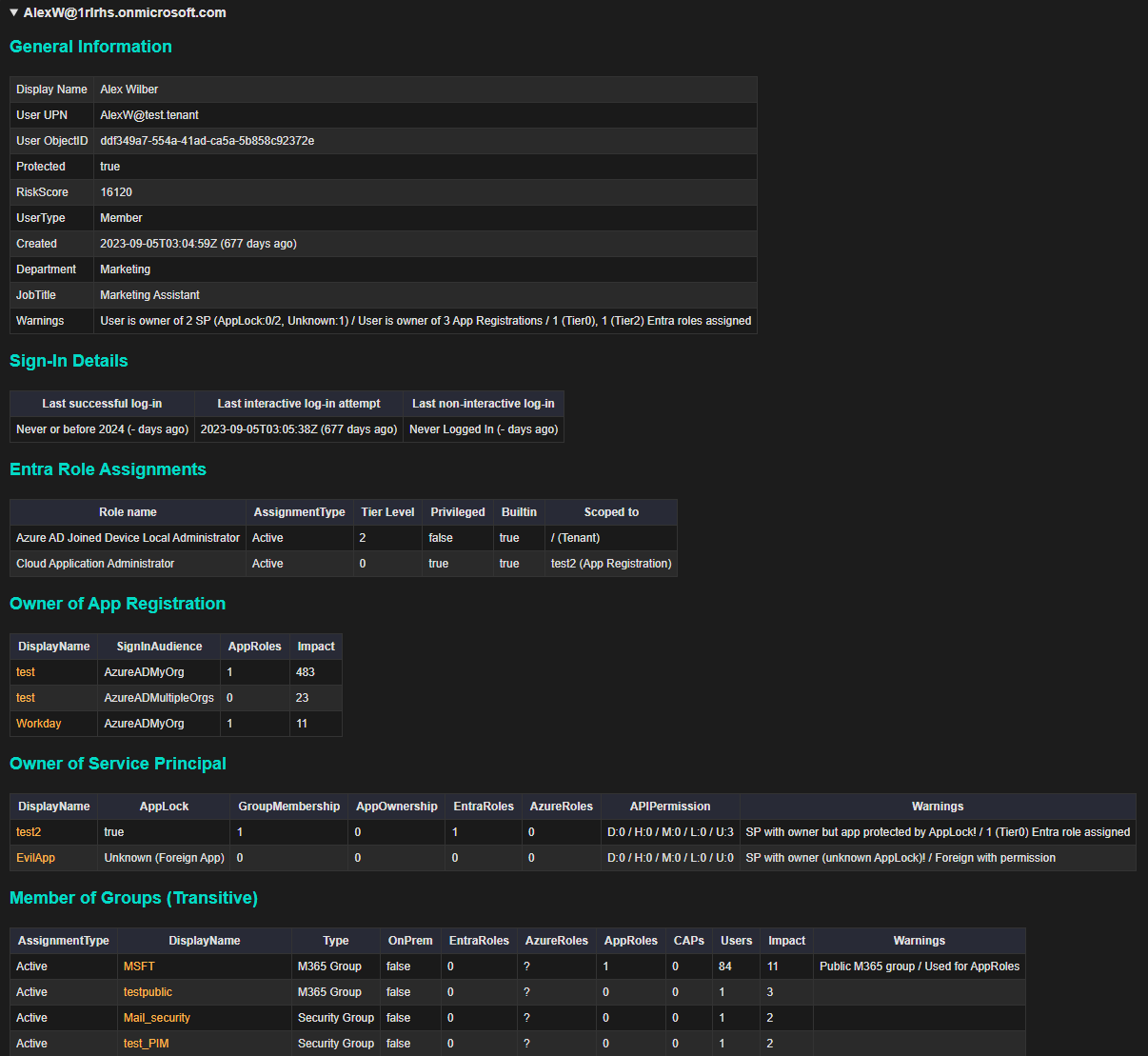
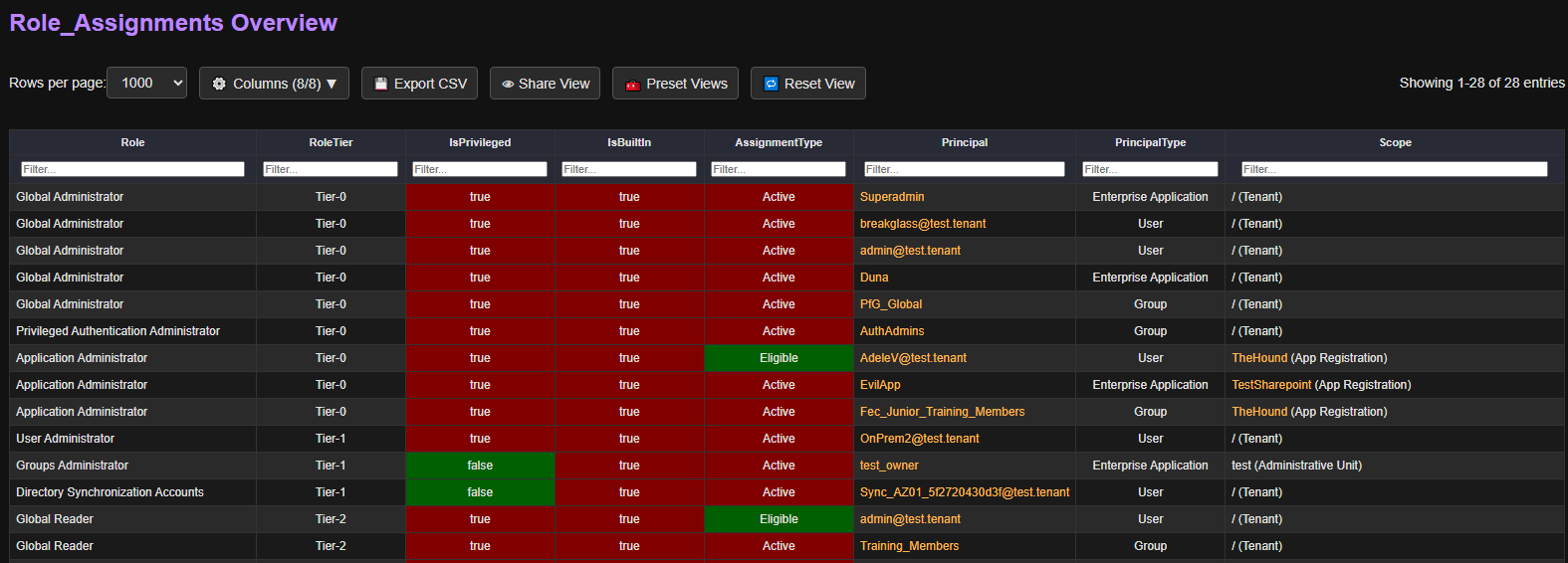
### Entra ID Roles
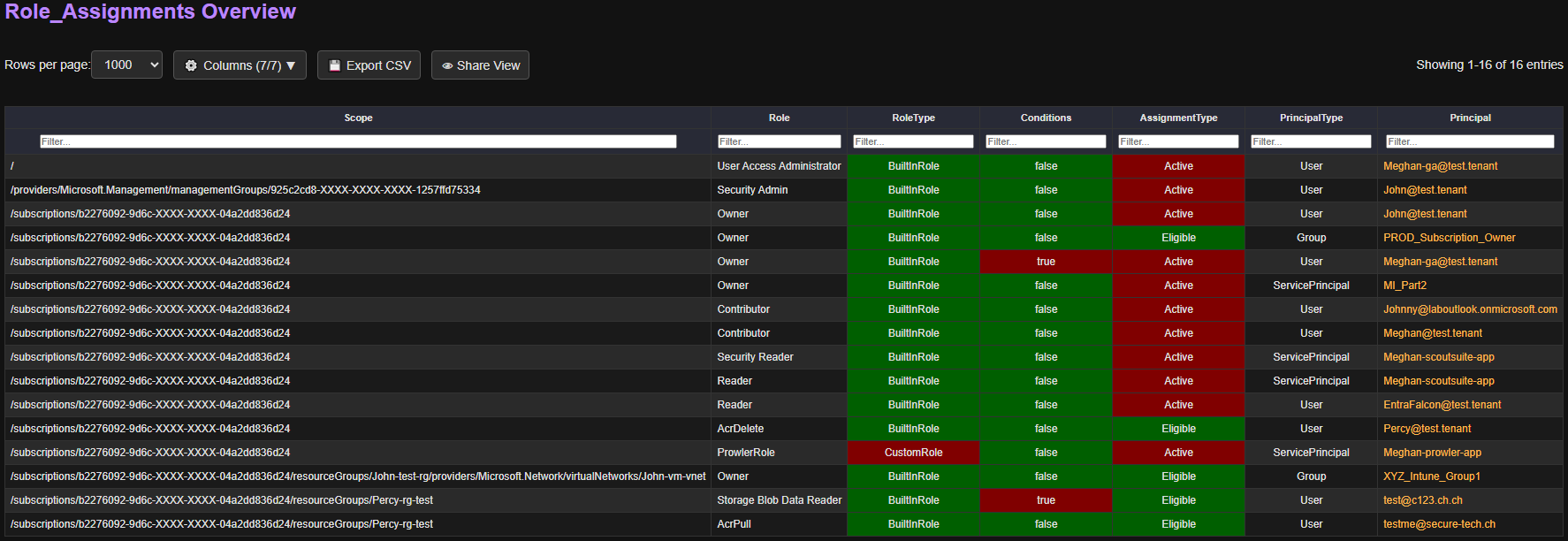
### Azure Roles
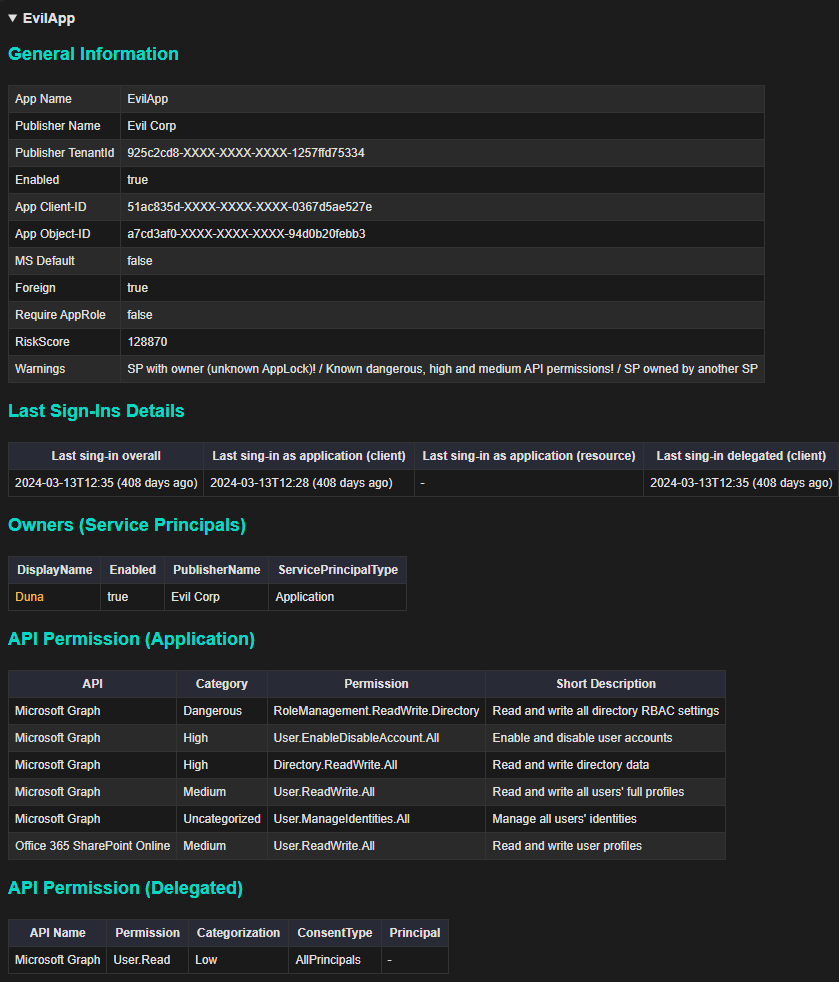
### Enterprise Application (Details Section)
### Conditional Access Policies
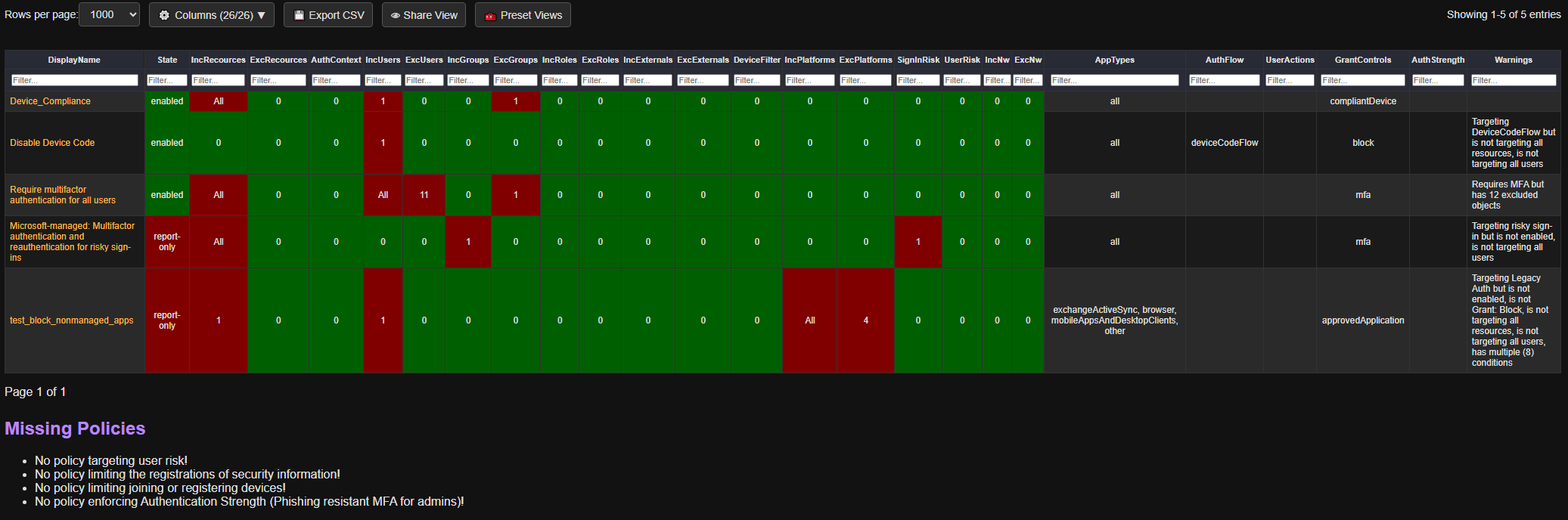
### Conditional Access Policies (Details Section)
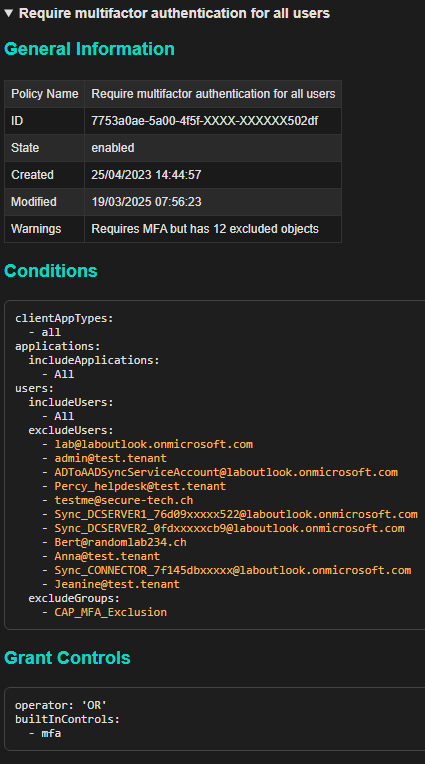
### PIM Role Settings (Entra)
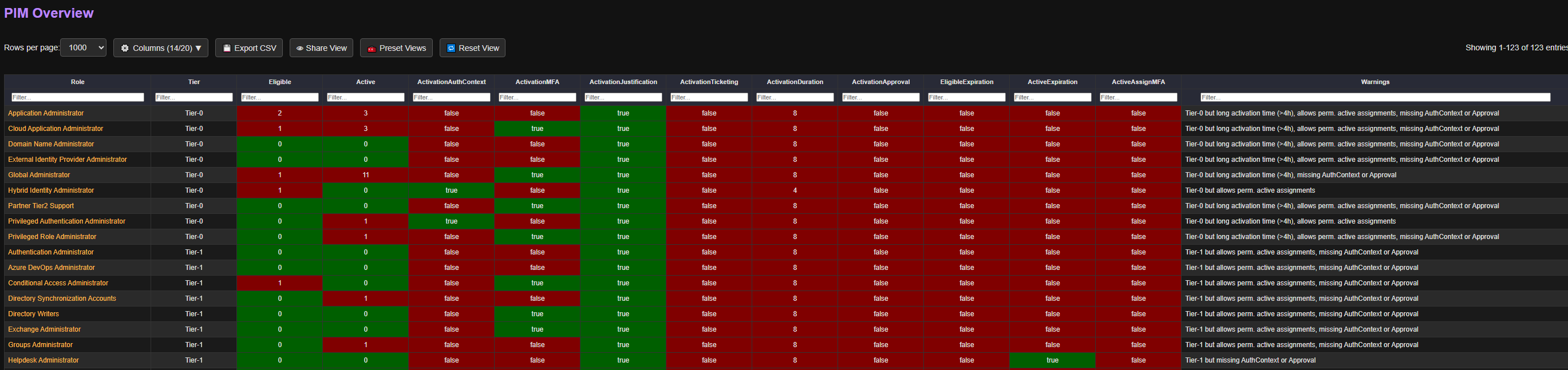
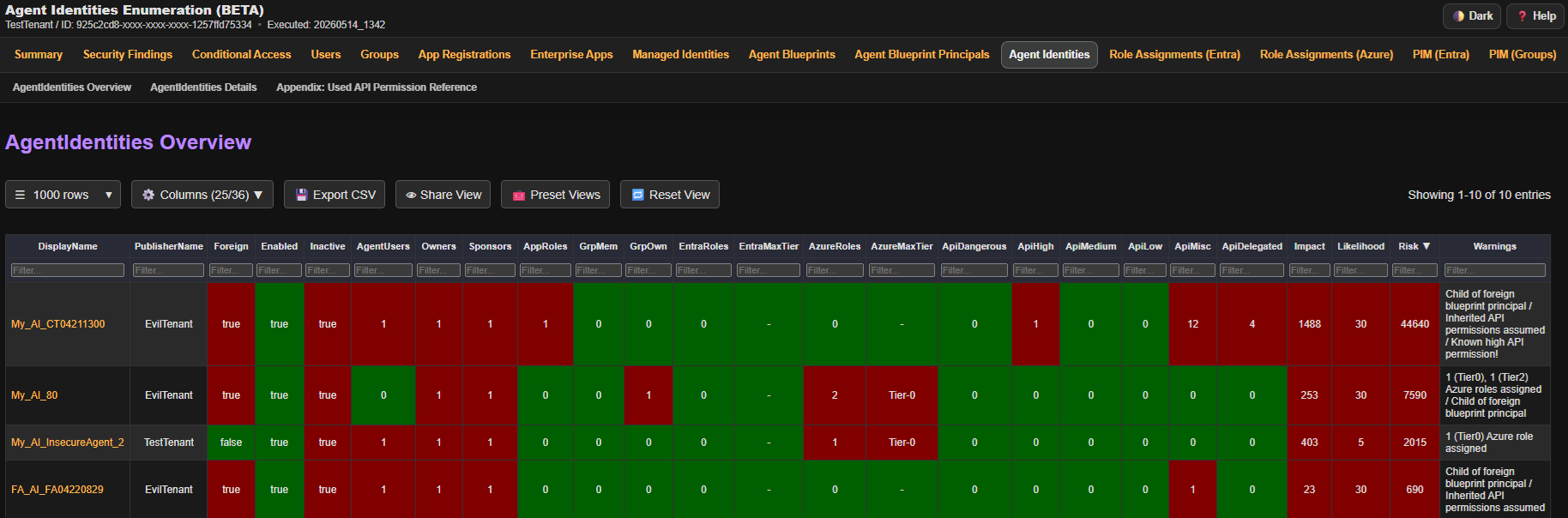
### Agent Identities
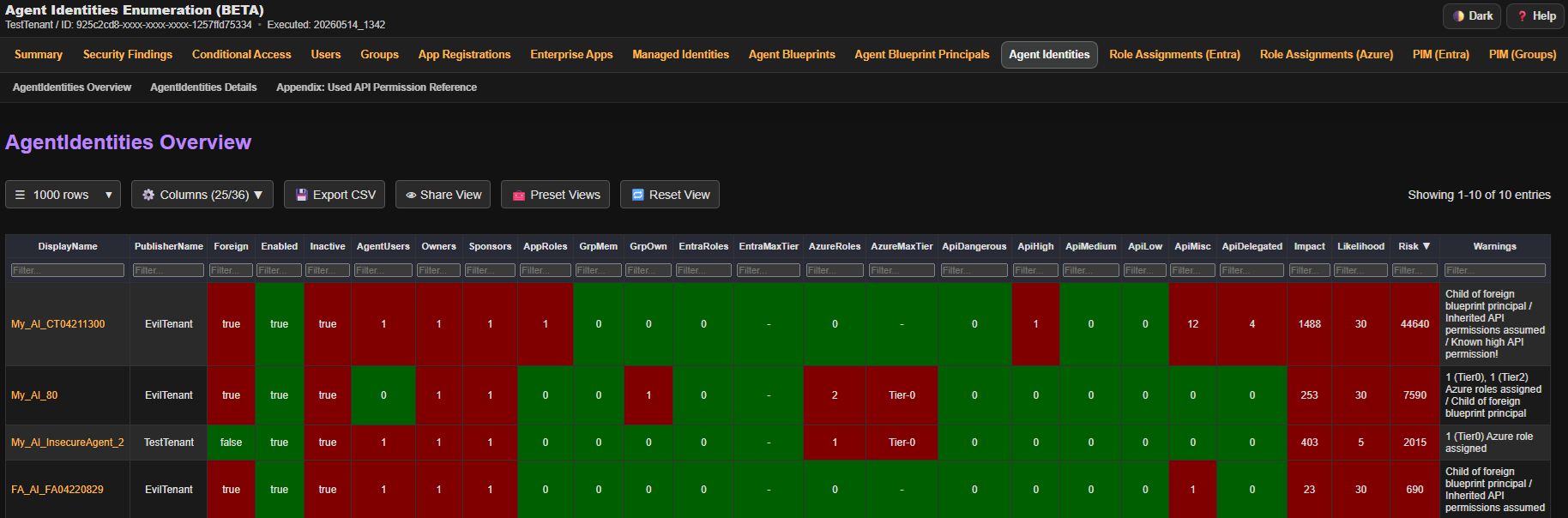
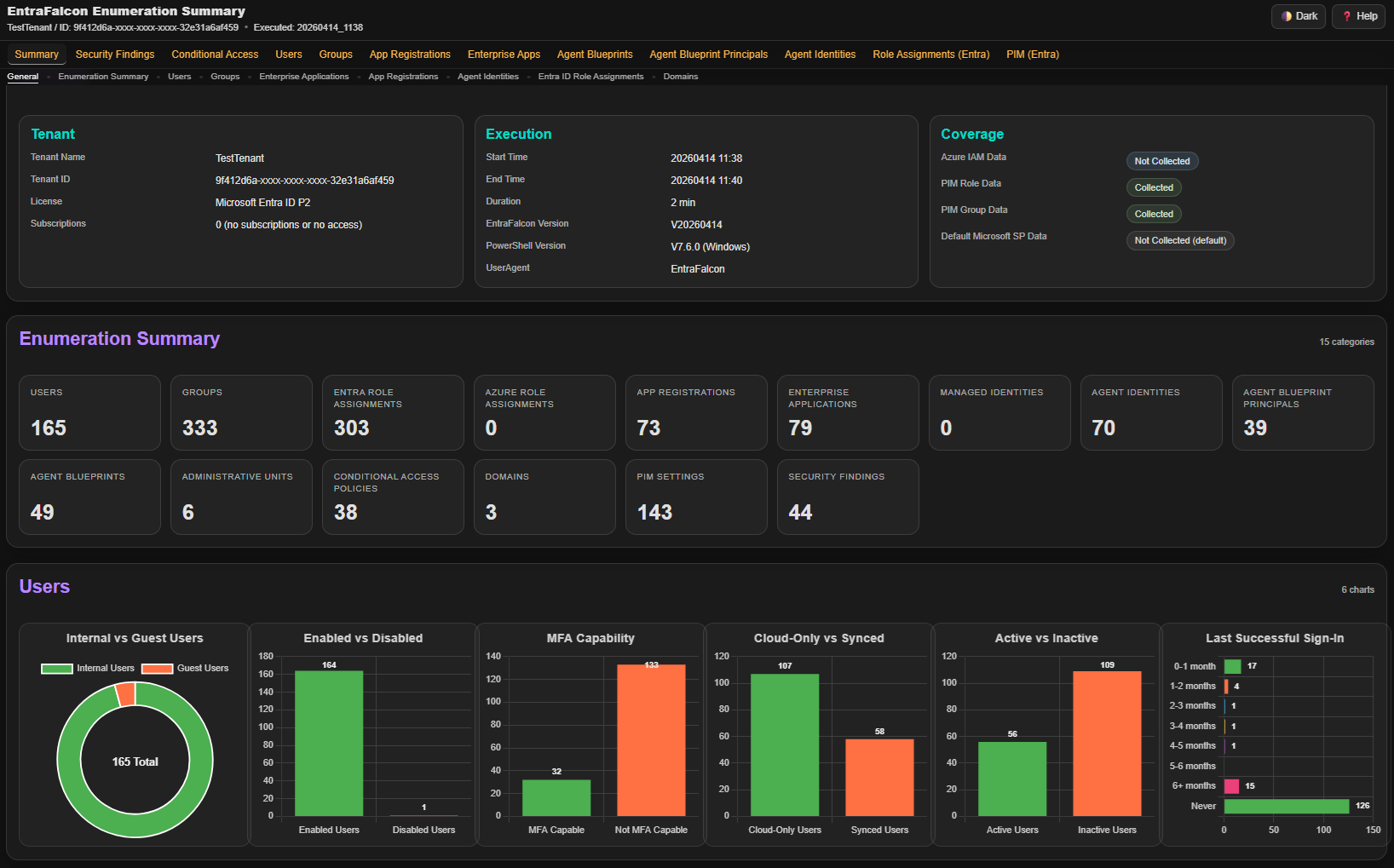
### Enumeration Summary
## 📑 HTML Report
### **General**
- Click the ⚙️ **Columns** button to show or hide specific columns.
- Click 💾 **Export** to download CSV/JSON or copy CSV/TSV/JSON of the currently visible data.
- Click 👁 **Share View** to copy filters, sorting, and column selection as a shareable link.
- Click 🧰 **Preset Views** to apply preconfigured filters and column selections.
- Click 🔄 **Reset View** to reset the view to the default.
- Click on object names to jump to detailed information, even in other reports.
- When using internal navigation, press the browser’s back button to return.
- Some table header fields display helper text on mouse hover.
- Sort data by clicking a table header.
- Alt+click a main table column header to quickly hide that column.
- Alt+click a main table content row to hide it temporarily. Use the hidden-rows chip or Reset View to show hidden rows again.
### **Filtering**
- If no operator is specified, filtering defaults to *contains*.
- Use `=` for an exact match.
- Use `^` for *starts with* (e.g., `^Mallory`).
- Use `$` for *ends with* (e.g., `$domain.ch`).
- Comparison operators like `>`, `<`, `>=`, `<=` are supported (numeric values only).
- Filters can be negated by starting with `!` (except for numeric comparisons). Examples: `!Mallory`, `!=Mallory`,`!^Mallory` or `!$domain.ch`.
- Use `=empty` to match empty cells, or `!=empty` to match non-empty cells.
- Use `||` to match any of multiple values in the same column (e.g., `Admin || Guest`).
- Use `&&` to require multiple matches in the same column (e.g., `!adm && !svc && !sql`).
- To apply OR logic across columns, use `or_`, `group1_`, `group2_`... directly in a filter field. Examples: in column 1: `or_>1`, in column 2: `or_!Mallory`
- *Note:* The **DisplayName** column also includes the object's ID (invisible), so filtering by ID is also possible.
### **Controls using GET Parameters**
- *Filtering*: Apply filters using field names as HTTP GET parameters, e.g., `?EntraRoles=>1&Enabled=true`.
To apply OR logic across columns, use the `or_` or `group1_` prefix (e.g., `?or_EntraRoles=>0&or_GrpMem=>0`).
- *Column Selection*: Choose which columns to display using the `columns` parameter. Example: `?columns=DisplayName,Owner`.
- *Sorting*: Sort the data using `sort` and `sortDir` parameters. Example: `?sort=Impact&sortDir=desc` or `?sort=OwnerCount&sortDir=asc`.
- *Object Details*: Jump directly to a specific object in the report using an anchor (`#`) and the object id, e.g. `#%ObjectID%`.
### **Rating**
- **Impact**: Represents the amount or severity of permissions the object has.
- **Likelihood**: Represents how easily the object can be influenced or how well it is protected.
- **Risk**: Calculated score: *Impact × Likelihood = Risk*.
- **Important**:
- This scoring is meant as a basic evaluation to help sort and prioritize entries in the table.
- Risk scores are not directly comparable across different object types or reports.
- It is not intended to replace a full risk assessment.
## 🔧Under the Hood
### Role Categorization
Entra ID and Azure roles are roughly categorized into different tier levels. This categorization influences the impact scores of objects assigned to those roles.
The goal is to assign a higher impact score to users with more powerful roles (e.g., Global Administrator) compared to users with less critical roles (e.g., Global Reader), even if both are considered privileged roles by Microsoft.
<details>
<summary>Entra ID Roles</summary>
| Role Name | Tier-Level | GUID |
|-----------------------------------------------|------------|----------------------------------------|
| Global Administrator | 0 | 62e90394-69f5-4237-9190-012177145e10 |
| Partner Tier2 Support | 0 | e00e864a-17c5-4a4b-9c06-f5b95a8d5bd8 |
| Privileged Authentication Administrator | 0 | 7be44c8a-adaf-4e2a-84d6-ab2649e08a13 |
| Privileged Role Administrator | 0 | e8611ab8-c189-46e8-94e1-60213ab1f814 |
| Domain Name Administrator | 0 | 8329153b-31d0-4727-b945-745eb3bc5f31 |
| External Identity Provider Administrator | 0 | be2f45a1-457d-42af-a067-6ec1fa63bc45 |
| Hybrid Identity Administrator | 0 | 8ac3fc64-6eca-42ea-9e69-59f4c7b60eb2 |
| Application Administrator | 0 | 9b895d92-2cd3-44c7-9d02-a6ac2d5ea5c3 |
| Cloud Application Administrator | 0 | 158c047a-c907-4556-b7ef-446551a6b5f7 |
| Security Administrator | 0 | 194ae4cb-b126-40b2-bd5b-6091b380977d |
| Agent ID Administrator | 1 | db506228-d27e-4b7d-95e5-295956d6615f |
| AI Administrator | 1 | d2562ede-74db-457e-a7b6-544e236ebb61 |
| Conditional Access Administrator | 1 | b1be1c3e-b65d-4f19-8427-f6fa0d97feb9 |
| Authentication Administrator | 1 | c4e39bd9-1100-46d3-8c65-fb160da0071f |
| Azure DevOps Administrator | 1 | e3973bdf-4987-49ae-837a-ba8e231c7286 |
| Directory Writers | 1 | 9360feb5-f418-4baa-8175-e2a00bac4301 |
| Entra SOC Identity Responder | 1 | 58f930cc-fcf4-4152-852c-1d7dbf502139 |
| Security Operator | 1 | 5f2222b1-57c3-48ba-8ad5-d4759f1fde6f |
| Exchange Administrator | 1 | 29232cdf-9323-42fd-ade2-1d097af3e4de |
| Groups Administrator | 1 | fdd7a751-b60b-444a-984c-02652fe8fa1c |
| Helpdesk Administrator | 1 | 729827e3-9c14-49f7-bb1b-9608f156bbb8 |
| Identity Governance Administrator | 1 | 45d8d3c5-c802-45c6-b32a-1d70b5e1e86e |
| Intune Administrator | 1 | 3a2c62db-5318-420d-8d74-23affee5d9d5 |
| Knowledge Administrator | 1 | b5a8dcf3-09d5-43a9-a639-8e29ef291470 |
| Knowledge Manager | 1 | 744ec460-397e-42ad-a462-8b3f9747a02c |
| Lifecycle Workflows Administrator | 1 | 59d46f88-662b-457b-bceb-5c3809e5908f |
| Directory Synchronization Accounts | 1 | d29b2b05-8046-44ba-8758-1e26182fcf32 |
| On Premises Directory Sync Account | 1 | a92aed5d-d78a-4d16-b381-09adb37eb3b0 |
| Partner Tier1 Support | 1 | 4ba39ca4-527c-499a-b93d-d9b492c50246 |
| Password Administrator | 1 | 966707d0-3269-4727-9be2-8c3a10f19b9d |
| SharePoint Administrator | 1 | f28a1f50-f6e7-4571-818b-6a12f2af6b6c |
| Teams Administrator | 1 | 69091246-20e8-4a56-aa4d-066075b2a7a8 |
| User Administrator | 1 | fe930be7-5e62-47db-91af-98c3a49a38b1 |
| Windows 365 Administrator | 1 | 11451d60-acb2-45eb-a7d6-43d0f0125c13 |
| Yammer Administrator | 1 | 810a2642-a034-447f-a5e8-41beaa378541 |
| Authentication Policy Administrator | 2 | 0526716b-113d-4c15-b2c8-68e3c22b9f80 |
| Azure AD Joined Device Local Administrator | 2 | 9f06204d-73c1-4d4c-880a-6edb90606fd8 |
| Cloud Device Administrator | 2 | 7698a772-787b-4ac8-901f-60d6b08affd2 |
| Global Reader | 2 | f2ef992c-3afb-46b9-b7cf-a126ee74c451 |
| Guest Inviter | 2 | 95e79109-95c0-4d8e-aee3-d01accf2d47b |
| Security Reader | 2 | 5d6b6bb7-de71-4623-b4af-96380a352509 |
| Directory Readers | 2 | 88d8e3e3-8f55-4a1e-953a-9b9898b8876b |
| Teams Reader | 2 | 1076ac91-f3d9-41a7-a339-dcdf5f480acc |
| Reports Reader | 2 | 4a5d8f65-41da-4de4-8968-e035b65339cf |
| Message Center Reader | 2 | 790c1fb9-7f7d-4f88-86a1-ef1f95c05c1b |
| License Administrator | 2 | 4d6ac14f-3453-41d0-bef9-a3e0c569773a |
</details>
<details>
<summary>Azure Roles</summary>
EntraFalcon uses curated ratings for the roles listed below. When a referenced built-in or custom role has no curated rating, EntraFalcon derives a tier from its permissions. If a restriction cannot be proven from the available permissions or conditions, the role keeps the more cautious, higher-risk rating.
Base impacts are Tier-0 `300`, Tier-1 `100`, Tier-2 `50`, Tier-3 `10`, and unknown `50`. Selected high-impact Tier-1 role IDs use a base of `125`. Context is applied afterward, and the resulting exposure levels are Medium `50+`, High `80+`, and Critical `200+`.
EntraFalcon adjusts the base impact using three kinds of context:
- **Scope:** Assignments covering the tenant root, management groups, or subscriptions have more impact than assignments on a resource group or individual resource.
- **Environment:** Common naming patterns such as `prod`, `prd`, `dev`, `test`, and `uat` help distinguish environments. Likely production increases the score, likely nonproduction lowers it, and mixed or unknown names are treated neutrally.
- **Resources:** Larger scopes receive more weight. An individual resource counts as one, while a confirmed empty resource group, subscription, or management group receives a lower score.
This model helps prioritize Azure role assignments for review. If scope or inventory information is missing or incomplete, EntraFalcon keeps that part of the score neutral instead of assuming a lower impact.
| Role Name | Tier-Level | GUID |
|--------------------------------------------------------------------|------------|----------------------------------------|
| Owner | 0 | 8e3af657-a8ff-443c-a75c-2fe8c4bcb635 |
| User Access Administrator | 0 | 18d7d88d-d35e-4fb5-a5c3-7773c20a72d9 |
| Contributor | 0 | b24988ac-6180-42a0-ab88-20f7382dd24c |
| Role Based Access Control Administrator | 0 | f58310d9-a9f6-439a-9e8d-f62e7b41a168 |
| Reservations Administrator | 0 | a8889054-8d42-49c9-bc1c-52486c10e7cd |
| Azure Resilience Management Drills Administrator | 0 | c914561b-1575-4601-af9c-a1356bf59818 |
| Azure Resilience Management Drills Assets Administrator | 0 | 5a2ec2f1-2375-4950-9906-59ec1d979249 |
| Azure Resilience Management Drills Target Resource Administrator | 0 | e4c7f620-39b8-4688-bba2-70dd82ef367b |
| Azure Resilience Management Goals Administrator | 0 | a2b7cc47-30ec-462f-a2f4-9ac6e1c266af |
| Security Admin | 1 | fb1c8493-542b-48eb-b624-b4c8fea62acd |
| Virtual Machine Contributor | 1 | 9980e02c-c2be-4d73-94e8-173b1dc7cf3c |
| Virtual Machine Data Access Administrator | 1 | 66f75aeb-eabe-4b70-9f1e-c350c4c9ad04 |
| Virtual Machine Administrator Login | 1 | 1c0163c0-47e6-4577-8991-ea5c82e286e4 |
| Windows Admin Center Administrator Login | 1 | a6333a3e-0164-44c3-b281-7a577aff287f |
| Container Registry Contributor and Data Access Configuration Administrator | 1 | 3bc748fc-213d-45c1-8d91-9da5725539b9 |
| Key Vault Administrator | 1 | 00482a5a-887f-4fb3-b363-3b7fe8e74483 |
| Key Vault Data Access Administrator | 1 | 8b54135c-b56d-4d72-a534-26097cfdc8d8 |
| Managed Identity Contributor | 1 | e40ec5ca-96e0-45a2-b4ff-59039f2c2b59 |
| Managed Identity Federated Identity Credential Contributor | 1 | 7e559ce2-48d7-4b27-9128-fa1b247f1308 |
| Key Vault Secrets Officer | 1 | b86a8fe4-44ce-4948-aee5-eccb2c155cd7 |
| Key Vault Secrets User | 1 | 4633458b-17de-408a-b874-0445c86b69e6 |
| Key Vault Certificates Officer | 1 | a4417e6f-fecd-4de8-b567-7b0420556985 |
| Key Vault Certificate User | 1 | db79e9a7-68ee-4b58-9aeb-b90e7c24fcba |
| Key Vault Crypto Officer | 1 | 14b46e9e-c2b7-41b4-b07b-48a6ebf60603 |
| Key Vault Contributor | 1 | f25e0fa2-a7c8-4377-a976-54943a77a395 |
| Azure Kubernetes Service RBAC Admin | 1 | 3498e952-d568-435e-9b2c-8d77e338d7f7 |
| Azure Kubernetes Service RBAC Cluster Admin | 1 | b1ff04bb-8a4e-4dc4-8eb5-8693973ce19b |
| Azure Kubernetes Service RBAC Writer | 1 | a7ffa36f-339b-4b5c-8bdf-e2c188b2c0eb |
| Azure Kubernetes Service Cluster Admin Role | 1 | 0ab0b1a8-8aac-4efd-b8c2-3ee1fb270be8 |
| Azure Kubernetes Service Contributor Role | 1 | ed7f3fbd-7b88-4dd4-9017-9adb7ce333f8 |
| Azure Arc Kubernetes Admin | 1 | dffb1e0c-446f-4dde-a09f-99eb5cc68b96 |
| Azure Arc Kubernetes Cluster Admin | 1 | 8393591c-06b9-48a2-a542-1bd6b377f6a2 |
| Azure Arc VMware VM Contributor | 1 | b748a06d-6150-4f8a-aaa9-ce3940cd96cb |
| AcrPush | 1 | 8311e382-0749-4cb8-b61a-304f252e45ec |
| Container Registry Repository Writer | 1 | 2a1e307c-b015-4ebd-883e-5b7698a07328 |
| Container Registry Repository Contributor | 1 | 2efddaa5-3f1f-4df3-97df-af3f13818f4c |
| Automation Contributor | 1 | f353d9bd-d4a6-484e-a77a-8050b599b867 |
| Logic App Contributor | 1 | 87a39d53-fc1b-424a-814c-f7e04687dc9e |
| Storage Account Contributor | 1 | 17d1049b-9a84-46fb-8f53-869881c3d3ab |
| Storage Account Key Operator Service Role | 1 | 81a9662b-bebf-436f-a333-f67b29880f12 |
| Reader and Data Access | 1 | c12c1c16-33a1-487b-954d-41c89c60f349 |
| Website Contributor | 1 | de139f84-1756-47ae-9be6-808fbbe84772 |
---
[Read more](https://github.com/compasssecurity/entrafalcon)
