
Skip to content
KitploitKITPLOIT
ToolsBlog
Submit
ToolsBlog
Submit

Hacking, PenTest, and Cybersecurity Tools for Your Security Arsenal!

Kitploit is a directory of hacking, cybersecurity, and pentesting tools. Discover the latest project updates to find vulnerabilities, analyze systems, automate testing, and strengthen your security.

··Feeds·Contact·Privacy·© 2026 Kitploit

Tool Directory

Categories

View all categories
Loading categories
EntraFalcon — A lightweight PowerShell tool for assessing the security posture of Microsoft Entra ID environments. It helps identify privileged objects, risky assignments, and potential misconfigurations. | Kitploit
Tools/GitHubGitHub/compasssecurity/entrafalcon
Vulnerability ScannersInformation GatheringPenetration TestingCloud SecurityIdentity & Access Management (IAM)Misconfiguration
GitHubcompasssecurity/entrafalcon

EntraFalcon

A lightweight PowerShell tool for assessing the security posture of Microsoft Entra ID environments. It helps identify privileged objects, risky assignments, and potential misconfigurations.


View Repository
458472 months agoReviewed by Kitploit

Most Popular

View all →

Discover the most used tools by our community.

Explore all tools

Browse our collection of tools

View all tools →
Share

EntraFalcon

alt text

EntraFalcon is a PowerShell-based assessment tool for pentesters, security analysts, and system administrators to evaluate the security posture of a Microsoft Entra ID environment.

Designed for ease of use, EntraFalcon runs on PowerShell 5.1 and 7, supports both Windows and Linux, and requires no additional PowerShell modules, extra installations, or Microsoft Graph API consent.

The tool helps uncover privileged objects, potentially risky assignments and Conditional Access misconfigurations that are often overlooked, such as:

  • Users with control over high-privilege groups or applications
  • External or internal enterprise applications with excessive permissions (e.g., Microsoft Graph API, Azure roles)
  • Users with Azure IAM role assignments directly on resources
  • Privileged accounts synced from on-premises
  • Inactive users or users without MFA capability
  • Unprotected groups used in sensitive assignments (e.g., Conditional Access exclusions, Subscription Owner, or eligible member of a privileged group)

Findings are presented in interactive HTML reports to support efficient exploration and analysis.

🚀 Features

  • Simple PowerShell script compatible with PowerShell 5.1 and 7. Works on Windows and Linux
  • Built-in authentication supporting multiple methods
  • Uses first-party Microsoft applications with pre-consented scopes to bypass Graph API consent prompts
  • Generates navigable HTML reports that support filtering, sorting, data export, etc.
  • Performs >80 automated checks and summarizes the results in a Security Findings Report
    • Includes checks for weak tenant configurations and risky object properties or permissions
    • Provides severity ratings as well as descriptions of the issue, potential threats, and remediation guidance
    • Lists affected objects and links directly to their detailed reports for further investigation
  • Performs basic impact, likelihood, and risk scoring to highlight weakly protected high-privilege objects and sort the data.
  • Displays warnings for risky configurations and elevated privileges
  • Enumerates Entra ID objects, including:
    • Users (including Agent Users)
    • Groups
    • Enterprise Applications
    • App Registrations
    • Managed Identities
    • Agent identities (BETA)
    • Agent identity blueprint principals (BETA)
    • Agent identity blueprints (BETA)
    • PIM assignments:
      • PIM for Entra Roles
      • PIM for Entra Groups
      • PIM for Azure Roles
    • Entra Role Assignments
    • Azure Role Assignments
    • Conditional Access Policies
    • Administrative Units
    • PIM settings:
      • PIM for Entra Roles
      • PIM for Groups (BroCi auth only)

✅ Requirements

TypePermissionMandatoryImpact if missing
Entra ID RoleGlobal ReaderYesNot possible to run the scripts
Azure RoleReader: On every Management Group or SubscriptionNoCan't assess Azure IAM assignments

Furthermore, you must be able to authenticate to the Microsoft Graph API and optionally the Azure ARM API from the device where you run the tool. Ensure that Conditional Access Policies do not block your authentication.

▶️ Usage

Download EntraFalcon

To get started, clone the repository and navigate into the project directory:

root@kitploit:~
git clone https://github.com/CompassSecurity/EntraFalcon
cd EntraFalcon

Note: You may need to temporarily change the PowerShell execution policy to run the script. Only do this for trusted scripts!

root@kitploit:~
Set-ExecutionPolicy -ExecutionPolicy Unrestricted -Scope Process

Run EntraFalcon

EntraFalcon includes built-in support for Entra ID authentication.
Multiple authentication flows are available to support different environments and restrictions.
Depending on the selected flow, this requires multiple interactive authentications.

Use -AuthFlow to select the authentication flow.

Use BroCi flow (default / Windows only)

BroCi uses alternate first-party applications and requires only one interactive sign-in.
It is further useful, when the Azure Active Directory PowerShell client requires assignment and must be avoided.

root@kitploit:~
.\run_EntraFalcon.ps1

Explicit BroCi selection:

root@kitploit:~
.\run_EntraFalcon.ps1 -AuthFlow BroCi

Auth Code Flow (Windows only)

root@kitploit:~
.\run_EntraFalcon.ps1 -AuthFlow AuthCode

Device Code Flow

It is often restricted by Conditional Access in hardened environments.
With DeviceCode, two Security Findings checks run with reduced depth (CAP-004 and CAP-005).

root@kitploit:~
.\run_EntraFalcon.ps1 -AuthFlow DeviceCode

Use Auth Code + Manual Code Flow Authentication

root@kitploit:~
.\run_EntraFalcon.ps1 -AuthFlow ManualCode
  1. The script copies the authentication URL to the clipboard.
  2. Paste the URL into a browser (optionally on another device for SSO support).
  3. Complete authentication.
  4. Copy the final redirect URL from the browser address bar (containing the authorization code) to the clipboard.
  5. Press Enter to continue; the script reads the code from the clipboard and completes token acquisition.

BroCi + Manual Code Flow

root@kitploit:~
.\run_EntraFalcon.ps1 -AuthFlow BroCiManualCode
  1. The script copies the authentication URL to the clipboard.
  2. Paste the URL into a browser (optionally on another device for SSO support).
  3. Open the browser developer tools and, in the Network tab, enable Preserve log.
  4. Complete authentication.
  5. Search the network log for code=1. and copy the request URL containing the code to the clipboard.
  6. Press Enter to continue; the script reads the code from the clipboard and completes token acquisition.

BroCi with Token

If a valid Azure Portal refresh token is already available (client c44b4083-3bb0-49c1-b47d-974e53cbdf3c), it can be used directly. Example: Obtaining the refresh token from the browser

  1. Open the browser developer tools and, in the Network tab, enable Preserve log.
  2. Authenticate at https://entra.microsoft.com.
  3. Search the network log for brk_client_id=c44b4083-3bb0-49c1-b47d-974e53cbdf3c and extract the refresh token from the response.
root@kitploit:~
.\run_EntraFalcon.ps1 -AuthFlow BroCiToken -BroCiToken "1.XXXXXXXXXXX"

Service Principal

Authenticates as a registered application using the OAuth2 client credentials grant — no user interaction required. Useful for automated executions.
Requires a custom Entra app registration with Application-type Graph API permissions (see below).

With client secret:

root@kitploit:~
.\run_EntraFalcon.ps1 -AuthFlow ServicePrincipal -Tenant "mysecuretenant.ch" -SPClientId "<AppId>" -SPClientSecret "<Secret>"

With PFX certificate:

root@kitploit:~
.\run_EntraFalcon.ps1 -AuthFlow ServicePrincipal -Tenant "mysecuretenant.ch" -SPClientId "<AppId>" -SPCertificatePath "C:\certs\app.pfx"

For a password-protected PFX, add -SPCertificatePassword (Read-Host -Prompt "Certificate password" -AsSecureString).

With PEM certificate + private key (PowerShell 7+ only):

root@kitploit:~
.\run_EntraFalcon.ps1 -AuthFlow ServicePrincipal -Tenant "mysecuretenant.ch" -SPClientId "<AppId>" -SPCertificatePemPath "C:\certs\cert.pem" -SPPrivateKeyPemPath "C:\certs\key.pem"

For an encrypted private key, add -SPPrivateKeyPemPassword (Read-Host -Prompt "Private key password" -AsSecureString).

Required App Registration Permissions

Grant the following Application permissions (not Delegated) on the app registration and admin-consent them:

In addition, assign the Azure Reader role on the root management group (or every relevant subscription) and optionally the Global Reader role to the service principal in Entra ID (required for per-user MFA status).

Other Parameters

Include Microsoft-Owned Enterprise Apps

By default, official Microsoft enterprise applications are excluded from the assessment to reduce noise. To include them in the enumeration and analysis, use the -IncludeMsApps switch:

root@kitploit:~
.\run_EntraFalcon.ps1 -IncludeMsApps

Skip PIM for Groups Assessment

Use the -SkipPimForGroups switch to skip PIM-for-Groups precollection and enrichment.
This also skips the standalone PIM (Groups) settings report.

root@kitploit:~
.\run_EntraFalcon.ps1 -SkipPimForGroups

Other Optional Parameters

📊 Some Example Reports

Security Finding Report

alt text alt text

Users

alt text

Users (Details Section)

alt text

Entra ID Roles

alt text

Azure Roles

alt text

Enterprise Application (Details Section)

alt text

Conditional Access Policies

alt text

Conditional Access Policies (Details Section)

alt text

PIM Role Settings (Entra)

alt text

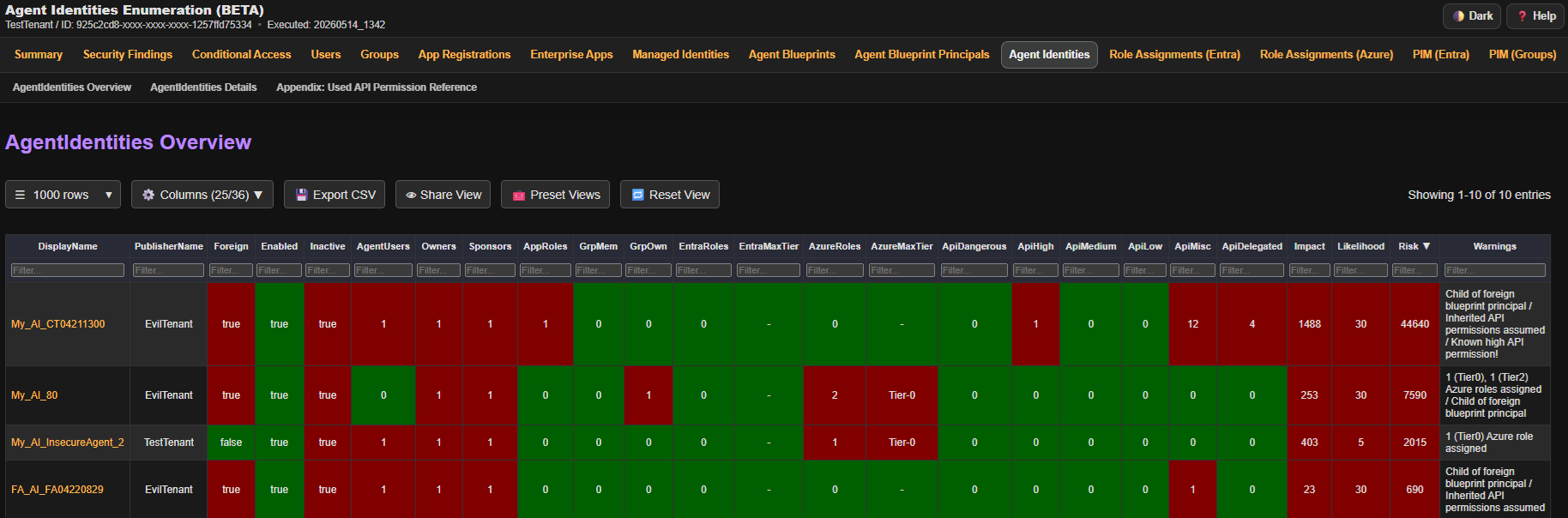
Agent Identities

alt text

Enumeration Summary

alt text

📑 HTML Report

General

  • Click the ⚙️ Columns button to show or hide specific columns.
  • Click 💾 Export CSV to download the currently visible data as a CSV file.
  • Click 👁 Share View to copy filters, sorting, and column selection as a shareable link.
  • Click 🧰 Preset Views to apply preconfigured filters and column selections.
  • Click 🔄 Reset View to reset the view to the default.
  • Click on object names to jump to detailed information, even in other reports.
  • When using internal navigation, press the browser’s back button to return.
  • Some table header fields display helper text on mouse hover.
  • Sort data by clicking a table header.

Filtering

  • If no operator is specified, filtering defaults to contains.
  • Use = for an exact match.
  • Use ^ for starts with (e.g., ^Mallory).
  • Use $ for ends with (e.g., $domain.ch).
  • Comparison operators like >, <, >=, <= are supported (numeric values only).
  • Filters can be negated by starting with ! (except for numeric comparisons). Examples: !Mallory, !=Mallory,!^Mallory or !$domain.ch.

Controls using GET Parameters

  • Filtering: Apply filters using field names as HTTP GET parameters, e.g., ?EntraRoles=>1&Enabled=true.
    To apply OR logic across columns, use or_ or group1_ prefix in (e.g., ?or_EntraRoles=>0&or_GrpMem=>0).
  • Column Selection: Choose which columns to display using the columns parameter. Example: ?columns=DisplayName,Owner.
  • Sorting: Sort the data using sort and sortDir parameters. Example: ?sort=Impact&sortDir=desc or ?sort=OwnerCount&sortDir=asc.
  • Object Details: Jump directly to a specific object in the report using an anchor (#) and the object id, e.g. #%ObjectID%.

Rating

  • Impact: Represents the amount or severity of permission the object has.
  • Likelihood: Represents how easily the object can be influenced or how well it is protected.
  • Risk: Calculated score: Impact × Likelihood = Risk.
  • Important:
    • This scoring is meant as a basic evaluation to help sort and prioritize entries in the table.
    • Risk scores are not directly comparable across different object types or reports.
    • It is not intended to replace a full risk assessment.

🔧Under the Hood

Role Categorization

Entra ID and Azure roles are roughly categorized into different tier levels. This categorization influences the impact scores of objects assigned to those roles. The goal is to assign a higher impact score to users with more powerful roles (e.g., Global Administrator) compared to users with less critical roles (e.g., Global Reader), even if both are considered privileged roles by Microsoft.

Note: For Azure roles, this categorization is less precise, as the actual impact depends heavily on the scope of the role assignment. For example, an Owner role on a single virtual machine has significantly less impact than when the same role is applied to an entire subscription. It might also be a test subscription with no resources at all.

Entra ID Roles
Azure Roles

API Permission Categorization

Certain API permissions allow an application to directly escalate to Global Administrator privileges. Therefore, several API permissions are categorized into different severity levels. This categorization influences the impact score of applications that have these permissions assigned — either as application permissions or delegated permissions for users.

Application Permission
Delegated Permission

Microsoft First-Party Enterprise Applications

By default, Microsoft applications are filtered out to simplify the review of Enterprise Applications. Use the -IncludeMsApps switch to include them. Applications from the following tenants are treated as Microsoft-owned:

  • f8cdef31-a31e-4b4a-93e4-5f571e91255a
  • 72f988bf-86f1-41af-91ab-2d7cd011db47
  • 33e01921-4d64-4f8c-a055-5bdaffd5e33d
  • cdc5aeea-15c5-4db6-b079-fcadd2505dc2

Checks Performed

The following table roughly summarizes the checks performed, along with their impact on scoring and whether a warning is displayed.

Checks Performed

🛡️ Detection

EntraFalcon is not stealthy and can be detected in environments where Microsoft Graph API and Azure sign-in activity are logged and monitored.

Default Authentication Used

When a full enumeration is performed with non-BroCi flows, the tool typically initiates four interactive logins and one non-interactive login. Depending on flow and endpoint support, one additional interactive sign-in may occur for Security Findings policy endpoints.

BroCi Authentication Used

When BroCi authentication is used, only one interactive login occurs.

When BroCi is enabled, EntraFalcon also queries api.azrbac.mspim.azure.com for PIM for Groups.

Details

For data collection, the tool sends multiple requests to the Microsoft Graph API and, optionally, the Azure ARM API—one or more per object. Where possible, it leverages the Graph Batch endpoint to reduce the number of individual requests and improve efficiency.

Interactive sign-ins use the browser's User-Agent. All non-interactive sign-ins and API requests (Graph and ARM) use EntraFalcon as the User-Agent, unless changed with the -UserAgent parameter.

To detect usage of EntraFalcon, blue teams can monitor for the listed application IDs in sign-in logs, look for unusual volumes of Graph API traffic, or analyze token refresh and batch request behavior.

🕳️ Known Limitations

  • M365 RBAC: Not assessed
  • Defender for Endpoint RBAC: Not assessed
  • Intune RBAC: Not assessed
  • Conditional Access user coverage: Effective user coverage and -ExportCapUncoveredUsers are best-effort calculations based on enumerated users, group members, role assignments, and resolvable external-user categories. External-user selectors are only resolved for tenant guest users matching b2bCollaborationGuest. Other external-user types or external users with specified external tenants can make coverage values approximate. Eligible PIM paths are reported as potential coverage and are not counted as currently covered. CSV export is limited to enabled policies and enabled users.
  • Cloud Environment: Cloud platforms evolve rapidly. As a result, some assessments or detections may become outdated or inaccurate over time. Moreover, tenants are becoming increasingly complex, and specific configurations or combinations of settings may lead to inaccurate results. While we strive to keep EntraFalcon up to date, it is always recommended to validate findings independently and not rely solely on the tool for critical decisions.
  • HTML Reports: The generated HTML reports do not implement protection mechanisms against cross-site scripting (XSS).

📦 Integrated External Tools

The following submodules have been forked and integrated into EntraFalcon to support authentication, Microsoft Graph interaction and report charts:

  • EntraTokenAid
  • GraphRequest
  • Send-ApiRequest
  • GraphBatchRequest
  • Chart.js
Download Tool
Auth FlowWindowsLinux/macOSInteractive LoginsConvenienceParameter(s)Notes
BroCiYesNo1High-AuthFlow BroCi (default)Avoids reliance on legacy clients such as Azure Active Directory PowerShell. Supports all enumerations.
Auth Code FlowYesNo4Normal-AuthFlow AuthCodeStandard non-BroCi auth code flow. Does not generate the standalone PIM (Groups) settings report.
Device Code FlowYesYes3Normal-AuthFlow DeviceCodeAuthentication can be completed on another device, but two Security Findings checks run with reduced depth. Does not generate the standalone PIM (Groups) settings report.
Auth Code + Manual Code FlowYesYes4Low-Normal-AuthFlow ManualCodeAuthentication can be completed on a different device or browser session. Does not generate the standalone PIM (Groups) settings report.
BroCi + Manual Code FlowYesYes1Low-AuthFlow BroCiManualCodeAuthorization code must be manually extracted from browser developer tools. Supports all enumerations.
BroCi with TokenYesYes0Low-AuthFlow BroCiToken -BroCiToken "<refresh_token>"Refresh token must be obtained manually (e.g., from browser dev tools or another auth tool). Supports all enumerations.
Service PrincipalYesYes0Low-AuthFlow ServicePrincipal -SPClientId "<appId>" -Tenant "<tenantId>" ...App-only OAuth2 client credentials flow. Requires a custom app registration with sufficient Graph API permissions. Supports all enumerations.
PermissionType
AdministrativeUnit.Read.AllApplication
AgentIdentity.Read.AllApplication
AgentIdentityBlueprint.Read.AllApplication
AgentIdentityBlueprintPrincipal.Read.AllApplication
Application.Read.AllApplication
AuditLog.Read.AllApplication
Device.Read.AllApplication
Group.Read.AllApplication
Organization.Read.AllApplication
Policy.Read.AllApplication
PrivilegedAccess.Read.AzureADGroupApplication
RoleManagement.Read.DirectoryApplication
RoleManagementPolicy.Read.AzureADGroupApplication
User.Read.AllApplication
ParameterDescriptionDefault Value
UserAgentUser agent used for the requests to the token endpoint and API calls.EntraFalcon
DisableCAEDisables requesting Continuous Access Evaluation (CAE) tokens.false
TenantSpecifies the tenant (ID or domain) to authenticate against. Useful when assessing a tenant other than the account’s home tenant.Account's home tenant
OutputFolderOutput folder where the reports are stored.Results_%TenantName%_YYYYMMDD_HHMM
LimitResultsLimits the number of groups and users in the report (after sorting by risk). Useful for large tenants.-
LogLevelControls runtime cli logging verbosity. Supported values: Off (default), Verbose, Debug, Trace.Off
ApiTopSets the max number of objects returned from the API. Lower values reduce timeout risk (HTTP 504), but increase request count.999 (Valid range: 5–999)
AuthFlowPreferred auth-flow selector. Values: BroCi (default), AuthCode, DeviceCode, ManualCode, BroCiManualCode, BroCiToken, ServicePrincipal.BroCi
BroCiTokenAzure Portal refresh token for AuthFlow BroCiToken.-
SPClientIdApplication (client) ID of the service principal. Required for -AuthFlow ServicePrincipal.-
SPClientSecretClient secret for the service principal. Used with -AuthFlow ServicePrincipal.-
SPCertificatePathPath to a PFX/P12 certificate file for service principal authentication.-
SPCertificatePasswordPassword (SecureString) for the PFX certificate specified by -SPCertificatePath.-
SPCertificatePemPathPath to a PEM certificate file. Used together with -SPPrivateKeyPemPath.-
SPPrivateKeyPemPathPath to the PEM private key file matching -SPCertificatePemPath.-
SPPrivateKeyPemPasswordPassword (SecureString) for the PEM private key specified by -SPPrivateKeyPemPath.-
CsvEnables writing CSV report files in addition to TXT/HTML report files.false
ExportCapUncoveredUsersFor each enabled Conditional Access policy with user targeting, exports a CSV listing users not covered by that policy. Files are written to a ConditionalAccessPolicies_UncoveredUsers subfolder in the output directory.false
ExportFindingsJsonExports all Security Findings as JSON at the end of the run.false
DebugObjectDumpExports final in-memory report objects as CLIXML to Debug_ObjectDump for troubleshooting and testing.false
  • Use =empty to match empty cells, or !=empty to match non-empty cells.
  • Use || to match any of multiple values in the same column (e.g., Admin || Guest).
  • Use && to require multiple matches in the same column (e.g., !adm && !svc && !sql).
  • To apply OR logic across columns, use or_, group1_, group2_... directly in a filter field. Examples: in column 1: or_>1, in column 2: or_!Mallory
  • Note: The DisplayName column also includes the object's ID (invisible), so filtering by ID is also possible.
  • Role NameTier-LevelGUID
    Global Administrator062e90394-69f5-4237-9190-012177145e10
    Partner Tier2 Support0e00e864a-17c5-4a4b-9c06-f5b95a8d5bd8
    Privileged Authentication Administrator07be44c8a-adaf-4e2a-84d6-ab2649e08a13
    Privileged Role Administrator0e8611ab8-c189-46e8-94e1-60213ab1f814
    Domain Name Administrator08329153b-31d0-4727-b945-745eb3bc5f31
    External Identity Provider Administrator0be2f45a1-457d-42af-a067-6ec1fa63bc45
    Hybrid Identity Administrator08ac3fc64-6eca-42ea-9e69-59f4c7b60eb2
    Application Administrator09b895d92-2cd3-44c7-9d02-a6ac2d5ea5c3
    Cloud Application Administrator0158c047a-c907-4556-b7ef-446551a6b5f7
    Security Administrator0194ae4cb-b126-40b2-bd5b-6091b380977d
    Agent ID Administrator1db506228-d27e-4b7d-95e5-295956d6615f
    AI Administrator1d2562ede-74db-457e-a7b6-544e236ebb61
    Conditional Access Administrator1b1be1c3e-b65d-4f19-8427-f6fa0d97feb9
    Authentication Administrator1c4e39bd9-1100-46d3-8c65-fb160da0071f
    Azure DevOps Administrator1e3973bdf-4987-49ae-837a-ba8e231c7286
    Directory Writers19360feb5-f418-4baa-8175-e2a00bac4301
    Exchange Administrator129232cdf-9323-42fd-ade2-1d097af3e4de
    Groups Administrator1fdd7a751-b60b-444a-984c-02652fe8fa1c
    Helpdesk Administrator1729827e3-9c14-49f7-bb1b-9608f156bbb8
    Identity Governance Administrator145d8d3c5-c802-45c6-b32a-1d70b5e1e86e
    Intune Administrator13a2c62db-5318-420d-8d74-23affee5d9d5
    Knowledge Administrator1b5a8dcf3-09d5-43a9-a639-8e29ef291470
    Knowledge Manager1744ec460-397e-42ad-a462-8b3f9747a02c
    Lifecycle Workflows Administrator159d46f88-662b-457b-bceb-5c3809e5908f
    Directory Synchronization Accounts1d29b2b05-8046-44ba-8758-1e26182fcf32
    On Premises Directory Sync Account1a92aed5d-d78a-4d16-b381-09adb37eb3b0
    Partner Tier1 Support14ba39ca4-527c-499a-b93d-d9b492c50246
    Password Administrator1966707d0-3269-4727-9be2-8c3a10f19b9d
    SharePoint Administrator1f28a1f50-f6e7-4571-818b-6a12f2af6b6c
    Teams Administrator169091246-20e8-4a56-aa4d-066075b2a7a8
    User Administrator1fe930be7-5e62-47db-91af-98c3a49a38b1
    Windows 365 Administrator111451d60-acb2-45eb-a7d6-43d0f0125c13
    Yammer Administrator1810a2642-a034-447f-a5e8-41beaa378541
    Authentication Policy Administrator20526716b-113d-4c15-b2c8-68e3c22b9f80
    Azure AD Joined Device Local Administrator29f06204d-73c1-4d4c-880a-6edb90606fd8
    Cloud Device Administrator27698a772-787b-4ac8-901f-60d6b08affd2
    Global Reader2f2ef992c-3afb-46b9-b7cf-a126ee74c451
    Guest Inviter295e79109-95c0-4d8e-aee3-d01accf2d47b
    Role NameTier-LevelGUID
    Owner08e3af657-a8ff-443c-a75c-2fe8c4bcb635
    User Access Administrator018d7d88d-d35e-4fb5-a5c3-7773c20a72d9
    Contributor0b24988ac-6180-42a0-ab88-20f7382dd24c
    Role Based Access Control Administrator0f58310d9-a9f6-439a-9e8d-f62e7b41a168
    Reservations Administrator0a8889054-8d42-49c9-bc1c-52486c10e7cd
    Security Admin1fb1c8493-542b-48eb-b624-b4c8fea62acd
    Virtual Machine Contributor19980e02c-c2be-4d73-94e8-173b1dc7cf3c
    Virtual Machine Data Access Administrator166f75aeb-eabe-4b70-9f1e-c350c4c9ad04
    Virtual Machine Administrator Login11c0163c0-47e6-4577-8991-ea5c82e286e4
    Windows Admin Center Administrator Login1a6333a3e-0164-44c3-b281-7a577aff287f
    Container Registry Contributor and Data Access Configuration Administrator13bc748fc-213d-45c1-8d91-9da5725539b9
    Key Vault Administrator100482a5a-887f-4fb3-b363-3b7fe8e74483
    Key Vault Data Access Administrator18b54135c-b56d-4d72-a534-26097cfdc8d8
    Key Vault Secrets Officer1b86a8fe4-44ce-4948-aee5-eccb2c155cd7
    Key Vault Secrets User14633458b-17de-408a-b874-0445c86b69e6
    Azure Kubernetes Service RBAC Admin13498e952-d568-435e-9b2c-8d77e338d7f7
    Azure Kubernetes Service RBAC Cluster Admin1b1ff04bb-8a4e-4dc4-8eb5-8693973ce19b
    Azure Arc Kubernetes Admin1dffb1e0c-446f-4dde-a09f-99eb5cc68b96
    Azure Arc Kubernetes Cluster Admin18393591c-06b9-48a2-a542-1bd6b377f6a2
    Azure Arc VMware VM Contributor1b748a06d-6150-4f8a-aaa9-ce3940cd96cb
    Storage Account Contributor117d1049b-9a84-46fb-8f53-869881c3d3ab
    Reader2acdd72a7-3385-48ef-bd42-f606fba81ae7
    SecurityReader239bc4728-0917-49c7-9d2c-d95423bc2eb4
    Virtual Machine User Login3fb879df8-f326-4884-b1cf-06f3ad86be52
    Desktop Virtualization User31d18fff3-a72a-46b5-b4a9-0b38a3cd7e63
    PermissionSeverityGUID
    RoleManagement.ReadWrite.DirectoryDangerous9e3f62cf-ca93-4989-b6ce-bf83c28f9fe8
    AppRoleAssignment.ReadWrite.AllDangerous06b708a9-e830-4db3-a914-8e69da51d44f
    Application.ReadWrite.AllDangerous1bfefb4e-e0b5-418b-a88f-73c46d2cc8e9
    RoleAssignmentSchedule.ReadWrite.DirectoryDangerousdd199f4a-f148-40a4-a2ec-f0069cc799ec
    PrivilegedAssignmentSchedule.ReadWrite.AzureADGroupDangerous41202f2c-f7ab-45be-b001-85c9728b9d69
    PrivilegedAccess.ReadWrite.AzureADGroupDangerous2f6817f8-7b12-4f0f-bc18-eeaf60705a9e
    RoleEligibilitySchedule.ReadWrite.DirectoryDangerousfee28b28-e1f3-4841-818e-2704dc62245f
    PrivilegedEligibilitySchedule.ReadWrite.AzureADGroupDangerous618b6020-bca8-4de6-99f6-ef445fa4d857
    Domain.ReadWrite.AllDangerous7e05723c-0bb0-42da-be95-ae9f08a6e53c
    Application.ReadUpdate.AllDangerousfc023787-fd04-4e44-9bc7-d454f00c0f0a
    AgentIdentityBlueprint.ReadWrite.AllHigh7fddd33b-d884-4ec0-8696-72cff90ff825
    AgentIdentityBlueprint.AddRemoveCreds.AllHigh0510736e-bdfb-4b37-9a1f-89b4a074763a
    ADSynchronization.ReadWrite.AllHighab43b826-2c7a-4aff-9ecd-d0629d0ca6a9
    EntitlementManagement.ReadWrite.AllHigh9acd699f-1e81-4958-b001-93b1d2506e19
    Organization.ReadWrite.AllHigh292d869f-3427-49a8-9dab-8c70152b74e9
    Policy.ReadWrite.PermissionGrantHigha402ca1c-2696-4531-972d-6e5ee4aa11ea
    RoleManagementPolicy.ReadWrite.AzureADGroupHighb38dcc4d-a239-4ed6-aa84-6c65b284f97c
    RoleManagementPolicy.ReadWrite.DirectoryHigh31e08e0a-d3f7-4ca2-ac39-7343fb83e8ad
    Policy.ReadWrite.AuthenticationMethodHigh29c18626-4985-4dcd-85c0-193eef327366
    User.DeleteRestore.AllHigheccc023d-eccf-4e7b-9683-8813ab36cecc
    User.EnableDisableAccount.AllHigh3011c876-62b7-4ada-afa2-506cbbecc68c
    DelegatedPermissionGrant.ReadWrite.AllHigh8e8e4742-1d95-4f68-9d56-6ee75648c72a
    Policy.ReadWrite.ConditionalAccessHigh01c0a623-fc9b-48e9-b794-0756f8e8f067
    DeviceManagementConfiguration.ReadWrite.AllHigh9241abd9-d0e6-425a-bd4f-47ba86e767a4
    DeviceManagementRBAC.ReadWrite.AllHighe330c4f0-4170-414e-a55a-2f022ec2b57b
    Directory.ReadWrite.AllHigh19dbc75e-c2e2-444c-a770-ec69d8559fc7
    Group.ReadWrite.AllHigh62a82d76-70ea-41e2-9197-370581804d09
    GroupMember.ReadWrite.AllHighdbaae8cf-10b5-4b86-a4a1-f871c94c6695
    UserAuthenticationMethod.ReadWrite.AllHigh50483e42-d915-4231-9639-7fdb7fd190e5
    User-PasswordProfile.ReadWrite.AllHigh56760768-b641-451f-8906-e1b8ab31bca7
    Sites.FullControl.AllHigha82116e5-55eb-4c41-a434-62fe8a61c773
    Sites.FullControl.All SharePointAPIHigh678536fe-1083-478a-9c59-b99265e6b0d3
    Sites.Manage.All SharePointAPIHigh9bff6588-13f2-4c48-bbf2-ddab62256b36
    Sites.Read.All SharePointAPIHighd13f72ca-a275-4b96-b789-48ebcc4da984
    Sites.ReadWrite.All SharePointAPIHighfbcd29d2-fcca-4405-aded-518d457caae4
    Sites.Manage.AllHigh0c0bf378-bf22-4481-8f81-9e89a9b4960a
    Sites.Read.AllHigh332a536c-c7ef-4017-ab91-336970924f0d
    Sites.ReadWrite.AllHigh9492366f-7969-46a4-8d15-ed1a20078fff
    Files.Read.AllHigh01d4889c-1287-42c6-ac1f-5d1e02578ef6
    Files.ReadWrite.AllHigh75359482-378d-4052-8f01-80520e7db3cd
    DeviceLocalCredential.Read.AllHighdb51be59-e728-414b-b800-e0f010df1a79
    AdministrativeUnit.ReadWrite.AllHigh5eb59dd3-1da2-4329-8733-9dabdc435916
    UserAuthMethod-HardwareOATH.ReadWrite.AllHigh7e9ebcc1-90aa-4471-8051-e68d6b4e9c89
    UserAuthMethod-Phone.ReadWrite.AllHigh6e85d483-7092-4375-babe-0a94a8213a58
    UserAuthMethod-QR.ReadWrite.AllHigh4869299f-18c3-40c8-98f2-222657e67db1
    UserAuthMethod-TAP.ReadWrite.AllHigh627169a8-8c15-451c-861a-5b80e383de5c
    User.ReadWrite.AllMedium741f803b-c850-494e-b5df-cde7c675a1ca
    Chat.Read.AllMedium6b7d71aa-70aa-4810-a8d9-5d9fb2830017
    Chat.ReadWrite.AllMedium294ce7c9-31ba-490a-ad7d-97a7d075e4ed
    Calendars.ReadMedium798ee544-9d2d-430c-a058-570e29e34338
    Calendars.ReadWriteMediumef54d2bf-783f-4e0f-bca1-3210c0444d99
    Mail.ReadMedium810c84a8-4a9e-49e6-bf7d-12d183f40d01
    Mail.ReadWriteMediume2a3a72e-5f79-4c64-b1b1-878b674786c9
    BitlockerKey.Read.AllMedium57f1cf28-c0c4-4ec3-9a30-19a2eaaf2f6e
    Mail.SendMediumb633e1c5-b582-4048-a93e-9f11b44c7e96
    OnlineMeetings.ReadWrite.AllMediumb8bb2037-6e08-44ac-a4ea-4674e010e2a4
    CustomSecAttributeAssignment.ReadWrite.AllMediumde89b5e4-5b8f-48eb-8925-29c2b33bd8bd
    ServicePrincipalEndpoint.ReadWrite.AllMedium89c8469c-83ad-45f7-8ff2-6e3d4285709e
    AgentIdentity.CreateAsManagerLow4c390976-b2b7-42e0-9187-c6be3bead001
    PermissionSeverityGUID
    RoleManagement.ReadWrite.DirectoryDangerousd01b97e9-cbc0-49fe-810a-750afd5527a3
    AppRoleAssignment.ReadWrite.AllDangerous84bccea3-f856-4a8a-967b-dbe0a3d53a64
    Application.ReadWrite.AllDangerousbdfbf15f-ee85-4955-8675-146e8e5296b5
    RoleAssignmentSchedule.ReadWrite.DirectoryDangerous8c026be3-8e26-4774-9372-8d5d6f21daff
    PrivilegedAssignmentSchedule.ReadWrite.AzureADGroupDangerous06dbc45d-6708-4ef0-a797-f797ee68bf4b
    PrivilegedAccess.ReadWrite.AzureADGroupDangerous32531c59-1f32-461f-b8df-6f8a3b89f73b
    RoleEligibilitySchedule.ReadWrite.DirectoryDangerous62ade113-f8e0-4bf9-a6ba-5acb31db32fd
    PrivilegedEligibilitySchedule.ReadWrite.AzureADGroupDangerousba974594-d163-484e-ba39-c330d5897667
    Domain.ReadWrite.AllDangerous0b5d694c-a244-4bde-86e6-eb5cd07730fe
    Application.ReadUpdate.AllDangerous0586a906-4d89-4de8-b3c8-1aacdcc0c679
    AgentIdentityBlueprint.AddRemoveCreds.AllHigh75b5feb2-bfe7-423f-907d-cc505186f246
    AgentIdentityBlueprint.ReadWrite.AllHigh4fd490fc-1467-48eb-8a4c-421597ab0402
    EntitlementManagement.ReadWrite.AllHighae7a573d-81d7-432b-ad44-4ed5c9d89038
    Organization.ReadWrite.AllHigh46ca0847-7e6b-426e-9775-ea810a948356
    Policy.ReadWrite.PermissionGrantHigh2672f8bb-fd5e-42e0-85e1-ec764dd2614e
    RoleManagementPolicy.ReadWrite.AzureADGroupHigh0da165c7-3f15-4236-b733-c0b0f6abe41d
    RoleManagementPolicy.ReadWrite.DirectoryHigh1ff1be21-34eb-448c-9ac9-ce1f506b2a68
    Policy.ReadWrite.AuthenticationMethodHigh7e823077-d88e-468f-a337-e18f1f0e6c7c
    User.DeleteRestore.AllHigh4bb440cd-2cf2-4f90-8004-aa2acd2537c5
    User.EnableDisableAccount.AllHighf92e74e7-2563-467f-9dd0-902688cb5863
    DelegatedPermissionGrant.ReadWrite.AllHigh41ce6ca6-6826-4807-84f1-1c82854f7ee5
    Policy.ReadWrite.ConditionalAccessHighad902697-1014-4ef5-81ef-2b4301988e8c
    DeviceManagementConfiguration.ReadWrite.AllHigh0883f392-0a7a-443d-8c76-16a6d39c7b63
    DeviceManagementRBAC.ReadWrite.AllHigh0c5e8a55-87a6-4556-93ab-adc52c4d862d
    Directory.ReadWrite.AllHighc5366453-9fb0-48a5-a156-24f0c49a4b84
    Group.ReadWrite.AllHigh4e46008b-f24c-477d-8fff-7bb4ec7aafe0
    GroupMember.ReadWrite.AllHighf81125ac-d3b7-4573-a3b2-7099cc39df9e
    UserAuthenticationMethod.ReadWrite.AllHighb7887744-6746-4312-813d-72daeaee7e2d
    Sites.FullControl.AllHigh5a54b8b3-347c-476d-8f8e-42d5c7424d29
    Sites.Manage.AllHigh65e50fdc-43b7-4915-933e-e8138f11f40a
    User-PasswordProfile.ReadWrite.AllHigh56760768-b641-451f-8906-e1b8ab31bca7
    Sites.Read.AllHigh205e70e5-aba6-4c52-a976-6d2d46c48043
    Sites.ReadWrite.AllHigh89fe6a52-be36-487e-b7d8-d061c450a026
    Files.Read.AllHighdf85f4d6-205c-4ac5-a5ea-6bf408dba283
    Files.ReadWrite.AllHigh863451e7-0667-486c-a5d6-d135439485f0
    DeviceLocalCredential.Read.AllHigh9917900e-410b-4d15-846e-42a357488545
    AdministrativeUnit.ReadWrite.AllHigh7b8a2d34-6b3f-4542-a343-54651608ad81
    User.ReadWrite.AllMedium204e0828-b5ca-4ad8-b9f3-f32a958e7cc4
    Chat.ReadWrite.AllMedium7e9a077b-3711-42b9-b7cb-5fa5f3f7fea7
    Mail.ReadMedium570282fd-fa5c-430d-a7fd-fc8dc98a9dca
    Mail.ReadWriteMedium024d486e-b451-40bb-833d-3e66d98c5c73
    Mail.SendMediume383f46e-2787-4529-855e-0e479a3ffac0
    CustomSecAttributeAssignment.ReadWrite.AllMediumca46335e-8453-47cd-a001-8459884efeae
    ServicePrincipalEndpoint.ReadWrite.AllMedium7297d82c-9546-4aed-91df-3d4f0a9b3ff0
    BitlockerKey.Read.AllMediumb27a61ec-b99c-4d6a-b126-c4375d08ae30
    AiEnterpriseInteraction.ReadMedium859cceb9-2ec2-4e48-bcd7-b8490b5248a5
    Calendars.ReadMedium465a38f9-76ea-45b9-9f34-9e8b0d4b0b42
    Calendars.Read.SharedMedium2b9c4092-424d-4249-948d-b43879977640
    Calendars.ReadWriteMedium1ec239c2-d7c9-4623-a91a-a9775856bb36
    Calendars.ReadWrite.SharedMedium12466101-c9b8-439a-8589-dd09ee67e8e9
    ChannelMessage.EditMedium2b61aa8a-6d36-4b2f-ac7b-f29867937c53
    ChannelMessage.ReadWriteMedium5922d31f-46c8-4404-9eaf-2117e390a8a4
    ChannelMessage.SendMediumebf0f66e-9fb1-49e4-a278-222f76911cf4
    ChatMessage.SendMedium116b7235-7cc6-461e-b163-8e55691d839e
    Chat.ReadWriteMedium9ff7295e-131b-4d94-90e1-69fde507ac11
    Contacts.ReadWriteMediumd56682ec-c09e-4743-aaf4-1a3aac4caa21
    Directory.AccessAsUser.AllMedium0e263e50-5827-48a4-b97c-d940288653c7
    Directory.Read.AllMedium06da0dbc-49e2-44d2-8312-53f166ab848a
    EAS.AccessAsUser.AllMediumff91d191-45a0-43fd-b837-bd682c4a0b0f
    EntitlementMgmt-SubjectAccess.ReadWriteMediume9fdcbbb-8807-410f-b9ec-8d5468c7c2ac
    EWS.AccessAsUser.AllMedium9769c687-087d-48ac-9cb3-c37dde652038
    Files.ReadWriteMedium5c28f0bf-8a70-41f1-8ab2-9032436ddb65
    IMAP.AccessAsUser.AllMedium652390e4-393a-48de-9484-05f9b1212954
    MailboxItem.ImportExportMediumdf96e8a0-f4e1-4ecf-8d83-a429f822cbd6
    MailboxFolder.ReadMedium52dc2051-4958-4636-8f2a-281d39c6981c
    MailboxFolder.ReadWriteMedium077fde41-7e0b-4c5b-bcd1-e9d743a30c80
    MailboxItem.ReadMedium82305458-296d-4edd-8b0b-74dd74c34526
    MailboxSettings.ReadWriteMedium818c620a-27a9-40bd-a6a5-d96f7d610b4b
    Notes.ReadMedium371361e4-b9e2-4a3f-8315-2a301a3b0a3d
    Notes.Read.AllMediumdfabfca6-ee36-4db2-8208-7a28381419b3
    Notes.ReadWriteMedium615e26af-c38a-4150-ae3e-c3b0d4cb1d6a
    Notes.ReadWrite.AllMedium64ac0503-b4fa-45d9-b544-71a463f05da0
    POP.AccessAsUser.AllMediumd7b7f2d9-0f45-4ea1-9d42-e50810c06991
    offline_accessLow7427e0e9-2fba-42fe-b0c0-848c9e6a8182
    openidLow37f7f235-527c-4136-accd-4a02d197296e
    emailLow64a6cdd6-aab1-4aaf-94b8-3cc8405e90d0
    profileLow14dad69e-099b-42c9-810b-d002981feec1
    User.ReadLow14dad69e-099b-42c9-810b-d002981feec1
    AreaCheckImpacts ScoreWarning Displayed
    GroupsIs a public M365 groupYesYes
    GroupsIs Dynamic / Is Dynamic and potentially dangerous queryYesYes
    GroupsEntra Roles (Active and Eligible)YesYes
    GroupsAzure Roles (Active and Eligible)YesYes
    GroupsUsed for AppRoleYesYes
    GroupsInternal/Foreign SP as OwnerYesYes
    GroupsIn restricted AUYesYes
    GroupsNested in privileged GroupYesYes
    GroupsUsed in CAPYesYes
    GroupsGroup TypeYesNo
    GroupsSecurity EnabledYesNo
    GroupsNested Member ActiveYesNo
    GroupsOwnersYesNo
    GroupsNested OwnersYesNo
    GroupsGuest as OwnerYesYes
    GroupsOn-Prem SyncYesNo
    GroupsMembers (transitive)YesNo
    GroupsRole-AssignableYesNo
    GroupsPIM for Groups: OnboardedNoNo
    GroupsPIM for Groups: Eligible member of privileged GroupYesYes
    GroupsPIM for Groups: Eligible owner of privileged GroupYesYes
    GroupsPIM for Groups: Unprotected group nested in protected groupNoYes
    EnterpriseAppEntra RoleYesYes
    EnterpriseAppAzure RoleYesYes
    EnterpriseAppForeignYesNo
    EnterpriseAppAPI Permission (Application)YesYes
    EnterpriseAppAPI Permission (Delegated)YesYes
    EnterpriseAppCredentialsYesYes
    EnterpriseAppOwnersYesYes
    EnterpriseAppOwnership over App RegistrationsYesYes
    EnterpriseAppOwnership of other Service PrincipalsYesYes
    EnterpriseAppAppLock(Yes)No
    EnterpriseAppApp owns AppRegistrationYesYes
    EnterpriseAppMember / owner of groupsYes(Yes)
    EnterpriseAppAppRolesYesNo
    EnterpriseAppAppRole requirementsYesNo
    EnterpriseAppInactiveNoNo
    EnterpriseAppLast successful sign-in (days)NoNo
    AppRegistrationsCredentialsYesYes
    AppRegistrationsEntra Connect App with credentialsYesYes
    AppRegistrationsEntra Connect App with multiple certsYesYes
    AppRegistrationsAppRolesYesNo
    AppRegistrationsAppRedirectURLNoNo
    AppRegistrationsAppLockYesNo
    AppRegistrationsOwnersYesYes
    AppRegistrations(Cloud) App Admins scopedNoNo
    AppRegistrationsPrivileges of the corresponding SPYesNo
    AppRegistrationsSign-in audienceNoNo
    ManagedIdentityOwnersYesYes
    ManagedIdentityEntra RoleYesYes
    ManagedIdentityAzure RoleYesYes
    ManagedIdentityAPI (App)YesYes
    ManagedIdentityOwnership over App RegistrationsYesYes
    ManagedIdentityOwnership of other Service PrincipalsYesYes
    ManagedIdentityMember / owner of groupsYes(Yes)
    UserEntra Roles (Active and Eligible)YesYes
    UserAzure Roles (Active and Eligible)YesYes
    UserPrivileged group membership (Active and Eligible)YesYes
    UserPrivileged group ownership (Active and Eligible)YesYes
    UserEntra Connect Sync userYesYes
    UserEntra Connect Cloud Sync userYesYes
    UserAppRegistration ownershipYesYes
    UserEnterpriseApplication ownershipYesYes
    UserNo MFA-factor registeredYesYes
    UserIs protectedYesNo
    UserInactiveNoNo
    UserMember / owner of groupsYes(Yes)
    UserSynced from on-premYesNo
    AgentIdentityLinked Agent UsersYesNo
    AgentIdentityForeign blueprint principal originYesYes
    AgentIdentityEffective API Permission (Application)YesYes
    AgentIdentityEffective API Permission (Delegated)YesYes
    AgentIdentityEntra RoleYesYes
    AgentIdentityAzure RoleYesYes
    AgentIdentityOwnership over App RegistrationsYesYes
    AgentIdentityOwnership of other Service PrincipalsYesYes
    AgentIdentityMember / owner of groupsYes(Yes)
    AgentIdentityBlueprintPrincipalLinked Agent IdentitiesYesNo
    AgentIdentityBlueprintPrincipalLinked Agent UsersYesNo
    AgentIdentityBlueprintPrincipalConfigured API Permission (Application)NoNo
    AgentIdentityBlueprintPrincipalConfigured API Permission (Delegated)NoNo
    AgentIdentityBlueprintPrincipalForeign parent blueprint originYesNo
    AgentIdentityBlueprintPrincipalEntra RoleNoNo
    AgentIdentityBlueprintPrincipalAzure RoleNoNo
    AgentIdentityBlueprintBlueprint principalsYesNo
    AgentIdentityBlueprintLinked Agent IdentitiesYesNo
    AgentIdentityBlueprintLinked Agent UsersYesNo
    AgentIdentityBlueprintInheritable API permissionsYesNo
    AgentIdentityBlueprintFederated credentialsYesNo
    AgentIdentityBlueprintSecrets / certificatesYesYes
    AgentIdentityBlueprintOwners / sponsorsYes(Yes)
    CAPNo or misconfigured policy for legacy authentication-Yes
    CAPNo or misconfigured policy for blocking device code flow-Yes
    CAPNo or misconfigured policy for limiting the registrations of security information-Yes
    CAPNo or misconfigured policy for targeting risky sign-ins-Yes
    CAPNo or misconfigured policy for targeting user risk-Yes
    CAPNo or misconfigured policy enforcing MFA-Yes
    CAPNo policy enforcing Authentication Strength-Yes
    CAPInclusion of roles which have scoped assignments-Yes
    PIMSettingsAuthContext-Yes
    PIMSettingsAuthContext linked CAP: Sign-In Frequency-Yes
    PIMSettingsAuthContext linked CAP: MFA or AuthStrength-Yes
    PIMSettingsAuthContext linked CAP: Enabled-Yes
    PIMSettingsAuthContext linked CAP: Included/Excluded users/groups/networks-Yes
    PIMSettingsAuthContext linked CAP: Conditions-Yes
    PIMSettingsActivation MFA-No
    PIMSettingsActivation justification or ticket-Yes
    PIMSettingsActivation duration-Yes
    PIMSettingsActivation approval-Yes
    PIMSettingsEligible assignment expiration-No
    PIMSettingsActive assignment expiration-Yes
    PIMSettingsActive assignments MFA-No
    PIMSettingsNotification role activation-No
    PIMSettingsNotification role assignment (active)-No
    PIMSettingsNotification role assignment (eligible)-No
    Application IDTypeResource IDPurpose
    1b730954-1685-4b74-9bfd-dac224a7b894Interactive00000003-0000-0000-c000-000000000000Retrieve PIM for Groups data
    04b07795-8ddb-461a-bbee-02f9e1bf7b46Interactive00000003-0000-0000-c000-000000000000Retrieve general tenant object data
    51f81489-12ee-4a9e-aaae-a2591f45987dInteractive00000003-0000-0000-c000-000000000000Retrieve PIM for Entra / Azure roles
    80ccca67-54bd-44ab-8625-4b79c4dc7775Interactive00000003-0000-0000-c000-000000000000Retrieve Security Findings policy context
    04b07795-8ddb-461a-bbee-02f9e1bf7b46Non-Interactive797f4846-ba00-4fd7-ba43-dac1f8f63013Retrieve Azure IAM role assignment data
    Application IDTypeResource IDPurpose
    c44b4083-3bb0-49c1-b47d-974e53cbdf3cInteractive00000003-0000-0000-c000-000000000000Initial auth to use the refresh token for BroCi
    50aaa389-5a33-4f1a-91d7-2c45ecd8dac8Non-Interactive00000003-0000-0000-c000-000000000000Retrieve PIM for Groups data
    50aaa389-5a33-4f1a-91d7-2c45ecd8dac8Non-Interactive01fc33a7-78ba-4d2f-a4b7-768e336e890eRetrieve PIM for Groups data
    74658136-14ec-4630-ad9b-26e160ff0fc6Non-Interactive00000003-0000-0000-c000-000000000000Retrieve general tenant object data
    74658136-14ec-4630-ad9b-26e160ff0fc6Non-Interactive797f4846-ba00-4fd7-ba43-dac1f8f63013Retrieve Azure IAM role assignment data